
Simple Picker
- ダウンロード商品¥ 200
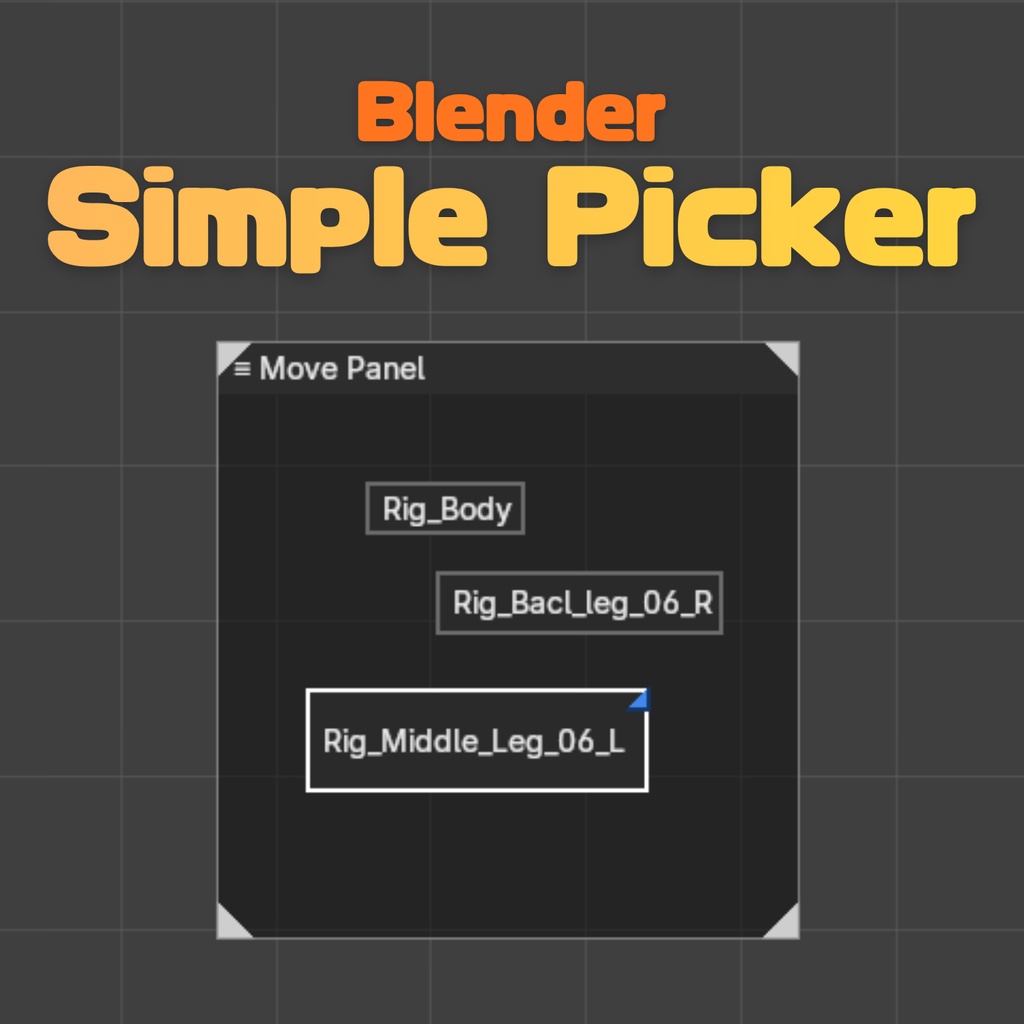
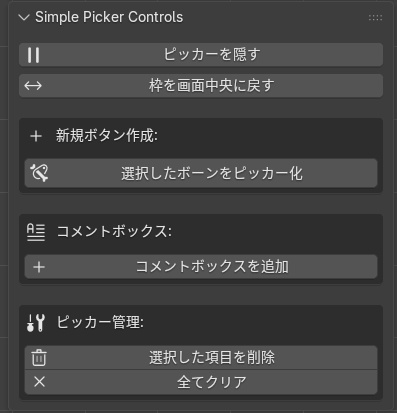
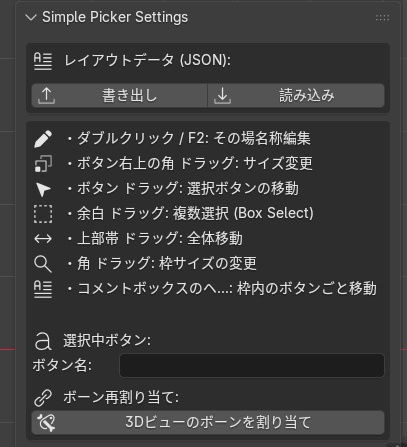


<Simple Pickerについて> Blender用の軽量なボーンピッカーアドオンです。 3Dビューポート上に、ポーズ用のボタン(ピッカー)を自由に配置できます。アウトライナーやボーン名を覚えなくても、クリックだけで狙ったボーンを選択できるようになります。 <主な機能>========== ・選択中のボーンから、ワンクリックでピッカーボタンを作成 ・ボタンのドラッグ移動・サイズ変更 ・余白ドラッグによる複数ボタンのボックス選択 ・ダブルクリック / F2キーでボタン名をその場編集 ・ボタンごとに割り当てるボーンを後から変更可能 ・「コメントボックス」でボタンをグループ化。ヘッダーをドラッグすると、枠内のボタンごとまとめて移動 ・レイアウト(ボタン配置・パネルサイズ)をJSONファイルとして書き出し・読み込み ・パネルが画面外に移動してしまった時に、ワンクリックで画面中央へ戻せる復帰ボタン <対応バージョン>========== Blender 4.2 LTS 〜 5.2 LTS(想定) 上記バージョンで問題なく動作する設計にしていますが、開発環境の都合上、実機での全バージョン通し確認は行えておりません。導入後に意図しない挙動があれば、まずはBlenderを最新のLTS版に更新のうえお試しください。 4.2より前のバージョンでは、インストール時に警告が表示される場合があります。 <インストール方法>========== Blenderを起動し、編集 > プリファレンス > アドオン を開く 右上の「インストール」から、ダウンロードした .py ファイルを選択 一覧に表示された「Simple Picker」のチェックボックスをオンにする <基本の使い方>========== ・アーマチュアをポーズモードにし、ピッカー化したいボーンを選択 ・3Dビューポート右側のサイドバー(Nキーで表示) →「Simple Picker」タブを開く ・「選択したボーンをピッカー化」を押すと、ビューポート上にボタンが作成される ・作成後は、ボタンをクリックしてボーンを選択可能。ドラッグでの移動やサイズ変更、余白ドラッグでの複数選択にも対応 関連するボタンは「コメントボックス」でグループ化できます。サイドバーから追加し、タイトル部分をドラッグすると、枠内に完全に収まっているボタンごとまとめて移動できます。 パネルの枠が見えなくなってしまった場合は、サイドバーの「枠を画面中央に戻す」ボタンを押してください。 <ご利用にあたって>========== 本アドオンは個人・商用問わずご自由にお使いいただけます。ただし、本ファイル(スクリプト)自体の複製・再配布・再販売は禁止します。譲渡や共有は行わず、必要な方には販売ページからご購入いただくようお願いします。 動作について万全を保証するものではありません。重要な制作データについては、アドオン導入前に必ずファイルのバックアップを取ってからお試しください。 不具合のご報告やご要望があれば、購入ページのコメント欄等でご連絡いただければ可能な範囲で対応いたします。 =================================== English A lightweight bone picker add-on for Blender. Place clickable pose buttons directly in the 3D viewport. No need to remember bone names or dig through the outliner — just click a button to select the bone you want. <Key Features>========== ・Create picker buttons with one click from your currently selected bones ・Drag to move a button, drag its corner to resize it ・Box-select multiple buttons by dragging on empty space ・Double-click or press F2 to rename a button in place ・Reassign the bone linked to a button at any time ・Group buttons together with Comment Boxes — drag the header to move the box and every button fully inside it at once ・Export/import your layout (button positions and panel size) as a JSON file ・One-click "recenter" button to bring the panel back if it ever drifts off-screen <Compatible Versions>========== Blender 4.2 LTS – 5.2 LTS (intended range) Designed to work across this range, though it has not been tested on every single point release due to development constraints. If you run into unexpected behavior, please try updating to the latest LTS build first. On versions older than 4.2, Blender may show a compatibility warning at install time. <Installation>========== Open Blender and go to Edit > Preferences > Add-ons Click "Install" in the top right and select the downloaded .py file Enable the checkbox next to "Simple Picker" in the list <Basic Usage>========== In Pose Mode, select the bones you'd like to turn into picker buttons Open the sidebar in the 3D viewport (press N) and go to the "Simple Picker" tab Click "Create Buttons From Selection" to generate buttons in the viewport Click any button to select its bone. Drag to move, drag the corner to resize, and drag on empty space to box-select multiple buttons at once. Use Comment Boxes to group related buttons: add one from the sidebar, then drag its title bar to move it — and everything fully inside it — together. If the panel ever ends up off-screen, use "Recenter Panel" in the sidebar to bring it back. <Terms of Use>========== Free to use for personal or commercial work. Redistributing, reselling, or reposting this file (the script itself) is not permitted. If someone else needs it, please point them to the store page rather than sharing your copy. Provided as-is, with no guarantee of flawless behavior in every scene or Blender build. Please back up your file before installing, especially for important production work. Questions or bug reports are welcome via the store page comments — happy to help where I can. =================================== 繁體中文 Blender 用的輕量骨骼拾取器(Bone Picker)外掛。 可以直接在 3D 視窗中放置可點擊的姿勢按鈕,不需要記住骨骼名稱或翻找大綱視窗,點一下按鈕就能選到想要的骨骼。 <主要功能>========== ・一鍵將目前選取的骨骼建立為拾取按鈕 ・拖曳移動按鈕、拖曳角落調整大小 ・在空白處拖曳可框選多個按鈕 ・雙擊或按 F2 可直接重新命名按鈕 ・隨時可重新指定按鈕對應的骨骼 ・使用「註解方塊(Comment Box)」將按鈕分組,拖曳標題列即可連同方塊內的按鈕一起移動 ・可將版面配置(按鈕位置、面板大小)匯出/匯入為 JSON 檔案 ・面板不小心跑到畫面外時,一鍵回到畫面中央 <相容版本>========== Blender 4.2 LTS ~ 5.2 LTS(設計目標) 以此版本範圍為設計目標,但並未在每一個小版本上實機測試過。若遇到異常狀況,建議先更新到最新的 LTS 版本再試。 4.2 之前的版本,安裝時可能會出現相容性警告。 <安裝方式>========== 開啟 Blender,進入「編輯 > 偏好設定 > 外掛」 點選右上角「安裝」,選擇下載的 .py 檔案 勾選清單中「Simple Picker」旁的核取方塊 <基本使用方法>========== 在姿勢模式(Pose Mode)中選取想要製作按鈕的骨骼 打開 3D 視窗右側的側邊欄(按 N 鍵),切換到「Simple Picker」分頁 點選「從選取項目建立按鈕」,即可在視窗中生成按鈕 之後點擊按鈕即可選取骨骼,也支援拖曳移動、拖曳角落調整大小,以及在空白處拖曳進行框選 可以使用「註解方塊」將相關按鈕分組:從側邊欄新增方塊後,拖曳標題列即可連同完全在方塊內的按鈕一起移動。 如果面板不小心移到畫面外,可使用側邊欄的「面板回到中央」功能復原。 <使用須知>========== 個人或商業用途皆可自由使用。 禁止複製、轉售或再散布本檔案(外掛程式本身)。若有其他人需要,請引導對方至販售頁面購買,而非分享您取得的檔案。 本外掛以現況(as-is)提供,無法保證在所有情境或所有 Blender 版本下都能完全正常運作。建議安裝前先備份您的檔案,尤其是正式製作中的重要檔案。 若有問題或發現錯誤,歡迎透過販售頁面的留言與我聯絡,會盡量協助處理。