

【無料】Shaker (Blender Toon Material)
- ダウンロード商品¥ 0
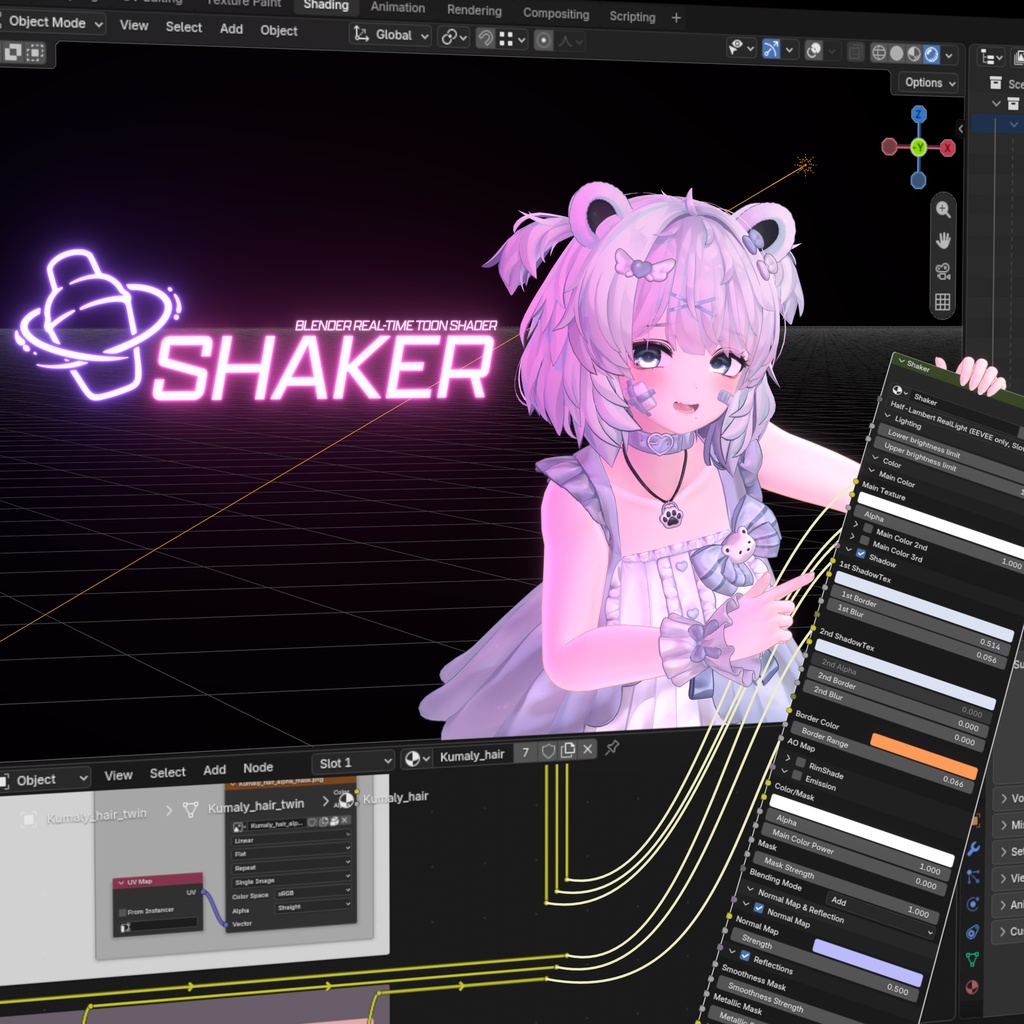

BlenderのEEVEEレンダラーで、VRChatに近い質感を再現できるように作られたマテリアルノードグループです。 A material node group built to reproduce a VRChat-like look in Blender's EEVEE renderer. Blender의 EEVEE 렌더러에서 VRChat과 비슷한 느낌의 재질을 낼 수 있도록 만들어진 마테리얼 노드 그룹입니다.
特徴
Diffuseベースのためジオメトリの半分が影で覆われてしまう従来のBlender用トゥーンマテリアルとは異なり、Half-Lambertを疑似的に実装することで、影の領域を完全にユーザーがコントロールできる点が特徴です。 モデリング段階でエンジン上での質感を事前に確認するための、プリビズ用途での使用を想定しています。 影に関する不具合があり、またコンパイル時間が長いため、アニメーション制作用途にはおすすめできません
注意事項
・Blender 5.2用マテリアルと4.5用マテリアルは互いに異なり、互換性はありません。(Menu Switch機能の有無による分離) ・LightのShadowオプションのチェックを外していただかないと正常に動作しません。 ・実際のライトに対応するRealLightモードと、光の方向をベクトルで指定するFakeLightモードがあります。RealLightモードはコンパイル時間が長いため、テクスチャの差し替えによる再コンパイルが頻繁に発生する段階では、なるべくFakeLightモードのご使用をおすすめします。 ・World Surfaceが単色ではなくHDRI画像の場合、影にエラーが発生することがあります。(Material Previewモード使用時、またはRenderedモードでSurface設定を変更した際)
対応バージョン
・Blender 5.2 LTS / 4.5 LTS:動作保証 ・Blender 4.2〜4.4:World Colorを黒に設定すれば動作します ・Blender 5.0〜5.1 / 4.1以下:エラーが発生します ・なるべく5.2または4.5のご使用をお願いいたします。
主な機能
・メインカラー3重レイヤー(通常・加算・乗算・スクリーン対応。デカールとして使用可能) ・Half-Lambertベースの、ユーザーがコントロール可能な2段階シェーディング ・RimShade / RimLight(RimShadeは乗算固定、RimLightは通常・加算・乗算・スクリーン対応) ・ノーマルマップ(強度調整可能) ・Toon Reflection ・MatCap(通常・加算・乗算・スクリーン対応)
リファレンス
・lilToon (lilLab) - https://lilxyzw.booth.pm/items/3087170 プロパティ名およびパラメーター範囲を参考にさせていただきました。
クレジット
・オリジナル3Dモデル「ひきくまりのクマリ」(Studio JINGO) - https://jingo1016.booth.pm/items/7928592 サンプル画像に使用しています。 内容物には含まれていません。
Features
Unlike conventional Blender toon materials, which are Diffuse-based and leave half of the geometry buried in shadow, this one emulates Half-Lambert shading, giving you full control over the shadowed areas. It is intended for previz use — checking how a model will look in-engine while you are still modeling. It has some shadow-related bugs and long compile times, so it is not recommended for animation production.
Notes
・The Blender 5.2 material and the 4.5 material are different and not compatible with each other. (Split due to the presence/absence of the Menu Switch feature.) ・You must uncheck the Shadow option on your Light for it to work correctly. ・There are two modes: RealLight, which responds to actual lights, and FakeLight, which lets you specify the light direction as a vector. RealLight has long compile times, so during stages where swapping textures triggers frequent recompiles, using FakeLight is recommended. ・If the World Surface is an HDRI image rather than a solid color, shadow errors may occur. (When using Material Preview mode, or when changing the Surface setting in Rendered mode.)
Supported Versions
・Blender 5.2 LTS / 4.5 LTS: fully supported ・Blender 4.2–4.4: works if World Color is set to black ・Blender 5.0–5.1 / 4.1 and below: errors occur ・Please use version 5.2 or 4.5 whenever possible.
Main Features
・Triple main color layers (Normal, Add, Multiply, Screen supported; usable as decals) ・User-controllable two-step shading based on Half-Lambert ・RimShade / RimLight (RimShade is fixed to Multiply; RimLight supports Normal, Add, Multiply, Screen) ・Normal Map (adjustable strength) ・Toon Reflection ・MatCap (Normal, Add, Multiply, Screen supported)
Reference
・lilToon (lilLab) - https://lilxyzw.booth.pm/items/3087170 Property names and parameter ranges were referenced from this.
Credits
・Original 3D model "Hikikumari no Kumari" (Studio JINGO) - https://jingo1016.booth.pm/items/7928592 Used in the sample images. Not included in the contents.
특징
Diffuse 기반이라 지오메트리의 절반이 그림자로 뒤덮히는 기존까지의 블렌더용 툰 마테리얼과 달리, Half-Lambert를 의사적으로 구현하여 그림자 영역을 완전히 사용자가 컨트롤할 수 있는 것이 특징입니다. 모델링 단계에서 엔진에서의 질감을 미리 확인하게 위한 프리비즈 용도로의 사용을 상정하고 있습니다. 그림자 관련 오류들이 있으며 컴파일 타임이 길기 때문에 애니메이션 제작 용도로는 추천드리지 않습니다.
주의사항
・Blender 5.2용 마테리얼과 4.5용 마테리얼은 서로 다르며 호환되지 않습니다. (Menu Switch 기능 유무로 인한 분리) ・Light의 Shadow 옵션을 체크 해제해주셔야 정상 작동합니다. ・실제 빛에 대응되는 RealLight 모드와 빛의 방향을 벡터로 지정해주는 FakeLight 모드가 존재합니다. RealLight 모드는 컴파일 타임이 길기 때문에, 텍스처 교체로 인한 리컴파일이 자주 일어나는 단계에는 가급적 FakeLight 모드를 사용하는 것을 권장드립니다. ・World Surface가 단일 색상이 아니라 HDRI 이미지인 경우 그림자에 오류가 발생할 수 있습니다. (Material Preview 모드 사용시, 혹은 Rendered 모드에서 Surface 설정을 변경시)
지원 버전
・Blender 5.2 LTS / 4.5 LTS : 작동 보증 ・Blender 4.2~4.4 : World Color를 검은색으로 맞추면 작동함 ・Blender 5.0~5.1 / 4.1 이하 : 오류 발생 ・가급적 5.2 또는 4.5 버전에서 사용해주시기 바랍니다.
주요기능
・메인 컬러 3중 레이어 (통상, 가산, 곱셈, 스크린 대응. 데칼로 사용 가능) ・Half-Lambert 기반의 사용자 컨트롤 가능한 2단계 음영 ・RimShade / RimLight (RimShade의 경우 곱셈 고정, RimLight의 경우 통상, 가산, 곱셈, 스크린 대응) ・Normal Map (강도 조정 가능) ・Toon Reflection ・MatCap (통상, 가산, 곱셈, 스크린 대응)
레퍼런스
・Liltoon (lilLab) - https://lilxyzw.booth.pm/items/3087170 프로퍼티 이름 및 파라미터 범위를 참조하였습니다.
크레딧
・オリジナル3Dモデル「ひきくまりのクマリ」(Studio JINGO) - https://jingo1016.booth.pm/items/7928592 샘플 이미지에 사용되었습니다. 내용물에는 포함되어 있지 않습니다