
【Astra CPU Silencer Extreme Edition v2.5.0】
- ダウンロード商品¥ 500
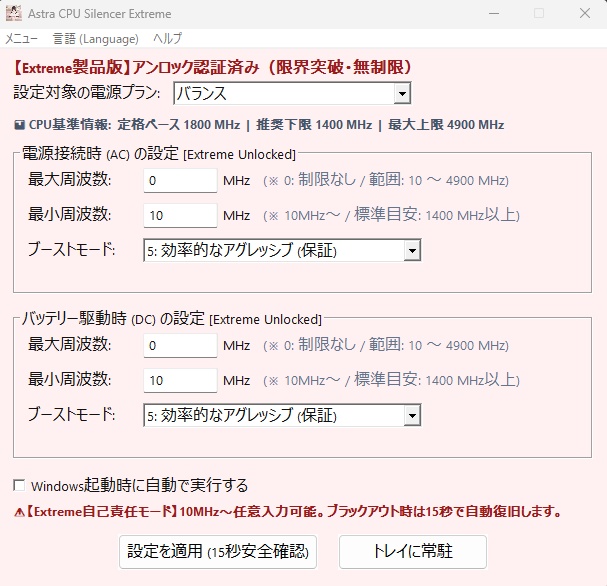


🎉 作者の誕生日記念!期間限定50%OFFセール! 🎉 作者の誕生日を記念して、10月31日まで特別セールを開催いたします! 🎁 通常価格 1,000円 → 特別価格 500円! なんと 50%OFF! 日頃の感謝を込めた期間限定の特別価格です。 この機会にぜひお試しください!✨ ================================================== 💡 【Astra CPU Silencer Extreme Edition v2.5.0】Extreme Editionとは? ================================================== 通常版Astra CPU Silencerの安全思想を引き継ぎながら、 より広いCPU周波数設定範囲を扱えるようにした 上級者・エンスージアスト向けモデルです。 ・最大/最小周波数を10MHz刻みで設定 ・Extreme入力下限 10MHz ・最大 0MHz = 制限なし ・Windows電源プランを直接切り替え ・AC/DC個別設定 ・日本語/英語UI ・Windows自動起動 ・Intel / AMD Ryzen対応設計 入力したMHz値へCPUを固定するツールではありません。 実際の周波数はWindows、CPU、負荷、温度、BIOSなどにより変化します。 ================================================== 🛡️ 15秒安全確認・自動ロールバック ================================================== 設定適用直前のWindows CPU電源設定を取得し、 新しい設定を一時適用します。 15秒以内に「この設定を維持」を選択した場合のみ保持します。 未確認のまま15秒経過した場合、 確認画面を閉じた場合、 または設定を戻す操作を行った場合は、 適用直前の設定へ自動的に復元します。 安全な復元に必要な設定を取得できない場合は、 Extreme設定そのものを適用しません。 ================================================== 🔍 CPU仕様データベース ================================================== CPU型番がCPU仕様DBと完全一致した場合のみ、 メーカー公称ベース周波数・最大周波数を表示します。 確認済みの最大値だけを入力上限として使用し、 DB未確認CPUの最大周波数を推測しません。 未確認CPUでは 0MHz(制限なし) をご利用ください。 2500MHzは実機検証に基づき、 2400MHzへ自動的に変更します。 ================================================== ⚡ Extremeプリセット ================================================== 🟢 極限超省エネ AC:800MHz / DC:600MHz 🟡 中速サイレント AC:3.0GHz / DC:2.6GHz 🔴 通常モード 最大周波数制限を解除 プリセットにも15秒安全確認が適用されます。 ================================================== 🛡️ 復元機能 ================================================== 【変更前へ復元】 Extreme使用前に保存したCPU電源設定と Processorメニュー表示状態へ戻します。 【完全初期化】 CPU設定をAstra基準初期値へ戻し、 Processorメニューとアプリ設定を初期化します。 ================================================== 🎁 60分無料体験 ================================================== ライセンス未登録状態でも60分間お試しいただけます。 体験時間は累積方式です。 手動でテストを終了した場合は、 残り時間を次回起動時へ引き継ぎます。 体験時間終了時は、 保存済みの変更前CPU設定への復元を試みた後、 Extremeライセンス登録画面を表示します。 ================================================== 🔑 製品版ライセンス ================================================== BOOTHでExtreme Editionをご購入後、 [メニュー] →[Extremeライセンスキーの登録] からマシンIDをご確認ください。 発行されたExtreme専用ライセンスキーを入力すると、 製品版としてご利用いただけます。 ================================================== 📂 パッケージ内容 ================================================== ・Astra CPU Silencer Extreme.exe ・Readme_JP.txt ・Readme_EN.txt ================================================== 📄 診断ログ ================================================== 保存先:C:\Users<Windowsユーザー名>\AppData\Roaming\Astra_CPU_Silencer_Extreme\Astra_Extreme_Diagnostic_Log.txt サポートや不具合調査に必要な診断情報は、 上記AppDataフォルダへ保存されます。 ================================================== 💻 動作環境 ================================================== 正式対応OS: Windows 11 64-bit 対応CPU: Intel CPU AMD Ryzen CPU 管理者権限が必要です。 ※Windows 10でも動作する場合がありますが、 正式サポート対象外です。 ================================================== 【免責事項・ご注意点】 ================================================== ・本ソフトウェアはWindows標準APIのみを使用する安全設計ですが、 CPUの動作周波数を変更する特性上、お使いのPC環境や設定値によっては OSの動作低下や一時的なフリーズが発生する可能性がございます。 ・本ソフトウェアの使用、または使用不能によって生じた 直接的・間接的な損害 (ハードウェアの故障、データの消失、事業の中断、機会損失等) について、開発者(Masa Tech!! / イタチ)は 一切の責任を負いかねます。 ・必ずお使いの環境にて 「無料お試し版(Trial)」で動作確認を行った上で、 ご自身の責任においてご利用・ご購入ください。 ================================================== 💌 お問い合わせ・サポート ================================================== masatech.dev.apps@gmail.com 開発: イタチ(教官 / まさTech!!) Astra 真昼(Mahiru)
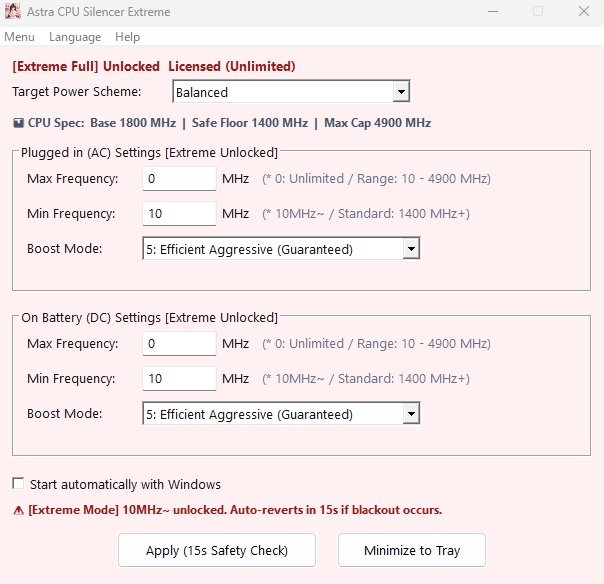
🎉 Developer's Birthday Sale! 50% OFF! 🎉 To celebrate the developer's birthday, we're offering a special limited-time discount until October 31, 2026! 🎁 Regular Price: ¥1,000 → Special Price: ¥500! That's 50% OFF! This special offer is our way of saying thank you for your support. Don't miss this opportunity! ✨ ================================================== 【Astra CPU Silencer Extreme Edition v2.5.0】 10 MHz fine control with a 15-second automatic rollback guard. An enthusiast Windows CPU power-management utility that does not directly modify CPU voltage or BIOS settings. ================================================== 💡 What is Extreme Edition? ================================================== Extreme Edition keeps the safety-oriented design philosophy of Astra CPU Silencer while providing a wider CPU frequency adjustment range. ・10 MHz maximum/minimum input steps ・Minimum input: 10 MHz ・Maximum 0 MHz = Unlimited ・Direct Windows power-plan switching ・Separate AC / DC settings ・Japanese / English UI ・Windows startup support ・Intel / AMD Ryzen design The entered MHz value does not lock the CPU to an exact frequency. Actual CPU frequency depends on Windows, CPU architecture, workload, temperature, BIOS settings, and other system controls. ================================================== 🛡️ 15-Second Safety Check ================================================== Before applying an Extreme setting, the application captures the current Windows CPU power settings. The new setting is applied temporarily. The setting is kept only when confirmed within 15 seconds. If it is not confirmed, the confirmation window is closed, or the user chooses to revert, the previously captured settings are automatically restored. If a safe rollback snapshot cannot be captured, the Extreme setting is not applied. ================================================== 🔍 Exact-Match CPU Database ================================================== Official base and maximum frequencies are used only when the detected CPU model exactly matches a verified database entry. Extreme does not guess the maximum frequency of an unverified CPU. For an unverified CPU, use: 0 MHz = Unlimited Based on project hardware testing, 2500 MHz is automatically redirected to 2400 MHz. ================================================== ⚡ Extreme Presets ================================================== 🟢 Extreme Low Power AC: 800 MHz / DC: 600 MHz 🟡 Medium Silent AC: 3.0 GHz / DC: 2.6 GHz 🔴 Normal Mode Maximum-frequency limit removed All Extreme presets use the 15-second safety check. ================================================== 🛡️ Restore Functions ================================================== [Restore Original] Restores the saved CPU power settings and Processor-menu visibility from before Extreme changed them. [Full Reset] Restores Astra baseline CPU settings and resets Processor-menu and application settings. ================================================== 🎁 60-Minute Trial ================================================== The unregistered version provides a 60-minute trial. Trial usage is accumulated. Manually ending the test preserves the remaining time for the next launch. When the trial expires, Extreme attempts to restore the saved pre-change CPU power settings before displaying the Extreme license-registration screen. ================================================== 🔑 Extreme License ================================================== After purchasing Extreme Edition on BOOTH: Menu -> Register Extreme License Key Check the displayed Machine ID and enter the issued Extreme license key to activate the full version. ================================================== 📂 Package Contents ================================================== ・Astra CPU Silencer Extreme.exe ・Readme_JP.txt ・Readme_EN.txt ================================================== 📄 Diagnostic Log ================================================== %AppData%\Astra_CPU_Silencer_Extreme\ Astra_Extreme_Diagnostic_Log.txt Diagnostic information required for support and troubleshooting is stored in the AppData folder above. ================================================== 💻 System Requirements ================================================== Official support: Windows 11 64-bit CPU: Intel processors AMD Ryzen processors Administrator privileges required. Windows 10 may work but is not officially supported. ================================================== DISCLAIMER & IMPORTANT NOTES ================================================== ・This software uses native Windows APIs and is designed with safety in mind. However, due to the nature of changing CPU operating frequency settings, system performance may decrease or temporary freezes may occur depending on the PC environment and selected settings. ・The developer (Masa Tech!! / Itachi) shall not be liable for any direct or indirect damages arising from the use of, or inability to use, this software, including hardware failure, data loss, business interruption, or loss of opportunity. ・Users are strongly advised to test the software on their own system using the Free Trial before purchasing or using the full version. Use of this software is at the user's own responsibility. ================================================== 💌 Support & Contact ================================================== masatech.dev.apps@gmail.com Developed by: Itachi (Kyokan / Masa Tech!!) Astra Mahiru