

{AutoToggleDevManager} 服のワンクリックアニメ
- ダウンロード商品¥ 200
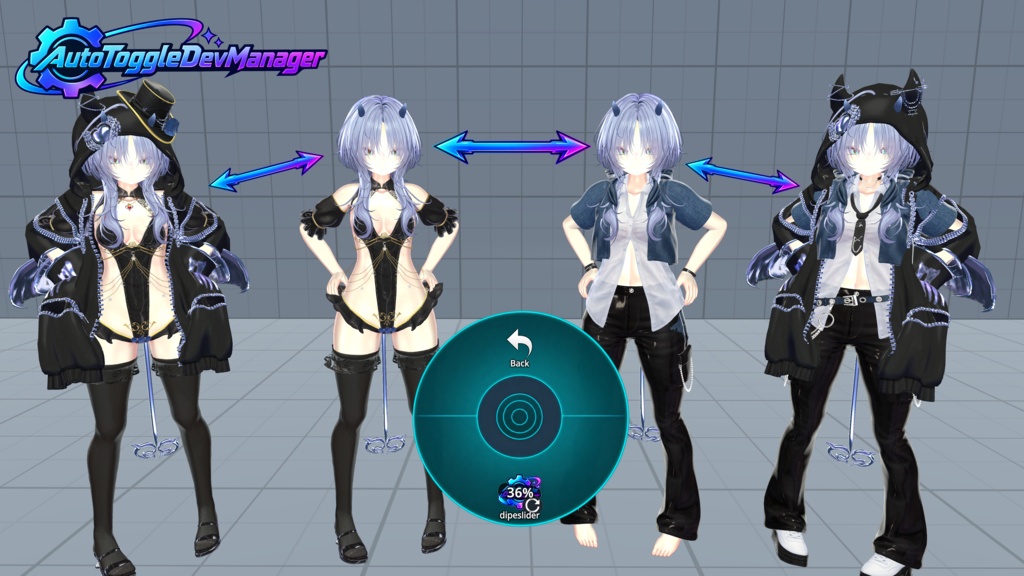
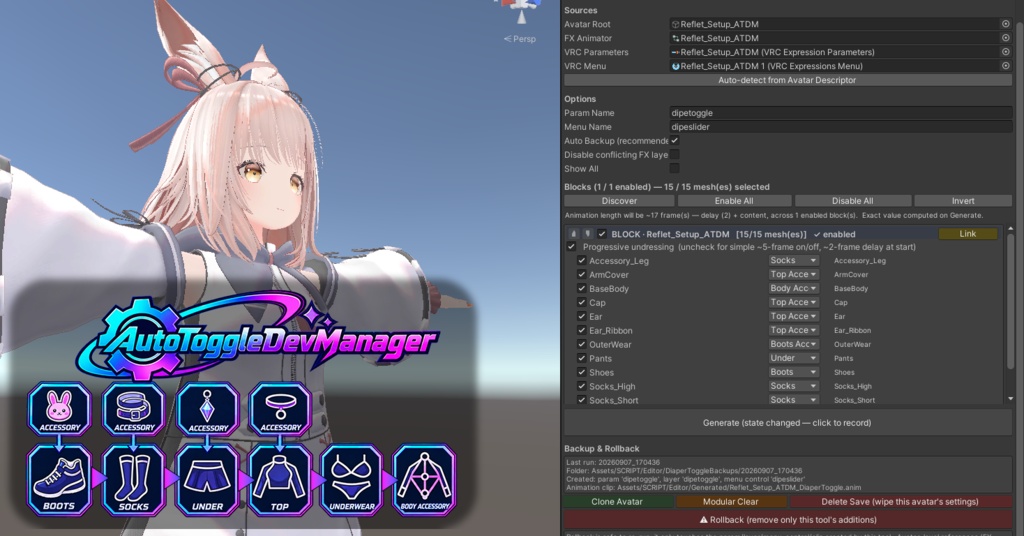


JP //////////////////////////////////////////////////////////////////////////// ATDM — Auto Toggle Dev Manager 1〜2クリックで完成!VRChat衣装切替アニメーション自動生成ツール VRChatアバター用の衣装トグルアニメーションを、ボタン1つで自動生成するEditor拡張ツールです。 複雑なFX Animator・VRCExpressionParameters・VRCExpressionsMenuへの登録も、ATDMがすべて代行します。 「衣装の数だけアニメーションを手で作っていた」——その時間を、もう取り戻しませんか? ✨ 主な機能 🎯 アバターを1クリックで解析 — Hierarchyをスキャンして衣装ブロックを自動検出 🎬 アニメーションを1クリックで生成 — MotionTime制御の _DiaperToggle.anim を生成、FX・パラメータ・メニューを自動バインド 🧹 不要なFXレイヤーを自動無効化 — 競合するアニメーションを自動検出、ウェイトを保存してRollback対応 💾 選択状態を自動保存 — チェックボックスのON/OFF・並び順を再起動後も保持 🔄 Selective Rollback — ツールが追加した要素だけ削除、ユーザーの手作業には触れない 📦 Avatar Clone (with _ATDM suffix) — アバターとアセットを複製して隔離開発、原本を汚さない 🛡️ 安全な失敗処理 — エラー時は部分変更をロールバック、確認ダイアログで誤操作防止 ⚙️ 細部まで設定可能 「自動生成」と聞いて「汎用的すぎて動かないのでは?」と思った方、ご安心ください。ATDMはきめ細やかな設定に対応しています: 🧩 ブロック単位の制御 Progressive / Simple モード切替(1枚ずつ脱ぐ vs 全部まとめて) ブロックごとに 有効/無効 メッシュの 表示/非表示 チェックボックス メッシュごとの Order カテゴリ(Top / Under / Boots / Socks / BodyAccessory など) 🔁 Sub-cycles 同じカテゴリに複数の衣装(例:パンツ2種類)がある場合、自動的にsub-cycleを生成 各variationで完全な脱衣アニメーションが独立して動作 🎚️ FXレイヤー制御 「競合するFXレイヤーを無効化」トグルで、手動で設定したウェイトを保護 ONにした場合、元のウェイトを記憶してRollbackで完全復元 🛡️ Body / Hair / AFK 自動フィルタ アバターの素体・髪・AFK系メッシュは自動的に判定して除外 BodyAll, H_AFK_pose, Hair, HairRibbon などをアタマの中で判別 誤判定があれば Show All トグルで全表示して確認可能 🔗 Link機能 別ブロックのメッシュを参照のみで共有(実体を複製しない) 1つの衣装を複数のブロックから使う場合に最適 📋 動作環境 Unity 2022.3 LTS 以降 VRChat SDK 3.x Modular Avatar 1.18+(任意、併用可能) Windows / macOS / Linux 🚀 使い方 1. Tools → ATDM でウィンドウを開く 2. Avatar Root にアバターのGameObjectをドラッグ 3. 必要に応じて Auto-detect でFX・Parameters・Menuを自動取得 4. Discover をクリック → 衣装ブロックが自動表示 5. ブロックのON/OFF、Orderを微調整 6. Generate をクリック → 完了! もうanimatorを開いて手作業でキーを打つ必要はありません。 🔒 安全性 すべての変更前に自動バックアップ(任意でOFF可能) Rollbackは追加した要素のみ削除 本体アバターや既存のパラメータ・レイヤーには触れない 開発中のミスは Ctrl+Z で戻せる 💡 こんな方におすすめ アバター衣装が10着以上あって、アニメーション管理が限界な方 新しい衣装を追加するたびに手作業が面倒な方 Progressive undressing(段階的脱衣)を簡単に実装したい方 衣装トグルのテスト工数を削減したい方 📦 同梱物 AutoToggleDevManager.png / _mini.png — アイコン AutoToggleDevManager.cs — メインスクリプト //////////////////////////////////////////////////////////////////////////// ENG ATDM — Auto Toggle Dev Manager Done in 1〜2 clicks! VRChat Outfit Toggle Animation Auto-Generator An Editor extension that generates VRChat avatar outfit toggle animations with a single button click. ATDM handles the entire registration into FX Animator, VRCExpressionParameters, and VRCExpressionsMenu for you. "Making one animation per outfit by hand" — isn't it time to take that time back? ✨ Key Features 🎯 Analyze your avatar in 1 click — scans the Hierarchy and auto-detects outfit blocks 🎬 Generate animations in 1 click — creates a MotionTime-driven _DiaperToggle.anim and auto-binds FX, parameters, and menu 🧹 Auto-disable conflicting FX layers — detects conflicting animations, saves original weights for Rollback 💾 Selection state auto-saved — checkbox state and order survive editor restarts 🔄 Selective Rollback — only removes elements added by the tool, never touches your manual edits 📦 Avatar Clone (with _ATDM suffix) — duplicate avatar + assets for isolated development, original stays untouched 🛡️ Safe failure handling — partial changes are rolled back on error; confirmation dialogs prevent accidents ⚙️ Fine-grained Configuration "Auto-generated" sounds too generic to work for my avatar? Don't worry — ATDM supports detailed per-block configuration: 🧩 Per-block control Progressive / Simple mode toggle (one-by-one vs all-at-once undressing) Enable / disable per block Per-mesh show / hide checkbox Per-mesh Order category (Top / Under / Boots / Socks / BodyAccessory etc.) 🔁 Sub-cycles When multiple outfits share a category (e.g. two pairs of pants), sub-cycles are generated automatically Each variation runs a complete undressing animation independently 🎚️ FX Layer control "Disable conflicting FX layers" toggle protects your manual weight tuning When enabled, original weights are saved and fully restored on Rollback 🛡️ Body / Hair / AFK auto-filter Avatar body skin, hair, and AFK indicator meshes are detected and excluded automatically Names like BodyAll, H_AFK_pose, Hair, HairRibbon are recognized on the fly If a mesh is misclassified, the Show All toggle reveals every mesh for manual review 🔗 Link feature Share meshes from another block by reference only (no duplication of actual renderers) Perfect for outfits that should appear in multiple blocks 📋 Requirements Unity 2022.3 LTS or later VRChat SDK 3.x Modular Avatar 1.18+ (optional, works alongside it) Windows / macOS / Linux 🚀 How to use 1. Open the window via Tools → ATDM 2. Drag the avatar's GameObject into Avatar Root 3. Click Auto-detect to populate FX / Parameters / Menu (if needed) 4. Click Discover — outfit blocks appear automatically 5. Tweak each block's ON/OFF and Order 6. Click Generate — done! No more opening the Animator window and dropping keys by hand. 🔒 Safety Automatic backup before every change (can be turned off in settings) Rollback only removes elements added by this tool The avatar itself and your existing parameters / layers are never touched Mistakes during development can be undone with Ctrl+Z 💡 Recommended for Avatars with 10+ outfits where animation management has become unmanageable Anyone tired of manual work every time a new outfit is added Creators who want to implement progressive undressing (step-by-step removal) easily Anyone who wants to cut down on outfit-toggle testing time 📦 Package contents AutoToggleDevManager.cs — main script AutoToggleDevManager.png / _mini.png — icons
Update informations
[2026-09-10: v1.0] ATDM [2026-09-13: v1.1] ATDM Add toggle mode, and slider variation Update soon....