

【無料】VRChat DLSS5 Cam - DLSS 5 ニューラルレンダリング撮影ツール(GeForce RTX / Radeon RX 7000・9000 対応)
- NVIDIA GeForce RTX 20 / 30 / 40 / 50ダウンロード商品¥ 0
- AMD Radeon RX 7000 / 9000ダウンロード商品¥ 0
- Linuxダウンロード商品¥ 0


GitHub repository: https://github.com/AlanBacker/VRChat-DLSS5-Cam Documentation: https://alanbacker.github.io/VRChat-DLSS5-Cam
日本語
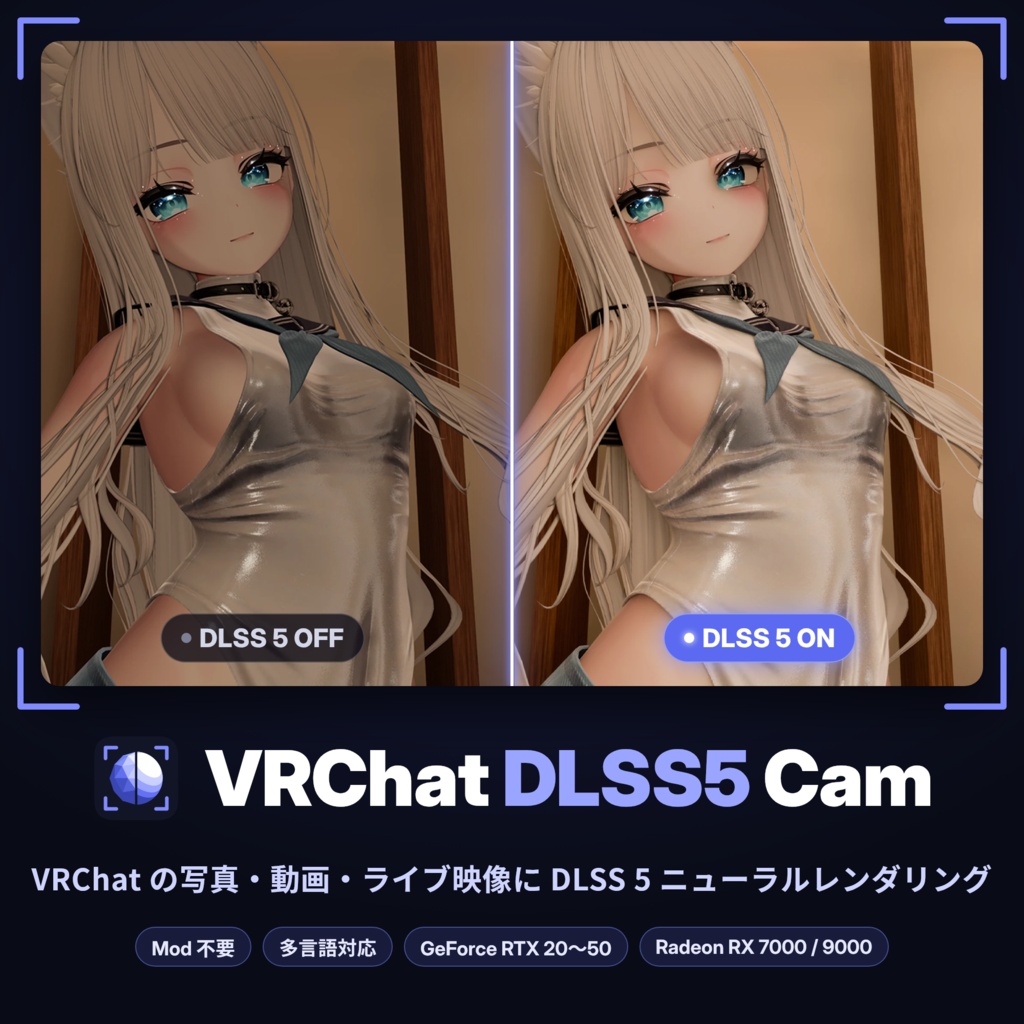
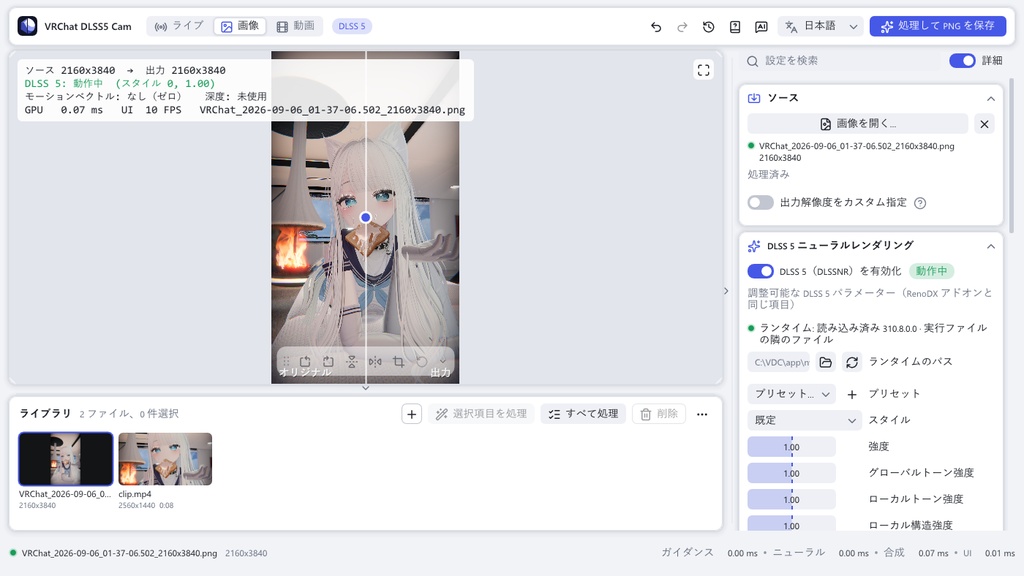
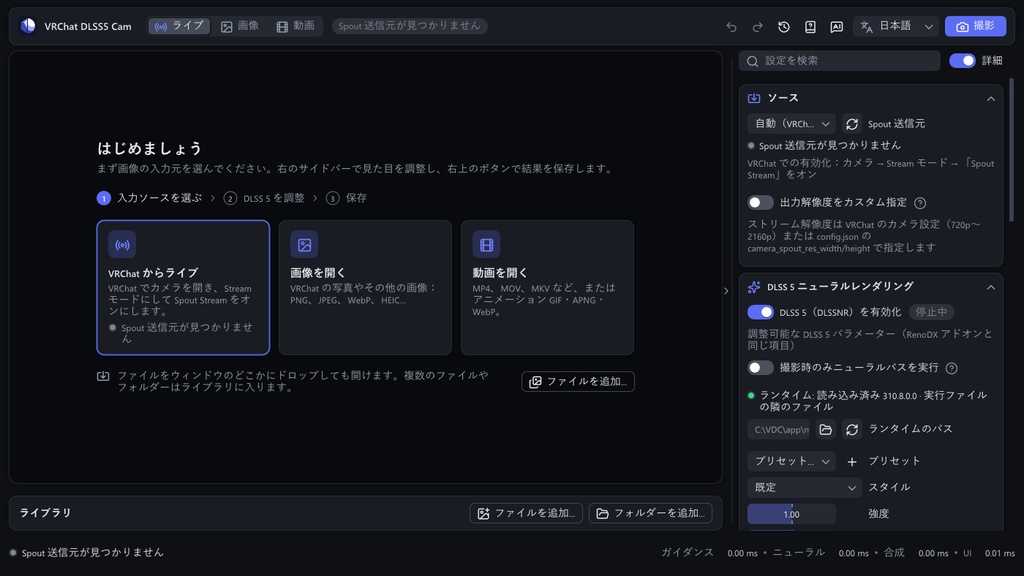
VRChat DLSS5 Cam は、VRChat のカメラ映像に NVIDIA の DLSS 5 ニューラルレンダリング(DLSSNR)を適用し、ロスレス PNG として保存する Windows 向けアプリケーションです。PC にある画像や動画も、同じ処理で仕上げられます。VRChat のプロセスには一切干渉せず、Mod や改変クライアントは必要ありません。ソースコードは MIT ライセンスで公開しており、無料で利用できます。 ■ 主な機能 ・ライブカメラ:Stream カメラの映像を Spout で受け取り、VRChat を前面にしたまま Ctrl+Alt+P で保存 ・静止画・動画・アニメーション:PNG、MP4(音声を保持)、PNG 連番、GIF / APNG / WebP で書き出し ・出力サイズは自由。元より大きくするときは DLSS 超解像でディテールを再構成(GeForce のみ) ・ライブラリに集めたファイルを、選んだ分だけ一括処理 ・ワイプ・オリジナル・深度・モーションベクトルの各表示で処理前後を比較 ・プリセット、アンドゥ・リドゥ、4 言語の UI、コマンドライン ・アプリ内アップデート(GitHub につながりにくい環境ではミラーサイト経由) ・MCP:Claude Desktop、Claude Code、Cursor、チャットボットなどの MCP クライアントから、ファイルを開いて処理・保存 ■ 動作環境 ・Windows 10 21H2 以降、または Windows 11(64 ビット) ・GeForce 版:NVIDIA GeForce RTX 20 / 30 / 40 / 50 シリーズと、GeForce ドライバー 616.56 以降(起動時にアプリが確認します)。DLSS 5 ランタイム 310.8 を同梱しており、カードに合ったビルドが起動時に選ばれます。 ・Radeon 版:AMD Radeon RX 7000 / RX 9000 シリーズ(RDNA 3 / RDNA 4)、Windows 11、Adrenalin 26.1.1 以降。ニューラルパスは別プロジェクト DLSS-NR-on-AMD(Daniel Blanco 氏)を通じて動作し、初回起動時にボタン一つで導入できます(本アプリには同梱していません)。 ・Linux パッケージ:同梱のランチャーが GeForce 版を Proton 上で動かします(NVIDIA GeForce RTX と NVIDIA ドライバー 5xx 以降が必要、Radeon は非対応)。ライブ(Spout)モードはなく、動画は WebP / GIF / APNG / PNG で保存されます。詳しくは https://alanbacker.github.io/VRChat-DLSS5-Cam/ja/linux.html ・ライブカメラを使う場合:Stream カメラに Spout Stream オプションがある VRChat ■ 導入手順 1. 下記の「ダウンロード」から、カードに合った zip を入手して任意の場所に展開します。 2. VRChatDLSS5Cam.exe を起動すると、初回は短いセットアップガイドが開きます。Radeon 版では「DLSS-NR-on-AMD をインストール…」を押すと、導入後にアプリが自動で再起動します。 3. VRChat でカメラを Stream モードにし、設定で Spout Stream をオンにすると、DLSS 5 適用後の映像がプレビューに表示されます。 4. Ctrl+Alt+P を押すと、Pictures\VRChat DLSS5 Cam に PNG が保存されます。画像や動画は、ウィンドウへのドロップで開けます。 ■ ダウンロード 最新版 https://github.com/AlanBacker/VRChat-DLSS5-Cam/releases/latest GeForce 版:VRChatDLSS5Cam-win64.zip Radeon 版:VRChatDLSS5Cam-win64-amd.zip Linux パッケージ:VRChatDLSS5Cam-linux-x86_64.tar.gz ソースコード https://github.com/AlanBacker/VRChat-DLSS5-Cam ■ ドキュメント ダウンロードから最初の 1 枚までを画像付きで一歩ずつ案内し、すべての設定、MCP、トラブルシューティングもまとめています。アプリの「ドキュメント」ボタンからも開けます。その隣の「AI に質問」ボタンから知りたいことをそのまま尋ねると、AI がドキュメントをもとに、ページへのリンクを添えて答えます。AI Q&A はオンラインサービス(Mintlify)で動くため、入力した質問は Mintlify に送られますが、PC の画像や動画が送られることはありません。使えないこともありますが、そのときはドキュメントをご覧ください。 https://alanbacker.github.io/VRChat-DLSS5-Cam/ja/ ■ 作例の共有 仕上げた写真や動画は、ハッシュタグ #VRCDLSS5CAM を付けて X に投稿していただけると嬉しいです。不具合の報告や機能の要望は、GitHub の Issues で受け付けています。アプリが正常に終了しなかったときは、次回の起動時に、バージョンとグラフィックカードが記入済みの報告フォームを開けます。
English
VRChat DLSS5 Cam is a Windows application that applies NVIDIA DLSS 5 Neural Rendering (DLSSNR) to VRChat's camera and saves the result as a lossless PNG. Pictures and videos on your computer go through the same processing. The VRChat process is never touched: no mod and no modified client are involved. The application is free, and its source code is published under the MIT licence. ■ Key features ・Live camera: VRChat's Stream Camera is received over Spout, and Ctrl+Alt+P saves a PNG while VRChat stays in front. ・Pictures, videos and animations, saved as PNG, MP4 (sound kept), a PNG sequence or GIF / APNG / WebP. ・Any output size; above the source's size, DLSS super resolution rebuilds the detail (GeForce only). ・A library that collects your files and processes any selection in one run. ・Wipe, original, depth and motion-vector views to compare before and after. ・Presets, undo and redo, a four-language interface and a command line. ・Updates from within the application, through mirror sites where GitHub is hard to reach. ・MCP: MCP clients such as Claude Desktop, Claude Code, Cursor or a chat bot can open, process and save files. ■ Requirements ・Windows 10 21H2 or Windows 11, 64-bit. ・GeForce edition: an NVIDIA GeForce RTX 20 / 30 / 40 / 50 card and GeForce driver 616.56 or newer (the application checks it at start). The DLSS 5 runtime 310.8 is included, and the build for your card is chosen at start. ・Radeon edition: an AMD Radeon RX 7000 / RX 9000 card (RDNA 3 / RDNA 4), Windows 11 and Adrenalin 26.1.1 or newer. The neural pass runs through DLSS-NR-on-AMD, a separate project by Daniel Blanco, which the application sets up with one press at the first start; nothing of it is bundled. ・Linux package: the bundled launcher runs the GeForce edition under Proton, on an NVIDIA GeForce RTX card with driver 5xx or newer (Radeon cards are not supported). There is no live (Spout) mode, and videos are saved as WebP, GIF, APNG or PNG. Details: https://alanbacker.github.io/VRChat-DLSS5-Cam/linux.html ・For the live camera: VRChat with the Stream Camera's Spout Stream option. ■ Setup 1. Download the archive for your card (see Download below) and extract it to any folder. 2. Start VRChatDLSS5Cam.exe; the first start opens a short setup guide. On a Radeon, press "Install DLSS-NR-on-AMD…", and the application restarts by itself when it is done. 3. In VRChat, switch the camera to Stream mode and enable Spout Stream in its settings. The preview then shows the camera with DLSS 5 applied. 4. Press Ctrl+Alt+P to save a PNG to Pictures\VRChat DLSS5 Cam. Pictures and videos open when you drop them onto the window. ■ Download Latest release https://github.com/AlanBacker/VRChat-DLSS5-Cam/releases/latest GeForce edition: VRChatDLSS5Cam-win64.zip Radeon edition: VRChatDLSS5Cam-win64-amd.zip Linux package: VRChatDLSS5Cam-linux-x86_64.tar.gz Source code https://github.com/AlanBacker/VRChat-DLSS5-Cam ■ Documentation Step-by-step guides with screenshots, from the download to your first picture, plus every setting, MCP and troubleshooting. The Documentation button in the application opens it too. The Ask AI button beside it lets you ask in your own words, and AI answers from the documentation with links to its pages. AI Q&A runs on Mintlify, an online service: the questions you type are sent there, but your pictures and videos never are. It may be unavailable at times; when it is, the documentation is the place to look. https://alanbacker.github.io/VRChat-DLSS5-Cam/ ■ Sharing results Photos and videos finished with the application are welcome on X under the hashtag #VRCDLSS5CAM. Bug reports and feature requests are handled through GitHub Issues. If the application did not close properly, the next start offers a report form with the version and your graphics card already filled in.
简体中文
VRChat DLSS5 Cam 是一款 Windows 应用程序,将 VRChat 相机画面接入 NVIDIA DLSS 5 神经渲染(DLSSNR),并保存为无损 PNG。电脑里的图片和视频也能用同样的方式处理。程序不对 VRChat 进程做任何干预,无需 Mod 或修改版客户端。源代码以 MIT 许可证公开,可免费使用。 ■ 主要功能 ・实时相机:通过 Spout 接收 Stream 相机画面,VRChat 留在前台时按 Ctrl+Alt+P 即可保存 ・图片、视频与动图:输出 PNG、MP4(保留音轨)、PNG 序列或 GIF / APNG / WebP ・输出尺寸可自由设定,放大时由 DLSS 超分辨率重建细节(仅 GeForce) ・文件集中在素材库,选中的部分可一次批量处理 ・分割对比、原始画面、深度、运动矢量四种视图,方便比较处理前后 ・预设、撤销与重做、四语言界面、命令行 ・程序内更新,GitHub 访问不畅时可经由镜像站 ・MCP:Claude Desktop、Claude Code、Cursor、聊天机器人等 MCP 客户端可以打开、处理并保存文件 ■ 运行环境 ・Windows 10 21H2 及以上,或 Windows 11(64 位) ・GeForce 版:NVIDIA GeForce RTX 20 / 30 / 40 / 50 系列,GeForce 驱动 616.56 或更新(程序启动时会检查)。已附带 DLSS 5 运行库 310.8,启动时自动选择适合显卡的版本。 ・Radeon 版:AMD Radeon RX 7000 / RX 9000 系列(RDNA 3 / RDNA 4),Windows 11,Adrenalin 26.1.1 或更新。神经渲染通过独立项目 DLSS-NR-on-AMD(作者 Daniel Blanco)运行,首次启动时按一下按钮即可安装(本程序不附带其任何文件)。 ・Linux 软件包:附带的启动脚本在 Proton 下运行 GeForce 版,需要 NVIDIA GeForce RTX 显卡和 5xx 或更新的 NVIDIA 驱动,不支持 Radeon。没有实时(Spout)模式,视频保存为 WebP / GIF / APNG / PNG。详见 https://alanbacker.github.io/VRChat-DLSS5-Cam/zh/linux.html ・使用实时相机时:带有 Stream 相机 Spout Stream 选项的 VRChat ■ 安装步骤 1. 从下方「下载」获取对应显卡的 zip,解压到任意位置。 2. 运行 VRChatDLSS5Cam.exe,首次启动会打开简短的设置向导。Radeon 版请点击「安装 DLSS-NR-on-AMD…」,安装完成后程序会自动重启。 3. 在 VRChat 中将相机切换至 Stream 模式,并在设置里开启 Spout Stream,预览中便会显示 DLSS 5 处理后的画面。 4. 按 Ctrl+Alt+P,PNG 会保存到「图片\VRChat DLSS5 Cam」文件夹。图片和视频直接拖入窗口即可打开。 ■ 下载 最新版本 https://github.com/AlanBacker/VRChat-DLSS5-Cam/releases/latest GeForce 版:VRChatDLSS5Cam-win64.zip Radeon 版:VRChatDLSS5Cam-win64-amd.zip Linux 软件包:VRChatDLSS5Cam-linux-x86_64.tar.gz 源代码 https://github.com/AlanBacker/VRChat-DLSS5-Cam ■ 文档 文档网站图文并茂,一步步讲解从下载到第一张图片的过程,并收录了全部设置、MCP 与疑难解答。程序中的「文档」按钮也会打开它。点旁边的「问 AI」按钮,就能用自己的话提问,AI 会根据文档回答,并附上相关页面的链接。AI 问答运行在在线服务 Mintlify 上,你输入的问题会发送给它,电脑里的图片和视频则不会。它有时可能用不了,这时请直接查阅文档。 https://alanbacker.github.io/VRChat-DLSS5-Cam/zh/ ■ 作品分享 使用本程序完成的照片与视频,欢迎带上 #VRCDLSS5CAM 标签发布到 X。问题反馈与功能建议请提交至 GitHub Issues。程序上次未正常结束时,下次启动可直接打开已填好版本和显卡信息的反馈表单。
한국어
VRChat DLSS5 Cam은 VRChat 카메라 영상에 NVIDIA DLSS 5 뉴럴 렌더링(DLSSNR)을 적용하고 무손실 PNG로 저장하는 Windows 애플리케이션입니다. 컴퓨터에 있는 이미지와 동영상도 같은 방식으로 처리할 수 있습니다. VRChat 프로세스에는 전혀 개입하지 않으므로 모드나 수정된 클라이언트가 필요하지 않습니다. 소스 코드는 MIT 라이선스로 공개되어 있으며 무료로 이용할 수 있습니다. ■ 주요 기능 ・실시간 카메라: Stream 카메라 영상을 Spout으로 받고, VRChat을 앞에 둔 채 Ctrl+Alt+P로 저장 ・이미지, 동영상, 애니메이션: PNG, MP4(오디오 유지), PNG 시퀀스, GIF / APNG / WebP로 내보내기 ・출력 크기를 자유롭게 지정, 원본보다 크면 DLSS 초해상도가 디테일을 재구성(GeForce 전용) ・라이브러리에 모은 파일 중 선택한 항목을 한 번에 처리 ・와이프, 원본, 깊이, 모션 벡터 보기로 처리 전후 비교 ・프리셋, 실행 취소와 다시 실행, 4개 언어 인터페이스, 명령줄 ・앱 안에서 업데이트(GitHub 접속이 어려우면 미러 사이트 경유) ・MCP: Claude Desktop, Claude Code, Cursor, 챗봇 등 MCP 클라이언트에서 파일을 열고 처리해 저장 ■ 동작 환경 ・Windows 10 21H2 이상 또는 Windows 11(64비트) ・GeForce 에디션: NVIDIA GeForce RTX 20 / 30 / 40 / 50 시리즈와 GeForce 드라이버 616.56 이상(시작할 때 앱이 확인합니다). DLSS 5 런타임 310.8이 포함되어 있으며, 시작할 때 그래픽 카드에 맞는 빌드가 선택됩니다. ・Radeon 에디션: AMD Radeon RX 7000 / RX 9000 시리즈(RDNA 3 / RDNA 4), Windows 11, Adrenalin 26.1.1 이상. 뉴럴 패스는 별도 프로젝트인 DLSS-NR-on-AMD(Daniel Blanco)를 통해 동작하며, 첫 실행 시 버튼 한 번으로 설치됩니다(이 앱에는 포함되어 있지 않습니다). ・Linux 패키지: 포함된 실행 스크립트가 GeForce 에디션을 Proton에서 실행합니다(NVIDIA GeForce RTX와 NVIDIA 드라이버 5xx 이상 필요, Radeon 미지원). 실시간(Spout) 모드는 없고 동영상은 WebP / GIF / APNG / PNG로 저장됩니다. 자세히 보기: https://alanbacker.github.io/VRChat-DLSS5-Cam/ko/linux.html ・실시간 카메라 사용 시: Stream 카메라에 Spout Stream 옵션이 있는 VRChat ■ 설치 방법 1. 아래 "다운로드"에서 그래픽 카드에 맞는 zip을 받아 원하는 위치에 압축 해제합니다. 2. VRChatDLSS5Cam.exe를 실행하면 처음에는 짧은 설정 가이드가 열립니다. Radeon 에디션에서는 "DLSS-NR-on-AMD 설치…"를 누르면 설치가 끝난 뒤 앱이 스스로 다시 시작합니다. 3. VRChat에서 카메라를 Stream 모드로 전환하고 설정에서 Spout Stream을 켜면, 미리보기에 DLSS 5가 적용된 화면이 표시됩니다. 4. Ctrl+Alt+P를 누르면 Pictures\VRChat DLSS5 Cam에 PNG가 저장됩니다. 이미지와 동영상은 창에 끌어다 놓으면 열립니다. ■ 다운로드 최신 릴리스 https://github.com/AlanBacker/VRChat-DLSS5-Cam/releases/latest GeForce 에디션: VRChatDLSS5Cam-win64.zip Radeon 에디션: VRChatDLSS5Cam-win64-amd.zip Linux 패키지: VRChatDLSS5Cam-linux-x86_64.tar.gz 소스 코드 https://github.com/AlanBacker/VRChat-DLSS5-Cam ■ 문서 다운로드부터 첫 이미지까지 스크린샷과 함께 한 단계씩 안내하고, 모든 설정, MCP, 문제 해결도 정리해 두었습니다. 앱의 "문서" 버튼으로도 열 수 있습니다. 바로 옆의 "AI에게 묻기" 버튼으로 궁금한 점을 편하게 물어보면, AI가 문서를 바탕으로 해당 페이지 링크와 함께 답합니다. AI Q&A는 온라인 서비스인 Mintlify에서 동작하므로 입력한 질문은 Mintlify로 전송되지만, 컴퓨터에 있는 이미지와 동영상은 전송되지 않습니다. 이용할 수 없을 때도 있으니, 그럴 때는 문서를 확인해 주세요. https://alanbacker.github.io/VRChat-DLSS5-Cam/ko/ ■ 작품 공유 완성한 사진과 동영상을 해시태그 #VRCDLSS5CAM과 함께 X에 올려 주시면 감사하겠습니다. 버그 제보와 기능 제안은 GitHub Issues에서 받고 있습니다. 앱이 정상적으로 종료되지 않았다면, 다음 실행 때 버전과 그래픽 카드 정보가 채워진 신고 양식을 바로 열 수 있습니다.
クレジット / Credits / 致谢 / 크레딧
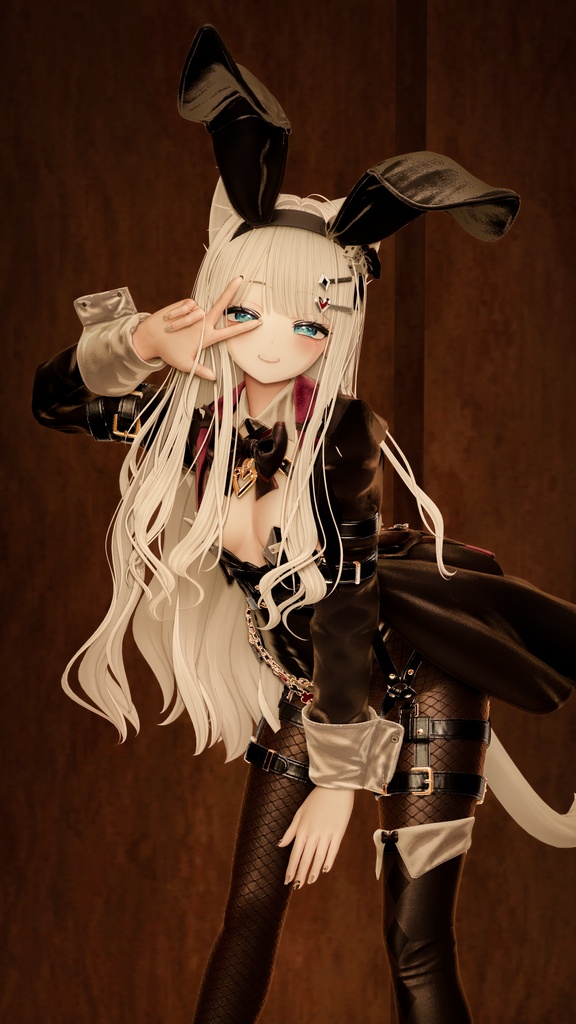
■ 掲載画像・動画のアバター / Avatar shown in the screenshots / 截图与视频中出现的模型 / 스크린샷에 등장하는 아바타 オリジナル3Dモデル「しなの」- Shinano(ポンデロニウム研究所) https://ponderogen.booth.pm/items/6106863 ■ ライセンス / Licence / 许可 / 라이선스 本体は MIT ライセンスです。サードパーティコンポーネントおよび NVIDIA の表示は、配布物に含まれる THIRD_PARTY_NOTICES.md に記載しています。Radeon 版が導入する DLSS-NR-on-AMD は同プロジェクトのライセンス(個人・非商用、再配布不可)に従います。 The application is MIT licensed. Third-party components and the NVIDIA notice are listed in THIRD_PARTY_NOTICES.md inside the package. DLSS-NR-on-AMD, installed by the Radeon edition, is subject to that project's own licence (personal, non-commercial, no redistribution). 本体采用 MIT 许可证。第三方组件与 NVIDIA 相关声明记载于分发包内的 THIRD_PARTY_NOTICES.md。Radeon 版所安装的 DLSS-NR-on-AMD 遵循该项目自己的许可(个人、非商业用途,禁止再分发)。 본체는 MIT 라이선스입니다. 서드파티 구성 요소와 NVIDIA 고지는 배포 패키지의 THIRD_PARTY_NOTICES.md에 정리되어 있습니다. Radeon 에디션이 설치하는 DLSS-NR-on-AMD는 그 프로젝트 자체의 라이선스(개인·비상업, 재배포 금지)를 따릅니다. ■ 注記 / Note / 声明 / 참고 本プロジェクトは VRChat Inc.、NVIDIA Corporation、AMD、および DLSS-NR-on-AMD プロジェクトとは関係ありません。同梱の DLSS 5 ランタイムは未公開のソフトウェアであり、利用は自己責任となります。ランタイムファイルの単体での再配布はご遠慮ください。 This project is not affiliated with VRChat Inc., NVIDIA Corporation, AMD or the DLSS-NR-on-AMD project. The bundled DLSS 5 runtime is unreleased software and is used at the user's own risk; please do not redistribute the runtime files on their own. 本项目与 VRChat Inc.、NVIDIA Corporation、AMD 以及 DLSS-NR-on-AMD 项目均无关联。随附的 DLSS 5 运行时属于未公开软件,使用风险由使用者自行承担,请勿单独再分发运行时文件。 이 프로젝트는 VRChat Inc., NVIDIA Corporation, AMD 및 DLSS-NR-on-AMD 프로젝트와 관련이 없습니다. 포함된 DLSS 5 런타임은 미공개 소프트웨어이며, 사용에 따른 책임은 사용자 본인에게 있습니다. 런타임 파일만 따로 재배포하지 마시기 바랍니다.