

【VRChat】Hajitch Avatar Batch Tool|複数アバター一括管理 / Batch Avatar Management|MA & Marshmallow PB Copy
- ダウンロード商品¥ 0
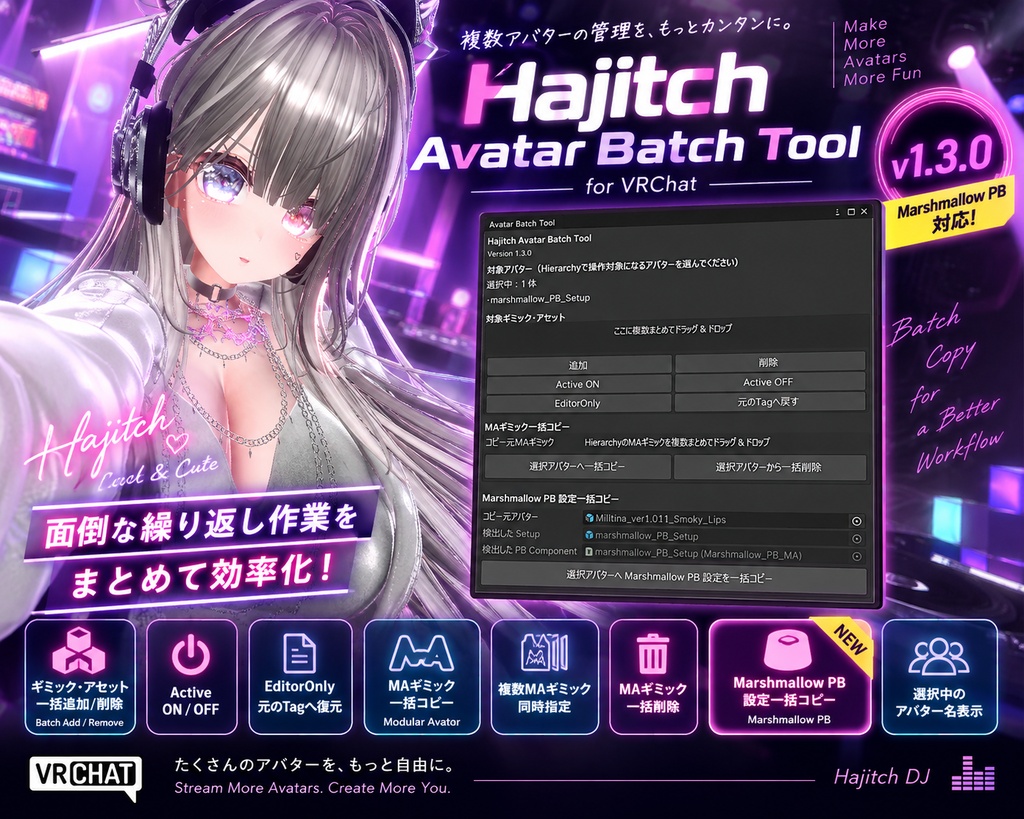

Hajitch Avatar Batch Tool v1.3.0 VRChatアバターのギミック管理や設定コピーを、複数アバターにまとめて行えるUnity Editor拡張ツールです。 同じアバターで衣装違い・改変違いをたくさん作っていると、 「同じギミックを全部に追加したい」 「不要なギミックをまとめて削除したい」 「ActiveやEditorOnlyをまとめて変更したい」 「完成したMAギミックを他の衣装にもコピーしたい」 「調整したMarshmallow PBの設定を他の衣装にもコピーしたい」 といった繰り返し作業が発生します。 Hajitch Avatar Batch Toolは、Hierarchyで複数アバターを選択し、これらの作業をまとめて行うためのツールです。 v1.3.0では、新たにMarshmallow PB設定一括コピー機能を追加しました。 主な機能 ・ギミック・アセットの一括追加 / 削除 ・Active ON / OFF ・EditorOnly / 元のTagへ復元 ・MA(Modular Avatar)ギミック一括コピー ・複数MAギミックの同時指定 ・MAギミック一括削除 ・Marshmallow PB設定一括コピー【NEW v1.3.0】 ・選択中のアバター名表示 Hierarchyで操作したいアバターを複数選択し、ツールから目的の処理を実行することで、複数アバターをまとめて編集できます。 MAギミック一括コピー コピー元アバターに設定済みのMA(Modular Avatar)ギミックを、選択した複数アバターへまとめてコピーできます。 コピー元MAギミックは複数指定可能です。 コピー時には可能な範囲で、 ・Position / Rotation / Scale ・Active状態 / Tag ・子Object ・Component設定 などを維持します。 コピー元アバター内部のGameObjectやComponentへの参照は、コピー先アバターの対応するHierarchyパスへ可能な限り自動で差し替えます。 コピー元と同じHierarchy位置へ配置し、同じ位置に同名ギミックが存在する場合は、二重追加を防ぐためスキップします。 MAギミック一括削除 登録したMAギミックを、選択した複数アバターからまとめて削除できます。 削除したいギミックを「コピー元MAギミック」へ登録し、対象アバターをHierarchyで選択して一括削除を実行します。 コピー元アバター自身は自動的にスキップします。 NEW:Marshmallow PB 設定一括コピー v1.3.0では、Marshmallow PBの設定を複数アバターへ一括コピーできる機能を追加しました。 1体のアバターで調整したMarshmallow PBの設定を、同じアバターの衣装違い・改変違いなどへまとめてコピーできます。 コピー元アバターを指定すると、 marshmallow_PB_Setup とMarshmallow PB Componentを自動検出し、保存されているシリアライズ設定値を選択したアバターへコピーします。 Marshmallow PBが参照しているコピー元アバター内部の ・GameObject ・Transform ・Component についても、コピー先アバターの対応するHierarchyパスへ可能な限り自動で再マッピングします。 そのため、衣装ごとに同じMarshmallow PB設定を手作業で入力し直す手間を減らすことができます。 Marshmallow PB設定コピーはUndo(Ctrl+Z)対応です。 ※コピー先にもmarshmallow_PB_Setupと同じ種類のMarshmallow PB Componentが必要です。 ※Hierarchy構造が異なる場合、一部の参照を自動で再マッピングできない場合があります。 こんな方におすすめ ・同じアバターの衣装違いを多数管理している ・同じギミックを複数アバターへ追加している ・MAギミックを衣装ごとに設定するのが大変 ・Marshmallow PBを衣装ごとに調整するのが大変 ・VRChatアバター改変の繰り返し作業を効率化したい 導入方法 ダウンロードしたZIPを解凍 Unityでアバタープロジェクトを開く Assets → Import Package → Custom Package... HajitchTools_v1.3.0.unitypackageを選択してImport Hajitch Tools → Avatar Batch Toolから起動 旧バージョンからのアップデート v1.2.0以前からアップデートする場合は、 Assets/HajitchTools フォルダーを一度削除してから、最新版のHajitchTools_v1.3.0.unitypackageをインポートすることをおすすめします。 HajitchToolsフォルダーを削除しても、アバター本体や設定済みのギミック、Marshmallow PBの設定が削除されることはありません。 ご使用前の注意 使用前にUnityプロジェクトのバックアップをおすすめします。 多数のアバターへ一括処理する場合は、最初に少数のアバターで動作確認してください。 MAギミックコピーやMarshmallow PB設定コピーでは、コピー元とコピー先に互換性のあるHierarchy構造が存在することを前提としています。 特殊なComponentや独自の参照方式、異なるHierarchy構造では、すべての設定・参照を完全に再現できない場合があります。 処理後は必ずUnity上で設定・動作をご確認ください。 ※Modular Avatar、Marshmallow PB、VRChat SDK、アバター、ギミック等は本商品には含まれません。 English Hajitch Avatar Batch Tool v1.3.0 A Unity Editor extension designed to simplify gimmick management and setting transfers across multiple VRChat avatar variations. If you maintain multiple outfits or customized versions of the same avatar, Hajitch Avatar Batch Tool helps reduce repetitive Unity setup work by allowing you to process multiple selected avatars at once. Features ・Batch Add / Remove gimmicks and assets ・Active ON / OFF ・Set EditorOnly / Restore original Tag ・Batch copy MA (Modular Avatar) gimmicks ・Select multiple MA gimmicks at once ・Batch remove MA gimmicks ・Batch copy Marshmallow PB settings【NEW v1.3.0】 ・Display selected avatar names MA Gimmick Batch Copy Copy one or multiple configured MA gimmicks from a source avatar to multiple selected avatars. The tool attempts to preserve Position / Rotation / Scale, Active state, Tag, child objects, and Component settings. References to GameObjects or Components inside the source avatar are remapped to corresponding Hierarchy paths in each destination avatar whenever possible. If a gimmick with the same name already exists at the corresponding location, it is skipped to prevent duplicates. NEW:Marshmallow PB Settings Batch Copy v1.3.0 adds batch copying of Marshmallow PB settings. Configure Marshmallow PB on one avatar and copy the settings to multiple outfit or customization variants at once. The tool automatically detects marshmallow_PB_Setup and its Marshmallow PB Component and copies the stored serialized settings to the selected avatars. Avatar-internal GameObject, Transform, and Component references are remapped, where possible, to corresponding Hierarchy paths on each destination avatar. Undo (Ctrl+Z) is supported. The destination avatars must already contain marshmallow_PB_Setup and the same Marshmallow PB Component type. Installation Extract the ZIP and import HajitchTools_v1.3.0.unitypackage using: Assets → Import Package → Custom Package... Open the tool from: Hajitch Tools → Avatar Batch Tool Updating When updating from v1.2.0 or earlier, we recommend deleting: Assets/HajitchTools before importing v1.3.0. This does not remove your avatars, installed gimmicks, or existing Marshmallow PB settings. Important Notes Back up your Unity project before use and test batch operations with a small number of avatars first. Different Hierarchy structures, custom Components, or special reference systems may prevent some settings or references from being reproduced automatically. Always verify your avatar settings and behavior in Unity after processing. Modular Avatar, Marshmallow PB, VRChat SDK, avatars, gimmicks, and other required assets are not included.
利用規約 / Terms of Use
日本語 Hajitch Avatar Batch Tool(以下「本ツール」)をダウンロードまたは使用した時点で、本利用規約に同意したものとみなします。 利用について 本ツールは、個人・法人を問わず利用できます。 本ツールを使用したVRChatアバターの改変、動画制作、ライブ配信、スクリーンショット撮影、その他のコンテンツ制作に利用できます。 本ツールを使用して制作・編集したアバターやコンテンツは、商用・非商用を問わず利用できます。 YouTube、Twitch等の収益化された動画・配信での利用も可能です。 本ツールを使用したことについて、クレジット表記や使用報告は必要ありません。 改変について 本ツールは、利用者自身が使用する目的で改変することができます。 ただし、改変した本ツールまたはその一部を第三者へ再配布・販売・共有することは禁止します。 禁止事項 以下の行為を禁止します。 ・本ツールの全部または一部の再配布 ・本ツールの再販売 ・改変した本ツールの再配布・販売 ・本ツールの第三者への譲渡・共有 ・本ツールを他の商品、アセット、ツール等へ同梱して配布・販売する行為 ・本ツールまたはその一部を、自身が制作したものとして公開・配布する行為 ・法令に違反する目的での使用 無料・有料を問わず、本ツールそのもの、または第三者が本ツールを取り出して使用できる状態での再配布は禁止します。 本ツールで扱うアセットについて 本ツールは、VRChatアバター、Modular Avatar、Marshmallow PB、その他のギミック・アセット等を操作するための補助ツールです。 本ツールを使用して他の作者が制作したアバター、衣装、ギミック、アセット等を編集・コピーする場合は、それぞれの配布元・販売元が定める利用規約を遵守してください。 本ツールを使用することによって、第三者が制作したアセットの利用許諾が追加されるものではありません。 著作権 本ツールの著作権は、作者 Hajitch に帰属します。 本利用規約は、本ツールの著作権を利用者へ譲渡するものではありません。 免責事項 本ツールは現状のまま提供されます。 本ツールの使用によって発生したデータの破損、設定の変更、Unityプロジェクトの不具合、アバターの動作不良、その他の損失・損害について、作者は責任を負いません。 使用前にUnityプロジェクトのバックアップを作成し、特に複数アバターへの一括処理を行う場合は、最初に少数のアバターで動作確認することをおすすめします。 Unity、VRChat SDK、Modular Avatar、Marshmallow PB等のアップデートや仕様変更により、本ツールが正常に動作しなくなる場合があります。 すべての環境・アバター・アセットでの完全な動作を保証するものではありません。 サポート・規約の変更 不具合報告の際は、本ツールのバージョン、Unity環境、エラー内容等をご連絡ください。 本利用規約は、必要に応じて変更される場合があります。 English Terms of Use By downloading or using Hajitch Avatar Batch Tool (the “Tool”), you are considered to have agreed to these Terms of Use. Permitted Use The Tool may be used by both individuals and organizations. You may use the Tool for VRChat avatar customization, video production, livestreaming, screenshots, and other content creation. Avatars and content created or edited using the Tool may be used for both commercial and non-commercial purposes. Use in monetized videos and livestreams, including platforms such as YouTube and Twitch, is permitted. Credit and usage reports are not required. Modification You may modify the Tool for your own use. However, redistribution, sale, or sharing of modified versions of the Tool, or any part of the Tool, is prohibited. Prohibited Uses The following are prohibited: ・Redistributing the Tool, in whole or in part ・Reselling the Tool ・Redistributing or selling modified versions of the Tool ・Transferring or sharing the Tool with third parties ・Including the Tool in another product, asset, or tool for redistribution or resale ・Claiming the Tool, or any part of it, as your own work ・Using the Tool for purposes that violate applicable laws Redistribution is prohibited regardless of whether it is free or paid, including distribution in a form that allows third parties to extract and use the Tool. Third-Party Assets The Tool is designed to assist with operations involving VRChat avatars, Modular Avatar, Marshmallow PB, gimmicks, and other assets. When using the Tool with avatars, outfits, gimmicks, or other assets created by third parties, you must comply with the terms and licenses established by their respective creators or distributors. Use of this Tool does not grant any additional rights or permissions for third-party assets. Copyright Copyright for Hajitch Avatar Batch Tool remains with Hajitch. These Terms of Use do not transfer ownership or copyright of the Tool to the user. Disclaimer The Tool is provided “as is.” The author is not responsible for data loss, configuration changes, Unity project issues, avatar malfunctions, or any other loss or damage resulting from use of the Tool. Creating a backup of your Unity project before using the Tool is strongly recommended. When performing batch operations on multiple avatars, testing with a small number of avatars first is also recommended. Updates or specification changes to Unity, VRChat SDK, Modular Avatar, Marshmallow PB, or related software may cause the Tool to stop functioning correctly. Compatibility and correct operation with every environment, avatar, or asset are not guaranteed. Support and Changes to These Terms When reporting an issue, please provide the Tool version, Unity environment, and relevant error information whenever possible. These Terms of Use may be updated when necessary.
更新履歴 / Update History
Version 1.3.0 日本語 ・Marshmallow PB 設定一括コピー機能を追加 ・設定済みのコピー元アバターから、選択した複数アバターへMarshmallow PB設定を一括コピー可能に ・marshmallow_PB_Setup を自動検出 ・Marshmallow PB Componentを自動検出 ・Marshmallow PBに保存されているシリアライズ設定値のコピーに対応 ・コピー元アバター内部を参照しているGameObject / Transform / Componentを、コピー先アバターの同じHierarchyパスへ可能な限り自動で再マッピング ・Marshmallow PB設定コピーのUndo(Ctrl+Z)に対応 ・既存のMAギミックコピー・削除機能とMarshmallow PBコピー機能をHajitch Avatar Batch Toolへ統合 ・ツールバージョン表記をv1.3.0へ更新 English ・Added Marshmallow PB Settings Batch Copy ・Marshmallow PB settings can now be copied from one configured source avatar to multiple selected avatars at once ・Added automatic detection of marshmallow_PB_Setup ・Added automatic detection of the Marshmallow PB Component ・Added support for copying serialized Marshmallow PB settings ・Avatar-internal GameObject / Transform / Component references are remapped, where possible, to the corresponding Hierarchy path on each destination avatar ・Added Undo (Ctrl+Z) support for Marshmallow PB setting copies ・Integrated Marshmallow PB copying into Hajitch Avatar Batch Tool alongside the existing MA gimmick copy/remove features ・Updated the tool version display to v1.3.0 Version 1.2.0 日本語 ・MAギミック一括コピーで、コピー元MAギミックを複数指定できる機能を追加 ・複数のMAギミックを、選択した複数アバターへまとめてコピーできるように変更 ・登録したMAギミックを、選択した複数アバターから一括削除する機能を追加 ・MAギミック一括削除時、コピー元アバター自身を自動的にスキップする処理を追加 ・コピー元アバター内部のGameObject / Component参照を、コピー先アバターの対応するHierarchyパスへ可能な限り自動で差し替える処理に対応 ・同じHierarchy位置に同名ギミックが存在する場合、二重追加を防ぐため自動的にスキップする処理に対応 English ・Added support for selecting multiple source MA gimmicks ・Multiple MA gimmicks can now be copied to multiple selected avatars at once ・Added batch removal of registered MA gimmicks from multiple selected avatars ・The source avatar is automatically skipped during MA gimmick batch removal ・Added automatic remapping, where possible, of GameObject / Component references inside the source avatar to corresponding Hierarchy paths on destination avatars ・Added duplicate prevention when a gimmick with the same name already exists at the corresponding Hierarchy location Version 1.1.0 日本語 ・ギミック・アセットの一括追加機能 ・ギミック・アセットの一括削除機能 ・Active ON / OFF 一括切り替え機能 ・EditorOnlyへの一括変更機能 ・元のTagへ復元する機能 ・MA(Modular Avatar)ギミック一括コピー機能 ・MAギミックコピー時のPosition / Rotation / Scale維持に対応 ・子ObjectおよびComponent設定を可能な範囲で維持してコピー ・コピー元アバター内部の参照を、コピー先アバターへ可能な範囲で再マッピング ・Hierarchyで選択中の対象アバター名をツール上に表示 English ・Added batch Add for gimmicks and assets ・Added batch Remove for gimmicks and assets ・Added batch Active ON / OFF switching ・Added batch EditorOnly setting ・Added Restore Original Tag function ・Added MA (Modular Avatar) gimmick batch copy ・Added support for preserving Position / Rotation / Scale when copying MA gimmicks ・Child Objects and Component settings are preserved where possible ・Source-avatar internal references are remapped to destination avatars where possible ・Added display of selected avatar names in the tool