

Asset Organizer
- Asset-Organizerダウンロード商品¥ 0
- BOOST (Support)ダウンロード商品¥ 500
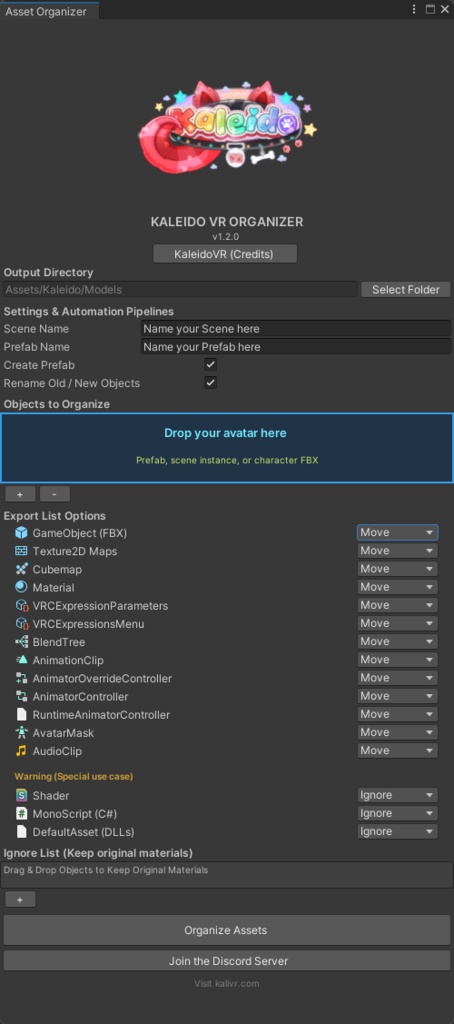


Website: https://kalivr.com Discord: https://discord.com/invite/cRsufJssTA GitHub: https://github.com/KaleidoVR
What this tool does
Unity editor tool that sorts a VRChat avatar into a consistent folder structure, remaps every reference, and writes a scene plus an optional prefab that point at those organized copies. Drop an avatar FBX or prefab into the window, press Organize Assets, and meshes, materials, textures, animations, controllers, menus, and parameters are collected into one output folder. Scene instances resolve back to their source asset. Made for people who want a clean project, not a pile of files with broken materials.
Copy, Move, or Ignore
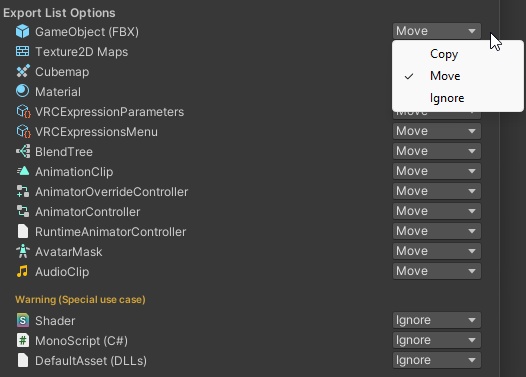
Each asset type has its own action. Copy is the default and the safe choice. ・Copy — duplicate into the output folder, leave the original in place ・Move — relocate the original into the output folder. Use only when you intend to move your source files ・Ignore — skip that type entirely Scripts, DLLs, shaders, and anything under Packages/, Assets/Editor, Assets/KaleidoVR/Editor, or Assets/KaleidoVR/Generated are always skipped. The tool will not relocate the VRChat SDK, Kaleido editor scripts, or Kaleido generated cache. Settings persist between sessions.
References stay intact
Copies go through the Unity asset database. Each copy gets its own GUID. The tool then rewrites the copied assets and the generated prefab so they point at the new files. Duplicating a .meta on disk would duplicate its GUID. Two assets would claim the same identity, and materials, controllers, and prefabs would resolve to the wrong file. This tool does not do that. Every run writes a log of what was copied, moved, and ignored to Logs/KaleidoVR/Organizer/. Clear Log Cache deletes those files after a confirm prompt.
Ignore List, prefab, scene, and Auto-Link
Ignore List objects are left out of the organized prefab and scene. Files that belong only to those objects, including their FBX, are not copied. Create Prefab writes a prefab into <output>/Prefabs/ and places that prefab into the scene. Scene Name and Prefab Name auto-fill from the first object you drop in. Organizing always writes a scene named after Scene Name. Textures are sorted into subfolders by suffix (normal, emission, metallic, roughness, AO). Auto-Link FX & Menu always runs on a single organized object when VRChat SDK3 Avatars is present: add or reuse a VRCAvatarDescriptor and assign the FX layer, expressions menu, and expression parameters. If the SDK is absent, that step is skipped with a warning instead of failing. Prefab generation expects the avatar root as a single object. Dropping several root objects nests them all under one new parent named after Prefab Name.
Output folder
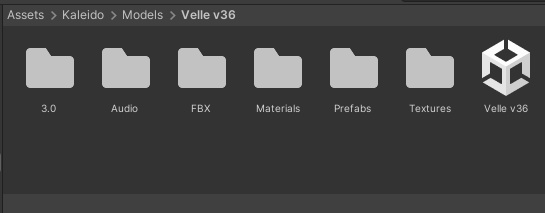
<output folder>/ ├── <Scene Name>.unity ├── FBX/ ├── Materials/ ├── Textures/ (Normals, Emissions, Metallic, Roughness, AO) ├── Audio/ ├── Prefabs/ ├── Other/ └── 3.0/ ├── Animations/ ├── BlendTrees/ ├── Avatar Masks/ ├── Controllers/ ├── Menus/ └── VRCExpressionParameters/
Requirements, install, and updates
・Unity 2022.3.22f1 or newer, including Unity 6 (6000.x) ・VRChat SDK3 Avatars is optional. It is only needed for Auto-Link FX & Menu. Install: 1. Assets > Import Package > Custom Package... 2. Select the included .unitypackage and import everything 3. Files land in Assets/KaleidoVR/Editor/ 4. Open KaleidoVR > Asset Organizer Importing a newer version over an older one replaces the files in place. The newest build is always available free on GitHub. The included readme has the link, so you can update any time without waiting for this page: https://github.com/KaleidoVR/Asset-Organizer/releases Please back up your project, or use version control, before your first Organize Assets.
Terms, support, and BOOST
This tool is free. The paid variant is simply a tip if you would like to support development — the files are identical. Thank you either way! Terms — Copyright (c) 2026 KaleidoVR. All rights reserved. ・Use it in your own personal and commercial Unity / VRChat projects ・Keep backup copies for your own use ・Do not redistribute, resell, reupload, or bundle it into another package, paid or free ・Do not claim it as your own work ・Provided as is, with no warranty. Backing up your project before applying changes is your responsibility. ・Downloaded items cannot be refunded on BOOTH. Questions, bug reports, and feature requests are welcome — report them in the Discord server under the Tickets channel: https://discord.com/invite/cRsufJssTA Website: https://kalivr.com
Updates
Easiest to follow updates through this GitHub link: https://raw.githubusercontent.com/KaleidoVR/Asset-Organizer/refs/heads/main/WHATS-NEW.txt