

SphereWave TransFormation (SWTF)
- SWTF_liltoon/Poiyomiダウンロード商品¥ 1,200
- SWTF_Revenue license (package not included)ダウンロード商品¥ 2,800
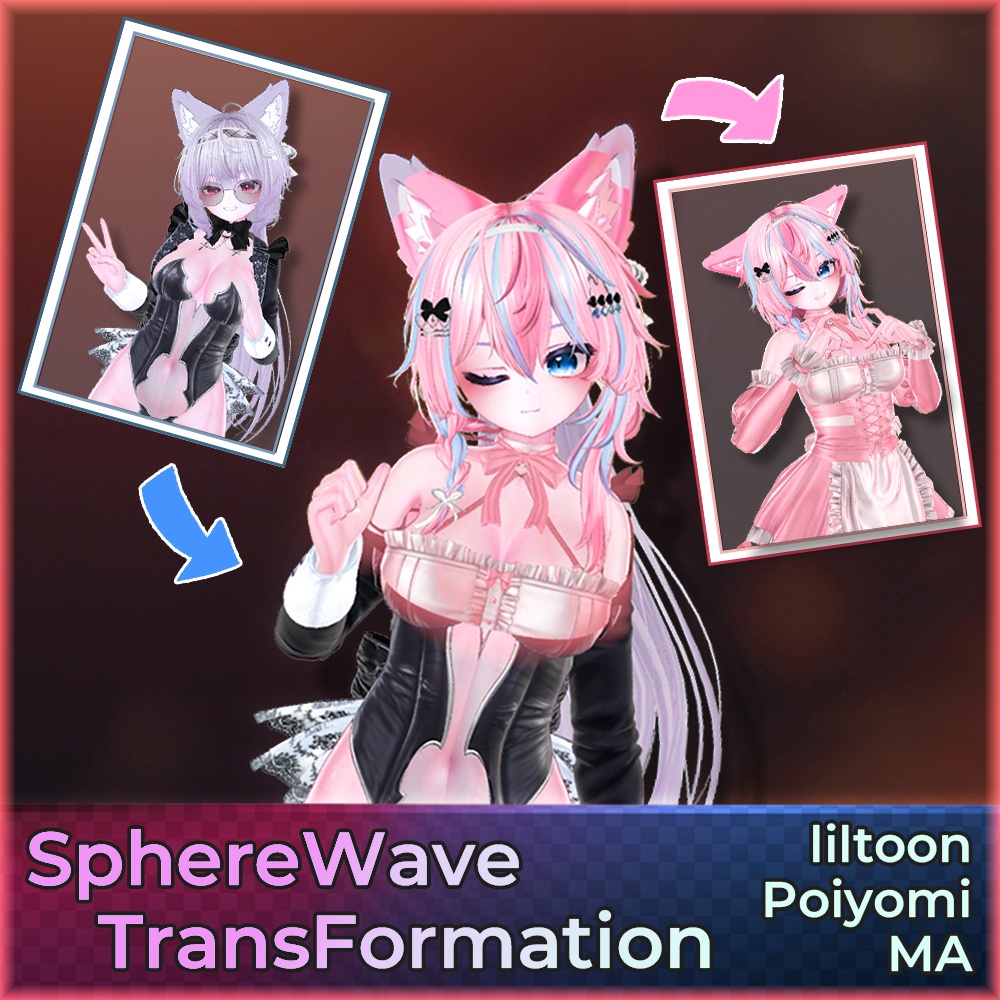
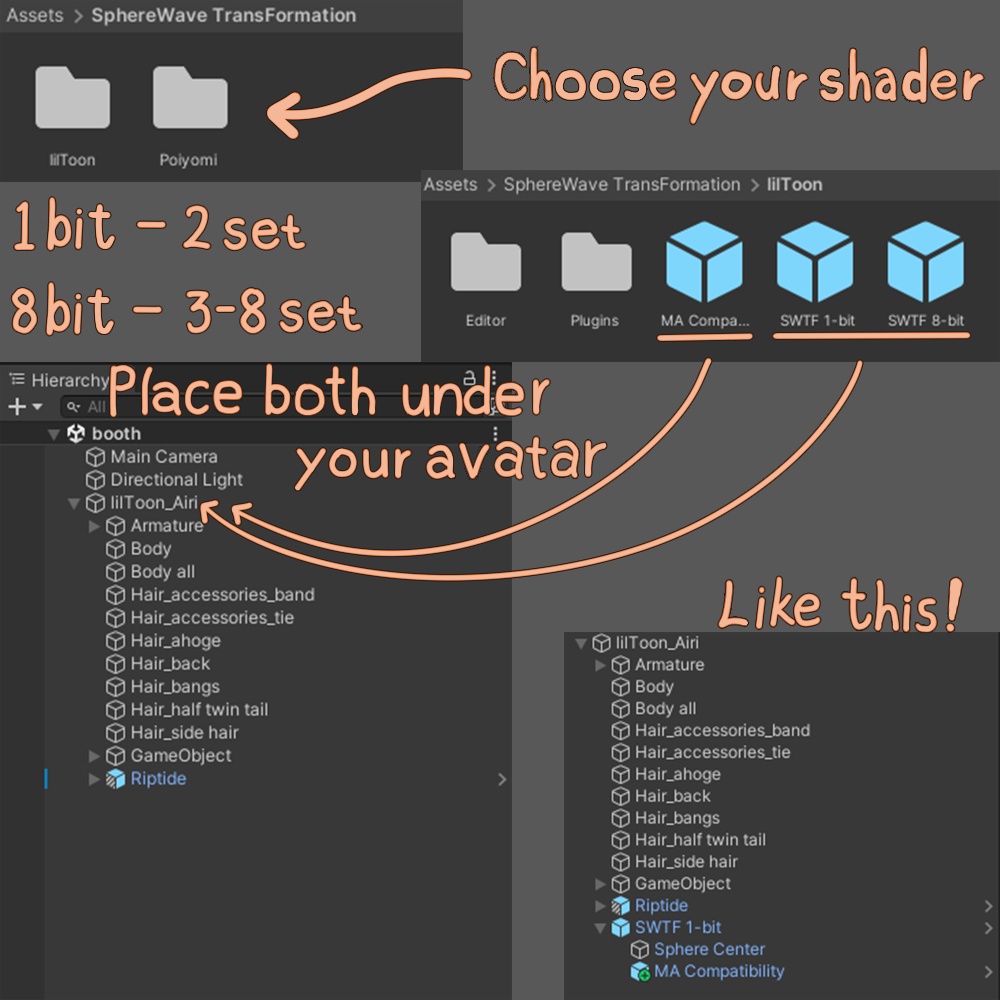
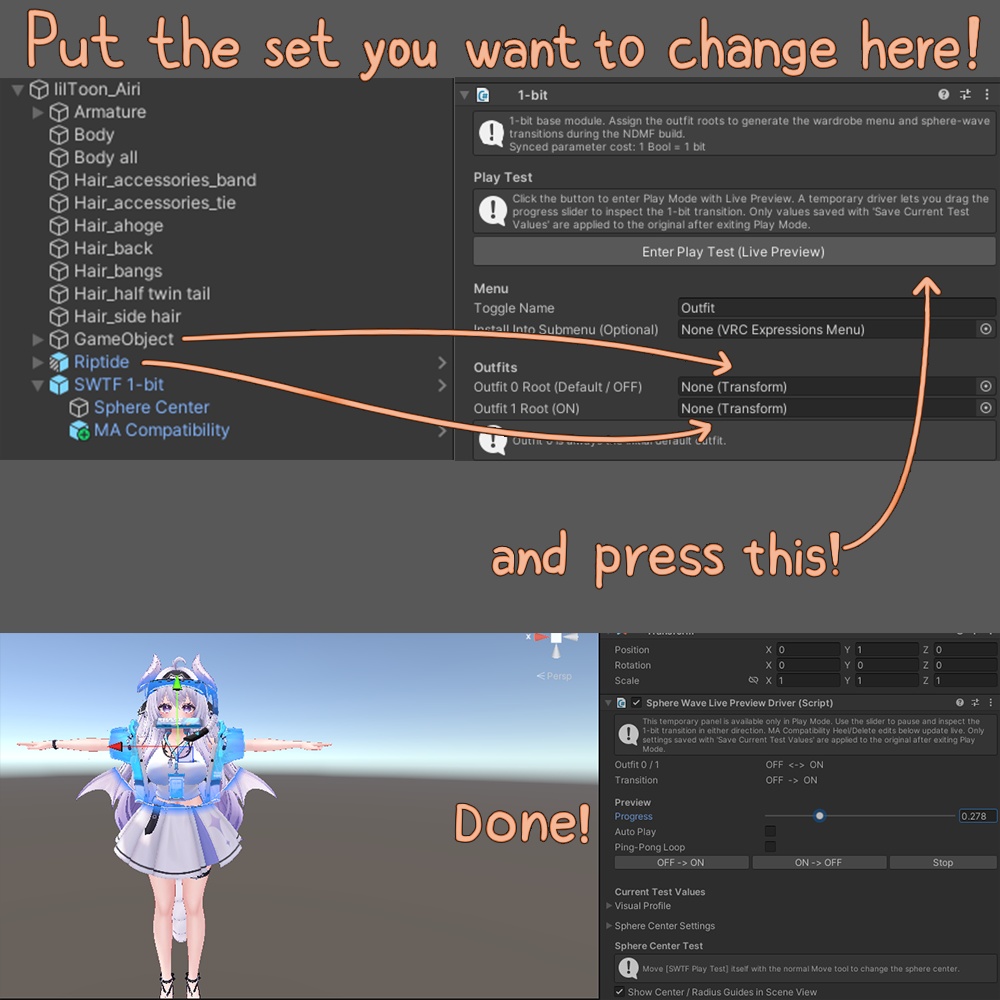
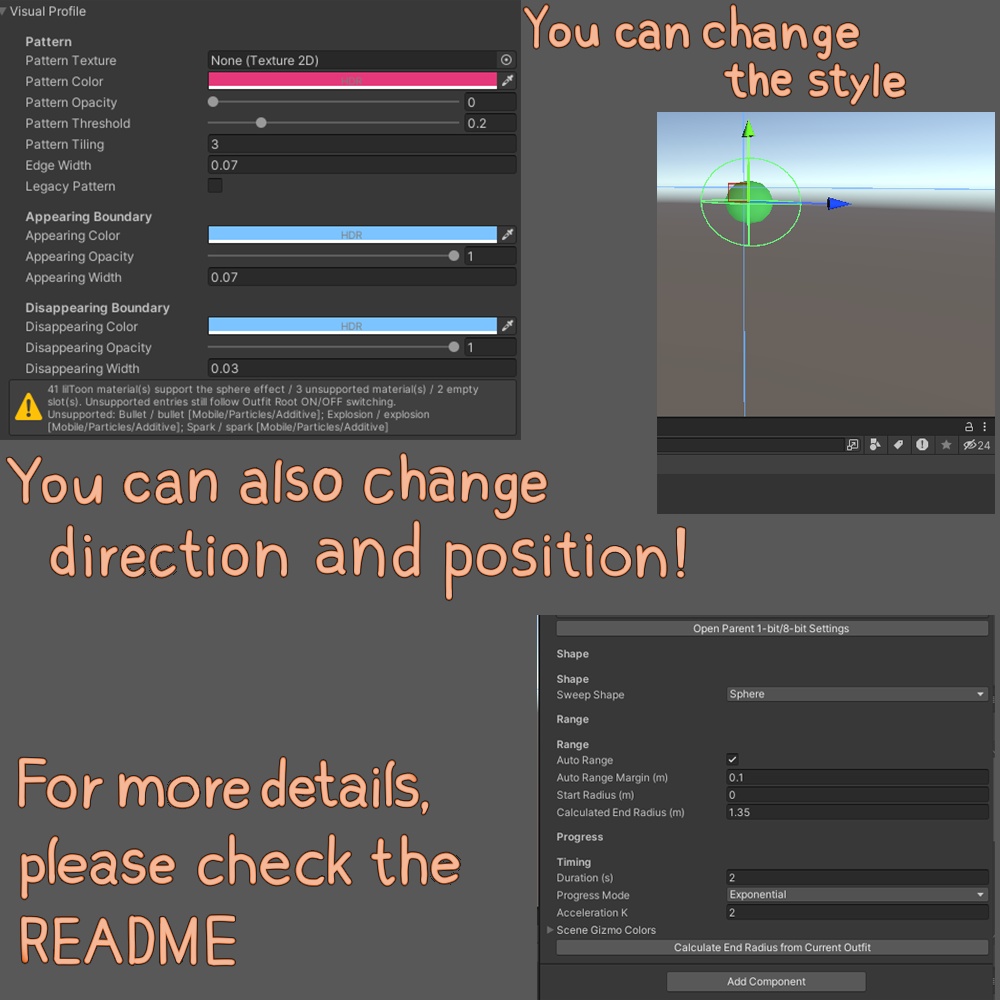


[波動が広がり、見た目が流れるように切り替わります。] [파동이 퍼지며, 외견이 흐르듯 바뀝니다] [A wave spreads as one look flows into the next.] -------------------------日本語------------------------- SphereWave TransFormation(SWTF)は、lilToon / Poiyomi向けの波動変身ツールです。 元のメッシュ・マテリアルアセットをそのままに、NDMF・Modular Avatarで切り替え演出とExpressionメニューを追加します。 ■ こんな方へ · トグルではなく、切り替わる様子を見せたいとき · 撮影・配信・宣材でインパクトがほしいとき · lilToon / Poiyomiの見た目を保ったまま変身FXを入れたいとき ■ 内容 · 1-bit: セット2つ切替(Bool 1) · 8-bit: セット3〜8から選択(Int 1) · Sphere(球面)/ Plate(板移動)で切り替え形状を選択 · Color Registration(色の切り替え) · Visual Profile / Live Preview · (任意)MA Compatibility · (任意)SWTF FX · (任意)Parameter Link ■ かんたん導入 1. セット数に合う SWTF 1-bit または 8-bit Prefabをアバター直下に置く(lilToon / Poiyomi 共通。0.9.95e以前から更新する場合は既存の SphereWave TransFormation フォルダーを削除してからインポート) 2. 切り替えるセットのRootをスロットに入れ、Live Previewで確認する 3. 調整した値を保存し、Playを終了してビルド/アップロードでインゲームに反映 ■ 動作環境・注意 · Unity 2022.3.22f1 / Modular Avatar(NDMF)/ lilToon または公式Poiyomi Toon / Pro · VRChat PC専用です。Android(Quest)・iOSには対応していません · アバター・セットは付属しません · ご利用前にREADMEを必ずお読みください · 本品は収益につながらない個人利用向けです。個人の収益活動には本品とオプション [SWTF_Revenue license (package not included)] の両方が必要です。企業・団体等の利用や広告案件は事前にお問い合わせください。詳しい利用条件はREADMEをご確認ください ■ ご注意 · デモ映像・サムネのアバター、セット、眼鏡などは付属しません · デモで使用する顔の切り替え設定は付属しません(Unityの基本機能と本ツールで、ご自身で設定できます!) -------------------------한국어------------------------- SphereWave TransFormation (SWTF)은 lilToon / Poiyomi용 파동 변신 툴입니다. 원본 메시·머티리얼 에셋은 그대로 두고, NDMF·Modular Avatar로 전환 연출과 Expression 메뉴를 붙입니다. ■ 이런 분께 · 토글이 아니라, 전환되는 모습을 보여주고 싶을 때 · 촬영·라이브·홍보 컷에서 임팩트가 필요할 때 · lilToon / Poiyomi 룩을 유지한 채 변신 FX를 넣고 싶을 때 ■ 구성 · 1-bit: 세트 2개 전환 (Bool 1개) · 8-bit: 세트 3~8개 선택 (Int 1개) · Sphere(구면) / Plate(판 이동) 전환 형태 선택 · Color Registration(색상 전환) · Visual Profile / Live Preview 미리보기 · (선택) MA Compatibility · (선택) SWTF FX · (선택) Parameter Link ■ 초간단 도입 1. 세트 수에 맞는 SWTF 1-bit 또는 8-bit 프리팹을 아바타 루트 아래에 둡니다(lilToon / Poiyomi 공통. 0.9.95e 이하에서 업데이트할 때는 기존 SphereWave TransFormation 폴더를 삭제한 뒤 가져오세요) 2. 전환할 세트 Root를 슬롯에 넣고 Live Preview로 확인합니다 3. 조절한 값을 저장하고 Play를 종료한 뒤 빌드·업로드하면 인게임에 적용됩니다 ■ 동작 환경 · 주의 · Unity 2022.3.22f1 / Modular Avatar(NDMF) / lilToon 또는 공식 Poiyomi Toon / Pro · VRChat PC 전용입니다. Android(Quest)·iOS는 지원하지 않습니다 · 아바타·세트는 포함되지 않습니다 · 사용 전 README를 꼭 읽어 주세요 · 본품은 수익과 연결되지 않은 개인 이용용입니다. 개인 수익 활동에는 본품과 옵션 [SWTF_Revenue license (package not included)] 둘 다 필요합니다. 기업·단체 등의 이용이나 광고 안건은 사전 문의해 주세요. 자세한 이용 조건은 README를 확인해 주세요 ■ 고지 · 데모 영상·썸네일의 아바타, 세트, 안경 등은 포함되지 않습니다 · 데모에 사용한 얼굴 전환 설정은 포함되지 않습니다 (유니티 기본 기능과 이 툴로 직접 설정하실 수 있어요!) -------------------------English------------------------- SphereWave TransFormation (SWTF) is a wave transformation tool for lilToon / Poiyomi. Original mesh and material assets remain untouched (non-destructive). NDMF and Modular Avatar add the transition effect and an Expression menu. ■ Ideal when you want · More than a toggle — to show the change as it unfolds · Impact for photos, streams, or promo shots · Transformation FX while keeping the lilToon / Poiyomi look ■ What's included · 1-bit: switch 2 sets (1 Bool) · 8-bit: choose among 3–8 sets (1 Int) · Choose Sphere or Plate sweep shape · Color Registration (color switching) · Visual Profile / Live Preview · (Optional) MA Compatibility · (Optional) SWTF FX · (Optional) Parameter Link ■ Quick start 1. Place the SWTF 1-bit or 8-bit prefab that matches your set count under the avatar root (works for both lilToon / Poiyomi; when updating from 0.9.95e or earlier, delete the existing SphereWave TransFormation folder before importing) 2. Assign set Roots to the slots and check with Live Preview 3. Save any adjusted values, exit Play Mode, then build and upload to apply in-game ■ Requirements · notes · Unity 2022.3.22f1 / Modular Avatar (NDMF) / lilToon or official Poiyomi Toon / Pro · VRChat PC only. Android (Quest) and iOS are not supported · Avatar and sets are not included · Please read the README before use · This product is for personal use that is not connected to revenue. Personal monetized activities require both this product and the option [SWTF_Revenue license (package not included)]. Please contact us in advance for use by companies or organizations, or for advertising projects. See the README for detailed usage terms ■ Notes · The avatar, sets, glasses, etc. shown in the demo / thumbnail are not included · The face-switching setup used in the demo is not included (you can set it up yourself with basic Unity features and this tool!) -------------------------Documents------------------------- [Changelog] (versions before 1.0.0 are beta) https://docs.google.com/document/d/1NeVF3jm17najdU_Av3R_iC3eMt1ijKtRb5YgSEr5wmI/edit?usp=sharing [日本語 Readme] https://drive.google.com/file/d/15eUsu3afIXcqPZ4CNQCY3QUofhAEgEOE/view?usp=sharing [한국어 Readme] https://drive.google.com/file/d/1MSzMymVnq5cIVMXq2JYg4wWD3T-YZVS3/view?usp=sharing [English Readme] https://drive.google.com/file/d/1ZCPiyTIHe4UFzxN-Arstef3Fn_MbmdSJ/view?usp=sharing -------------------------Special Thanks------------------------- @Ricky_SP5 @madomi1324 @Khrine_VRC @Ducci0722 -------------------------Credits------------------------- ©あまとうさぎ (used for the animal ears and tail in the video)