
【Photoshopプラグイン】PSD Layer Renamer|レイヤー一括リネーム・CSV管理・連番書き出し(UXP)
- PSD Layer Renamer マニュアル.pdfダウンロード商品¥ 0
- PSD Layer Renamer 体験版1.0.0ダウンロード商品¥ 0
- PSD Layer Renamer 正規版1.0.0ダウンロード商品¥ 1,500
- PSD Layer Renamer Manual (English)ダウンロード商品¥ 0
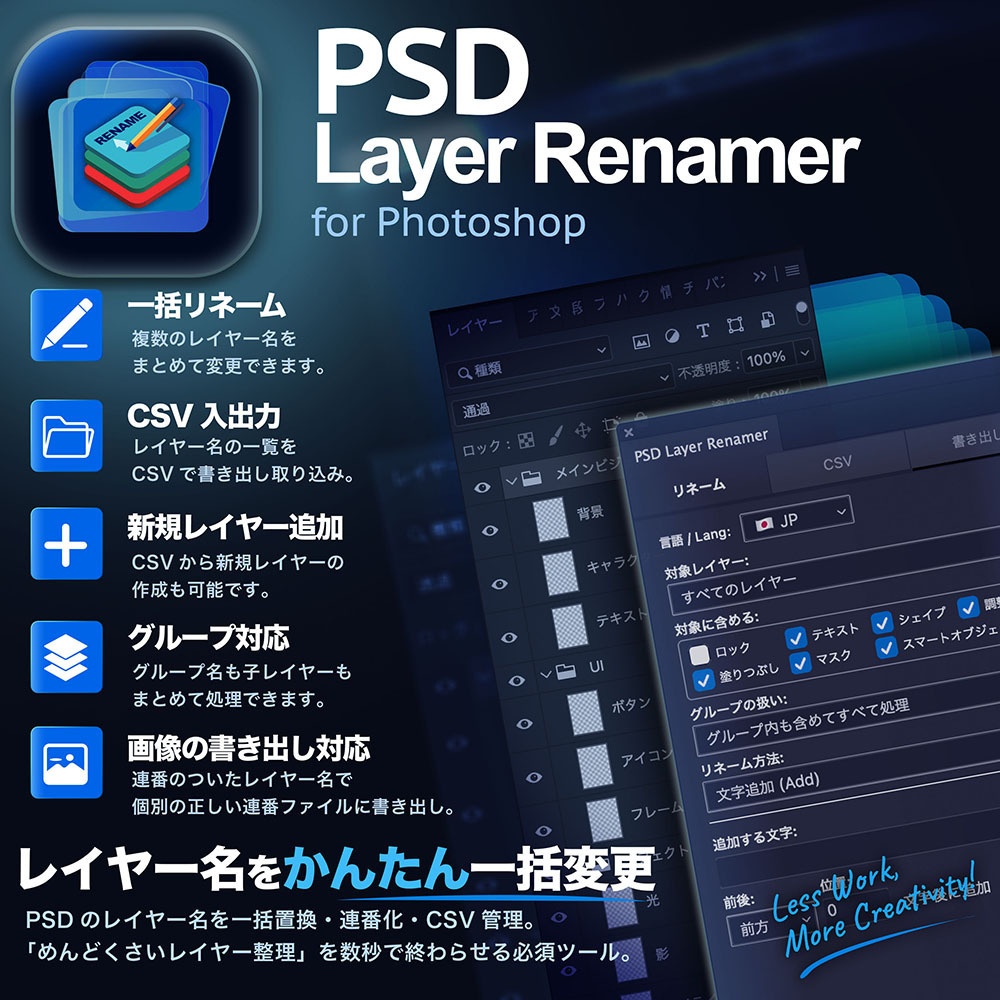


体験版 追加公開記念キャンペーン実施中! 製品版を11/3までセール価格 980円! 通常1,500円 → 980円 ────────────────────────────── Photoshopのレイヤー整理や名前変更作業に時間を取られていませんか? 「PSD Layer Renamer」は、Photoshopでの複雑なレイヤー命名・文字置換・連番付与から、CSVを使ったレイヤー構造の作成・更新、個別ファイルの連番書き出しまでを1本で完結できる高機能UXPプラグインです。 開発者が実際に制作現場で直面した課題をもとに、実用性の高い機能を網羅。Web・グラフィックデザイン、Live2Dパーツ分け、マンガ・アニメーションの連番処理、素材制作など、レイヤーを大量に扱うあらゆるクリエイターの作業時間を大幅に削減します。 ────────────────────────────── 💡 こんなシーン・お悩みにおすすめ! ◆ Live2Dのパーツ分け・構造管理に パーツ名リスト(CSV)を取り込むだけで、レイヤーとグループを自動生成。すでにあるレイヤー構成をCSVに書き出し、表計算ソフトで手軽に名前を整えて戻すことも可能です。 ◆ マンガ・アニメーションの連番ファイル書き出しに 事前にレイヤー名を「001, 002, 003…」と欠番のないきれいな連番に整えてから書き出せるため、手動でファイル名を修正する二度手間がなくなります。 ◆ Webデザイン・ゲームUI制作(画像アセット機能の効率化)に 大量のリネームが必要なアイコンやUIパーツの切り出しに最適です。Photoshop標準の「画像アセット機能」に欠かせない「.png」などの拡張子付与、スマホ用の「2倍サイズ(@2x)」指定なども、ルールを決めて数クリックで一括処理できます。 ◆ 画像素材・バナー・アイコン制作の整理に 「特定のテキストレイヤーだけ名前を変えたい」「先頭に一括で接頭辞(Prefix)を付けたい」といった作業も数クリックで完了。何十枚もあるレイヤーを手作業で書き換える必要はありません。 ──────────────────────────────
✨ 主な機能と特徴
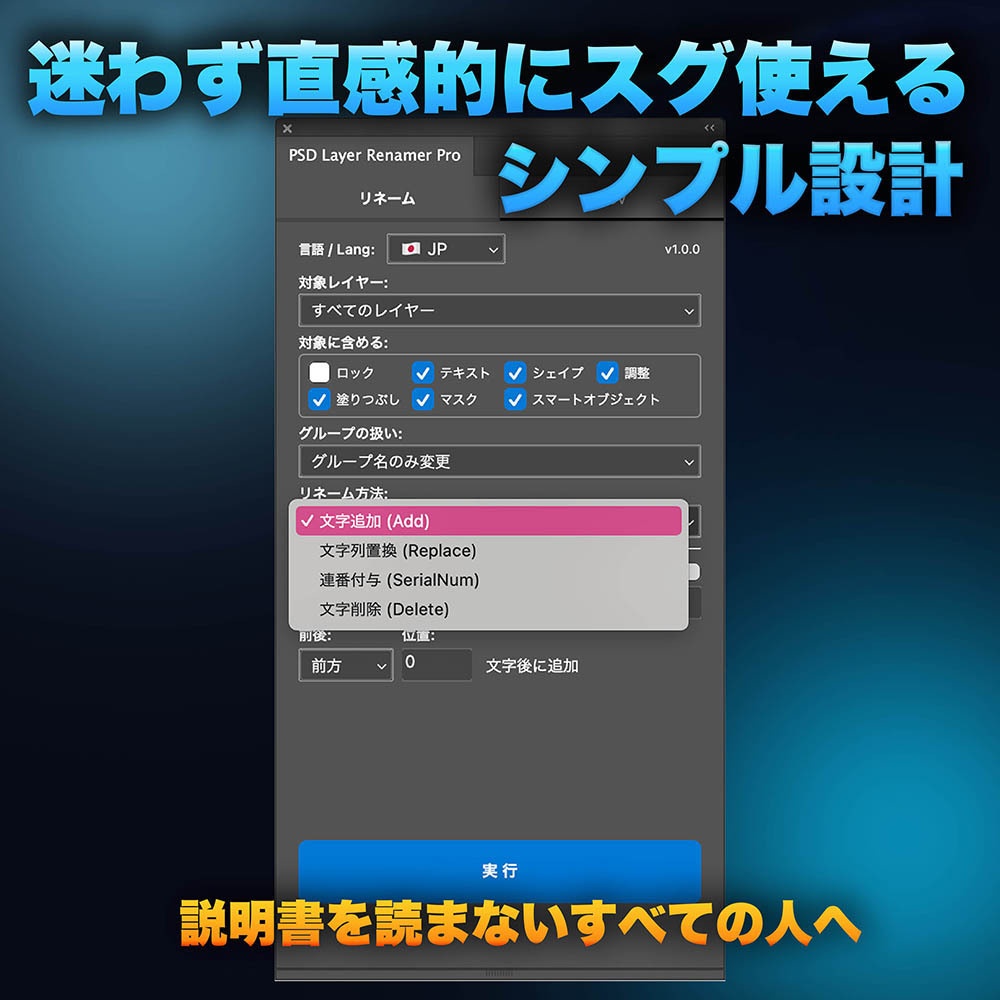
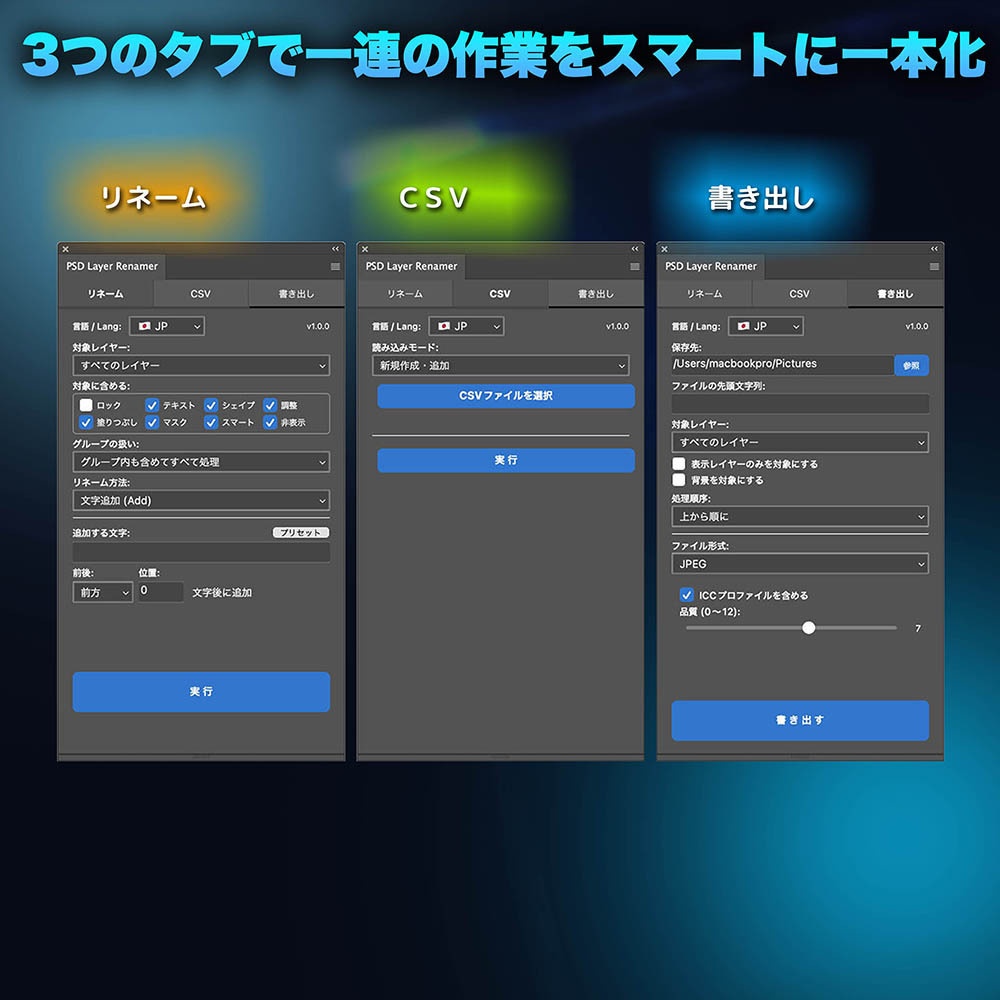
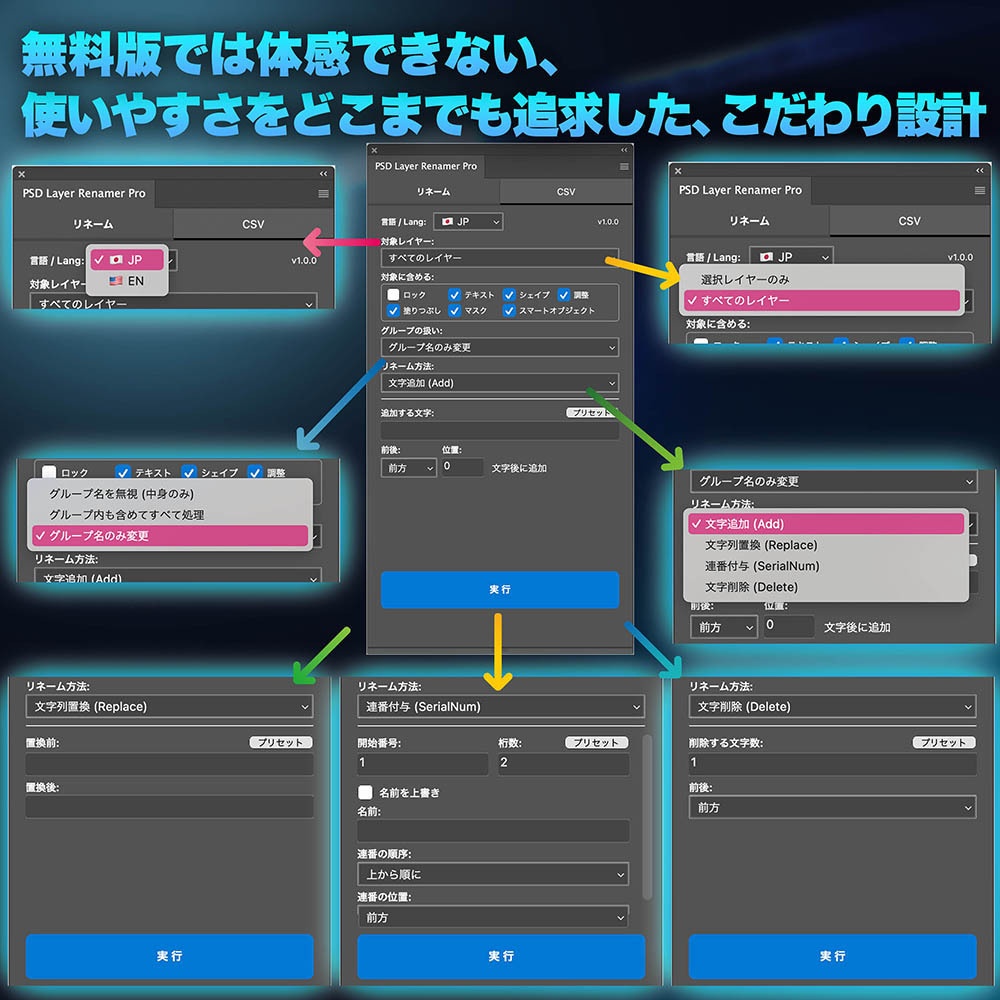
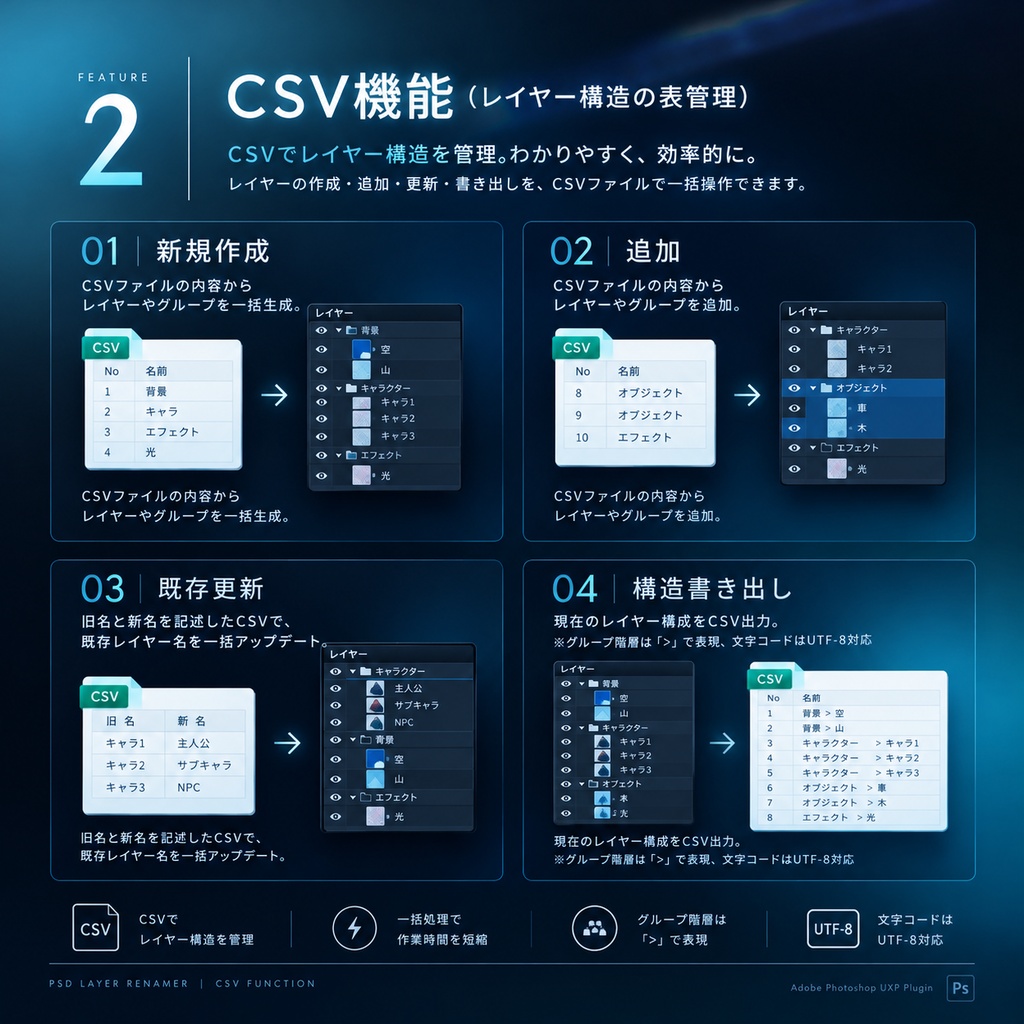
【1】リネーム機能(一括置換・連番・追加・削除) ・文字追加:前後や任意の位置を指定して、名前の先頭・途中・末尾に追加。 ・文字置換:名前に含まれる特定の文字列をまとめて一括置換。 ・連番付与:開始番号や桁数(例: 001, 002…)を指定可能。欠番のない連番を自動生成。 ・文字削除:指定した文字数を一括で削除。 ・対象を細かく指定:「すべてのレイヤー / 選択レイヤーのみ」に加え、テキスト・シェイプ・調整レイヤー・塗りつぶし・マスク・スマートオブジェクトなどを種類ごとにON/OFF可能。(※ロック中レイヤーは初期設定で対象外) ・スキップ:1つおき、2つおきなど、一定の間隔をあけてリネーム。上から・下からのどちらから数えるかも選べます。連番付与と組み合わせた使い方もできます。 ・グループ対応:グループ名を含める / 無視する / グループ名のみ変更 を自由に選択可能。 ※レイヤー名に一括で「.png」や「.jpg」を付与できるため、Photoshop標準の「画像アセット機能」を使用する際の命名用リネームツールとしても非常に便利です。 【2】CSV機能(レイヤー構造の表管理) ・新規作成:CSVファイルの内容からレイヤーやグループを一括生成。 ・追加:CSVファイルの内容からレイヤーやグループを追加。 ・既存更新:旧名と新名を記述したCSVで、既存レイヤー名を一括アップデート。 ・構造書き出し:現在のレイヤー構成をCSV出力。(※グループ階層は「>」で表現、文字コードはUTF-8対応) 【3】書き出し機能(レイヤー個別出力) ・多形式対応:レイヤーを1枚ずつ JPEG / PNG / BMP / PSD の個別ファイルとして書き出し。 ・詳細設定:透明部分のトリミング、JPEG品質設定、ICCプロファイル埋め込み(JPEG/PSD)、BMPビット数指定(16/24/32bit)に対応。 ・自動調整:保存不可な文字や重複ファイル名は自動調整。同名ファイルが存在する場合は上書きし、結果件数を表示。 ・安全設計:初期設定では背景レイヤーを書き出し対象外に設定(チェックで対象化も可能)。設定内容は次回起動時に自動復元されます。 ※Photoshop標準の「画像アセット機能」とは別に「レイヤーからファイル」に相当する自由度のある書き出し機能です。 【4】プリセット保存・共有 ・よく使う設定をプリセットとして登録・呼び出し可能。 ・プリセットの書き出し/読み込みに対応しているため、別PCへの移行やチーム間での共有も簡単です。 【5】日本語 / 英語の表示切り替え対応 ・UI(操作画面)は日本語・英語の両対応。Photoshopの言語環境や好みに合わせてスムーズに操作できます。 【6】安心の「取り消し(Undo)」対応 ・リネームやCSV変更などの操作は、Photoshop標準の「取り消し(Undo)」で元に戻せます。大量のレイヤーでも安心して試しながら作業できます。 ──────────────────────────────
🛠 動作環境・仕様
・対応ソフト:Adobe Photoshop 2021(v22.0)以降(UXPプラグイン対応バージョン) ・形式:CCXプラグインパッケージ(ダブルクリックで簡単インストール) ・対応OS:macOS / Windows ・対応言語:日本語 / 英語(UI画面) ──────────────────────────────
🆓 体験版について
・10日間、すべての機能をお試しいただけます。 ・メールアドレスを入力して届く確認コードを入力すると、体験版が始まります。 ・同じメールアドレス、または同じ端末での体験版のやり直しはできません。 ・期間が終わったあとも続けて使う場合は、正規版を購入し認証キーを入手/入力してください。体験版のあいだでも、パネルのメニューからいつでも正規版として使用開始できます。 ──────────────────────────────
🔑 ライセンス・認証について
・ご購入後に認証キーを入手して有効化します。 (認証キーの入手方法はマニュアルに記載されています) ・1つの認証キーで最大2台までアクティベーション可能です(PCの買い替え等による端末解除・再登録もプラグイン内から行えます)。 ──────────────────────────────
📦 収録内容(Zipファイルの中身)
・プラグイン本体(.ccx) ・ユーザーマニュアル(日本語) ・READ ME ──────────────────────────────
⚠️ ご注意
・本製品はAdobe Photoshop専用のUXPプラグインです(旧式のCEP/Legacy Scriptには対応しておりません)。 ・付属の取扱説明書(マニュアル)は現在「日本語版」のみとなります(英語版マニュアルは順次追加予定です)。 ・万が一に備え、プラグイン実行前には必ずデータのバックアップ(保存)を行ってください。
⚠️ サポート
・不具合のご報告や機能要望につきましては、本ページの「ショップへのお問い合わせ」からご連絡ください。
利用規約・プライバシーポリシー
ご購入・ご利用前に、こちらをご確認ください(日本語・英語): https://docs.google.com/document/u/1/d/e/2PACX-1vTR1T2sqhcK4YCF1mekTaMncxjH_tn4uoQB7lB9Z5HlbgfeITNvAmVAuNoIHuBbVaaBqWdg7L8WHq_2/pub
ENGLISH
Free demo version newly released! Special campaign underway! Get the full version on sale for 980 JPY until November 3rd! Regularly 1,500 JPY $\rightarrow$ 980 JPY ────────────────────────────── Are you spending too much time organizing layers and renaming files in Photoshop? "PSD Layer Renamer" is a powerful UXP plugin that streamlines everything in one place: complex layer naming, text replacement, and sequential numbering in Photoshop, creating and updating layer structures using CSV, and exporting individual files with sequential numbers. Built directly on the challenges developers faced in actual production environments, it is packed with highly practical features. It drastically cuts down working hours for creators who handle massive amounts of layers, including Web and graphic design, Live2D parts separation, sequential processing for manga and animation, and asset creation. ────────────────────────────── 💡 Recommended for these situations and challenges! ◆ For Live2D parts separation and structure management Simply import a part name list (CSV) to automatically generate layers and groups. You can also export existing layer structures to a CSV, easily organize names using spreadsheet software, and import them back. ◆ For exporting sequential files for manga and animation You can organize layer names into clean, unbroken sequences like "001, 002, 003..." before exporting, eliminating the tedious extra step of manually renaming files. ◆ For web design and game UI creation (streamlining Image Assets) Ideal for slicing icons and UI parts that require heavy renaming. You can apply rules to add extensions like ".png" or specify smartphone sizes like "@2x" (crucial for Photoshop's standard "Image Assets" feature) and process them all at once in just a few clicks. ◆ For organizing image assets, banners, and icons Tasks like "I only want to change the names of specific text layers" or "Add a prefix to everything at once" can be completed in just a few clicks. There is no need to manually rename dozens of layers. ──────────────────────────────
✨ Key Features & Highlights
【1】Renaming Features (Batch Replace, Sequential Numbering, Add, & Delete) Add Text: Insert text at the beginning, end, or specific positions of layer names. Replace Text: Batch replace specific strings included in layer names. Sequential Numbering: Custom starting numbers and digit padding (e.g., 001, 002...). Automatically generates gapless sequential numbers. Delete Text: Batch delete a specified character count. Granular Target Selection: Choose "All Layers" or "Selected Layers Only," with toggle switches (ON/OFF) for specific layer types—Text, Shape, Adjustment, Fill, Mask, Smart Objects, and more. (*Locked layers are excluded by default) Skip Rename: Rename layers at fixed intervals (e.g., every 2nd or 3rd layer). Choose whether to count from top to bottom or bottom to top. Can also be combined with sequential numbering. Group Handling: Choose to include group names, ignore group names, or rename group names only. *Easily add ".png" or ".jpg" to layer names in bulk, making this an exceptionally convenient tool for setting up layer names when using Photoshop's native Image Assets feature. 【2】CSV Integration (Spreadsheet Management for Layer Structures) Create New: Generate layers and groups in bulk directly from a CSV file. Append: Add new layers and groups from CSV file data. Update Existing: Update existing layer names in bulk using a CSV containing old and new names. Export Structure: Export the current layer hierarchy to a CSV file. (*Group hierarchies are represented with ">", exported in UTF-8 encoding) 【3】Export Features (Individual Layer Export) Multi-Format Support: Export layers individually as JPEG, PNG, BMP, or PSD files. Advanced Settings: Supports trimming transparent areas, JPEG quality adjustments, embedded ICC profiles (JPEG/PSD), and BMP bit depth selection (16/24/32-bit). Automatic Formatting: Invalid file path characters and duplicate filenames are automatically sanitized. Overwrites existing files with matching names and displays an execution log count upon completion. Safe Design: Background layers are excluded from export by default (can be included via checkbox). Settings are automatically restored on the next launch.*Provides a flexible export solution equivalent to "Layers to Files," independent of Photoshop's native Image Assets feature. 【4】Preset Management & Sharing Save and load frequently used settings as presets. Export and import presets effortlessly for seamless migration to another PC or sharing across teams. 【5】Bilingual Interface (Japanese / English) Features full Japanese and English UI support. Switch smoothly based on your working preferences or Photoshop language setup. 【6】Reliable Undo Support All batch operations, including renaming and CSV updates, fully integrate with Photoshop's native Undo system. Experiment and tweak large volumes of layers with complete peace of mind. ──────────────────────────────
🛠 System Requirements & Specifications
•Compatible Software: Adobe Photoshop 2021 (v22.0) or later (versions supporting UXP plugins) •Format: CCX plugin package (easy installation with a double-click) •Supported OS: macOS / Windows •Supported Languages: Japanese / English (UI) ──────────────────────────────
🆓 About the Free Trial
•Enjoy full access to all features free for 10 days. •Enter your email address and input the verification code sent to your inbox to start your trial. •The trial cannot be restarted using the same email address or on the same device. •To continue using the plugin after the trial period ends, please purchase the full version and enter your license key. You can upgrade to the full version at any time during your trial directly from the panel menu. ──────────────────────────────
🔑 Licensing & Activation
•Activate the plugin using the license key obtained after purchase.(Detailed steps on how to retrieve your license key are provided in the user manual) •A single license key can be activated on up to 2 devices (device deactivation and re-registration for PC upgrades can be performed directly within the plugin). ──────────────────────────────
📦 Package Contents (ZIP File)
•Plugin file (.ccx) •User Manual (Japanese) •READ ME ──────────────────────────────
⚠️ Important Notice
•This product is a UXP plugin designed exclusively for Adobe Photoshop (legacy CEP and legacy script formats are not supported). •The included user manual is currently available in Japanese only (an English manual will be added in a future update). •As a standard precaution, please ensure you back up (save) your documents before running plugin operations.
⚠️ Support
•For bug reports or feature requests, please contact us via "Contact Shop" on this page.
Terms of Service / Privacy Policy
Please read before purchasing or using this product (Japanese and English): https://docs.google.com/document/u/1/d/e/2PACX-1vTR1T2sqhcK4YCF1mekTaMncxjH_tn4uoQB7lB9Z5HlbgfeITNvAmVAuNoIHuBbVaaBqWdg7L8WHq_2/pub