

Yumeka MechBody
- ダウンロード商品¥ 3,000
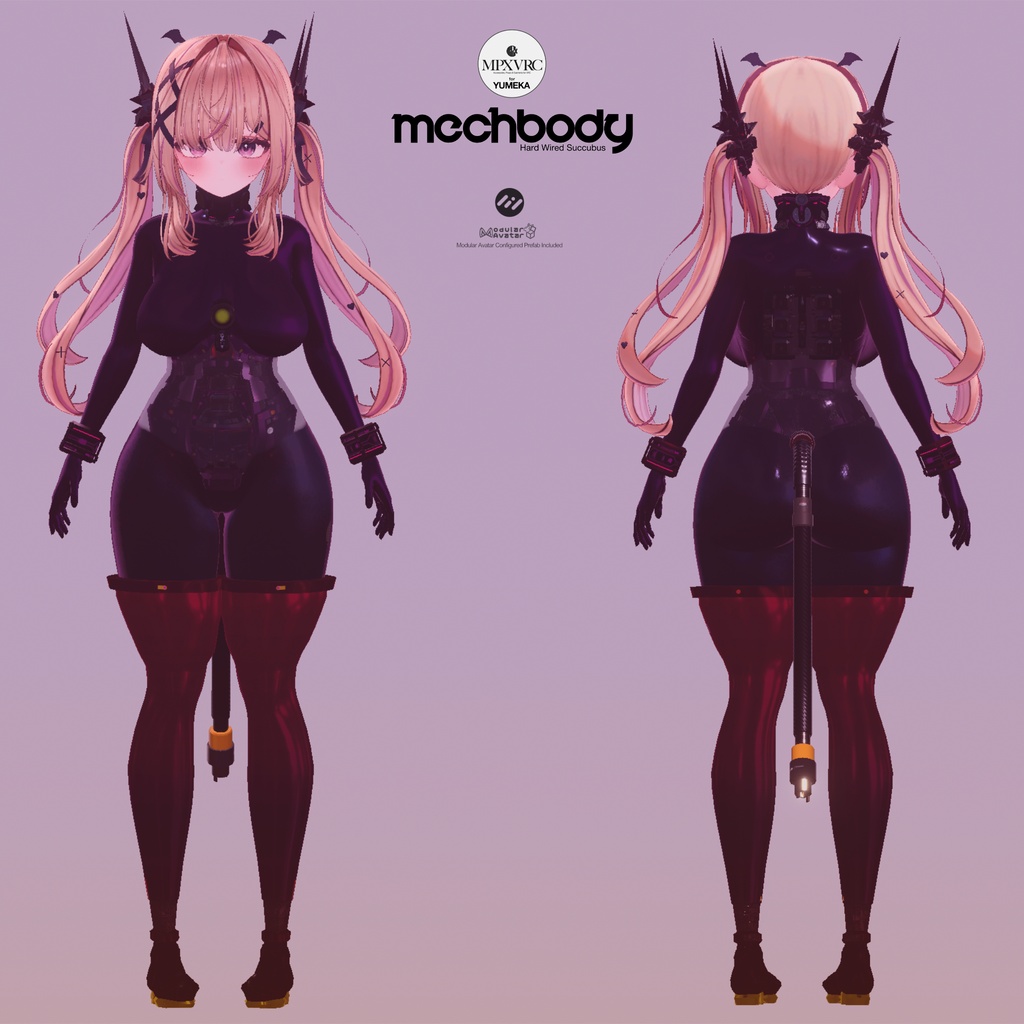
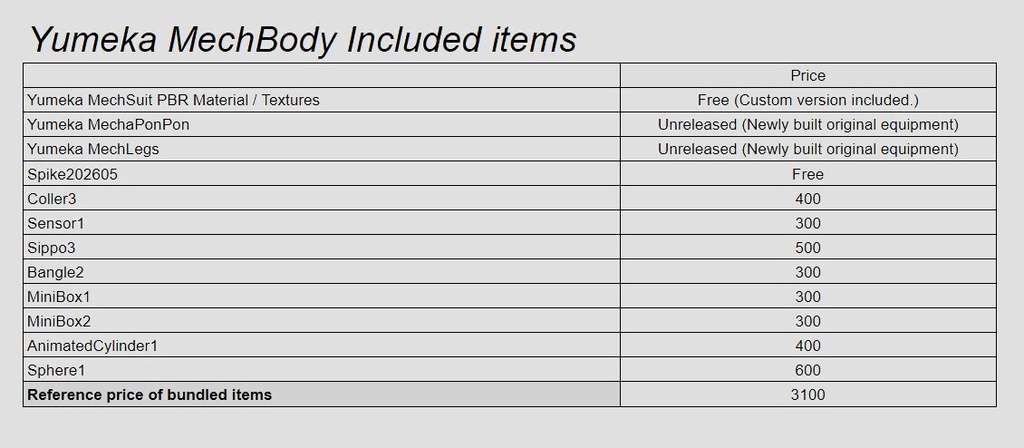


ゆめかちゃん用のメカボディです。新造したアセットと発売済み製品を組み合わせて1つのPrefabにまとめました。ボディにマテリアルを適用後、同梱のPrefabをアバター配下にドラッグ&ドロップするだけで、全ての装備が装着できます。 腹部と背中に3種の部品が埋め込まれており、絶えずアニメーションします。発光部分のグラフィックはスクロールします。しっぽにはPhysBoneが設定されており、体の動きに合わせて揺れます。 This is a mechanical body designed for Yumeka-chan. It combines newly created assets with previously released products into a single Prefab. After applying the material to the body, simply drag and drop the included Prefab onto your avatar to equip the entire set. Three types of components are embedded in the abdomen and back, featuring continuous animation, while the glowing sections display a scrolling graphic effect. The tail is equipped with PhysBone settings, allowing it to sway naturally with the body's movement. ---------------------------------------------------------------------------------- Boothのシステム上、ダウンロード商品の返品/返金はできません。あらかじめご了承ください。 Due to Booth's system limitations, returns and refunds for downloadable products are not possible. Please understand this in advance. https://booth.pixiv.help/hc/ja/articles/230691407-%E3%82%AD%E3%83%A3%E3%83%B3%E3%82%BB%E3%83%AB-%E8%BF%94%E9%87%91%E5%87%A6%E7%90%86%E3%81%AE%E6%B5%81%E3%82%8C%E3%81%AB%E3%81%A4%E3%81%84%E3%81%A6%E7%9F%A5%E3%82%8A%E3%81%9F%E3%81%84 ---------------------------------------------------------------------------------- シェーダーはLiltoonを使用しています。事前に導入しておいてください。 Liltoon is required for installation. https://booth.pm/ja/items/3087170 ---------------------------------------------------------------------------------- Modular Avatarを使用しています。事前に導入しておいてください。 Uses Modular Avatar. Please install it in advance. https://modular-avatar.nadena.dev/ja ---------------------------------------------------------------------------------- 導入方法: 1. Unitypackageをインポートします 2. \Assets\MilpixDesign\YumekaMechBody\Prefabフォルダ内のPrefabを、Hierarchyのアバター下に配置してください 3. \Assets\MilpixDesign\YumekaMechBody\Materialフォルダ内の「YumekaMechBody」マテリアルを、ビューポートのアバターのボディにドラッグ&ドロップして適用してください Installation Instructions: 1. Import the Unity package. 2. Place the prefab located in the `\Assets\MilpixDesign\YumekaMechBody\Prefab` folder under the avatar in the Hierarchy. 3. Drag and drop the "YumekaMechBody" material from the `\Assets\MilpixDesign\YumekaMechBody\Material` folder onto the avatar's body in the viewport to apply it. ---------------------------------------------------------------------------------- ライセンス License: 本製品は、VN3ライセンス(https://www.vn3.org/)を採用しております。 本製品をご購入前に下記リンクから内容をご確認ください。 本製品を購入された時点で本利用規約に同意したものとさせて頂きます。 本規約は、あしやまひろこ(@hiroko_TB)氏が作成したVN3ライセンス( https://www.vn3.org/ )のテンプレートを使用しています。 This product uses the VN3 License (https://www.vn3.org/). Please check the details at the link below before purchasing this product. By purchasing this product, you agree to these terms of use. These terms use the VN3 License (https://www.vn3.org/) template created by Ashiyama Hiroko (@hiroko_TB). JP https://drive.google.com/file/d/1q5V1DylqKehQrI6FbMY1pq9JWyqh-Du5/view?usp=drive_link EN https://drive.google.com/file/d/1j3Rij7Gob9Vdg79fbVhEMGwaxDE9fyjN/view?usp=drive_link ZH https://drive.google.com/file/d/13696cyOQTqAgOaFalRG6Af5jaC7JBqco/view?usp=drive_link KR https://drive.google.com/file/d/18hA3Z3gHwCctvUE1lgRm-cuVnO5vDMek/view?usp=drive_link