

テクスチャをモデルに投影しベイク・メッシュ化して貼り付けられるツール(ArmoProjTex)
- マニュアルダウンロード商品¥ 0
- ツール本体ダウンロード商品¥ 500
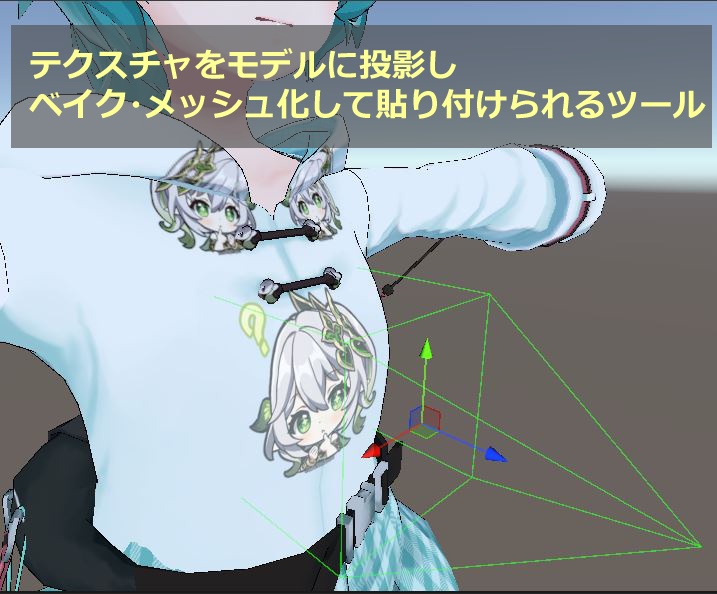
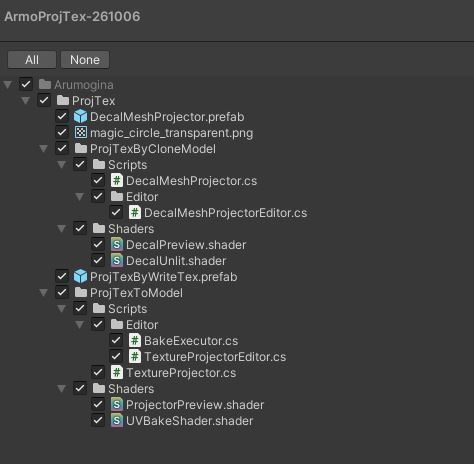


https://arumogina.booth.pm/items/9007420 *こちらのSnakeProjTexをDL欄に追加しました。 Unity上で任意のテクスチャを対象にセットしたモデルに投影し、メッシュ生成・既存テクスチャへのペイクの2つの方法で貼り付けられるツールです。使い方の概要・動作確認は動画を、詳しいパラメタ解説や補足事項はマニュアルをご覧ください。 メッシュ生成方式では生成したメッシュに元の投影元メッシュからウェイト情報をコピー、BlendShapeを再構築することによる追従性能、メッシュを生成することで投影テクスチャを高解像度のまま貼り付けられることが利点となっています。 テクスチャベイク方式では手軽にテクスチャにベイク出来ること・解像度が足りない場合にテクスチャを任意の倍率にしてからベイクすることで解像度の低さから発生するぼやけを防止出来ます。 同梱物は画像2枚目を参照。 使用開始時、該当スクリプトを空のオブジェクトに貼り付けるか、同梱のprefabをシーンに配置してご使用ください。 ++動作確認環境 Unity2022.3.22f1 ++ライセンス 同梱されている全てのファイルの再配布を禁止します。 ツールによる生成物に関しては本ライセンスによる制限はありません。 ++検索用 テクスチャ投影,デカール,デカールメッシュ,テクスチャメッシュ化,投影ベイク The following is a translated version. The official description is based on the Japanese version. This tool projects a model onto any texture in Unity and allows you to apply it in two ways: by generating a mesh or by baking it onto an existing texture. Please watch the video for an overview of how to use it and to verify its functionality, and refer to the manual for detailed explanations of parameters and additional notes. The advantages of the mesh generation method include copying weight information from the original source mesh to the generated mesh, reconstructing BlendShapes to ensure accurate tracking, and the ability to apply projected textures at high resolution by generating the mesh. The texture baking method allows you to easily bake textures. If the resolution is insufficient, you can scale the texture to any desired ratio before baking to prevent blurring caused by low resolution. See the second image for included files. To get started, attach the script to an empty object or place the included prefab in your scene. ++ Tested on Unity 2022.3.22f1 ++ License Redistribution of all included files is prohibited. There are no restrictions under this license regarding content generated by the tool. Translated with DeepL.com (free version) 以下说明为翻译版本。正式说明以日语版为准。 这是一款可在Unity中将任意纹理投影到指定模型上,并通过“生成网格”和“烘焙到现有纹理”两种方式进行贴图的工具。关于使用方法概述及功能验证,请观看视频;有关详细参数说明及补充事项,请参阅手册。 在网格生成方法中,其优势在于:可将原始投影源网格的权重信息复制到生成的网格中,并通过重建BlendShape来提升追踪性能;此外,通过生成网格,还能以高分辨率的形式贴图。 在纹理烘焙方式中,不仅可以轻松地将纹理烘焙到模型上,而且当分辨率不足时,可以通过将纹理放大到任意倍率后再进行烘焙,从而防止因分辨率过低而产生的模糊现象。 随附内容请参见第二张图片。 开始使用时,请将相应脚本粘贴到空对象上,或将随附的预制体放置到场景中。 ++运行测试环境 Unity 2022.3.22f1 ++许可协议 禁止重新分发随附的所有文件。 对于通过本工具生成的内容,不受本许可协议的限制。