
Warudo 画面固定スクリーンオーバーレイプラグイン
- ダウンロード商品¥ 300
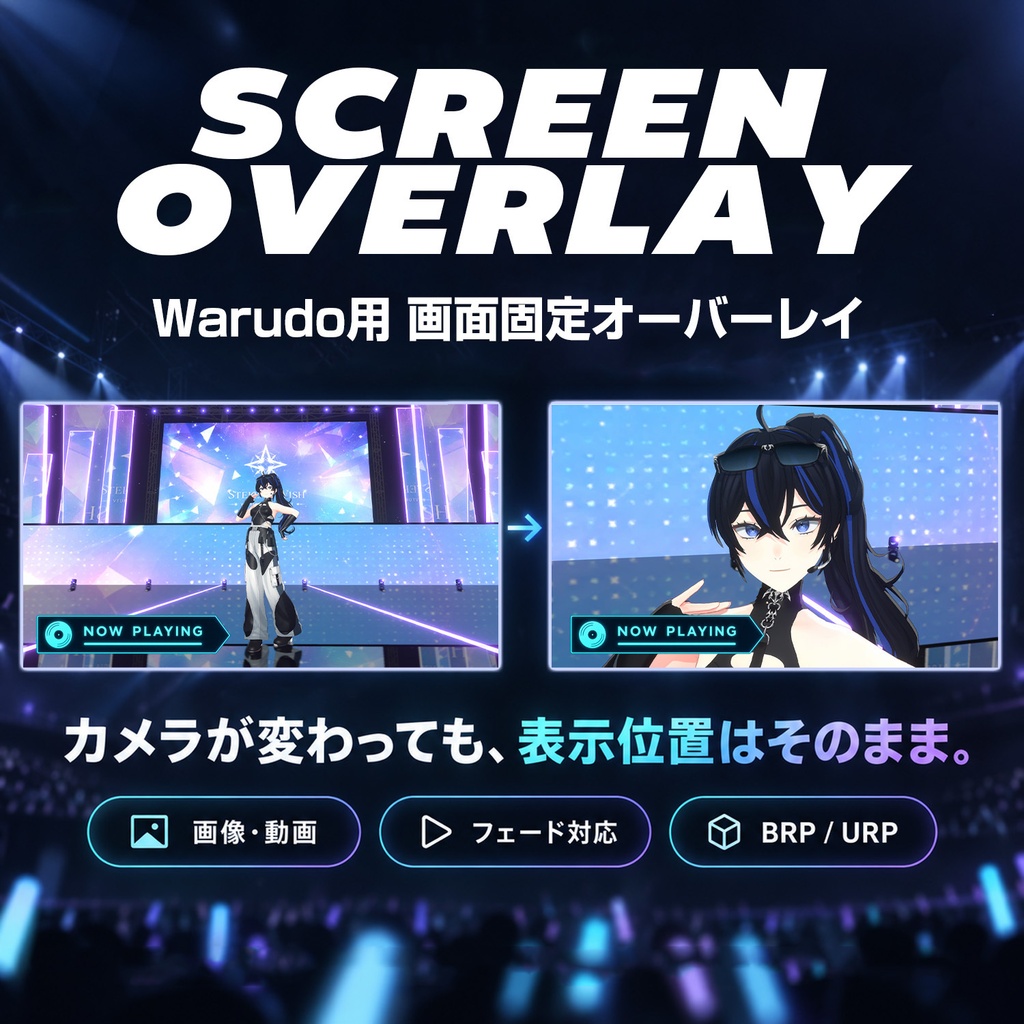


画像や動画などをWarudoの画面上の好きな位置に重ねて表示するプラグインです。 ライブ中にカメラを切り替えても、曲タイトルやロゴなどを同じ位置・サイズで表示できます。 本来はOBS上で表示していたものもWarudo内で扱うことでオペレーションが簡略化できるかとおもいます。 歌枠の曲名表示、ライブの告知、配信画面の装飾などにご活用ください。 ※現行版はWarudo 0.15.2以降向けです。旧バージョンでは使用できませんのでご注意ください。 0.15.2未満の場合は、Steamライブラリで「Warudo」を右クリックし、「プロパティ」→「ベータ」からBeta版を選択してアップデートしてください。 This plugin lets you overlay images, videos, and other sources anywhere on your Warudo screen. Keep song titles, logos, and other visuals in the same position and at the same size, even when switching cameras during a live performance. Managing overlays directly in Warudo—including those you would normally display in OBS—can help simplify your workflow. Use it for song titles during singing streams, live event announcements, stream decorations, and more. Please note: The current version requires Warudo 0.15.2 or later and does not support older versions. If you are using a version earlier than 0.15.2, right-click “Warudo” in your Steam Library, select “Properties” → “Betas,” then select the Beta branch to update.
主な機能 Main Feature
■ 画面に固定して表示 カメラの移動や切り替えに影響されず、指定した位置に表示します。 ■ フェードイン・フェードアウト 表示・非表示を、設定した秒数でなめらかに切り替えられます。 アセットの有効状態とは別に表示・非表示のトグルスイッチがあるのでそちらを切り替えるとフェードが適用されます。 ■ 位置・サイズを調整 基準位置、位置、表示枠サイズ、スケール、縦横比の維持、不透明度、左右・上下反転を設定できます。 ■ BRP/URP対応・多言語表示 Warudoの言語設定に応じて、日本語・英語・簡体字中国語・繁体字中国語で項目を表示します。 ■ Fixed Screen Position Display content at your chosen position, unaffected by camera movement or switching. ■ Fade In / Fade Out Smoothly show or hide content over a configurable duration. A separate visibility toggle is provided alongside the asset’s enabled state. Use the visibility toggle to apply fades. ■ Position and Size Adjustments Adjust the anchor, position, display frame size, scale, aspect ratio preservation, opacity, and horizontal or vertical flipping. ■ BRP / URP Support & Multilingual Settings Setting labels automatically follow Warudo’s language setting, with support for Japanese, English, Simplified Chinese, and Traditional Chinese.
選択できるコンテンツ Supported Content Sources
Warudo内蔵スクリーンの読み込み機能を利用しています。 画像/動画/デスクトップ/ウィンドウ/ブラウザー(URL・HTML)/Spout/NDI ※対応形式や読み込み条件は、Warudo内蔵スクリーンの仕様と使用環境に依存します。すべての形式・外部ソフトとの組み合わせを保証するものではありません。 Uses Warudo’s built-in Screen asset loading functionality. Images / Videos / Desktop / Window / Browser (URL & HTML) / Spout / NDI Please note: Supported formats and loading requirements depend on Warudo’s built-in Screen specifications and your environment. Compatibility with every format or external application is not guaranteed.
導入方法 Installation
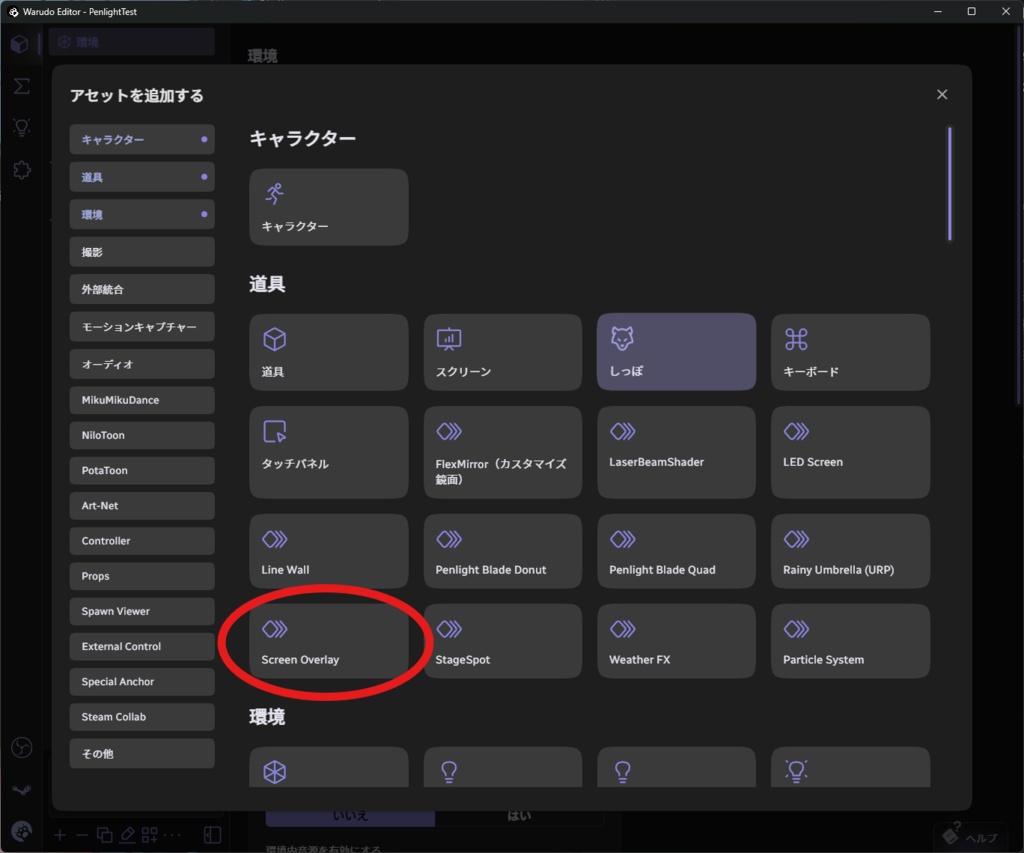
1. Warudoのデータフォルダ内にある「Plugins」フォルダへ、ScreenOverlay.warudoを入れます。 2. Warudoを起動、または再起動します。 3. 「アセットを追加する」→「Screen Overlay」を追加します。 ※道具カテゴリ内に表示されます。「道具アセットの中から選択」ではありません。 4. コンテンツとソースを選び、位置やサイズを設定してください。 ■「有効」と「表示(フェード)」の違い 有効: アセットの有効状態を切り替えます。無効にすると、フェードせず即座に消えます。 表示(フェード): アセットを有効にしたまま、指定秒数でフェードイン・フェードアウトします。ライブ中の曲名表示などには、こちらをご利用ください。 ※表示するには「有効」と「表示(フェード)」の両方をオンにしてください。 ※非表示にしても動画の再生は継続します。 1. Place “ScreenOverlay V1.0.warudo” in the “Plugins” folder inside Warudo’s data folder. 2. Launch or restart Warudo. 3. Open “Add Asset” and add “Screen Overlay.” Note: It appears under the Props category. Do not use “Choose from Prop Assets.” 4. Select your content type and source, then adjust the position and scale. ■ “Enabled” vs. “Visible (fade)” Enabled: Toggles the asset’s enabled state. Disabling it hides the content immediately without a fade. Visible (fade): Fades the content in or out over the specified duration while keeping the asset enabled. Use this toggle for song titles and similar overlays during live performances. Note: - Both “Enabled” and “Visible (fade)” must be on for the content to appear. - Video playback continues while the content is hidden.
対応環境・注意事項 System Requirements & Notes -
- 動作確認環境:Warudo Pro 0.15.2/BRP・URP - 現行版はWarudo 0.15.2以降向けです。旧バージョンでは使用できませんのでご注意ください。 - Warudo本体、表示する画像・動画、外部送信ソフトなどは別途ご用意ください。 - 商品画像内のステージ・キャラクター・表示素材は使用イメージです。 - 内蔵スクリーンの3D変形、照明、クロマキー、マスク、切り抜き機能は対象外です。 - ファイルの拡張子と実際の画像形式が異なる場合、読み込めないことがあります。 - Warudoの更新により、動作や互換性が変わる場合があります。 Tested with Warudo Pro 0.15.2 / BRP and URP. The current version requires Warudo 0.15.2 or later. Older versions are not supported. Warudo, images and videos to display, and any external sending software must be obtained separately. Stages, characters, and display materials shown in the product images are for demonstration purposes only. The built-in Screen asset’s 3D deformation, lighting, chroma key, masking, and cropping features are not supported. Files may fail to load if their extensions do not match their actual image formats. Warudo updates may affect functionality or compatibility.
お問い合わせ Content
不具合の際は、Warudoのバージョン、BRP/URPの設定、使用したソースの種類、再現手順を添えて、BOOTHメッセージからご連絡ください。 If you encounter an issue, please contact us via BOOTH messages and include your Warudo version, rendering pipeline setting (BRP or URP), source type, and steps to reproduce the issue.
