

【Windows専用】TrueMemoryScope - タスクマネージャーで見えない「真のメモリ消費量」を暴く診断ツール
- TrueMemoryScope「真のメモリ消費量」日本語版ダウンロード商品¥ 0
- TrueMemoryScope「真のメモリ消費量」応援(商品は同じものです。)ダウンロード商品¥ 100
- TrueMemoryScope English Versionダウンロード商品¥ 0
- TrueMemoryScope English Version (Donate)ダウンロード商品¥ 100
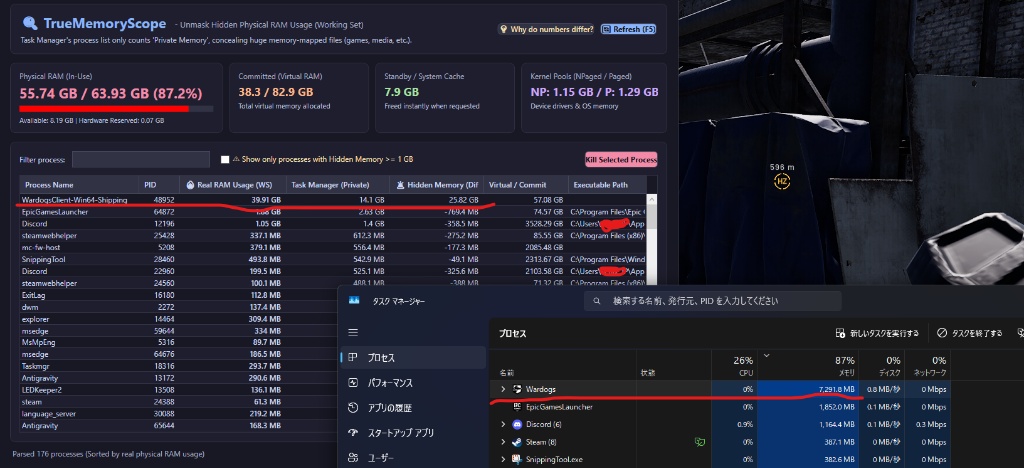

【Windows 10/11】TrueMemoryScope - タスクマネージャーで見えない「真のメモリ消費量」を暴く診断ツール Unmask Hidden Physical RAM Usage Concealed by Windows Task Manager (Installer Edition) ━━━━━━━━━━━━━━━━━━━━━━━━━━━━━━━━━ ■ 日本語案内 (Japanese Guide) ━━━━━━━━━━━━━━━━━━━━━━━━━━━━━━━━━ 【キャッチコピー】 「メモリがなぜかパンパン…でもタスクマネージャーを見ても犯人が分からない!」 その原因、タスクマネージャーの仕様で隠れている【大容量ファイルマップ】かもしれません。 本ツールは、ゲームや重いアプリが実際にRAMチップを何GB占有しているかを一発で可視化します! 【消えたメモリの正体(Windowsの罠)】 Unreal Engine製ゲームや最新3Dゲーム、動画編集ソフトは、膨大なテクスチャやアセットを「メモリマップトファイル」としてメモリに直接ロードします。 しかし、Windowsのタスクマネージャーのプロセス一覧は、仕様上「プライベートメモリ」しか集計しないため、この巨大なマップ領域が丸ごと除外(非表示)されてしまいます。 例えば、あるゲームが実際には【39.9 GB】も物理RAMを占有していても、タスクマネージャー上では「7.2 GB」としか表示されず、残り【約33 GB】が不可視になってしまうのです。 【TrueMemoryScope の特徴・機能】 ✅ 物理メモリ実消費 (WS) を正確に表示:各アプリが実際にRAMチップ上に占有している「真のメモリ量」を大きい順に一覧表示! ✅ 隠れメモリ(差分)の可視化:タスクマネージャーから隠れているファイルマップ領域を差分として一発算出。 ✅ 隠れメモリ 1GB 以上のみ抽出:見かけと実態の差が大きい怪しいアプリをワンクリックで特定できます。 ✅ かんたんインストーラー:初心者でもダブルクリックするだけで安全に導入可能(管理者権限不要)。 ✅ きれいにアンインストール可能:Windowsの「インストールされているアプリ」から安全に完全削除。 ✅ 日本語 / 英語 完全対応:右上のボタン一つで日英を瞬時に切り替え可能。 ✅ スタンドアロン&高速動作:最新C# WPF製ネイティブアプリ。黒いコマンド画面は一切出ず、一瞬で起動します。 【同梱内容】 ・TrueMemoryScope_Setup_v1.0.0.exe(インストーラー本体) ・ご購入者様へ_はじめにお読みください.txt / README_For_Buyers.txt ・参考_タスクマネージャー比較画像.png 【動作環境・スペック】 ・対応OS: Windows 10 / Windows 11 (64-bit) ・対応メモリ: 全容量対応(16GB / 32GB / 64GB / 128GB 等) ・ファイルサイズ: 約55MB(インストーラー) ・追加ランタイム: 不要(完全スタンドアロンで動作) ・管理者権限: 不要(一般ユーザー権限で安全に導入可能) 【利用規約・免責事項】 ・本ソフトウェアの著作権は制作者(iostlover, 999,999,999)に帰属します。 ・本ツールの二次配布・無断転載・再販売は禁止いたします。 ・本ソフトウェアの使用により生じたトラブルや損害について、制作者は一切の責任を負いません。 ━━━━━━━━━━━━━━━━━━━━━━━━━━━━━━━━━ ■ English Guide (For Global Users) ━━━━━━━━━━━━━━━━━━━━━━━━━━━━━━━━━ [Catchphrase] "My RAM is nearly 90% full, but Task Manager doesn't show where it's going!" The culprit might be massive Memory-Mapped Files hidden by Task Manager's design. TrueMemoryScope instantly reveals how many gigabytes of physical RAM chips your games and apps are actually occupying! [Why Task Manager Lies (The Windows Trap)] Modern 3D games (Unreal Engine, etc.) and heavy media apps map huge asset packs directly into memory. However, Task Manager's "Processes" tab only counts "Private Working Set" (memory exclusive to that process). For example, while a game is actively holding 【39.9 GB】 of physical RAM hardware, Task Manager only reports 【7.2 GB】 in the process list, leaving 【over 32 GB】 completely invisible! [Key Features & Capabilities] ✅ Real Physical RAM Usage (WS): Displays actual physical RAM footprint occupied by each app, sorted largest to smallest. ✅ Hidden Memory (Diff) Visualization: Instantly calculates mapped memory hidden from Task Manager. ✅ 1-Click Hidden Memory Filter (>= 1 GB): Isolate memory hogs with massive discrepancies. ✅ Easy Setup Wizard: Clean installer with zero admin hassle (installs safely to user profile). ✅ Clean Uninstallation: Fully registered in Windows "Installed apps" for complete removal anytime. ✅ Full English & Japanese Support: Toggle between English and Japanese with a single click. ✅ Standalone & Blazing Fast: Native C# WPF. Zero console popups, launches in milliseconds with zero dependencies. [System Requirements & Specs] • Supported OS: Windows 10 / Windows 11 (64-bit) • Supported RAM: All configurations (16 GB / 32 GB / 64 GB / 128 GB+) • Package Size: ~55 MB (Installer) • Dependencies: None (100% self-contained standalone) • Administrator Rights: Not required (installs safely to user profile) [Terms of Service & License] • Copyright (c) 2026 iostlover, 999,999,999. All rights reserved. • Redistribution, resale, or unauthorized sharing of this software is strictly prohibited. • The creators assume no responsibility for any damages or issues arising from the use of this software.