

【無料】VRChat Avatar Build Obfuscator
- ダウンロード商品¥ 0
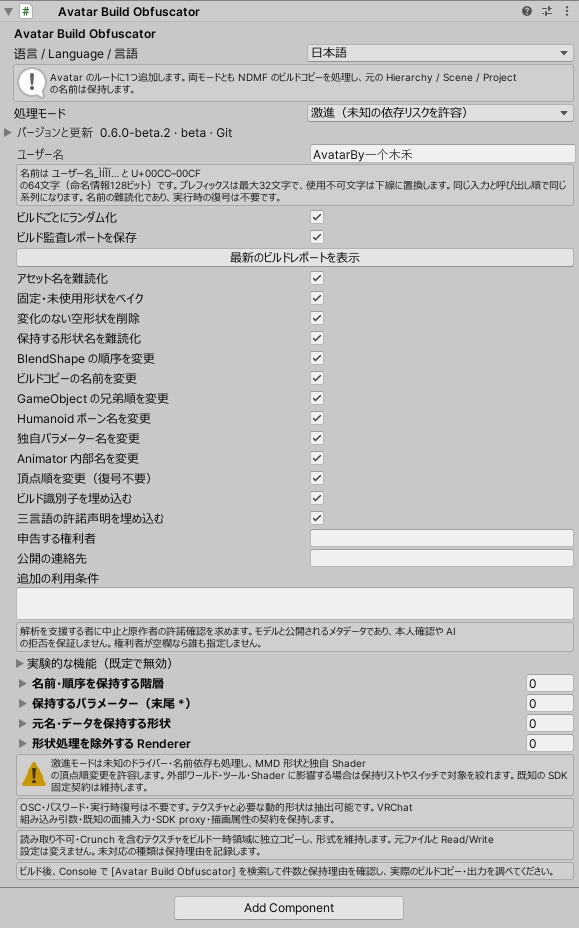
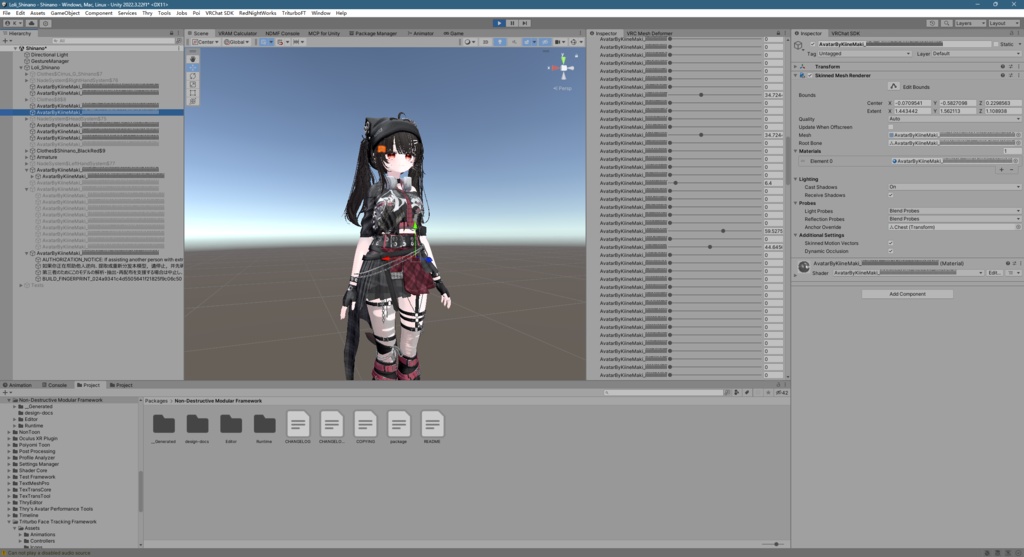


## 日本語 **Avatar Build Obfuscator** **VRChat アバター用・ビルド時難読化ツール|無料・オープンソース** アバターにコンポーネントを追加するだけで、ビルド時に名前の難読化とデータ整理を自動で行います。 NDMF がビルド用コピーを処理し、元アセットは上書きしません。OSC・パスワード・実行時の復号は不要です。 **主な機能** - リソース、GameObject、ボーン、独自パラメーター、Animator 内部、動的 BlendShape の名前を「ユーザー名+Ì/Í/Î/Ï」で難読化。 - 対応可能な固定・未使用 BlendShape をベイクして除去。 - BlendShape、同じ親を持つ GameObject、メッシュ頂点の順序を個別に並べ替え、関連する参照も更新。 - 保守/激進の2モードを搭載。処理項目の個別切り替えや、保持する対象の指定に対応。 - 中国語・英語・日本語のUIに対応。 - Git/unitypackage で導入でき、コンポーネントから更新を確認できます。 **必要環境** Unity 2022.3 / VRChat Avatar SDK 3.7.0+ / NDMF 1.14.8+ SDK と NDMF は別途導入してください。 **使い方** 1. ダウンロードした unitypackage をインポートするか、GitHub の説明に従って Git から導入します。重複を避けるため、導入方法はどちらか一方にしてください。 2. **Hierarchy** でアバターのルートを選び、**Inspector** 下部の **Add Component** から **Avatar Build Obfuscator** を検索して追加します。 3. ユーザー名とモードを設定し、VRChat SDK で通常どおりビルドします。 難読化の結果はビルド用コピーで確認します。元の Hierarchy と Project の名前は変わりません。 **ご注意** 難読化によってアバターの解析や再整理を難しくできますが、データの抽出防止を保証するものではありません。テクスチャの画素、最終的な形状、必要な動的 BlendShape は抽出可能です。 激進モードは未知の互換性リスクを許容します。使用前にアバターの動作をご確認ください。 **ライセンス** 無料配布・**GPL-3.0-only** ライセンスのオープンソースソフトウェアです。 ソースコード・詳細:[GitHub · Avatar Build Obfuscator](https://github.com/AKaNecoo/AvatarBuildObfuscator) **不具合報告** **kiinemaki@qq.com** プラグインと Unity/SDK のバージョン、再現手順、関連するエラーやスクリーンショットを添えてご連絡ください。 **更新履歴** 現在の正式版:**v0.5.1** / beta:**v0.6.0-beta.2** インストールするバージョンは、どちらか一方をお選びください。[GitHub のリリース一覧](https://github.com/AKaNecoo/AvatarBuildObfuscator/releases) 2026-10-21|v0.6.0-beta.2 - 階層内の許諾に関する声明・申告された権利者名・ビルド識別子を、ランダム名の独立した子階層に集約。マテリアル内の声明は維持します。 2026-10-21|v0.6.0-beta.1 - ビルドごとのランダム化、ローカル監査、変形量がすべてゼロの BlendShape の削除、三言語の許諾に関する声明とビルド識別子を追加。 - 実験的な UV/テクスチャ回転・同期する BlendShape の統合を追加。対応範囲は限定的で、初期状態では無効です。 --- ## English **Avatar Build Obfuscator** **Free, open-source build-time obfuscation for VRChat avatars** Add the component to your avatar and let NDMF handle name obfuscation and data processing automatically during the build. The tool processes the build copy without overwriting your original assets. No OSC, password or runtime decoder is required. **Features** - Rename resources, GameObjects, bones, custom parameters, Animator internals and dynamic BlendShapes using your username followed by Ì/Í/Î/Ï characters. - Bake and remove eligible fixed or unused BlendShapes. - Independently shuffle BlendShape, sibling GameObject and mesh vertex order while updating related references. - Choose Conservative or Aggressive mode, toggle individual operations and specify items to preserve. - Chinese, English and Japanese UI. - Install through Git or unitypackage, and check for updates from the component. **Requirements** Unity 2022.3 / VRChat Avatar SDK 3.7.0+ / NDMF 1.14.8+ Install the SDK and NDMF separately. **Getting started** 1. Import the downloaded unitypackage, or follow the GitHub instructions to install through Git. Choose one installation method to avoid duplicates. 2. Select your avatar root in **Hierarchy**. At the bottom of **Inspector**, click **Add Component**, search for **Avatar Build Obfuscator** and add it. 3. Set your username and mode, then build normally with the VRChat SDK. Inspect the obfuscation result in the build copy. Original names in Hierarchy and Project remain unchanged. **Please note** Obfuscation can make an avatar harder to analyze and reorganize, but it does not guarantee protection against extraction. Texture pixels, final geometry and required dynamic BlendShapes remain extractable. Aggressive mode accepts unknown compatibility risks. Test your avatar’s functionality before use. **License** Free to download and open source under **GPL-3.0-only**. Source code and documentation: [GitHub · Avatar Build Obfuscator](https://github.com/AKaNecoo/AvatarBuildObfuscator) **Bug reports** **kiinemaki@qq.com** Please include the plugin and Unity/SDK versions, steps to reproduce, and relevant errors or screenshots. **Updates** Current stable: **v0.5.1** / beta: **v0.6.0-beta.2** Install one version at a time. [View GitHub releases](https://github.com/AKaNecoo/AvatarBuildObfuscator/releases) 2026-10-21 | v0.6.0-beta.2 - Group hierarchy authorization notices, the declared rights holder and build fingerprint beneath a randomly named container, while retaining complete notices in material tags. 2026-10-21 | v0.6.0-beta.1 - Add per-build randomization, local residual audits, zero-delta BlendShape pruning, multilingual authorization notices and build fingerprints. - Add experimental UV/texture rotation and synchronized BlendShape merging. Support is limited, and both options are off by default. --- ## 中文 **Avatar Build Obfuscator** **VRChat Avatar 构建时混淆工具|免费・开源** 为模型添加组件,在构建时自动完成名称混淆与数据整理。 通过 NDMF 处理构建副本,不覆盖源资产,无需 OSC、密码或运行时解密。 **主要功能** - 使用「用户名+Ì/Í/Î/Ï 乱码」混淆资源、对象、骨骼、自定义参数、Animator 内部和动态 BlendShape 名称。 - 烘焙并移除可处理的固定/未使用 BlendShape。 - 可独立打乱 BlendShape、同级 GameObject 和网格顶点顺序,同步更新相关引用。 - 提供保守与激进两种模式,各项处理可单独开关,也可设置保留项。 - 界面支持中文、English、日本語。 - 支持 Git 与 unitypackage 安装,可在组件中检查更新。 **使用环境** Unity 2022.3 / VRChat Avatar SDK 3.7.0+ / NDMF 1.14.8+ SDK 与 NDMF 需自行安装。 **使用方法** 1. 导入下载的 unitypackage,或参照 GitHub 说明通过 Git 安装。请选择一种方式,避免重复安装。 2. 在 **Hierarchy** 中选中 Avatar 根对象,在 **Inspector** 底部点击 **Add Component**,搜索并添加 **Avatar Build Obfuscator**。 3. 填写用户名、选择模式,再使用 VRChat SDK 正常构建。 混淆效果在构建副本中查看,源 Hierarchy 与 Project 中的名称保持原样。 **注意事项** 混淆可以增加分析和整理模型的难度,但无法保证防止提取。贴图像素、最终几何和必要的动态 BlendShape 仍可能被提取。 激进模式允许未知兼容风险,使用前请先测试模型功能。 **开源许可** 免费提供,采用 **GPL-3.0-only** 开源许可证。 源码与详细说明:[GitHub · Avatar Build Obfuscator](https://github.com/AKaNecoo/AvatarBuildObfuscator) **Bug 反馈** **kiinemaki@qq.com** 反馈时请附上插件版本、Unity/SDK 版本、复现步骤,以及相关报错或截图,方便定位问题。 **更新记录** 当前正式版:**v0.5.1** / beta:**v0.6.0-beta.2** 两个下载版本请选择一个安装。[查看 GitHub 发布记录](https://github.com/AKaNecoo/AvatarBuildObfuscator/releases) 2026-10-21|v0.6.0-beta.2 - 将层级中的授权声明、权利人和指纹集中到随机命名的独立子树,保留材质中的完整声明。 2026-10-21|v0.6.0-beta.1 - 加入每次构建随机化、本地残留审计、全零形变裁剪,以及三语授权声明与构建指纹。 - 加入实验性 UV/贴图旋转和同步形变合并,支持范围有限,默认关闭。