

【VRChat / MA】 Pair Ring & Ring Necklace
- ダウンロード商品¥ 200
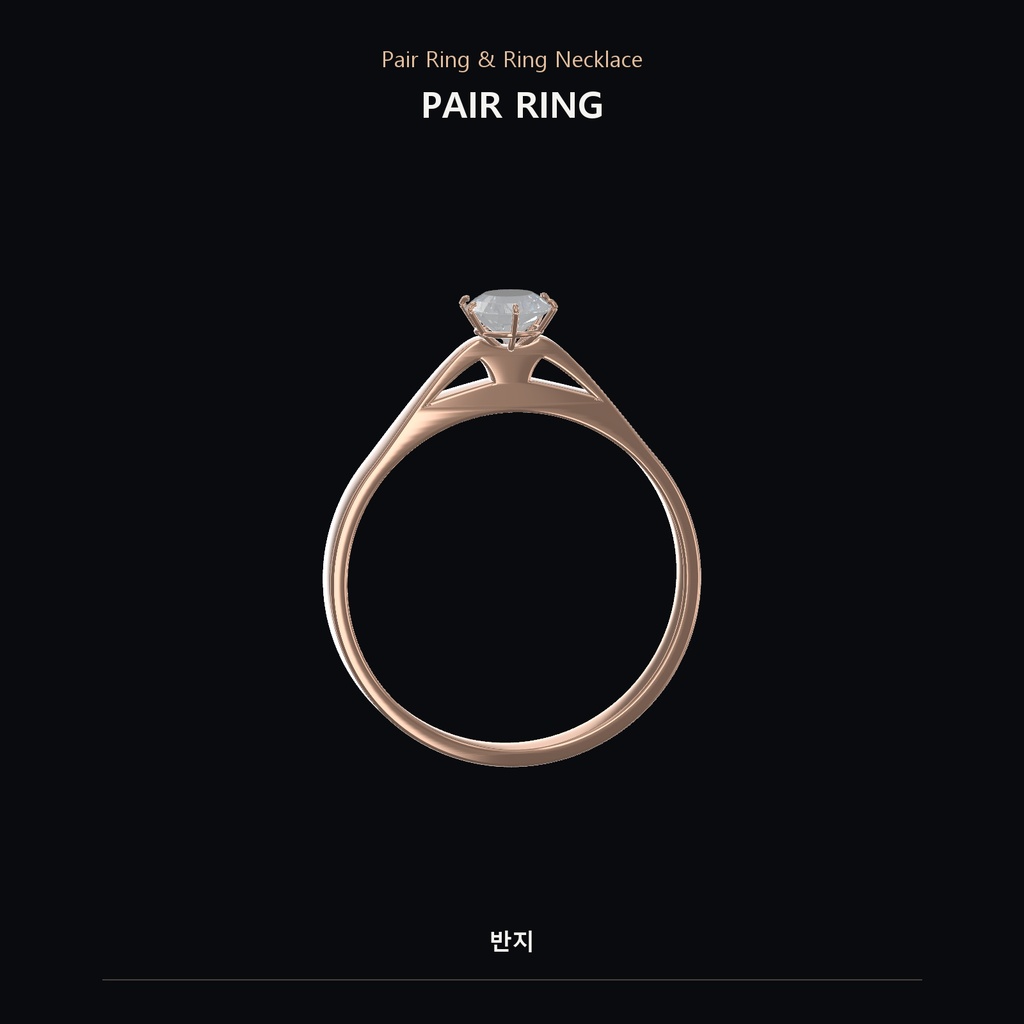
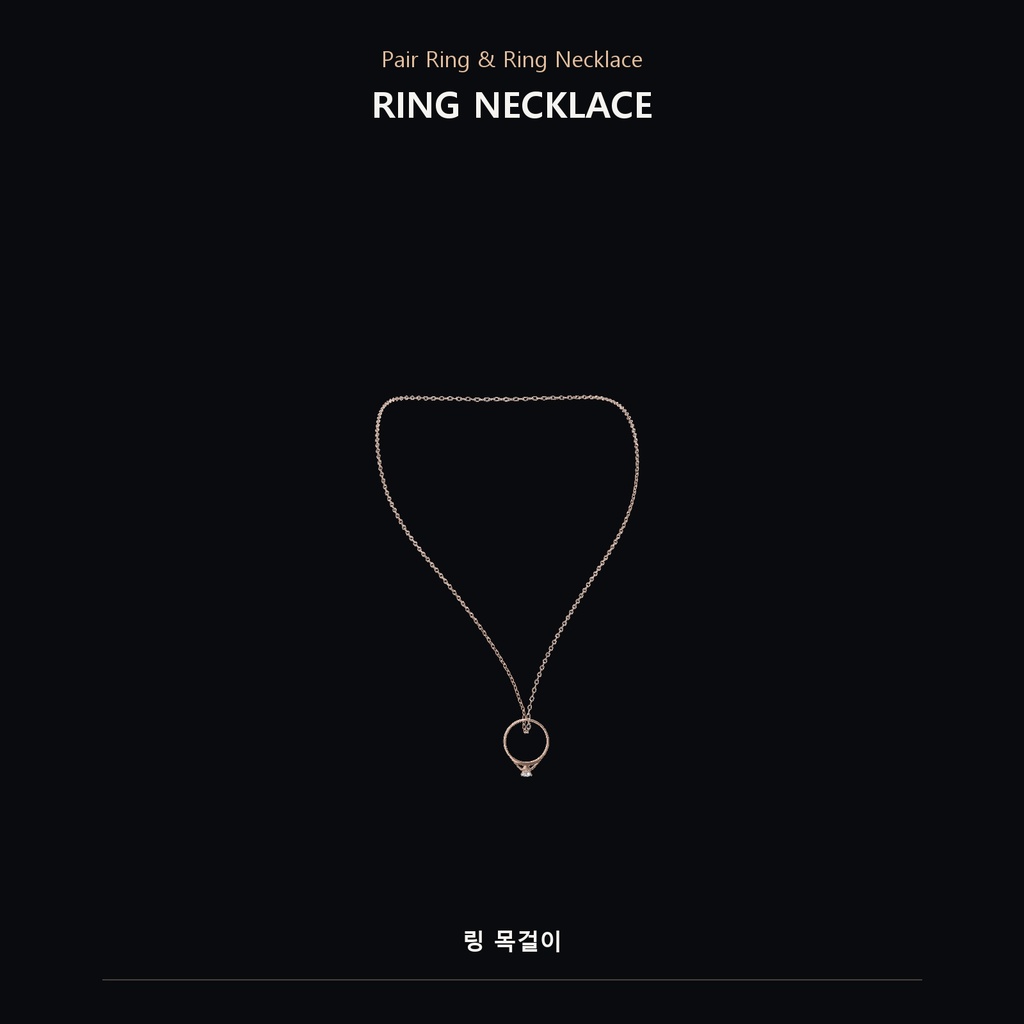
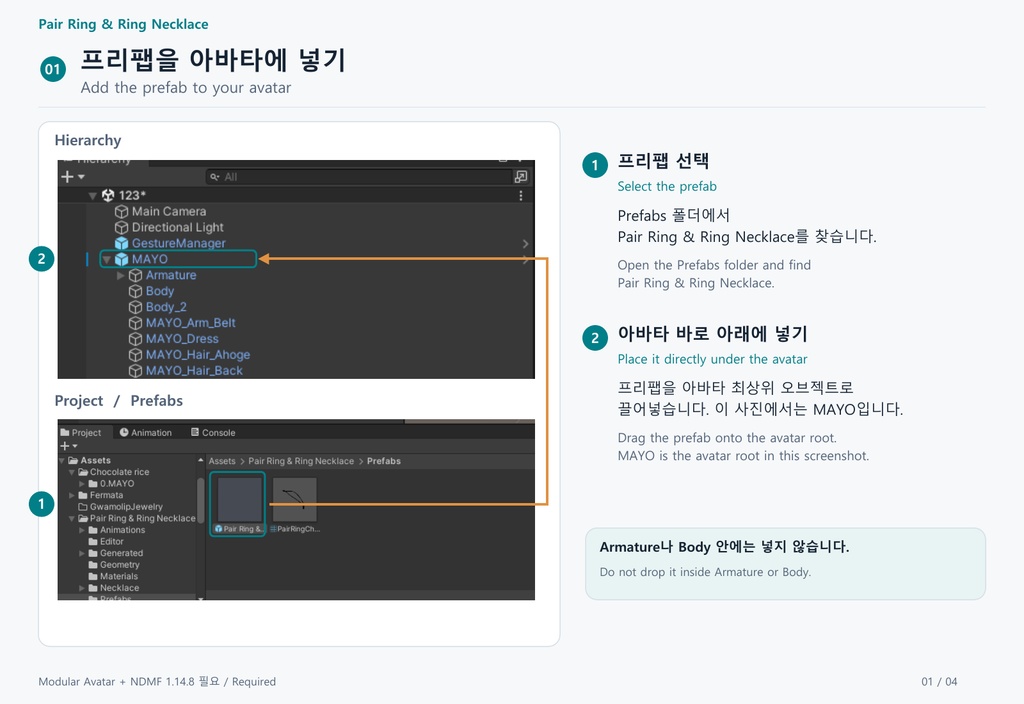
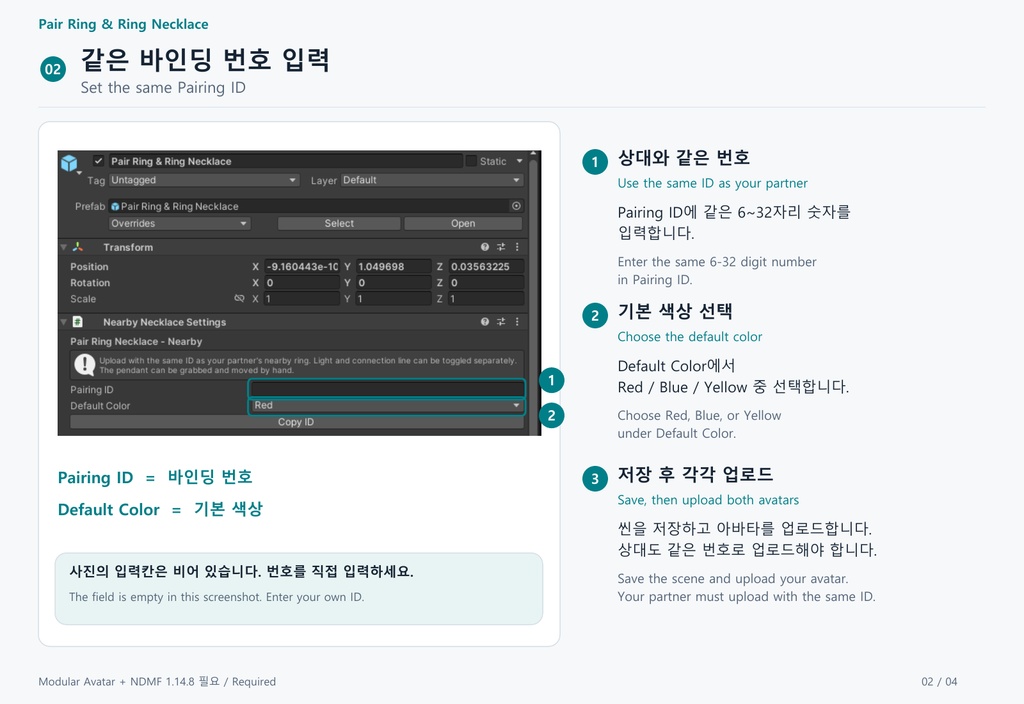
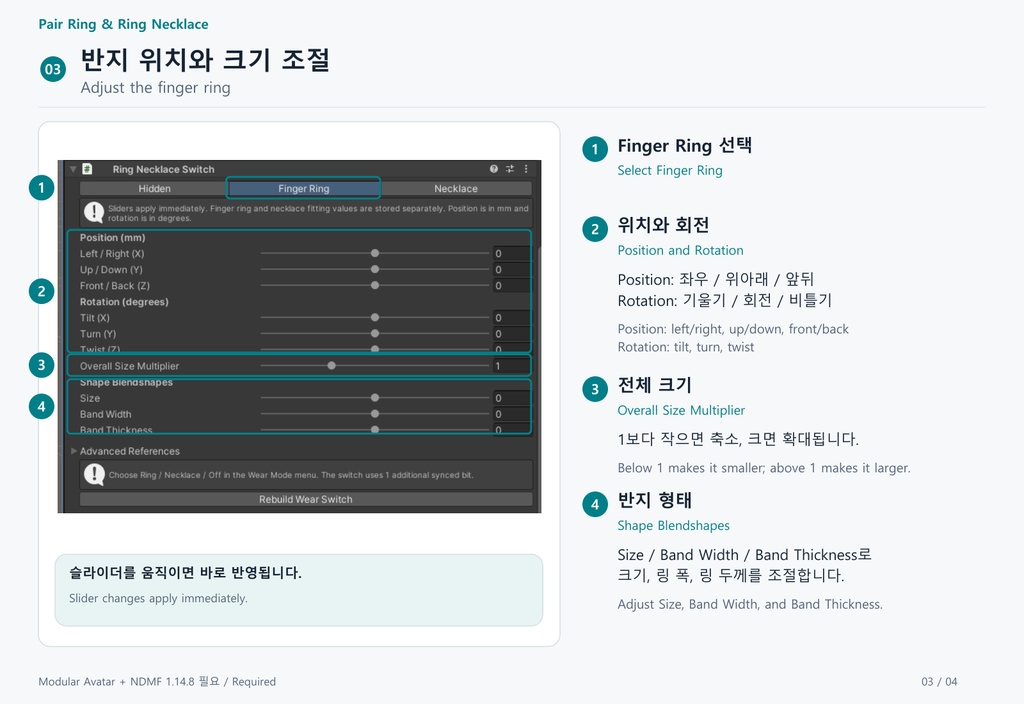
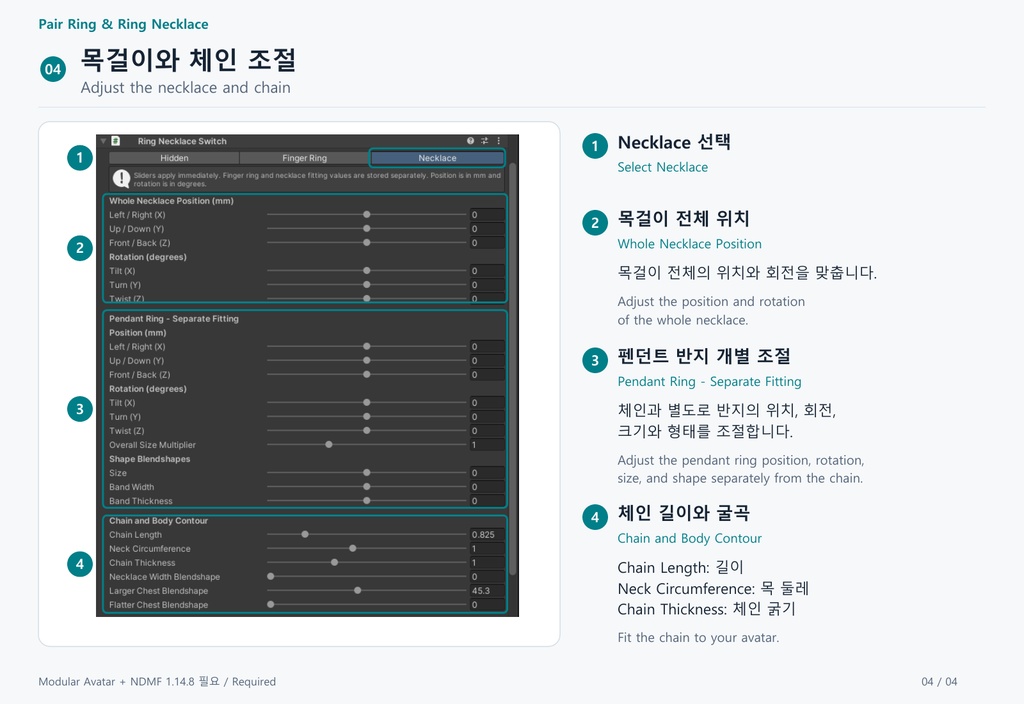


English Pair Ring & Ring Necklace A crystal ring for VRChat with a pairing feature. Switch between wearing it on a finger and wearing it as a ring necklace. When two users with the same Pairing ID are nearby, the accessory can light up and display a connection line. 【Features】 - Switch between Ring / Necklace / Off from the avatar menu. - Toggle the light and connection line separately. - Choose Red, Blue, or Yellow and adjust brightness. - Adjust position, rotation, size, band width, and band thickness in Unity. - Adjust the necklace chain and pendant ring separately. - PhysBone movement and grabbing for the pendant. - Crystal and metal shaders, MatCap, textures, and animations included. - No external application required. 【Requirements】 Install the VRChat Avatars SDK, Modular Avatar, and NDMF 1.14.8 before importing. Tested with Unity 2022.3.22f1. For PC avatars. 【Setup】 1. Import one language edition of the package. 2. Open Assets/Pair Ring & Ring Necklace/Prefabs. 3. Drag the Pair Ring & Ring Necklace prefab directly under your avatar root. 4. Enter the same 6–32 digit Pairing ID as your partner. 5. Adjust the ring and necklace to fit your avatar. 6. Save the scene and upload your avatar. Both users need to upload with the same ID. 【Before purchasing】 - Nearby detection only. This product does not detect a partner across the entire world. - Designed for two users. Multiple connection lines for three or more users, including avatar clones, are not supported. - Contact permissions and avatar visibility settings can affect detection. - Bones connect automatically, but position and shape require fitting. The default necklace shape is based on Shinano; other avatars need adjustment. - Reupload your avatar after changing the Pairing ID or fitting settings. - Avatars, clothing, the SDK, Modular Avatar, and NDMF are not included. - Standalone Quest compatibility is not guaranteed. - Install only one language edition per project. Different language editions replace the same product files. 한국어 Pair Ring & Ring Necklace 페어링 기능이 있는 VRChat용 크리스탈 반지입니다. 손가락 반지와 반지를 걸어 착용하는 목걸이로 전환할 수 있습니다. 같은 바인딩 번호를 설정한 두 사용자가 가까이 있으면 불빛과 연결선 기능을 사용할 수 있습니다. 【주요 기능】 - 아바타 메뉴에서 반지 / 목걸이 / 끄기 전환 - 불빛과 연결선 개별 On·Off - 빨강 / 파랑 / 노랑 선택 및 밝기 조절 - Unity에서 위치, 회전, 크기, 링 폭과 두께 조절 - 목걸이 체인과 펜던트 반지 개별 조절 - PhysBone을 이용한 펜던트 움직임과 잡기 - 크리스탈·메탈 셰이더, 맷캡, 텍스처, 애니메이션 포함 - 외부 프로그램 없이 사용 【필수 설치】 패키지를 넣기 전에 VRChat Avatars SDK, Modular Avatar, NDMF 1.14.8을 설치해주세요. Unity 2022.3.22f1에서 확인한 PC 아바타용 상품입니다. 【설치 방법】 1. 사용할 언어의 패키지 하나를 Import합니다. 2. Assets/Pair Ring & Ring Necklace/Prefabs 폴더를 엽니다. 3. Pair Ring & Ring Necklace 프리팹을 아바타 최상위 오브젝트 바로 아래에 넣습니다. 4. 상대와 같은 6~32자리 바인딩 번호를 입력합니다. 5. 반지와 목걸이 위치, 크기를 아바타에 맞게 조절합니다. 6. 씬을 저장하고 아바타를 업로드합니다. 상대도 같은 번호로 업로드해야 합니다. 【구매 전 확인】 - 근거리 감지 방식입니다. 같은 월드 전체를 거리와 무관하게 감지하는 기능은 없습니다. - 두 사용자 간 사용을 기준으로 합니다. 복제 아바타를 포함해 3명 이상을 여러 선으로 연결하는 기능은 지원하지 않습니다. - Contact 허용 및 아바타 표시 설정에 따라 감지가 제한될 수 있습니다. - 본 연결은 자동이지만, 위치와 형태는 직접 맞춰야 합니다. 목걸이 기본 형태는 시나노 기준이며 다른 아바타는 조절이 필요합니다. - 바인딩 번호나 맞춤 설정을 변경하면 아바타를 다시 업로드해야 합니다. - 아바타, 의상, SDK, Modular Avatar, NDMF는 포함되지 않습니다. - Quest 단독 실행 환경의 호환성은 보장하지 않습니다. - 한 프로젝트에는 언어판 하나만 설치해주세요. 다른 언어판을 Import하면 동일한 상품 파일이 교체됩니다. 日本語 Pair Ring & Ring Necklace ペアリング機能付きのVRChat用クリスタルリングです。 指輪としての装着と、リングをチェーンに通したネックレスとしての装着を切り替えられます。 同じペアリング番号を設定した2人が近くにいると、発光や接続ラインの機能を使用できます。 【主な機能】 - アバターメニューで指輪/ネックレス/非表示を切り替え - 発光と接続ラインを個別にオン・オフ - 赤/青/黄の選択と明るさ調整 - Unity上で位置・回転・サイズ・リングの幅と厚みを調整 - ネックレスのチェーンとペンダントリングを個別に調整 - PhysBoneによるペンダントの揺れ・つかみ操作 - クリスタル・メタル用シェーダー、MatCap、テクスチャ、アニメーション付属 - 外部アプリ不要 【必要なもの】 導入前にVRChat Avatars SDK、Modular Avatar、NDMF 1.14.8をインストールしてください。 Unity 2022.3.22f1で確認済みのPCアバター向け商品です。 【導入方法】 1. 使用する言語のパッケージを1つインポートします。 2. Assets/Pair Ring & Ring Necklace/Prefabs を開きます。 3. Pair Ring & Ring NecklaceのPrefabをアバターのルート直下に配置します。 4. 相手と同じ6〜32桁のペアリング番号を入力します。 5. 指輪とネックレスの位置・サイズをアバターに合わせて調整します。 6. シーンを保存してアバターをアップロードします。相手も同じ番号でアップロードしてください。 【購入前にご確認ください】 - 近距離検知方式です。距離に関係なくワールド全域で相手を検知する機能はありません。 - 2人での使用を想定しています。複製アバターを含む3人以上を複数のラインで接続する機能には対応していません。 - Contactの許可やアバターの表示設定により、検知が制限される場合があります。 - ボーンは自動接続されますが、位置や形状は手動調整が必要です。ネックレスの初期形状はしなの基準のため、他のアバターでは調整してください。 - ペアリング番号や装着設定を変更した場合は、アバターの再アップロードが必要です。 - アバター・衣装・SDK・Modular Avatar・NDMF本体は付属しません。 - Quest単体での動作は保証していません。 - 1つのプロジェクトには言語版を1つだけ導入してください。別の言語版をインポートすると、同じ商品のファイルが置き換わります。