

[WARUDO/VRC/VseeFace/VtubeStudio] Virture 4CUT photo studio
- For VRC/VseeFace/VtubeStudio/Meligo Usersダウンロード商品¥ 2,800
- For Warudo Usersダウンロード商品¥ 2,800
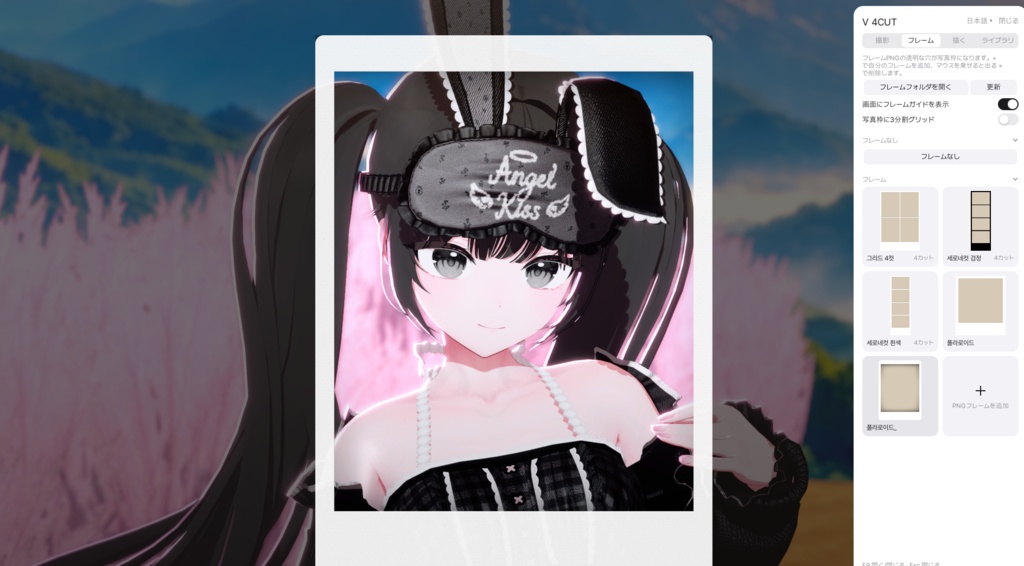

본 프로그램은 한국어, 일본어, 영어를 지원합니다. This program supports Korean, Japanese, and English. 本プログラムは韓国語・日本語・英語に対応しています。 ▶ 세부설명 및 이용 약관(Details&License): https://app.notion.com/p/seuly/V-4cut-404cb3cddeff801aa0ebfb991ae13c2e?source=copy_link Warudo, VRC, Meligo, Vseeface, VtubeStudio 등 Spout2를 지원하는 모든 곳에서 나의 버추얼 캐릭터로 한국의 네컷 사진관에 온 기분을 느껴보세요. 방법은 단 하나, 프레임을 선택하고 촬영 버튼만 누르면 됩니다. [기능] 1. 사진 촬영 - 1컷 ~ n컷까지 자신이 원하는 프레임을 넣어 사진을 촬영해보세요. - 기본적으로 4컷, 폴라로이드 타입의 프레임이 내장되어 있습니다. 2. 꾸미기 - 다양한 펜, 그리고 내 컴퓨터에 설치된 폰트로 사진을 꾸며보세요. - Warudo의 경우 캐릭터에 직접 그리는 옵션도 제공합니다. 3. 보정 - 찍은 사진을 다양하게 보정해보세요. - 곡선, 레벨, 그라데이션, 색조 등을 조절하여 사진의 분위기를 바꾸세요. ------------------------------------------------------------ Warudo、VRChat(VRC)、Meligo、VSeeFace、VTube Studioなど、Spout2に対応したあらゆる環境で、自分のバーチャルキャラクターと一緒に韓国の「人生4カット(인생네컷)」のようなフォトブース体験を楽しみましょう! 使い方はとても簡単! フレームを選んで、撮影ボタンを押すだけ 【機能】 1. 写真撮影 - 1カットから複数カットまで、お好きなフレームを使って自由に撮影できます。 - 4カット写真やポラロイド風のフレームが標準で用意されています。 2. デコレーション - さまざまなペンや、PCにインストールされているフォントを使って写真を自由にデコレーションできます。 - Warudoでは、キャラクターに直接お絵描きできるオプションも搭載しています。 3. 写真補正 - 撮影した写真を自由に補正・編集できます。 - トーンカーブ、レベル補正、グラデーション、色相などを調整して、写真の雰囲気を変えてみましょう。 -------------------------------------------------------------- Experience the fun of a Korean-style four-cut photo booth with your own virtual character! Compatible with any application that supports Spout2, including Warudo, VRChat (VRC), Meligo, VSeeFace, and VTube Studio. It's super simple! Just choose a frame and press the capture button! [Features] 1. Photo Capture - Take photos using your own custom frames, from a single shot to as many shots as you like. - Built-in frames include classic four-cut photo strips and Polaroid-style layouts. 2. Decoration - Decorate your photos with various drawing pens and any fonts installed on your computer. - Warudo users can also enable an option to draw directly on their virtual characters. 3. Photo Editing & Color Correction - Enhance and customize your photos with various editing tools. - Adjust curves, levels, gradients, hue, and more to create the perfect mood for your photos. Avatar: Chocolate Rice Sio