

黒薔薇と茨の冠ヘイロー【しなの対応・VRChat・ギミック付】
- ダウンロード商品¥ 200
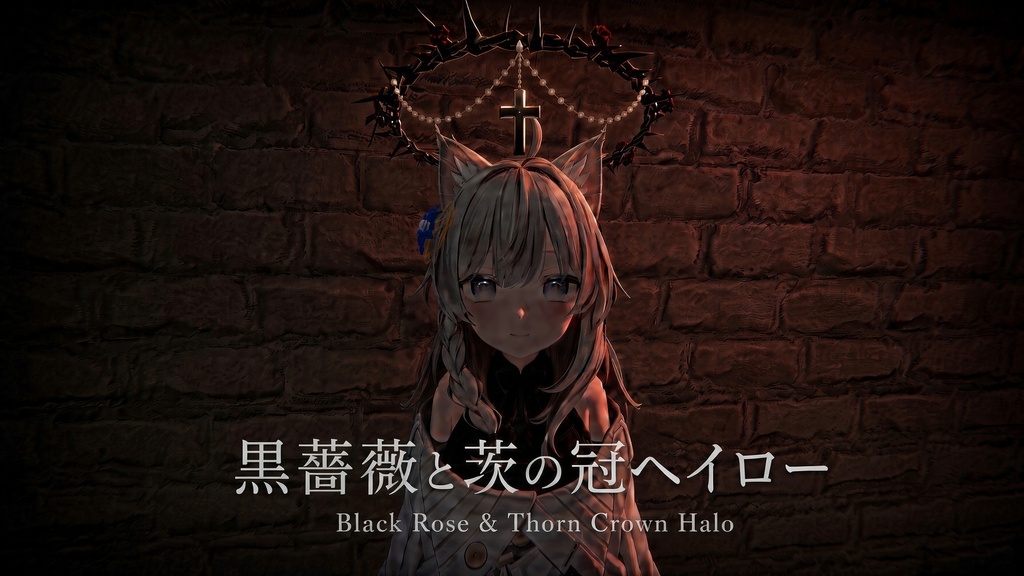
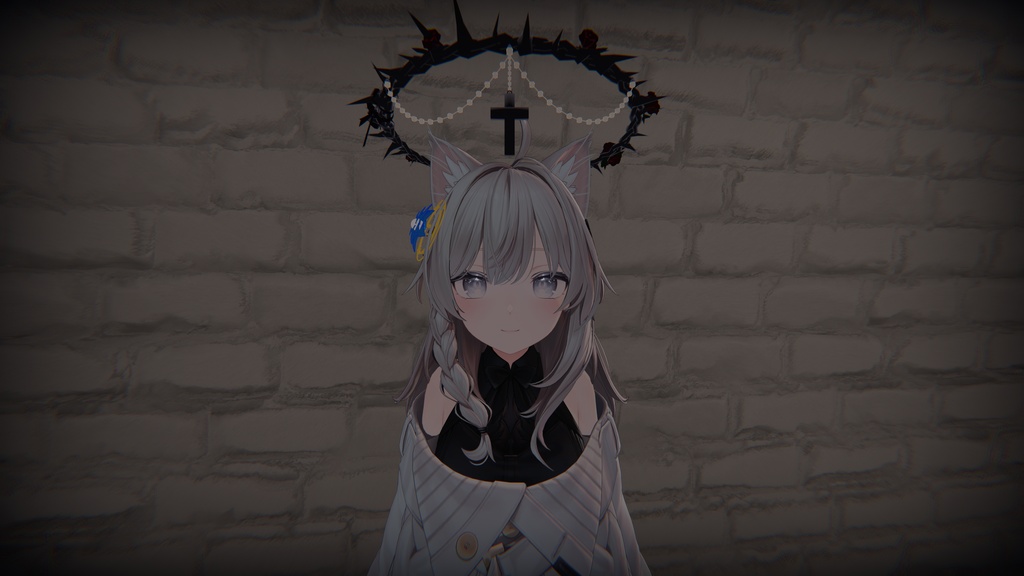
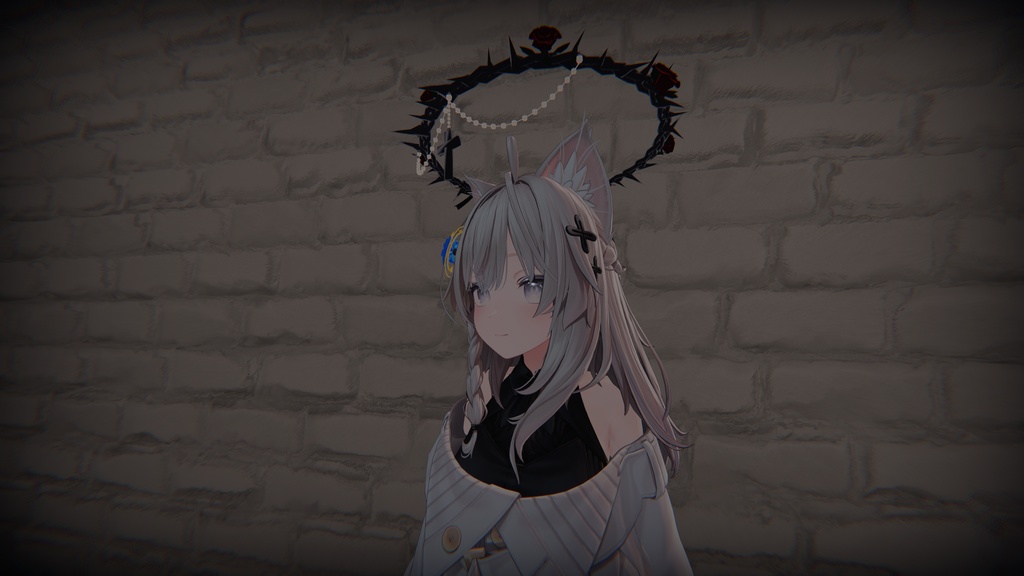


【動画】 https://youtu.be/Rt3PVkG5-4s ※英語・韓国語の説明は、日本語の下にあります。 ※English and Korean descriptions are below the Japanese text. ※영어와 한국어 설명은 일본어 설명 아래에 있습니다. 頭上で、黒薔薇がゆっくりと巡る。 振り向けば、十字架が静かに揺れる。 三つ編みの茨に、黒薔薇とリボン、真珠と十字架を添えた ゴシックロリータの為の VRChat 向けヘイローです。 Modular Avatar で、頭のボーンに追従します。 ■ 特長 ・回る黒薔薇 茨のリング・黒薔薇・リボンが、12秒で1周するゆるやかな速さで、 頭上をめぐり続けます。 ・揺れる十字架と真珠 真珠のスワッグと十字架は回転せず、PhysBone で自然に揺れます。 止まっているときは美しい弧のまま、動いたときだけ、ふわりと。 ・置くだけで装着 「MA Bone Proxy」と回転アニメーション(MA Merge Animator)を設定済み。 プレハブをアバターのルートの子にするだけで、頭上の定位置に収まります。 ・lilToon 用のマテリアル(5枚)を同梱。色違いも作りやすい構成です ■ 内容物 ・Halo_BlackRose_v1.0.unitypackage ・readme.txt (日本語 / English / 한국어) アバター本体のデータは含まれません。 ■ 必要なもの ・VRChat SDK (Avatars) ・Unity 2022.3.22f1 ・lilToon (動作確認: 2.3.4) ・Modular Avatar (動作確認: 1.18.7) lilToon・Modular Avatar は同梱されません。VCC または ALCOM から追加してください。 ■ 動作確認 ・「しなの」/ VRChat SDK の Build & Test で確認 ・他のアバターでは未確認です。頭のボーンに追従する設定なので、 位置と大きさを調整すれば取り付けられる想定です。 ■ 導入方法 (かんたん) 1. unitypackage をUnityにインポート 2. 「Halo_BlackRose_Shinano」プレハブを、アバターのルートの子にする 3. いつもどおりビルド (Unity の画面上では足元に表示されますが、ビルド時に頭上へ移動します) くわしい手順は、同梱の readme.txtをご覧ください。 ■ データ情報 ・三角形数 : 約8,660 ・メッシュ : 4 / マテリアル : 5枚(lilToon) ・PhysBone : 5 / 追加ボーン : 16 ・アニメーション : FX レイヤー 1(リングの回転、常時再生) ■ ご注意 ・VRChatでは、頭のボーンの下にあるものは、自分の視点(一人称)では見えません。 鏡や、他の人からは見えます。 ・リングの回転は常に再生されます(オン・オフの切り替えはありません)。 ・他のアバターに付ける場合は、そのアバターの利用規約にも従ってください。 ・アバターのパフォーマンスランクには、上記の数値が加算されます。 ■ 利用規約 (要約) ・個人・法人を問わず、ご自身のアバターへの取り付けと使用が可能です。 ・位置・大きさ・色の調整が可能です。 ・再配布、転載、販売、改変データの配布は禁止です。 ・本データを同梱したアバターを、第三者に利用させる目的で配布することは禁止です。 ・くわしくは、同梱の readme.txt をご覧ください。(日本語版が正本です) ■ クレジット ・商品画像のモデル : 「しなの」 @ぽんでろ #Shinano3D ■ お問い合わせ 制作者 : sora craft sora ━━━━━━━━━━━━━━━━━━━━━━━━ English ━━━━━━━━━━━━━━━━━━━━━━━━ Black roses drift slowly above your head. Turn around, and a cross sways softly. A gothic-lolita halo for VRChat: a braided crown of thorns adorned with black roses, a ribbon, pearls and a cross. It follows the head bone via Modular Avatar. ■ Features - Turning black roses The thorn ring, black roses and ribbon circle above you, one slow turn every 12 seconds. - Swaying cross and pearls The pearl swags and cross do not rotate; they sway naturally with PhysBone. Graceful arcs at rest, a gentle swing when you move. - Just drop it in "MA Bone Proxy" and the spin animation (MA Merge Animator) are already set up. Make the prefab a child of your avatar's root and it sits right above your head. - Includes 5 lilToon materials, easy to recolor ■ Contents - Halo_BlackRose_v1.0.unitypackage - readme.txt (Japanese / English / Korean) Avatar data is NOT included. ■ Requirements - VRChat SDK (Avatars) - Unity 2022.3.22f1 - lilToon (tested: 2.3.4) - Modular Avatar (tested: 1.18.7) lilToon and Modular Avatar are not included. Add them via VCC or ALCOM. ■ Tested with - "Shinano", using VRChat SDK Build & Test. - Not verified on other avatars. It follows the head bone, so it should be attachable once you adjust its position and size. ■ Quick setup 1. Import the unitypackage into Unity 2. Make the "Halo_BlackRose_Shinano" prefab a child of your avatar's root 3. Build as usual (In the Unity editor it may appear at the feet; it moves above the head at build time.) See the included readme.txt for details. ■ Data info - Triangles: approx. 8,660 - Meshes: 4 / Materials: 5 (lilToon) - PhysBone: 5 / Extra bones: 16 - Animation: 1 FX layer (ring spin, always on) ■ Notes - Items under the head bone are not visible from your own first-person view in VRChat. They are visible in mirrors and to other players. - The ring spin always plays (there is no on/off toggle). - When using it on another avatar, please also follow that avatar's terms of use. - The figures above are added to your avatar's performance statistics. ■ Terms (summary) - Individuals and companies may attach and use it on their own avatars. - Adjusting position, size and color is allowed. - Redistribution, reposting, selling and distributing modified data are prohibited. - Distributing an avatar that includes this data for third parties to use is prohibited. - See the included readme.txt for details. (The Japanese version is the original.) ■ Credit - Model in the product images: "Shinano" @ぽんでろ #Shinano3D ■ Contact Creator: sora craft sora ━━━━━━━━━━━━━━━━━━━━━━━━ 한국어 ━━━━━━━━━━━━━━━━━━━━━━━━ 머리 위에서 흑장미가 천천히 돕니다. 뒤돌아보면 십자가가 조용히 흔들립니다. 땋은 가시 왕관에 흑장미와 리본, 진주와 십자가를 더한 고딕 로리타를 위한 VRChat용 헤일로입니다. Modular Avatar로 머리 본에 붙어 따라갑니다. ■ 특징 - 회전하는 흑장미 가시 링·흑장미·리본이 12초에 한 바퀴, 천천히 머리 위를 돕니다. - 흔들리는 십자가와 진주 진주 장식과 십자가는 회전하지 않고, PhysBone으로 자연스럽게 흔들립니다. 멈춰 있을 때는 아름다운 곡선 그대로, 움직일 때만 부드럽게. - 놓기만 하면 장착 「MA Bone Proxy」와 회전 애니메이션(MA Merge Animator) 설정 완료. 프리팹을 아바타 루트의 자식으로 만들기만 하면 머리 위 제자리에 놓입니다. - lilToon용 머티리얼 5장 포함. 색상 변경도 쉽습니다 ■ 구성품 - Halo_BlackRose_v1.0.unitypackage - readme.txt (일본어 / 영어 / 한국어) 아바타 본체의 데이터는 포함되어 있지 않습니다. ■ 필요한 것 - VRChat SDK (Avatars) - Unity 2022.3.22f1 - lilToon (동작 확인: 2.3.4) - Modular Avatar (동작 확인: 1.18.7) lilToon과 Modular Avatar는 포함되어 있지 않습니다. VCC 또는 ALCOM에서 추가해 주세요. ■ 동작 확인 - 「시나노」에서 VRChat SDK의 Build & Test로 확인했습니다. - 다른 아바타에서는 확인하지 않았습니다. 머리 본을 따라가도록 설정되어 있어 위치와 크기를 조정하면 장착할 수 있을 것으로 예상합니다. ■ 간단 설치 방법 1. unitypackage를 Unity에 임포트 2. 「Halo_BlackRose_Shinano」 프리팹을 아바타 루트의 자식으로 만들기 3. 평소처럼 빌드 (Unity 화면에서는 발밑에 표시될 수 있지만, 빌드할 때 머리 위로 이동합니다) 자세한 방법은 포함된 readme.txt를 참고해 주세요. ■ 데이터 정보 - 삼각형 수: 약 8,660 - 메시: 4 / 머티리얼: 5장 (lilToon) - PhysBone: 5 / 추가 본: 16 - 애니메이션: FX 레이어 1 (링 회전, 상시 재생) ■ 주의사항 - VRChat에서는 머리 본 아래에 있는 것은 자신의 시점(1인칭)에서는 보이지 않습니다. 거울이나 다른 사람에게는 보입니다. - 링 회전은 항상 재생됩니다 (켜기/끄기 전환은 없습니다). - 다른 아바타에 장착할 경우, 해당 아바타의 이용 약관도 준수해 주세요. - 위의 수치는 아바타의 퍼포먼스 랭크에 가산됩니다. ■ 이용 약관 (요약) - 개인·법인을 불문하고 본인의 아바타에 장착하여 사용할 수 있습니다. - 위치·크기·색상 조정이 가능합니다. - 재배포, 전재, 판매, 개조 데이터의 배포는 금지됩니다. - 본 데이터를 포함한 아바타를 제3자가 사용하도록 배포하는 것은 금지됩니다. - 자세한 내용은 포함된 readme.txt를 참고해 주세요. (일본어판이 원본입니다) ■ 크레딧 - 상품 이미지의 모델: 「시나노」 @ぽんでろ #Shinano3D ■ 문의 제작자: sora craft sora