

JanTaku - 全自動から完全手動までのリーチ麻雀卓
- ダウンロード商品¥ 3,500
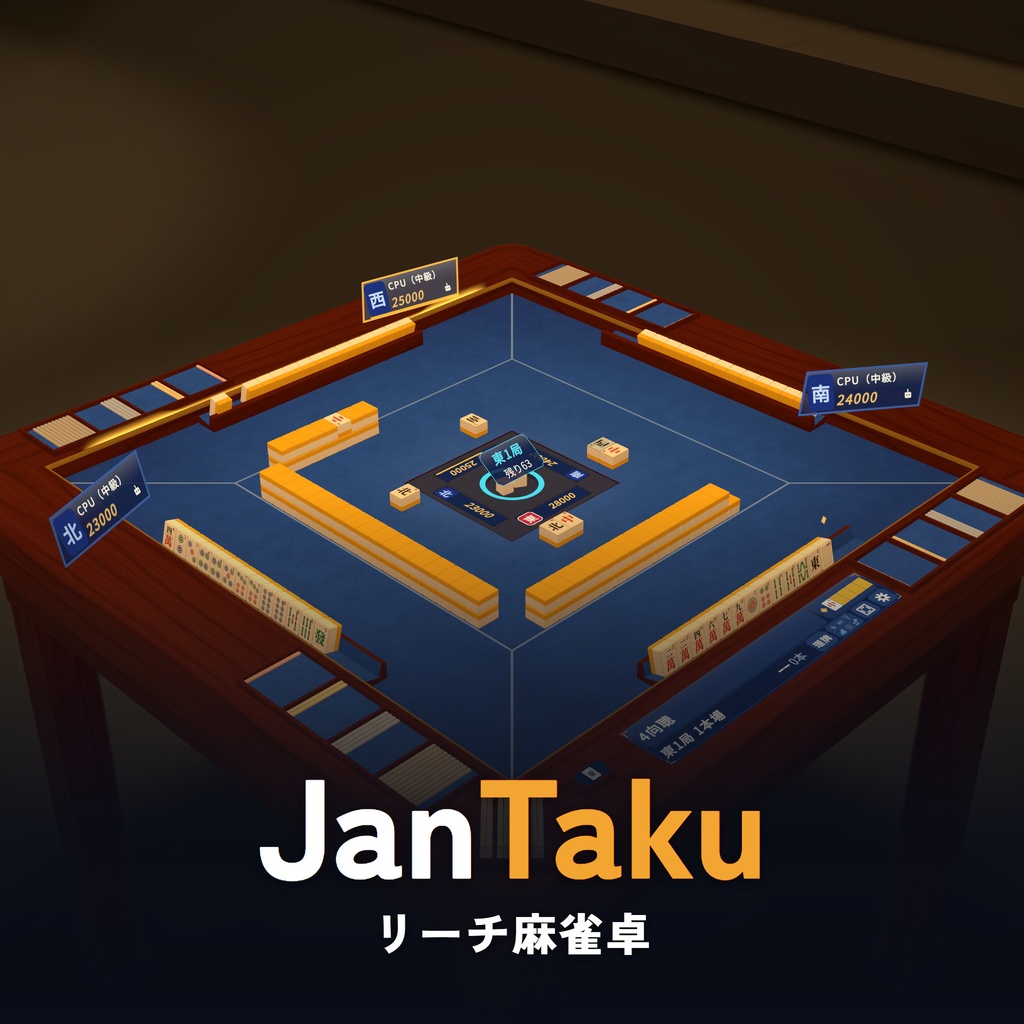
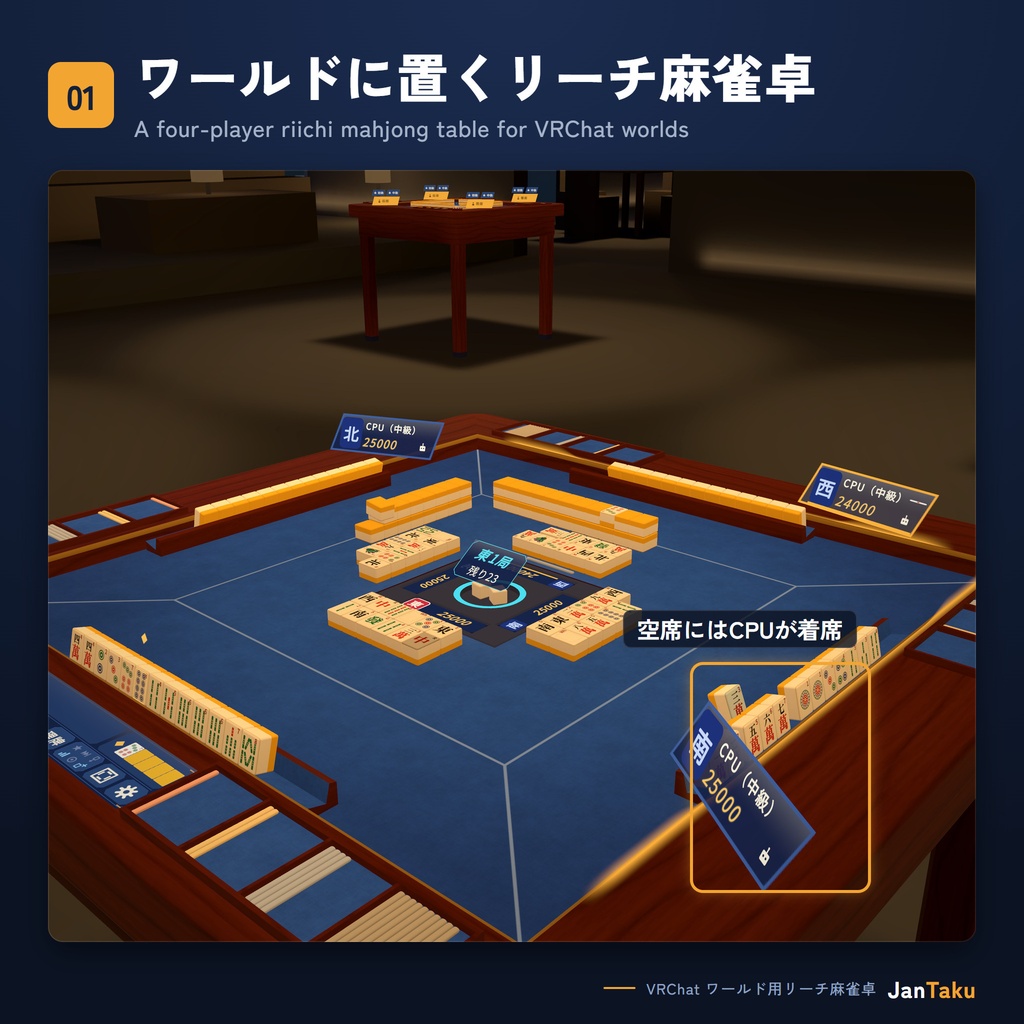
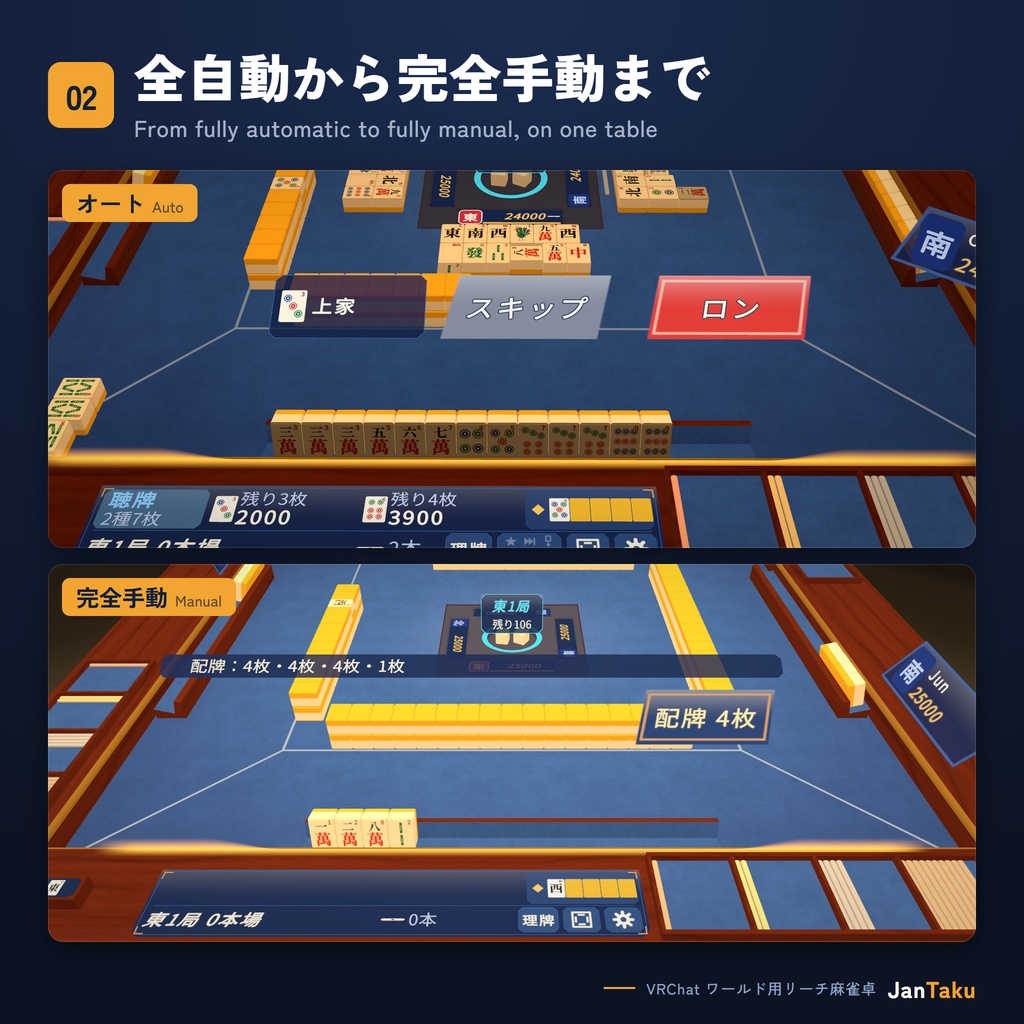
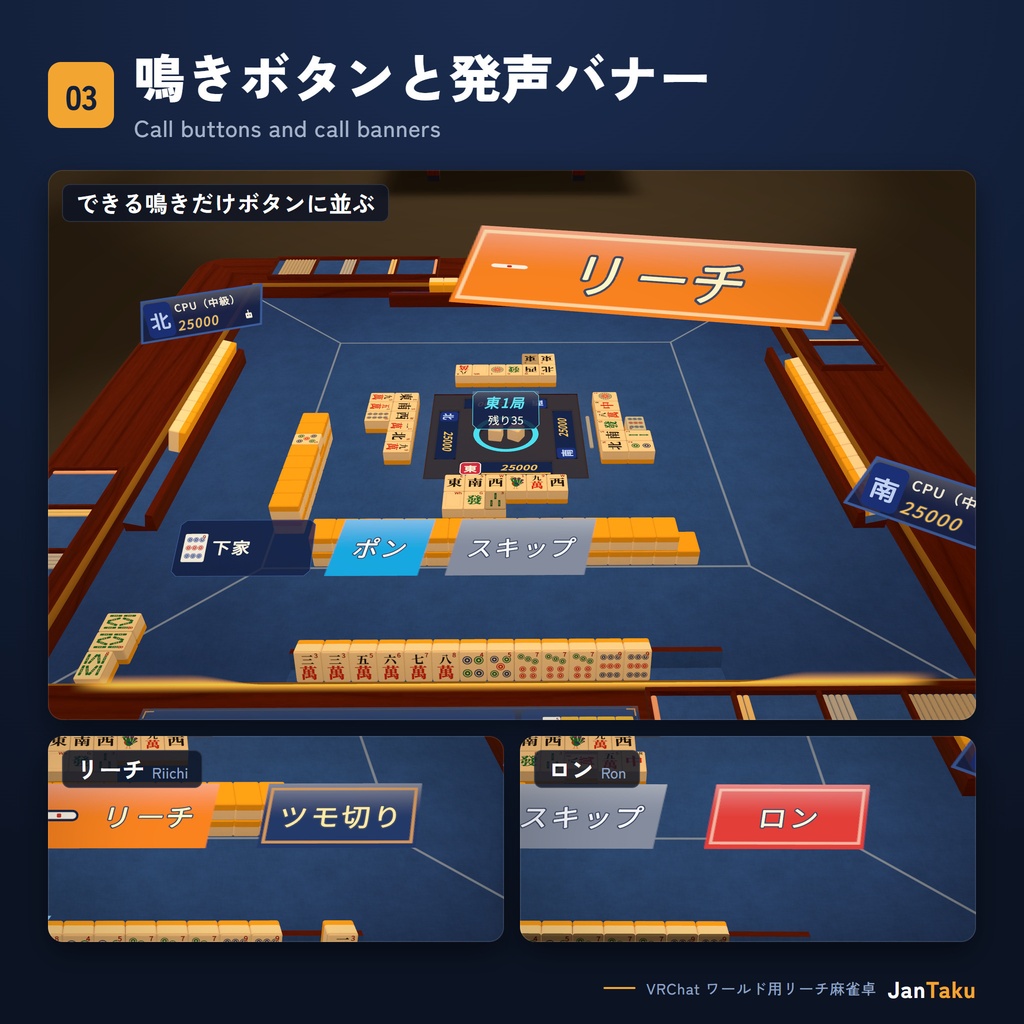
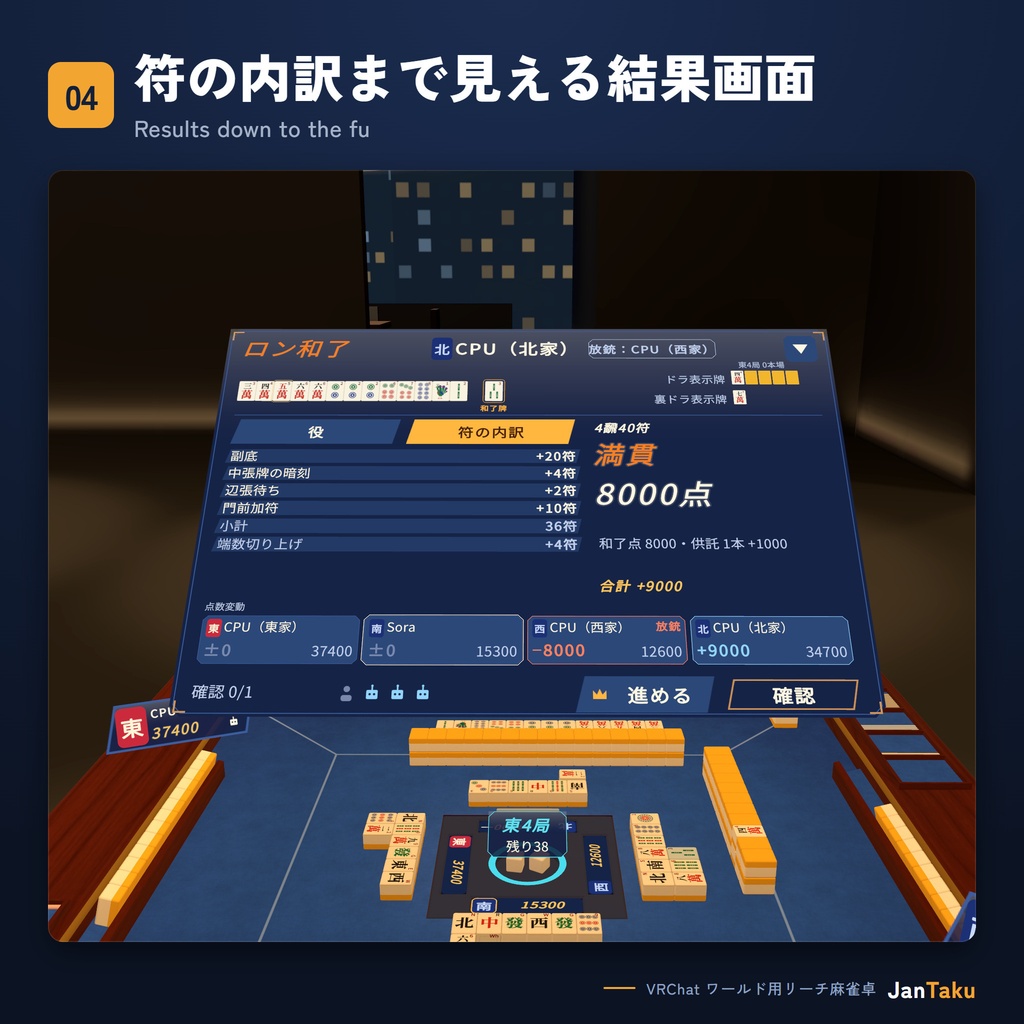
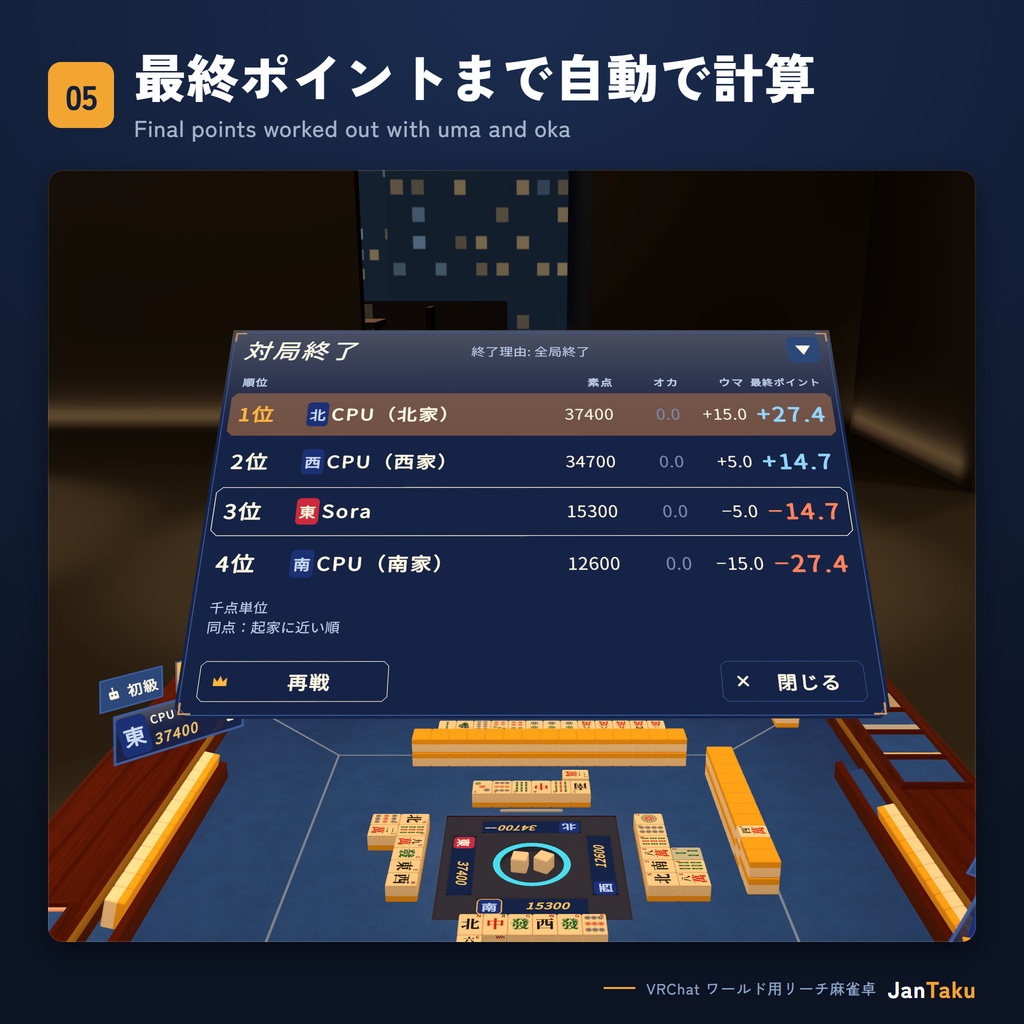
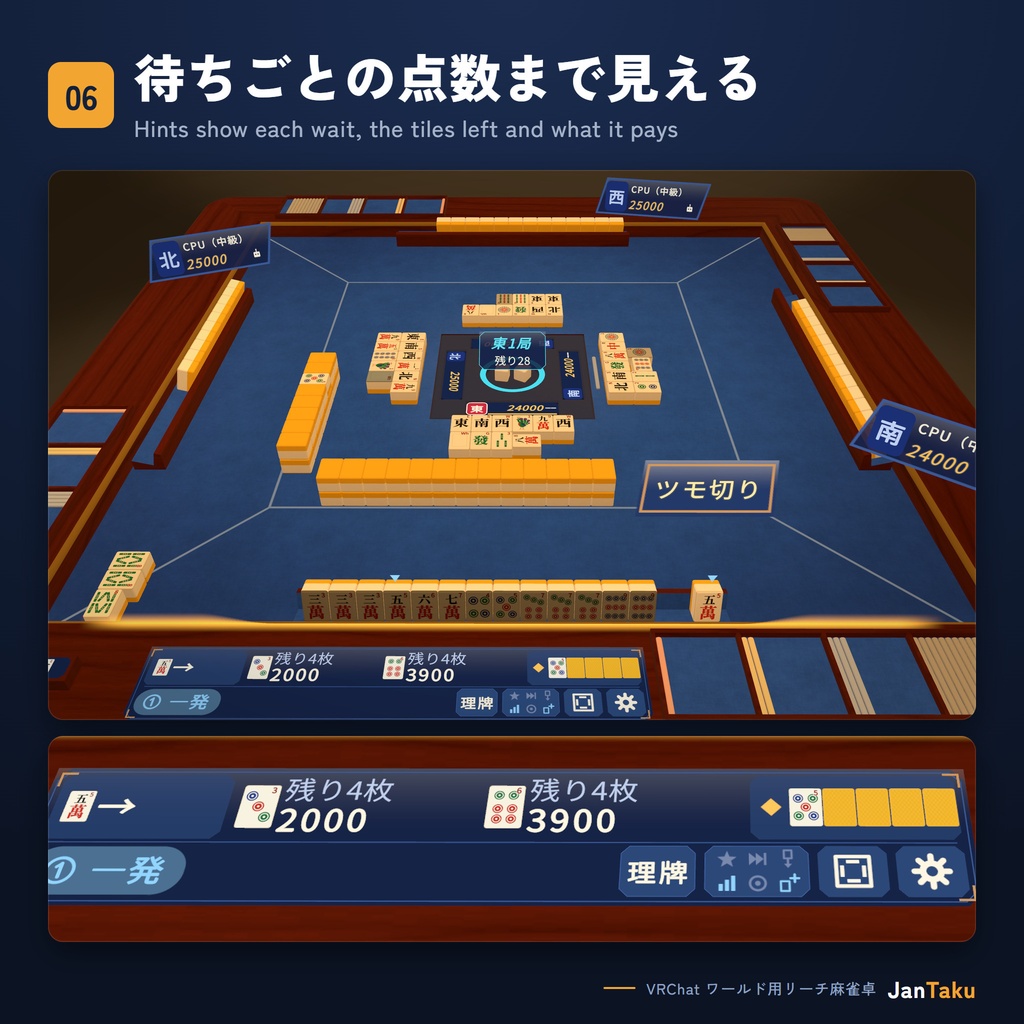
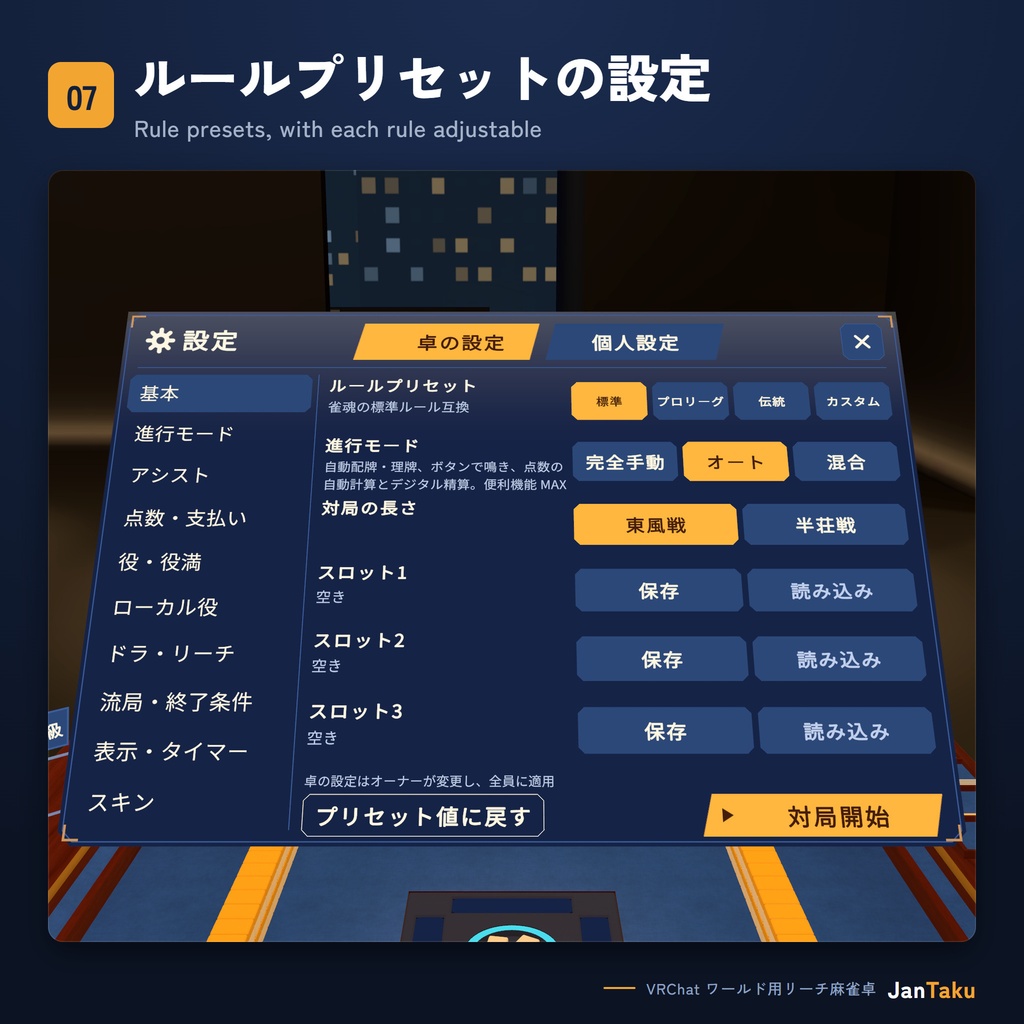
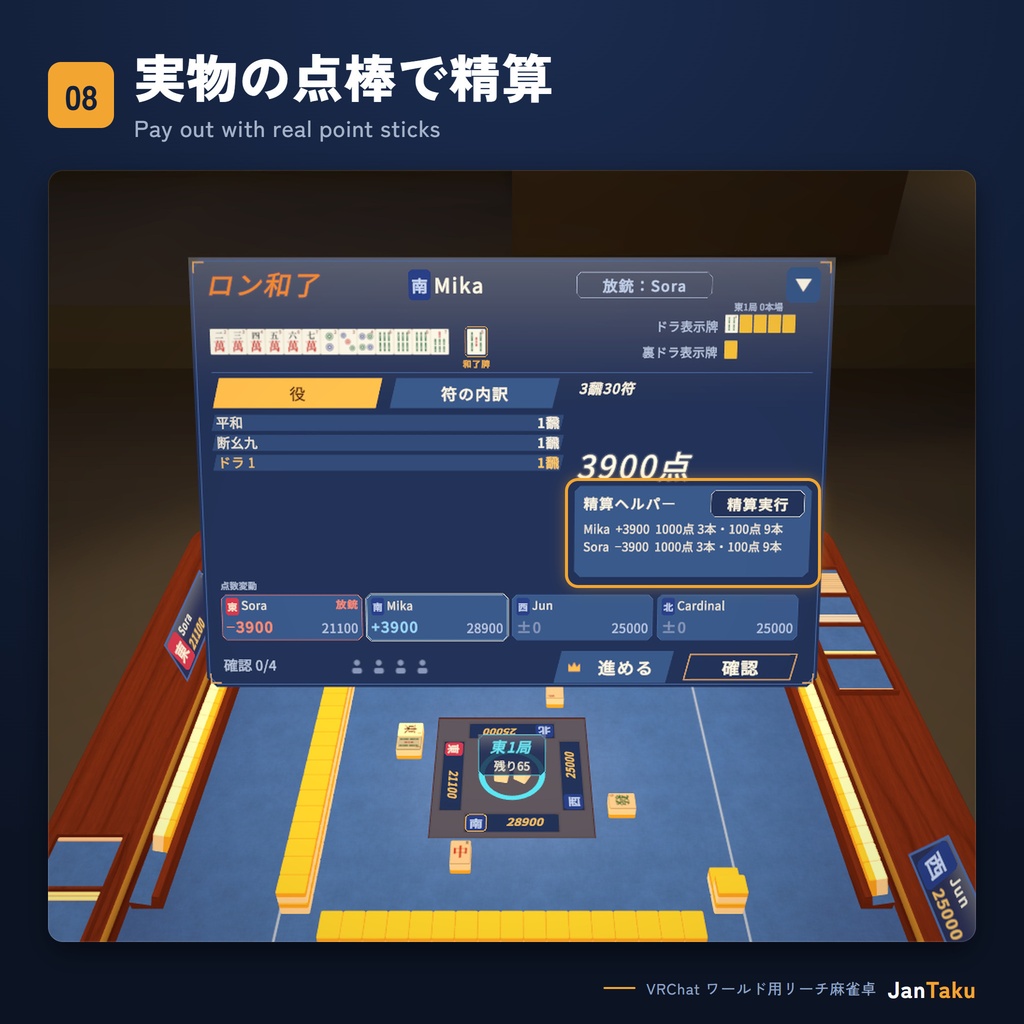
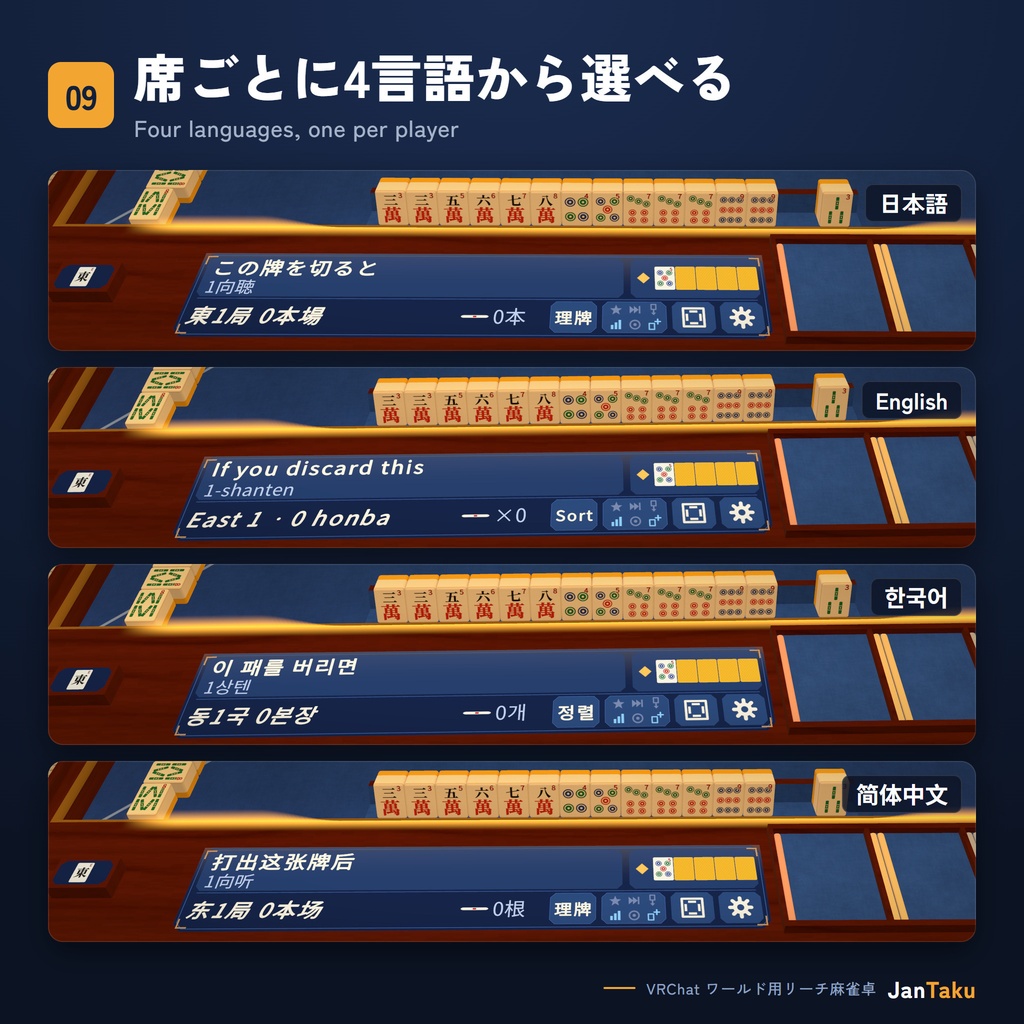
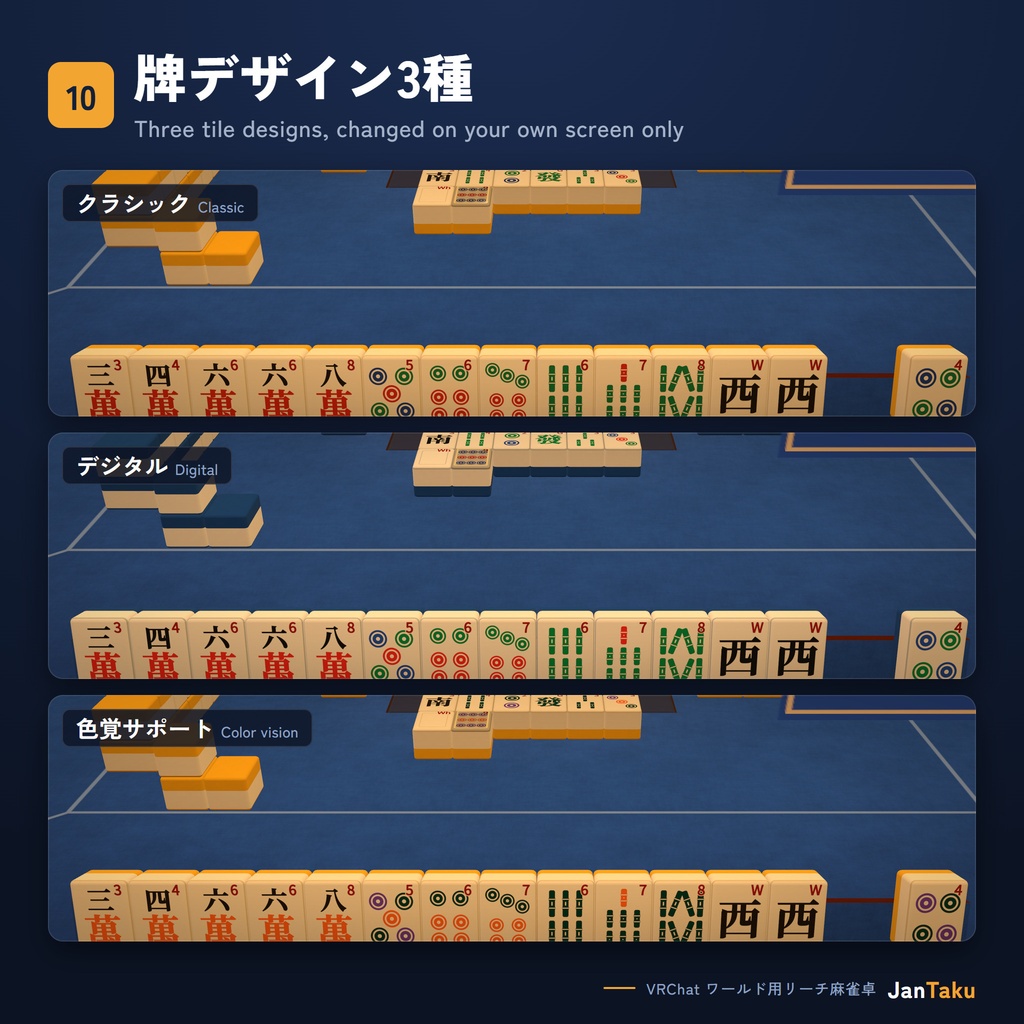
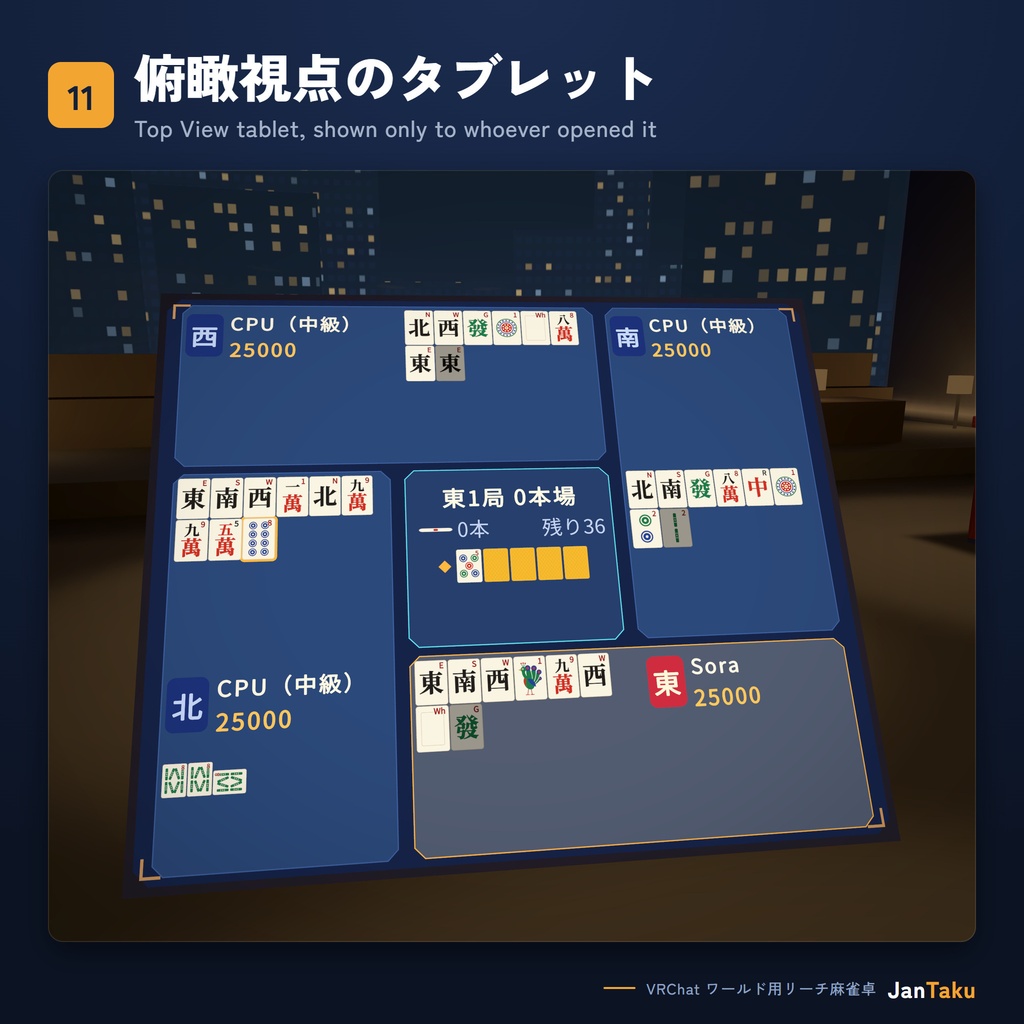
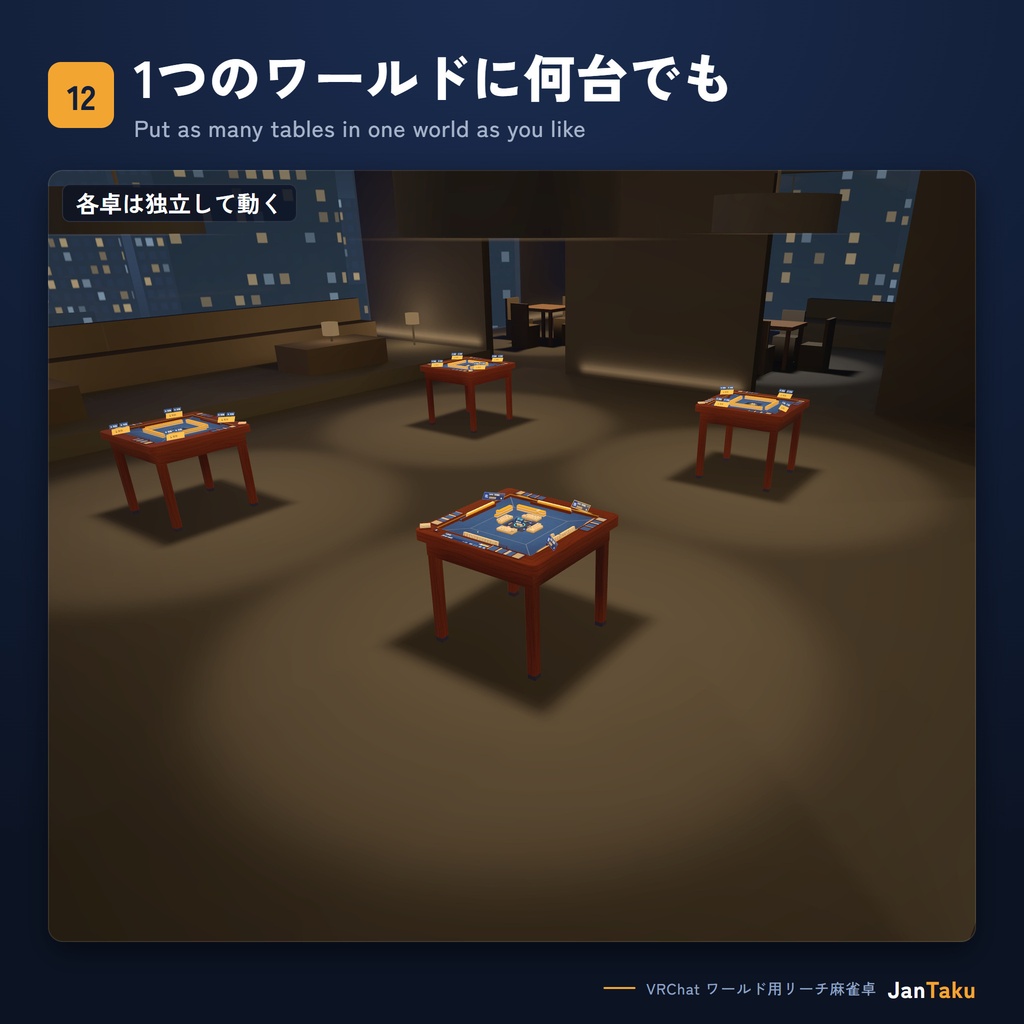


【発売記念価格】2026年11月15日まで3,500円、以降は4,500円です。 JanTaku(雀卓)は、VRChatのワールドに置いて使う4人打ちリーチ麻雀卓のプレハブです。 点数計算は卓が行います。牌を手で取って切る完全手動のプレイから、ボタン中心のオートプレイまで、1つの卓で選べます。 無料の体験ワールドで実際に遊べます。 https://vrchat.com/home/world/wrld_8e6b2172-5b73-44f8-a5d0-eeaa72daba75 デモ動画 https://youtu.be/tvT4QyjbqBs 【特徴】 ■ 点数計算 ・符を正確に計算します。複数の解釈ができる手は高点法で最も高い点数を採用し、役満の複合にも対応しています。 ・結果画面には役の一覧、飜と符、符の内訳、点数と支払いの内訳が出ます。対局が終わると、素点、オカ、ウマ、最終ポイントを順に表示します。 ■ ルール ・ルールプリセットは3種類です。 標準:雀魂の標準ルール互換 プロ・リーグ:Mリーグ公式ルール互換 伝統:天鳳ルール互換 ・赤ドラ0/3/4枚、裏ドラ、カン裏、一発、喰いタン、後付け、数え役満、ダブル役満、流し満貫、切り上げ満貫、ダブロン、途中流局、ウマ、オカなどを個別に変更できます。 ・持ち時間のタイマーと、人和、八連荘、大車輪、三連刻、一色三順のローカル役もオンにできます。 ・サービス名はルールの互換を示すためのもので、JanTakuは各サービスと提携していません。 ■ 進行モード ・完全手動:牌山から手で牌を取り、手で河に置き、実物の点棒で精算します。山積み、王牌、ドラ表示牌、局の後の片付けは卓が受け持ちます。精算ヘルパーが誰が誰にどの点棒を何本払うかを示し、ボタンひとつで点棒を移せます。 ・オート:自動配牌と自動理牌、できる鳴きだけが並ぶボタン、自動点数計算とデジタル精算で進みます。 ・その間は、自動配牌、鳴きボタン、点数方式などのトグルで自由に組み合わせられます。 ・ジェスチャーで宣言:1000点棒をリーチ棒置き場に置くとリーチ、手牌を前へ倒すと和了になります。ボタンを押したときと同じように働きます。 ■ ヒントと自動操作 ・聴牌、待ち牌と残り枚数、待ちごとの点数、3種類を区別するフリテン表示、同じ牌の強調などのヒントを、各プレイヤーが自分でオン・オフできます。残り枚数は自分に見えている牌だけで数えます。 ・自動和了、鳴きなし、自動ツモ切り、ワンタップ打牌などの自動操作も各自で選べます。 ■ プレイヤーごとの設定 ・表示言語は日本語、English、한국어、简体中文の4つです。同じ卓でも各自が自分の言語で遊べます。「自動」にするとVRChatの言語に合わせます。 ・牌デザインはクラシック、デジタル、色覚サポートの3種類で、自分の画面だけで切り替わります。 ・UIサイズなどの個人設定は保存され、同じワールドのすべてのJanTaku卓で共通です。 ■ オーナーの引き継ぎと復帰 ・卓のオーナーがワールドを離れると、残った着席者の1人が自動でオーナーを引き継ぎます。牌山、点数、リーチ、フリテンの状態はそのまま保たれ、対局は止まりません。 ・対局中にワールドを離れた人は、同じ表示名で戻ってくると、手牌と点数をそのまま引き継いで再着席します。 ■ CPU ・鳴きボタンを使う卓では、空席にCPUが入ります。手動の卓でも、オーナーが空席をCPUに任せられます。 ・強さは初級と中級の2段階で、オーナーが対局前に席ごとに選びます。対局中は変えられず、対局の途中で席に入ったCPUは卓の既定の強さで打ちます。 ・初級は牌効率どおりに打ちます。中級はドラと役を重視し、手が遠いときは他家のリーチに降ります。 ・CPUは4種類の声で、チー、ポン、カン、リーチ、ロン、ツモと、流局時の聴牌・ノーテンを発声します。 ■ 観戦と学習 ・卓の横の観戦ボードに、局の情報と4席の点数が出ます。 ・俯瞰視点のタブレットは、卓を上から見た図を牌の画像で描きます。離れていても捨て牌が読みやすく、押した人の画面にだけ出ます。 ・学習モードでは全員の手牌が公開され、観戦ボードで席をフォローすると、その席の手牌とヒントが見られます。 ■ ワールド制作者の方へ ・1つのワールドに卓を何台でも置けて、各卓は独立して動きます。デモシーンには卓4台の配置例が入っています。 ・卓は外寸88cm四方、高さは標準で74cmです。立って遊ぶワールドでは0.90mがおすすめです。VRChatの椅子を使わないので、現実で座っていても立っていても遊べます。 ・ルールプリセット、進行モード、卓スキンの初期値は、インスペクターで卓ごとに決められます。 ・VRC Light Volumes を使うワールドでは、設定なしで卓がその光を受けます。 ・外部サーバー、課金、利用期限、ライセンス認証はありません。販売者のサービスがなくなっても、ワールドに入れた卓はそのまま動きます。 ■ 音 ・打牌、ツモ、鳴き、サイコロ、点棒、ボタンの音は実際の録音です。 ・リーチ、和了、結果画面の音と、自分の手番と鳴きの機会を知らせる通知音2種の計5つは、好きな音を入れられるよう無音のファイルで入っています。Assets/JanTaku/Audio/ にある同じ名前のファイルを差し替えると、その音が鳴ります。通知音は本人にだけ聞こえます。 【内容物】 ・JanTaku_v1.0.0.zip(約36MB) JanTaku_v1.0.0.unitypackage 卓のプレハブ デモシーン:卓4台、4言語の案内ポスター、ライティングの例 取扱説明書と利用規約:日本語、English、한국어、简体中文 サードパーティ表記 README.txt と docs フォルダ:導入方法と、取扱説明書、利用規約、サードパーティ表記のテキスト版。インポートしなくても読めます。 VRChat SDK と UdonSharp は含まれていません。 【動作環境】 ・Unity:VRChatがワールド制作用にサポートしているバージョン。執筆時点では 2022.3.22f1 です。 ・VRChat Creator Companion(VCC)で作ったワールドプロジェクト ・VRChat SDK - Worlds 3.10.4 以上。UdonSharp は Worlds SDK に含まれています。 ・TextMeshPro と TMP Essential Resources ・Built-in レンダーパイプライン。VRChatワールドの標準です。 ・PC専用 【負荷の目安】卓1台あたり ・ポリゴン 66,078 ・マテリアル 20 ・テクスチャメモリ 129.7MiB ・UdonBehaviour 296 ・卓に届くリアルタイムのポイントライトやスポットライトは、1つにつき卓1台あたりドローコールを約400増やします。ライトはベイクをおすすめします。 【導入方法】 1. VCCでワールドプロジェクトを用意し、VRChat SDK - Worlds を 3.10.4 以上にします。 2. Unityでプロジェクトを一度開き、SDKの初回設定が終わるまで待ちます。 3. ZIPを展開して、JanTaku_v1.0.0.unitypackage をインポートします。 4. Window > TextMeshPro > Import TMP Essential Resources を実行します。 5. メニュー JanTaku > Setup > Run everything を一度実行します。VRChatのレイヤーと衝突マトリクス、TMPの韓国語の改行をまとめて設定します。 6. Assets/JanTaku/Prefabs/JanTaku_Table.prefab をシーンに置きます。ルートは床の高さに置き、Scale は (1, 1, 1) のままにします。 更新するときは、新しいパッケージを既存のフォルダの上にそのままインポートします。各手順の詳細は同梱の取扱説明書にあります。 【注意事項】 ・PC専用です。Android(Quest など)と iOS には対応していません。 ・4人打ちのみです。 ・CPUの強さは初級と中級の2段階です。 ・CPUボイスは日本語の1セットで、表示言語によって変わりません。 ・1つのワールドに置くJanTaku卓は、すべて同じバージョンにしてください。 ・卓の Scale は (1, 1, 1) のままお使いください。非均一スケールには対応していません。 ・VRChatクライアントを改造した人は、他人の手牌や牌山などの隠れた牌を読み取れます。VRChatのカードゲームやボードゲームすべてに共通する制限です。 ・公式ワールドで販売している和了演出のスキンは、このパッケージには含まれていません。 【お問い合わせ】 BoothのショップSkyFall Den(https://skyfallden.booth.pm)のメッセージでお送りください。 JanTakuのバージョン(Assets/JanTaku/VERSION.txt)、UnityとSDKのバージョン、症状、Consoleに出た [JanTaku] で始まるメッセージを添えていただけると、原因を調べやすくなります。
利用規約
利用条件の全文は、パッケージに同梱の利用規約(EULA)にあります。要点は次のとおりです。 できること ・ワールドの数、1つのワールドに置く卓の数に制限なく使えます。 ・ワールドはパブリック、フレンド、プライベートなど、どの公開範囲でも公開できます。 ・ワールドのスクリーンショットや動画を撮影して公開できます。動画の広告収益など、公開して得る収益も受け取れます。 ・卓の色、マテリアル、細部のデザインを変えるなど、自分で使うために改変できます。 できないこと ・本製品を入れたワールドを収益化すること。VRChatの中では、収益化機能を使うことを指します。たとえば、クリエイターエコノミーで商品やサブスクリプションを売ることや、VRChatで購入した人やサブスクリプションに加入した人だけがワールドやその機能を使えるようにすることが当てはまります。VRChatの外では、そのワールドに関わる入場料や利用料、寄付や支援者向けの特典(Patreonなど)、スポンサー契約(スポンサー付きの動画や配信を含む)、有料イベントや企業イベントが当てはまります。収益が本製品と関係なくても同じです。 ・和了、リーチ、鳴きの演出のようなエフェクトや、スキン、テーマをゲームプレイに追加すること。自分のワールドだけで使うための自作も含みます。こうしたアドオンや改変版は、無償でも配布できません。 ・有償か無償かを問わず、本製品やその一部のファイルを、改変版も含めて再配布すること ・再販売や、ほかの商品への同梱 ・牌の絵、モデル、効果音などのアセットを取り出して配布や販売をすること ・第三者への再許諾 ・自分が制作したものとして表示すること ワールドをVRChatにアップロードすること自体は、再配布に当たりません。ほかの人のワールド制作を手伝うときにファイルを渡す場合は、その人も本製品を購入する必要があります。 各言語版の内容が異なる場合は、韓国語版が優先します。
更新履歴
2026-11-01 v1.0.0 初回リリース アップデートを公開するときは、このBoothの商品から配布します。
English
【Launch price】¥3,500 until November 15, 2026, then ¥4,500. JanTaku is a four-player riichi mahjong table prefab for VRChat worlds. The table does the scoring. One table covers everything from fully manual play, where players draw and discard by hand, to automatic play driven by buttons. Try it in the free trial world: https://vrchat.com/home/world/wrld_8e6b2172-5b73-44f8-a5d0-eeaa72daba75 Demo video: https://youtu.be/tvT4QyjbqBs 【Features】 ■ Scoring - Fu are counted exactly. When a hand can be read more than one way, the highest-scoring reading wins, and stacked yakuman are scored. - The results screen shows the yaku, han and fu, a fu breakdown and the payment breakdown. At the end of a game it shows raw scores, oka, uma and final points in order. ■ Rules - Three rule presets: Standard: compatible with Mahjong Soul's default rules Pro: compatible with the official M.League rules Orthodox: compatible with Tenhou rules - You can change red fives (0, 3 or 4), ura dora, kan ura, ippatsu, open tanyao, atozuke, kazoe yakuman, double yakuman, nagashi mangan, kiriage mangan, double ron, abortive draws, uma, oka and more, one by one. - You can also switch on a turn timer and five local yaku: Renhou, Paarenchan, Daisharin, Sanrenkou and Isshoku Sanjun. - The service names indicate rule compatibility only. JanTaku is not affiliated with any of these services. ■ Play modes - Fully manual: players draw from the wall, place their discards and pay with physical point sticks, all by hand. The table builds the wall and looks after the dead wall, dora indicators and clean-up. The settlement helper shows who pays whom with which sticks and moves them with one button. - Automatic: auto deal and sorting, call buttons that appear only for calls you can make, automatic scoring and digital payments. - Individual toggles such as auto deal, call buttons and scoring method let you mix the two freely. - Declare by gesture: drop a 1000-point stick on the riichi spot to declare riichi, or push your hand forward to declare a win. Each gesture does exactly what its button does. ■ Hints and auto options - Each player can switch on hints: tenpai, waits and tiles left, value per wait, furiten markers that tell the three kinds apart, same-tile highlight and more. Tiles left are counted only from tiles you can see. - Auto-win, auto-skip calls, auto-tsumogiri, one-tap discard and other auto options are per player too. ■ Per-player settings - Display language: English, 日本語, 한국어 or 简体中文. Everyone at the same table can use their own language, and Auto follows your VRChat language. - Three tile designs, Classic, Digital and Colorblind, switched on your own screen only. - Personal settings such as UI size are saved and apply to every JanTaku table in the world. ■ Owner hand-off and rejoining - If the table owner leaves the world, one of the remaining seated players becomes the owner automatically. The wall, scores, riichi and furiten carry on unchanged and the game does not stop. - A player who leaves mid-game and comes back with the same display name is reseated with their hand and score intact. ■ Bots - On tables with call buttons, bots fill empty seats. On manual tables the owner can hand an empty seat to a bot. - There are two levels, Easy and Normal, which the owner picks per seat before the game. The level cannot be changed during a game, and a bot that takes over a seat mid-game plays at the table's default level. - Easy plays for tile efficiency. Normal values dora and yaku and folds against riichi when its own hand is far from ready. - Bots call chii, pon, kan, riichi, ron and tsumo out loud in four Japanese voices, and say tenpai or noten at an exhaustive draw. ■ Spectating and learning - The spectator board beside the table shows round info and all four scores. - The Top View tablet draws the table from above with tile images, so discards stay readable from a distance. Only the person who opened it can see it. - In Learning mode every hand is open, and following a seat on the spectator board shows that seat's hand and hints. ■ For world creators - Place as many tables in one world as you like; each one runs on its own. The demo scene has a four-table layout. - The table is 88 cm square and 74 cm high by default. For worlds where people play standing, 0.90 m is recommended. It does not use VRChat stations, so players can sit or stand in real life. - The default rule preset, play mode and table skin are set per table in the inspector. - In worlds that use VRC Light Volumes, the table is lit by them with no setup. - No external servers, billing, expiry dates or license activation. Tables already in your world keep working even if the seller's services go away. ■ Sound - The tile discard, draw and call sounds, the dice, the point sticks and the buttons are real recordings. - Five sounds ship as silent files so you can drop in your own: riichi, win, results, and the two alerts for your turn and for a call chance. Replace the file with the same name in Assets/JanTaku/Audio/ and it plays. Alerts are heard only by the player they are for. 【Contents】 - JanTaku_v1.0.0.zip (about 36 MB) JanTaku_v1.0.0.unitypackage Table prefab Demo scene with four tables, guide posters in four languages and a lighting example Manual and EULA in English, Japanese, Korean and Simplified Chinese Third-party notices README.txt and a docs folder: the setup steps, and text copies of the manual, EULA and third-party notices that you can read without importing VRChat SDK and UdonSharp are not included. 【Requirements】 - Unity: the version VRChat supports for world creation. At the time of writing that is 2022.3.22f1. - A world project made with the VRChat Creator Companion (VCC) - VRChat SDK - Worlds 3.10.4 or later. UdonSharp comes with the Worlds SDK. - TextMeshPro, with TMP Essential Resources imported - Built-in render pipeline, the standard for VRChat worlds - PC only 【Performance per table】 - Polygons: 66,078 - Materials: 20 - Texture memory: 129.7 MiB - UdonBehaviours: 296 - Each real-time point or spot light that reaches the table adds about 400 draw calls per table. Baked lighting is recommended. 【Setup】 1. Prepare a world project in VCC with VRChat SDK - Worlds 3.10.4 or later. 2. Open the project in Unity once and wait for the SDK's first-time setup to finish. 3. Unzip the download and import JanTaku_v1.0.0.unitypackage. 4. Run Window > TextMeshPro > Import TMP Essential Resources. 5. Run JanTaku > Setup > Run everything once. It sets up VRChat's layers and collision matrix and TMP's Korean line breaking in one go. 6. Drag Assets/JanTaku/Prefabs/JanTaku_Table.prefab into your scene. Keep its root at floor height and its scale at (1, 1, 1). To update, import the new package over the existing folder. The included manual covers every step in detail. 【Limitations】 - PC only. Android (including Quest) and iOS are not supported. - Four players only. - Bots have two levels, Easy and Normal. - Bot voices are one Japanese set and do not change with the display language. - All JanTaku tables in one world must be the same version. - Keep the table's scale at (1, 1, 1). Non-uniform scale is not supported. - Someone using a modified VRChat client can read hidden tiles, such as other players' hands and the wall. This applies to every card and board game in VRChat. - The win-effect skins sold in the official world are not part of this package. 【License】 The full terms are in the EULA that comes with the package. In short: You can - use it in any number of worlds, with any number of tables in each - publish those worlds at any visibility, including public, friends and private - take and publish screenshots and videos of those worlds, and earn revenue from publishing them, such as video ad revenue - modify it for your own use, such as changing the table's colors, materials and design details You cannot - monetize a world that contains it. Inside VRChat, that means using VRChat's monetization features, for example selling products or subscriptions through the Creator Economy, or putting the world or its features behind a VRChat purchase or subscription. Outside VRChat, it means money tied to the world, such as entry or access fees, donations or supporter rewards (Patreon and similar), sponsorships (including sponsored videos and streams), and paid or corporate events. This applies even if the money has nothing to do with JanTaku. - add effects to the gameplay, such as win, riichi or call effects, skins or themes, even ones you made only for your own world. Add-ons and modified versions like that cannot be distributed either, even for free. - redistribute the files or any part of them, modified or not, paid or free - resell it or include it in another product - take individual assets such as tile art, models or sounds out of it and distribute or sell them - sublicense it to anyone else - present it as your own work Uploading a world to VRChat is not redistribution. If someone helps you build your world and needs the files, they need their own copy. If the language versions of the EULA differ, the Korean version governs. 【Updates】 2026-11-01 v1.0.0 First release When an update is released, it is delivered through this Booth item. 【Contact】 Send a message to the Booth shop SkyFall Den (https://skyfallden.booth.pm). Please include your JanTaku version (Assets/JanTaku/VERSION.txt), your Unity and SDK versions, what happened, and any Console messages that start with [JanTaku].
한국어
【출시 기념 가격】2026년 11월 15일까지 3,500엔, 이후 4,500엔입니다. JanTaku는 VRChat 월드에 놓고 쓰는 4인 리치마작 테이블 프리팹입니다. 점수 계산은 테이블이 해 줍니다. 패를 손으로 뽑고 버리는 완전수동 플레이부터 버튼 중심의 자동 플레이까지 한 테이블에서 고를 수 있습니다. 무료 체험 월드에서 직접 쳐 볼 수 있습니다. https://vrchat.com/home/world/wrld_8e6b2172-5b73-44f8-a5d0-eeaa72daba75 데모 영상 https://youtu.be/tvT4QyjbqBs 【특징】 ■ 점수 계산 ・부를 정확히 계산합니다. 여러 해석이 가능한 손은 고점법으로 가장 높은 점수를 채택하고, 복합 역만도 처리합니다. ・결과 화면에는 역 목록, 판과 부, 부 내역, 점수와 지불 내역이 나옵니다. 대국이 끝나면 소점, 오카, 우마, 최종 포인트를 차례로 보여 줍니다. ■ 룰 ・룰 프리셋은 세 가지입니다. 기본: 작혼 기본 룰 호환 프로리그: M리그 공식 룰 호환 정통: 텐호 룰 호환 ・적도라 0/3/4장, 뒷도라, 깡뒷도라, 일발, 쿠이탕, 아토즈케, 헤아림 역만, 더블 역만, 유국만관, 절상만관, 더블 론, 도중 유국, 우마, 오카 등을 하나씩 바꿀 수 있습니다. ・제한 시간 타이머와 인화, 팔연장, 대차륜, 삼연각, 일색삼순 로컬역도 켤 수 있습니다. ・서비스 이름은 룰 호환을 알리는 용도이며, JanTaku는 해당 서비스와 제휴 관계가 없습니다. ■ 진행 모드 ・완전수동: 패산에서 손으로 패를 뽑고, 손으로 강에 놓고, 실물 점봉으로 정산합니다. 패산 쌓기, 왕패, 도라 표시패, 국이 끝난 뒤 정리는 테이블이 맡습니다. 정산 도우미가 누가 누구에게 어떤 점봉을 몇 개 낼지 보여 주고, 버튼 하나로 점봉을 옮깁니다. ・자동: 자동 배패와 자동 정렬, 할 수 있는 콜만 뜨는 버튼, 자동 점수 계산과 디지털 정산으로 진행합니다. ・두 모드 사이는 자동 배패, 콜 버튼, 점수 방식 같은 토글로 자유롭게 섞을 수 있습니다. ・손동작으로 선언: 1000점 봉을 리치봉 자리에 놓으면 리치, 손패를 앞으로 눕히면 화료가 됩니다. 버튼을 누른 것과 똑같이 동작합니다. ■ 힌트와 자동 옵션 ・텐파이, 대기패와 남은 패 수, 대기별 점수, 세 종류를 구별하는 후리텐 표시, 같은 패 강조 같은 힌트를 각자 켜고 끌 수 있습니다. 남은 패 수는 나에게 보이는 패만으로 셉니다. ・자동 화료, 후로 없음, 자동 버림, 한 번 탭 같은 자동 옵션도 각자 고릅니다. ■ 플레이어마다 다른 설정 ・화면 언어는 한국어, 일본어, 영어, 중국어 간체 네 가지입니다. 같은 테이블에서도 각자 자기 언어로 보고, '자동'으로 두면 VRChat 언어를 따릅니다. ・패 디자인은 클래식, 디지털, 색약 대응 세 가지이고, 내 화면에서만 바뀝니다. ・UI 크기 같은 개인 설정은 저장되고, 같은 월드의 모든 JanTaku 테이블에 함께 적용됩니다. ■ 오너 승계와 복귀 ・테이블 오너가 월드를 떠나면 남은 착석자 중 한 명이 자동으로 오너를 이어받습니다. 패산, 점수, 리치, 후리텐 상태가 그대로 유지되고 대국은 멈추지 않습니다. ・대국 중에 월드를 떠난 사람이 같은 표시 이름으로 돌아오면, 손패와 점수를 그대로 이어받아 다시 앉습니다. ■ 봇 ・콜 버튼을 쓰는 테이블에서는 빈자리에 봇이 들어옵니다. 수동 테이블에서도 오너가 빈자리를 봇에게 맡길 수 있습니다. ・난이도는 쉬움과 보통 두 가지이고, 오너가 대국 전에 자리마다 고릅니다. 대국 중에는 바꿀 수 없고, 대국 도중에 자리에 들어온 봇은 테이블의 기본 난이도로 칩니다. ・쉬움은 패 효율대로 칩니다. 보통은 도라와 역을 챙기고, 손이 멀 때는 상대 리치에 내립니다. ・봇은 네 가지 목소리로 치, 퐁, 깡, 리치, 론, 쯔모를 외치고, 유국 때는 텐파이나 노텐을 말합니다. ■ 관전과 교육 ・테이블 옆 관전 보드에 국 정보와 네 자리의 점수가 나옵니다. ・탑 뷰 태블릿은 테이블을 위에서 본 모습을 패 그림으로 그립니다. 멀리서도 버림패가 잘 읽히고, 누른 사람 화면에만 나옵니다. ・교육 모드에서는 모든 손패가 공개되고, 관전 보드에서 자리를 팔로우하면 그 자리의 손패와 힌트를 볼 수 있습니다. ■ 월드 제작자를 위한 정보 ・한 월드에 테이블을 몇 대든 놓을 수 있고, 테이블마다 따로 동작합니다. 데모 씬에 테이블 4대 배치 예시가 들어 있습니다. ・테이블은 외곽 88 cm 정사각형, 높이는 기본 74 cm입니다. 서서 치는 월드에는 0.90 m를 권장합니다. VRChat 의자 기능을 쓰지 않아서 현실에서 앉아 있든 서 있든 그대로 칠 수 있습니다. ・룰 프리셋, 진행 모드, 테이블 스킨의 초기값은 인스펙터에서 테이블마다 정합니다. ・VRC Light Volumes를 쓰는 월드에서는 따로 설정하지 않아도 테이블이 그 조명을 받습니다. ・외부 서버, 과금, 사용 기한, 라이선스 인증이 없습니다. 판매자 서비스가 사라져도 월드에 넣은 테이블은 그대로 동작합니다. ■ 소리 ・타패, 쯔모, 콜, 주사위, 점봉, 버튼 소리는 실제 녹음입니다. ・리치, 화료, 결과 화면 소리와 내 차례와 콜 기회를 알리는 알림음 두 가지, 모두 다섯 개는 원하는 소리를 넣을 수 있도록 무음 파일로 들어 있습니다. Assets/JanTaku/Audio/ 의 같은 이름 파일을 바꾸면 그 소리가 납니다. 알림음은 본인에게만 들립니다. 【구성품】 ・JanTaku_v1.0.0.zip(약 36 MB) JanTaku_v1.0.0.unitypackage 테이블 프리팹 데모 씬: 테이블 4대, 4개 국어 안내 포스터, 조명 예시 설명서와 이용 허락 계약서: 한국어, 일본어, 영어, 중국어 간체 서드파티 고지 README.txt와 docs 폴더: 설치 방법과, 설명서, 이용 허락 계약서, 서드파티 고지의 텍스트판입니다. 임포트하지 않아도 읽을 수 있습니다. VRChat SDK와 UdonSharp는 들어 있지 않습니다. 【요구 사항】 ・Unity: VRChat이 월드 제작용으로 지원하는 버전. 작성 시점에는 2022.3.22f1입니다. ・VRChat Creator Companion(VCC)으로 만든 월드 프로젝트 ・VRChat SDK - Worlds 3.10.4 이상. UdonSharp는 Worlds SDK에 들어 있습니다. ・TextMeshPro와 TMP Essential Resources ・Built-in 렌더 파이프라인. VRChat 월드의 기본입니다. ・PC 전용 【부하 기준】 테이블 1대당 ・폴리곤 66,078 ・머티리얼 20 ・텍스처 메모리 129.7 MiB ・UdonBehaviour 296 ・테이블에 닿는 실시간 포인트 라이트나 스폿 라이트는 하나마다 테이블 1대당 드로콜을 약 400 늘립니다. 라이트는 베이크를 권장합니다. 【설치 방법】 1. VCC로 월드 프로젝트를 준비하고 VRChat SDK - Worlds를 3.10.4 이상으로 맞춥니다. 2. Unity에서 프로젝트를 한 번 열고 SDK의 첫 설정이 끝날 때까지 기다립니다. 3. ZIP을 풀고 JanTaku_v1.0.0.unitypackage를 임포트합니다. 4. Window > TextMeshPro > Import TMP Essential Resources를 실행합니다. 5. 메뉴 JanTaku > Setup > Run everything을 한 번 실행합니다. VRChat 레이어와 충돌 매트릭스, TMP의 한국어 줄바꿈을 한꺼번에 설정합니다. 6. Assets/JanTaku/Prefabs/JanTaku_Table.prefab을 씬에 놓습니다. 루트는 바닥 높이에 두고, Scale은 (1, 1, 1) 그대로 둡니다. 업데이트할 때는 새 패키지를 기존 폴더 위에 그대로 임포트합니다. 단계마다 자세한 설명은 동봉된 설명서에 있습니다. 【알아 두실 점】 ・PC 전용입니다. Android(Quest 등)와 iOS는 지원하지 않습니다. ・4인 대국만 지원합니다. ・봇 난이도는 쉬움과 보통 두 가지입니다. ・봇 음성은 일본어 한 벌이고, 화면 언어에 따라 바뀌지 않습니다. ・한 월드에 놓는 JanTaku 테이블은 모두 같은 버전이어야 합니다. ・테이블의 Scale은 (1, 1, 1)로 두세요. 비균일 스케일은 지원하지 않습니다. ・VRChat 클라이언트를 개조한 사람은 다른 사람의 손패나 패산 같은 숨겨진 패를 읽을 수 있습니다. 모든 VRChat 카드 게임과 보드 게임에 공통된 한계입니다. ・공식 월드에서 판매하는 화료 연출 스킨은 이 패키지에 들어 있지 않습니다. 【이용 조건】 이용 조건 전문은 패키지에 동봉된 이용 허락 계약서(EULA)에 있습니다. 요점은 다음과 같습니다. 할 수 있는 것 ・월드 수와 한 월드에 놓는 테이블 수에 제한 없이 쓸 수 있습니다. ・월드는 퍼블릭, 프렌드, 프라이빗 등 어떤 공개 범위로도 공개할 수 있습니다. ・월드의 스크린샷과 영상을 찍어 공개할 수 있습니다. 동영상 광고 수익처럼 공개해서 얻는 수익도 받을 수 있습니다. ・테이블의 색, 재질, 세부 디자인을 바꾸는 것처럼, 직접 쓰기 위해 수정할 수 있습니다. 할 수 없는 것 ・제품을 넣은 월드로 수익을 내는 것. VRChat 안에서는 수익화 기능을 쓰는 것이 해당합니다. 예를 들어 크리에이터 이코노미(Creator Economy)로 상품이나 구독을 파는 것, VRChat에서 구매하거나 구독한 사람만 월드나 그 기능을 쓸 수 있게 하는 것입니다. VRChat 밖에서는 그 월드와 관련된 입장료나 이용료, 후원이나 후원자 보상(Patreon 등), 스폰서십(협찬받은 영상이나 방송 포함), 유료 이벤트나 기업 이벤트가 해당합니다. 버는 돈이 제품과 관계없어도 마찬가지입니다. ・화료, 리치, 콜 연출 같은 이펙트나 스킨, 테마를 게임플레이에 더하는 것. 자기 월드에서만 쓰려고 직접 만든 것도 해당합니다. 이런 애드온이나 수정본은 무료로도 배포할 수 없습니다. ・유료든 무료든, 제품이나 그 일부의 파일을 수정본을 포함해 다른 사람에게 재배포하는 것 ・재판매하거나 다른 상품에 넣는 것 ・패 그림, 모델, 효과음 같은 에셋을 떼어 내 배포하거나 판매하는 것 ・다른 사람에게 이용을 재허락하는 것 ・자기가 만든 것처럼 표시하는 것 월드를 VRChat에 업로드하는 것 자체는 재배포가 아닙니다. 다른 사람의 월드 제작을 도우면서 그 사람에게 파일을 건네야 한다면, 그 사람도 제품을 구매해야 합니다. 언어판마다 내용이 다를 경우 한국어판이 우선합니다. 【업데이트 기록】 2026-11-01 v1.0.0 첫 출시 업데이트를 내면 이 Booth 상품에서 배포합니다. 【문의】 Booth 상점 SkyFall Den(https://skyfallden.booth.pm)의 메시지로 보내 주세요. JanTaku 버전(Assets/JanTaku/VERSION.txt), Unity와 SDK 버전, 증상, Console에 나온 [JanTaku]로 시작하는 메시지를 함께 보내 주시면 원인을 찾기 쉬워집니다.
クレジット / Credits / 크레딧
Fonts ・Noto Sans CJK JP © 2014-2021 Adobe SIL Open Font License 1.1 ・Noto Serif CJK JP Bold © 2017-2024 Adobe SIL Open Font License 1.1 牌の絵の漢字の字形 / Character shapes on the tile faces / 패 그림의 글자 모양 ・Noto is a trademark of Google Inc. CPUボイス / Bot voices / 봇 음성 (Aivis Common Model License 1.0) ・AivisSpeech: まお Model: オズチャット -Oz Chat- / Trippy (@ozchat); voice: ねゆたろ ・AivisSpeech: コハク Model: オズチャット -Oz Chat- / Trippy (@ozchat); voice: ねゆたろ ・AivisSpeech: るな Model: 魔法プログラム (@MAHOPROGRAM) ・AivisSpeech: まい Model: 魔法プログラム (@MAHOPROGRAM) 効果音 / Sound effects / 효과음 (CC0 1.0) ・Macif "domino pieces 1", "domino pieces hit" (Freesound) ・Flem0527 "Dice Rolling on Table" (Freesound) ・Kenney "Casino Audio" (kenney.nl) ・husamalhomsi "wood-click-3.wav" (Freesound) シェーダー / Shader / 셰이더 ・Mochie Standard (Mochie's Unity Shaders) Copyright (c) 2020 MochiesCode MIT License (MochiesCode portions) JanTaku/Mochie Standard の名前で同梱 / Bundled as JanTaku/Mochie Standard / JanTaku/Mochie Standard라는 이름으로 들어 있음 中に含まれるコードの表記 / Notices for the code it includes / 안에 든 코드의 고지: THIRD-PARTY-NOTICES.md 1.7 VRChat is a trademark of VRChat Inc. JanTaku is not affiliated with VRChat Inc.