
ForgottenGarden | 잊혀진 정원 [Warudo Pro/Standard]
- Standardダウンロード商品¥ 4,000
- Proダウンロード商品¥ 5,000
- Pro + Standardダウンロード商品¥ 6,000
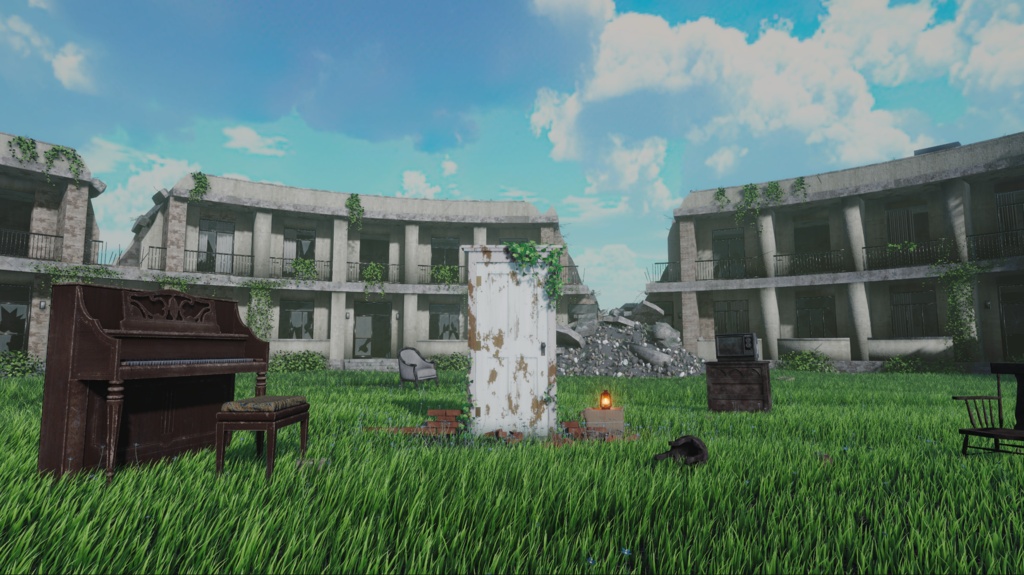


☀️ 잊혀진 정원 🌙 VORA의 신규 맵 「잊혀진 정원」이 정식 출시되었습니다! 무너진 건물로 둘러싸인 신비로운 분위기의 정원을 연출했습니다. ☀️🌙 🔸 2가지 시간대 지원 (낮 / 밤) 🔸 시간대별 볼륨 (Pro 버전) 🔸 맵 중앙의 문 열고 닫기 기능( 열리는 각도, 속도 변경 가능) 🔸 시간 변경 및 문 조작 블루프린트 Pro 버전에는 볼륨 설정이 포함되어 있습니다. ❗❗❗일반 버전에는 볼륨 설정이 포함되지 않습니다.❗❗❗ 일반 버전에서는 카메라에서 직접 Bloom과 Tonemapping을 설정해서 사용하는 것을 권장합니다. Warudo 일반 버전과 Pro 버전의 렌더링 차이로 인해 화면이 일부 다르게 보일 수 있습니다. ❗❗❗버전을 확인 후 구매해주세요❗❗❗ ZIP파일 내부에 매뉴얼이 동봉 되어 있습니다. 설치 후 매뉴얼을 보고 블루프린트 세팅 부탁드립니다! 설치 및 설정에 어려움이 있다면 아래 디스코드 채널 또는 X DM으로 문의해 주세요. 디스코드: https://discord.gg/NhJfSq4s9k X: https://x.com/VORA_Prod 간편 자동 설치 복잡하게 파일을 옮기거나 블루프린트를 직접 구성할 필요가 없습니다. 설치 프로그램이 필요한 리소스와 블루프린트를 자동으로 적용하고 현재 씬을 저장합니다. 1. Warudo를 실행합니다. 2. 효과를 적용할 씬을 열어둡니다. 3. 제공된 Setup EXE를 실행합니다. 4. 설치 매니저에서 설치 시작 버튼을 누릅니다. 5. 설치가 끝나면 설치 매니저 하단의 지금 씬 재시작을 선택합니다.
日本語
# ☀️ 忘れられた庭園 🌙 VORAの新作マップ「忘れられた庭園」が正式にリリースされました! 崩れた建物に囲まれた、神秘的な雰囲気の庭園を再現しました。☀️🌙 🔸 2つの時間帯に対応(昼 / 夜) 🔸 時間帯ごとのVolume設定(Pro版) 🔸 マップ中央の扉の開閉機能(開く角度・速度の調整可能) 🔸 時間帯の切り替え・扉の操作用Blueprint Pro版にはVolume設定が含まれています。 ❗❗❗通常版にはVolume設定が含まれていません。❗❗❗ 通常版では、カメラ側でBloomとTonemappingを直接設定して使用することをおすすめします。 Warudoの通常版とPro版ではレンダリング方式が異なるため、画面の見え方が一部異なる場合があります。 ❗❗❗購入前に必ずバージョンをご確認ください。❗❗❗ ZIPファイルにはマニュアルが同梱されています。 インストール後、マニュアルを参照してBlueprintの設定を行ってください! インストールや設定でお困りの場合は、以下のDiscordチャンネルまたはXのDMまでお気軽にお問い合わせください。 Discord: https://discord.gg/NhJfSq4s9k X: https://x.com/VORA_Prod --- ## 簡単自動インストール 複雑なファイル移動やBlueprintの手動構築は必要ありません。 インストーラーが必要なリソースとBlueprintを自動的に適用し、現在のシーンを保存します。 1. Warudoを起動します。 2. マップを適用するシーンを開きます。 3. 付属のSetup EXEを実行します。 4. インストールマネージャーで「インストール開始」ボタンをクリックします。 5. インストール完了後、インストールマネージャー下部の「今すぐシーンを再起動」を選択します。
English
# ☀️ Forgotten Garden 🌙 VORA's new map, "Forgotten Garden," is officially released! Explore a mysterious garden surrounded by ruined buildings, creating a unique and enchanting atmosphere. ☀️🌙 🔸 2 Time Settings (Day / Night) 🔸 Time-Specific Volume Settings (Pro Version) 🔸 Central Gate Open/Close Function (Adjustable Opening Angle and Speed) 🔸 Blueprints for Time Switching and Gate Control The Pro version includes Volume settings. ❗❗❗The Standard version does NOT include Volume settings.❗❗❗ For the Standard version, we recommend manually configuring Bloom and Tonemapping through the camera settings. Due to rendering differences between Warudo Standard and Pro, some visual elements may appear differently. ❗❗❗Please make sure to select the correct version before purchasing.❗❗❗ A manual is included in the ZIP file. After installation, please refer to the manual to configure the Blueprints! If you experience any difficulties with installation or setup, feel free to contact us through our Discord channel or X DM. Discord: https://discord.gg/NhJfSq4s9k X: https://x.com/VORA_Prod --- ## Easy Automatic Installation No need to manually move files or build Blueprints from scratch. The installer automatically applies all required resources and Blueprints and saves your current scene. 1. Launch Warudo. 2. Open the scene where you want to install the map. 3. Run the provided Setup EXE. 4. Click the "Start Installation" button in the Installation Manager. 5. Once installation is complete, select "Restart Scene Now" at the bottom of the Installation Manager.