
Voice Orbit|AIの声を光にする音声ビジュアライザー【Windows 11】
- ダウンロード商品¥ 1,000
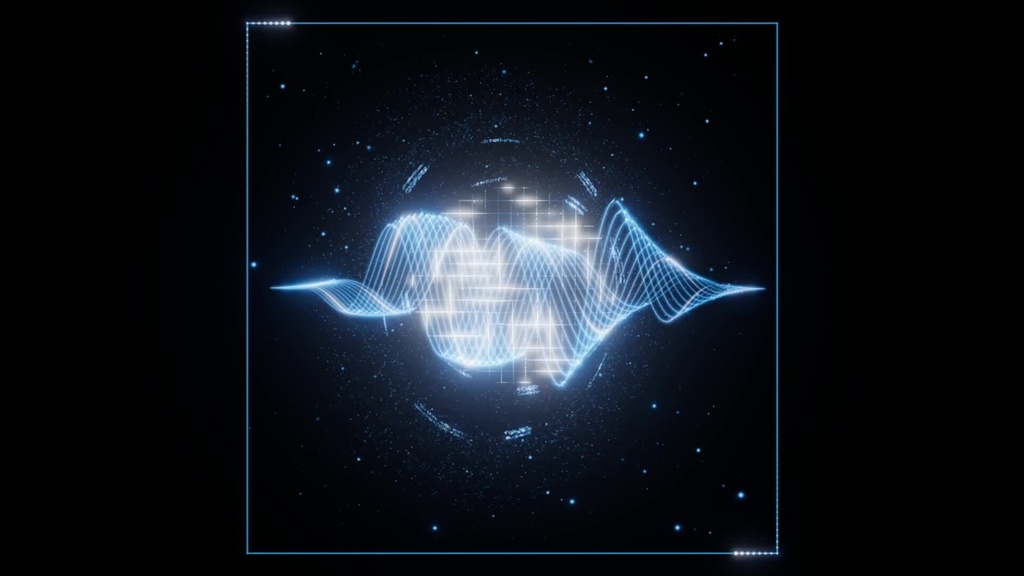

🎙️ AIの声を、光に。Voice Orbit AIアプリの再生音に合わせて、波形・粒子・光のリングが動くWindows用音声ビジュアライザーです。サブモニターを近未来のような空間に。 【主な機能】 ・外部アプリ/ブラウザー/PC全体の再生音に連動 ・8種類の配色と自由な単色、感度・光の強さを調整 ・全画面表示、移動・サイズ変更できるミニ表示 ・ミニ表示の位置とサイズを保存、サイズに合わせた明るさの自動調整 ・ドラッグで回転、ホイールで拡大縮小、メニュー非表示 【対応環境】 Windows 11、Intel/AMDの64ビットPC。Microsoft Edge WebView2 RuntimeとWebGL 2対応の描画環境が必要です。.NET実行環境は同梱。アプリの操作画面は日本語です。Mac・スマートフォン向けではありません。 【使い方】 ZIPをすべて展開し、フォルダー内のVoiceOrbit.exeを起動。AIアプリで音声会話を開始し、Voice Orbitの「外部AIアプリを選ぶ」から取得元を選択して「反応開始」。詳細は同梱の「はじめに.txt」をご覧ください。 F11:全画面/Esc:通常表示/H:メニュー表示切替。 【購入前にご確認ください】 本商品は音に反応する表示ソフトです。AIサービスや音声会話機能そのものは含みません。AIサービスのアカウント・利用料金は別途必要な場合があります。内蔵ブラウザーは普段のブラウザーとは別にログインが必要です。 ブラウザーのタブ単位での音声選択には非対応です。同じブラウザーの別ウィンドウやタブの音も反応に含まれる場合があります。AI用と動画・音楽用でブラウザーを分けてご利用ください。 キャラクター、文字起こし、字幕、自分のマイク波形は含まれません。 開発PCで起動・音声取得・描画を確認済みですが、別PCでの実機テストは未実施です。すべてのPC・AIサービスでの動作を保証するものではありません。 【内容】 Windows用アプリ一式、使い方、使用ライブラリーのライセンス。ダウンロード商品です。 【利用条件】 個人で使用するための改変は可能です。ただし、改変の有無、有償・無償を問わず、本ソフトの第三者への再配布・転売は禁止します。 同梱の外部ライブラリーには、それぞれのライセンスが適用されます。本利用条件は、それらのライセンスで認められる権利を制限するものではありません。 ──────── English ──────── 🎙️ Voice Orbit — Turn AI voices into light. A Windows audio visualizer with animated waveforms, particles and glowing rings that respond to playback audio from your selected app. FEATURES • Capture playback from an external app, browser or the entire PC • Eight color presets, custom single colors, sensitivity and brightness controls • Full-screen and movable/resizable mini window • Saved mini-window position and size, automatic brightness scaling • Drag to rotate, scroll to zoom, hide the controls REQUIREMENTS Windows 11 on Intel/AMD x64. Microsoft Edge WebView2 Runtime and WebGL 2 support required. .NET runtime included. The application UI is Japanese. This is not a Mac or mobile application. GETTING STARTED Extract the entire ZIP and launch VoiceOrbit.exe without separating it from the other files. Start voice playback in your AI app, select the source in Voice Orbit and start capture. See the included Japanese guide. F11: full screen; Esc: normal view; H: toggle controls. BEFORE PURCHASING This is an audio visualization tool, not an AI service. AI accounts and any service fees are separate. The built-in browser has its own sign-in session. Capture is not per browser tab; audio from other tabs or windows of the same browser may also be included. Use separate browsers for AI and other media. No character, transcription, subtitles or microphone visualization is included. Startup, audio capture and rendering were tested on the development PC only; testing on another physical PC has not yet been completed. Compatibility with every PC and AI service is not guaranteed. DOWNLOAD CONTENTS Windows application, Japanese instructions and third-party library licenses. TERMS OF USE You may modify this software for your own personal use. Redistribution to third parties or resale of this software, whether modified or unmodified, free of charge or for payment, is prohibited. Bundled third-party libraries remain subject to their respective licenses. These terms do not restrict any rights granted under those licenses.