
VOXTAGE | All-in-One Vocal Rack for Karaoke & Singing Streams (English)
- Freeダウンロード商品¥ 0
- Entryダウンロード商品¥ 500
- Proダウンロード商品¥ 3,800
- Upgrade (Entry → Pro)ダウンロード商品¥ 3,300

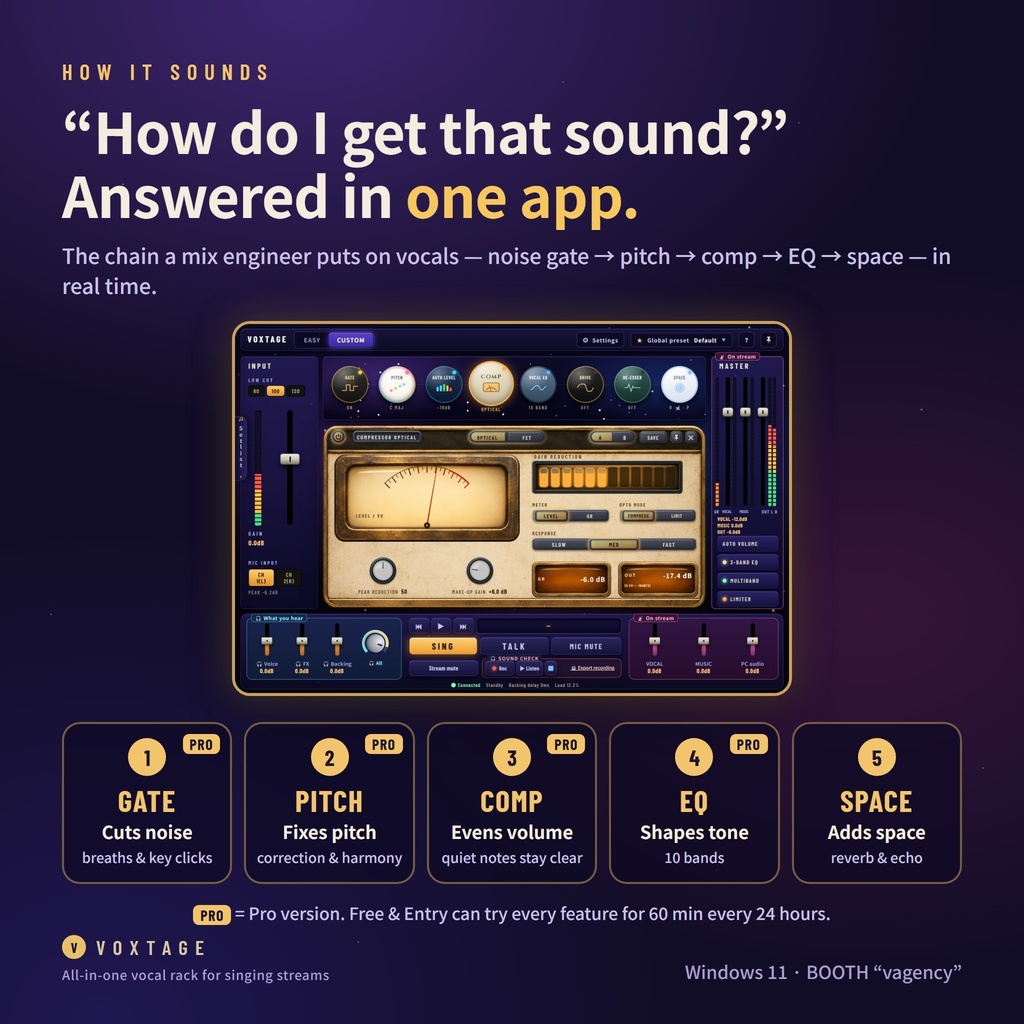
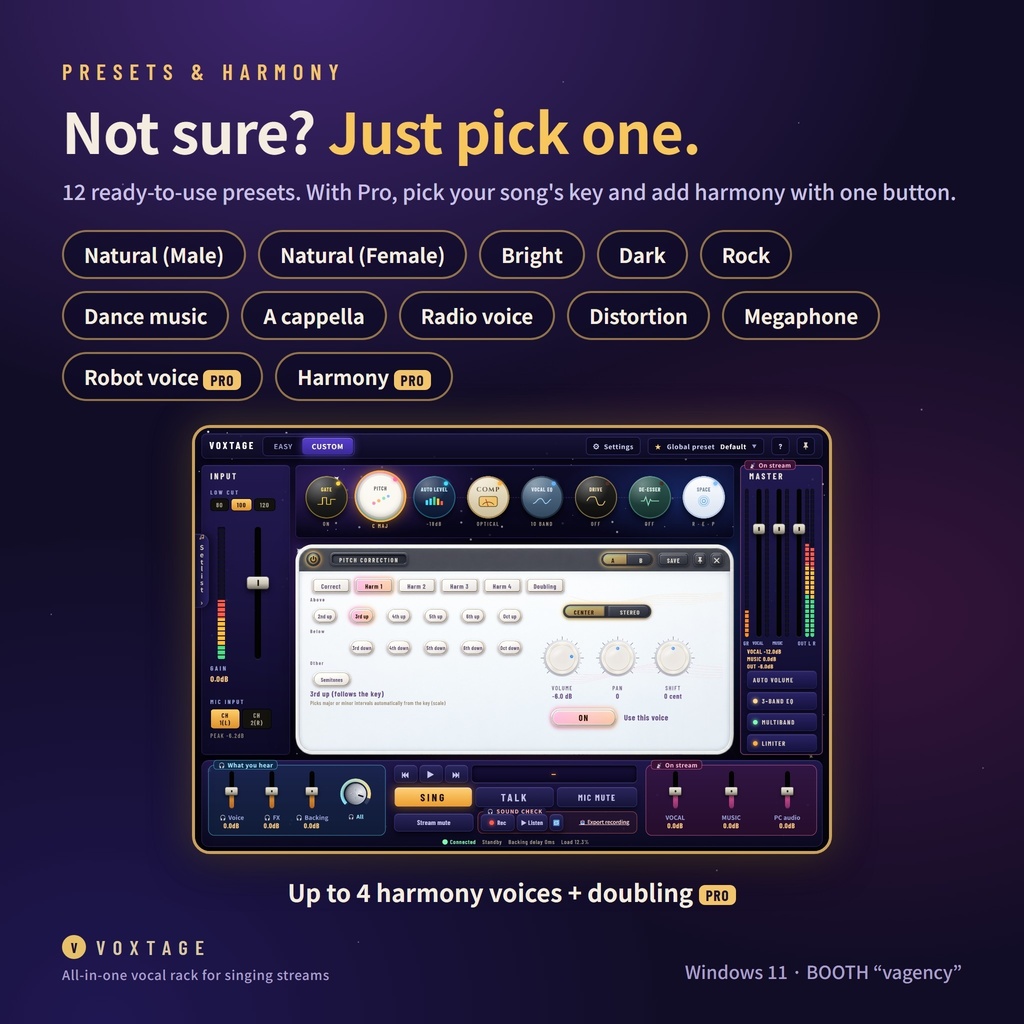
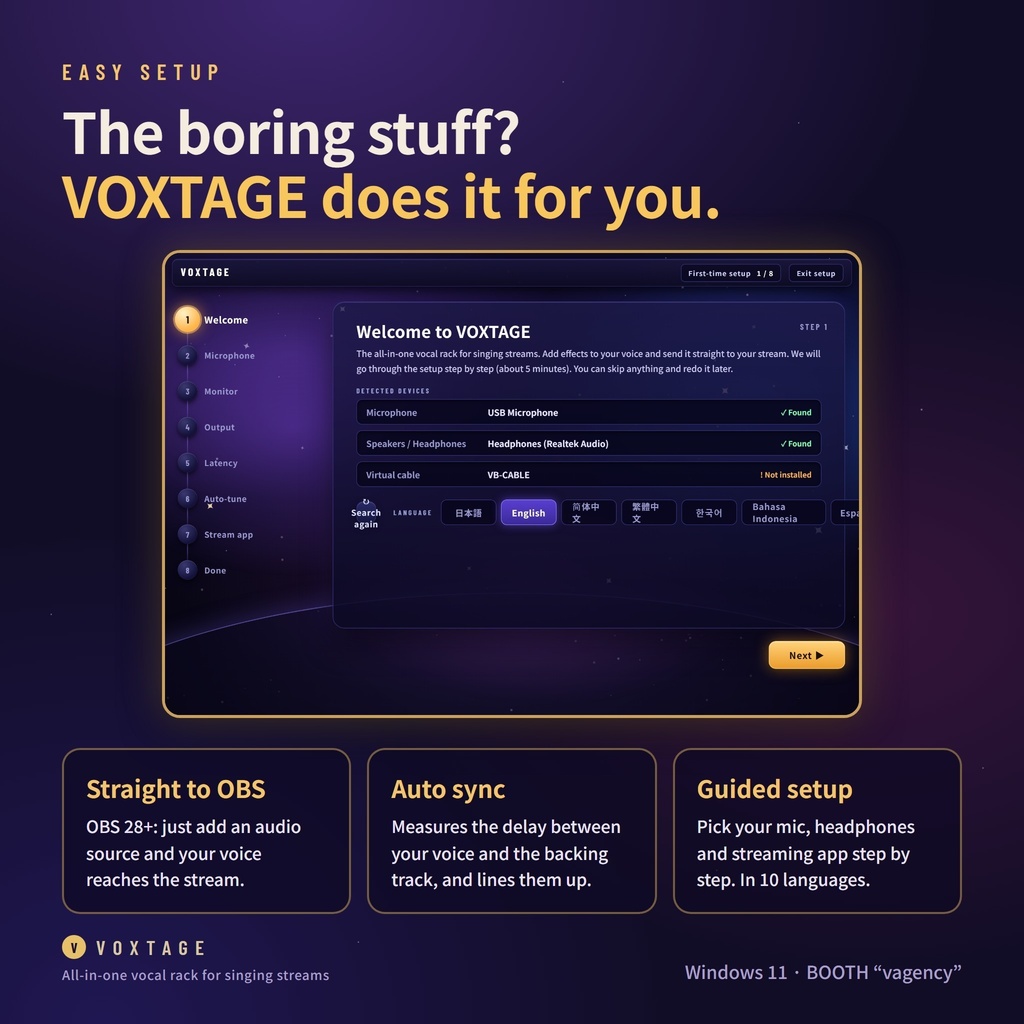
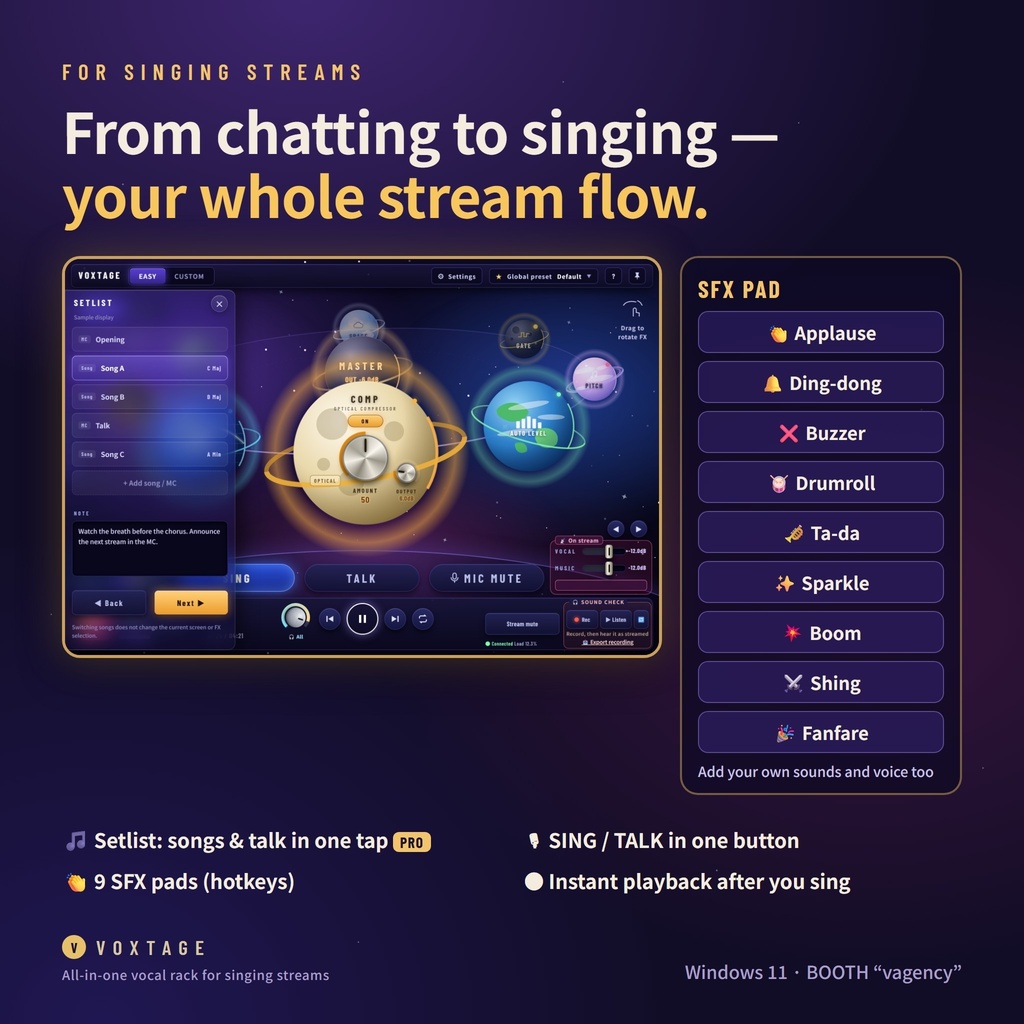
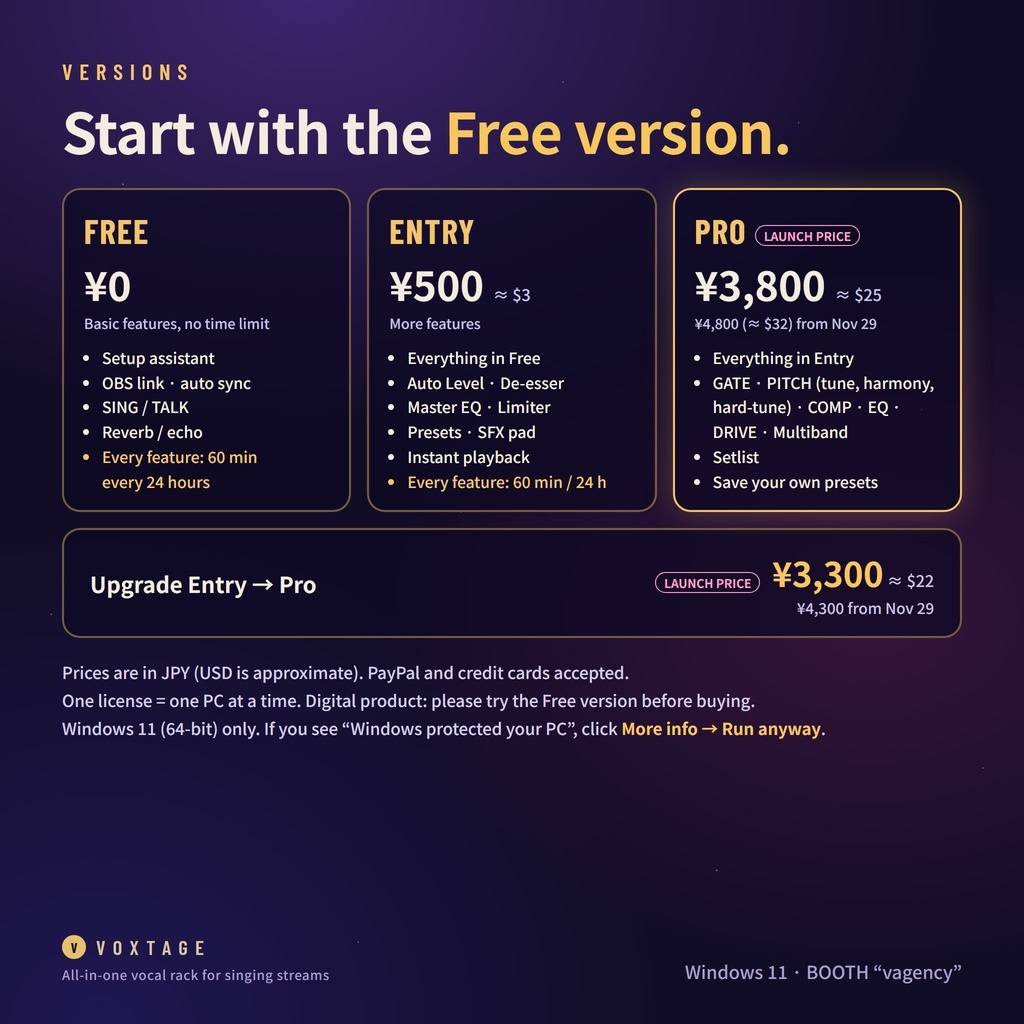


VOXTAGE — All-in-One Vocal Rack for Karaoke & Singing Streams No DAW. No Voicemeeter. No complicated audio routing. Just plug in your mic, pick a preset, and sing. ✔ A mix engineer's vocal chain, live while you sing noise gate → pitch correction → compressor → EQ → reverb / echo ✔ Sends straight to OBS (OBS 28+) — just add an audio source ✔ Fixes voice / backing track sync automatically ✔ Harmony (up to 4 voices), doubling and hard-tune ✔ Built for karaoke streams, unarchived karaoke included: setlist, SING / TALK switch, SFX pad ✔ 10 languages: English, 简体中文, 繁體中文, 한국어, Bahasa Indonesia, Español, Português, Deutsch, ไทย, 日本語 — opens in your Windows language ✔ Free version: every feature, 60 minutes in total every 24 hours (pause anytime, the rest is saved) Sound design: Nitona27 (composer / mix engineer) — x.com/Nitona27 WHAT'S INSIDE ([Pro] = Pro version only) • GATE [Pro] – cuts breaths and keyboard noise • PITCH [Pro] – pitch correction, up to 4-part harmony, doubling, hard-tune • COMP [Pro] – keeps quiet notes from getting buried • EQ [Pro] – 10-band tone shaping • SPACE – reverb and echo • Auto Level, De-esser, Master EQ, Limiter, Drive [Pro], Multiband [Pro] • 12 presets: Natural (male / female), Bright, Dark, Rock, Dance, A cappella, Radio voice, Distortion, Megaphone, Hard-tune, Harmony • Setup assistant, auto sync, instant playback, SFX pad with hotkeys, Setlist [Pro] FAQ Q. Does it work with a USB mic? A. Yes — any mic or audio interface that works on Windows. Check with the Free version first. Q. Latency / CPU? A. The load is shown at the bottom of the window. Test it with the Free version while your streaming app is running. Q. Mac or Windows 10? A. No. Windows 11 (64-bit) only. Q. Streaming apps other than OBS? A. Yes, through VB-CABLE (free, can be installed with VOXTAGE). Q. Monetized streams? A. Yes. Streams, recordings and videos (monetized too) are all fine. Q. Internet? A. Only to activate your license. After that it works offline. REQUIREMENTS • Windows 11 (64-bit) only • OBS Studio 28+ for the direct link; other apps via VB-CABLE • If Windows shows "Windows protected your PC", click "More info" → "Run anyway". This appears for new apps and is not a virus. • One license = one PC at a time (you can move it to a new PC from the app, up to 3 times in 30 days) • Digital product: no refunds except where required by law. Please try the Free version first. VERSIONS (prices in JPY — USD is approximate) • Free — ¥0: every feature, 60 minutes in total every 24 hours • Entry — ¥500 (about $3): Auto Level, reverb / echo, De-esser, Master EQ, Limiter, presets, SFX pad, playback, SING / TALK, setup assistant, OBS link, auto sync • Pro — launch price ¥3,800 (about $25), ¥4,800 (about $32) from Nov 29: everything • Upgrade Entry → Pro — launch price ¥3,300 (about $22), ¥4,300 from Nov 29 BOOTH accepts PayPal and credit cards. Your card company converts the price to your currency. AFTER YOU BUY 1. Download "How to get your code.pdf" from your BOOTH purchase. 2. Open the code page and enter your BOOTH order number and order time (find them in BOOTH → Purchase history → order details). 3. Enter the code in VOXTAGE: Settings → License. Questions in English are welcome — use "Contact shop" on this page, or email vagency.2107@gmail.com.
Terms of Use
These Terms of Use (the "Terms") set out the conditions for using "VOXTAGE" (the "Software"), a vocal app for streaming provided by Studio Tsukumo (BOOTH shop "vagency") (the "Operator"). You must agree to these Terms to use the Software. The Operator presents these Terms on the BOOTH product page and in the Software's first-time setup. By starting to use the Software, you are deemed to have agreed to these Terms. (This English translation is provided for convenience. If it differs from the Japanese original, the Japanese original prevails.) [Article 1 (Editions and license codes)] The Software comes in Free, Entry and Pro editions. The Free edition costs nothing and lets you use the basic features (setup assistant, output to your stream, latency correction, SING/TALK and ambience effects) with no time limit. On Free and Entry, a trial of all features starts when you open the app, for up to 60 minutes in total every 24 hours. The Entry and Pro editions and the upgrade (from Entry to Pro) become available when you enter and activate a license code purchased on BOOTH (a "Code") in the Software. The features available in each edition are as described on the BOOTH product page and in the Software. During periods set by the Operator, such as launch campaigns, you may be able to receive the Entry edition for free from a button in the Software on a PC that has not been activated yet. The Entry edition you receive keeps working after the period ends. The Code created when you receive it is treated the same as a purchased Code (PC transfer is also possible). [Article 2 (License to use)] On condition that you comply with these Terms, the Operator grants you a non-exclusive, non-transferable, non-sublicensable right to use the Software. One Code can be activated on one PC at a time. When you replace your PC (including reinstalling Windows), release it with "Unregister this PC (PC transfer)" in the Software and then activate on the new PC (up to 3 times in 30 days). You are free to stream, record and make videos with the Software (including monetized ones). Rights to audio processed with the Software belong to you (or to the rights holders of the original audio or music), and the Operator claims no rights to it. You are responsible for clearing the rights to music and backing tracks used in your streams, following the rules of each streaming service and rights holder. [Article 3 (Purchase and refunds)] Codes are purchased and paid for through BOOTH (pixiv Inc.), and BOOTH's terms apply. Because Codes are digital goods, returns and refunds after purchase are not accepted in principle. Please check that the Software works with the Free edition before buying. This does not apply where a refund is required by law or where the Software cannot be used due to the Operator's fault. [Article 4 (Prohibited acts; no imitation or unauthorized reuse)] You must not do any of the following (except where permitted by law): ・Copy, reuse, redistribute or sell the Software's source code, program, images, audio, presets or other materials without permission (including modified versions) ・Transfer, sell, lend, publish or share the Software or a Code with others ・Reverse engineer, disassemble, decompile, analyze or modify the Software ・Reuse the Software's code or materials to develop, distribute or sell similar or competing tools ・Circumvent or disable activation, or the Free edition's feature or trial-time limits, or distribute means to do so ・Place excessive load on, or gain unauthorized access to, the activation server ・Use the Software for purposes that violate laws or public order and morals, or that infringe the rights of others You may, however, share settings, presets and setlist files you made yourself with the Software (except distributing the presets included with the Software as they are). When posting to "PRESET CLOUD" (Pro), post only presets you made yourself and images you have the right to use. You may not post anything that infringes others' rights, or names or images that hurt people. Posted presets, names, descriptions, creator names and images are published after review by the Operator, and users of the Software can then load them and use them in their own streams, recordings, etc. The Operator may, with a reason, decline to publish a post, stop publishing it, or stop posts from that PC. You can withdraw your own posts at any time (presets loaded before withdrawal remain on the PCs that loaded them). [Article 5 (Rights and legal action)] Copyright and other rights in the Software's source code, program, images, audio and other materials belong to the Operator (or, for third-party software and materials included in the Software, to their rights holders). No rights beyond the uses permitted by these Terms are transferred to you. If a violation of the preceding article or an infringement of rights is confirmed, the Operator may take legal action, such as claims for damages or injunctions. Open source software included in the Software is subject to its respective license. Please use third-party products and services used together with the Software (VB-CABLE, OBS, streaming services, etc.) in accordance with each provider's terms. [Article 6 (Suspension of use)] If you violate these Terms, the Operator may invalidate the activation of your Code without prior notice. In that case, amounts already paid will not be refunded. [Article 7 (Updates, support and end of service)] The Operator may change or update the Software without notice. The Operator is under no obligation to provide updates. If the Operator ends operation of the activation server or provision of the Software, it will announce this on the BOOTH product page in advance wherever possible. Activated PCs verify their activation token locally, and the Operator will endeavor to keep them working after the end of service (new activations and PC transfers will no longer be possible). Replies to inquiries and support are provided as far as the Operator is able. The Operator does not promise to reply to every inquiry or to solve every problem. [Article 8 (Disclaimer)] The Software is provided as is. The Operator does not guarantee that it works on every PC, audio device or streaming setup, that it fits any particular purpose, or that it is free of defects. Always check your sound before an important stream. Excessive volume can damage your hearing, speakers or equipment. Start with your headphone volume low. To the extent permitted by law, the Operator is not liable for damages you incur from using the Software. However, where the Operator is liable, except in cases of the Operator's intent or gross negligence, compensation is limited to direct and ordinary damages actually incurred by you, up to the amount you paid for the Code (500 yen for the Free edition). [Article 9 (Personal information)] Handling of your nickname, PC ID and similar information is as set out in the separate Privacy Policy. [Article 10 (Changes to the Terms)] The Operator may change these Terms when the change is in the general interest of users, or when the change does not conflict with the purpose of the agreement and is reasonable in light of its necessity and the appropriateness of its content. When making a change, the Operator will announce the new content and its effective date in the Software or on the BOOTH product page before the effective date. [Article 11 (Governing law and jurisdiction)] These Terms are governed by the laws of Japan. Any dispute concerning the Software shall be subject to the exclusive jurisdiction, in the first instance, of the district court or summary court having jurisdiction over the Operator's address. [Contact] Please contact us by message via "Contact the shop" on the VOXTAGE product page on BOOTH (https://vagency.booth.pm/items/9057393). Operator / developer: Studio Tsukumo (BOOTH shop "vagency") Established / last updated: November 12, 2026
Privacy Policy
Studio Tsukumo (BOOTH shop "vagency") (the "Operator") handles user information processed by "VOXTAGE" (the "Software"), a vocal app for streaming, as follows. (This English translation is provided for convenience. If it differs from the Japanese original, the Japanese original prevails.) [1. Information sent to the Operator] The Software sends information to the Operator's activation server over the internet only in the following cases: ・When you enter a nickname (in the first-time tutorial, ⚙ Settings or the license screen; also sent in the Free edition), or when your nickname or edition changes: PC ID, nickname, edition (Free / Entry / Pro) ・When you change your nickname on an activated PC: Code, PC ID, new nickname (the nickname recorded for that Code on the activation server is also changed to the new one) ・When you enter and activate a Code: Code, PC ID, nickname (for an upgrade, also the original Entry Code) ・When you receive the Entry edition free in a launch campaign: PC ID, nickname (the Operator creates and records a Code for that PC) ・When you press "Unregister this PC (PC transfer)": Code, PC ID ・When you send something from "Feedback & requests" in ⚙ Settings: only the text you wrote and the Software version (no PC ID or nickname is attached; even the Operator cannot tell who wrote it) ・When an audio-sync measurement (such as "Sound setup" in ⚙ Settings) finishes or fails: the names of the devices you selected for mic, monitor output, PC audio source and output to your streaming software, the results of measurements 1 and 2 (milliseconds), the outcome (finished, or which step failed and why), the Software's version, and the last part of the Software's activity log for the current launch (up to 60 lines: when audio started and stopped, device names, error messages, measurement results, and per-minute processing load and dropout counts; the name of your Windows user folder is hidden). No PC ID, nickname or Code is attached, so even the Operator cannot tell whose it is. This is used to improve the Software (to understand delay trends per device and why measurements fail). It is sent in the background with no on-screen notice. If it cannot be sent, the Software works as usual. ・When you post to "PRESET CLOUD": PC ID, the codes used on that PC (to confirm Pro), the preset contents, name, description, creator name and the chosen image (your own image or icon if you chose one). The PC ID and codes are also sent when you use the community list, loading, "My posts" or reporting, but they are recorded only when you post, plus a download count (who downloaded is not recorded). When you report, only the reported preset and the reason are recorded (the Operator cannot tell who reported). In addition, at startup the Software asks for the current price to show (whether a sale is on) and the sale announcement image. A PC that is not activated also asks whether a launch campaign is running (neither sends any user information). The activation server also keeps records of the registration date, change dates, activation date and time, and unregistrations. Nothing is sent or recorded for people who neither enter a nickname nor activate. The "PC ID" is a separate value the Software derives from the identifier Windows assigns to the PC. The original identifier itself is never sent. [2. Information that is not sent] ・Audio such as your mic voice, singing, music or recordings ・How you use the Software (usage such as which features you used and when; the log sent with a measurement above contains nothing about this other than when audio started and stopped) ・Files on your PC, the content of your streams, or audio device information other than the device names sent with the measurement above (except when you send it yourself via "Copy diagnostics" below) ・Your real name, email address, home address, etc. (please don't use your real name as a nickname; except what you write yourself in the contact form) The Software contains no advertising mechanisms and no feature-usage tracking (analytics). [3. Purposes of use] ・Activating Codes and managing which PC can use a Code ・Verifying your identity for PC transfers and inquiries ・Preventing misuse such as sharing Codes ・Understanding user numbers per edition and delay trends per device to improve the Software (updates) ・Responding to inquiries ・Reviewing and publishing "PRESET CLOUD" posts, and letting posters view and withdraw their own posts [4. Storage and management] The activation server runs on Google Apps Script and Google Sheets (services of Google LLC; data is stored on Google's servers in the US and elsewhere). Only the Operator can view the records. When communicating, Google receives your IP address and similar data as part of how its service works. Its handling follows Google's Privacy Policy (https://policies.google.com/privacy). The Operator does not record IP addresses. Google is used so that the Operator can store its records; it does not mean providing information to Google. Information on the US personal-data protection system is published on the website of Japan's Personal Information Protection Commission. The Operator protects the records against leaks and loss by measures such as limiting access to the Operator and never releasing the signing key for activation tokens. [5. No disclosure to outside parties] Except as required by law, the Operator never discloses the information it obtains. It does not provide, sell, lend or publish it to third parties, and does not use it for advertising or any other purpose. However, what you post to "PRESET CLOUD" and the Operator publishes (preset contents, name, description, creator name and image) is made public to users of the Software at the poster's own choice. PC IDs, codes and nicknames are never made public. "As required by law" means cases where a court, the police or similar authority requests disclosure under the law and the Operator is obliged to comply. [6. Purchase information] Purchase and payment information on BOOTH is managed by BOOTH (pixiv Inc.) under its terms and privacy policy. The Operator uses only the information BOOTH shares with sellers (such as order details), and only to confirm orders and respond to inquiries. [7. Information stored on your PC] Settings, presets, setlists, your nickname, the activation token, Free edition usage time, etc. are stored only on that PC (in the Software's storage location) and are not sent to the Operator. Check recordings are saved as WAV to your Downloads folder only when you press save. Recordings you don't save are deleted when you close the Software. The diagnostic text created by "Copy diagnostics" (audio transfer counts, audio device names and formats, processing load; no voice or music audio) reaches the Operator only if you paste and send it yourself. The contact form opened from "Report a problem" in ⚙ Settings is a Google Form (a service of Google LLC). What you send (nickname, type and details of the problem, pasted diagnostics, edition and version, and your email address if you enter one) is stored on Google's servers (the response spreadsheet). Only the Operator views it, and it is used only to respond to inquiries, fix bugs and improve the Software. It is never disclosed to outside parties (except as required by law). [8. Retention period] Records are kept only as long as needed to manage Code activation and respond to inquiries, and are deleted when no longer needed. [9. Requests for access, correction or deletion] If you want to access, correct or delete your records, or stop their use, contact us at the address below with your nickname and (if activated) your Code. Once your identity is confirmed, we will respond in accordance with the law. Deleting an activation record may make it impossible to verify that PC's activation or transfer it. [10. Changes to this policy] This policy may be changed as needed. Changes will be announced in the Software or on the BOOTH product page. [Contact] Please contact us by message via "Contact the shop" on the VOXTAGE product page on BOOTH (https://vagency.booth.pm/items/9057393). Operator / developer: Studio Tsukumo (BOOTH shop "vagency") Established / last updated: November 12, 2026