

Unity ♡ Makeup Studio [メイクスタジオ]
- ダウンロード商品¥ 1,200
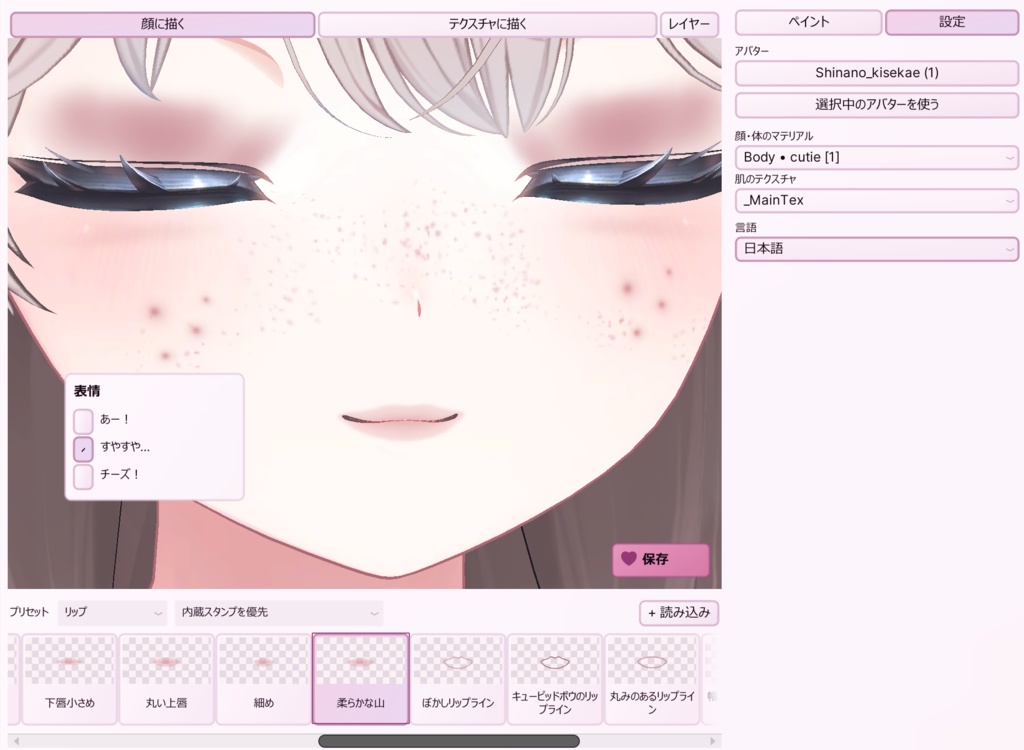


This is a Unity tool that lets you do your avatar’s makeup right inside Unity. It automatically creates a texture and material for your look. You can apply them to your avatar or export the makeup separately. ♡ How to Use: 1. Install unity package 2. Click tools in unity and choose makeup studio. 3. Select your avatar prefab. 4. Put on makeup or draw on the avatar/texture. 5. Save or export the texture.
Terms of Use
♡ Translated: English, Spanish, Korean, Japanese ♡ Icon credits: Game-icons.net · CC BY 3.0 ♡ Please don’t share, resell, or redistribute Makeup Studio, even if you’ve modified it. Don’t reuse its code or files to make or distribute your own tool. Third-party icons are covered by their own licenses. ♡ Exporting a texture doesn’t change who owns the original avatar or textures. Follow the original creator’s terms when sharing or selling an export that includes their work. ♡ You’re free to share makeup-only decals you create, as long as you have permission to share any third-party artwork included in them.
メイクスタジオ
メイクスタジオは、Unity上でアバターに直接メイクができるツールです。作成したメイクのテクスチャとマテリアルが自動で生成され、アバターに適用したり、メイク部分だけを書き出したりできます。 ♡ 使い方 1. Unityパッケージをインポートします。 2. Unityのメニューから「Tools → Makeup Studio」を開きます。 3. メイクしたいアバターのプレハブを選びます。 4. アバターの顔やテクスチャに直接描いて、メイクを仕上げます。 5. テクスチャを保存するか、書き出します。 ♡ アイコン素材クレジット Game-icons.net · CC BY 3.0 ♡ Translated: English, Spanish, Korean, Japanese ♡ - ツール本体: 改変の有無を問わず、メイクスタジオ本体の共有・再配布・転売は禁止です。また、本ツールのコードやファイルを流用して、独自のツールを作成・配布することも禁止です。第三者のアイコン素材には、それぞれのライセンスが適用されます。 ♡ - 書き出したテクスチャ: 書き出しによって、元のアバターやテクスチャの権利が移ることはありません。元の素材を含むデータを配布・販売する場合は、各制作者の利用規約に従ってください。 ♡ - 書き出したデカール: ご自身で作成したメイクのみのデカールは、自由に共有できます。第三者の素材を含む場合は、その素材の共有が許可されていることをご確認ください。