

【Unityエディタ拡張】Cutout Mask Painter | アバターに直接塗ってマスク作成、ぼかし・グラデーション対応【多言語】【lilToon拡張】lilGlassMask | マスクで指定した部分をガラス風に
- lilGlassMask※セール終了後は通常価格になりますダウンロード商品¥ 200
- Cutout Mask Painter※セール終了後は通常価格になりますダウンロード商品¥ 800
- 【お得セット】Cutout Mask Painter + lilGlassMask ※セール終了後は通常価格になりますダウンロード商品¥ 800


【Cutout Mask Painter 機能紹介】 https://x.com/anninworks/status/2122953319685738860 ------------------------------------------------------------
lilGlassMask
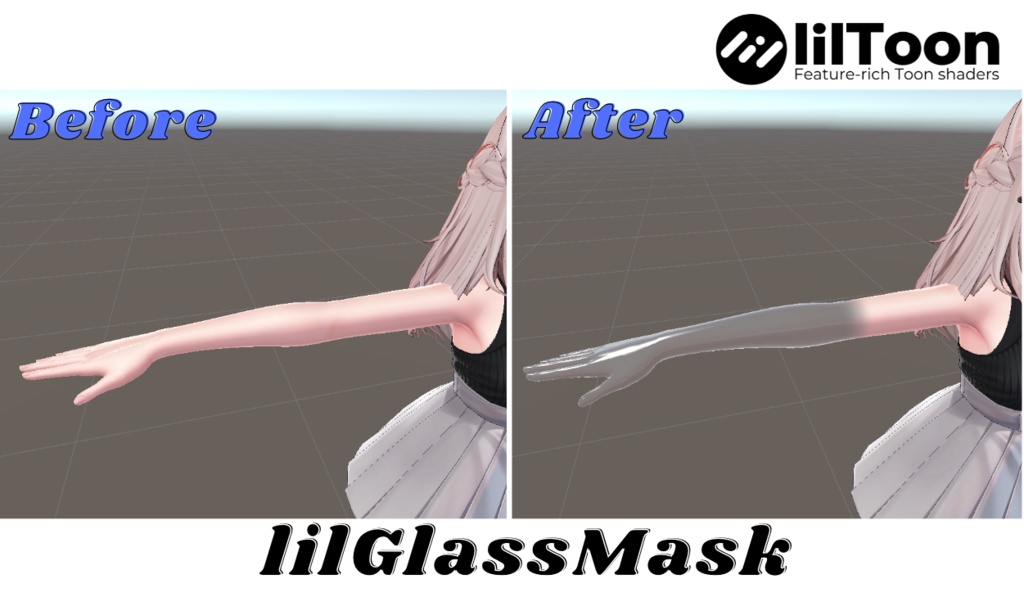
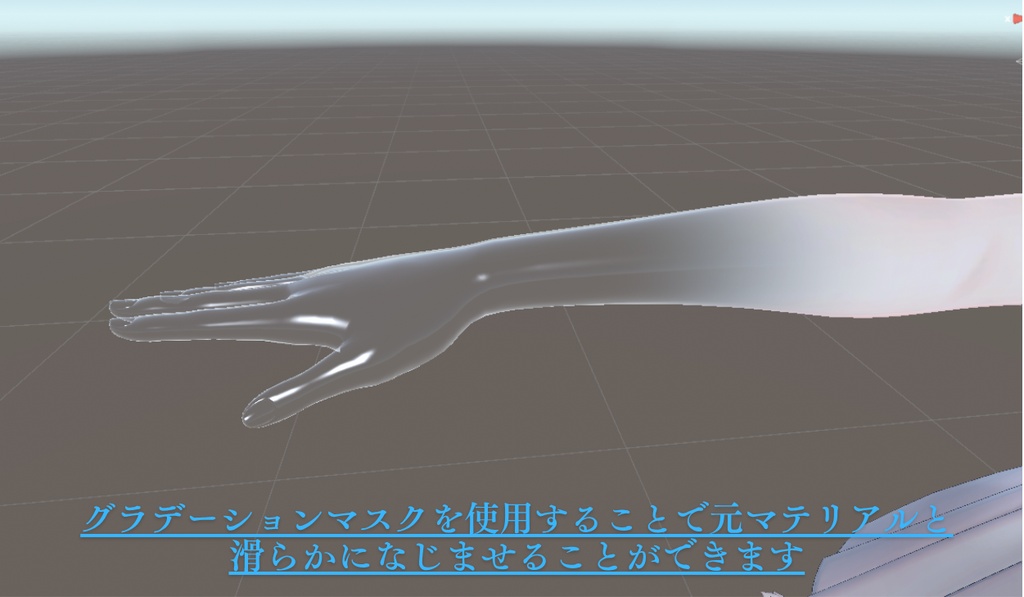
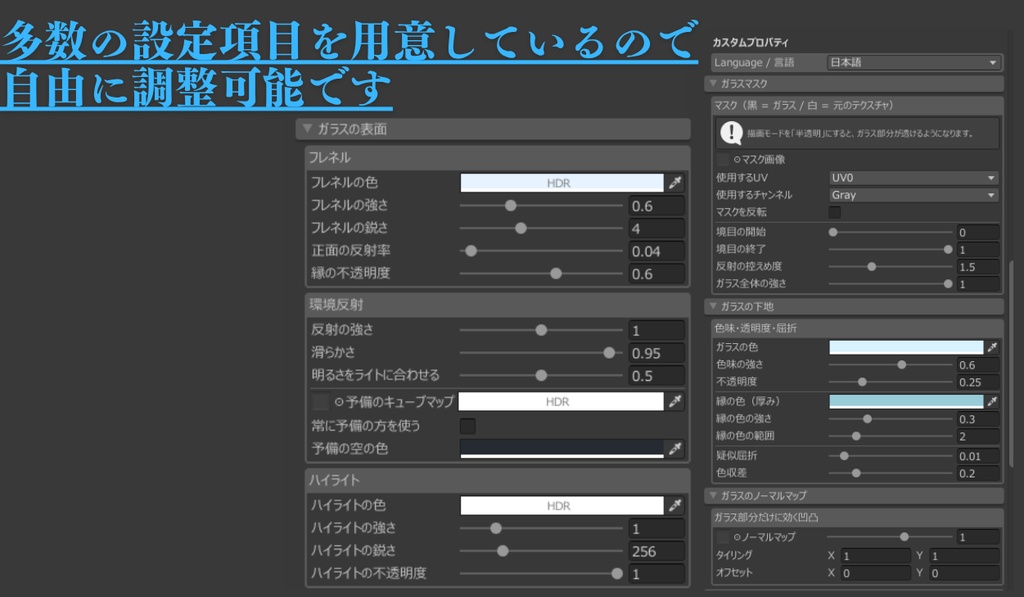
【発売記念セール中】通常500円→200円(11/20〜11/25の期間中) ※セール終了後は通常価格になります マスクで指定したところだけ、ガラスみたいな見た目にできるlilToon拡張シェーダーです。 マスクのグラデーションに合わせて反射や透明感がだんだん弱まるので、ガラスと元のテクスチャが自然になじみます。 ■ こんなときに ・腕や足の一部だけをクリスタルのようにしたい ・アクセサリーや服の一部をガラス素材にしたい ・「だんだんガラスになっていく」ような表現がしたい ■ 特徴 ・マスクの黒い部分がガラス風になります ・グレーの部分は、ガラスと元のテクスチャが滑らかに混ざります ・いつものlilToonと同じ感覚で設定できます ■ グラデーションマスクを簡単に作るには グラデーションのマスクは、同時発売の「Cutout Mask Painter」で、Unityの中でアバターに直接塗って作れます。 塗って、ぼかして、ガラスにする。画像編集ソフトはいりません。 Cutout Mask Painter:1,000円→800円 お得なセット版:1,100円→800円 ■ 動作環境 ・ Unity 2022.3.22f1 ・lilToon 2.4.1以降 ・VRChat SDK3 Avatars ■ ご購入前に ・本商品にlilToon本体は含まれていません。先にlilToonを導入してください。 ・lilToonのカスタムシェーダーのため、他のカスタムシェーダーと同じマテリアルでは併用できません。 ・lilToon本体の大きなアップデートで、一時的に動かなくなる可能性があります。その場合は順次対応します。 ・導入前にプロジェクトのバックアップをおすすめします。 ■ 導入方法 1. ダウンロードしたZIP内のunitypackageをプロジェクトにインポート 2. マテリアルのシェーダーを「lilGlassMask/lilToon」に変更 3.1. 描画モードを「半透明」にします。 半透明以外ではガラスが透けず、正しく表示されません。 4. 「ガラスマスク/◎マスク画像」にマスク画像を設定 詳しい使い方は同梱のマニュアルをご覧ください。 ------------------------------------------------------------ [Launch sale] 500 JPY -> 200 JPY from Nov 20 to Nov 25 (JST). Regular price after the sale. A lilToon custom shader that turns only the masked area into glass. Reflections and transparency fade along the mask's gradient, so the glass blends naturally into the original texture. Black areas of the mask become glass Gray areas blend smoothly between glass and the original texture Set it up just like regular lilToon Want an easy way to paint gradient masks? Try "Cutout Mask Painter", released at the same time. Paint masks directly on your avatar in Unity. Cutout Mask Painter:1,000 JPY -> 800 JPY Bundle: 1,100 JPY -> 800 JPY Requirements: Unity 2022.3.22f1 / lilToon 2.4.1 or later / VRChat SDK3 Avatars lilToon is not included. Please install lilToon first. Contact: Booth message or X (@anninworks) ------------------------------------------------------------
Cutout Mask Painter
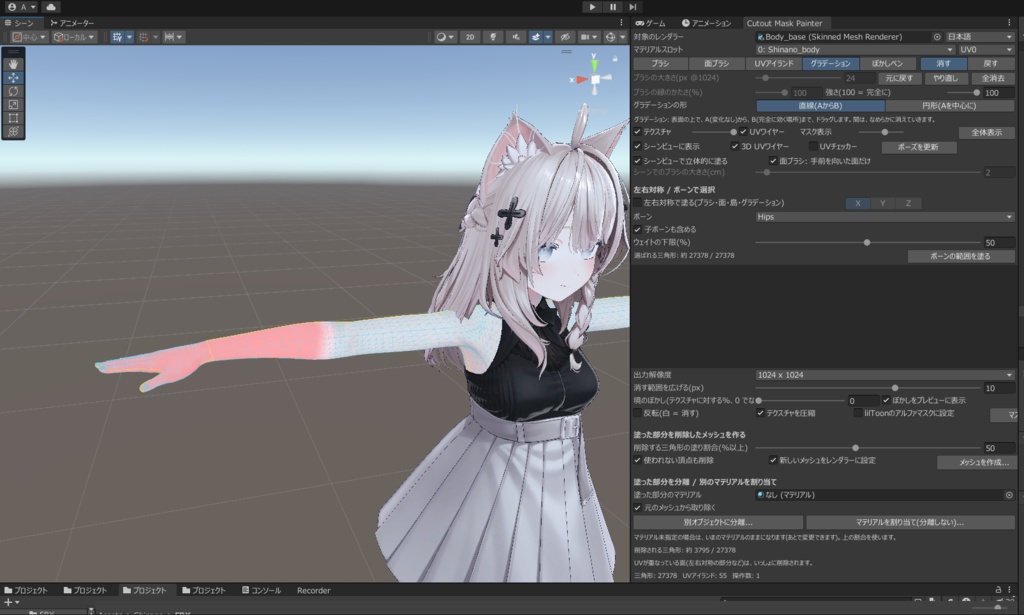
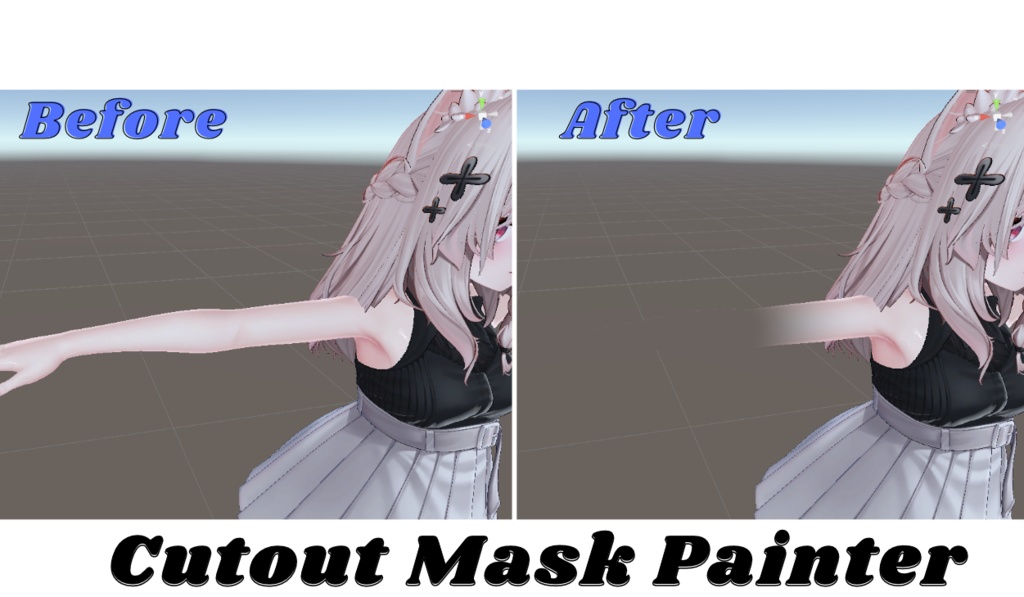
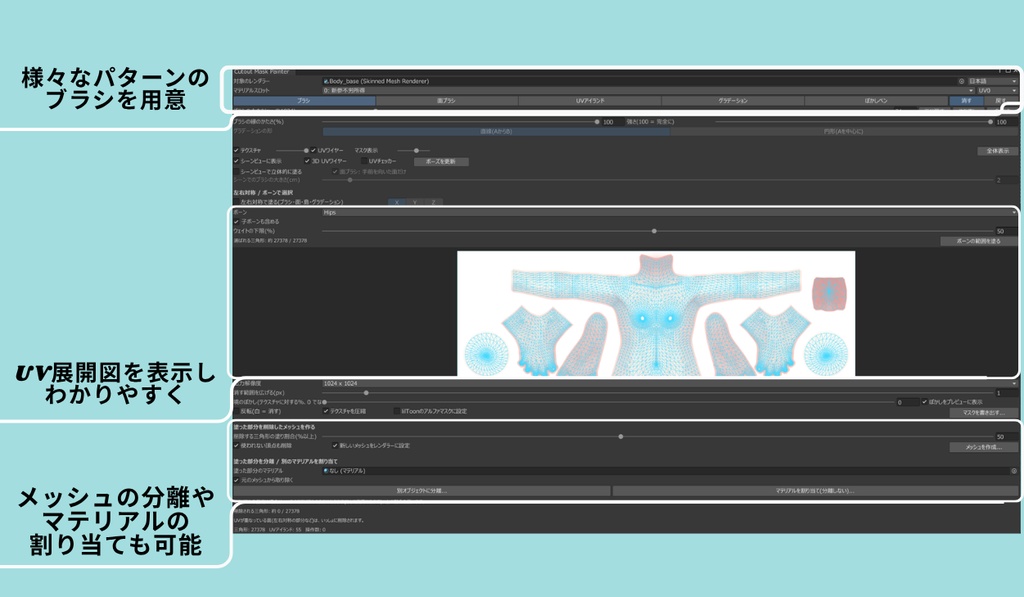
【発売記念セール中】通常1,000円 → 800円(11/20〜11/25の期間中) ※セール終了後は通常価格になります Unityの中だけで、アバターに直接塗ってマスクを作れるエディタ拡張です。 画像編集ソフトとUnityを行ったり来たりしなくて大丈夫。 ぼかしやグラデーションも、自分の手でそのまま塗れます。 ■ こんなときに ・服の下に隠れる肌を消したい(貫通対策) ・だんだん消えていくような表現がしたい ・シェーダー用のグラデーションマスクを手軽に作りたい ・テクスチャのUVのどこがどこか分からなくて困っている ■ できること ・オブジェクトを指定すると、メインテクスチャとUVを自動で読み込み ・UV展開図の上でも、シーンビューでアバターに直接でも塗れる ・ぼかし・グラデーションを自分で操作して塗れる ・左右対称で塗れる(グラデーションも左右対称に対応) ・ボーン(ウェイト)から塗る範囲を選べる ・出力解像度を選べる(256/ 512 / 1024 / 2048 / 4096) ・塗った部分のメッシュを別オブジェクトとして分離できる ・分離せずに、塗った部分だけ別のマテリアルを割り当てられる ・多言語対応 (English / 日本語 / 简体中文 / 繁體中文 / 한국어) ■ lilGlassMaskと合わせて 作ったグラデーションマスクを同時発売の「lilGlassMask」に入れると、塗ったところがガラスになり、元のテクスチャと滑らかになじみます。 塗って、ぼかして、ガラスにする。 ■ 動作環境 ・Unity 2022.3.22f1 ・VRChat SDK3 Avatars ■ ご購入前に ・導入前にプロジェクトのバックアップをおすすめします。 ・メッシュ分離やマテリアル割り当ての前に、アバターの複製を作っておくと安心です。 ・アバターやテクスチャの改変は、それぞれの利用規約の範囲内で行ってください。 ■ 導入方法 1. ダウンロードしたZIP内のunitypackageをプロジェクトにインポート 2. メニューのTools > Cutout Mask Painterなどから開く 3. マスクを作りたいオブジェクトを指定して塗る 詳しい使い方は同梱のマニュアルをご覧ください。 ------------------------------------------------------------ [Launch sale] 1,000 JPY -> 800 JPY from Nov 20 to Nov 25 (JST). Regular price after the sale. A Unity Editor extension that lets you paint masks directly on your avatar, all inside Unity. No need to switch to image editing software. Paint blur and gradients by hand. Loads the main texture and UVs automatically Paint on the UV layout or directly on the avatar in the Scene view Hand-painted blur and gradients Symmetry painting (including gradients) Select areas by bone weights Selectable output resolution Separate painted mesh parts into a new object, or assign another material to them Multi-language UI (English / 日本語 / 简体中文 / 繁體中文 / 한국어) Works great with "lilGlassMask": paint, blur, and turn it into glass. lilGlassMask: 500 JPY -> 200 JPY Bundle: 1,100 JPY -> 800 JPY Requirements: Unity 2022.3.22f1 / VRChat SDK3 Avatars Contact: Booth message or X (@anninworks) ------------------------------------------------------------
セット
【発売記念セール中】通常1,100円 → 800円(11/20〜11/25の期間中) ※セール終了後は通常価格になります 塗って、ぼかして、ガラスにする。 マスク作りから仕上げまで、Unityの中だけで完結する2点セットです。 ■ セット内容 ・Cutout Mask Painter(単品 通常1,000円) アバターに直接塗ってマスクを作れるUnityエディタ拡張。ぼかしやグラデーションもそのまま塗れます。 ・lilGlassMask(単品 通常500円) マスクの黒いところをガラス風にするlilToon拡張シェーダー。グラデーションで元のテクスチャと滑らかになじみます。 ■ 使い方の流れ 1. Cutout Mask Painterで、ガラスにしたいところをアバターに直接塗る 2. 境目をぼかしやグラデーションで整えて、マスクを書き出す 3. 書き出したマスクをlilGlassMaskに設定する 4. ガラスと元のテクスチャが滑らかに混ざった仕上がりに 各商品の詳しい説明、動作環境、注意事項は、各説明欄をご覧ください。 🎉発売記念セール🎉 Cutout Mask Painter:通常1,000円 → 800円 lilGlassMask:通常500円→200円 ■ ご購入前に ・セットの中身は単品版と同じです。単品をお持ちの方は、重複購入にご注意ください。 ・アップデートは単品版と同じタイミングで、セットにも反映します。 ・lilGlassMaskの利用にはlilToon本体が必要です(本商品には含まれません)。 ------------------------------------------------------------ [Launch sale] 1,100 JPY -> 800 JPY from Nov 20 to Nov 25 (JST). Regular price after the sale. Paint, blur, and turn it into glass. A two-item bundle that takes you from mask painting to the finished look, all inside Unity. Includes: Cutout Mask Painter (1,000 JPY): paint masks directly on your avatar, with hand-painted blur and gradients lilGlassMask (500 JPY): a lilToon custom shader that turns masked areas into glass and blends them smoothly The contents are the same as the individual items. lilToon is not included. Contact: Booth message or X (@anninworks) ------------------------------------------------------------
利用規約
【杏仁豆腐の作業場 利用規約】 対象:lilGlassMask / Cutout Mask Painter(以下「本商品」) ■ 著作権 本商品の著作権は杏仁豆腐(杏仁豆腐の作業場)に帰属します。 ご購入いただいた方には、以下の範囲での利用を許諾します。 ■ できること ・個人・法人を問わず、自分のアバターや作品への使用 ・VRChatなどのサービスへのアップロード ・本商品を使った画像や動画の公開(配信・収益化を含む) ・自分で使うための改変 ・Cutout Mask Painterで作成したマスク画像の自由な使用(販売物への同梱も可) ・lilGlassMaskを使ったアバター・衣装・アクセサリーの販売 ただし、シェーダー本体は同梱せず、購入者に本商品の入手を案内してください。 ■ 禁止事項 ・本商品の再配布・転売・譲渡(改変したもの、一部だけのものも含む) ・本商品を自作と偽って公開すること ・本商品のコードをもとにした、類似するシェーダーやツールの配布・販売 ※lilToon由来の部分はMITライセンスに従います ・法令や公序良俗に反する目的での使用 ・アバターやテクスチャなど、他者の作品の利用規約に違反する使用 ■ 免責 ・本商品の使用によって生じた損害について、作者は責任を負いません。導入前にプロジェクトのバックアップを取ってください。 ・lilToon、Unity、VRChatなどの仕様変更により、動作しなくなる場合があります。対応はできる範囲で行います。 ・デジタル商品のため、購入後の返品・返金はお受けできません。 ・本規約は予告なく変更することがあります。変更後は、最新の規約が適用されます。 ■ 使用しているソフトウェア lilGlassMaskは、lilToon(lilxyzw様、MITライセンス)をもとにしたカスタムシェーダーです。 lilToonのライセンスは、同梱の「ThirdPartyNotices.txt」をご覧ください。 ■ お問い合わせ BoothメッセージまたはX(@anninworks) 制定日:【2026/11/20】 ------------------------------------------------------------ [Annin Works Terms of Use] Applies to: lilGlassMask / Cutout Mask Painter ("the Product") Copyright belongs to Annin Tofu (Annin Works). Purchasers may use the Product as follows. Allowed: - Use on your own avatars and works (individuals and companies) - Uploading to VRChat and other services - Publishing images and videos that use the Product (including monetized content) - Modifying the Product for your own use - Free use of masks created with Cutout Mask Painter, including in products you sell - Selling avatars, outfits and accessories that use lilGlassMask, as long as the shader itself is not included and buyers are told to get it separately Not allowed: - Redistributing, reselling or transferring the Product (modified or partial copies included) - Claiming the Product as your own work - Distributing or selling similar shaders or tools based on the Product's code - Parts derived from lilToon remain under the MIT License. - Use that breaks the law or the terms of other creators' works Disclaimer: - The author is not responsible for any damage caused by using the Product. Back up your project first. - Updates to lilToon, Unity or VRChat may break the Product. Fixes will be made where possible. - No refunds for digital products. - These terms may change without notice. The latest version applies. Third-party software: lilGlassMask is based on lilToon by lilxyzw (MIT License). See ThirdPartyNotices.txt. Contact: Booth message or X (@anninworks) ------------------------------------------------------------
更新履歴
【2026/11/20】Cutout Mask Painter Ver.1.0.0 発売 【2026/11/20】lilGlassMask Ver.1.0.0 発売