
적막의 대성당 — 스테인드글라스 배경 [Warudo Standard]
- ダウンロード商品¥ 2,400
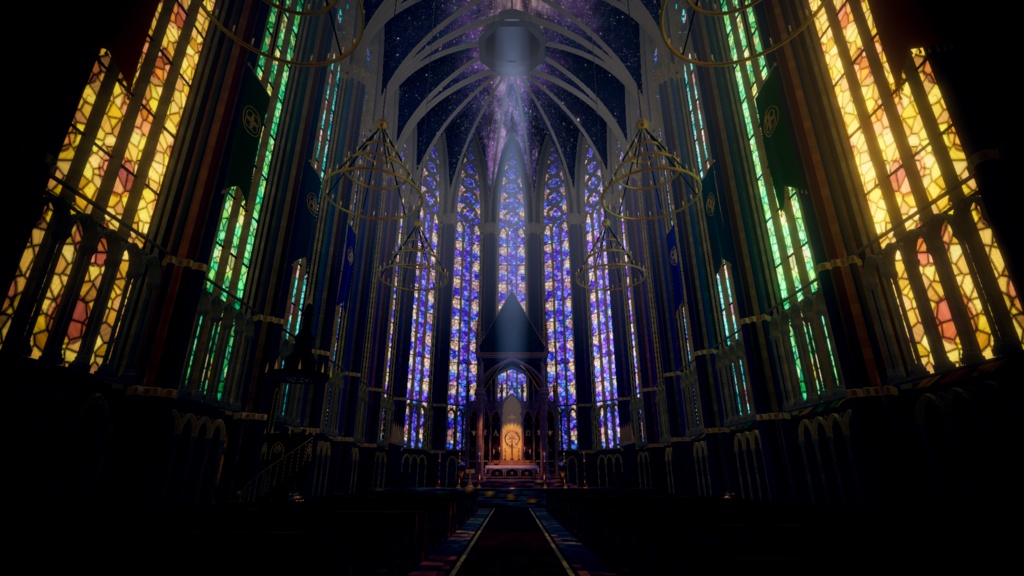


[안내사항] ・Warudo Standard(일반/BiRP) 전용 3D 환경(Environment)입니다. PRO(URP) 버전용이 아닙니다. ・환경 설정에서 [포스트 프로세싱 볼륨 활성화]와 [실시간 조명 사용]을 켜 주세요. ・생성형 AI를 활용해 제작·수정한 상품입니다. ・영어·일본어 전문은 본문 아래 「English Description」「日本語説明」 섹션에 있습니다. ============================== ⛪ 적막의 대성당 | Cathedral of Stillness 빛이 쏟아지는 스테인드글라스와 금빛 제단이 있는 고딕 대성당입니다. 낮·석양·밤 세 가지 시간대와 카메라 5컷 샘플 씬을 갖춘 Warudo Standard 전용 3D 환경으로, 방송·토크·노래·촬영 배경으로 사용할 수 있습니다. ✨ 스테인드글라스 구간마다 색이 달라지는 창으로 빛이 쏟아집니다. 창에서 들어오는 빛줄기는 Ctrl + Alt + 5로 켜고 끌 수 있습니다. 🌌 밤하늘 천장 은하수가 흐르는 밤하늘 천장이 본당 위를 덮습니다. ⛪ 제단 금박 상징으로 장식한 제단이 본당 끝에 자리합니다. 🕯️ 촛불과 샹들리에 흔들리는 촛불과 샹들리에, 파이프 오르간이 공간의 분위기를 채웁니다. 🌫️ 라이팅과 분위기 배경 조명은 베이크되어 있습니다. 캐릭터의 밝기는 아바타 재질과 캐릭터 조명 설정에 따라 달라질 수 있습니다. ・Ctrl + Alt + 4 : 안개 ・Ctrl + Alt + 5 : 창에서 들어오는 빛줄기 ・Ctrl + Alt + 6 : 떠다니는 먼지 입자 🌗 시간대 전환 ・Ctrl + Alt + 1 / 2 / 3 : 낮 / 석양 / 밤 ・Ctrl + Alt + 0 : 시간대 순서대로 전환 ※ Warudo 영상 창을 클릭한 뒤 조작해 주세요. 기존 캐릭터 배치나 다른 단축키와 충돌하지 않는지 확인해 주세요. ※ 시간대·효과 단축키는 변경할 수 없습니다. 🎥 카메라 5컷 샘플 씬 ・Ctrl + Shift + F1 : 제단 앞 ・Ctrl + Shift + F2 : 설교단 위 ・Ctrl + Shift + F3 : 장미창 (입구 방향) ・Ctrl + Shift + F4 : 본당 통로 (제단 방향) ・Ctrl + Shift + F5 : 성가대석 옆 카메라 단축키는 샘플 씬에서 작동하며, 전환할 때 Character 1도 해당 위치로 이동합니다. 샘플 씬의 카메라 단축키는 블루프린트에서 변경할 수 있습니다. ※ 홍보 영상의 연속 카메라 이동과 자동 시간대 전환은 촬영용 연출이며 상품 기능에 포함되지 않습니다. ※ 다인 합방 연결과 원격 트래킹 설정은 포함되지 않습니다. 필요한 모델과 트래킹은 별도로 준비해 주세요. 📦 파일 구성 ・Warudo 환경 파일 (.warudo) ・카메라 5컷 샘플 씬 (Scenes 폴더) ・사용 안내문 (한국어·일본어·영어) ・이용조건 (LICENSE_KO.txt / LICENSE_JA.txt / LICENSE_EN.txt) ・AI 제작 고지·사용 리소스 안내 (AI_DISCLOSURE_CREDITS.txt) ・미리보기 이미지 7장 ※ 아바타·의상·FBX·Blender·Unity 제작 원본은 포함되어 있지 않습니다. 💻 권장 사양 PC Warudo Standard 0.15.1에서 확인했습니다. ・파일 형식 : .warudo (Environments) ・베이크 조명 포함 ※ 아바타·해상도·방송 설정에 따라 성능은 달라집니다. 최신 버전의 FPS는 별도로 측정하지 않았습니다. 🔧 설치 방법 ① ZIP을 해제하고 Warudo에서 Open Data Folder로 데이터 폴더를 엽니다. ② Environments 폴더 바로 안에 StainedGlassCathedral.warudo를 넣습니다. ③ Warudo를 다시 실행하고 Environment → Source에서 StainedGlassCathedral을 선택합니다. 자세한 사용법은 동봉된 사용 안내문을 확인해 주세요. 📜 사용 안내 1인 1라이선스입니다. 구매는 상품 데이터의 사용 권한을 제공하며, 저작권이나 재판매 권한을 양도하지 않습니다. ● 허용 ・구매자 본인의 방송·영상·사진·SNS 콘텐츠 이용 및 수익 창출 ・구매자 본인의 사용을 위한 설정 변경 및 개변 ● 금지 ・상품 파일의 공유·양도·대여·재배포·재판매 ・개변한 데이터의 배포 ・본인이 제작한 상품이라고 주장하는 행위 ・상품에서 모델·텍스처 등의 데이터를 추출해 별도 소재로 재배포·재판매하는 행위 ・제공된 상품 데이터를 AI 모델의 학습·미세조정용 데이터로 사용하는 행위 ● 합방 ・구매자가 월드를 실행하는 방송·영상에 함께 출연하는 사람은 별도로 구매하지 않아도 됩니다. ・참여자가 같은 합방 화면을 자신의 채널에서 동시 송출하거나 편집·업로드하는 것도 허용합니다. ・배경 파일을 받아 자신의 Warudo에서 직접 사용하는 사람은 각각 본품을 구매해야 합니다. 같은 팀·회사에도 동일하게 적용됩니다. ・설치·수정·세팅을 의뢰해 작업자가 상품 파일을 직접 다루는 경우, 작업자와 실제 사용자 모두 본품을 구매해야 합니다. 파일은 각자 구매한 경로에서 다운로드해 주세요. ※ 위 조건은 Poly Haven CC0 원본 소재 자체의 권리를 제한하지 않습니다. ・뮤직비디오, 콘서트, 광고·홍보 등 기업·상업 프로젝트에 사용하는 경우에는 이용 전에 문의해 주세요. 🔄 취소·환불 디지털 다운로드 상품은 주문 확정 후 단순 변심에 의한 취소·환불이 원칙적으로 어렵습니다. 파일 손상, 설명과 다른 내용, 안내된 확인 환경에서의 오류는 주문 정보·Warudo 버전·문제 화면과 함께 문의해 주세요. 확인 후 수정 파일 제공 등 필요한 조치를 안내하겠습니다. 관련 법령 및 BOOTH 약관에 따른 구매자의 권리는 제한하지 않습니다. 🤖 AI 제작 고지 생성형 AI(Anthropic Claude, OpenAI Codex)를 활용해 제작·수정했습니다. 기획·방향 결정·검수·판매는 마루쿠(Maruku)가 맡았습니다. Poly Haven CC0 텍스처 8종을 사용했습니다. 상세 제작 정보와 리소스 출처는 동봉된 AI_DISCLOSURE_CREDITS.txt를 확인해 주세요. 💬 문의 BOOTH의 샵 문의 기능을 이용해 주세요. 아래 크레딧의 메일·디스코드로도 연락할 수 있습니다. ============================== Environment Artist : 마루쿠 / mrk_studio E-mail : mrk2026studio@gmail.com Discord : m_aruku
English Description
[Before You Buy] ・A 3D Environment for Warudo Standard (BiRP) only. Not for Warudo PRO (URP). ・Enable Post Processing Volumes and Realtime Lights in the Environment settings. ・Created and refined with the assistance of generative AI. ・Full Korean text is in the description above; full Japanese text is in the 日本語説明 section below. [About — Cathedral of Stillness] A Gothic cathedral with luminous stained glass and a golden altar. Windows that change colour throughout the building, a Milky Way night-sky ceiling, a gilded altar backdrop with symbols, flickering candles, a pipe organ and chandeliers provide a fantasy setting for streams, chats, singing and photography. Background lighting is baked. Character brightness depends on avatar materials and character lighting settings. [Contents] ・Warudo environment file (.warudo) ・Five-cut camera sample scene (Scenes folder) ・Setup guides in Korean, Japanese and English ・Usage terms (LICENSE_KO.txt / LICENSE_JA.txt / LICENSE_EN.txt) ・AI disclosure and resource credits (AI_DISCLOSURE_CREDITS.txt) ・Seven preview images Avatars, outfits, FBX files and Blender/Unity source projects are not included. [Specifications and Installation] ・Format: .warudo (Environments) Checked with PC Warudo Standard 0.15.1 ・Includes baked lighting. 1. Extract the ZIP and use Open Data Folder in Warudo. 2. Place StainedGlassCathedral.warudo directly in the Environments folder. 3. Restart Warudo and select StainedGlassCathedral under Environment → Source. Performance varies with avatars, resolution and streaming settings. FPS has not been re-measured for the current version. See the included guides for details, including sample scene installation. [Features and Hotkeys] Lighting ・Ctrl + Alt + 1 / 2 / 3: Day / Sunset / Night ・Ctrl + Alt + 0: Cycle through lighting presets Effects on/off ・Ctrl + Alt + 4: Fog ・Ctrl + Alt + 5: Window light shafts ・Ctrl + Alt + 6: Floating dust Five-cut camera sample scene ・Ctrl + Shift + F1: In front of the altar ・Ctrl + Shift + F2: On the pulpit ・Ctrl + Shift + F3: Rose window, facing the entrance ・Ctrl + Shift + F4: Nave aisle, facing the altar ・Ctrl + Shift + F5: Beside the choir stalls Camera hotkeys work in the sample scene and also move Character 1 to the matching location. Click the Warudo output window before using hotkeys. Check existing character placement and possible shortcut conflicts. Lighting/effect hotkeys cannot be changed. Sample scene camera hotkeys can be edited in the blueprint. Continuous camera movement and automatic time-of-day switching in promotional videos are filming effects, not included product features. Multi-person collaboration connections and remote tracking setup are not included. Users must separately provide and configure the required models and tracking. [Full Product License and Usage Terms] These conditions define how purchasers may use the supplied product data. They do not assert that the seller holds exclusive copyright over all AI-generated elements or third-party materials. One license per person. Purchase grants permission to use the product data; it does not transfer copyright or resale rights. Allowed: Use in the purchaser's streams, videos, photos and social media content, including monetization. Configuration changes and modifications for the purchaser's own use are permitted. Prohibited: Sharing, transferring, lending, redistributing or reselling product files; distributing modified data; claiming to have created the product; extracting models, textures or other data from the product for redistribution or resale as standalone materials; using the supplied product data to train or fine-tune AI models. These terms do not restrict rights to the original Poly Haven CC0 materials themselves. Contact us before use in corporate/commercial projects such as music videos, concerts, advertising or promotional campaigns. [Collaborations and Setup Services] Guests who only appear in a stream or video where the purchaser runs the environment do not need to purchase it. Participants may simultaneously stream the same collaboration footage on their own channels and edit or upload that footage. Anyone who receives the environment file and directly uses it in their own Warudo must purchase the full product individually, including members of the same team or company. If another person directly handles the files for installation, modification or setup, both that worker and the actual user must purchase the full product. Each person must download the files from their own purchase. [AI Disclosure and Credits] Created and refined with generative AI (Anthropic Claude, OpenAI Codex). Planning, direction, review and sales: Maruku. Uses eight Poly Haven CC0 textures. See AI_DISCLOSURE_CREDITS.txt for production details and resource sources. [Cancellations, Refunds and Support] Cancellation or refund requests due to a change of mind are generally not accepted after an order for this digital download is confirmed. For damaged files, content that differs from the description or issues in the stated verification environment, contact us with your order details, Warudo version and screenshots. After checking the issue, we will advise on appropriate assistance, such as corrected files. This does not limit purchaser rights under applicable law or BOOTH's terms. [Contact] Use BOOTH's shop contact function. E-mail: mrk2026studio@gmail.com Discord: m_aruku Planning and sales: Maruku
日本語説明
【ご購入前に】 ・Warudo Standard(通常版/BiRP)専用の3D環境(Environment)です。PRO(URP)向けではありません。 ・環境設定でポストプロセシングボリュームとリアルタイムライトを有効にしてください。 ・生成AIを活用して制作・調整した商品です。 ・韓国語・英語の全文は、商品ページ内の各説明をご確認ください。 【商品紹介 — 静寂の大聖堂】 光が差し込むステンドグラスと金色の祭壇がある、ゴシック様式の大聖堂です。 場所ごとに色が変わる窓、天の川が流れる夜空の天井、金箔のシンボルで飾った祭壇、揺らめくろうそく、パイプオルガンやシャンデリアが、幻想的な配信・トーク・歌・撮影の舞台を彩ります。 背景の照明はベイク済みです。キャラクターの明るさはアバターのマテリアルやキャラクター照明設定によって変わります。 【内容】 ・Warudo環境ファイル(.warudo) ・カメラ5カットのサンプルシーン(Scenesフォルダ) ・導入説明書(韓国語・日本語・英語) ・利用条件(LICENSE_KO.txt / LICENSE_JA.txt / LICENSE_EN.txt) ・AI制作・使用素材のクレジット(AI_DISCLOSURE_CREDITS.txt) ・プレビュー画像7枚 ※ アバター・衣装・FBX・Blender/Unityの制作プロジェクトは付属しません。 【仕様・導入方法】 ・ファイル形式:.warudo(Environments) 動作確認環境:PC版Warudo Standard 0.15.1 ・ベイク済み照明を含みます。 ① ZIPを解凍し、WarudoのOpen Data Folderからデータフォルダを開きます。 ② Environmentsフォルダ直下にStainedGlassCathedral.warudoを入れます。 ③ Warudoを再起動し、Environment → SourceでStainedGlassCathedralを選択します。 ※ 動作速度はアバター・解像度・配信設定によって変わります。現行バージョンのFPSは再測定していません。 ※ サンプルシーンの導入など、詳しい使い方は同梱の説明書をご確認ください。 【機能・ショートカット】 ライティング切り替え ・Ctrl + Alt + 1/2/3:昼/夕焼け/夜 ・Ctrl + Alt + 0:時間帯を順番に切り替え 演出のオン・オフ ・Ctrl + Alt + 4:霧 ・Ctrl + Alt + 5:窓から差し込む光の筋 ・Ctrl + Alt + 6:漂うほこり カメラ5カットのサンプルシーン ・Ctrl + Shift + F1:祭壇の前 ・Ctrl + Shift + F2:説教壇の上 ・Ctrl + Shift + F3:バラ窓(入口方向) ・Ctrl + Shift + F4:身廊の通路(祭壇方向) ・Ctrl + Shift + F5:聖歌隊席の横 ※ カメラキーはサンプルシーンで動作し、切り替え時にCharacter 1も対応する位置へ移動します。 ※ 操作前にWarudoの映像ウィンドウをクリックしてください。既存のキャラクター配置や他のキーとの競合にご注意ください。 ※ 照明・演出のキーは変更できません。サンプルシーンのカメラキーはブループリントで変更できます。 ※ 紹介動画の連続的なカメラ移動・時間帯の自動切り替えは撮影用演出で、商品機能には含まれません。 ※ 複数人コラボの接続・リモートトラッキング設定は含まれません。必要なモデルやトラッキングは利用者が別途用意・設定してください。 【背景本体のライセンス・利用条件】 以下は、購入者に提供する商品データの利用範囲を定める条件です。AI生成物や第三者の素材全体について、販売者が独占的な著作権を主張するものではありません。 1人につき1ライセンスです。購入により商品データの使用権を提供します。著作権や再販売権の譲渡ではありません。 許可:購入者本人の配信・動画・写真・SNSコンテンツへの利用および収益化。購入者本人の利用のための設定変更・改変。 禁止:商品ファイルの共有・譲渡・貸与・再配布・再販売、改変したデータの配布、自作の商品と偽る行為、商品からモデル・テクスチャ等を抽出し、独立した素材として再配布・再販売すること。提供された商品データをAIモデルの学習・ファインチューニングに使用すること。 ※ 上記はPoly HavenのCC0素材そのものの権利を制限するものではありません。 ※ MV・コンサート・広告・宣伝などの企業・商業プロジェクトは、事前にお問い合わせください。 【コラボ配信・設定作業の依頼】 購入者が背景を実行する配信・動画に出演するだけの方は、追加購入不要です。 参加者が同じコラボ映像を自分のチャンネルで同時配信したり、編集・投稿したりすることも許可します。 ただし、背景ファイルを受け取り、自分のWarudoで直接使用する方は、それぞれ背景本体を購入してください。同じチーム・会社でも同様です。 導入・改変・設定を第三者に依頼し、その作業者が商品ファイルを直接扱う場合は、作業者と実際の利用者の双方が背景本体を購入してください。ファイルは各自の購入先からダウンロードしてください。 【AI制作・クレジット】 生成AI(Anthropic Claude、OpenAI Codex)を活用して制作・調整しました。企画・方向性の決定・確認・販売:마루쿠(Maruku)。 Poly HavenのCC0テクスチャ8種を使用しています。詳しい制作情報・素材の出典は、同梱のAI_DISCLOSURE_CREDITS.txtをご確認ください。 【キャンセル・返金・不具合対応】 ダウンロード商品の注文確定後、お客様都合によるキャンセル・返金は原則としてお受けしていません。 ファイルの破損、説明と異なる内容、記載の動作確認環境での不具合は、注文情報・Warudoのバージョン・状況が分かる画像を添えてご連絡ください。確認後、修正データの提供など必要な対応をご案内します。 適用法令およびBOOTHの規約に基づく購入者の権利を制限するものではありません。 【お問い合わせ】 BOOTHの「ショップへのお問い合わせ」からご連絡ください。 E-mail: mrk2026studio@gmail.com Discord: m_aruku 企画・販売:마루쿠(Maruku)