
画像納品チェック|寸法・容量・ファイル名をまとめて確認|無料版あり
- 無料版ダウンロード商品¥ 0
- 一括版ダウンロード商品¥ 1,480
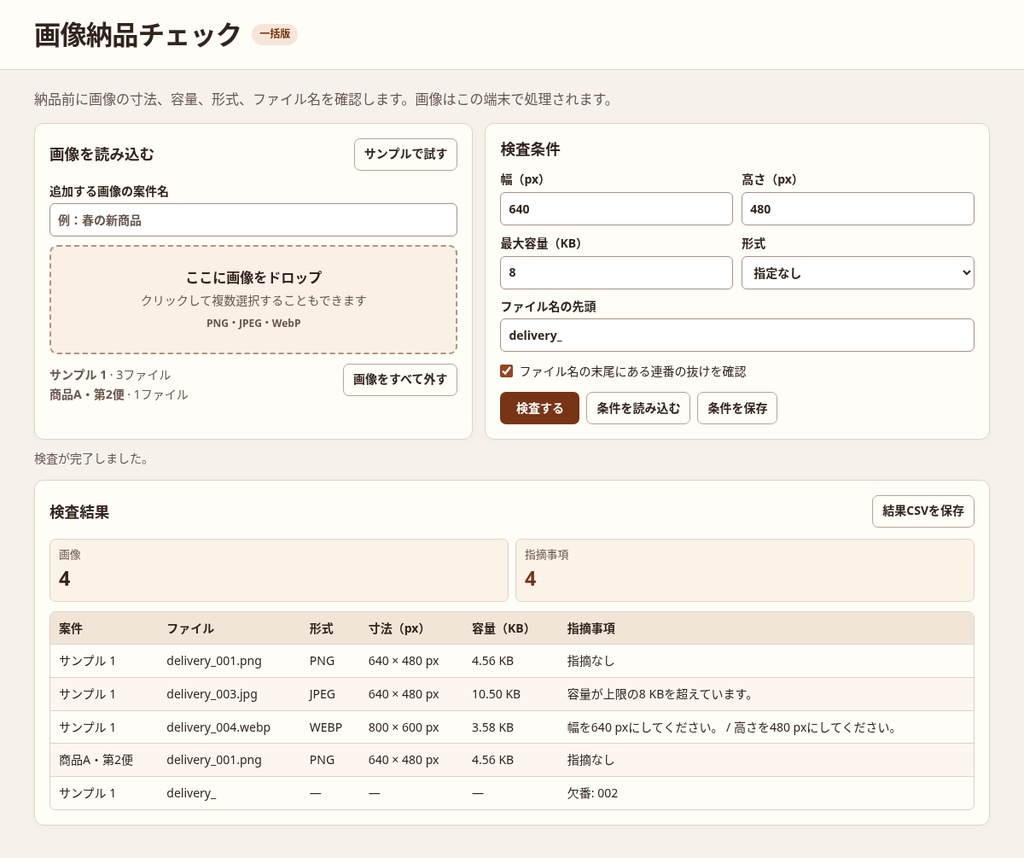



JPEG・PNG・WebPの納品前に、指定の寸法や容量を外れた画像、ファイル名の重複・連番の欠番をまとめて確認するツールです。提出先ごとに寸法、容量上限、接頭辞などの条件を設定できます。 【無料版 0円・利用期限なし】 一つの納品分に含まれる画像を複数枚読み込み、確認が必要な箇所を一覧で見られます。 【一括版 買い切り】 案件名を付けて複数の納品分を扱い、共通の検査条件で確認できます。繰り返し使う条件をJSONで保存・再利用でき、検査結果はCSVで書き出せます。 【使い方】 ZIPを展開し、同梱のHTMLをChromeまたはEdgeで開いてください。インストールや登録は不要です。画像は端末内で処理し、画像を改変したり外部に送ったりしません。確認用のサンプル3枚付きです。 【検査範囲】 ファイルに記録されたピクセル寸法、ファイル容量、ファイル名を確認します。EXIFによる表示上の回転は反映しません。元画像の完全性や見た目の確認は、納品前に別途行ってください。 English Image Delivery Checker | Offline Batch Image Preflight Check a batch of PNG, JPEG, or WebP images before handing it off. Set delivery requirements for dimensions, file size, format, and filenames, then see which files need attention. Free — no time limit Load multiple images from one delivery and view the results. Check for duplicate names and missing sequence numbers alongside the dimensions, format, and size checks. Pro — one-time purchase Add several named deliveries, check all of them against the same settings, and export the results as CSV. Save and reload settings profiles in JSON for recurring jobs. How it works Extract the ZIP and open the included HTML file in Chrome or Edge. The interface and guide are in English. No account, installation, or uploads are required. Three sample images are included. Limits Up to 1,000 files total and 50 MB per image. The tool reads metadata without changing the originals. Dimensions are taken from the file without applying EXIF rotation.