

Dazzle My Unity - Unityエディタ壁紙ツール【VRChat / Unity】
- ダウンロード商品¥ 1,000
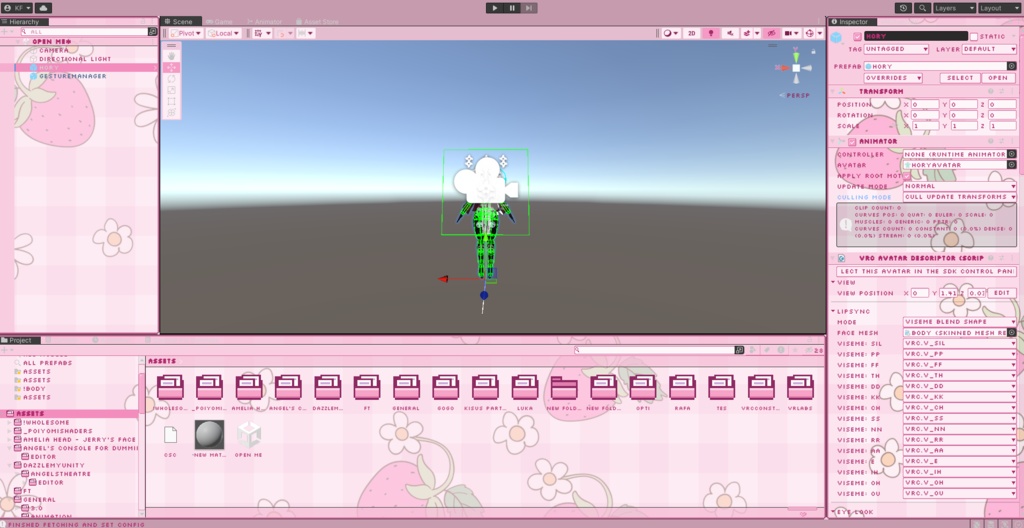
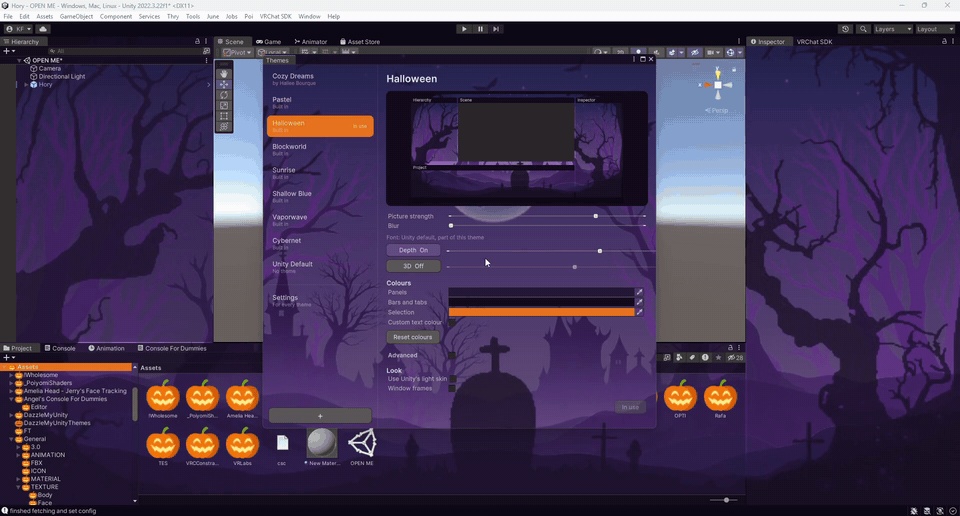
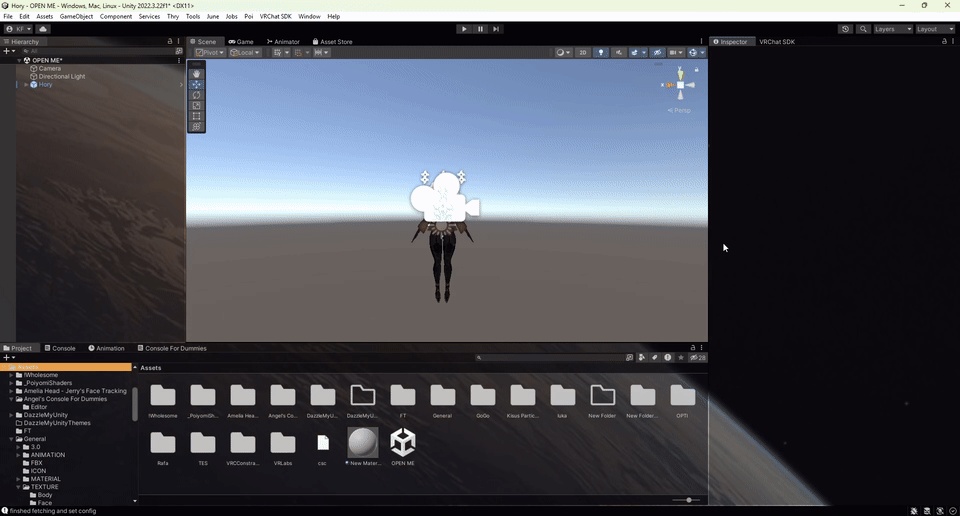
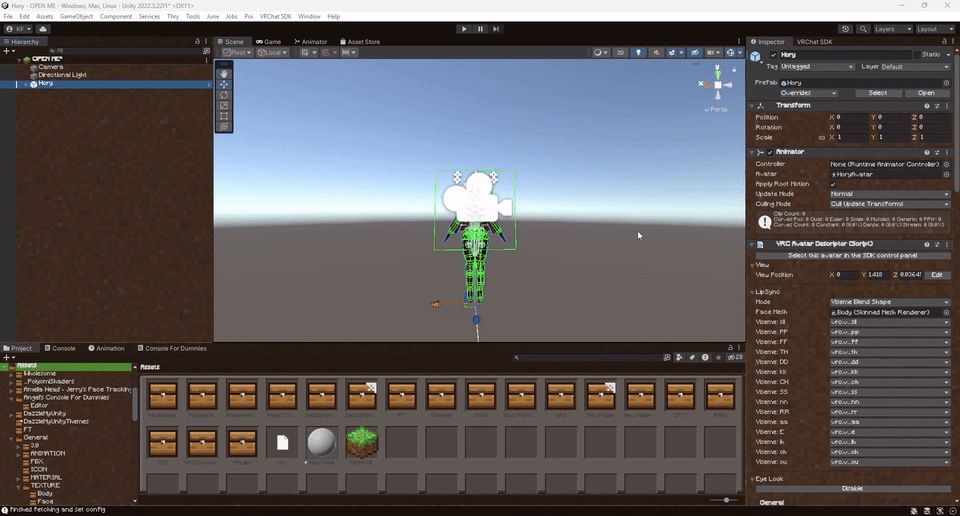
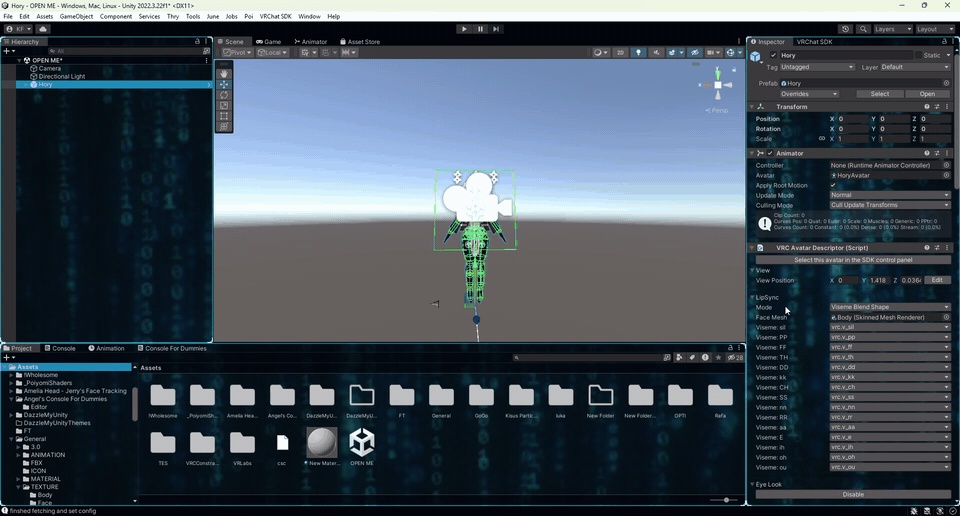


紹介動画 / Video: https://www.youtube.com/watch?v=uBX9J9K4YdE 【概要】 いつも同じ、灰色のUnity画面に飽きていませんか? Unityを自分だけの見た目にしてみたいと思ったことはありませんか? Dazzle My Unity は、Unityエディタに好きな画像やGIFアニメの壁紙を設定し、配色・フォント・アイコン・BGMまでまとめて着せ替えできる Unity エディタ拡張です。 壁紙はすべてのウィンドウの「後ろ」に表示されるので、作業のじゃまになりません。Sceneビュー・Gameビュー・Animatorはそのまま見やすく、編集モードでもプレイモードでも同じテーマのまま作業できます。 自分だけのUnityで、もっと居心地よく作業しましょう! 紹介動画:https://www.youtube.com/watch?v=uBX9J9K4YdE 【こんな方におすすめ】 ・Unityのデフォルトの見た目に飽きてしまった方 ・お気に入りのイラストやGIFを眺めながら作業したい方 ・アバター改変やワールド制作の時間をもっと楽しくしたい方 ・自作テーマを作って、配布・販売してみたい方 【できること・主な機能】 ■ 壁紙・見た目のカスタマイズ ・すべてのウィンドウの背後に、静止画またはGIFアニメの壁紙を表示 ・マウスの動きに合わせて、奥行きのあるレイヤーがゆらゆら動きます ・エディタ全体の配色・フォントをテーマに合わせて統一 ・フォルダやファイルのアイコンを変更(アニメーションするアイコン、カーソルを合わせると開くフォルダ、選択すると反応するアイコンにも対応) ・ウィンドウ枠・スクロールバー・スライダーもテーマに合わせて変更 ・テーマごとにループBGMを設定でき、音量も個別に調整できます ・好きな画像を何でも壁紙にできます ■ ステッカー機能(v1.4〜) ・54種類の内蔵ステッカー(アニメーションするものも多数) ・好きなウィンドウにドラッグして、移動・拡大縮小・回転が可能 ・PNG / JPG / GIF / PSD から自作ステッカーを追加可能 ・名前やタグで検索でき、自作ステッカーには「Mine」タグが付きます ・ステッカーはテーマごとに保存されます(内蔵テーマにも対応) ・書き出した .dazzletheme ファイルにステッカーも保存されます ・「Spill past window」で、ステッカーを隣のウィンドウにはみ出させることも可能 ・ステッカーは文字やアイコンの下に表示され、カーソルを合わせると薄くなるので作業のじゃまになりません ■ 自作テーマ ・「+」を押すだけで、新しいテーマをすぐに作成できます ・自分のイラスト・GIF・音楽を追加し、色・フォント・アイコンを選ぶだけ ・「Advanced」をONにすると、各レイヤーの動きや光の当たり方、ファイル形式ごとのアイコン、ウィンドウ枠・スクロールバー・スライダー、Projectウィンドウの見た目まで細かく設定できます ■ 軽さ・安心設計 ・Settings から「Reduce Motion(動きを減らす)」、フレームレートの制限、プレイモード中やUnityが裏にあるときのアニメーション停止、BGMのミュートが可能 ・導入直後はUnity標準の見た目のままなので、テーマを選ぶまで何も変わりません ・ボタン一つですべてをOFFにして、元のUnityの見た目に戻せます 【導入方法】 1. .unitypackage をプロジェクトにインポートします(ダブルクリック、またはProjectウィンドウにドラッグ&ドロップ)。 2. インポート画面で「Import」を押します。 3. メニューに「Tools」>「Angel」>「Dazzle My Unity」が表示されれば導入完了です。 【使い方】 1. メニューから「Tools」>「Angel」>「Dazzle My Unity」>「Themes」を開きます。 2. お好きなテーマを選び、「Use this theme」を押します。 3. 自分だけのテーマを作りたいときは「+」を押し、画像・GIF・音楽・色・フォント・アイコンを設定します。 4. 動きの量やスピード、BGMは「Settings」から調整できます。 5. 元の見た目に戻したいときは、ボタン一つですべてOFFにできます。 【動作環境】 ・Unity 2022.3 ・VRChat SDK を導入したUnityプロジェクト(本ツールはVRChat SDKのコードの一部を利用しています) 【注意事項】 ・アニメーション壁紙やエフェクトは、PCの処理能力をある程度使用します。PCが爆発しないようご注意ください!Unityが重く感じる場合は、Settings からフレームレートを下げるか、「Reduce Motion」をONにしてください。 ・サンプル画像・動画内のアバター(diraccoonr様の「Hory」)は本商品には含まれません。素敵なアバターをお借りしました。ぜひショップもご覧ください! https://payhip.com/b/hATDU 【内容物】 ・Dazzle My Unity 本体(.unitypackage/52MB) ・テキストファイル(TXT/537B) 【利用規約】 本商品(Angel's Dazzle My Unity)をご購入・ダウンロードした時点で、以下の規約に同意したものとみなします。 ・本ツールおよびそのファイルの流出・共有・再配布・再アップロード・転売を禁止します。ただし、ご自身で作成したテーマは販売していただいて構いません。 ・テーマを再配布する際は、プラグインから直接書き出した .dazzletheme ファイルの形式でお願いします。 ・ご自身で入手していない方へ、パッケージや同梱ファイルを渡すことを禁止します。 ・個人利用・商用利用ともに可能です。 ・本ツール、そのファイル、同梱のテーマ・イラスト・アイコン・フォント・音楽を、配布するアバター・アセット・プロジェクト・パッケージに含めることはできません。 ・本ツールやそのコードを自作と偽ること、およびAIに読み込ませることを禁止します。 ・デジタル商品のため、返金はお受けできません。 ・今後のUnity・VRChat SDK・サードパーティ製パッケージのアップデートによって生じた問題について、制作者は責任を負いかねます。ただし、必要に応じて対応アップデートを行う場合があります。 【連絡先】 不具合のご報告・ご質問は、BOOTHのメッセージ、または以下までお気軽にどうぞ。 ・Discord:https://discord.gg/Azqg3jH5bk ・Instagram:@angelstheatre(https://www.instagram.com/angelstheatre/) ・ウェブサイト:https://angelstheatre.com/ 作ったテーマをみんなに見せたい方は、ぜひDiscordサーバーに投稿してください! https://discord.gg/WkVdzgbEZa 【更新履歴】 v1.4 — ステッカー&スプライト ・54種類の内蔵ステッカーを収録したステッカートレイを新搭載(アニメーションするものも多数) ・ステッカーを好きなウィンドウにドラッグし、移動・拡大縮小・回転できるように ・PNG / JPG / GIF / PSD から自作ステッカーを追加できるように ・ステッカーを名前やタグで検索可能に。自作ステッカーには「Mine」タグが付きます ・テーマごとにステッカーを保存(内蔵テーマにも対応) ・書き出した .dazzletheme ファイルにステッカーも保存されるように ・テーマエディタにステッカーパネルを追加(サイズ・不透明度・反転・重なり順) ・「Spill past window」で隣のウィンドウにはみ出せるように ・ステッカーは文字やアイコンの下に表示され、カーソルを合わせると薄くなるように ・プレイモード中の非表示、アニメーションのON/OFFなどのステッカー設定を追加 ・「Reduce Motion」がアニメーションステッカーにも適用されるように ―――――――――――――――――――― English Description 【Overview】 I'm sure you're tired of staring at the same boring Unity screen... Ever wanted to customize Unity to be your own? Dazzle My Unity is an easy add-on tool for Unity that lets you add wallpapers to your own project! Animated backgrounds, matching colors, custom fonts, themed icons and music, all behind your windows and never in your way. Your Scene view, Game view and Animator stay clear, and your theme looks the same in Edit mode and Play mode. Feel more at home! Preview video: https://www.youtube.com/watch?v=uBX9J9K4YdE 【Recommended for】 ・Anyone who's bored of Unity's default look ・Creators who want their favorite art or GIFs on screen while they work ・Avatar and world creators who want editing to feel more fun ・Anyone who wants to make, share or sell their own themes 【Features】 ■ Wallpapers & Look ・Backgrounds behind every window, from still pictures or animated GIFs ・Layered depth that shifts and drifts as you move your mouse ・Matching colors and fonts across the whole editor ・Custom icons for your folders and files, including icons that animate, open when you hover over them, or react when you select them ・Themed window frames, scrollbars and sliders ・Looping music for each theme, with its own volume control ・Any image you want can become your background ■ Stickers (v1.4+) ・54 built-in stickers, many of them animated ・Drag stickers onto any window, then move, resize and rotate them ・Add your own stickers from PNG, JPG, GIF or PSD files ・Search by name or tag; your own stickers get a "Mine" tag ・Each theme keeps its own stickers, built-in themes included ・Stickers are saved inside exported .dazzletheme files ・"Spill past window" lets stickers hang over into nearby windows ・Stickers stay under text and icons, and fade when you point at them
English (continued)
■ Make Your Own Themes ・Press + and your new theme is ready to go ・Add your own art, GIFs and music, then pick your colors, fonts and icons ・Turn on Advanced to control every detail: how each layer moves and catches the light, your own icons for each file type, custom window frames, scrollbars and sliders, and the look of your Project window ■ Light & Safe ・Settings let you reduce motion, lower the frame rate, pause animations in Play mode or when Unity is in the background, and mute the music ・Starts on Unity's normal look, so nothing changes until you pick a theme ・One button turns everything off and puts Unity back the way it was 【Installation】 1. Import the .unitypackage into the project (double-click it, or drag it into the Project window). 2. Click Import. 3. You'll now see Tools > Angel > Dazzle My Unity in the menu bar. 【How to Use】 1. Open Tools > Angel > Dazzle My Unity > Themes. 2. Pick a theme you like and press "Use this theme". 3. Press + to make your own theme with your art, GIFs, music, colors, fonts and icons. 4. Open Settings to adjust motion, speed and music. 5. Want your old Unity back? One button turns everything off. 【Requirements】 ・Unity 2022.3 ・A Unity project with the VRChat SDK installed (Dazzle My Unity uses part of its code) 【Notes】 ・Animated backgrounds and effects use some of your PC's power. Careful not to make your PC explode! If Unity feels slow, turn down the frame rate or turn on Reduce Motion in Settings. ・The avatar in the preview ("Hory" by diraccoonr) is NOT included. Credit goes to diraccoonr — go check out her store! https://payhip.com/b/hATDU 【Contents】 ・Dazzle My Unity (.unitypackage, 52MB) ・Text file (TXT, 537B) 【Terms of Service】 By purchasing or downloading Angel's Dazzle My Unity, you agree to the following terms: ・DO NOT leak, share, redistribute, reupload, or resell this tool or its files. However, you may sell your own themes. ・Themes must be redistributed as a .dazzletheme file, exported directly through the plugin. ・Do not send the package or included files to anyone who has not obtained their own copy. ・You are allowed to use Dazzle My Unity for personal and commercial work. ・You may NOT include Dazzle My Unity, its files, or its included themes, art, icons, fonts or music inside an avatar, asset, project, or package that you distribute. ・Do not claim the tool or its code as your own or give it to AI. ・No refunds will be provided for digital purchases. ・I am not responsible for issues caused by future Unity, VRChat SDK, or third-party package updates, though compatibility updates may be provided when necessary. 【Contact】 For bug reports or questions, send a BOOTH message or reach out here: ・Discord: https://discord.gg/Azqg3jH5bk ・Instagram: @angelstheatre (https://www.instagram.com/angelstheatre/) ・Website: https://angelstheatre.com/ Got a theme you want to share? Come post it in the server! https://discord.gg/WkVdzgbEZa 【Changelog】 v1.4 — Stickers & Sprites ・New Sticker tray with 54 built-in stickers, many of them animated ・Drag stickers onto any window, then move, resize and rotate them ・Add your own stickers from PNG, JPG, GIF or PSD files ・Search stickers by name or tag, and your own get a "Mine" tag ・Each theme keeps its own stickers, built-in themes included ・Stickers are saved inside exported .dazzletheme files ・Theme editor sticker panel for size, opacity, flip and layering ・"Spill past window" lets stickers hang over into nearby windows ・Stickers stay under text and icons, and fade when you point at them ・New sticker settings, including hide in Play Mode and animation on or off ・Reduce Motion now also calms animated stickers