

【3Dモデル】和モダン照明6種セット|照明設定ツール付き
- ダウンロード商品¥ 500
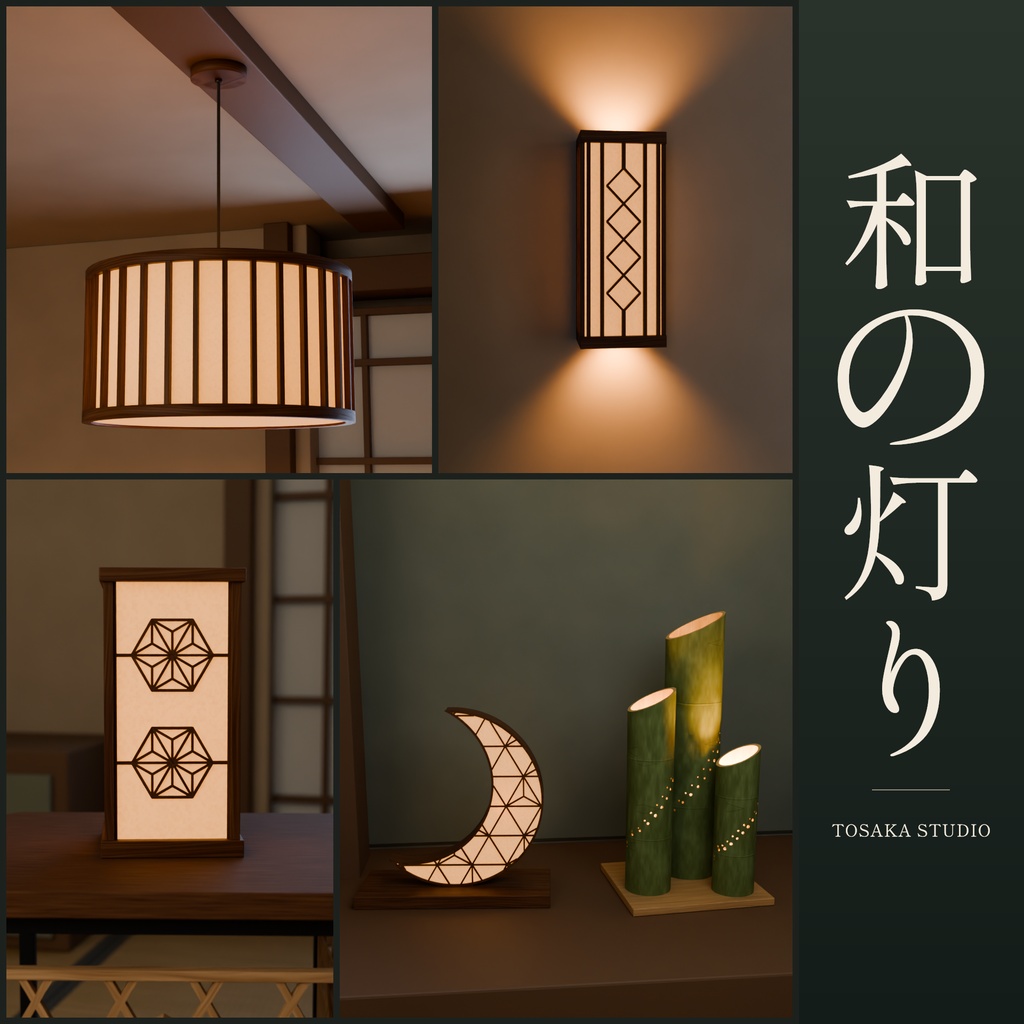
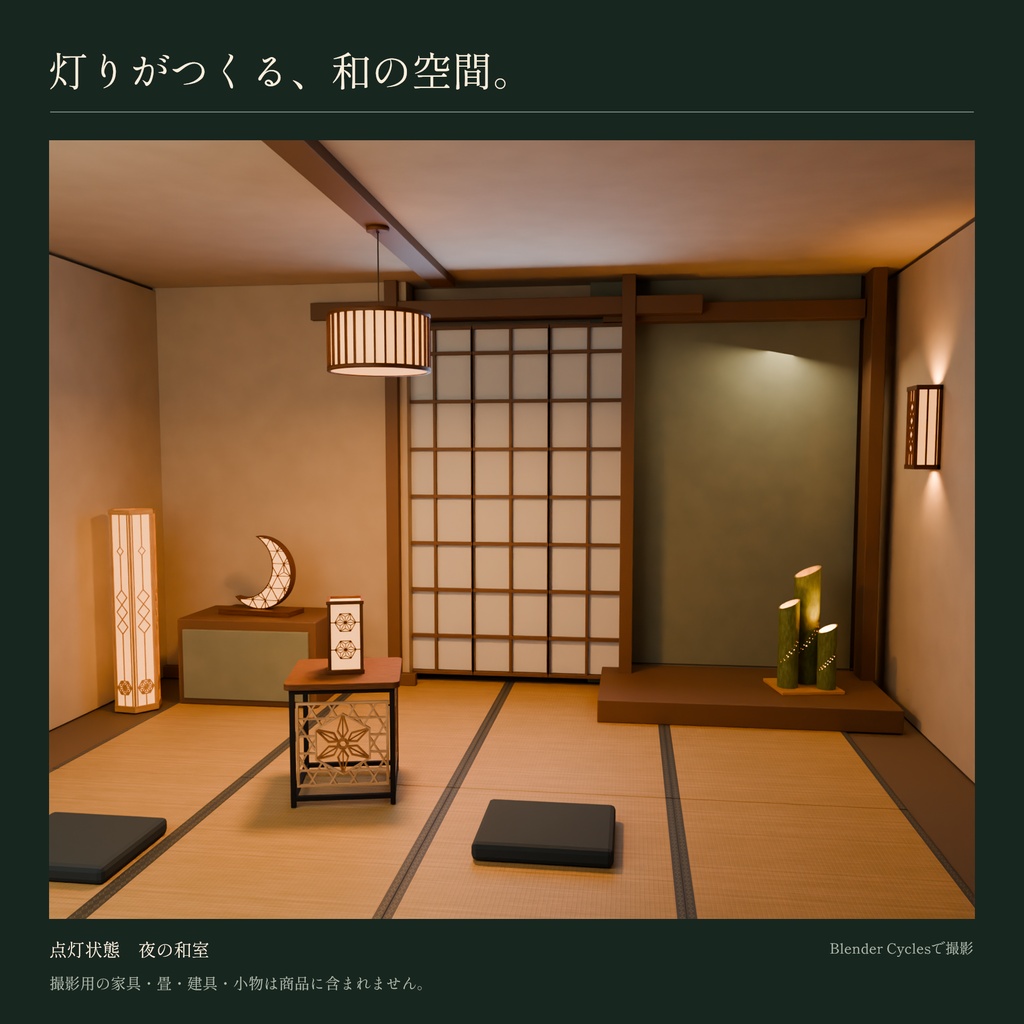
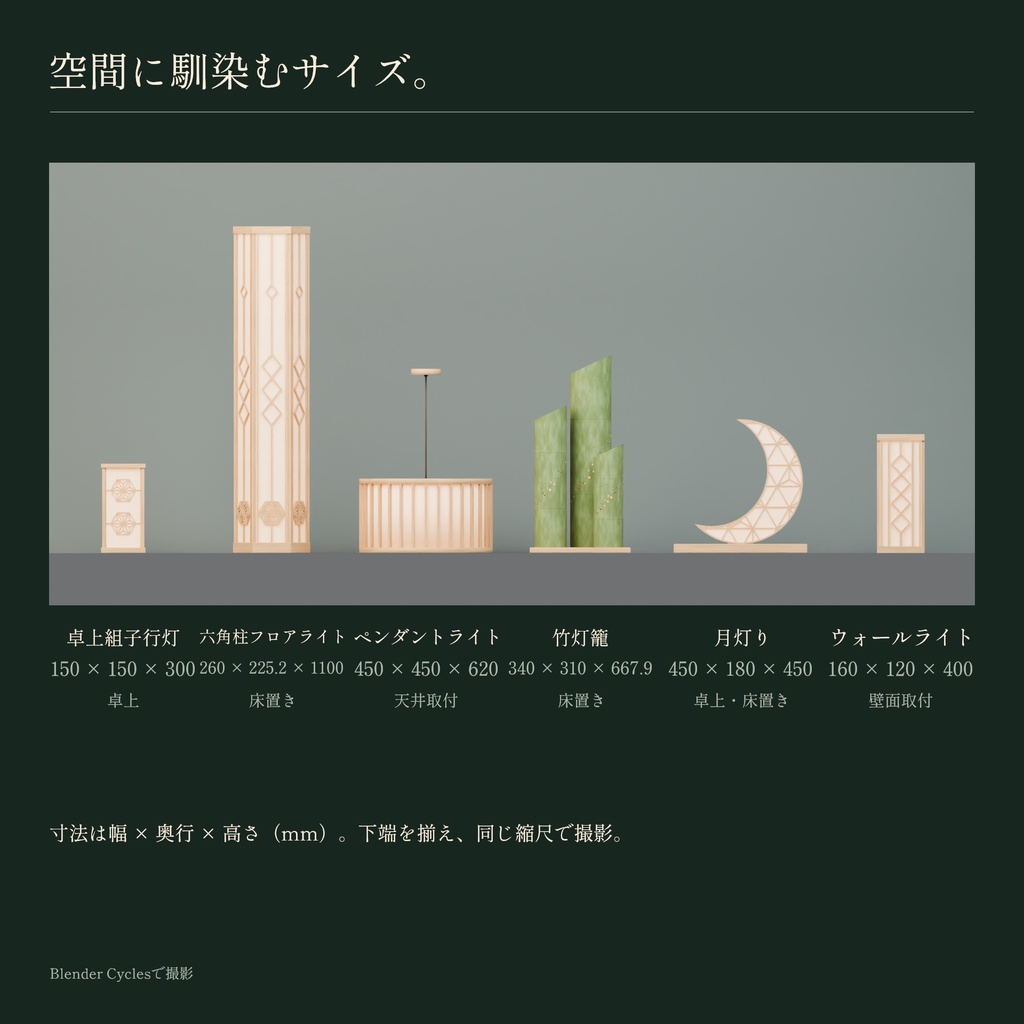
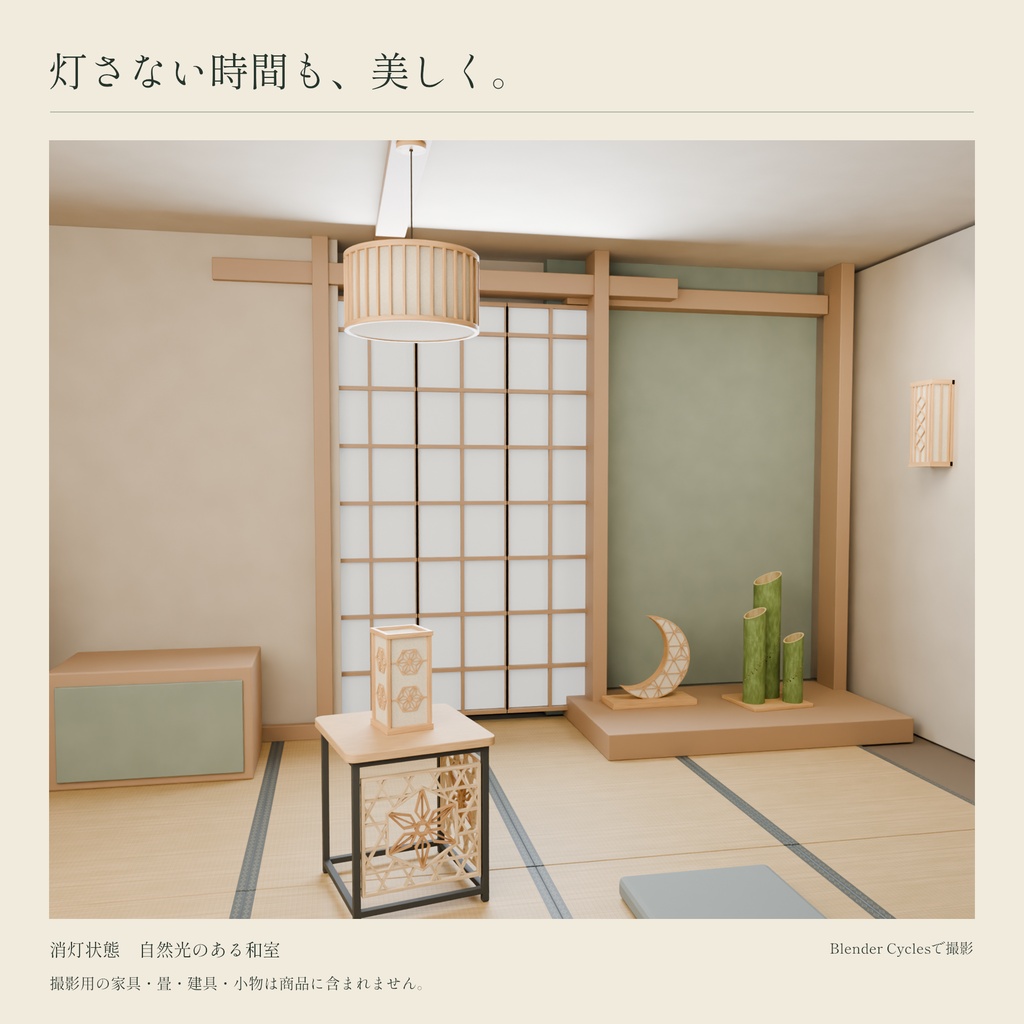


和の空間に、やさしい灯りを。 組子の繊細な意匠、和紙を通した柔らかな光、竹からこぼれる小さな灯り。 日本の伝統的な美しさを取り入れた、和モダン照明6種類の3Dモデルセットです。 和室、旅館、茶室、和モダン住宅など、VRChat・clusterのワールド制作をはじめ、さまざまな空間演出にご活用いただけます。 木材・竹材のカラーバリエーションに加え、光色や明るさを自由に調整できるUnity専用の照明設定ツールを同梱しています。 ◆ 照明6種類・基本Prefab18種類 ◆ 木材3色・竹材3色 ◆ 光色4種類+任意色 ◆ 3種類の照明方式 ◆ cluster・VRChat PC実機動作確認済み ◆ 個人・商用利用可 灯しても、灯さなくても、美しく。 TOSAKA Japanese Lighting Collection Vol.01 Designed by TOSAKA STUDIO.
収録モデル・カラーバリエーション
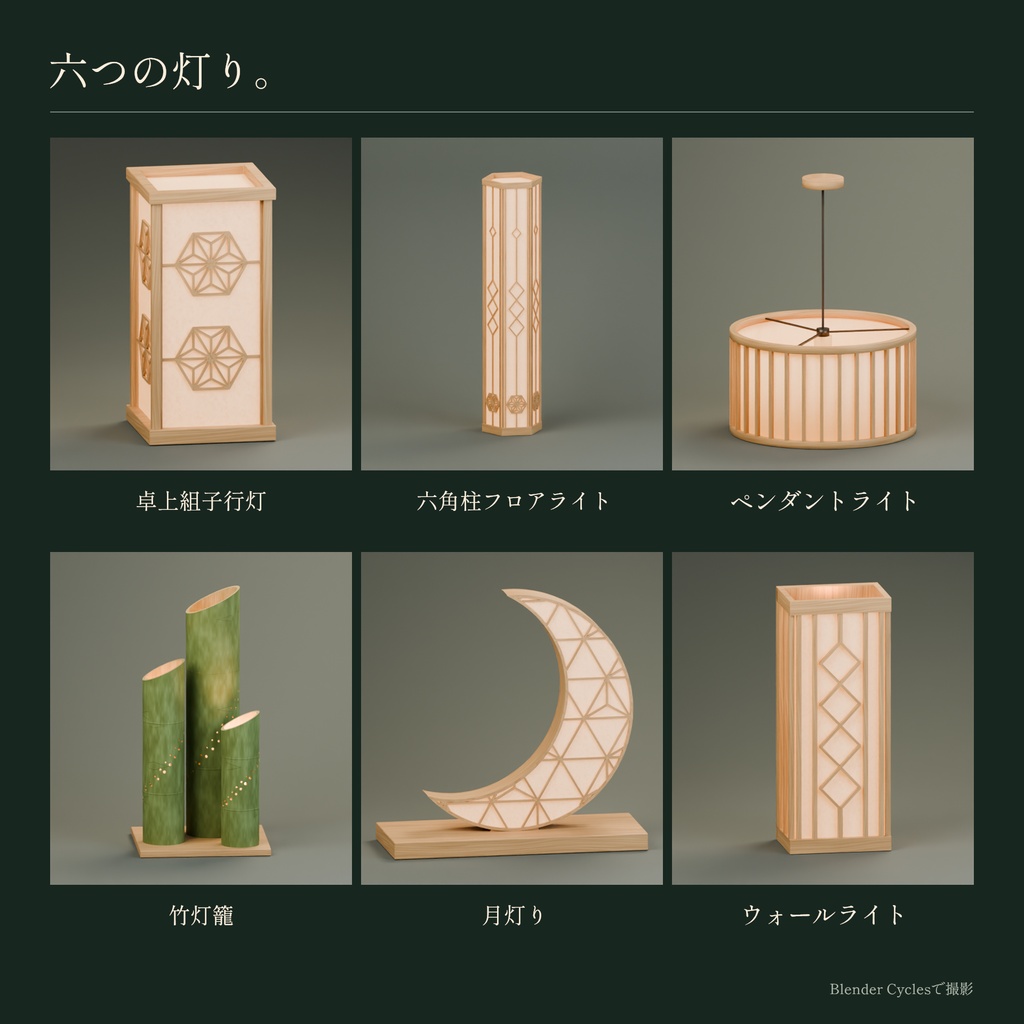
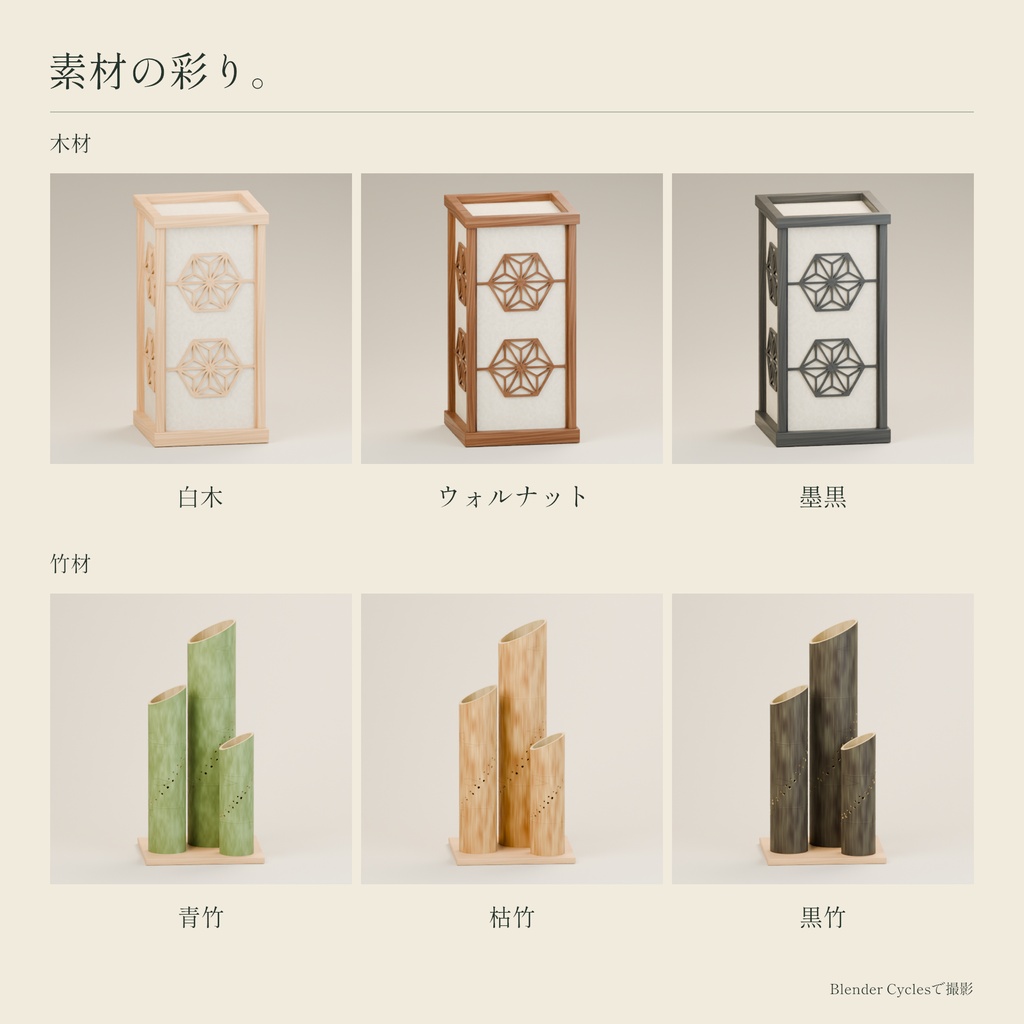
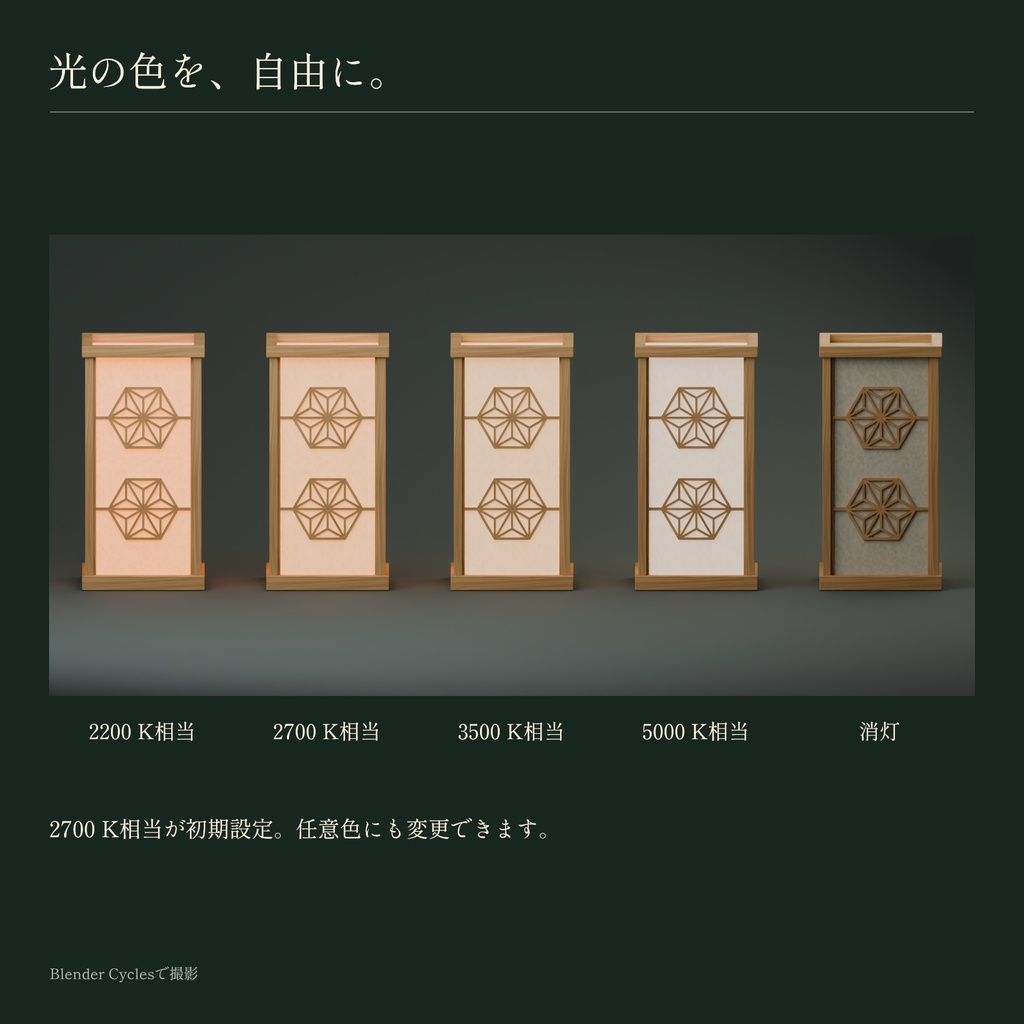
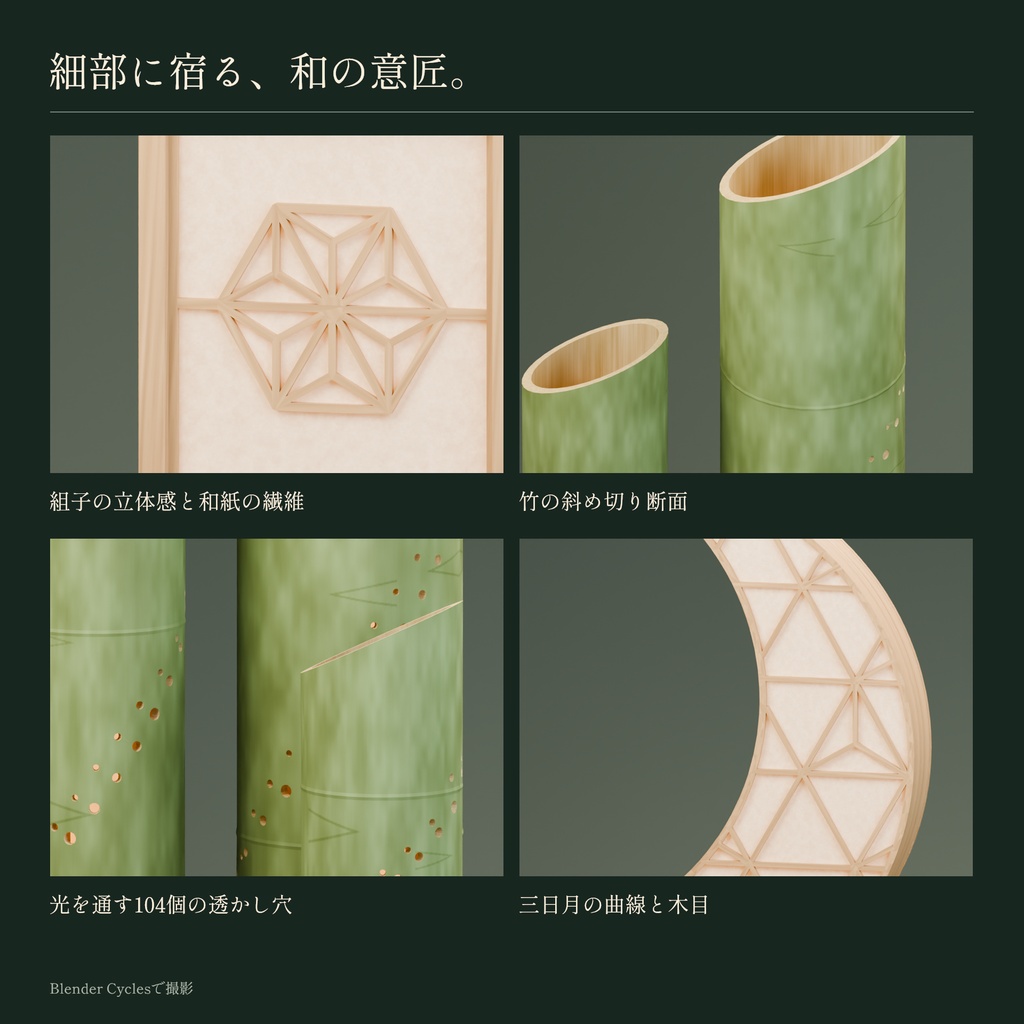
【照明6種類】 ・卓上組子行灯 / Kumiko Table Lantern ・六角柱フロアライト / Hexagonal Floor Lantern ・ペンダントライト / Pendant Light ・竹灯籠 / Bamboo Lantern ・月灯り / Crescent Moon Lamp ・ウォールライト / Wall Light 【木材3色】 ・白木 / Natural Wood ・ウォルナット / Walnut ・墨黒 / Charcoal Black 【竹材3色】 ・青竹 / Green Bamboo ・枯竹 / Aged Bamboo ・黒竹 / Black Bamboo 【光色4種類】 ・琥珀色:2200K相当 ・電球色:2700K相当 ・温白色:3500K相当 ・昼白色:5000K相当 任意の光色への変更、点灯・消灯にも対応しています。 【モデル仕様】 ・6モデル合計31,524 tris ・基本Prefab18種類 ・立体メッシュによる組子細工 ・竹灯籠には104個の貫通穴を実装 造形と質感を維持しながら、ワールド制作での利用を考慮した軽量化を行っています。
Unity専用・照明設定ツール
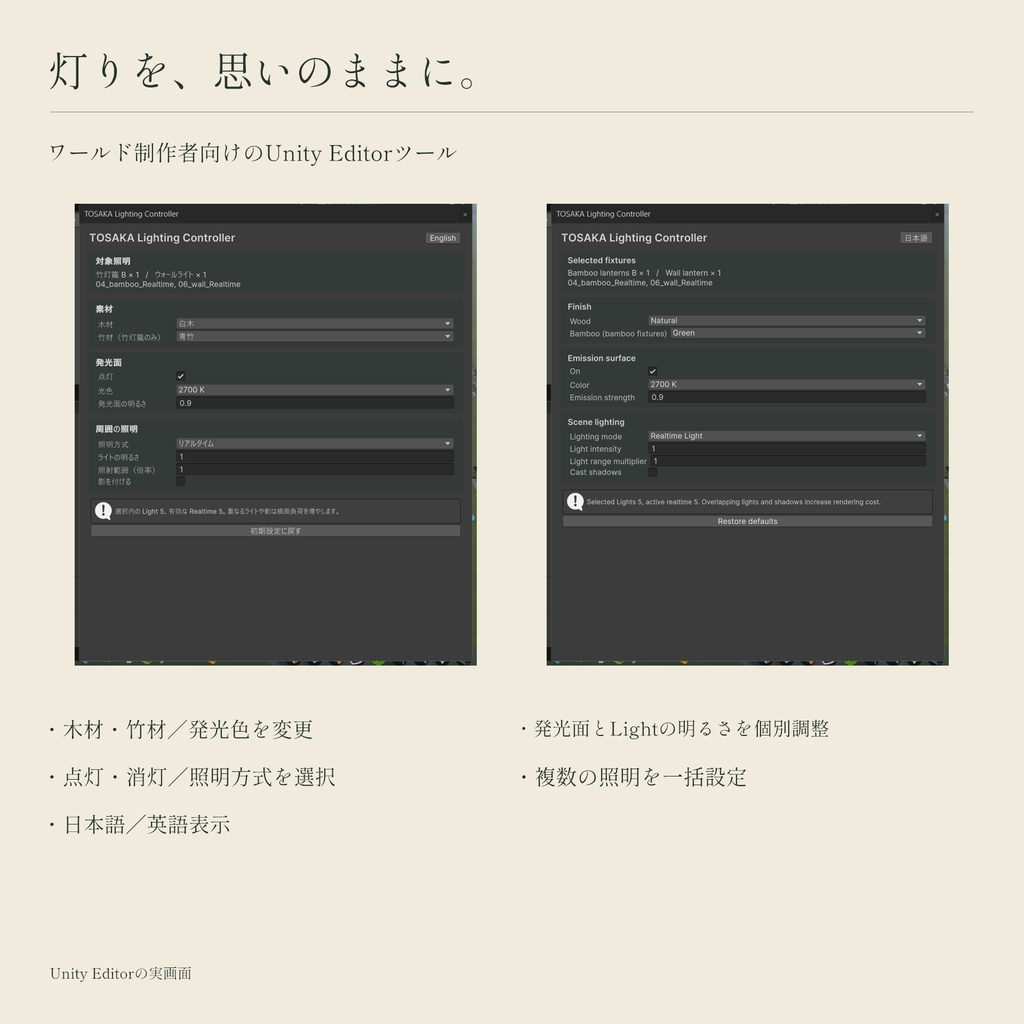
【TOSAKA Lighting Controller】 Unity上で照明の材質や光の設定を簡単に変更できる、専用Editorツールを収録しています。 主な機能: ・木材・竹材の変更 ・光色4種類+任意色 ・点灯/消灯 ・発光面の明るさ調整 ・Lightの強度調整 ・照射範囲の調整 ・影の有無 ・照明方式の切り替え ・複数照明の一括設定 ・初期設定への復元 ・Undo/Redo対応 ・日本語/英語UI切り替え 複数の照明をまとめて設定できるため、旅館や住宅など、多数の照明を使用する空間の制作にも便利です。 【起動方法】 Unity上部メニュー Tools → TOSAKA → Lighting Controller ※ワールド制作者向けのUnity Editorツールです。ワールド内でプレイヤーが操作する点灯スイッチや調光ギミックは含まれません。
用途に合わせた3種類の照明方式
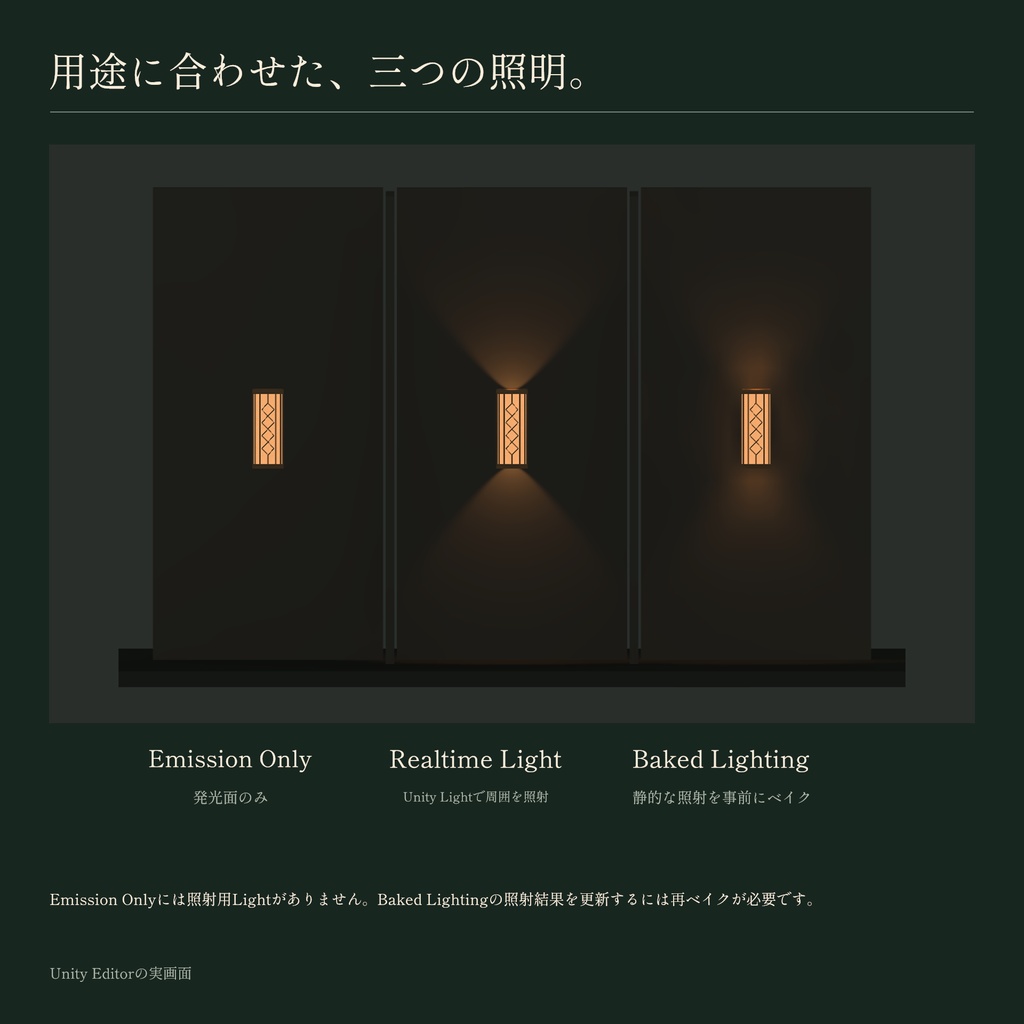
各照明に3種類のPrefabを用意しています。 ■ Emission Only 発光面のみを使用した軽量な構成です。 周囲を直接照らすLightを持たないため、多数の装飾照明を配置する場合などに適しています。 ■ Realtime Light UnityのLightを使用して、周囲の壁や床をリアルタイムで照らします。 明るさ・照射範囲・影を調整でき、空間に合わせた照明演出が可能です。 ■ Baked Lighting ライトベイクを利用した固定照明向けの構成です。 静的な照明を使用する和室や旅館などのワールド制作に適しています。 ※Realtime Lightは配置数や影の設定によって描画負荷が増加します。 ※Baked Lightingの照射結果を変更するには再ベイクが必要です。 ※Bloomなどの発光演出はワールド側の描画設定に依存します。
収録ファイル・ダウンロード内容
TOSAKA_Japanese_Lighting_Collection_Vol01_v1.0.0.zip 容量:約88MB ・Unitypackage(Unity 6/cluster向け) ・Unitypackage(Unity 2022/VRChat PC向け) ・基本Prefab18種類 ・照明設定Editorツール ・Blenderファイル6点 ・FBXファイル6点 ・テクスチャ一式 ・README(日本語/英語) ・画像付きPDF操作マニュアル(日本語/英語) ・利用規約(日本語/英語) ・更新履歴 Blenderファイルには必要なテクスチャをパック済みです。 詳しい導入方法や操作方法については、同梱のPDFマニュアルをご確認ください。
動作確認環境・対応プラットフォーム
【動作確認済み】 ・Unity 6000.2.6f2 ・Unity 2022.3.22f1 ・Built-in Render Pipeline ・Blender 5.1.2 ・cluster(Windows) ・VRChat(PC) clusterおよびVRChat PCの実機環境にて、モデルの表示や照明の動作確認を行っています。 【未検証環境】 ・VRChat Quest版 ・Android/iOS/Mac ・URP/HDRP ・上記以外のUnityバージョン 未検証環境での動作は保証しておりません。 使用環境に対応したUnitypackageを選択してインポートしてください。 cluster・VRChatのSDKは付属しません。
注意事項・お問い合わせ
・商品画像内の畳、家具、障子、建具、撮影用小物は付属しません。 ・照明の色や明るさは、ワールドの環境光や描画設定によって異なる場合があります。 ・Bloomなどのポストプロセスはワールド側で設定してください。 ・2種類のUnitypackageを同じプロジェクトにインポートする必要はありません。 ・ワールド内で操作する照明スイッチや調光ギミックは含まれません。 不具合やご質問がございましたら、BOOTHのメッセージ機能よりお問い合わせください。 製品バージョン・Unityバージョン・使用環境を添えていただけますと幸いです。
利用規約
【許可事項】 ・個人利用・商用利用 ・モデルおよびテクスチャの改変 ・VRChat、cluster等のワールド、ゲーム、映像、ライブ配信、画像への組み込みと使用 ・本素材を組み込んだ完成作品の公開・販売 ・各プラットフォームの利用規約に従った、ワールド公開に必要な組み込み済みデータのアップロード クレジット表記は任意です。 表記する場合: TOSAKA Japanese Lighting Collection Vol.01 / TOSAKA STUDIO 【禁止事項】 ・素材データそのものの再配布・再販売(無料配布を含む) ・改変した素材データそのものの再配布・再販売 ・第三者が素材を抽出し、再利用するための配布 ・自作発言 ・第三者の権利を侵害する行為や違法行為への利用 本製品の著作権はTOSAKA STUDIOに帰属します。 本製品の購入により、上記の範囲で素材を利用できます。 詳細は同梱の利用規約をご確認ください。
English Description
TOSAKA Japanese Lighting Collection Vol.01 Bring the warmth of Japanese lighting into your virtual worlds. A collection of six Japanese-style lighting props featuring traditional kumiko lattice, soft washi paper lighting, perforated bamboo and a glowing crescent moon. Designed for traditional Japanese rooms, ryokan inns, tea rooms and contemporary Japanese interiors. 【Included Models】 ・Kumiko Table Lantern ・Hexagonal Floor Lantern ・Pendant Light ・Bamboo Lantern Set ・Crescent Moon Lamp ・Wall Light 【Features】 ・6 lighting models ・18 base prefabs ・31,524 triangles in total ・104 through-holes in the bamboo lanterns ・3 wood finishes ・3 bamboo finishes ・4 light color presets and custom colors ・On / Off settings ・Japanese / English editor interface ・Blender and FBX files ・Illustrated Japanese / English PDF manuals 【Color Variations】 Wood: ・Natural Wood ・Walnut ・Charcoal Black Bamboo: ・Green Bamboo ・Aged Bamboo ・Black Bamboo Light colors: ・2200K equivalent ・2700K equivalent ・3500K equivalent ・5000K equivalent ・Custom colors 【TOSAKA Lighting Controller】 Adjust your lighting directly inside the Unity Editor using the included dedicated tool. ・Change wood and bamboo finishes ・Adjust light colors ・Switch lights on or off ・Adjust surface emission independently of light intensity ・Adjust light range and shadows ・Switch lighting modes ・Edit multiple fixtures at once ・Restore default settings ・Undo / Redo support ・Japanese / English language switching Open the tool from: Tools → TOSAKA → Lighting Controller 【Three Lighting Modes】 Emission Only: A lightweight configuration using glowing surfaces without direct illumination from Unity Light components. Realtime Light: Illuminates surrounding surfaces in real time, with adjustable intensity, range and shadows. Baked Lighting: Designed for static environments using baked illumination. Rebaking is required to update baked lighting. 【Included Files】 TOSAKA_Japanese_Lighting_Collection_Vol01_v1.0.0.zip File size: approximately 88 MB ・Unity package for Unity 6 / cluster ・Unity package for Unity 2022 / VRChat PC ・18 base prefabs ・Lighting Controller editor tool ・6 Blender files with packed textures ・6 FBX files ・Textures ・Japanese / English README files ・Japanese / English PDF user manuals ・Terms of use ・Changelog 【Tested Environments】 ・Unity 6000.2.6f2 ・Unity 2022.3.22f1 ・Built-in Render Pipeline ・Blender 5.1.2 ・cluster (Windows) ・VRChat (PC) Tested in both the cluster Windows client and the VRChat PC client. Quest, Android, iOS, Mac, URP and HDRP have not been tested. 【Terms of Use】 Personal and commercial use are permitted. Modification of the assets is permitted. Redistribution or resale of the source assets is prohibited. Please read the included terms of use for the complete conditions. 【Important Notes】 ・Tatami, furniture, shoji screens, architectural fittings and decorative props shown in promotional images are not included. ・Lighting appearance may vary depending on your world's lighting and rendering settings. ・Bloom and other post-processing effects depend on your world settings. ・Realtime lights and shadows may increase rendering costs. ・The Lighting Controller is a Unity Editor tool for world creators. In-world interactive light switches are not included. ・Please import only the Unity package appropriate for your project. ・Platform SDKs are not included. 【Support】 For questions or technical issues, please contact us through the BOOTH messaging system. Please include the product version, Unity version and platform. Designed by TOSAKA STUDIO. https://tosakatos.booth.pm/
Terms of Use
【Permitted Uses】 ・Personal and commercial use. ・Modification of models and textures. ・Incorporation and use in VRChat and cluster worlds, games, videos, livestreams and images. ・Publication and sale of finished works incorporating these assets. ・Uploading incorporated assets through a platform's normal world publishing workflow, subject to its terms. Credit is optional. Suggested credit: TOSAKA Japanese Lighting Collection Vol.01 / TOSAKA STUDIO 【Prohibited Uses】 ・Redistribution or resale of the source assets, including free redistribution. ・Redistribution or resale of modified source assets. ・Distribution that enables others to extract and reuse the assets as source materials. ・Claiming authorship of the assets. ・Illegal use or infringement of third-party rights. Copyright remains with TOSAKA STUDIO. Purchase grants permission to use the assets within the scope described above. Please refer to the included terms of use for full details.
更新履歴
v1.0.0 — 初版公開 / Initial release
TOSAKA STUDIO
空間を彩る、ひとつのかたち。 TOSAKA STUDIOでは、メタバースや3D空間向けのインテリア・建築小物を制作しています。 無料の和モダン畳セットや組子サイドテーブルと組み合わせることで、統一感のある和の空間を制作できます。 気に入っていただけましたら、ショップのフォローやスキをしていただけると嬉しいです。 ▼ TOSAKA STUDIO https://tosakatos.booth.pm/ ▼ 無料・和モダン畳セット https://tosakatos.booth.pm/items/9229517 ▼ 組子サイドテーブル https://tosakatos.booth.pm/items/9216336