

Audio Sync Baker
- Digital1,500 JPY
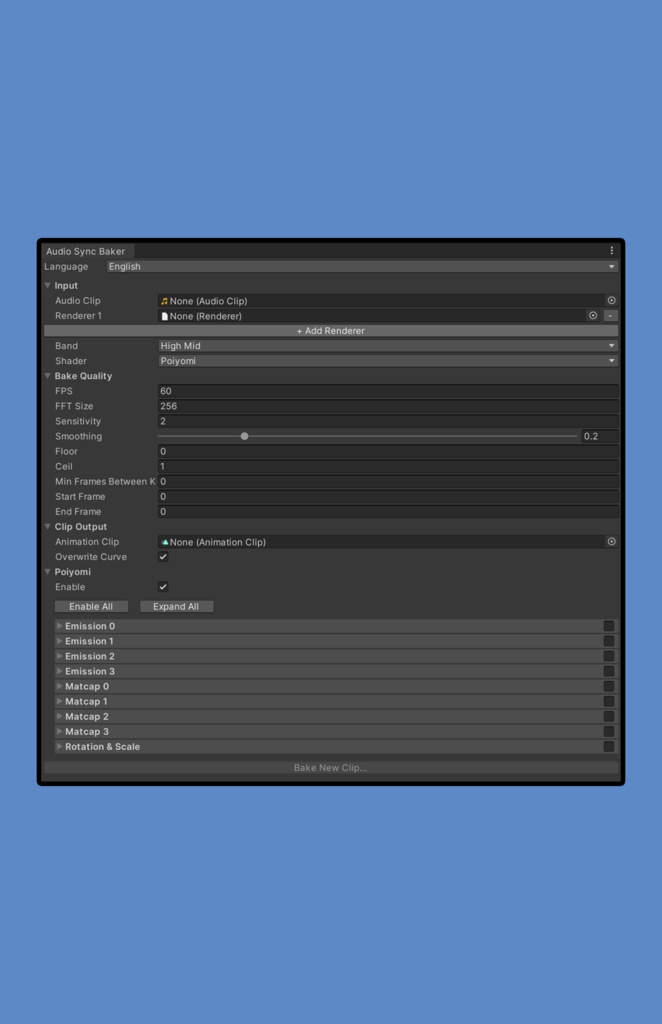
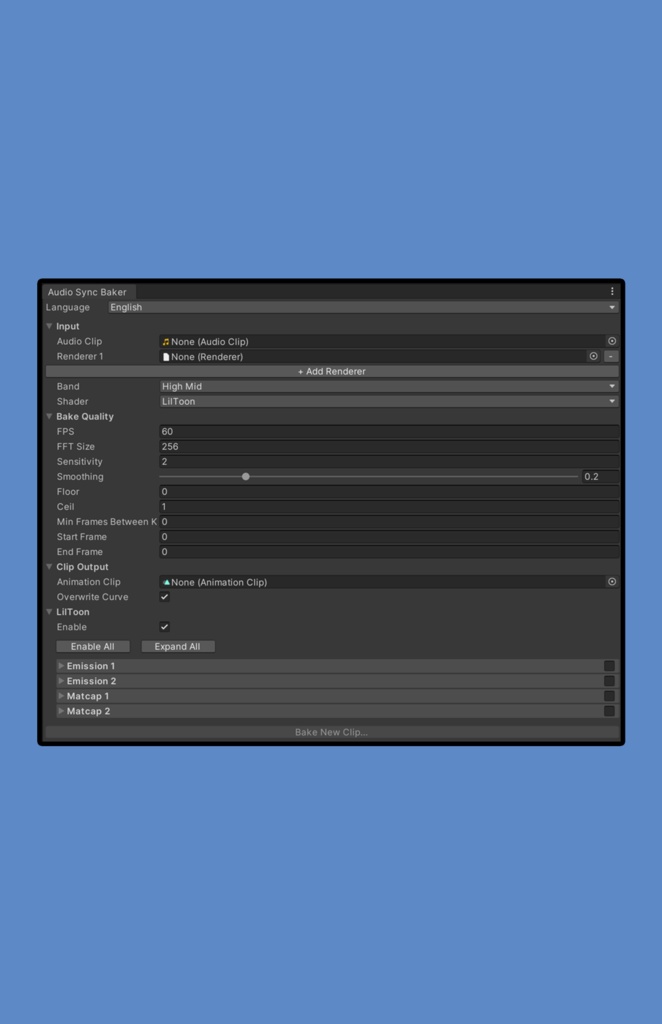
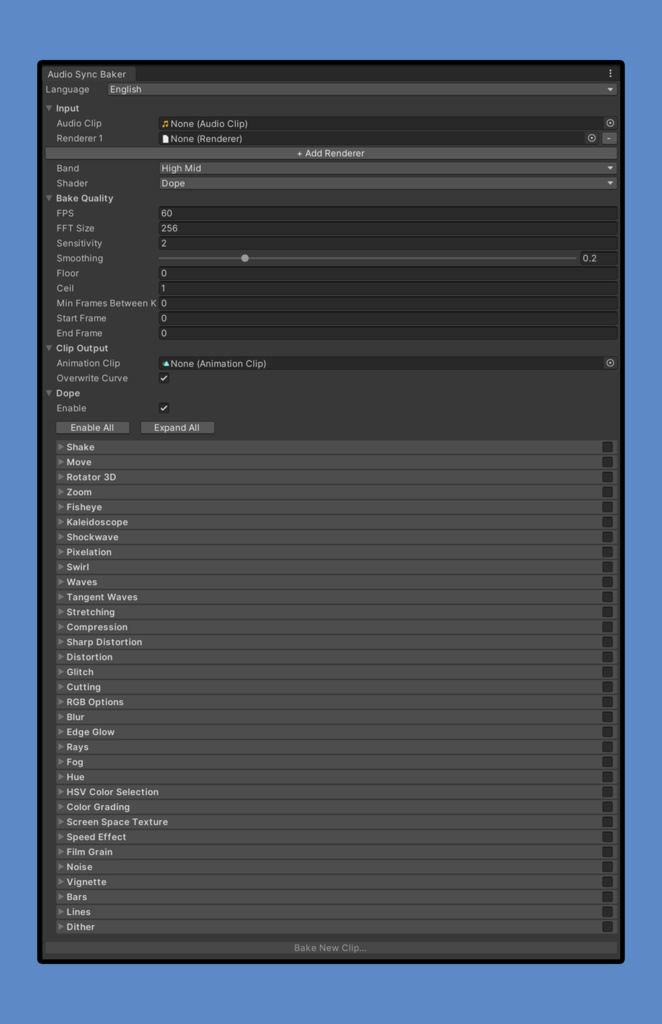
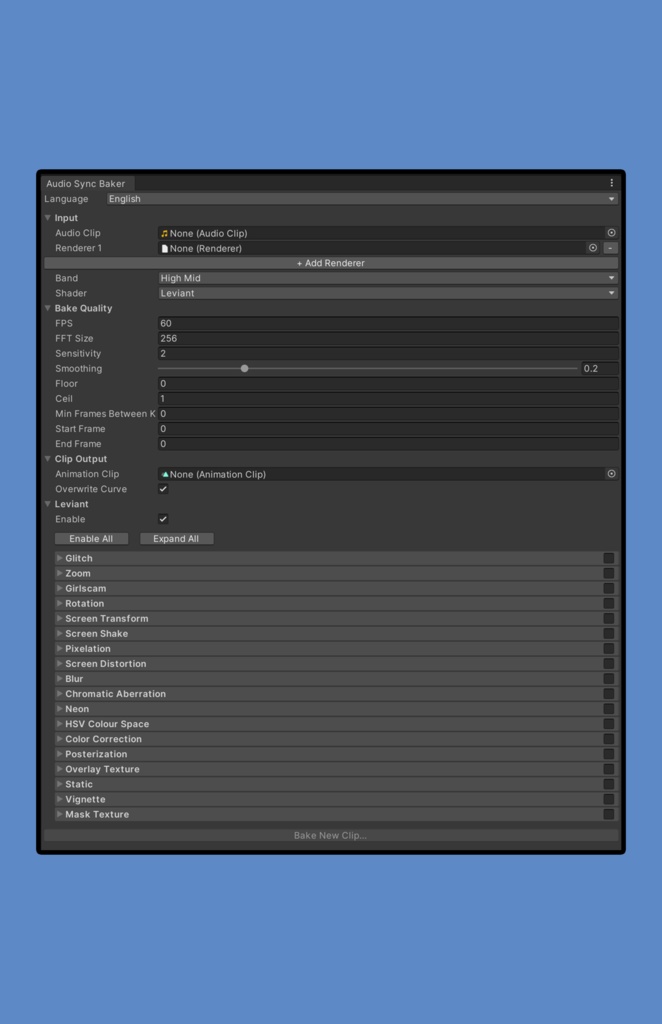
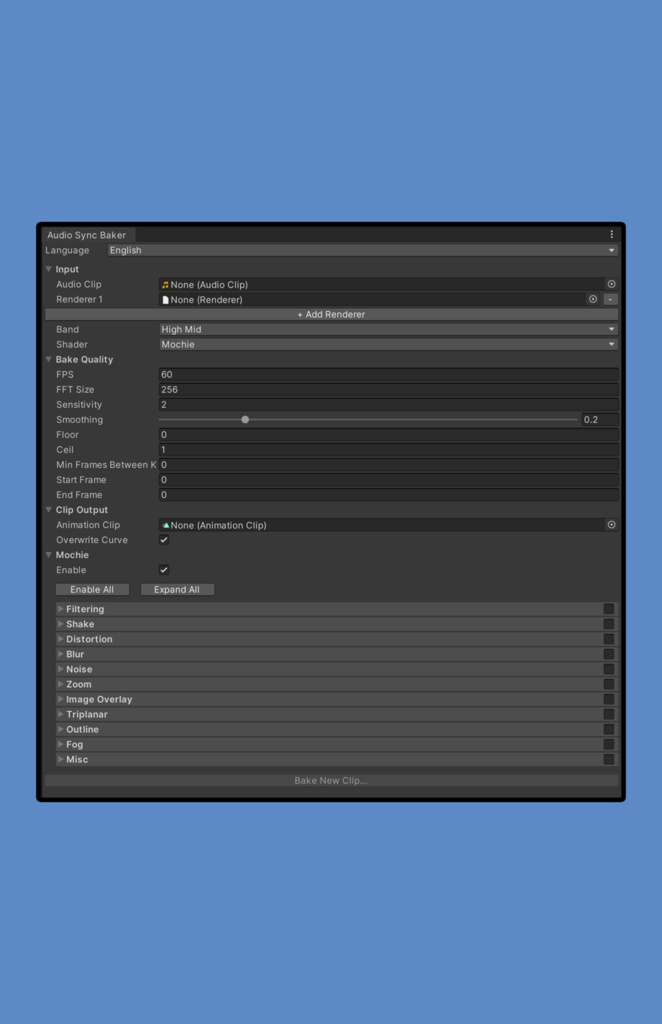
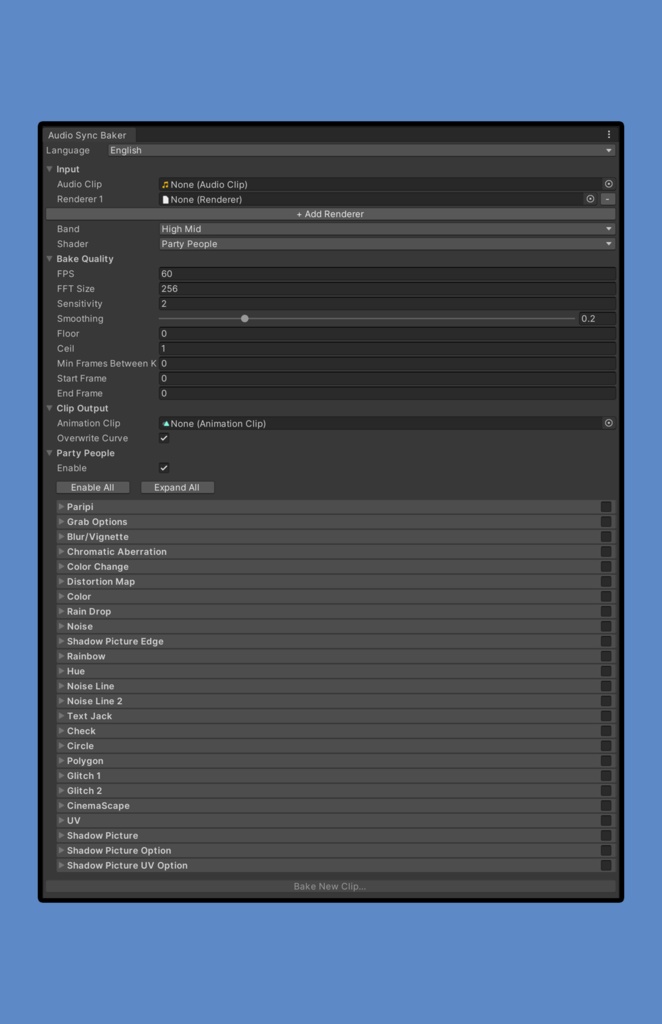
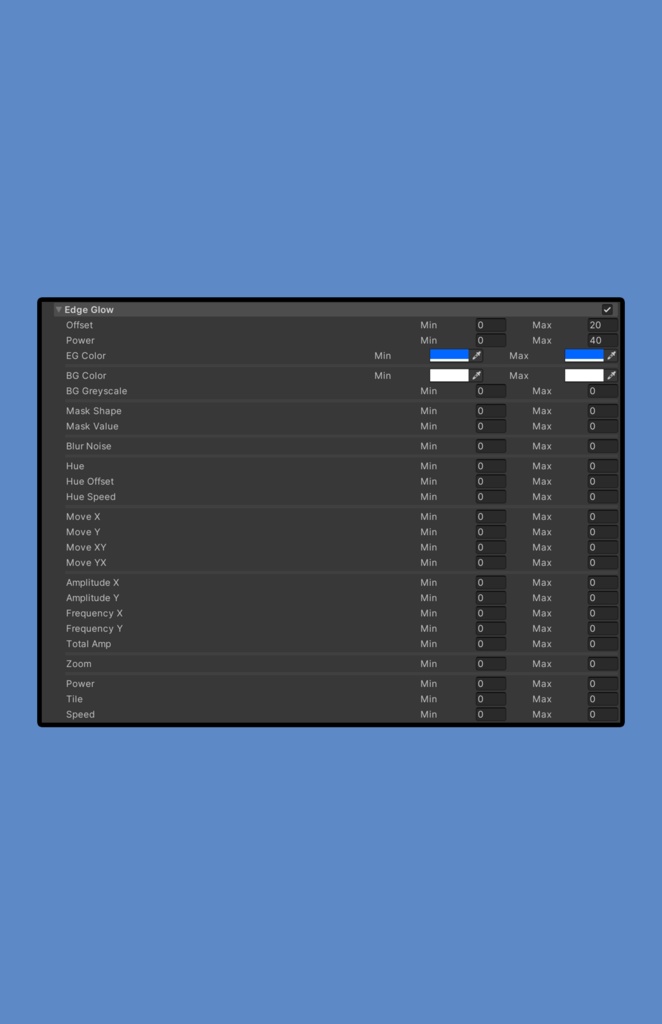


Audio Sync Bakerは、音楽に同期したアニメーションキーフレームを生成するUnityエディターツールです。オーディオの周波数帯域(Bass、LowMid、HighMid、Treble)を解析し、メッシュレンダラーにリアクティブなアニメーションをベイクして、アバターやオブジェクトにオーディオリアクティブなエフェクトを作成します。 このツールは、UnityのAnimator Controllerで使用できるキーフレーム付きのAnimationClipを生成します。アバターにクリップとオーディオを設定するには、Unityのアニメーションシステムに関する基本的な知識が必要です。 Audio Sync Baker is a Unity Editor tool that generates animation keyframes synchronized to music. It analyzes audio frequency bands (Bass, LowMid, HighMid, Treble) and bakes reactive animations onto mesh renderers, creating audio-reactive effects for avatars and objects. The tool generates an AnimationClip with keyframes that you can use in Unity's Animator Controller. You'll need basic knowledge of Unity's animation system to set up the clip and audio in your avatar. Scroll down for english version
機能
・マルチレンダラーサポート:複数のレンダラーに同時にアニメーションをベイク ・カスタマイズ可能なオーディオ解析:感度、スムージング、FFTサイズ、周波数帯域を調整 ・閾値コントロール:オーディオレスポンスをフィルタリングする最小/最大閾値を設定 ・キーフレーム最適化:キーフレームの密度と配置を制御 ・フレーム範囲制御:部分的なベイクの開始フレームと終了フレームを指定 ・上書き保護:既存のカーブを上書きするか、コピーを作成するオプション ・Poiyomiマテリアルリネーム:マテリアルごとのアニメーション用のPoiyomiの「ロック時にリネーム」機能をサポート
対応シェーダー
Poiyomiシェーダー https://www.poiyomi.com/download 現在サポートされているプロパティ: ・マットキャップ 0-3:発光の強さと明るさ ・発光 0-3:発光の強さ ・頂点オプション:ローカルスケールとローカルローテーション テスト済みバージョン:Poiyomi 9.3.66 Liltoonシェーダー https://lilxyzw.github.io/lilToon/ 現在サポートされているプロパティ: ・マットキャップ 1 & 2:メインカラーの強度 ・発光 1 & 2:メインカラーの強度と不透明度 テスト済みバージョン:LilToon 2.3.2 視界ジャックシェーダー(完全サポート) 以下の視界ジャックシェーダーは包括的なプロパティサポートを提供します: ・Dope Shader ScreenFX https://www.patreon.com/posts/dope-shader-34475269 テスト済みバージョン:2.3.5 ・Leviant's UberShader https://github.com/Leviant/ScreenSpace_Ubershader テスト済みバージョン:v2.8, v2.9 ・Mochie Screen FX https://github.com/MochiesCode/Mochies-Unity-Shaders テスト済みバージョン:x 1.21 ・パリピ https://booth.pm/en/items/1095863 テスト済みバージョン:v14.3 ほとんどの視界ジャックシェーダープロパティがサポートされており、オーディオリアクティブなエフェクトを完全にカスタマイズできます。 注意:Poiyomi、LilToonの追加プロパティは、需要が高い場合に追加できます。追加を希望する特定のプロパティがある場合は、Boothを通じてお問い合わせください。
互換性
テスト済みUnityバージョン:Unity 2022.3.22f1 このツールは他のUnityバージョンでも動作するはずですが、Unity 2022.3.22f1でテスト・検証済みです。異なるUnityバージョンで問題が発生した場合は、お知らせください。
言語サポート
このツールには英語と日本語のローカライゼーションが含まれています。 注意:私のUnity環境は英語のため、日本語のローカライゼーションに軽微な翻訳エラーがある可能性があります。問題があればお知らせください。
要件と知識
・Unity Editor(Unity 2022.3.22f1でテスト済み) ・Unityのアニメーションシステムの基本的な理解 ・キーフレームアニメーションの基本的な理解 このツールは、Unityのアニメーションシステムに関する基本的な知識を既にお持ちのユーザーに推奨されます。 セットアップと使用方法を説明するチュートリアル動画がこのショップページで利用できます。
インストール
1. "Audio Sync Baker.unitypackage"ファイルを開く 2. プロンプトが表示されたら、すべてのファイルをインポート 3. メニューからツールを開く:シャザム/Audio Sync Baker 4. オーディオクリップ、レンダラー、シェーダー設定を構成 5. "Bake Into Clip"をクリックしてアニメーションクリップを生成
利用規約
Copyright (c) シャザム 以下のことが可能です: ・このツールと生成されたアニメーションクリップをプロジェクト(個人・商用)で使用 ・自分の使用のためにコードを変更 以下のことは禁止されています: ・このツールをいかなる形式でも再配布(商用・非商用を問わず) ・ツールを他の人と共有 ・販売または配布用のアセットパッケージにツールを含める ・ヘイトスピーチ、人種差別、差別、または個人やグループに対する暴力や危害を促進するコンテンツに関連して、このツールまたは生成されたコンテンツを使用 個人使用での変更は許可されていますが、明示的な書面による許可なしに再配布や共有は厳禁です。
免責事項
自己責任での使用:このツールは「現状のまま」提供され、いかなる保証もありません。このツールの使用により、Unityプロジェクト、アセット、またはファイルに発生する可能性のある損害、データ損失、または問題について、一切の責任を負いません。 このツールを使用することで、これらのリスクを理解し、受け入れることを承認したものとみなされます。
サポート
質問、バグ報告、または機能リクエストについては、https://shazam.booth.pm を通じてお問い合わせください。ツール関連の問題については、できる限りサポートいたします。 ご注意:一般的なUnityアニメーションシステムのサポートは提供できません。このツールは、Unityのアニメーションワークフローを既に理解しているユーザー向けに設計されています。
含まれていないもの
このツールには、Audio Sync Bakerエディタースクリプトのみが含まれています。以下は含まれていません: ・シェーダー(Poiyomi、LilToon、または視界ジャックシェーダーは別途入手が必要) ・3Dモデル、FBXファイル、またはアバター ・オーディオファイル ・その他のアセット類 このツールを使用するには、必要なシェーダーを別途所有またはアクセスできる必要があります。
追加の注意事項
・このツールは、「Preload Audio Data」が有効で、「Load Type」が「Decompress On Load」または「Compressed In Memory」(Streamingではない)に設定されているオーディオクリップで最もよく動作します ・読み込みエラーが発生した場合は、ベイクボタンを再度クリックしてみてください。一時的な読み込みの問題が解決することがよくあります ・このツールはUnityのプレイモード中には使用できません。ベイクする前にプレイモードを終了してください
Features
・Multi-Renderer Support: Bake animations to multiple renderers simultaneously ・Customizable Audio Analysis: Adjust sensitivity, smoothing, FFT size, and frequency bands ・Threshold Controls: Set min/max thresholds to filter audio response ・Keyframe Optimization: Control keyframe density and placement ・Frame Range Control: Specify start and end frames for partial bakes ・Overwrite Protection: Option to overwrite existing curves or create copies ・Poiyomi Material Renaming: Support for Poiyomi's "rename when locked in" feature for per-material animation
Supported Shaders
Poiyomi Shader https://www.poiyomi.com/download Currently supported properties: ・Matcap 0-3: Emission Strength and Intensity ・Emission 0-3: Emission Strength ・Basics & Fun: Rotation and Scale Tested Version: Poiyomi 9.3.66 LilToon Shader https://lilxyzw.github.io/lilToon/ Currently supported properties: ・Matcap 1 & 2: Strength ・Emission 1 & 2: Strength and Alpha Tested Version: LilToon 2.3.2 ScreenFX Shaders (Full Support) The following ScreenFX shaders have comprehensive property support: ・Dope Shader ScreenFX https://www.patreon.com/posts/dope-shader-34475269 Tested Version: 2.3.5 ・Leviant's UberShader https://github.com/Leviant/ScreenSpace_Ubershader Tested Version: v2.9 ・Mochie Screen FX https://github.com/MochiesCode/Mochies-Unity-Shaders Tested Version: x 1.21 ・パリピ https://booth.pm/en/items/1095863 Tested Version: v14.3 Most ScreenFX shader properties are supported, allowing full customization of audio-reactive effects. Note: Additional Poiyomi, Liltton properties can be added if there is high demand. Contact me through Booth if you have specific properties you wish for to be added.
Compatibility
Tested Unity Version: Unity 2022.3.22f1 The tool should work with other Unity versions, but has been tested and verified on Unity 2022.3.22f1. If you encounter issues with different Unity versions, please report them.
Language Support
The tool includes English and Japanese localization. Note: My Unity environment is in English, so there may be minor translation errors in the Japanese localization. Please report any issues.
Requirements & Knowledge
・Unity Editor (tested on Unity 2022.3.22f1) ・Basic understanding of Unity's animation system ・Basic understanding of what animating keyframes is This tool is recommended for users who already have basic knowledge of Unity's animation system. A tutorial video is available on this shop page demonstrating setup and usage.
Installation
1. Open the "Audio Sync Baker.unitypackage" file 2. Import all files when prompted 3. Open the tool via the menu: シャザム/Audio Sync Baker 4. Configure your audio clip, renderers, and shader settings 5. Click "Bake Into Clip" to generate your animation clip
License & Copyright
Copyright (c) シャザム You are free to: ・Use this tool and the generated animation clips in your projects (personal and commercial) ・Modify the code for your own use You are NOT allowed to: ・Redistribute this tool in any form (commercial or non-commercial) ・Share the tool with others ・Include the tool in asset packages for sale or distribution ・Use this tool or any generated content in connection with hate speech, racism, discrimination, or any content that promotes violence or harm against individuals or groups Modification is permitted for personal use, but redistribution and sharing are strictly prohibited without explicit written permission.
Disclaimer
Use at Your Own Risk: This tool is provided "as is" without warranty of any kind. I take no responsibility for any damage, data loss, or issues that may occur to your Unity projects, assets, or files as a result of using this tool. By using this tool, you acknowledge that you understand and accept these risks.
Support
For questions, bug reports, or feature requests, please contact me through https://shazam.booth.pm. I'll do my best to help with tool-related issues. Please note: I cannot provide general Unity animation system support. This tool is designed for users who already understand Unity's animation workflow.
What's NOT Included
This tool includes only the Audio Sync Baker editor script. The following are NOT included: ・No shaders (Poiyomi, LilToon, or ScreenFX shaders must be obtained separately) ・No 3D models, FBX files, or avatars ・No audio files ・No additional assets of any kind You must own or have access to the required shaders separately to use this tool.
Additional Notes
・The tool works best with audio clips that have "Preload Audio Data" enabled and "Load Type" set to "Decompress On Load" or "Compressed In Memory" (not Streaming) ・If you encounter loading errors, try clicking the bake button again, as this often resolves temporary loading issues ・The tool cannot be used during Unity Play Mode - please exit play mode before baking
更新履歴/Update History
2025/03/07 v1.0.1
デモ使用素材 / Credits
Hanka/斑霞: [StudioYONO] BOOTH: https://booth.pm/ja/items/6970249 X: https://x.com/NOyonokoNO Ikazuchi for AudioLink: [NO.SIGNAL] BOOTH: https://nosignal.booth.pm/items/7755989 X: https://x.com/Vanitas0Vanitas