

1LoafofBread's PhysBone Optimizer v2.0
- Digital325 JPY
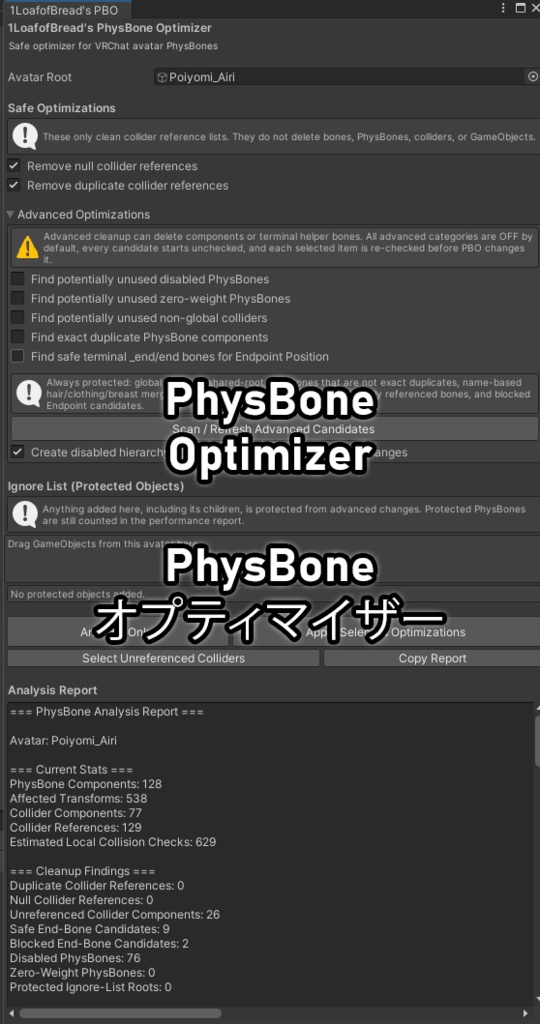
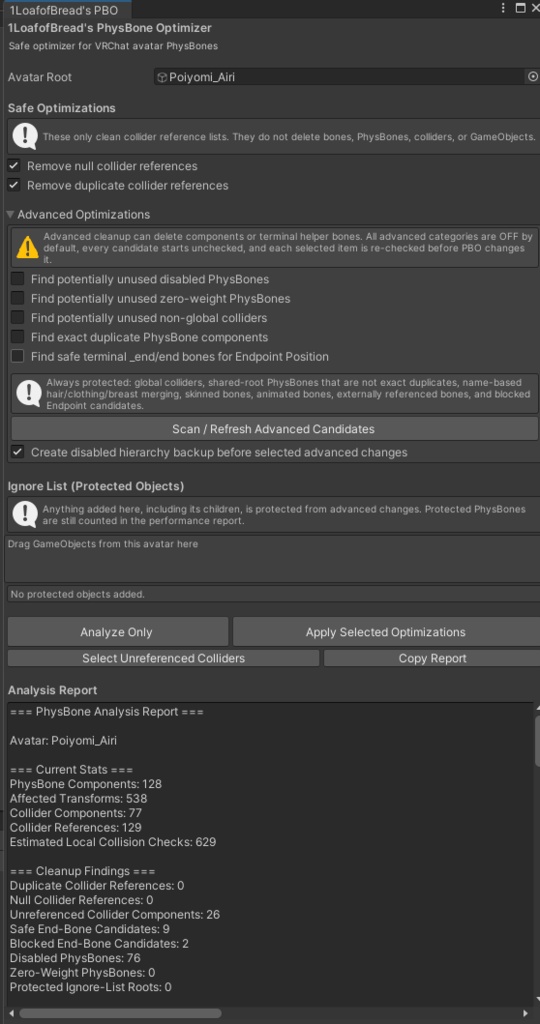


1LoafofBread's PhysBone Optimizer v2.0 A Unity editor tool to safely analyze, clean up, and optimize VRChat PhysBone components for better avatar performance. ~~~ Key Features ~~~ - Avatar Scanning: Select an avatar root GameObject to scan VRCPhysBone and PhysBone Collider components. - Safe Cleanup: Remove null and duplicate collider references without deleting valid PhysBones, bones, or colliders. - Advanced Optimizations: Review potentially unused disabled/zero-weight PhysBones, non-global colliders, exact duplicate PhysBones, and safe Endpoint Position candidates. - Safety Checks: Protects global colliders, animated bones, SkinnedMeshRenderer bones, referenced bones, shared PhysBones, and unsafe endpoint candidates. - Analysis Report: View component counts, affected transforms, collider usage, collision estimates, expensive PhysBones, warnings, and before/after changes. - Ignore Objects: Protect selected objects and their children from Advanced changes. - Backup / Undo: Optional backup before Advanced changes with Unity Undo support. ~~~ How to Use ~~~ 1. Open via `Tools > 1LoafofBread's PBO` 2. Select your avatar GameObject in the "Avatar Root" field 3. Leave Safe Optimizations enabled for normal cleanup 4. Add anything you want protected to the Ignore List 5. Click "Analyze Only" to inspect the avatar without changes 6. For Advanced cleanup, enable the scans you want and refresh candidates 7. Review candidates individually and select only what you want changed 8. Click "Apply Selected Optimizations" 9. Review the Before -> After report Advanced candidates are never selected automatically. If PBO cannot safely verify a change, it protects or skips the item. ~~~ License ~~~ - Free for personal/commercial use in Unity projects (VRChat avatars) - No redistribution, modification, or removal of credits - Provided "as-is" - no warranties for avatar performance, compatibility, data loss, or VRChat compliance ~~~ Feedback ~~~ Bugs or feature requests? Please message me. --------------------------------------------------------------------------------- 1LoafofBread's PhysBone Optimizer v2.0 VRChatアバターのPhysBoneコンポーネントを安全に分析、整理、最適化するUnityエディタツールです。 ~~~ 主な機能 ~~~ - アバタースキャン:Avatar RootからVRCPhysBoneとPhysBone Colliderをスキャンします。 - 安全な整理:有効なPhysBone、ボーン、Colliderを削除せず、Nullおよび重複したCollider参照を削除します。 - Advanced最適化:無効/Weight 0のPhysBone、非Global Collider、重複PhysBone、安全なEndpoint候補を手動で確認できます。 - 安全チェック:Global Collider、AnimationやSkinnedMeshRendererで使用されるボーン、他から参照されるボーン、共有PhysBone、安全でないEndpoint候補を保護します。 - 分析レポート:コンポーネント数、Affected Transform、Collider使用状況、Collision推定、高負荷PhysBone、警告、最適化前後の変更を表示します。 - Ignore List:選択したオブジェクトと子オブジェクトをAdvanced変更から保護します。 - Backup / Undo:Advanced変更前のバックアップ作成とUnity Undoに対応します。 ~~~ 使い方 ~~~ 1. `Tools > 1LoafofBread's PBO` から開く 2. 「Avatar Root」にアバターGameObjectを設定 3. 通常はSafe Optimizationsを有効のまま使用 4. 保護したいオブジェクトをIgnore Listへ追加 5. 「Analyze Only」で変更せずに確認 6. Advancedを使う場合は必要なスキャンを有効にして候補を更新 7. 候補を個別に確認し、変更したい項目だけを選択 8. 「Apply Selected Optimizations」を実行 9. Before -> Afterレポートを確認 Advanced候補は自動では選択されません。安全性を確認できない項目は変更せず、保護またはスキップされます。 ~~~ ライセンス ~~~ - Unityプロジェクト(VRChatアバター)での個人/商用利用は無料 - 再配布、改変、クレジットの削除は禁止 - 「現状のまま」提供 - アバターパフォーマンス、互換性、データ損失、VRChat準拠などの保証はありません ~~~ フィードバック ~~~ バグや機能リクエストがありましたら、ご連絡ください。 (自動翻訳) (翻訳に問題がある場合はお知らせください)