

VRC-OSC-Clicker
- Digital350 JPY
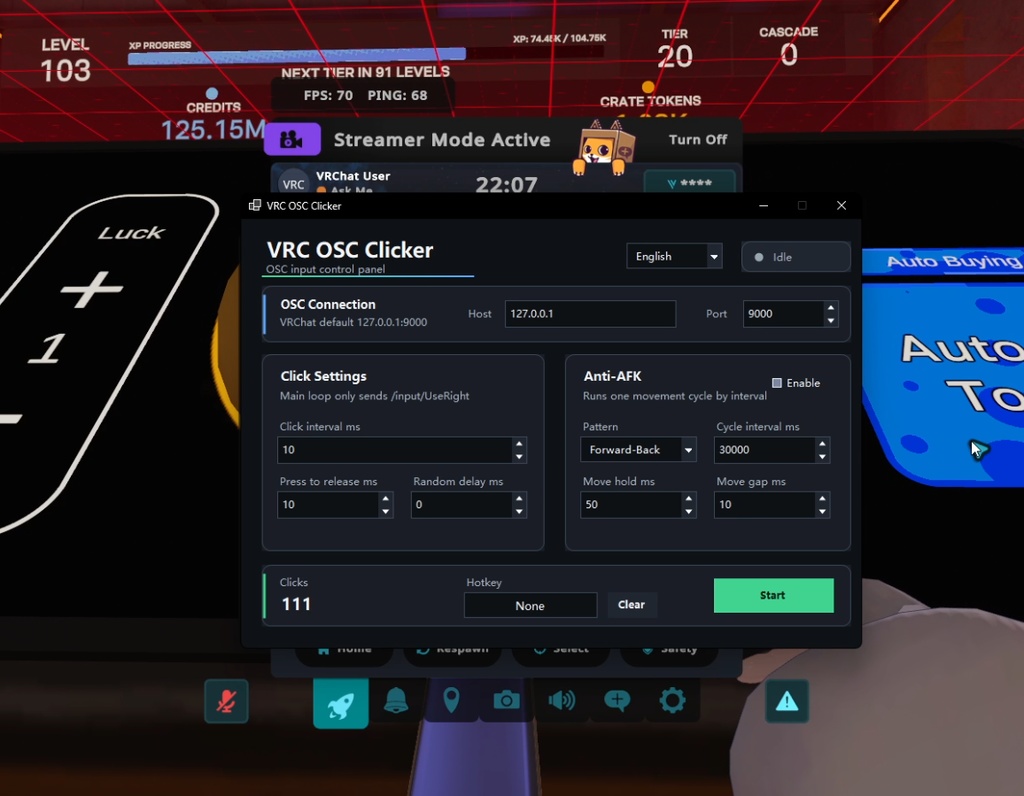

# VRC OSC Clicker A lightweight OSC input tool for VRChat. VRC OSC Clicker is designed for situations where you need to repeatedly use an item held in your hand in VRChat. It sends VRChat OSC input commands directly, especially `/input/UseRight`, which corresponds to using the item in your right hand. This is not a general-purpose mouse left-click auto clicker. It does not simulate mouse clicks or keyboard input. Instead, it sends VRChat OSC input messages directly to VRChat. Please check the video for a concrete example of how it works. ## Main Use Case This tool is mainly intended for repeatedly using hand-held items in VRChat. For example, it can be useful when a world item requires repeated use input, or when you want to continuously activate something you are holding in your avatar’s hand. Because it works through OSC, VRChat does not need to be the active foreground window. You can keep VRChat running in the background while this tool continues to send OSC input automatically. This means you can let the tool handle repeated item-use input while you do other things on your PC. ## What This Tool Does - Sends VRChat OSC input commands directly - Repeatedly sends `/input/UseRight` - Can be used for repeated right-hand item use - Works even when VRChat is running in the background - Allows you to do other PC tasks while it keeps sending input - Includes optional anti-AFK movement ## What This Tool Is Not - It is not a normal mouse auto clicker - It does not click your physical mouse - It does not simulate Windows mouse input - It is not intended for general desktop clicking - It only sends OSC input commands to VRChat ## Features - OSC-based VRChat input control - Repeated right-hand item-use input - Adjustable use interval - Adjustable press / release duration - Optional random delay - Anti-AFK movement cycle - Movement patterns: - Forward → Backward - Backward → Forward - Left → Right - Right → Left - Adjustable anti-AFK movement interval - Custom OSC host and port - Global hotkey support - Automatic settings save - English / Japanese / Chinese UI ## Background Operation Since VRC OSC Clicker works through OSC, VRChat does not need to be focused. You can keep VRChat open in the background and let the tool repeatedly send item-use input while you: - browse the web - chat - work on other tasks - watch videos - use other applications ## Default OSC Target Host: `127.0.0.1` Port: `9000` Please enable OSC in VRChat before using this tool. ## How to Use 1. Enable OSC in VRChat. 2. Launch VRC OSC Clicker. 3. Keep the default OSC host and port, or change them if needed. 4. Adjust the use interval and press / release timing. 5. Optionally enable Anti-AFK movement. 6. Optionally bind a global hotkey. 7. Press Start. ## Notes This is an unofficial tool and is not affiliated with VRChat Inc. Please use it responsibly and follow the rules of the worlds, events, groups, and communities you join. Some worlds or communities may not allow automated input or repeated item-use behavior. Use at your own responsibility. --- # VRC OSC Clicker VRChat 向けの軽量 OSC 入力ツールです。 VRC OSC Clicker は、VRChat 内で手に持っているアイテムを繰り返し使用したい場面を想定して作られています。 VRChat の OSC 入力コマンドを直接送信し、特に右手のアイテム使用に対応する `/input/UseRight` を繰り返し送信できます。 これは一般的なマウス左クリック連打ツールではありません。 マウスクリックやキーボード入力をエミュレートするものではなく、VRChat に対して OSC 入力メッセージを直接送信します。 具体的な動作例は動画をご確認ください。 ## 主な用途 このツールは、VRChat 内で手に持っているアイテムを繰り返し使用する用途を主に想定しています。 たとえば、ワールド内のアイテムが繰り返し使用入力を必要とする場合や、アバターの手に持っているものを継続的に起動・使用したい場合に利用できます。 OSC 経由で動作するため、VRChat を最前面のウィンドウにしておく必要はありません。 VRChat をバックグラウンドで起動したまま、このツールが自動で OSC 入力を送信し続けることができます。 そのため、PC で別の作業をしながら、手持ちアイテムの使用入力を自動で継続できます。 ## このツールでできること - VRChat の OSC 入力コマンドを直接送信 - `/input/UseRight` を繰り返し送信 - 右手に持っているアイテムの繰り返し使用 - VRChat がバックグラウンドでも動作 - 別の作業をしながら OSC 入力を継続 - 任意で離席防止用の移動も実行可能 ## このツールではないもの - 通常のマウス連打ツールではありません - 物理マウスのクリックは行いません - Windows のマウス入力をエミュレートしません - デスクトップ上のクリック用途には向いていません - VRChat に OSC 入力コマンドを送信するためのツールです ## 機能 - OSC による VRChat 入力制御 - 右手アイテム使用入力の繰り返し送信 - 使用間隔の調整 - 押下から解放までの時間調整 - ランダム遅延 - 離席防止用の移動サイクル - 移動パターン: - 前 → 後 - 後 → 前 - 左 → 右 - 右 → 左 - 離席防止移動の実行間隔を調整可能 - OSC ホスト / ポート設定 - グローバルホットキー対応 - 設定の自動保存 - 英語 / 日本語 / 中国語 UI ## バックグラウンド動作 VRC OSC Clicker は OSC 経由で動作するため、VRChat を最前面にしておく必要はありません。 VRChat をバックグラウンドで起動したまま、以下のようなことをしながら、手持ちアイテムの使用入力を自動で継続できます。 - Web ブラウジング - チャット - 別の作業 - 動画視聴 - 他のアプリの使用 ## デフォルト OSC 接続先 ホスト: `127.0.0.1` ポート: `9000` 使用前に VRChat 側で OSC を有効にしてください。 ## 使い方 1. VRChat で OSC を有効にします。 2. VRC OSC Clicker を起動します。 3. 必要に応じて OSC ホストとポートを設定します。 4. 使用間隔と押下 / 解放の時間を調整します。 5. 必要に応じて離席防止移動を有効にします。 6. 必要に応じてグローバルホットキーを設定します。 7. Start を押します。 ## 注意事項 このツールは非公式ツールであり、VRChat Inc. とは関係ありません。 参加するワールド、イベント、グループ、コミュニティのルールを守って使用してください。ワールドやコミュニティによっては、自動入力やアイテムの繰り返し使用が許可されていない場合があります。 使用は自己責任でお願いします。