

Virtual Arcana Companion【VRC用タロットギミック】
- 通常版Digital1,200 JPY
- 支援版(内容は一緒です)Digital1,500 JPY
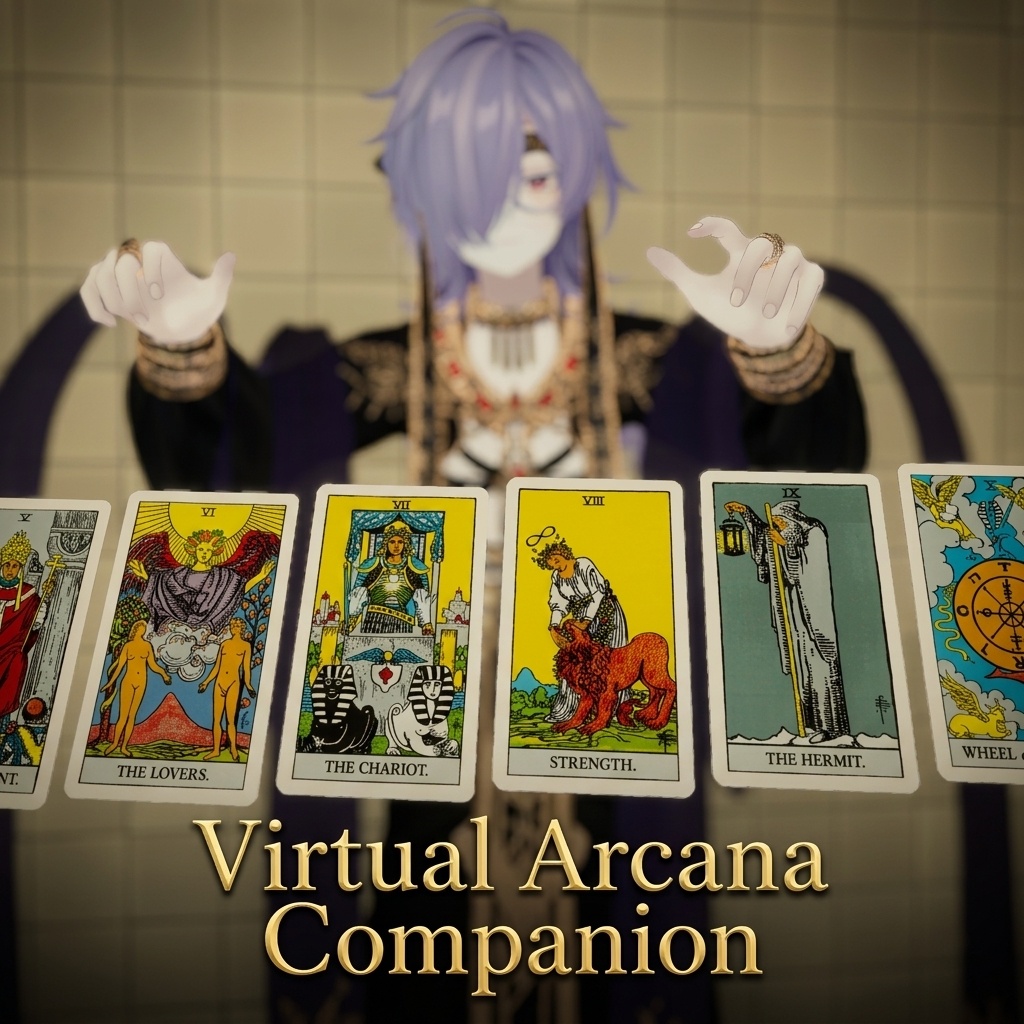


🃏 Virtual Arcana Companion とは? あなたの手の中に、神秘のタロットデッキを。 「Virtual Arcana Companion (VAC)」は、VRChat向けアバターに78枚すべてのフルデッキタロットカードを自動導入できるエクスプレッションギミックです。 大アルカナ22枚に加え、小アルカナ56枚(ワンド・カップ・ソード・ペンタクル)を完全収録。 手動で好きなカードを選べる「通常版」と、ボタン一つで運命のカードと正位置/逆位置を引ける「ランダムドロー版」の2種類のエディションを同梱しています。 VRChatのワールドで、フレンドや自分への本格的なタロット占いを手軽に楽しむことができます! --- 🃏 What is Virtual Arcana Companion? Hold a mystic tarot deck right inside VRChat! "Virtual Arcana Companion (VAC)" is an automatic setup expression gimmick that integrates a complete 78-card tarot deck directly onto your VRChat avatar. Includes all 22 Major Arcana and 56 Minor Arcana cards (Wands, Cups, Swords, Pentacles). Comes with two editions: "Standard Version" for manual card selection, and "Random Draw Version" for fully randomized drawing with upright and reversed states at the push of a button. Enjoy authentic tarot readings with friends or for yourself anywhere in the metaverse!
📝 商品説明 (Product Description)
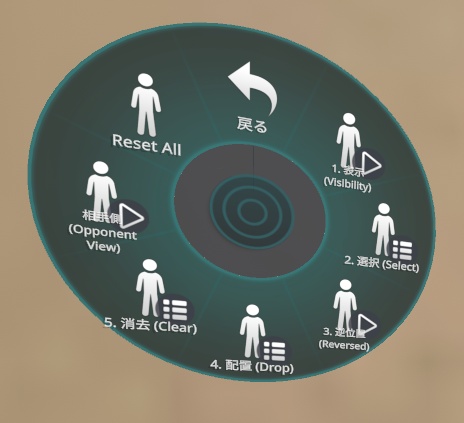
【日本語】 VRChatアバターに、本格的なタロット占いの機能を。 「ランダムドロー版」と、最大15枚まで展開できる「スプレッド版」の2種類のセットです。 ※アバターは付属しません 独自の軽量化・安定化設定により、 多機能ながらもアバターへの負担を最小限に抑えました。 【主な機能・特徴 / Key Features】 ✨ フルデッキ78枚完全収録 大アルカナ22枚 + 小アルカナ56枚(計78枚)の高精細タロットカードを収録。 ✨ Complete 78-Card Deck Includes all 22 Major Arcana and 56 Minor Arcana high-resolution tarot cards. --- ✨ 選べる2つの導入ツールを同梱! 1. 【通常版 (Tools/Virtual Arcana Companion)】 アルカナカテゴリとラジアルパペットで、好きなカードを自由に選んで出せるモード。 2. 【ランダムドロー版 (Tools/Virtual Arcana Companion (RANDOM-DRAW))】 リングメニューの「引く」を押すだけで、デッキから完全ランダムでカード&正位置/逆位置をドローする本格占いモード。 ✨ Two Setup Tools Included! 1. [Standard Version (Tools/Virtual Arcana Companion)] Select any specific card using Arcana categories and Radial Puppets. 2. [Random Draw Version (Tools/Virtual Arcana Companion (RANDOM-DRAW))] Draw cards randomly from the deck with automatic upright/reversed orientation via the Expressions Menu. --- ✨ アバター追従&高精度ブレ防止(Anti-Jitter) カードはアバターの胸元(Chest)基準で前方に展開。激しく動いたり歩いたりしても、カードがガクガク揺れたりブレたりしない高精度なブレ防止設計です。 (※本機能はアバターの体に追従して安定表示される機能です。空間その場にカードを置き去りにするワールド固定機能ではございません) ✨ Avatar-Following & Anti-Jitter Stabilization Cards are displayed in front of your chest bone. Designed with smooth anti-jitter stabilization so the cards stay clear and stable in front of you even while moving, walking, or dancing. (*Please note: Cards follow your avatar movement and do not freeze statically in world coordinates.) --- ✨ 最大15枚まで配置可能(ページ分割管理) 手元に出したカードを、目の前に最大15枚まで並べて配置(Drop)可能。 VRChatのメニュー制限(1階層最大8ボタン)に合わせ、8スロットごとに自動でページ分割(Drop 1-8 / Drop 9-15等)されるため、快適に操作できます。 ✨ Place Up to 15 Cards (Paged Menu Management) Place (Drop) up to 15 cards in front of you. Accommodates VRChat's 8-button per menu limit by automatically organizing slots into sub-pages (e.g., Drop 1-8 / Drop 9-15) for smooth ring menu navigation. --- ✨ 対面表示(相手に見せる)機能 「相手側 (Opponent View)」のトグルをONにすると、カード全体が180度反転。目の前に座っているフレンドから見て正面を向くため、対面占い・セッションがスムーズに行えます。 ✨ Opponent View Feature Toggle "Opponent View" to flip all cards 180 degrees towards friends sitting or standing in front of you for easy face-to-face readings. --- ✨ 正位置・逆位置(Reversed)対応 カードの逆位置(上下反転)表示にワンタップで切り替え可能。ランダムドロー版では確率による自動逆位置判定にも対応しています。 ✨ Upright & Reversed (Orientation) Support Switch cards to their reversed state with a single tap. The Random Draw tool also features probability-based automatic reversed draws. --- ✨ 一括リセット機能 「Reset All」ボタンで、配置したカードを手元・スロットから一発で消去・初期化できます。 ✨ One-Click Reset Clear all deployed cards and return everything to the initial state instantly with the "Reset All" button. --- ✨ スプレッド(配置)の自由なカスタマイズ デフォルトではカードが一列(横並び)に生成されますが、導入後にUnityのヒエラルキー内にある各スロット(S1, S2, S3...)の位置や角度を動かすことで、スリーカードやケルト十字などのオリジナルスプレッドを自由に自作・配置してアバターに保存可能です。 ✨ Customizable Spreads Spreads default to a horizontal row. You can easily create custom layouts (like Past/Present/Future or Celtic Cross) by repositioning each slot object (S1, S2, S3...) in Unity's hierarchy view before uploading. --- ✨ Modular Avatar 完全対応・約30秒の全自動導入 専用のエディタ拡張ツールにより、アバターを選択してボタンを押すだけの全自動セットアップ。 導入診断機能付き。パラメータ空き容量の自動チェックや、フェイストラッキング等で圧縮アドオンをご使用の方向けの「容量制限無視」オプションも完備。 ✨ Full Modular Avatar Integration (~30s Setup) One-click automatic setup via custom Editor window. Built-in diagnostic tool checks parameter space accurately (8-bit synced floats) and includes an "Ignore parameter limit" option for users with build-time parameter compression addons (e.g. face tracking).
🛠️ 内容物 (Contents)
・VAC.unitypackage - CreateTarotGimmick.cs(通常選択版 導入ツール) - CreateRandomTarotGimmick.cs(ランダムドロー版 導入ツール) - タロットカードテクスチャ(78枚+裏面) - マテリアル・シェーダー設定アセット ・README.txt(導入説明・仕様書) ・CHANGELOG.txt(更新履歴) - VAC.unitypackage - CreateTarotGimmick.cs (Standard Setup Tool) - CreateRandomTarotGimmick.cs (Random-Draw Setup Tool) - Tarot card textures (78 cards + card back) - Materials and shader presets - README.txt (Manual & documentation) - CHANGELOG.txt (Version history)
📦 導入手順
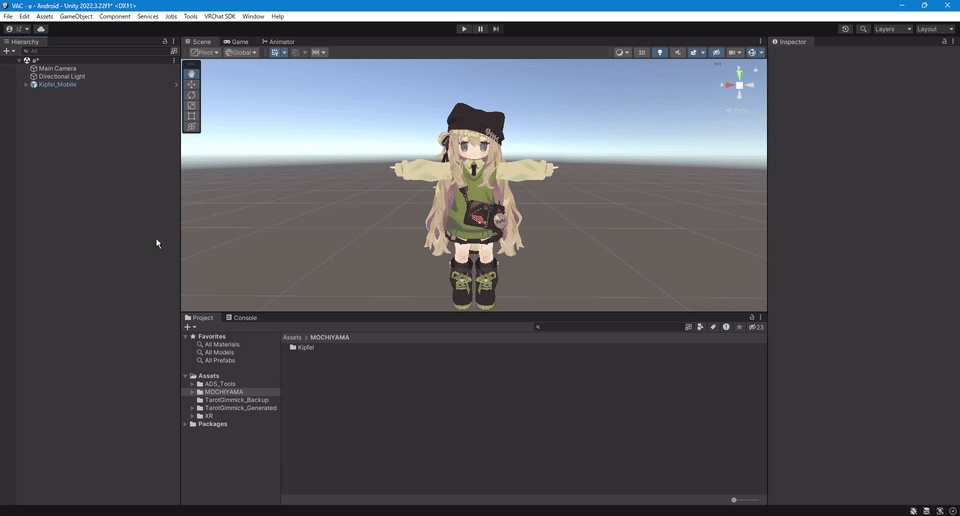
1. Modular Avatar を VCC からインストール 2. Unity メニューの Assets→Import Package→Custom Package から、 本パッケージをインポート 3. Unity メニュー → `Tools` → `Virtual Arcana Companion (SPREAD)` を開く 4. シーン内のアバターを確認(自動検出されます。手動での割り当ても可能です) 5. 「設置できる最大枚数」などを調整 6.「Create Gimmick (CLEAN & GENERATE)」ボタンを押す 7. アバターをアップロードして完了!
📦 Installation Guide
1. Install Modular Avatar via VCC. 2. Import this package into your project (from Unity Menu -> `Assets` -> `Import Package` -> `Custom Package...`). 3. Open Unity Menu -> `Tools` -> `Virtual Arcana Companion (SPREAD)`. 4. Verify your avatar in the scene (It will be detected automatically. Manual assignment is also possible). 5. Adjust settings like the "Maximum number of slots". 6. Press the **"Create Gimmick (CLEAN & GENERATE)"** button. 7. Upload your avatar and you're done!
⚠️ Troubleshooting (If it cannot be installed or does not work properly)
If this gimmick does not work properly, please check the following items: 1. Is Modular Avatar (MA) installed? This gimmick requires the use of Modular Avatar. Please install Modular Avatar into your project before pressing the installation button. 2. Is there enough "Parameter Capacity" on your avatar? VRChat avatars have a maximum synchronized parameter limit of 256 bits. This gimmick consumes parameters based on the maximum number of cards you set. ・ Solution: Delete unnecessary parameters, or reduce the "Maximum number of slots" slider in the Unity Editor and reinstall. (You can check the "Required bits / Available bits" in real-time within the Editor.) 3. Is your Unity version up to date (2022.3.x)? It may not work properly on versions other than Unity 2022.3.x, which is the recommended version for VRChat. 4. Is your VRCSDK up to date? Older versions of the VRCSDK may fail to load certain components correctly. Please update to the latest version via the VCC (VRChat Creator Companion). 5. Is a Chest bone assigned to your avatar? This gimmick calculates the position of the cards based on the avatar's Chest bone. If the Chest bone is not properly assigned in the Humanoid settings, the position may shift. Please verify this if a warning appears in the Editor. 6. Cannot install properly when multiple avatars are in the scene If there are multiple avatars in the same scene, please ensure that the checkbox (☑) in the Inspector for the avatar you want to install on is enabled. If other unnecessary avatars are checked, the tool may not react properly. (* You can also manually assign the target avatar from the tool's window.) 7. Cannot find the imported package (file) This gimmick is operated from the top menu bar in Unity. After importing the package, click on the Tools menu at the top of the screen and select Virtual Arcana Companion (SPREAD) to open the tool window.
⚠️ 導入できない・正常に動作しない場合
本ギミックが正常に動作しない場合は、以下の項目をご確認ください。 1. Modular Avatar (MA) が未導入ではありませんか? 本ギミックは Modular Avatar の使用を前提としています。 先にプロジェクトへ Modular Avatar をインストールしてから、導入ボタンを押してください。 2. アバターの「パラメータ容量」は足りていますか? VRChat のアバターには 256 bit という同期パラメータの上限があります。 本ギミックは設置枚数に応じてパラメータを消費します。 ・解決策: 不要なパラメータを削除するか、 Unity エディタの「設置できる最大枚数」スライダーを減らして導入し直してください。 (エディタ上でリアルタイムに「必要 bit / 空き bit」を確認できます) 3. Unity のバージョンは最新(2022.3.x)ですか? VRChat が推奨する Unity 2022.3.x 以外のバージョンでは、正常に動作しない可能性があります。 4. VRCSDK は最新ですか? 古いバージョンの VRCSDK では、一部のコンポーネントが正しく読み込まれないことがあります。 VCC (VRChat Creator Companion) を通じて最新版にアップデートしてください。 5. アバターに Chest(胸)ボーンは設定されていますか? 本ギミックはアバターの Chest ボーンを基準にカードの位置を計算します。 Humanoid 設定で Chest ボーンが正しく割り当てられていないアバターの場合、位置がずれることがあります。 エディタ上に警告が表示される場合はご確認ください。 6. 複数のアバターがシーンにある場合、正しく導入できない 同一シーン内にアバターが複数ある場合、導入したいアバターの Inspector のチェックボックス(☑)がオンになっているかご確認ください。他の不要なアバターのチェックが入っていると、ツールが正しく反応しない場合がございます。(※対象アバターはツールの画面から手動で指定することも可能です) 7. インポートしたパッケージ(ファイル)がどこにあるか分からない 本ギミックは Unity 上部のメニューバーから操作します。パッケージをインポートした後、画面上の Tools メニューを開き、Virtual Arcana Companion (SPREAD) をクリックしてツール画面を開いてください。
Virtual Arcana Companion (VAC) - Update History / 更新履歴歴
━━━━━━━━━━━━━━━━━━━━━━━━ 【v1.0.6】 2026-07-11 ━━━━━━━━━━━━━━━━━━━━━━━━ [日本語] ■ パラメータ容量計算の修正 ・【重要バグ修正】導入診断(ステップ2)におけるアバターの空きパラメータ容量計算処理にて、Float型パラメータを誤って32bitとして積算していた不具合を修正いたしました。 - VRChat公式の同期Float仕様(8bit)に合わせて正確に積算されるようになり、「残り -bit」という異常な数値の表示や、空き容量があるアバターでの不要な容量不足エラーが解消されました。 ■ ランダムドロー版の配置メニュー不具合修正 ・【重要バグ修正】ランダムドロー版(RANDOM-DRAW)にて、Expressions Menuの「配置 (Drop)」および「消去 (Clear)」サブメニューのアセット保存処理(CreateAsset)が漏れていた不具合を修正いたしました。 - これによりModular Avatar統合時やビルド時にサブメニューの参照が切れる問題が解消され、メニューの展開および「配置」ボタンが正常に動作するようになりました。 ■ アバター追従・ブレ防止機能の表記適正化 ・【仕様適正化】ギミックのカード追従挙動について、空間にカードを残す「空間置き去り型のワールド固定」ではなく、「アバター(体)に追従し、激しく動いてもブレずに維持される高精度追従機能」であることをUIおよび説明書にて明確化いたしました。 ■ フェイストラッキング等のパラメータ圧縮アドオン使用者向け対応 ・【機能追加】ビルド(アバターアップロード)時にパラメータを自動で圧縮・削減するアドオン(VRCFTのフェイストラッキングアドオン等)を使用している場合、Unity上のエディタ(導入ツール)での256bitパラメータ容量チェックを無視して構築を続行できるオプション「容量制限無視」トグルスイッチを追加しました。 - パラメータ容量が不足していると判定された場合(ステップ2の導入診断画面)に、チェックボックス「ビルド時パラメータ圧縮アドオンを使用するため容量制限を無視する」が表示されます。 - チェックを入れることで警告が「❌」から「⚠」に変わり、そのまま「次へ」進んで構築を完了させることができます。 ■ 設置枚数の事前設定機能の追加 ・【機能追加】ステップ1(アバター選択画面)にて、あらかじめ「設置できる最大枚数」と必要ビット数をスライダーで事前設定・確認できるようにしました。 [English] ■ Fixed Parameter Capacity Calculation - Critical Bug Fix: Fixed an issue where Float parameters in the avatar were incorrectly calculated as 32 bits instead of the official VRChat 8-bit synced float specification during Step 2 diagnostics. - Resolves abnormal negative bit displays (e.g. "-bit") and false-positive capacity limit errors on avatars with ample free parameter space. ■ Fixed Random-Draw Drop Menu Issue - Critical Bug Fix: Fixed a missing asset creation call (`CreateAsset`) for the "Drop" and "Clear" submenus in the Random-Draw tool (`CreateRandomTarotGimmick.cs`). - Resolves the issue where submenus became unlinked during Modular Avatar merge, restoring full functionality to the "Drop" buttons. ■ Clarified Avatar-Following & Anti-Jitter Behavior - Clarification: Clarified in the UI and documentation that card placement is designed to follow the avatar chest with jitter-free stabilization rather than static world-lock positioning. ■ Added "Ignore Parameter Limit" Option for Face Tracking / Parameter Compression Addon Users - Feature Added: Added a new toggle option "Ignore parameter limit (using parameter compression addon at build)" for users who utilize parameter compression addons at build time. ■ Pre-select Card Count Feature - Feature Added: Added a slider to Step 1 (Avatar Select screen) to pre-select and verify the maximum card count and required bits beforehand.
利用規約 / Terms of Use
・本アセットの改変・カスタマイズは自由です。 ・本アセットに含まれるデータの再配布・再販売は禁止いたします。 ・アバターへの組み込み状態でのパブリックアバターアップロードは禁止いたします。 - Modification and customization are permitted. - Redistribution or resale of this asset (in whole or in part) is strictly prohibited. - Uploading as a Public Avatar containing this gimmick is prohibited.