

【1DAY-FREE】【VRChat】VRC Screen Bridge|Easy PC Video Window Streaming Tool for VRChat
- TrialDigital0 JPY
- FullDigital100 JPY
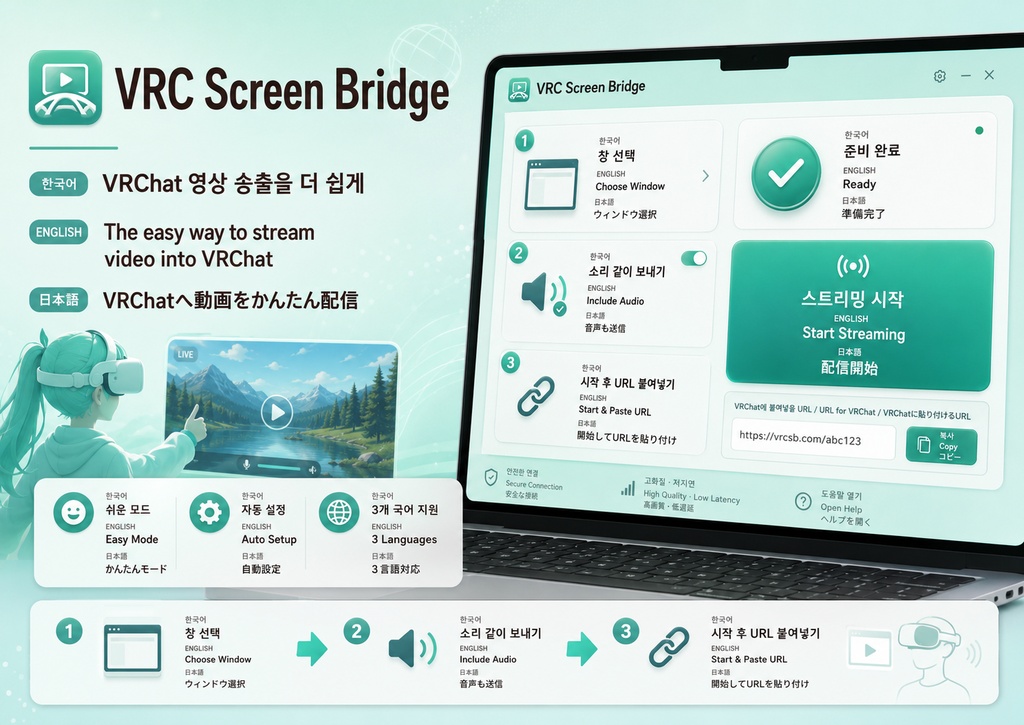
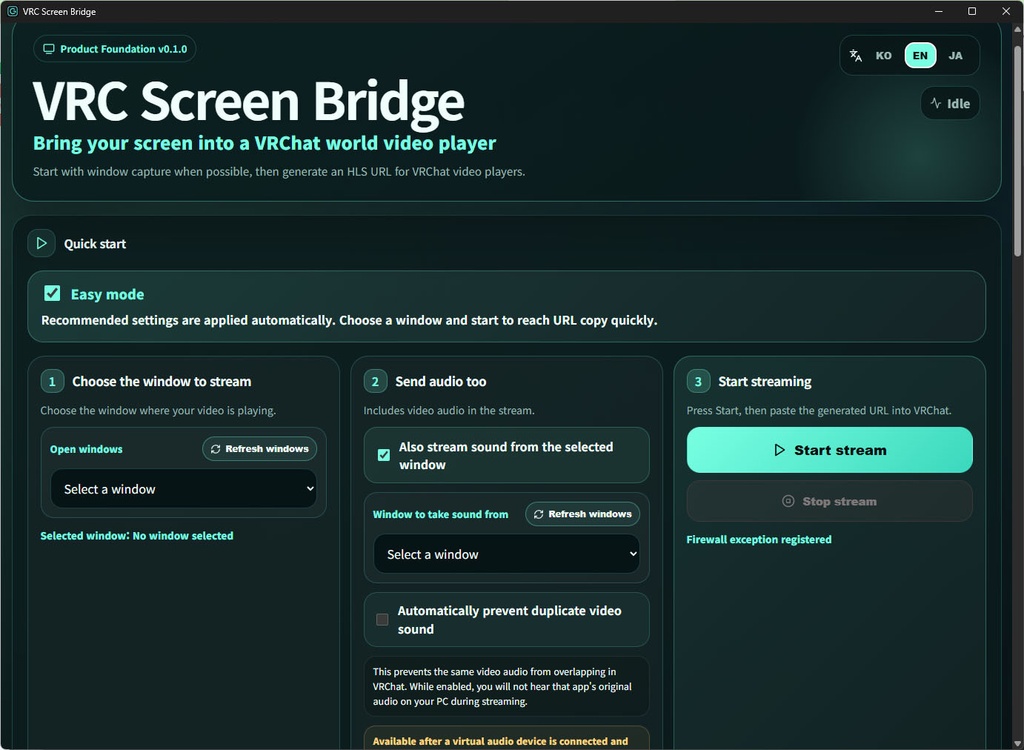
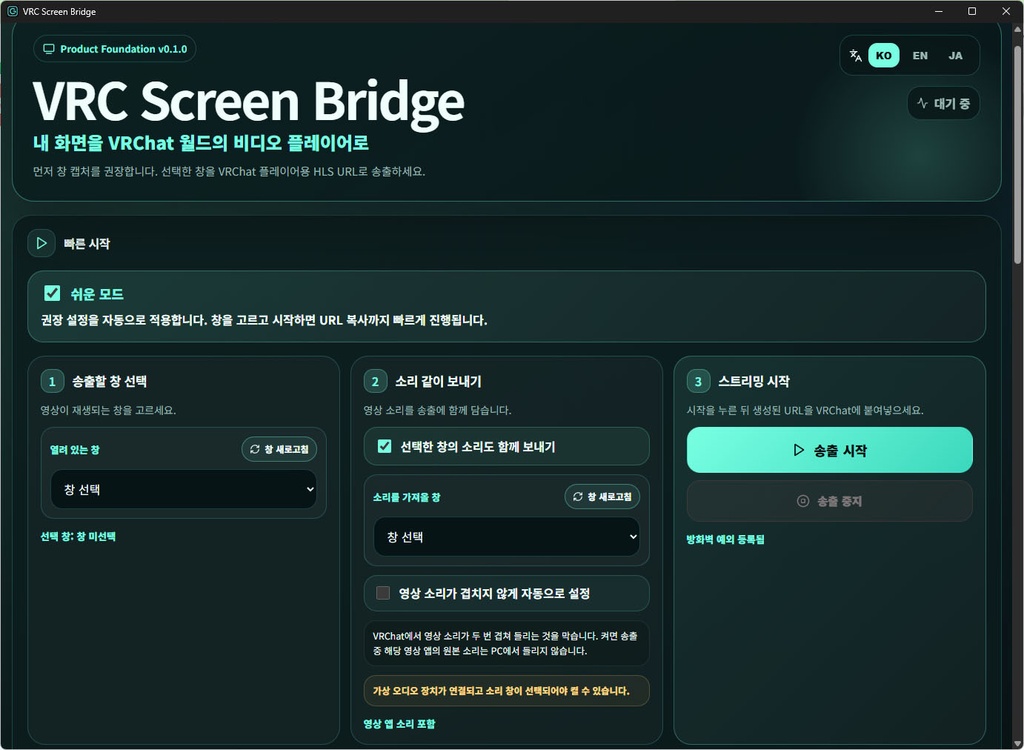
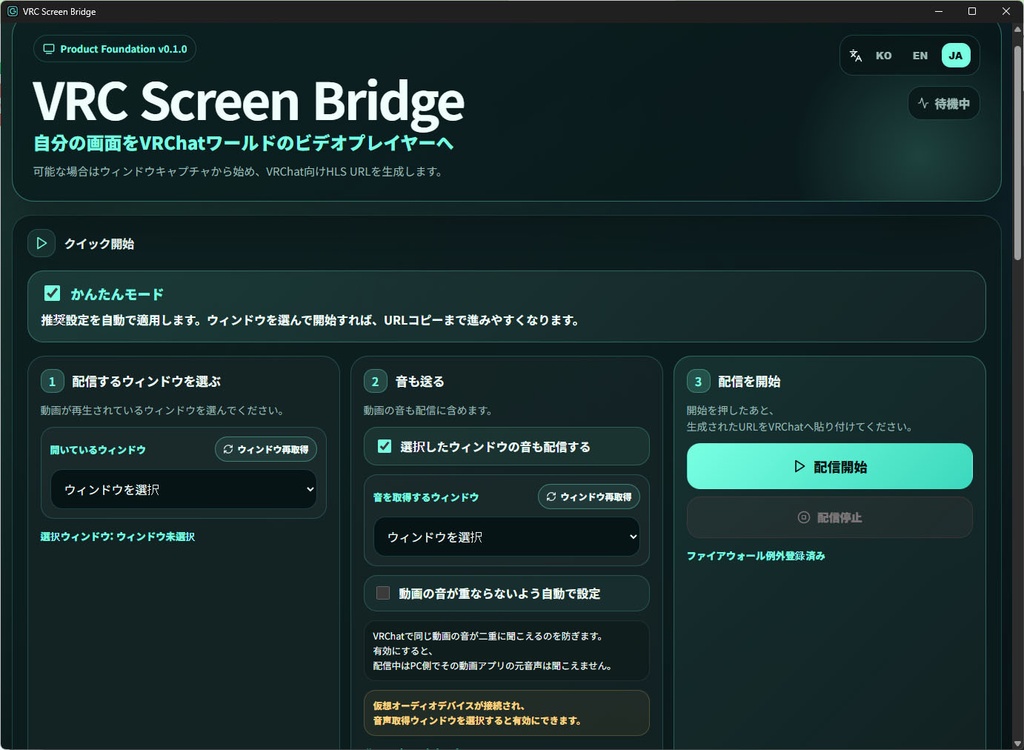


日本語 VRC Screen Bridge PCで再生している映像をVRChatワールド内の動画プレイヤーへ送信し、友達と一緒に視聴しやすくするWindows向けツールです。 単なる画面共有ではなく、 VRChatの中で同じ映像を一緒に見る体験を、より快適にすることを目的に作られています。 主な特徴 ・VRChat内で一緒に視聴 PC上で再生している映像を送信し、生成された再生URLをVRChatの動画プレイヤーに入力することで、複数人で同じ映像を楽しめます。 ・元の映像アプリ側の音声を自動整理 一般的な画面共有では、 PC側で再生されている元の音声と、VRChatの動画プレイヤーから再生される音声が同時に聞こえてしまい、 タイミングのずれた2つの音を重ねて聞く状態になることがあります。 VRC Screen Bridgeはこの問題を減らすため、 元の映像アプリのローカル再生音を自動的に整理し、VRChatの動画プレイヤーへ送信された音声だけを聞きやすい流れをサポートします。 つまり、 PC側の元音声とVRChat側の送信音声が二重に聞こえる不快さを抑え、 一緒に見ている人たちと、より自然に同じ映像と音を共有できます。 ・動画プレイヤー向け再生URLを生成 VRChatの対応動画プレイヤーに入力できる公開再生URLを生成します。 ・映像アプリを中心にした送信設計 ブラウザや動画プレイヤーなど、共有したい映像ウィンドウを基準に送信を構成できます。 ・VRChat再生互換性を意識した構成 AVPro系の再生環境を意識したHLS送信フローと安定化処理を含みます。 ・マルチメディア互換性の自動保護 一部のシステム調整によってWindowsのマルチメディア再生経路に問題が残る場合を検出し、 不具合の原因になりうるMMCSS設定の残骸を自動的に整理する保護機能を備えています。 こんな方におすすめ ・VRChatのワールド内で友達と映像を一緒に見たい方 ・通常の画面共有より、動画プレイヤーを使った視聴体験を重視したい方 ・元の音声と送信音声が重なって聞こえる問題を減らしたい方 ・VRChat向けの映像送信環境を手軽に用意したい方 注意事項 ・Windows環境向けに制作されています。 ・VRChatワールド側の動画プレイヤー実装やネットワーク環境によって再生挙動が異なる場合があります。 ・映像、音声、配信コンテンツは、利用者が権利を保有している、または許可された範囲でご使用ください。 한국어 VRC Screen Bridge PC에서 재생 중인 영상을 VRChat 월드 안의 영상 플레이어로 송출해, 친구들과 함께 감상할 수 있도록 돕는 Windows용 도구입니다. 단순한 화면 공유가 아니라, VRChat 안에서 같은 영상을 함께 보는 경험을 더 편하게 만들기 위해 설계되었습니다. 핵심 특징 ・VRChat 내부에서 함께 시청 PC에서 재생 중인 영상 화면을 송출하고, 생성된 주소를 VRChat 영상 플레이어에 입력해 여러 사람과 함께 감상할 수 있습니다. ・원본 영상 소리 자동 정리 일반적인 화면 공유 방식은 PC에서 재생되는 원본 소리와 VRChat 영상 플레이어에서 나오는 소리가 동시에 들려 싱크가 어긋난 두 소리를 겹쳐 듣게 되는 불편이 생길 수 있습니다. VRC Screen Bridge는 이 문제를 줄이기 위해 원본 영상 앱의 로컬 재생 소리를 자동으로 정리하고, VRChat 영상 플레이어에 송출되는 소리만 들리는 흐름을 지원합니다. 즉, 내 PC에서 따로 들리는 원본 소리와 VRChat에서 들리는 송출 소리가 겹치는 문제를 줄여, 함께 보는 사람들과 더 자연스럽게 같은 화면과 소리를 공유할 수 있습니다. ・영상 플레이어용 송출 URL 생성 VRChat 영상 플레이어에 입력할 수 있는 공개 재생 주소를 생성해 줍니다. ・영상 앱 중심의 송출 흐름 브라우저, 플레이어 등에서 재생 중인 영상 창을 기준으로 송출을 구성할 수 있습니다. ・VRChat 재생 호환성을 고려한 송출 구성 AVPro 기반 재생 환경을 고려한 HLS 송출 흐름과 안정화 처리를 포함합니다. ・멀티미디어 호환성 자동 보호 특정 시스템 튜닝으로 인해 Windows 멀티미디어 재생 경로가 꼬이는 경우를 감지하고, 문제가 될 수 있는 잘못된 MMCSS 설정 잔재를 자동으로 정리하는 보호 기능을 포함합니다. 이런 분께 추천합니다 ・VRChat 월드 안에서 친구들과 영상을 함께 보고 싶은 분 ・화면 공유 대신 영상 플레이어를 이용해 보다 자연스럽게 같이 감상하고 싶은 분 ・원본 앱 소리와 VRChat 송출음이 겹쳐 들리는 문제를 줄이고 싶은 분 ・VRChat 영상 감상용 송출 환경을 간편하게 구성하고 싶은 분 참고 사항 ・Windows 환경에서 사용하도록 제작되었습니다. ・VRChat 월드의 영상 플레이어 종류와 네트워크 환경에 따라 재생 동작이 달라질 수 있습니다. ・영상, 음원, 방송 콘텐츠는 이용자가 권리를 보유했거나 허가된 범위 내에서 사용해 주세요. English VRC Screen Bridge A Windows tool that helps you stream video playing on your PC into a VRChat world video player, so you can watch it together with friends inside VRChat. It is not just a simple screen-sharing utility. VRC Screen Bridge is designed to make shared video watching inside VRChat smoother and more comfortable. Key Features ・Watch together inside VRChat Stream a video window from your PC, place the generated playback URL into a VRChat video player, and enjoy the same content together with others. ・Automatic original-audio cleanup With ordinary screen-sharing methods, the original audio from the source app on your PC and the audio coming from the VRChat video player may be heard at the same time. This can create an unpleasant situation where you hear two slightly out-of-sync audio sources overlapping each other. VRC Screen Bridge is designed to reduce that problem by supporting a workflow where the local playback audio from the original video app is automatically cleaned up, while the streamed audio from the VRChat video player remains the one you hear. In other words, it helps reduce the issue of hearing both the PC-side source audio and the VRChat-side streamed audio at once, making shared viewing feel much more natural. ・Playback URL generation for video players Creates a public playback URL that can be entered into supported VRChat video players. ・Video-window-oriented streaming Built around capturing and streaming the actual video application/window you want to share. ・VRChat playback compatibility focus Includes an HLS streaming path and compatibility-oriented handling designed with AVPro-style playback environments in mind. ・Automatic multimedia compatibility guard Includes protection that detects and cleans up problematic leftover MMCSS registry values that may interfere with Windows multimedia playback behavior on affected systems. Recommended For ・Users who want to watch videos together with friends inside VRChat ・Users who prefer a video-player-based shared viewing experience instead of ordinary screen sharing ・Users who want to reduce double-audio or out-of-sync overlapping sound ・Users who want a more convenient way to prepare VRChat-friendly video streaming Notes ・Designed for Windows. ・Playback behavior may vary depending on the VRChat world, video player implementation, and network environment. ・Please use video, audio, and broadcast content only within the rights and permissions you hold.