

VRCNamePlateCreator
- Digital400 JPY
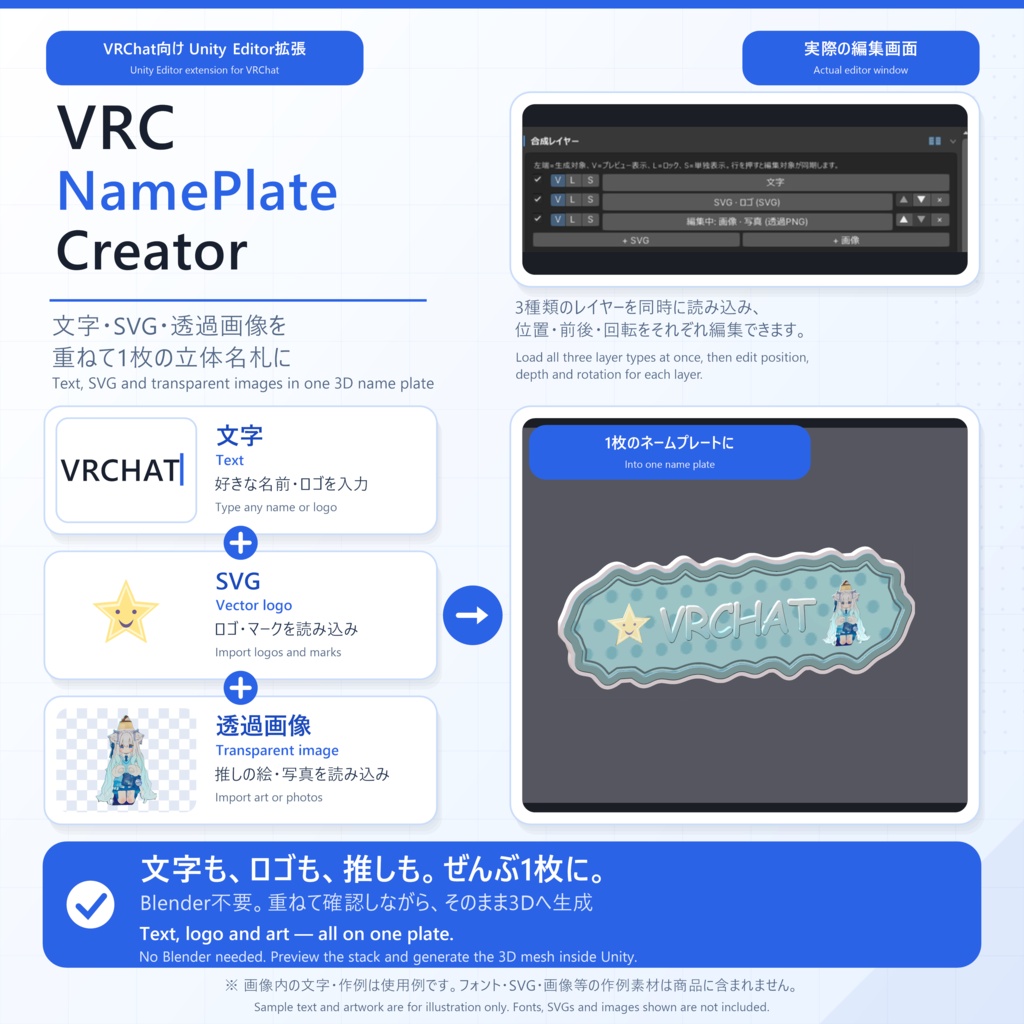
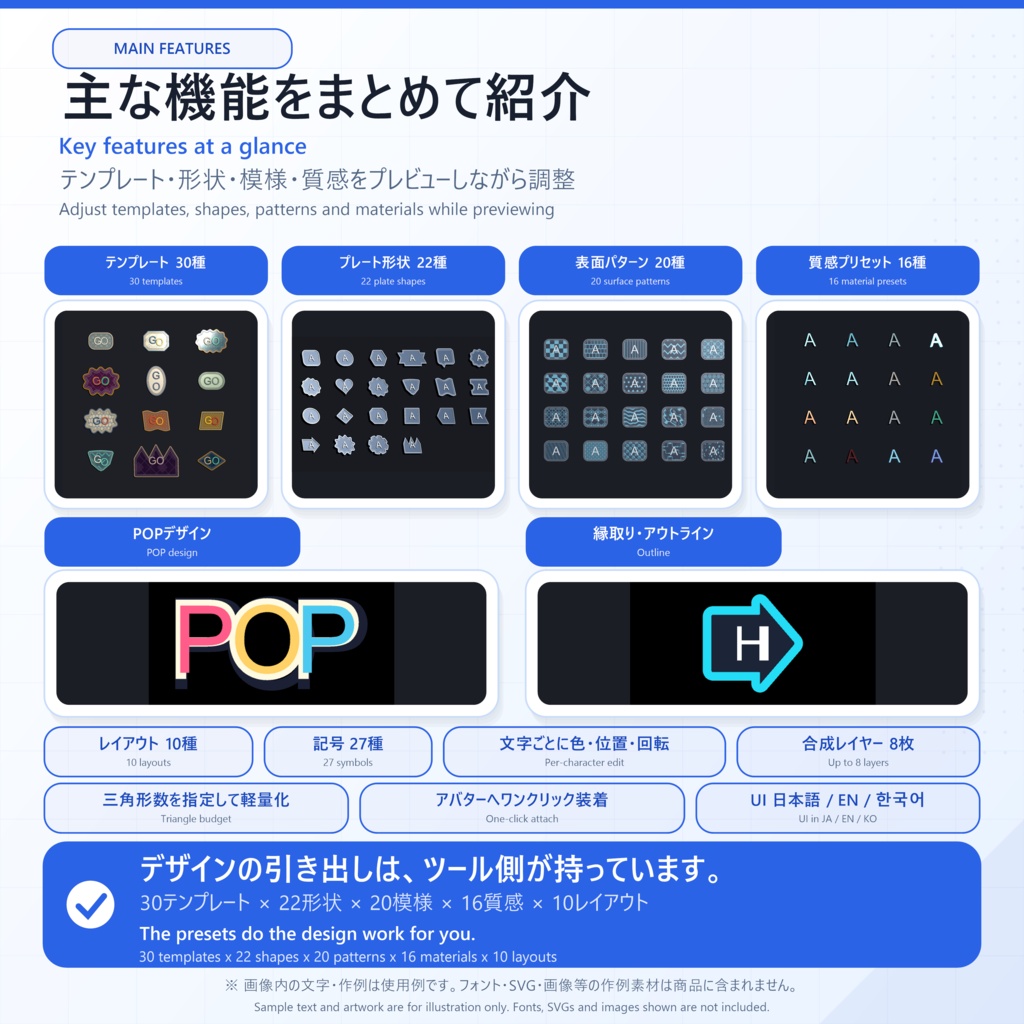


本商品はダウンロード商品です。物理商品の発送はありません。 名前・ロゴ・推しマークを、アバターに付ける立体ネームプレートへ。 VRC NamePlate Creatorは、文字・SVG・透過画像から、厚みのある3DネームプレートをUnity内で作成できるEditor拡張です。 ◆ 1. Blender不要、Unityだけで完結 文字はTTFフォントの輪郭、SVGは塗り形状、写真はアルファ輪郭から、前面・背面・側面を持つ本物の押し出し3Dメッシュを生成。デザインから生成・アバター装着(頭上/胸元)までUnity内で完結します。Modular Avatar導入時は非破壊装着にも対応。 ◆ 2. 選んで調整するだけのデザイン機能 ・30テンプレート × 10レイアウト(直線/扇形/円/波/縦書きなど) ・背景プレート22種・表面パターン20種・質感プリセット16種 ・文字にSVG・画像を最大8枚重ねるレイヤー合成 ・文字ごとの位置・回転・倍率・色編集、リアルタイム3Dプレビュー、Ctrl+Z対応 ・UIは日本語 / English / 한국어 ◆ 3. 動作環境とご注意 ・Windows / Unity 2022.3.22f1 ・対応フォント: TrueTypeの .ttf / .ttc(CFF系.otf・カラーフォントは非対応。フォントは同梱されません) ・ゲーム内での文字変更はできません(Unityで編集して再生成) ・Quest向けシェーダー/マテリアルは同梱・自動変換なし
✦ VRC NamePlate Creator とは
好きな文字・ロゴ・背景透過画像から、VRChatアバターへ装着できる立体ネームプレートをUnity内で作成するEditor拡張です。 TTFフォントの輪郭を直接読み取り、TextMeshProの板ポリではなく、前面・背面・側面を持つ本物の押し出し3Dメッシュを生成します。 Blenderへの書き出しや、コア生成機能に必須の外部パッケージはありません。Bone Proxy装着にはModular Avatar 1.17.1、Exメニュー表示トグルにはVRC SDKも必要です。PhysBone揺れにはVRC SDKが必要です。 文字だけのシンプルな名札から、ロゴ・透過画像・背景プレートを重ねたデザインまで、プレビューを見ながら仕上げられます。
✦ 購入後の流れ
1. unitypackageをUnityへImport 2. 文字や素材を選び、テンプレート・形・模様・質感をプレビューで調整 3. 3Dメッシュを生成し、HeadまたはChestへ装着 Modular Avatarは必須ではありません。導入時はBone Proxyによる非破壊装着と、VRC SDK併用時のExメニュー表示トグル作成に対応します。
✦ 動作環境
・Windows ・Unity 2022.3.22f1 ・コア生成機能の必須パッケージなし(Bone Proxy装着にはModular Avatar 1.17.1、Exメニュー表示トグルにはVRC SDKも必要、PhysBone揺れにはVRC SDKが必要) ・対応フォント: TrueTypeアウトラインの `.ttf` / `.ttc` ※ CFF/PostScriptアウトラインの `.otf`、カラーフォントは非対応です。 ※ 本商品にフォントファイルは含まれません。
✦ 同梱内容
VRCNamePlateCreator_v0.1.0.zip 購入後は「00_はじめにお読みください.txt」の案内に従い、unitypackageのImport → 画像付きHTML取扱説明書の順でご確認ください。 HTML取扱説明書は日本語・英語・韓国語の3言語で、ページ上部のボタンから切り替えられます。
✦ 使用上の注意
・動作確認済み環境はWindows / Unity 2022.3.22f1です。その他のOS・Unityバージョンでの動作は保証していません。 ・非常に複雑なSVG、高解像度の写真輪郭、長い文字列では頂点数が増え、プレビューが重くなる場合があります。 ・文字入力は最大300文字です。入力または編集データ読込時に超過分は切り詰められます。ネームプレート用途では20文字以内を推奨します。 ・未指定時はBuilt-in Render PipelineのStandardマテリアルを生成します。本商品にQuest向けシェーダー/マテリアルは含まれず、自動変換もしません。URP/HDRPへの自動変換も行いません。 【できないこと】 ・ゲーム内で文字列を自由に変更する機能はありません。文字変更はUnity Editorで行い、再生成してください。OSC等による動的変更は対象外です。 ・CFF/PostScriptアウトラインの.otfとカラーフォントは変換できません。TrueTypeアウトラインの.ttf/.ttcをご使用ください。 ・SVGは塗り形状のみを変換します。stroke、clip/mask/filter、埋め込み画像、グラデーション形状、SVGのtext要素は直接変換できません。文字や線はSVG作成ソフト側で塗りのアウトラインへ変換してください。 ・背景透過画像はアルファ付きPNGを推奨します。透明部分がない画像は長方形として処理されます。 ・写真メッシュは元画像アセットを参照します。生成後も元画像をProject内へ残してください。 ・生成物を無償でプレゼント・配布する場合は、使用したフォント・SVG・画像・マテリアル等のライセンスを必ずご確認ください。生成物の有料販売は禁止です。 ・画像・SVGは著作権者の許諾がある素材のみをご使用ください。写真を使う場合は、被写体(人物・他者のアバター・私有物等)の権利もご確認ください。 ・ご使用前にUnityプロジェクトのバックアップを推奨します。 ・本ツールは現状有姿で提供されます。免責の範囲を含む詳細は、購入前に下記の利用規約全文をご確認ください。 ・商品画像・動画内のアバター、フォント、ロゴ、画像、マテリアルは同梱されません。 ・商品画像・動画・取扱説明書の作例アバターは「キプフェル」(©もち山金魚)です。権利者様の利用規約の範囲内で使用しており、アバターは本商品に含まれません。もち山金魚様が本商品を推奨するものではありません。 キプフェル: https://mukumi.booth.pm/items/5813187 ・ダウンロード商品のため、注文確定後のキャンセル・返金はBOOTHの現行ポリシー上できません。購入前に動作環境・制限・利用規約をご確認ください。 ・本ツールの開発には、生成AIツールをコーディング・ドキュメント作成の補助として使用しています。
✦ 更新履歴
・v0.1.0 初回リリース
✦ 利用規約
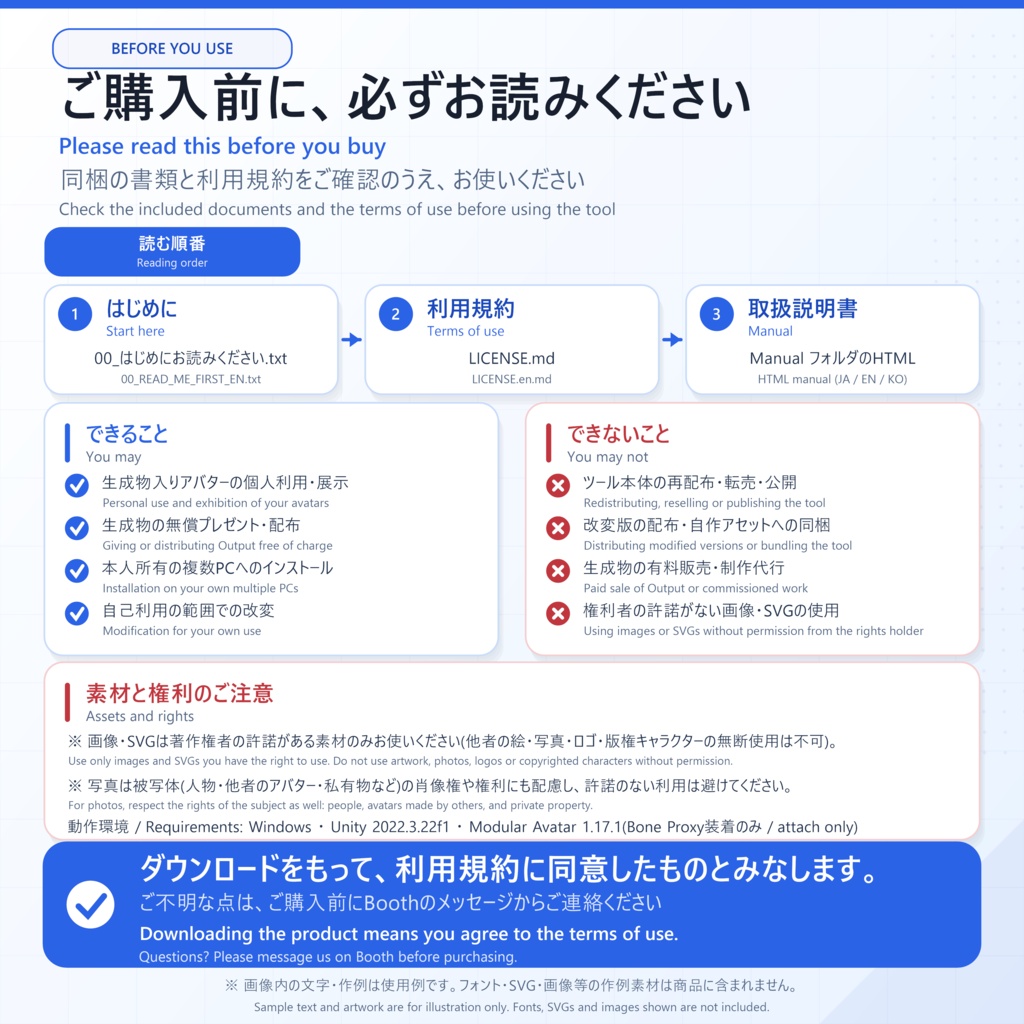
規約版 / Terms revision: 2026-08-06 本規約は、本ツール「VRC NamePlate Creator」(以下「本ツール」)の購入者(以下「利用者」)に適用されます。 本ツールをダウンロード・使用した時点で、本規約に同意したものとみなします。 ◆ 1. 許可されること ・利用者本人による、本ツールを使用したネームプレート(名前バッジ)メッシュの生成・編集 ・本ツールで生成したメッシュ・マテリアル(以下「生成物」)を含むアバター・作品の個人利用・展示、および生成物を**対価を受け取らず無償で**第三者へプレゼント・配布すること(制作代行・受託作業を除き、使用素材のライセンスが許諾する範囲内) ・利用者本人が所有する複数の PC へのインストール ◆ 2. 禁止されること ・本ツール本体(ソースコード・unitypackage を含む)の再配布・転売・譲渡・貸与・公開 ・本ツールの改変版の配布(自己利用の範囲内での改変は可) ・**制作代行・受託作業での使用**(第三者から依頼を受け、その第三者向けの生成物を作成する行為。依頼者が本ツールを購入している場合も含みます) ・本ツールまたはその一部を、自作ツール・アセットに組み込んで配布する行為 ・生成物を**有償で販売・譲渡・配布する行為**(生成物単体のほか、アバター・作品・アセット等への同梱を含みます)。また、使用素材のライセンスが許諾しない形で生成物を無償配布する行為(第 3 条参照) ・権利者の許諾を得ていない画像・SVG・フォント等を素材として使用する行為(他者のイラスト・写真・ロゴ・版権キャラクター等を含みます) ◆ 3. 生成物と使用素材の権利 ・本ツールは、利用者が指定した TTF/TTC フォント、SVG、画像等の素材をもとにメッシュを生成します。**使用素材自体の著作権・使用許諾は、本ツールの使用によって変化しません。** 生成物を無償でプレゼント・配布できるかどうかは、使用した各素材のライセンス(EULA・利用規約等)が定めるところにも従います。使用素材のライセンスが商用利用を許可している場合でも、第 2 条により生成物の有料販売は禁止されます。 ・本ツールにはフォント、SVG、画像、マテリアル等の制作素材は同梱されません。素材の選定・権利確認は利用者の責任で行ってください。 ・写真・画像を素材として使用する場合は、被写体(人物・他者のアバター・キャラクター・私有物等)の肖像権・パブリシティ権・商標権等についても、利用者の責任で確認してください。 ・本ツールの作者は、生成物および使用素材のライセンスについて一切保証せず、また生成物に対して独自の権利を主張しません。 ・本ツールに含まれる第三者製ソフトウェアには、各第三者ライセンスが優先して適用されます。本規約は、それらのライセンスが許諾する権利を制限しません。詳細は `THIRD_PARTY_NOTICES.md` と各ライセンス本文をご確認ください。 ◆ 4. 免責 ・本ツールは現状有姿(AS IS)で提供されます。適用法令で認められる範囲で、作者は本ツールの使用または使用不能から生じる間接損害、特別損害、付随的損害、結果的損害および逸失利益について責任を負いません。ただし、作者の故意または重過失による場合その他法令上免責が認められない場合は、この限りではありません。 ・使用前にプロジェクトのバックアップを推奨します。 ◆ 5. その他 ・本規約は予告なく変更される場合があります。購入済みの利用者には購入時点で公開されていた版が適用されます。規約版は冒頭の日付で識別します。 ・本規約の解釈は日本法に準拠し、日本語版と英語版に相違がある場合は日本語版を優先します。
English
This is a digital download; no physical item will be shipped. Turn names, logos, and favorite symbols into dimensional nameplates for your avatar. VRC NamePlate Creator is a Unity Editor extension that creates thick 3D nameplates from text, SVGs, and transparent images inside Unity. ◆ 1. No Blender — everything inside Unity Creates real extruded 3D meshes with front, back, and side faces — text from TTF font outlines, SVGs from filled shapes, and photos from alpha contours. Design, generation, and avatar attachment (Above Head / Chest) all happen inside Unity. Non-destructive attachment is supported when Modular Avatar is installed. ◆ 2. Pick-and-adjust design tools ・30 templates × 10 layouts (Linear, Arc, Circle, Wave, Vertical, and more) ・22 background plates, 20 surface patterns, and 16 material presets ・Up to eight SVG/image layers on top of the text layer ・Per-character position/rotation/scale/color editing, realtime 3D preview, and Ctrl+Z Undo ・Japanese / English / Korean UI ◆ 3. Requirements & notes ・Windows / Unity 2022.3.22f1 ・Supported fonts: TrueType-outline .ttf / .ttc (CFF/PostScript-outline .otf and color fonts are unsupported; no fonts are included) ・Text cannot be changed in-game (change it in the Unity Editor and generate again) ・Quest shaders/materials are not included or generated; no automatic conversion is performed
✦ What is VRC NamePlate Creator?
VRC NamePlate Creator is a Unity Editor extension for making dimensional nameplates for VRChat avatars from text, logos, and transparent-background images. It reads TTF font outlines directly and creates real extruded geometry with front, back, and side faces—not a TextMeshPro texture on a flat quad. No Blender round trip or external package is required for core generation. Bone Proxy attachment requires Modular Avatar 1.17.1; the Expressions Menu toggle also requires the VRC SDK; PhysBone swing requires the VRC SDK. Build anything from a simple text badge to a layered design with logos, transparent images, and a background plate while watching the result in the realtime preview.
✦ From import to attachment
1. Import the unitypackage into Unity 2. Choose your text or assets, then adjust the template, shape, pattern, and material in the preview 3. Generate the 3D mesh and attach it to the Head or Chest bone Modular Avatar is optional. When installed, it enables non-destructive attachment through Bone Proxy and creation of an Expressions Menu visibility toggle when used with the VRC SDK.
✦ Requirements
・Windows ・Unity 2022.3.22f1 ・No required package for core generation (Bone Proxy attachment requires Modular Avatar 1.17.1; the Expressions Menu toggle also requires the VRC SDK; PhysBone swing requires the VRC SDK) ・Supported fonts: TrueType-outline `.ttf` / `.ttc` * CFF/PostScript-outline `.otf` files and color fonts are unsupported. * No font files are included with this product.
✦ Contents
VRCNamePlateCreator_v0.1.0.zip After purchase, follow 00_READ_ME_FIRST_EN.txt, then import the unitypackage and open the illustrated English manual. The HTML manual ships in Japanese, English, and Korean, switchable from the buttons at the top of the page.
✦ Usage notes
・Verified environment: Windows / Unity 2022.3.22f1. Other operating systems and Unity versions are not guaranteed. ・Very complex SVGs, high-resolution photo contours, or long text may increase geometry and slow the preview. ・Text input is limited to 300 characters. Extra input is truncated when typing or loading editing data; 20 characters or fewer is recommended for nameplates. ・With no assigned material, the tool creates a Built-in Render Pipeline Standard material. Quest shaders/materials are not included or generated, and no automatic conversion is performed. URP/HDRP conversion is also not performed. [What the tool cannot do] ・Text cannot be changed freely in-game. Change it in the Unity Editor and generate again; dynamic changes through OSC or similar systems are outside the tool's scope. ・CFF/PostScript-outline .otf files and color fonts cannot be converted. Use TrueType-outline .ttf/.ttc fonts. ・SVG conversion targets filled geometry only. stroke, clip/mask/filter, embedded images, gradient geometry, and SVG text elements are not converted directly. Convert text and strokes to filled outlines in your SVG authoring application. ・Alpha PNG is recommended for transparent-background images. A fully opaque image becomes a rectangle. ・Photo mesh materials reference the source texture. Keep that image asset in the Unity project after generation. ・Before giving or distributing Output free of charge, verify the licenses of every font, SVG, image, material, and other source asset used. Paid sale of Output is prohibited. ・Use only images and SVGs you have permission to use. When you use a photo, check the rights of the subject as well (people, avatars made by others, private property). ・Back up your Unity project before use. ・The Tool is provided "AS IS." Read the complete Terms below before purchase for the applicable limitations. ・Avatars, fonts, logos, images, and materials shown in product images or videos are not included. ・The avatar shown in the product images, video, and manual is "Kipfel" (© Mochiyama Kingyo), used within the scope of the rights holder's terms of use. The avatar is not included in this product, and Mochiyama Kingyo does not endorse this product. Kipfel: https://mukumi.booth.pm/items/5813187 ・Under BOOTH's current policy, confirmed download orders cannot be canceled or refunded. Check the requirements, limitations, and Terms before purchase. ・Generative AI tools assisted with coding and documentation during development.
✦ Update history
・v0.1.0 Initial release
✦ Terms of Use
The Japanese version is the authoritative original; if the Japanese and English versions differ, the Japanese version prevails. Terms revision: 2026-08-06 These terms apply to purchasers ("User") of "VRC NamePlate Creator" (the "Tool"). By downloading or using the Tool, you agree to these terms. ◆ 1. Permitted ・Generating and editing nameplate (name badge) meshes with the Tool for the User's own works. ・Personal use and exhibition of avatars or works containing meshes and materials generated with the Tool ("Output"), and giving or distributing Output to third parties free of charge and without receiving compensation (excluding commission or contract work and only as permitted by each source asset license). ・Installation on multiple PCs owned by the same User. ◆ 2. Prohibited ・Redistributing, reselling, transferring, lending, or publishing the Tool itself (including source code and unitypackage). ・Distributing modified versions of the Tool (modification for personal use is allowed). ・Use for commission or contract work (creating Output for a third party at that party's request, including when the client has purchased the Tool). ・Incorporating the Tool or any part of it into other tools or assets for distribution. ・Selling, transferring, or distributing Output for compensation, whether standalone or included with an avatar, work, asset, or other product. Distributing Output free of charge in a way not permitted by the license of a source asset is also prohibited (see Section 3). ・Using images, SVGs, fonts, or other source assets that the rights holder has not permitted you to use, including artwork, photos, logos, and copyrighted characters created by others. ◆ 3. Rights to Output and Source Assets ・The Tool builds meshes from TTF/TTC fonts, SVGs, images, and other source assets selected by the User. Using the Tool does not change the copyright or license terms of any source asset. Whether Output may be given or distributed free of charge is also governed by the license, EULA, or terms of each source asset used. Even when a source asset license permits commercial use, paid sale of Output is prohibited under Section 2. ・No production fonts, SVGs, images, or materials are bundled with the Tool. Selecting source assets and verifying their rights and licenses is the User's responsibility. ・When photos or images are used as source assets, checking the rights of the subject depicted (people, avatars created by others, characters, private property, and so on), including portrait rights, publicity rights, and trademarks, is also the User's responsibility. ・The author of the Tool makes no warranty regarding the Output or the licensing of any source asset used, and claims no independent rights over the Output. ・Third-party software included with the Tool is governed by its own license. These Terms do not restrict rights granted by those licenses. See `THIRD_PARTY_NOTICES.md` and the applicable license text. ◆ 4. Disclaimer ・The Tool is provided "AS IS." To the extent permitted by applicable law, the author is not liable for indirect, special, incidental, or consequential damages or lost profits arising from use or inability to use the Tool. This limitation does not apply where liability cannot lawfully be excluded, including damage caused by intentional misconduct or gross negligence. ・Backing up your project before use is recommended. ◆ 5. Miscellaneous ・These terms may change without notice. The version published at the time of purchase applies to existing purchasers. The revision date at the top identifies the applicable version. ・These terms are governed by Japanese law. If the Japanese and English versions differ, the Japanese version prevails.