

【VRChatアバター・衣装・髪型・アクセ管理用TOOL・簡単着せ替え機能あり】MyAvatarCatalog
- MyAvatar_Catalog_v1.0.1(全部込み)(All-in-One)Digital1,000 JPY
- MyAvatar_Catalog_v1.0.1(全部込み)(All-in-One)+投げ銭用(Support Edition)Digital1,200 JPY
- Catalog機能のみ Catalog Feature Only (Base Version)Digital500 JPY
- Dressing Room機能拡張 ※こちらは拡張機能です。単体では動作しません。Dressing Room Extension (*Requires Base Version)Digital500 JPY
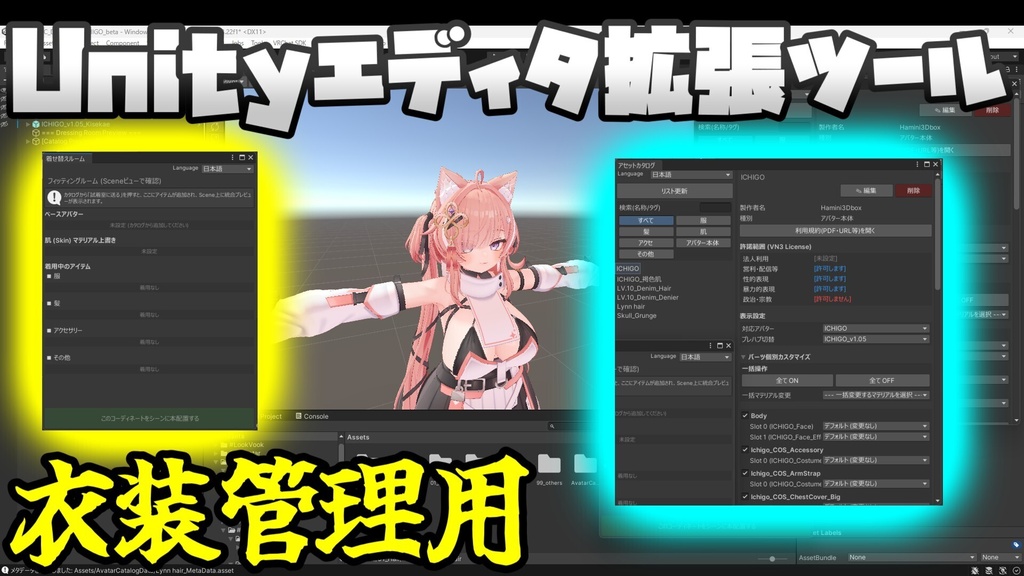

▽はじめに もともとはVRChatを始めてから複数衣装を購入したものの、管理方法が分からず、「とりあえず自分が使いやすいように」と自分用に作成したところから始まりました。 開発を進めるうちに意外と良い形に仕上がったため、同じ悩みを持つ方の助けになればと思い、販売してみることにした次第です。 BOOTHを利用しての販売は初めてで色々と勉強中ですが、皆様のアバターライフを快適にするお手伝いができれば幸いです! ▽商品説明 VRChat向けアバターの衣装・髪・肌・アクセサリーなどの着せ替えアイテムを一元管理し、「完全非破壊」で着せ替えや適用を行うことができるUnityエディタ拡張ツールです。 「アバターの着せ替えを行うたびにHierarchyが複雑になる」「複数の衣装の組み合わせを試すのが面倒」といった、アバター改変における煩わしさを根本から解消するために開発されました。 初心者から上級者まで、すべてのVRChatユーザーの改変作業を圧倒的に効率化します。 用途に合わせてお選びいただけるよう、「Base(カタログ機能)」と、さらに高度なプレビューが可能になる「拡張機能(試着室&マイセット保存)」に分けてご用意しています。 ▽エディション(機能)の違い 【Base版】(カタログ機能のみ) アセットの整理・適用に特化した基本ツールです。 アセットカタログ機能: Projectウィンドウの深いフォルダを探す手間を省き、衣装などのPrefabをツール内に一覧で分類・カタログ化します。 非破壊・一元管理: 元のアセットの構造やリンクを維持したまま、クリーンな環境で改変を楽しめます。 フェイルセーフ設計: 適用時にModular Avatar等の重複付与を自動で防ぐ安全装置や、Missing(リンク切れ)の一括クリーンアップ機能を搭載しています。 【Dressing Room機能拡張版】(※Base版が必要です) Base版に「試着室」機能を追加し、圧倒的な時短を実現する拡張モジュールです。 サクサク動く試着室: Sceneにアバターを配置しなくても着せ替えができるのが最大の特徴です。 パーツごとのON/OFFやマテリアルの個別変更がエディタ上で直感的に行えます。 マイセット保存機能: 試着室で作成したお気に入りの組み合わせを、プリセットとして保存・読み込みが可能です。 ▽動作要件・必須アセット Unityバージョン: 2022.3.22f1 OS: Windows 10 / 11 必須アセット: VRChat SDK (Avatar) 推奨アセット: Modular Avatar(非破壊での適用に強く推奨)、lilToon等 ▽内容物 【全部込み版(フルセット)】 これ一つで全機能が使えます MyAvatar_Catalog_vX.X.X.unitypackage ReadMe.txt(マニュアルURL記載) 【Catalog機能のみ版(Base)】 まずは整理機能を使いたい方向け MyAvatar_Catalog_Base_vX.X.X.unitypackage 【Dressing Room機能拡張版】 Base版をお持ちで、機能をアップグレードしたい方向け MyAvatar_DressingRoom_Extension_vX.X.X.unitypackage ▽使い方・マニュアル 詳細な導入方法や使い方は、以下のオンラインマニュアル(Googleドキュメント)をご確認ください。 https://drive.google.com/drive/folders/1UiCNrKrzc_dH6GUQP0qeHUWx6oO727uP?usp=sharing ▽ご利用にあたっての注意事項・利用規約 ・本ツールの改変は個人の利用範囲内で自由に行っていただいて構いません。 ・本ツールに含まれるスクリプトやデータの再配布および販売は、改変の有無を問わず固く禁止いたします。 ・本ツールを使用して発生したいかなる損害・トラブルについても、製作者は一切の責任を負いかねます。 ・必ず事前にプロジェクトのバックアップ(VCCからのCreate Backup等)を取った上でご利用ください。 ▽サポート・お問い合わせ バグ報告や機能の要望などがございましたら、BOOTHのメッセージ機能よりお気軽にご連絡ください。 (※お問い合わせの際は、「発生している現象」「ご使用のUnityバージョン」「エラーログのスクリーンショット」等を添えていただくとスムーズです) ------------------------------------------------------------------------------------- ▽ Product Description "MyAvatar_Catalog" is a Unity Editor extension that allows you to centrally manage VRChat avatar outfits, hair, skin, and accessories, and apply outfit changes completely non-destructively. It was developed to fundamentally resolve the annoyances of avatar modification, such as "the Hierarchy gets messy every time I change outfits" or "trying out combinations of multiple outfits is a hassle." It overwhelmingly streamlines the modification workflow for all VRChat users, from beginners to advanced users. To suit your needs, it is available in two modules: the "Base" (Catalog Feature) and the "Extension" (Dressing Room & MySet Save features) which enables advanced previews. ▽ Differences in Editions / Features [Base Version] (Catalog Feature Only) A basic tool specialized in organizing and applying assets. Asset Catalog Feature: Saves you the trouble of digging through deep folders in the Project window by classifying and cataloging Prefabs directly within the tool. Non-Destructive & Centralized Management: Enjoy modifying in a clean environment while maintaining the structure and links of your original assets. Fail-Safe Design: Equipped with a safety mechanism that automatically prevents duplicate applications of components like Modular Avatar, and a batch cleanup feature for Missing (broken) links. [Dressing Room Extension Version] (Base Version is required) An extension module that adds the "Dressing Room" feature to the Base Version, realizing overwhelming time savings. Smooth Dressing Room: The biggest feature is that you can change outfits without placing the avatar in the Scene! You can intuitively toggle individual parts ON/OFF and change materials slot-by-slot right in the editor. MySet Save Feature: You can save and load your favorite combinations created in the Dressing Room as presets. ▽ Requirements & Required Assets Unity Version: 2022.3.22f1 OS: Windows 10 / 11 Required Asset: VRChat SDK (Avatar) Recommended Assets: Modular Avatar (Highly recommended for non-destructive application), lilToon, etc. ▽ Contents [All-in-One Version (Full Set)] You can use all features with just this one! MyAvatar_Catalog_vX.X.X.unitypackage ReadMe.txt (Contains Manual URL) [Catalog Feature Only Version (Base)] For those who just want to use the organizing feature first. MyAvatar_Catalog_Base_vX.X.X.unitypackage [Dressing Room Extension Version] For those who already own the Base Version and want to upgrade the features. MyAvatar_DressingRoom_Extension_vX.X.X.unitypackage ▽ How to Use / Manual For detailed installation instructions and usage, please refer to the following online manual (Google Docs), which is always kept up to date. https://drive.google.com/drive/folders/1UiCNrKrzc_dH6GUQP0qeHUWx6oO727uP?usp=sharing ▽ Terms of Use & Disclaimer You are free to modify this tool within the scope of your personal use. Redistribution and resale of the scripts or data included in this tool, regardless of whether it has been modified or not, is strictly prohibited. The creator shall not be held liable for any damages or troubles caused by the use of this tool. Please make sure to create a backup of your project (e.g., using "Create Backup" in VCC) before use. ▽ Support / Contact If you have any bug reports or feature requests, please feel free to contact us via the BOOTH message feature. (*When contacting us, please include "the issue you are experiencing," "your Unity version," and "screenshots of the error log" for a smoother support experience.)
使用アバター
オリジナル3Dモデル「イチゴ」https://booth.pm/ja/items/7328789
更新履歴
v1.0.0 (2026/08/08):MyAvatar_Catalog 初回リリース v1.0.1 (2026/08/10):Catalog機能とDressing Room機能を分けました