
🐾 Pawlette|かわいいきせかえデスクトップウィジェット【Windows対応】
- Digital1,480 JPY
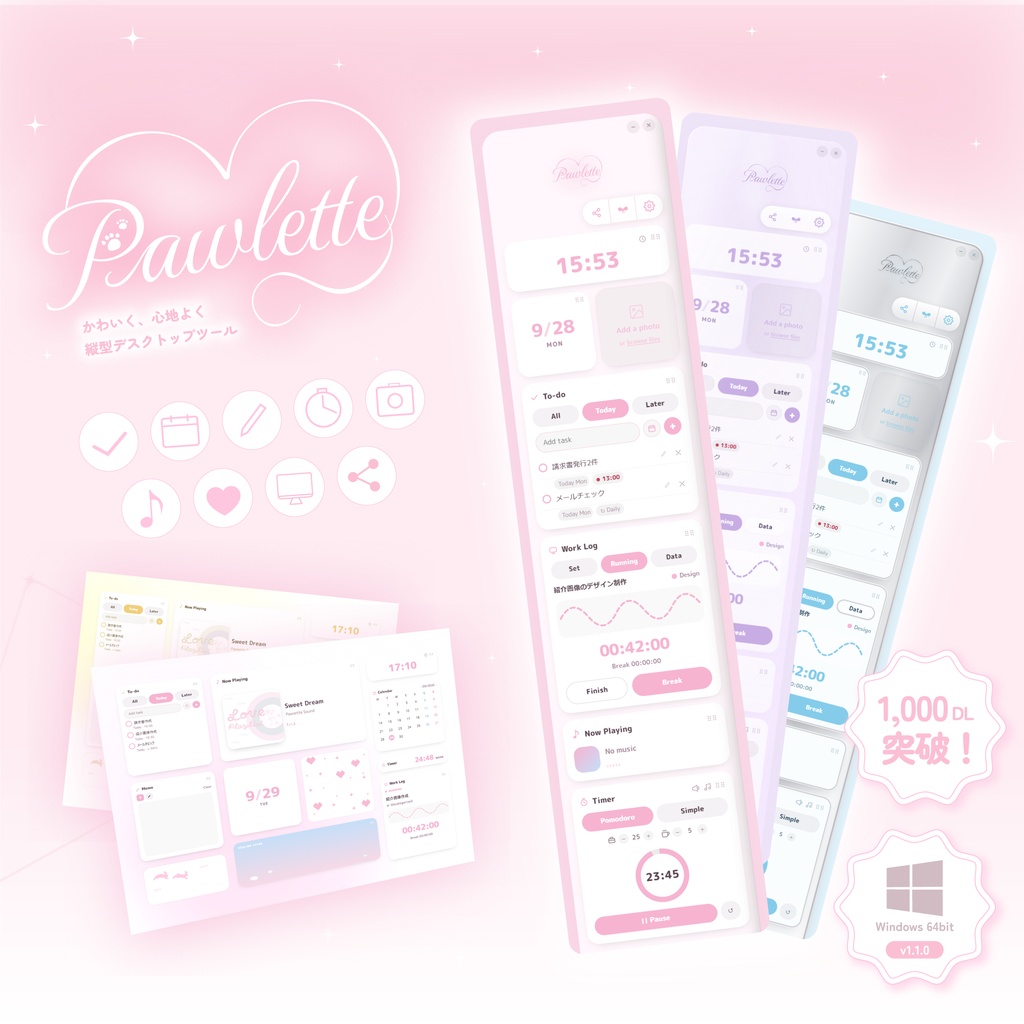
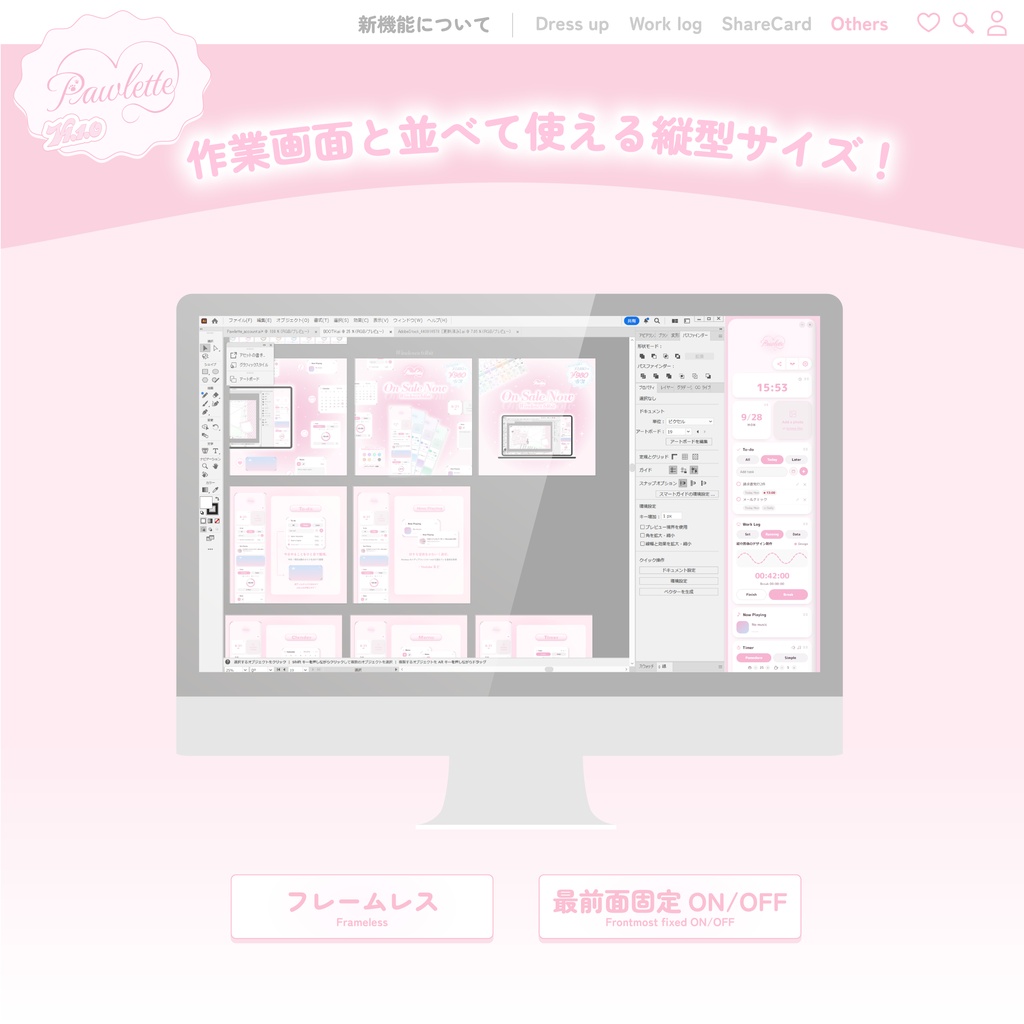


Pawlette(パウレット)🐾×🎨 Pawletteをv1.1.2へアップデートしました!(2026/10/24) SettingsでFramelessをONにした際、ウィンドウをつかんで移動できなくなる問題を修正しました。 v1.1.1では、長時間利用時の安定性やデータ保存まわりを整え、Todo・Work Log・ウィンドウ配置などを使いやすく改善しました。(2026/10/23) 自動アップデート、またはBOOTHから手動で更新できます。 ──────────────────── 作業画面と縦に並べて使える、常駐型デスクトップウィジェットアプリです💻 お気に入りのウィジェットやカラーを組み合わせて、あなたらしい画面を作れます◝✩ ⭐️⸝推しポイント ・「かわいい」が大好きなデザイナーが制作した、世界一かわいいウィジェットアプリ! ・作業画面の左右どちらにも置ける、邪魔にならない縦長サイズ ・3種類のDress-upスタイルと、豊富なカラーバリエーション ・1回の購入でずっと使える! ・アップデートは基本無料、かつ自動アプデに対応しているため再インストールの必要なし! ※アプリ内の表示やボタン名は英語表記です。操作はシンプルなので、迷わずご利用いただけます。
ꔫ Pawletteでできることꔫ
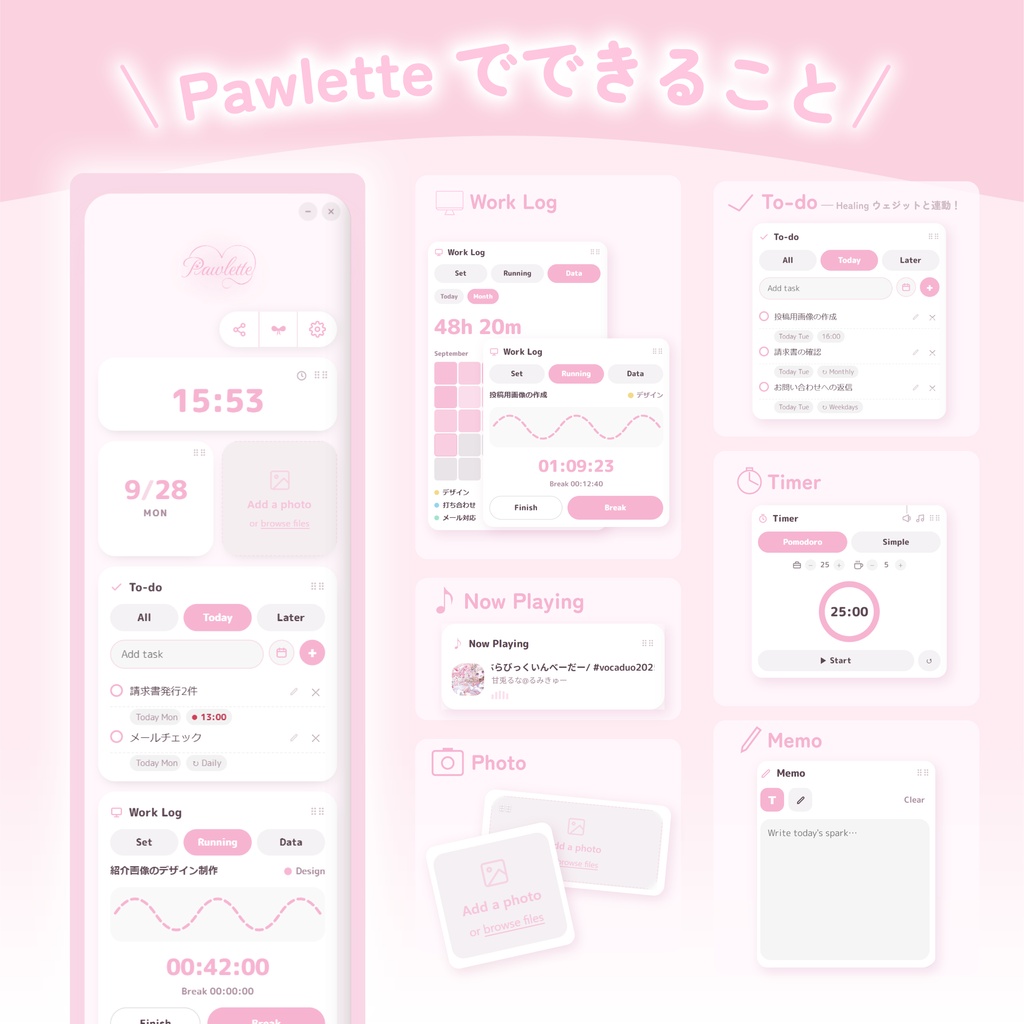
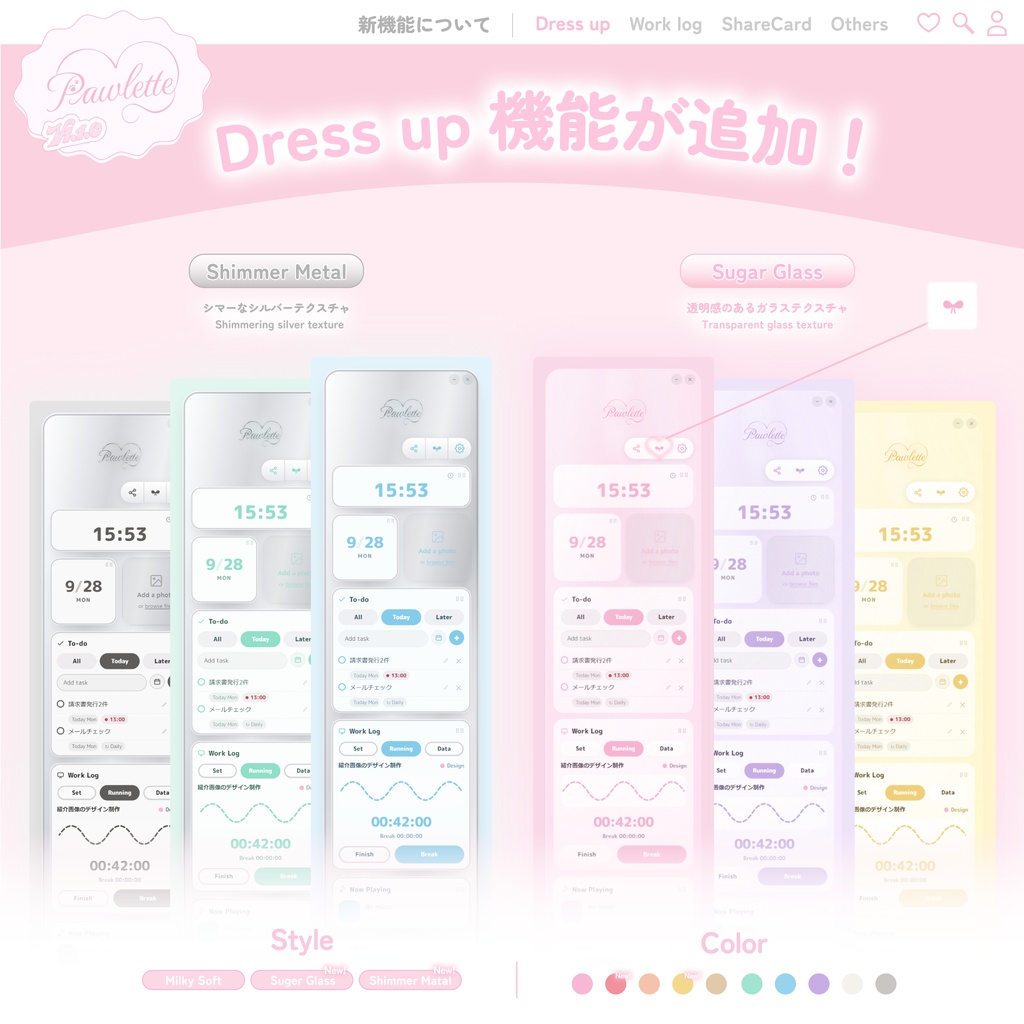
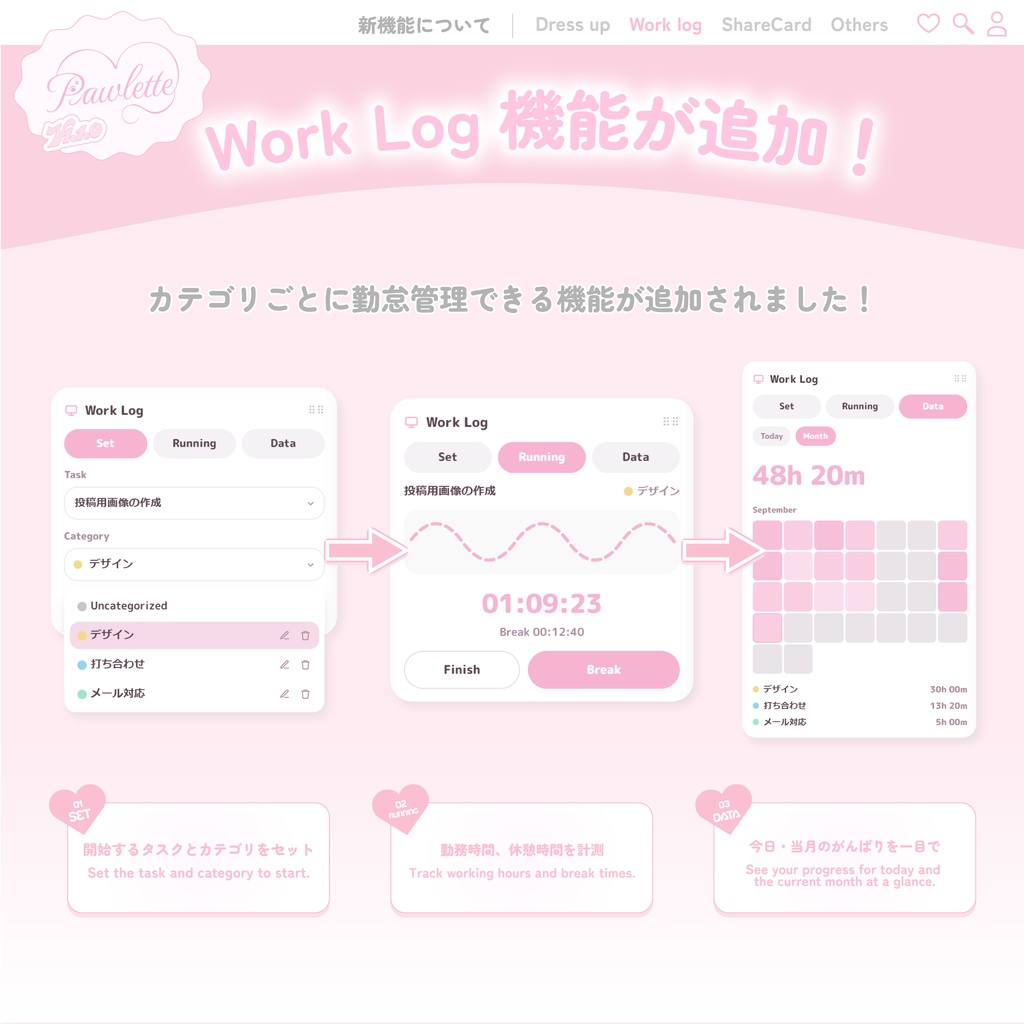
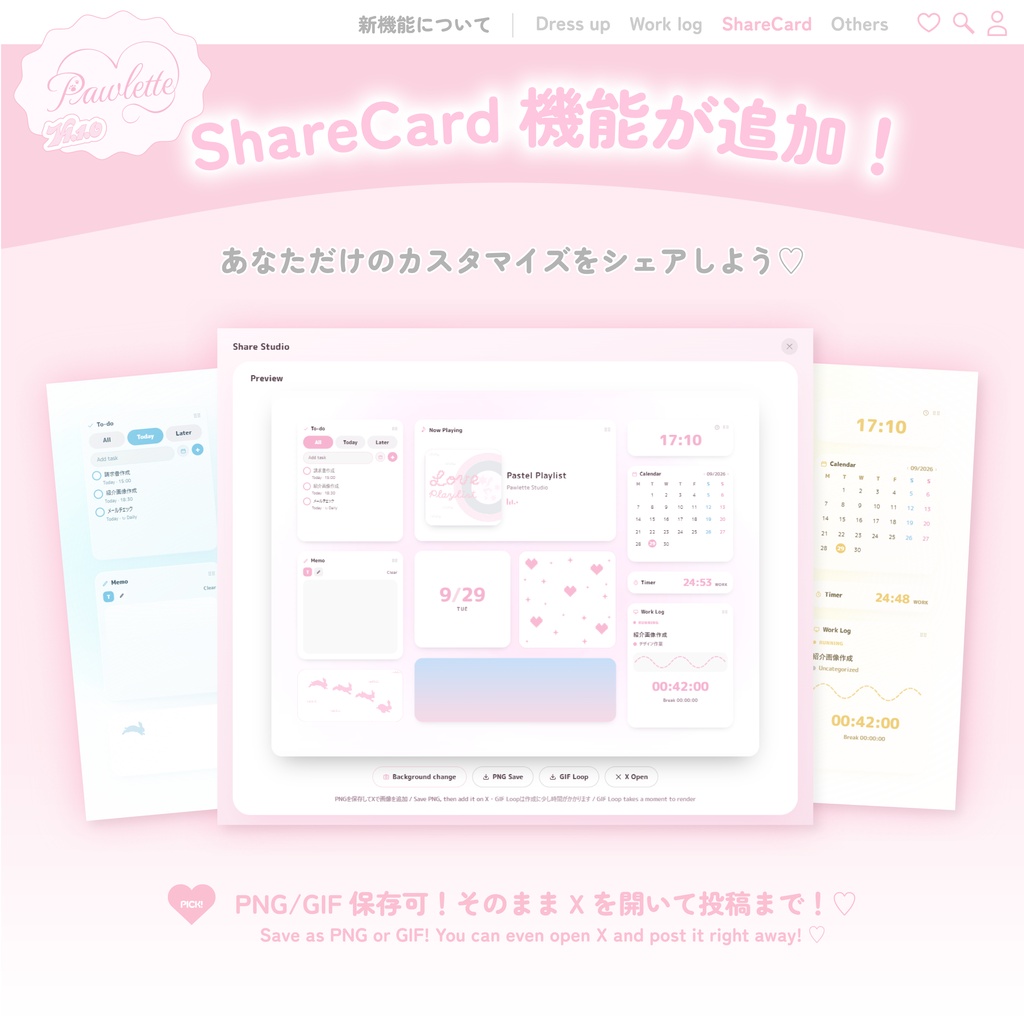
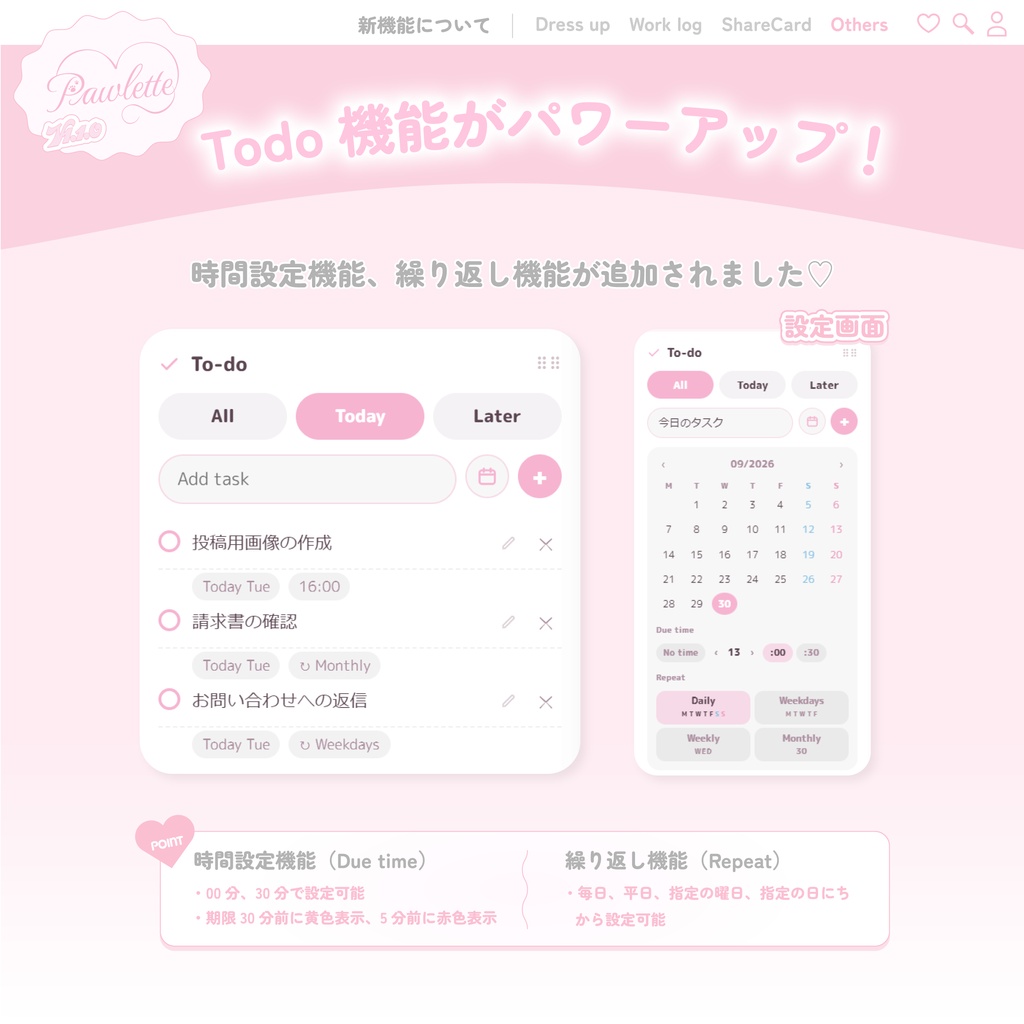
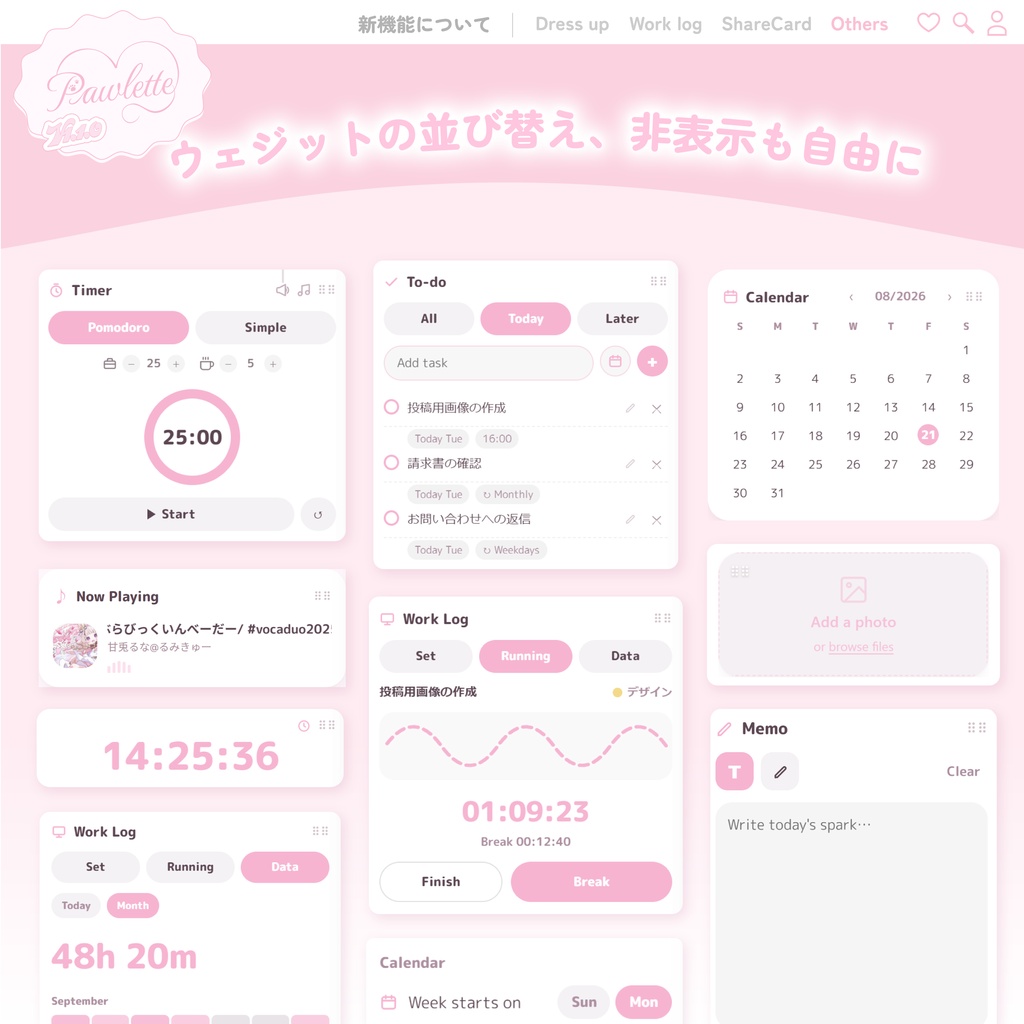
🖼️ Photo 大切な画像を、正方形でもワイドでも好きな形で飾れます。 画像・GIFに対応!(GIFは8MB以下) 画像の入れ替え・表示位置の調整・削除も可能。 📅 Calendar 月表示で予定を見渡せる、シンプルなカレンダー。 週の開始曜日を日曜日/月曜日から選択可能。 ⏱️ Timer / Pomodoro 集中したいときはPomodoro、気軽に計測したいときはSimple Timer。 作業時間・休憩時間を自分のペースに合わせて調整できます。 タイマー音は3種類から選択可能! ① Pomodoroモード 作業時間(Work):5分刻み/最大90分 休憩時間(Break):1分刻み/最大30分 ② Simpleモード 0から数え上げるストップウォッチ 最大6時間 🎵 Now Playing Windowsで再生中の音楽や動画の情報を表示。 曲名・アーティスト名・アートワークに対応。YouTubeなどでも連携確認済み。 ✅ Todo タスクの追加・編集・削除・並び替えに対応。 日付・時刻・繰り返しも設定できます。 ✏️ Memo ペンと消しゴムで書ける、お絵描きメモ。 拡大表示でじっくり書き込みも可能。 📊 Work Log タスクとカテゴリを選んで、作業時間と休憩時間を記録。 実行中/今日の記録/月の記録にてがんばりを確認できます✨ 月間ヒートマップから日別詳細を開き、各セッションの始業/就業時刻を修正できます。 日跨ぎの記録も可能です◎ ☁️ Healing Scene(FuwaFuwa) ながめているだけで癒される演出ウィジェット。 完了したタスクと連動して、ふわふわが増えます♡ 🎀 Dress-up 次の3スタイルから、Pawlette全体の質感を変更できます。 ・Milky Soft ・Sugar Glass ・Shimmer Metal Pink / Red / Peach / Yellow / Beige / Mint / Sky / Purple / White / Grayの10色に対応。 Milky Softでは、2色を組み合わせたCustomカラーも作成できます🎀 📸 Share Studio 現在のPawletteを4:3のShareCardとしてレイアウト。 ・PNG保存(1200×900) ・約5秒のループGIF保存(960×720) ・背景画像/背景GIFの設定 ・GIF書き出しの進捗表示とキャンセル ・Xの投稿画面を既定ブラウザで開く Xを開いた際、画像は自動添付されません。保存したPNGまたはGIFをX側で追加してください。GIF Loopの作成には少し時間がかかります。
⋈ 動作環境
・Windows 10 / 11(64bit) ・インストール、アップデート確認、Now Playingの一部機能にインターネット接続が必要
⋈ 同梱内容
・インストーラー(exe) ・README(使い方・インストール方法) ・利用規約 ・インストール時の警告画面についての案内 ※本ソフトは現時点で電子署名を行っていません。 ダウンロードやインストール時に、ブラウザやWindowsから「信頼できることを確認してください」「WindowsによってPCが保護されました」と表示される場合があります。 これは未署名アプリに表示される標準的な警告です。詳しい手順はREADMEと、同梱の「こんな表示が出たら」フォルダをご確認ください。
⋈ アップデートについて
不具合修正・機能改善・カラー追加などは、一部を除き基本的に無料で継続提供予定です。 旧版をご利用中の場合は、Pawletteをインターネット接続中に起動すると自動アップデートを確認します。BOOTHから最新版をダウンロードし、上書きインストールすることも可能です。 アップデート前にPawletteを正常終了してください。既存のTodo・Memo・Work Log・写真・各種設定は、通常そのまま引き継がれます。 新しく追加されたウィジェットは、アップデート直後には表示されない場合があります。右上のSettingsを開き、Widgetsから使用したいウィジェットをONにしてください。
⋈ 更新履歴
v1.1.2(2026/10/24) - FramelessをONにすると、ウィンドウをつかんで移動できなくなる問題を修正 v1.1.1(2026/10/23) - Now Playingの長時間利用時の安定性を改善 - Photoの保存を安全化し、不要なデータの蓄積を抑制 - 前回終了時の左右の配置を、次回起動時に復元 - Dailyタスクの日付更新・優先表示と、Today内での並び替えに対応 - Work LogのTaskプルダウンを見やすく改善 - バージョン表示の追加、内部システムの更新、セキュリティを改善 v1.1.0(2026/09/30) - Share Studioを追加(PNG・GIF Loop保存、背景GIF、X共有導線) - Work Logに日別詳細・時刻修正・Next dayを追加 - Todo編集、Dress-up、二重起動防止などを改善 v1.0.4(2026/09/01) - 一部環境で表示されるエラーメッセージを修正 v1.0.3(2026/09/01) - Todoの期限表示に曜日を追加 v1.0.2(2026/08/26) - Settings・Timer・Todo・Photo・Always on Topを改善 - PhotoのGIF表示とFrameless切り替えに対応 v1.0.1(2026/08/24) - CustomカラーとTodoの並び替えを追加 - 起動時表示・タイトルバー・最前面表示などを改善
⋈ Q&A(よくあるご質問)
Q. Now Playingの文字やHealing Sceneの雲が、ものすごい速さで動きます A. お使いのPCの「Windowsのアニメーション効果」がOFFになっている可能性があります。 以下から確認・ONにして、Pawletteを再起動してみてください。 ・Windows 11:設定 → アクセシビリティ → 視覚効果 →「アニメーション効果」 ・Windows 10:設定 → 簡単操作 → ディスプレイ →「Windowsにアニメーションを表示する」
⋈ サポート
不具合やご質問、アプデ希望などはこちらのdisccordチャンネルで受け付けをしております✉ 1人体制のため、返信が遅れることがございます。 また、いただいたメッセージすべてに目を通しておりますがすべてに対応できるわけではございませんので、ご了承ください。 Pawlette|disccordチャンネル 🔗https://discord.gg/rcQ7mpP65D
⋈ ご利用にあたって
個人利用はもちろん、配信・実況などでの商用利用もOKです(現在の形式のまま使用する範囲に限ります)。 再配布・転売・素材の抜き出し利用、逆コンパイル・改変は禁止です。 Now Playing機能はWindowsから再生中のメディア情報を取得しますが、外部へ送信することはありません。 ご利用の環境によっては動作に影響が出る場合があります、あらかじめご了承ください。 デジタルコンテンツの性質上、購入後の返金は原則承っておりません(返金の取り扱いはBOOTHの規約に準じます)。 詳細は同梱の利用規約をご確認ください。
⋈ English
Pawlette 🐾×🎨 Pawlette has been updated to v1.1.2! (October 24, 2026) This update fixes an issue where the window could not be dragged after enabling Frameless mode in Settings. v1.1.1 improved long-session stability, data storage, Todo, Work Log, and window placement. (October 23, 2026) Update automatically or download the latest installer from BOOTH. ──────────────────── Pawlette is a slim desktop widget app designed to sit beside your workspace 💻 Combine your favorite widgets, colors, and styles to create a setup that feels uniquely yours ◝✩ ⭐️ Highlights ・A cute widget app created by a designer who loves all things adorable ・A slim vertical layout that fits on either side of your workspace ・Three Dress-up styles with a wide range of colors ・One-time purchase with continued access ・Most updates are free, with automatic updates supported The interface and button labels are in English, with simple and easy-to-use controls. ꔫ What Pawlette Can Do ꔫ 🖼️ Photo Display images or GIFs in square and wide widgets. GIFs must be 8 MB or smaller. Images can be replaced, repositioned, or removed. 📅 Calendar A simple monthly calendar with Sunday-start and Monday-start options. ⏱️ Timer / Pomodoro Pomodoro mode supports Work sessions up to 90 minutes and Breaks up to 30 minutes. Simple mode is a stopwatch that counts upward for up to 6 hours. Three timer sounds are included. 🎵 Now Playing Displays the title, artist, and artwork of music or videos currently playing in Windows. Compatible playback with YouTube has also been confirmed. ✅ Todo Add, edit, delete, and reorder tasks. Dates, due times, and repeating schedules are supported. ✏️ Memo A drawing memo with pen, eraser, and expanded editing view. 📊 Work Log Choose a task and category to record working and break time. View current, daily, and monthly records. Daily details and individual session times can be edited from the monthly heatmap. Sessions that continue past midnight are also supported. ☁️ Healing Scene — FuwaFuwa A relaxing animated widget. More FuwaFuwa appear as you complete tasks ♡ 🎀 Dress-up Choose from Milky Soft, Sugar Glass, and Shimmer Metal. Available colors: Pink / Red / Peach / Yellow / Beige / Mint / Sky / Purple / White / Gray Milky Soft also supports Custom Color, allowing you to combine two colors. 📸 Share Studio Arrange your current widgets into a 4:3 ShareCard. ・PNG export: 1200 × 900 ・Approximately 5-second GIF Loop: 960 × 720 ・Background images and GIFs ・GIF export progress and cancellation ・Shortcut to open the X posting screen Images are not attached to X automatically. Please add the saved PNG or GIF manually. GIF Loop creation may take a little time. ⋈ System Requirements ・Windows 10 / 11, 64-bit ・Internet connection required for installation, update checks, and some Now Playing functions ⋈ Included Files ・Installer (.exe) ・README with setup and usage instructions ・Terms of Use ・Guide for Windows security warning screens Pawlette is currently not digitally signed. Your browser or Windows may display messages such as “Make sure you trust this file” or “Windows protected your PC.” These are standard warnings for unsigned applications. Please refer to the included guides for installation instructions. ⋈ Updates Bug fixes, improvements, and additional colors are generally planned as free updates, with some possible exceptions. If your installed version supports automatic updates, launch Pawlette while connected to the internet to check for updates. You may also download the latest installer from BOOTH. Please close Pawlette normally before updating. Todo, Memo, Work Log, Photo, and Settings data will usually be carried over. New widgets may be hidden after an update. Open Settings, select Widgets, and enable the widgets you wish to use. ⋈ Update History v1.1.2 (October 24, 2026) ・Fixed an issue where the window could not be dragged after enabling Frameless mode v1.1.1 (October 23, 2026) ・Improved Now Playing stability during long sessions ・Made Photo storage safer and prevented unnecessary data buildup ・Restored the previous left or right window placement on launch ・Improved Daily task rollover, priority display, and reordering in Today ・Improved the Work Log Task dropdown ・Added version information and strengthened internal security v1.1.0 (September 30, 2026) ・Added Share Studio with PNG and GIF Loop export, GIF backgrounds, and an X shortcut ・Added daily details, time editing, and Next day support to Work Log ・Improved Todo editing, Dress-up, and duplicate-launch prevention v1.0.4 (September 1, 2026) ・Fixed an error message shown in some environments v1.0.3 (September 1, 2026) ・Added weekdays to Todo due-date labels v1.0.2 (August 26, 2026) ・Improved Settings, Timer, Todo, Photo, and Always on Top ・Added GIF support for Photo and Frameless switching v1.0.1 (August 24, 2026) ・Added Custom Color and Todo reordering ・Improved startup placement, title-bar settings, and Always on Top ⋈ Q&A Q. The Now Playing text or Healing Scene clouds move extremely fast. A. Windows animation effects may be turned off. Enable them, then restart Pawlette. Windows 11: Settings → Accessibility → Visual effects → Animation effects Windows 10: Settings → Ease of Access → Display → Show animations in Windows ⋈ Support For bug reports, questions, and update requests, please join the Pawlette Discord server ✉ Pawlette is managed by one person, so replies may take some time. All messages are read, but not every request can be accommodated. Pawlette Discord Server https://discord.gg/rcQ7mpP65D ⋈ Terms of Use Personal use is permitted. Commercial use in streams and recorded videos is also permitted when Pawlette is used in its original form. Redistribution, resale, extracting included assets, reverse engineering, and modification are prohibited. Now Playing reads currently playing media information from Windows. This information is not sent to an external server. Performance may vary depending on your device and environment. Due to the nature of digital products, refunds are generally unavailable after purchase and are handled according to BOOTH’s policies. Please read the included Terms of Use for full details.