

Mesh Eater(メッシュイーター)|メッシュ削除・分離ツール【Unity/VRChat】
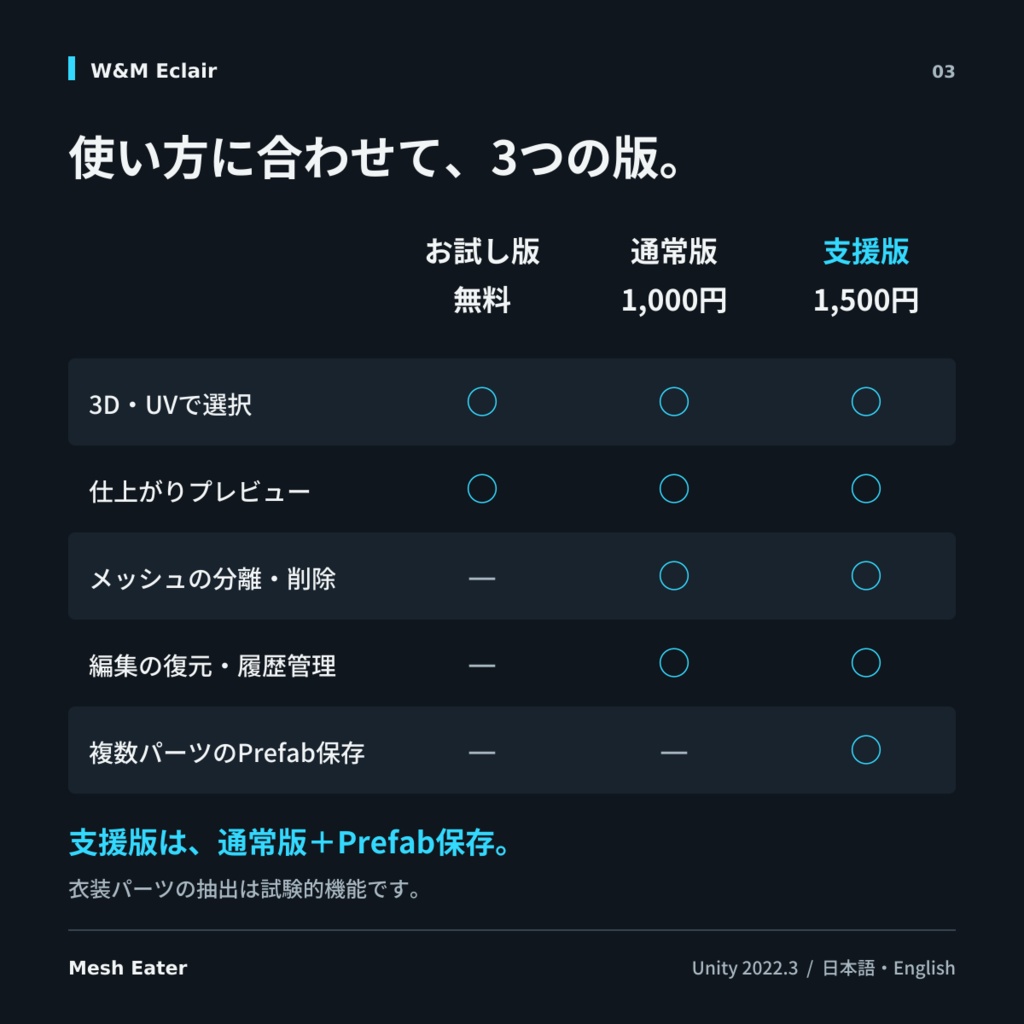
- お試し版[Trial-Free]Digital0 JPY
- 通常版[Standard]Digital1,000 JPY
- 支援版[Supporter]Digital1,500 JPY
- 製作者へ餌付け版[Feed the Creator]Digital2,000 JPY
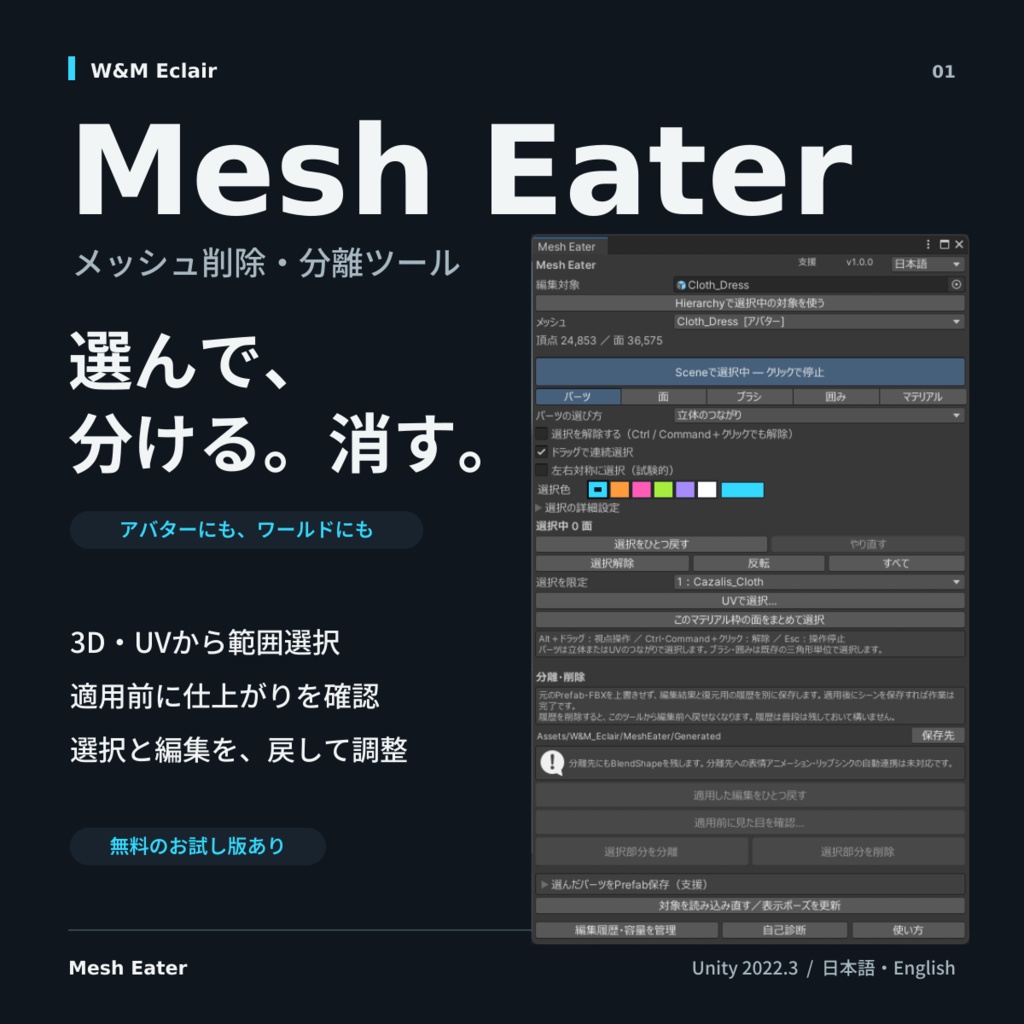
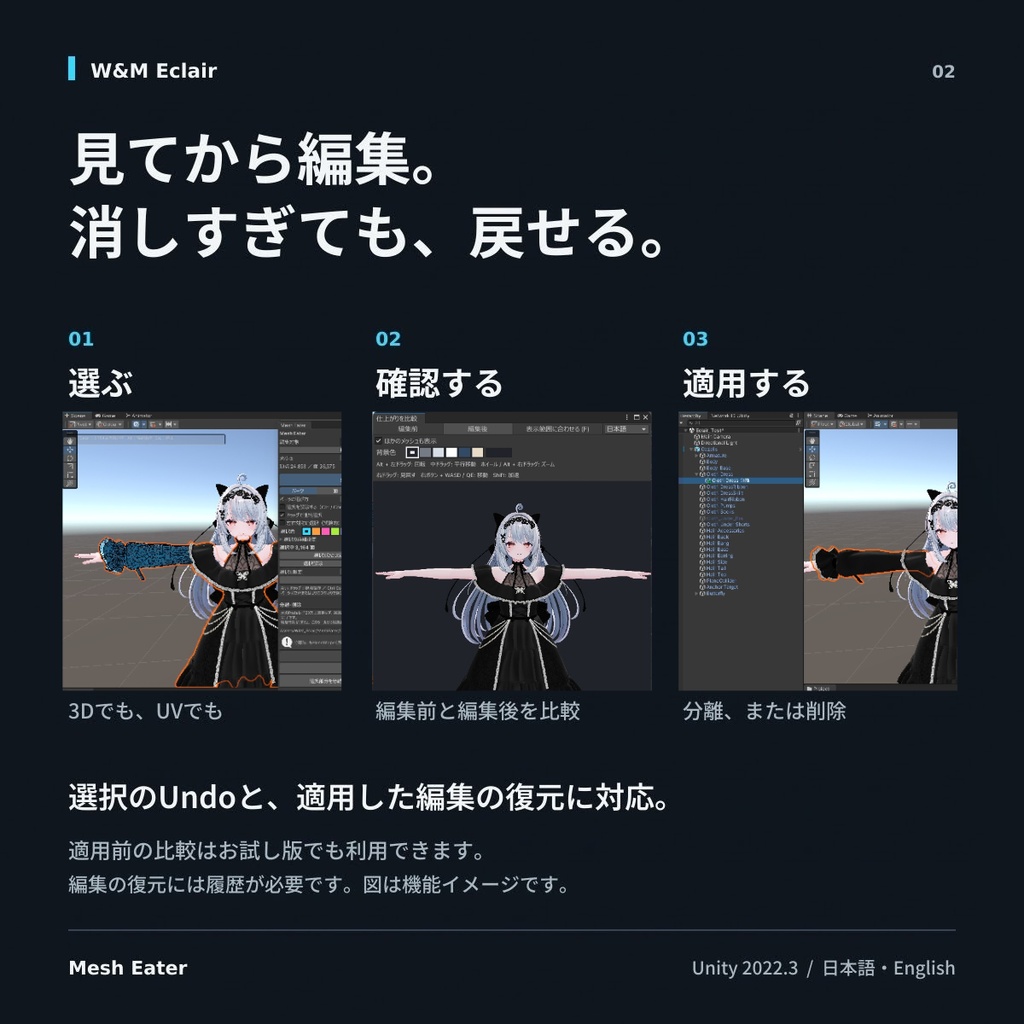


【Mesh Eater(メッシュイーター)】 Mesh Eaterは、Unity上でメッシュの一部を選び、分離・削除できるUnity Editor拡張です。 アバターの衣装やアクセサリーはもちろん、ワールドの小物などにも使えます。 Mesh Eater is a Unity Editor tool for selecting, splitting, and deleting parts of meshes. It supports avatar clothing, accessories, and world objects. Scene上で大まかに選び、UV展開図で細かく調整することもできます。 元のPrefabやFBXを上書きせず、編集したメッシュと復元用の履歴を別に保存します。 Select roughly in Scene and refine your selection in UV. Original Prefabs and FBX files are kept unchanged; edited meshes and restoration history are saved separately. 【主な機能】 Main Features ・Scene上でのパーツ/面/ブラシ/囲み/マテリアル枠の選択 ・UV展開図からの選択と、押したままなぞる連続選択 ・選択のUndo/Redoと、選択範囲の自動一時保存 ・編集前/編集後を見比べるプレビュー ・周囲のメッシュを含めた表示と、視点の回転・移動・ズーム ・日本語/English対応 ・Scene selection by part, face, brush, box, or material slot ・UV selection and continuous painting while dragging ・Selection Undo/Redo and temporary selection autosaving ・Before/after previews with surrounding meshes ・Orbit, pan, and zoom controls ・Japanese / English support 「マテリアル」の選択は、操作する面を枠ごとに絞る機能です。色や質感を変更する操作ではありません。 The material filter limits selectable faces by material slot; it does not change material properties. 【購入前にご確認ください】 Before Purchasing 既存の三角形を分離・削除するツールです。三角形の途中での切断、断面の生成、穴埋め、自動フィット、ウェイト変換は含みません。 Operations use existing triangles. Cutting through triangles, generating cut surfaces, filling holes, automatic fitting, and weight conversion are not included. 左右対称選択は試験的機能です。左右の形や三角形の分け方が異なる場合など、反対側の一部が選ばれないことがあります。プレビューを確認し、必要な面は手動で補ってください。 UV画面では、同じ座標に重なる面をまとめて選択します。 Mirror selection is experimental and may miss faces when shape or triangulation differs between sides. Check the preview and add missing faces manually. Overlapping UV faces are selected together. 分離先への表情アニメーション、リップシンク、Animator、LODGroupの自動付け替えは行いません。 Cloth付きメッシュの編集、Prefab Mode、再生中、Animationプレビュー中、結合済みStatic Batchは対象外です。特殊な頂点変形シェーダーでは、表示と選択位置がずれる場合があります。 Expressions, lip sync, Animator bindings, and LOD membership are not reassigned automatically. Cloth mesh editing, Prefab Mode, Play Mode, Animation preview, and combined static batches are unsupported. Vertex-deforming shaders may cause selection positions to differ from the visible surface. 履歴は普段は残しておいて構いません。履歴を削除すると、現在の見た目は保持しますが、その記録より前へツールやCtrl+Zで戻せなくなります。 編集前へ戻すには、バックアップ、元Prefabの置き直し、元Meshの再設定などが必要です。履歴整理でシーンを保存する際は、ほかの未保存の変更も含めて保存します。 Deleting history preserves the current appearance but removes restoration to earlier states through the tool or Ctrl+Z. Use a backup, the original Prefab, or the original mesh to return to an earlier state. History cleanup also saves other unsaved changes in affected scenes. 編集や衣装の移植は、元のモデル・衣装などの利用規約に従って行ってください。 Follow source asset licenses when editing or transferring clothing. 【商品画像について】 Product Images アバター本体・衣装・ワールド・マテリアル等は付属しません。 Avatars, clothing, worlds, and materials are not included. --- 【内容物】 Contents ・Mesh Eater本体unitypackage(購入パッケージに準ずる) ・README/更新履歴(日本語・英語) ・権利表示 Your selected package's unitypackage, Japanese/English guides and changelogs, and copyright notices.
【各パッケージの違い】 Package Differences
■ お試し版 モデルの読み込み、Scene・UVでの範囲選択、選択のUndo/Redo、仕上がりのプレビューを利用できます。 分離・削除の適用、Mesh保存、適用後の復元、履歴管理、Prefab保存は利用できません。 Trial — Free Model loading, Scene/UV selection, selection Undo/Redo, and previews. Applying edits, saving meshes or Prefabs, restoring applied edits, and history management are unavailable. ■ 通常版 お試し版の機能に加え、メッシュの分離・削除、Mesh保存、適用した編集の復元、履歴管理を利用できます。 ツールからのPrefab保存は含まれません。 Standard Trial features plus mesh splitting/deletion, mesh saving, edit restoration, and history management. Tool-based Prefab saving is not included. ■ 支援版 通常版の全機能に加え、選んだ複数パーツのPrefab保存と、オブジェクト全体のPrefab保存を利用できます。 Supporter All Standard features, plus saving multiple selected parts or a whole object as a Prefab. ■ 製作者へ餌付け版 内容物は支援版と同じですがワニ山のモチベが上がります。うめぇ肉を食う!! Feed the Creator Same contents as Supporter, but with a motivation boost for Waniyama. Time for some delicious meat!! 【支援版のPrefab保存について】 Prefab Saving in Supporter シャツ、袖、飾りなどを複数選び、メッシュと参照ボーン、必要な親階層をひとつのPrefabにまとめられます。 関連するPhysBoneと参照先のPBコライダーも含められます。未選択の衣装や体と共有するPBは、初期状態では外してあり、必要なら個別に選べます。 Save multiple parts with their referenced bones and necessary parents in one Prefab. Related PhysBones and PB colliders can be included. PBs shared with unselected clothing or the body are excluded by default and can be selected individually. 衣装パーツの抽出は試験的機能です。スケール調整やもちふぃったーなど別途行ってください。 アバター衣装などを別のアバターに着せる際は該当アバターの利用規約を必ずご確認ください。 「パーツを選ぶ」ではConstraint・Animator・Modular Avatarなどの設定は含みません。検出した関連設定は保存前に案内します。 コンポーネント設定も残したい場合は「オブジェクト全体」を使えます。保存範囲外へのScene参照がある場合は、保存を止めて案内します。 Clothing extraction is experimental. Adjust scale and fit clothing separately, using tools such as MochiFitter as needed. Check the applicable avatar licenses before transferring clothing. “Choose parts” excludes Constraint, Animator, and Modular Avatar settings; detected related settings are reported before saving. Use “Whole object” to preserve component settings. References to Scene objects outside the saved hierarchy stop saving.
【購入後のキャンセル・返金】 Cancellations and Refunds
デジタル商品の性質上、購入後のキャンセル・返金には対応しません。購入前に、お試しでの動作、各プランの機能差、対応環境、制限事項をご確認ください。 Due to the nature of digital products, cancellations and refunds are not available after purchase. Before purchasing, please test the free Trial package and review each plan’s features, supported environment, and limitations. ただし、商品の契約不適合などにより法令上の解除・返金等の権利が認められる場合は、その定めに従います。本規約は、法令上認められる利用者の権利を妨げるものではありません。 However, if applicable law grants you the right to cancel the contract, receive a refund, or seek other remedies, including where the product does not conform to the contract, those legal provisions will apply. These terms do not limit your statutory rights.
【対応環境】 Supported Environment
・Unity 2022.3 LTS向け ・Unity 2022.3.22f1でユーザーによる基本動作確認済み ・MeshRenderer+MeshFilter/SkinnedMeshRenderer Unity 2022.3 LTS; basic operation user-tested with 2022.3.22f1. Supports MeshRenderer + MeshFilter and SkinnedMeshRenderer.
【アップデート/Update】
[v1.1.1] ・操作手順に番号を付け、画面配置を整理しました。 ・全プランで、編集対象・選択範囲・塗り操作のUndo/Redo履歴の復帰を改善しました。 ・MAトグルの設定を、分離パーツの子階層へ配置するようにしました。 ・上書きImport時のプラン切り替え、編集の復元、履歴適用の不具合を修正しました。 ・マテリアルやMAトグルの変更を誤判定する問題と、自己診断のエラーを修正しました。 ・Added numbered steps and improved the window layout. ・Improved recovery of editing targets, selections, and painting Undo/Redo history across all plans. ・MA toggle settings are now placed under the separated part. ・Fixed plan switching through overwrite imports, edit restoration, and history state switching. ・Fixed false change warnings for materials and generated MA toggles, along with diagnostic errors. --- [v1.1.0] ・分離したパーツをHierarchyで自動選択・表示するようにしました。 ・MA導入済みアバターでは、分離パーツのInspectorから表示トグルを作成できるようにしました。 ・パーツの改名・親階層の変更に対応し、復元時に変更が失われる場合の確認を追加しました。復元時は生成したMAトグルもまとめて取り除きます。 ・見た目を維持できる場合に、分離先の未使用マテリアルスロットを整理するようにしました。 ・シーンの初回保存案内を追加し、自己診断の負荷を軽減しました。 ・Separated parts are now automatically selected and revealed in the Hierarchy. ・Added Inspector-based visibility toggle creation for avatars with Modular Avatar installed. ・Added support for renamed and reparented parts, with confirmation before discarding changes during restoration. Generated MA toggles are removed together with the split. ・Unused material slots are removed from separated parts where appearance can be preserved. ・Added initial Scene-save guidance and reduced the workload of self-diagnostics. --- 【更新方法/How to update】 ツールとプレビューを閉じ、使用するunitypackageを全項目上書きImportしてください。フォルダの削除は不要です。作成済みのMesh・Prefab・編集履歴は引き続き利用できます。 Close the tool and preview windows, then import all items from your plan’s unitypackage with overwrite enabled. No folder deletion is required. Existing meshes, Prefabs, and edit history remain usable.
【サポート】 Support
BOOTHメッセージまたはXのDMからご連絡ください。 https://x.com/waniekuyuki_vrc Contact through BOOTH messages or X DMs. Unityのバージョン、Mesh Eaterの版名とバージョン、操作内容、Consoleのエラー全文を添えていただけると確認しやすくなります。 Include your Unity version, Mesh Eater package/version, reproduction steps, and full Console error. 制作 Created by:W&M Eclair/W&Mえくれあ屋