

Nova Neon — 3D Neon Sign Kit for VRChat (Quest Ready)
- Digital0 JPY
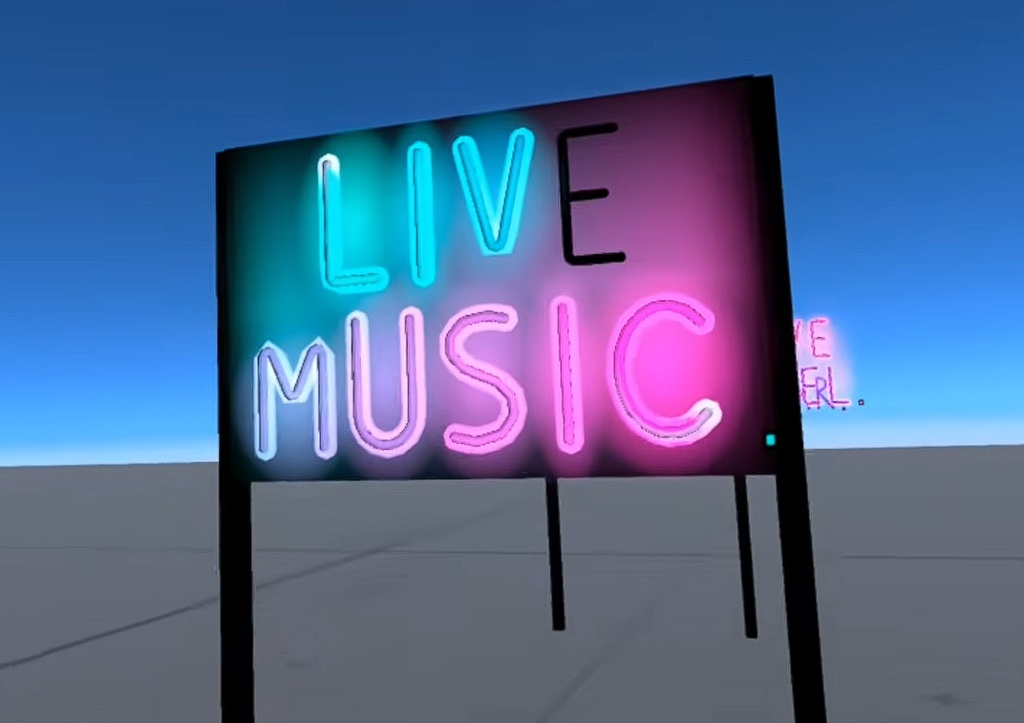

Real bent-glass neon, not a flat texture. NovaNeon generates genuine 3D tube letters — you can see the cylinder cross-section, and they read correctly from every angle. The layered glow carries the look even without world bloom, including on Quest. --- 平面テクスチャではなく、本物の曲げガラスのような立体チューブ文字。 断面が見える3Dチューブはどの角度から見ても正しく、ブルームが使えない 環境(Questを含む)でも成立する多層グローを搭載しています。
What's included (日本語での説明は以下をご覧ください。)
- Type any text: uppercase A-Z, 0-9, & ! ? . - + ' and space. Multi-line signs supported. - Any color — or a per-letter gradient blending between two colors. - Arc mode (arch or valley) plus adjustable letter height, tube radius and letter spacing. - 8 one-click themed presets: OPEN / BAR / CAFE / RAMEN / 24H / LOVE HOTEL / DIVE BAR / LIVE MUSIC. - Aging-tube flicker: random dropouts, per-letter stutters, and a left-to-right startup cascade. - Procedural transformer buzz (120 Hz hum, seamless loop) that ducks with the flicker. - Interactable power switch with a lit LED indicator. - Layered glow: per-letter halo + wall wash, each with an intensity slider. Reads at night with no bloom required. - Optional backboard (dark board + two posts) that always fits your text, with adjustable post length. - Subtle tube patina (glass grime) on by default. - Unlimited signs in one project: each Sign Name is an independent sign with its own prefab and assets.
PERFORMANCE & QUEST
- A 10-letter sign is roughly 10-13k triangles including all glow layers. Zero real-time lights. - Quest safe end to end: VRChat/Mobile shaders only, spatial audio, Kaiser texture filtering. - Everything — meshes, glow textures, audio — is generated by the included editor tools. No third-party assets.
HOW TO USE
1. Open "Nova Neon > Generate Neon Sign". 2. Pick a preset, or type your own text and options. 3. Press Generate Sign, then drag the prefab into your scene. Regenerating takes seconds, so tuning your sign is painless.
REQUIREMENTS & NOTES
- A VRChat Worlds project (Creator Companion) with UdonSharp. - The generator runs in the editor; the generated prefabs run in any world. - Uppercase only — real neon signage is almost always uppercase. - Text and settings are baked at generation; re-run the generator to change them. - The power switch and flicker are per-player (local, not synced). - Generated signs may be used freely in your worlds, including commercial ones. Redistribution or resale of the kit itself is not permitted (see LICENSE).
NovaNeon — VRChat用 3Dネオンサインキット(Quest対応)
■特徴 - 好きなテキストを入力:英大文字A-Z・数字0-9・& ! ? . - + '・ スペースに対応。複数行のサインも作れます。 - 好きな色、または2色のグラデーション(1文字ずつ色が変わります)。 - アーチ/バレーの円弧配置、文字の高さ・チューブ半径・字間を調整可能。 - ワンクリックのテーマプリセット8種:OPEN / BAR / CAFE / RAMEN / 24H / LOVE HOTEL / DIVE BAR / LIVE MUSIC。 - 老朽化チューブのフリッカー:ランダムな減光、文字ごとの瞬き、 左から右への順次点灯。 - 手続き生成のトランスバズ(120Hzハム、シームレスループ)が フリッカーに連動します。 - LED付きの電源スイッチ(インタラクション可能)。 - 多層グロー:文字ごとのハロー+壁への光の広がり、それぞれに 強度スライダー。ブルームなしでも夜なら光って見えます。 - テキストに合わせて自動調整されるバックボード(板+2本の支柱) オプション。支柱の長さも調整可能。 - チューブのパティーナ(ガラスのくすみ)はデフォルトON。 - 1つのプロジェクトに看板は無制限。Sign Nameごとに独立した サインとアセットを持ちます。 ■パフォーマンス・Quest対応 - 10文字のサインで約1万〜1.3万ポリゴン(グロー全レイヤー込み)。 リアルタイムライト0。 - Questで安心:VRChat/Mobileシェーダーのみ、空間音響対応、 Kaiserテクスチャフィルタリング。 - メッシュ・グロー・オーディオはすべて付属ツールが生成。 サードパーティアセットは不使用です。 ■使い方 1. 「Nova Neon > Generate Neon Sign」を開く。 2. プリセットを選ぶか、テキストと設定を入力。 3. Generate Signを押して、プレハブをシーンに置くだけ。 再生成は数秒なので、微調整も気軽にできます。 ■動作要件 - VRChatワールドプロジェクト(Creator Companion + UdonSharp環境)。 - 生成ツールはエディタ内で動作し、生成されたプレハブは どのワールドでも使えます。 ■注意 - 英大文字のみ対応です(実際のネオン看板はほぼ大文字のため)。 - テキスト・設定は生成時にベイクされます。変更時は再生成してください。 - 電源スイッチとフリッカーはプレイヤーごとのローカル動作です (同期なし)。 - 生成したサインはワールド(商用ワールドを含む)で自由に ご利用いただけます。本キット自体の再配布・再販は禁止です (LICENSE参照)。