

衣装変換の歪み直し DecoFit|伸びた・ゆがんだボタン・ブローチ・金具を元の形に戻す【VRChat・NDMF・非破壊】
- 製品版Digital1,200 JPY
- 無料お試し版Digital0 JPY
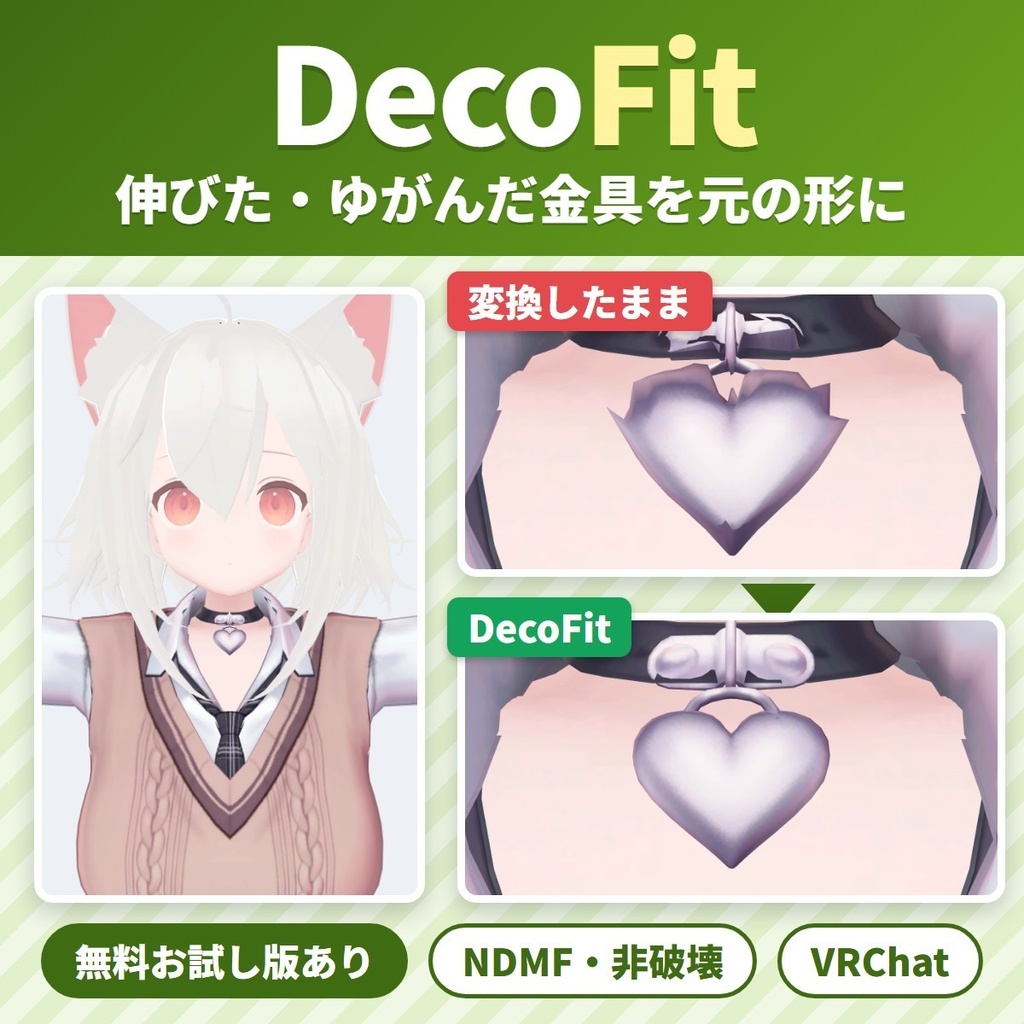
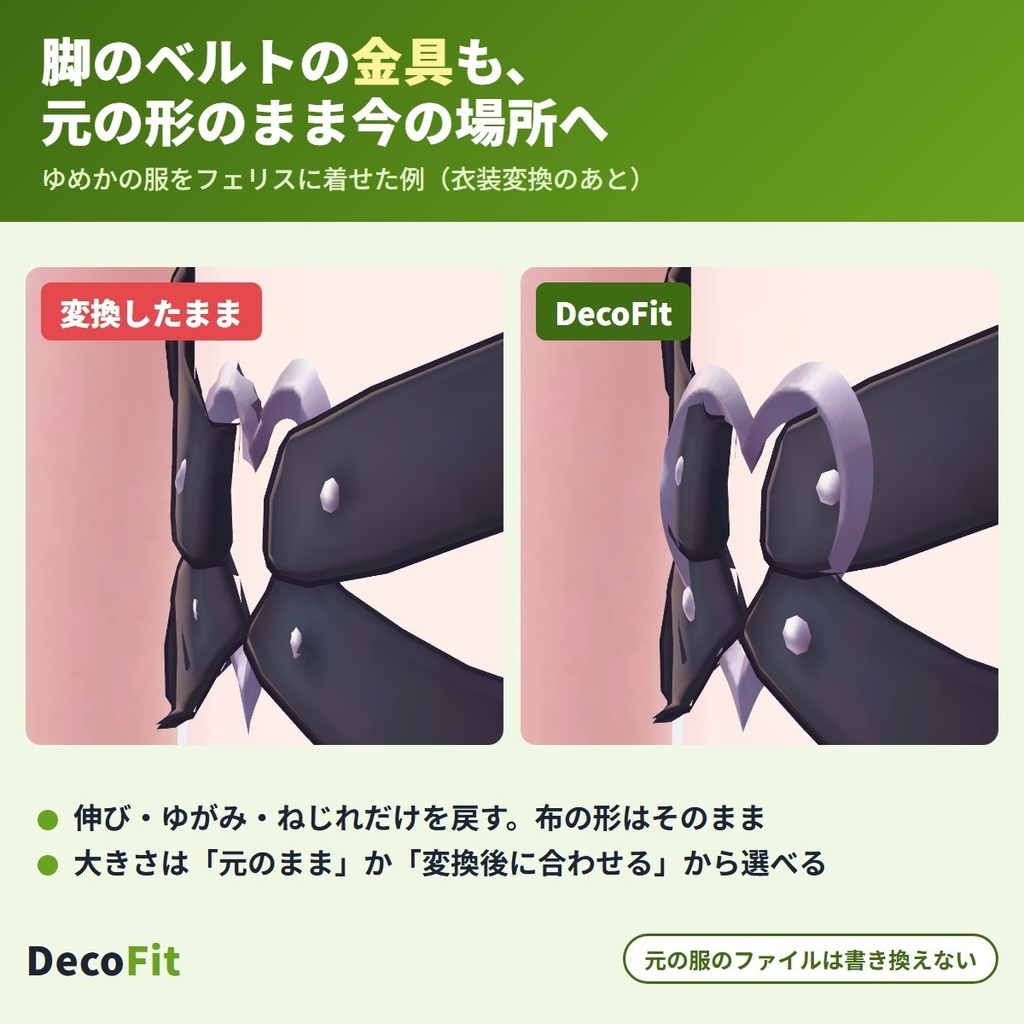
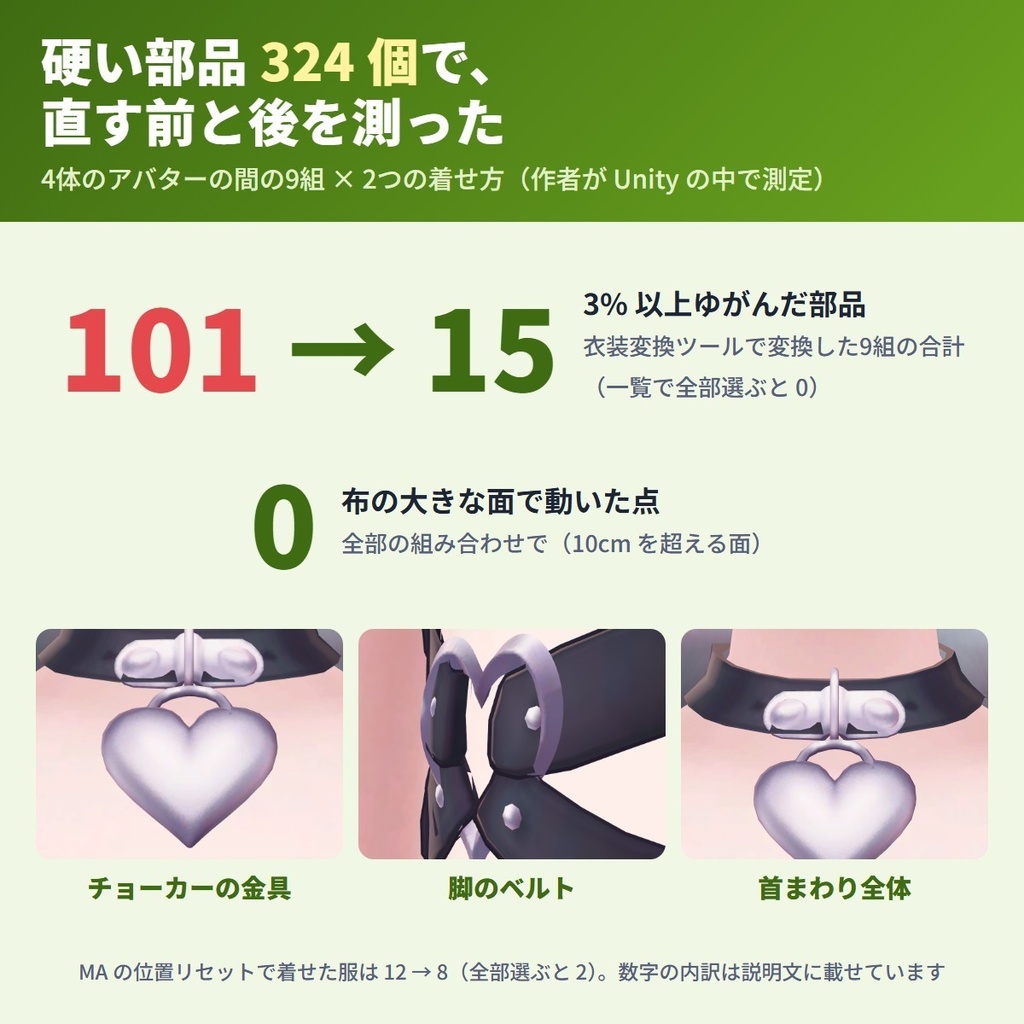
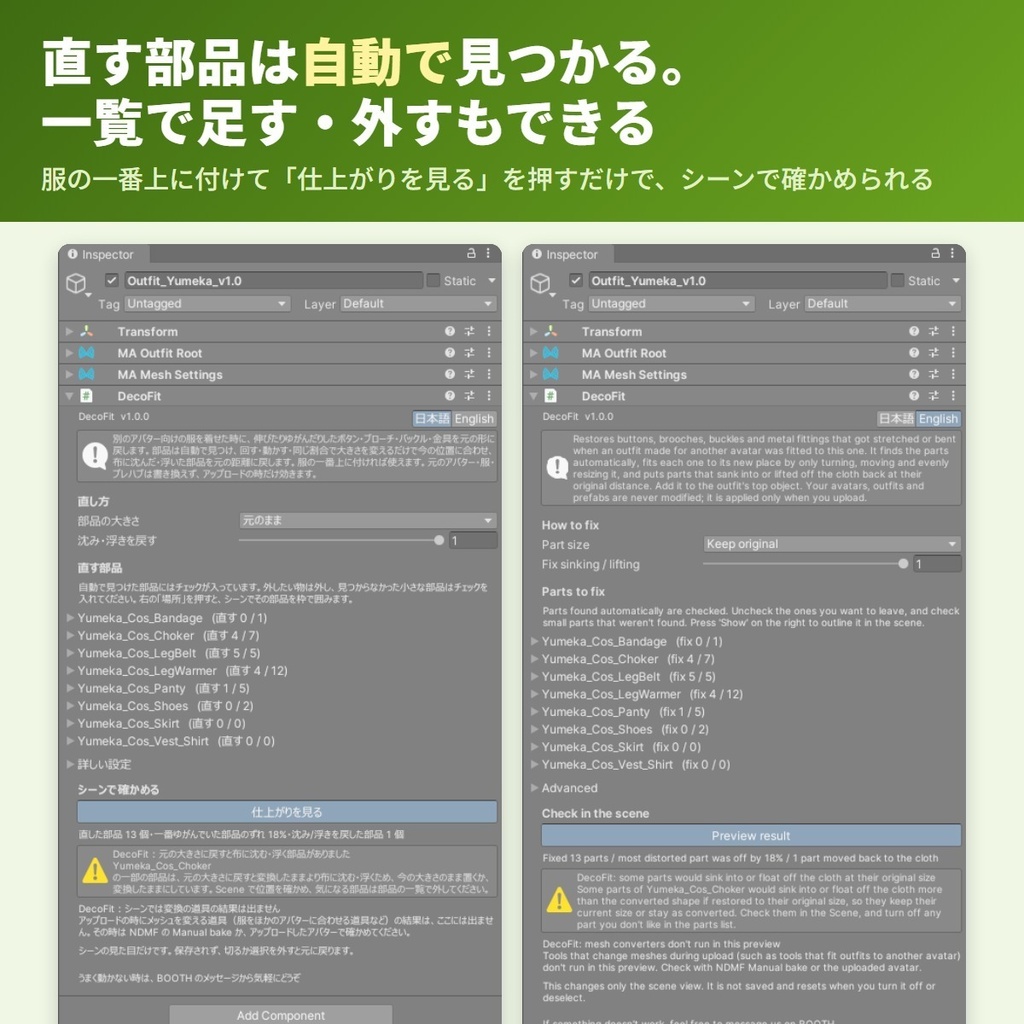
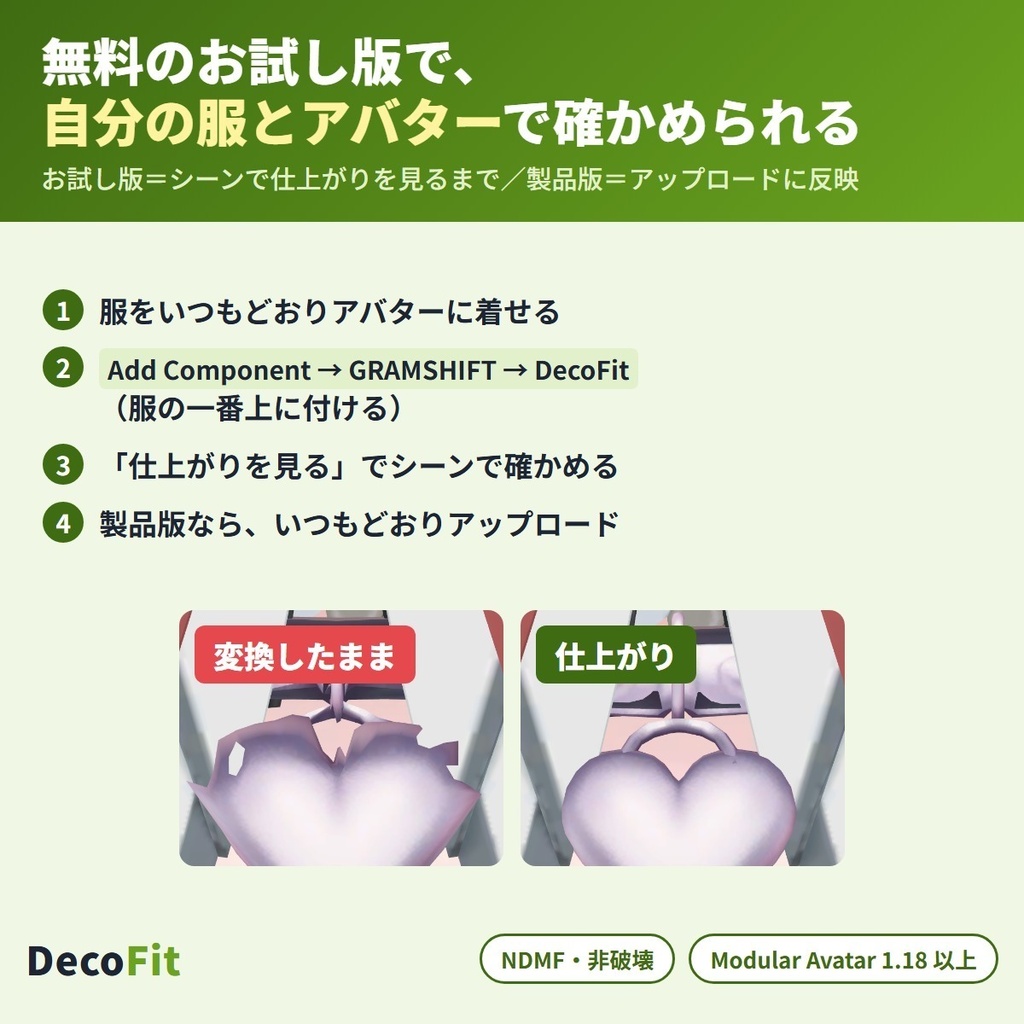


衣装変換(別のアバター向けの服を着せる・Modular Avatar での着せ替え)で伸びた・ゆがんだボタン・ブローチ・バックル・金具を、元の形に戻す Unity エディタ拡張です(NDMF 対応・非破壊)。 服の一番上に付けるだけで小さな硬い部品を自動で見つけ、元の服と同じ形のまま今の場所に置き直します。布の形と元の服のファイルはそのまま残ります。 English / 简体中文 / 한국어:下の段落に説明があります(descriptions below) ■ まずは無料お試し版で、自分の服とアバターを確かめる お試し版では「仕上がりを見る」で直した姿をシーンで見られます。気に入ったら製品版をお試し版の上から入れると、アップロードまで使えます。 ■ できること ・直す部品を自動で見つける(一覧のチェックで足す・外すこともでき、「場所」でシーンに枠を出せる) ・伸び・ゆがみ・ねじれを元に戻す。布はそのまま ・部品と布の間の距離を元の服に近づける(沈み・浮きを戻す・強さ 0〜1) ・部品の大きさは「元のまま」か「変換後に合わせる」から選べる ・WearFit(作者の衣装変換ツール)で変換した服と、MA の「位置を元アバターに合わせてリセット」で着せた服で確かめています ・「仕上がりを見る」でアップロード前にシーンで確かめられる。部品を外せば変換したままの形に戻る ・日本語/English 切り替え ■ 確かめた結果(作者の Unity の中での検査) 4体のアバターの間で着せ替えた9組×2つの着せ方、硬い部品 324 個で測った「大きさの 3% 以上ゆがんだ部品」の数です(直す前 → 自動で選んだまま/一覧で全部選んだ時)。 ・衣装変換ツール(WearFit)で変換:9組の合計 101 → 15/0(最大 140.7%) RadDollV3 の服 → HAOLAN:21 → 3/0 ゆめかの服 → フェリス:11 → 2/0 ・MA の位置リセットで着せた:9組の合計 12 → 8/2 ・布(10cm を超える大きな面)の点が動いた数:0(全部の組み合わせで) ・布から 1mm 以上 沈んだ・浮いた部品(元の服との差):57 → 37/33 ■ 使う前に ・服の規約で、ほかのアバターへの改変・流用が許されているか確かめてください(VN3 ライセンスなら改変の項目) ■ 使い方 1. Modular Avatar(1.18 以上 2.0 未満)を入れてから、unitypackage をプロジェクトに入れる 2. 服をいつもどおりアバターに着せる 3. 服の一番上に「Add Component → GRAMSHIFT → DecoFit」を付ける 4. 「直す部品」の一覧を見て、「仕上がりを見る」で確かめ、いつもどおりアップロードする ■ 動作環境 ・Unity 2022.3 / VRChat SDK3 Avatars / Modular Avatar 1.18 以上 2.0 未満(NDMF 1.14 以上 2.0 未満が一緒に入ります) ・作者が試した版:Unity 2022.3.22f1 / SDK 3.10.5 / MA 1.18.7 / NDMF 1.14.8 ・確認したアバター:ゆめか(Arka_X 様)・フェリス(リュクらぼ 様)・HAOLAN(かなリぁ 様)・RadDollV3(三丁目の魔界 様)の4体。服は RadDollV3・ゆめか・HAOLAN 用の3着 ・Modular Avatar が無い・範囲外の版の時は、DecoFit は働かず Console に案内が出ます(アバターの組み立ては止めません) ■ よくある質問 Q. 衣装変換したらボタンやブローチが伸びてしまいました。直せますか? A. 直せます。服の一番上に DecoFit を付け、「直す部品」の一覧と「仕上がりを見る」で確かめてから、いつもどおりアップロードします。 Q. Blender を使わずに直せますか? A. Unity の中だけで直せます。元の服のファイルは書き換えません。 Q. どの衣装変換の道具で使えますか? A. 作者の WearFit で変換した服と、MA の「位置を元アバターに合わせてリセット」で着せた服で試しています。ほかの衣装変換ツールはまだ試していません。 Q. 布に溶け込んだ部品も直せますか? A. 布と点がつながった部品は、布から切り離せないため直せません(下の制限)。 ■ 制限 ・VRChat の中での見た目と実際のアップロードは、作者はまだ確かめていません(確かめたのは Unity の中だけです) ・布と点がつながった(布に溶け込んだ)部品は直せません ・次の部品は自動では選びません(一覧でチェックを入れれば直ります):0.3cm より小さい・6cm より大きい・穴の開いた形・いくつもの骨にまたがって動く・点が20より少ない物 ・一覧に出るのは、大きさ 10cm 以下・点が8以上の部品です ・「沈み・浮きを戻す」を 0 にすると、試した中の1組で沈み・浮きの部品が増えました(2 → 4 個。既定の 1 では増えた組は 0) ・アップロードの時にメッシュを変える道具の結果は、「仕上がりを見る」には出ません(NDMF の Manual bake かアップロードしたアバターで確かめてください) ・部品の色・模様(テクスチャ)・揺れ物は変えません ・お試し版の直しはシーンの見た目だけで、アップロードしたアバターには入りません ・ゆがみが全部消えるわけではありません。試した中で、自動で選んだままの時に大きさの 3% 以上ゆがみが残った部品は 23 個(一番大きい物 53.6%)、一覧で全部選んだ時は 2 個でした ・リベット・ピンのような小さな物や、2本の骨にまたがって動くボタンは、自動で選ばれないことがあります。一覧でチェックを入れてください ・靴ひも・鎖は自動では選びません。房飾り(タッセル)は自動で選ばれることがあるので、揺らしたい時は一覧でチェックを外してください ■ Fit シリーズ(Fit series) ・WearFit https://booth.pm/ja/items/9032442 ・LidFit https://booth.pm/ja/items/9014545 ・IrisFit https://booth.pm/ja/items/9016322 ・NeckFit https://booth.pm/ja/items/9020805 ・BandFit https://booth.pm/ja/items/9034318 ・SkinFit https://booth.pm/ja/items/9034575 ■ 困った時は うまく動かない時は、このページの「ショップへのお問い合わせ」から気軽にどうぞ(服とアバターの名前と、表示された文があると早く調べられます)。
利用規約
・VRChat などで使うアバター・服の改変に、個人・法人・商用を問わず使えます ・このツールを使って直した服・アバターの公開・販売に、このツール側の制限はありません(服とアバターのそれぞれの規約に従ってください) ・製品版のソースは、自分で使うために改変できます。お試し版の制限を外すための改変・解析はできません ・ツールのファイル(改変した物を含む)の再配布・転売・共有はできません ・同梱の「利用規約_Terms.txt」が正です Terms (summary): you may use it to modify avatars and outfits for VRChat etc., for personal, corporate or commercial use; this tool puts no limit on publishing or selling outfits or avatars fixed with it (follow the terms of each outfit and avatar); you may modify the full version's source for your own use, but you may not modify or analyze the trial to remove its limits; the tool files (including modified versions) may not be redistributed, resold or shared. The included "利用規約_Terms.txt" is authoritative.
更新履歴
1.0.0(2026-10)公開 1.0.0 (2026-10) released
English
DecoFit restores buttons, brooches, buckles and metal fittings that got stretched or bent when you fit an outfit made for another avatar to yours. It is a Unity editor extension for VRChat avatars (NDMF, non-destructive): add it to the top of the outfit, and it finds the small rigid parts and puts each one back in its original shape where it sits now. The cloth and your original files stay as they are. ■ Try the free trial first The trial shows the fixed result in the Scene with "Preview result". If you like it, install the full version on top of the trial to apply the fix to your uploads. ■ What it does ・Finds the parts to fix automatically. Add or remove parts with the checkboxes in the list; "Show" draws a box around a part in the Scene ・Undoes stretch, skew and twist. The cloth is not moved ・Brings the gap between each part and the cloth back close to the original outfit ("Fix sinking / lifting", strength 0-1) ・Part size: "Keep original" or "Match converted" ・Tested with outfits converted by WearFit (our outfit conversion tool) and outfits dressed with Modular Avatar "Reset position to base avatar" ・Check the result in the Scene with "Preview result" before uploading. Uncheck a part to put it back to the converted shape ・Japanese / English UI ■ Test results (inside the author's Unity) Outfits swapped between 4 avatars: 9 pairs x 2 fitting styles, 324 hard parts. The numbers are parts distorted by 3% or more of their size (before -> automatic choice / all parts checked in the list). ・Converted with an outfit conversion tool (WearFit): 101 -> 15 / 0 in total over 9 pairs (worst 140.7%) RadDollV3 outfit -> HAOLAN: 21 -> 3 / 0 Yumeka outfit -> Felis: 11 -> 2 / 0 ・Dressed with MA reset position: 12 -> 8 / 2 in total over 9 pairs ・Cloth points moved (large surfaces over 10 cm): 0 in every pair ・Parts sunk into or floating off the cloth by 1 mm or more (vs. the original outfit): 57 -> 37 / 33 ■ Before you start ・Check that the outfit's terms allow modifying it for other avatars (for VN3 licenses, see the modification item) ■ How to use 1. Install Modular Avatar (1.18 or later, below 2.0), then import the unitypackage into your project 2. Dress the avatar in the outfit as usual 3. On the top object of the outfit, Add Component -> GRAMSHIFT -> DecoFit 4. Look over the "Parts to fix" list, check with "Preview result", then upload as usual ■ Requirements ・Unity 2022.3 / VRChat SDK3 Avatars / Modular Avatar 1.18 or later, below 2.0 (NDMF 1.14 or later, below 2.0 comes with it) ・Versions the author tested: Unity 2022.3.22f1 / SDK 3.10.5 / MA 1.18.7 / NDMF 1.14.8 ・Avatars checked: Yumeka (Arka_X), Felis (リュクらぼ), HAOLAN (かなリぁ) and RadDollV3 (三丁目の魔界). Outfits: 3, made for RadDollV3, Yumeka and HAOLAN ・Without Modular Avatar, or with a version outside this range, DecoFit stays off and shows a notice in the Console (the avatar build is not stopped) ■ FAQ Q. My buttons and brooches got stretched after converting an outfit. Can it fix them? A. Yes. Add DecoFit to the top of the outfit, check the "Parts to fix" list and "Preview result", then upload as usual. Q. Can I fix them without Blender? A. Yes, everything happens inside Unity. Your original outfit files are not changed. Q. Which outfit conversion tools does it work with? A. We tested outfits converted by our WearFit and outfits dressed with MA "Reset position to base avatar". Other outfit conversion tools have not been tested yet. Q. Can it fix parts that are merged into the cloth? A. No. Parts whose points are joined to the cloth cannot be separated from it (see Limitations). ■ Limitations ・The author has not yet checked the look inside VRChat or a real upload (checked inside Unity only) ・Parts merged into the cloth (points joined to it) cannot be fixed ・Not picked automatically (check them in the list to fix them): smaller than 0.3 cm, larger than 6 cm, ring shapes, parts moved by several bones, fewer than 20 vertices ・Only parts up to 10 cm with 8 or more vertices are listed ・With "Fix sinking / lifting" at 0, sinking or floating parts increased in one tested pair (2 -> 4). At the default of 1, no pair increased ・Tools that change meshes at upload do not run in "Preview result" (check with NDMF Manual bake or the uploaded avatar) ・Colors, textures and PhysBones are not changed ・The trial fixes the Scene view only, not uploaded avatars ・Not every distortion goes away. In our tests, 23 parts kept a distortion of 3% or more of their size with the automatic choice (the largest 53.6%), and 2 with all parts checked ・Small things like rivets and pins, and buttons moved by two bones, may not be picked automatically. Check them in the list ・Shoelaces and chains are never picked automatically. Tassels may be picked; uncheck them if you want them to swing ■ Fit series ・WearFit https://booth.pm/ja/items/9032442 ・LidFit https://booth.pm/ja/items/9014545 ・IrisFit https://booth.pm/ja/items/9016322 ・NeckFit https://booth.pm/ja/items/9020805 ・BandFit https://booth.pm/ja/items/9034318 ・SkinFit https://booth.pm/ja/items/9034575 ■ Need help? If something does not work, feel free to contact us with "Contact the shop" on this page (the outfit and avatar names and any message shown help us look into it quickly).
简体中文
DecoFit 可以修复把其他模型的衣装改穿到你的模型上时,被拉伸或弯曲的纽扣、胸针、搭扣和金属配件。这是一款用于 VRChat 模型的 Unity 编辑器扩展(NDMF,非破坏式)。只需把它添加到衣装的顶层对象上,它就会找出这些小型刚性部件,并在各部件当前的位置把形状恢复原样。布料部分和你的原始文件都会保持不变。 ■ 建议先使用免费体验版 在体验版中,可以通过 "Preview result"(预览结果)在 Scene 中查看修复后的效果。满意的话,在体验版之上安装正式版,修复就会应用到你上传的模型。 ■ 功能介绍 ・自动找出需要修复的部件。可以用列表中的复选框添加或移除部件;点击 "Show"(显示)会在 Scene 中用方框标出对应部件 ・消除拉伸、倾斜和扭曲。不会移动布料 ・让各部件与布料之间的间距恢复到接近原衣装的状态("Fix sinking / lifting"(修正陷入/浮起),强度 0-1) ・部件大小:可选 "Keep original"(保持原始大小)或 "Match converted"(匹配转换后大小) ・已使用 WearFit(我们的衣装转换工具)转换的衣装,以及用 Modular Avatar "Reset position to base avatar"(将位置重置为基础模型)穿戴的衣装进行测试 ・上传前可在 Scene 中通过 "Preview result"(预览结果)确认效果。取消勾选某个部件,即可让它恢复为转换后的形状 ・支持日语/英语界面 ■ 测试结果(在作者的 Unity 环境中) 在 4 个模型之间互换衣装:9 组 × 2 种穿戴方式,共 324 个硬质部件。数值为变形达到自身尺寸 3% 以上的部件数(修复前 -> 自动选择 / 勾选列表中全部部件)。 ・用衣装转换工具(WearFit)转换:9 组合计 101 -> 15 / 0(最大变形 140.7%) RadDollV3 衣装 -> HAOLAN:21 -> 3 / 0 Yumeka 衣装 -> Felis:11 -> 2 / 0 ・用 MA 重置位置穿戴:9 组合计 12 -> 8 / 2 ・布料顶点被移动的数量(超过 10 cm 的大面积部分):所有组均为 0 ・陷入布料或从布料浮起 1 mm 以上的部件(与原衣装相比):57 -> 37 / 33 ■ 使用前须知 ・请确认衣装的使用条款允许为其他模型进行改模(VN3 许可证请查看“改变”相关条目) ■ 使用方法 1. 安装 Modular Avatar(1.18 及以上、低于 2.0),然后将 unitypackage 导入项目 2. 照常给模型穿上衣装 3. 在衣装的顶层对象上,选择 Add Component(添加组件)-> GRAMSHIFT -> DecoFit 4. 检查 "Parts to fix"(待修复部件)列表,用 "Preview result"(预览结果)确认后照常上传 ■ 运行环境 ・Unity 2022.3 / VRChat SDK3 Avatars / Modular Avatar 1.18 及以上、低于 2.0(会随附 NDMF 1.14 及以上、低于 2.0) ・作者测试过的版本:Unity 2022.3.22f1 / SDK 3.10.5 / MA 1.18.7 / NDMF 1.14.8 ・已确认的模型:Yumeka(Arka_X)、Felis(リュクらぼ)、HAOLAN(かなリぁ)、RadDollV3(三丁目の魔界)。衣装:3 套,分别为 RadDollV3、Yumeka 和 HAOLAN 专用 ・未安装 Modular Avatar 或版本不在上述范围内时,DecoFit 不会生效,并会在 Console 中显示提示(不会中断模型构建) ■ 常见问题 Q. 转换衣装后,纽扣和胸针被拉伸了,能修复吗? A. 可以。把 DecoFit 添加到衣装的顶层对象上,检查 "Parts to fix"(待修复部件)列表并用 "Preview result"(预览结果)确认,然后照常上传即可。 Q. 不用 Blender 也能修复吗? A. 可以,所有操作都在 Unity 内完成。你的原始衣装文件不会被改动。 Q. 支持哪些衣装转换工具? A. 我们测试了用自家 WearFit 转换的衣装,以及用 MA "Reset position to base avatar"(将位置重置为基础模型)穿戴的衣装。其他衣装转换工具尚未测试。 Q. 能修复与布料合为一体的部件吗? A. 不能。顶点与布料相连的部件无法从布料中分离(参见“限制事项”)。 ■ 限制事项 ・作者尚未在 VRChat 内确认外观,也未进行实际上传测试(仅在 Unity 内确认) ・与布料合为一体(顶点相连)的部件无法修复 ・以下部件不会被自动选中(如需修复,请在列表中勾选):小于 0.3 cm、大于 6 cm、环形、受多根骨骼影响、顶点数少于 20 ・列表中只会显示 10 cm 以内且顶点数在 8 个及以上的部件 ・"Fix sinking / lifting"(修正陷入/浮起)设为 0 时,有一组测试中陷入或浮起的部件有所增加(2 -> 4)。使用默认值 1 时,没有任何一组增加 ・上传时修改网格的工具不会在 "Preview result"(预览结果)中运行(请通过 NDMF Manual bake 或上传后的模型确认) ・不会更改颜色、纹理和 PhysBones ・体验版只修复 Scene 视图中的显示,不适用于上传的模型 ・并非所有变形都能消除。测试中,使用自动选择时仍有 23 个部件残留自身尺寸 3% 以上的变形(最大 53.6%),勾选全部部件时为 2 个 ・铆钉、别针等小部件,以及受两根骨骼影响的纽扣,可能不会被自动选中。请在列表中勾选 ・鞋带和链条不会被自动选中。流苏可能会被选中;如果希望它们摆动,请取消勾选 ■ Fit 系列 ・WearFit https://booth.pm/ja/items/9032442 ・LidFit https://booth.pm/ja/items/9014545 ・IrisFit https://booth.pm/ja/items/9016322 ・NeckFit https://booth.pm/ja/items/9020805 ・BandFit https://booth.pm/ja/items/9034318 ・SkinFit https://booth.pm/ja/items/9034575 ■ 需要帮助? 如果遇到无法正常使用的情况,欢迎通过本页面的“联系店铺”与我们联系(告知衣装和模型名称以及显示的提示信息,有助于我们快速排查)。
한국어
DecoFit은 다른 아바타용 의상을 내 아바타에 맞췄을 때 늘어나거나 휘어진 단추, 브로치, 버클, 금속 장식을 복원해 주는 도구입니다. VRChat 아바타용 Unity 에디터 확장(NDMF, 비파괴 방식)으로, 의상 최상위에 추가하면 작은 단단한 파츠를 찾아 현재 위치에서 각각 원래 형태로 되돌립니다. 천 부분과 원본 파일은 그대로 유지됩니다. ■ 먼저 무료 체험판으로 확인해 보세요 체험판에서는 "Preview result"(결과 미리보기)로 수정된 결과를 Scene에서 확인할 수 있습니다. 마음에 드시면 체험판 위에 정식 버전을 설치해 업로드용 아바타에 수정을 적용하세요. ■ 기능 ・수정할 파츠를 자동으로 찾아 줍니다. 목록의 체크박스로 파츠를 추가하거나 뺄 수 있고, "Show"(표시)를 누르면 Scene에서 해당 파츠에 상자가 표시됩니다 ・늘어남, 기울어짐, 뒤틀림을 되돌립니다. 천은 움직이지 않습니다 ・파츠와 천 사이의 간격을 원래 의상에 가깝게 되돌립니다("Fix sinking / lifting"(파고듦/뜸 보정), 강도 0~1) ・파츠 크기: "Keep original"(원본 유지) 또는 "Match converted"(변환 후에 맞춤) ・WearFit(저희 의상 변환 도구)로 변환한 의상과 Modular Avatar의 "Reset position to base avatar"(기본 아바타 위치로 초기화)로 입힌 의상으로 테스트했습니다 ・업로드 전에 "Preview result"로 Scene에서 결과를 확인할 수 있습니다. 파츠의 체크를 해제하면 변환된 형태로 되돌아갑니다 ・일본어 / 영어 UI ■ 테스트 결과(제작자의 Unity 환경 내) 아바타 4종 사이에서 의상을 서로 바꿔 입힘: 9쌍 x 착용 방식 2종, 단단한 파츠 324개. 수치는 크기의 3% 이상 일그러진 파츠 수입니다(수정 전 -> 자동 선택 / 목록의 모든 파츠 체크). ・의상 변환 도구(WearFit)로 변환: 9쌍 합계 101 -> 15 / 0 (최대 140.7%) RadDollV3 의상 -> HAOLAN: 21 -> 3 / 0 Yumeka 의상 -> Felis: 11 -> 2 / 0 ・MA reset position으로 입힘: 9쌍 합계 12 -> 8 / 2 ・천의 점 이동(10cm를 넘는 큰 면): 모든 쌍에서 0 ・천에 1mm 이상 파고들거나 떠 있는 파츠(원래 의상 대비): 57 -> 37 / 33 ■ 시작하기 전에 ・의상의 이용 약관에서 다른 아바타용 개변이 허용되는지 확인해 주세요(VN3 라이선스는 개변 항목을 확인하세요) ■ 사용 방법 1. Modular Avatar(1.18 이상, 2.0 미만)를 설치한 뒤 unitypackage를 프로젝트에 임포트합니다 2. 평소처럼 아바타에 의상을 입힙니다 3. 의상의 최상위 오브젝트에서 Add Component(컴포넌트 추가) -> GRAMSHIFT -> DecoFit을 선택합니다 4. "Parts to fix"(수정할 파츠) 목록을 확인하고 "Preview result"(결과 미리보기)로 확인한 뒤 평소처럼 업로드합니다 ■ 요구 사항 ・Unity 2022.3 / VRChat SDK3 Avatars / Modular Avatar 1.18 이상, 2.0 미만 (NDMF 1.14 이상, 2.0 미만이 함께 설치됩니다) ・제작자가 테스트한 버전: Unity 2022.3.22f1 / SDK 3.10.5 / MA 1.18.7 / NDMF 1.14.8 ・확인한 아바타: Yumeka (Arka_X), Felis (リュクらぼ), HAOLAN (かなリぁ), RadDollV3 (三丁目の魔界). 의상: RadDollV3, Yumeka, HAOLAN용 3종 ・Modular Avatar가 없거나 이 범위를 벗어난 버전에서는 DecoFit이 작동하지 않고 Console에 안내가 표시됩니다(아바타 빌드는 중단되지 않습니다) ■ FAQ Q. 의상을 변환했더니 단추와 브로치가 늘어났어요. 고칠 수 있나요? A. 네. 의상 최상위에 DecoFit을 추가하고 "Parts to fix" 목록과 "Preview result"를 확인한 뒤 평소처럼 업로드하세요. Q. Blender 없이도 고칠 수 있나요? A. 네, 모든 작업이 Unity 안에서 이루어집니다. 원본 의상 파일은 변경되지 않습니다. Q. 어떤 의상 변환 도구에서 사용할 수 있나요? A. 저희 WearFit으로 변환한 의상과 MA "Reset position to base avatar"로 입힌 의상으로 테스트했습니다. 다른 의상 변환 도구는 아직 테스트하지 않았습니다. Q. 천에 합쳐진 파츠도 고칠 수 있나요? A. 아니요. 천과 점이 연결된 파츠는 천에서 분리할 수 없습니다(제한 사항 참고). ■ 제한 사항 ・VRChat 내에서의 모습과 실제 업로드는 아직 확인하지 못했습니다(Unity 안에서만 확인) ・천에 합쳐진(점이 연결된) 파츠는 수정할 수 없습니다 ・자동으로 선택되지 않는 파츠(목록에서 체크하면 수정됩니다): 0.3cm 미만, 6cm 초과, 고리 모양, 여러 본으로 움직이는 파츠, 버텍스 20개 미만 ・10cm 이하이고 버텍스가 8개 이상인 파츠만 목록에 표시됩니다 ・"Fix sinking / lifting"이 0이면 테스트한 한 쌍에서 파고들거나 뜬 파츠가 늘었습니다(2 -> 4). 기본값 1에서는 늘어난 쌍이 없었습니다 ・업로드 시 메시를 변경하는 도구는 "Preview result"에서 작동하지 않습니다(NDMF Manual bake 또는 업로드한 아바타로 확인하세요) ・색상, 텍스처, PhysBone은 변경되지 않습니다 ・체험판은 Scene 뷰만 수정하며 업로드한 아바타는 수정하지 않습니다 ・모든 일그러짐이 사라지는 것은 아닙니다. 테스트에서 자동 선택으로는 23개 파츠가 크기의 3% 이상 일그러진 채로 남았고(최대 53.6%), 모든 파츠를 체크하면 2개가 남았습니다 ・리벳이나 핀 같은 작은 것, 본 두 개로 움직이는 단추는 자동으로 선택되지 않을 수 있습니다. 목록에서 확인해 주세요 ・신발끈과 체인은 자동으로 선택되지 않습니다. 태슬은 선택될 수 있으니 흔들리게 하려면 체크를 해제하세요 ■ Fit 시리즈 ・WearFit https://booth.pm/ja/items/9032442 ・LidFit https://booth.pm/ja/items/9014545 ・IrisFit https://booth.pm/ja/items/9016322 ・NeckFit https://booth.pm/ja/items/9020805 ・BandFit https://booth.pm/ja/items/9034318 ・SkinFit https://booth.pm/ja/items/9034575 ■ 도움이 필요하신가요? 작동하지 않는 부분이 있으면 이 페이지의 "샵에 문의하기"로 편하게 문의해 주세요(의상과 아바타 이름, 표시된 메시지를 알려 주시면 빠르게 확인할 수 있습니다).