
Premiere Downgrader|Premiere Pro 2025変換ツール
- Digital0 JPY
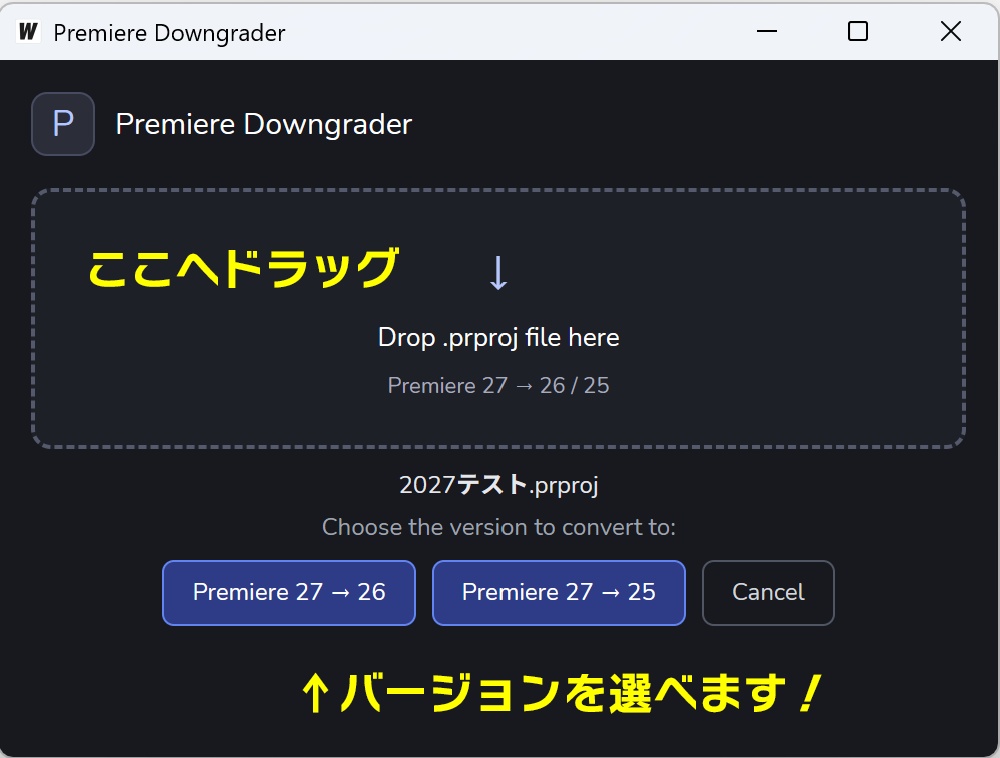

Premiere Downgrader|Premiereのプロジェクトを旧バージョンに変換 🎉 Premiere 27のプロジェクトに対応して、バージョンアップしました!(v2.0) Premiereの新しいバージョンで作ったプロジェクトを、古いバージョンのPremiereで開けるように変換するツールです。 ● Premiere 27 → 26 / 25 ● Premiere 26 → 25 使い方は簡単! アプリにプロジェクトファイル(.prproj)をドラッグ&ドロップして、変換先のバージョンを選ぶだけ。 【v2.0の新機能】 ● Premiere 27に対応 最新のPremiere 27で作ったプロジェクトを、Premiere 26・25で開ける形式に変換できます。 ● 変換先のバージョンを選べる ファイルをドロップすると「Premiere 27 → 26」「Premiere 27 → 25」のようなボタンが表示されます。相手の環境に合わせて、変換先をワンクリックで選べます。 ● 複数ファイルをまとめて変換 いくつものプロジェクトファイルを一度にドロップして、一括で変換できます。ファイルごとの結果も一覧で確認できます。 ● Mac版を新たに追加 Apple Silicon・Intelの両方のMacに対応しました。 【安心して使える設計】 ● 元のプロジェクトファイルはそのまま残ります ● 変換後のファイルは、元のファイルと同じフォルダに別名で保存されます (例:sample.prproj → sample_26.prproj / sample_25.prproj) ● 同じ名前のファイルがすでにある場合は、上書きせずにお知らせします ● インストール不要。ダウンロードしてすぐに使えます 【対応環境】 ● Windows 10 / 11(64ビット) ● macOS(Apple Silicon / Intel) ● 使い方・注意事項は同梱のREADME.txtをご覧ください。 ⚠️Macの場合、初回起動時に「開発元を確認できません」などの警告が表示されます。同梱のREADME.txtの「初めて起動するとき」の手順で開いてください(最初の1回だけ必要です)。 ⚠️Macの場合、「新しいマスキングを有効にする」を選ぶと、なぜかPremiereが再起動する場合があります。 その場合は「新しいマスキングなしで開く」を選んでください。 ※ 変換後、一部のエフェクトや設定などが完全に再現されない場合があります。変換後はPremiereで内容をご確認ください。 Premiere Downgrader | Convert Premiere projects to older versions 🎉 Updated to v2.0 with support for Premiere 27 projects! This tool converts projects made in a newer version of Premiere so they can be opened in an older version of Premiere. ● Premiere 27 → 26 / 25 ● Premiere 26 → 25 Easy to use! Just drag and drop your project file (.prproj) onto the app and choose the version to convert to. [New in v2.0] ● Premiere 27 support Convert projects made in the latest Premiere 27 so they open in Premiere 26 or 25. ● Choose your target version When you drop a file, buttons such as “Premiere 27 → 26” and “Premiere 27 → 25” appear. Pick the version that matches the other person’s setup with a single click. ● Batch conversion Drop several project files at once and convert them all in one go. You can check the result for each file in a list. ● New Mac version Works on both Apple Silicon and Intel Macs. [Designed for peace of mind] ● Your original project file is left untouched ● The converted file is saved under a new name in the same folder as the original (e.g. sample.prproj → sample_26.prproj / sample_25.prproj) ● If a file with the same name already exists, the app lets you know instead of overwriting it ● No installation needed. Download and start using it right away [Supported systems] ● Windows 10 / 11 (64-bit) ● macOS (Apple Silicon / Intel) ● For instructions and notes, see the included README.txt. ⚠️ On Mac, a warning such as “the developer cannot be verified” appears the first time you open the app. Follow the steps under "初めて起動するとき" (First launch) in the included README.txt to open it. This is only needed once. ⚠️ On Mac, choosing to enable the new masking when opening a converted project may cause Premiere to restart for some reason. If this happens, choose to open the project without the new masking. ※ After conversion, some effects or settings may not be fully reproduced. Please open the project in Premiere and check its contents after converting.