
Product Price PDF | Compare Excel price lists
- Full softwareDigital4,900 JPY
- Example documents — no softwareDigital0 JPY
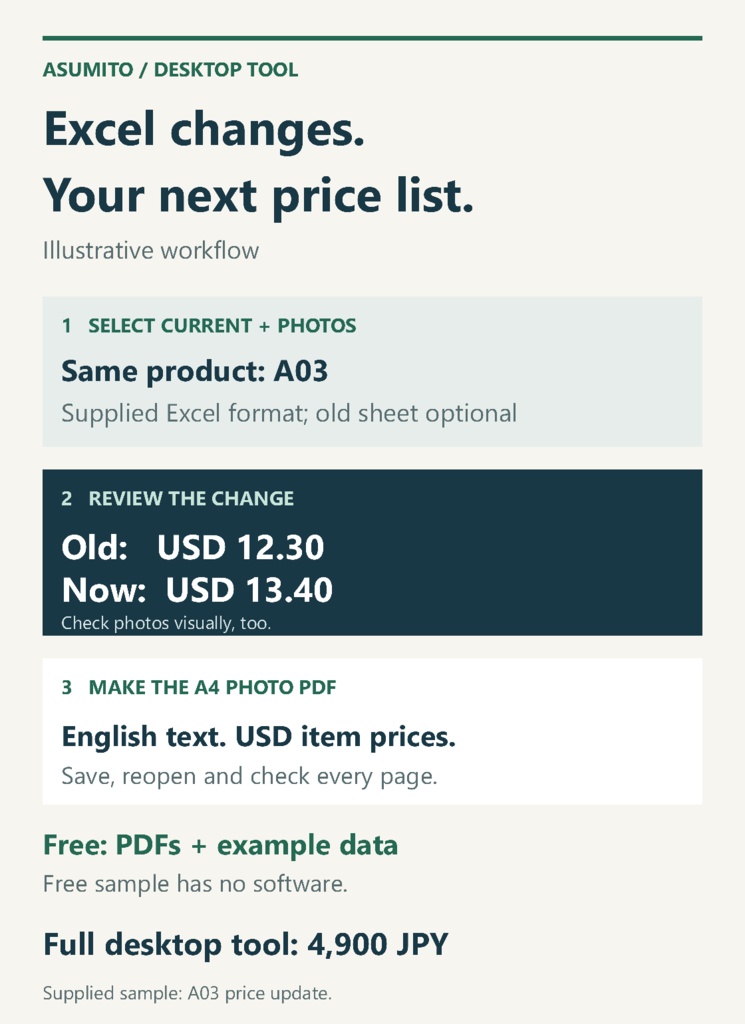
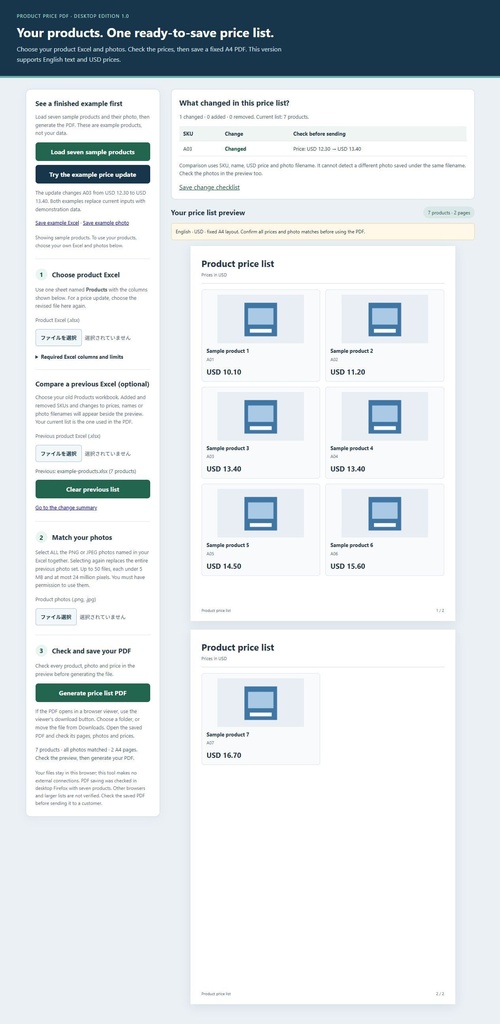
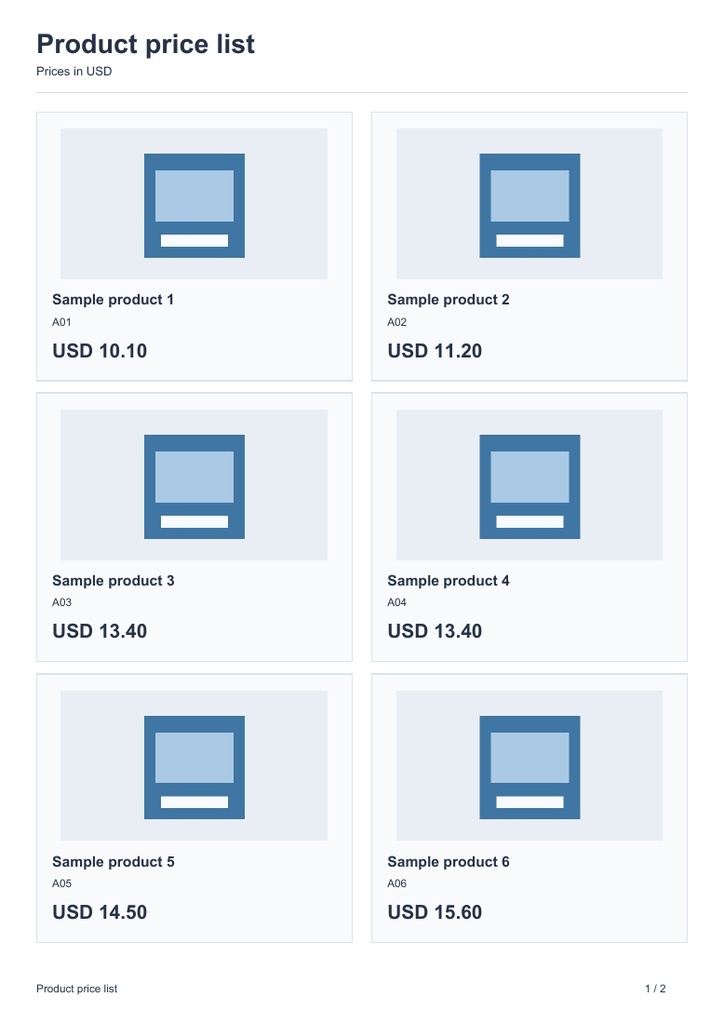


Product Price PDF | Compare Excel price lists Compare Excel revisions. Make a photo price list. For small wholesalers using the supplied four-column workbook and matching photos. Desktop Firefox. Basic-keyboard English text, USD item prices and fixed A4. Full software: 4,900 JPY per business. Free sample: documents only, no software. Download the sample PDFs and read the input checklist before buying. For small wholesalers and makers who maintain product information in Excel and need the next customer price list. This is downloadable desktop software, not a custom design service or a pack of finished price lists for your products. WHAT YOU RECEIVE The full ZIP has nine files: the desktop HTML tool, two example workbooks, one owned example image, two expected PDF price lists, opening instructions, a licence and help/payment guidance. One purchasing business may create and share price-list PDFs for products sold by that business. The tool has no subscription or activation. The free ZIP contains example PDFs, workbooks, the example image and an explanation. It does not contain the software or offer a functional trial with your own data. ONE PRICE UPDATE TO INSPECT The included example changes A03 from USD 12.30 to USD 13.40. The previous/current workbooks and expected PDFs let you compare the same row. A03 stays the same ID. The screen comparison checks product name, USD price and image filename by SKU. A photo replaced under the same filename still needs your visual check. USE YOUR FILES 1. Extract the full ZIP and open ProductPricePDF.html in desktop Firefox. 2. Prepare the supplied four columns: SKU, Product, Price, ImageFilename, in a sheet named Products. Use plain values, numeric USD prices and basic-keyboard English text. Choose the current workbook and all matching PNG/JPEG photos. 3. Optionally select the old workbook, review differences, then generate the PDF. 4. Save with the Save link or the PDF viewer's download button. If it goes to Downloads, move/copy it to your chosen folder. Reopen and inspect every page. PRE-PURCHASE INPUT CHECKLIST Copy values into the supplied .xlsx workbook format. The sheet must be named Products and have these four columns in exactly this order: SKU | Product | Price | ImageFilename - SKU: nonempty and unique, up to 24 basic-keyboard characters. - Product: up to 38 basic-keyboard characters. - Text: ordinary English letters, numbers and basic punctuation; no accented letters, curly quotes or emoji. Do not assume a general Excel file will import. - Price: a number from 0 to 9,999,999.99 USD, with at most two decimals. - ImageFilename: an exact selected PNG/JPEG filename, at most 160 characters; no folder paths or URLs. - No formulas anywhere in the workbook: paste values instead. Workbook below 2 MB; 1-50 product rows. Select the full matching photo set together, at most 50 photos, each below 5 MB and at most 24 million pixels. The free examples show this format; they do not run the software with your data. CHECK THESE LIMITS BEFORE PURCHASE English/basic-keyboard text, USD item prices and one A4 portrait layout only. No Japanese, accented text, formulas, tax/currency conversion, .pub conversion, custom page design, shop connection or backup. Workbooks below 2 MB; full photo set must match filenames, with each image below 5 MB and24 million pixels or less. Saving a seven-product, two-page example was checked in desktop Firefox. A 50-product, nine-page PDF was generated, but saving that larger PDF and using 50 different large photos have not been checked. The 1-50 row input limit is not a tested performance guarantee. Check your complete saved output before sharing it. PRICE AND PAYMENT One-time BOOTH licence price:4,900 JPY. USD amounts inside the example documents are product prices, not the licence charge. Use the payment options offered by BOOTH; country/card eligibility and conversion charges are not promised. This download has no physical shipment. Obtain purchased files from BOOTH purchase history/library or the payment-confirmation email. BOOTH's standard digital-goods cancellation/refund rules apply; no additional 14-day money-back promise is offered. LIMITED SALE AND HELP New sales end by27 November 2026 at18:00 Japan time. English how-to questions are accepted through 11 December 2026 at 12:00 Japan time, with an initial reply or necessary owner handoff by 18:00 that day. Normal help covers this version's opening, data preparation and output steps, not custom work. Contact ASUMITO through BOOTH messages. Do not send your business files, customer information, passwords, identity or payment information. An owner handoff transfers responsibility for continued handling in the same BOOTH conversation. It does not mean a reply or resolution has already reached you. The contact route, licence and necessary defect handling remain after normal sales/help end. Payment/rights exceptions need owner handling with the actual available method and cost confirmed. The first image is an illustrative workflow diagram using the included fictional update. The next images are a captured application view and an actual example PDF. The sample product image is an invented fixture, not a photograph of your products. The software and materials were prepared with AI assistance. No customer savings, purchase history or business outcome is claimed.