

【VRChat】脇差 鞘の塗り14種 腰に差す・持つ・抜く【Quest対応・MA対応】
- Digital500 JPY
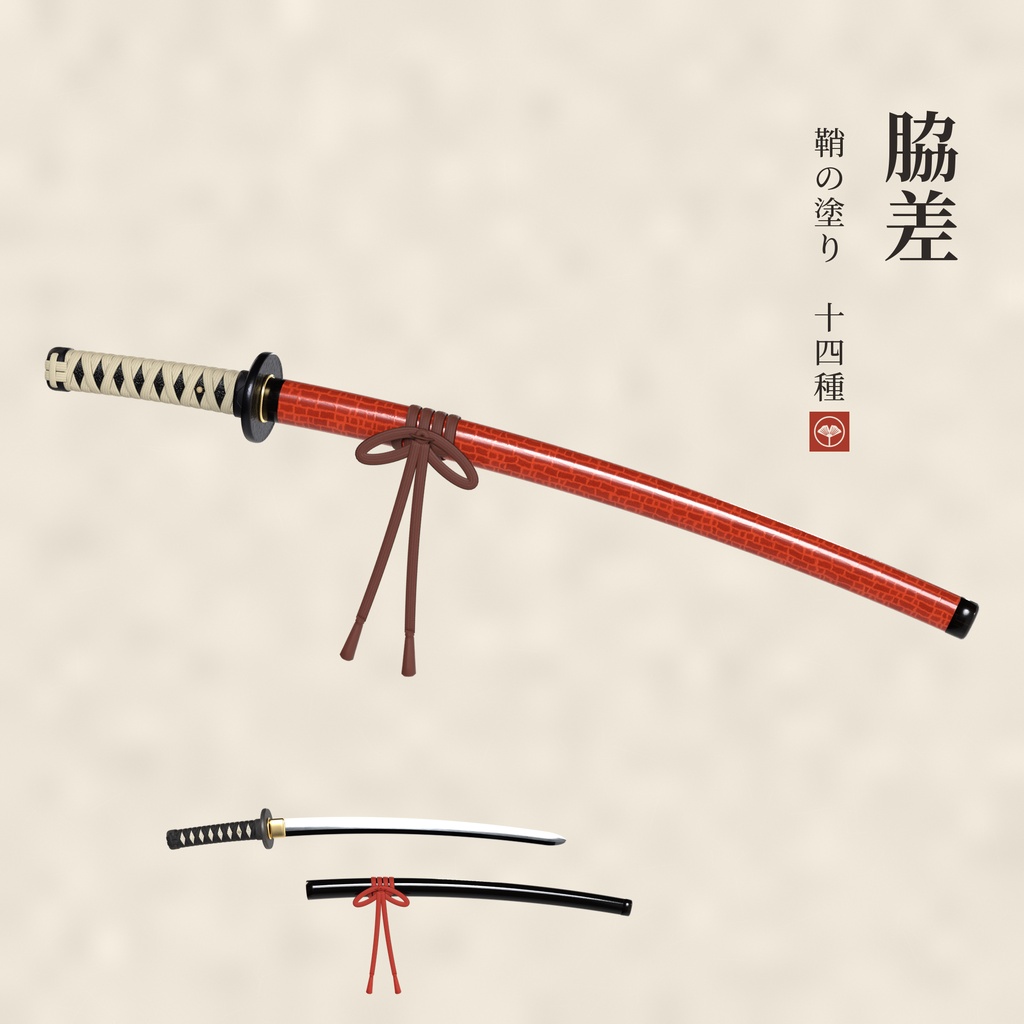
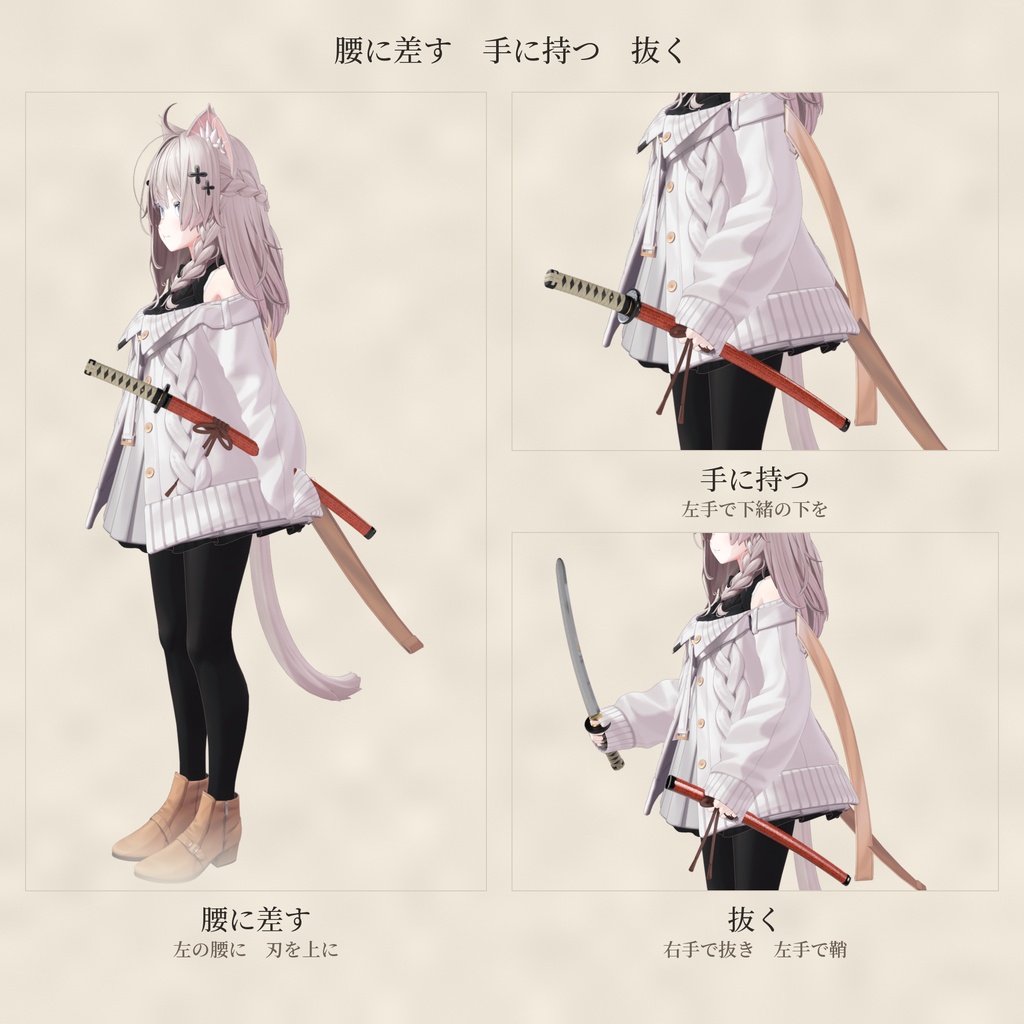
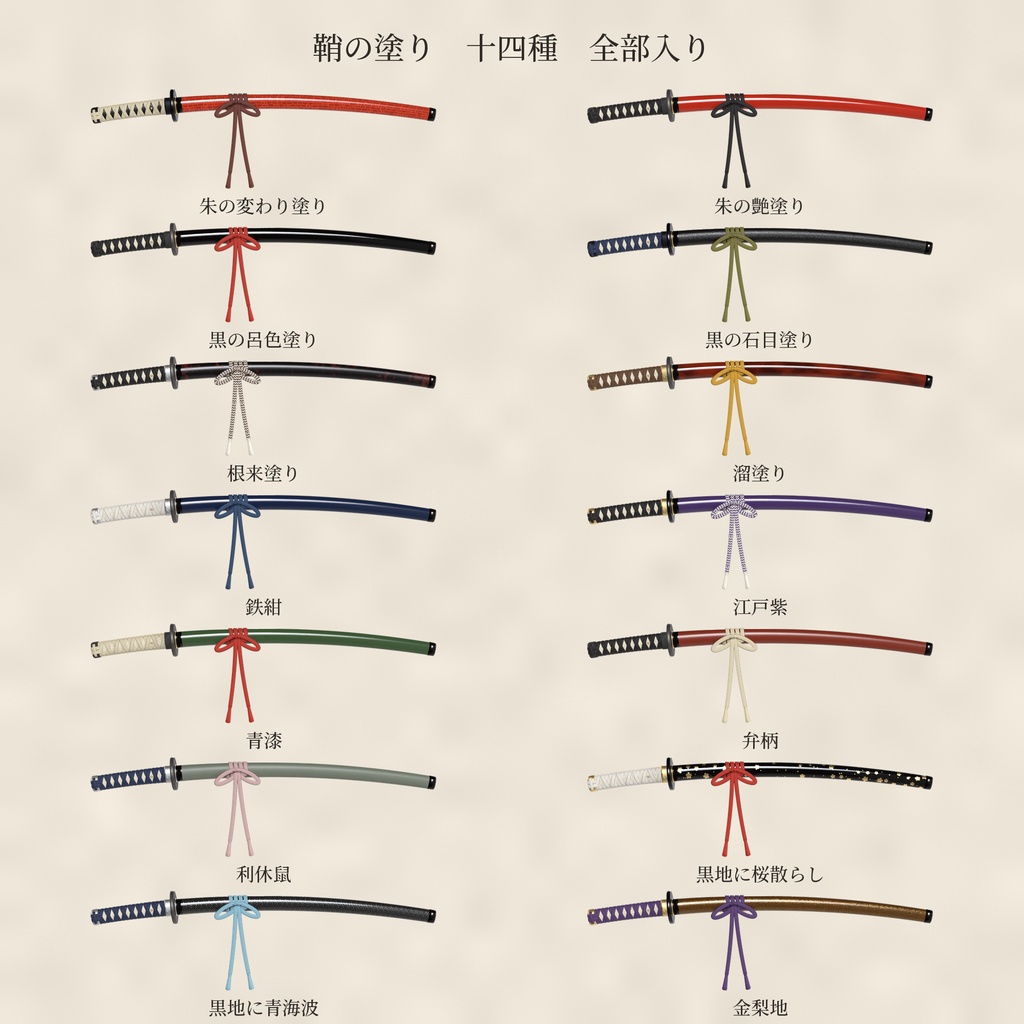
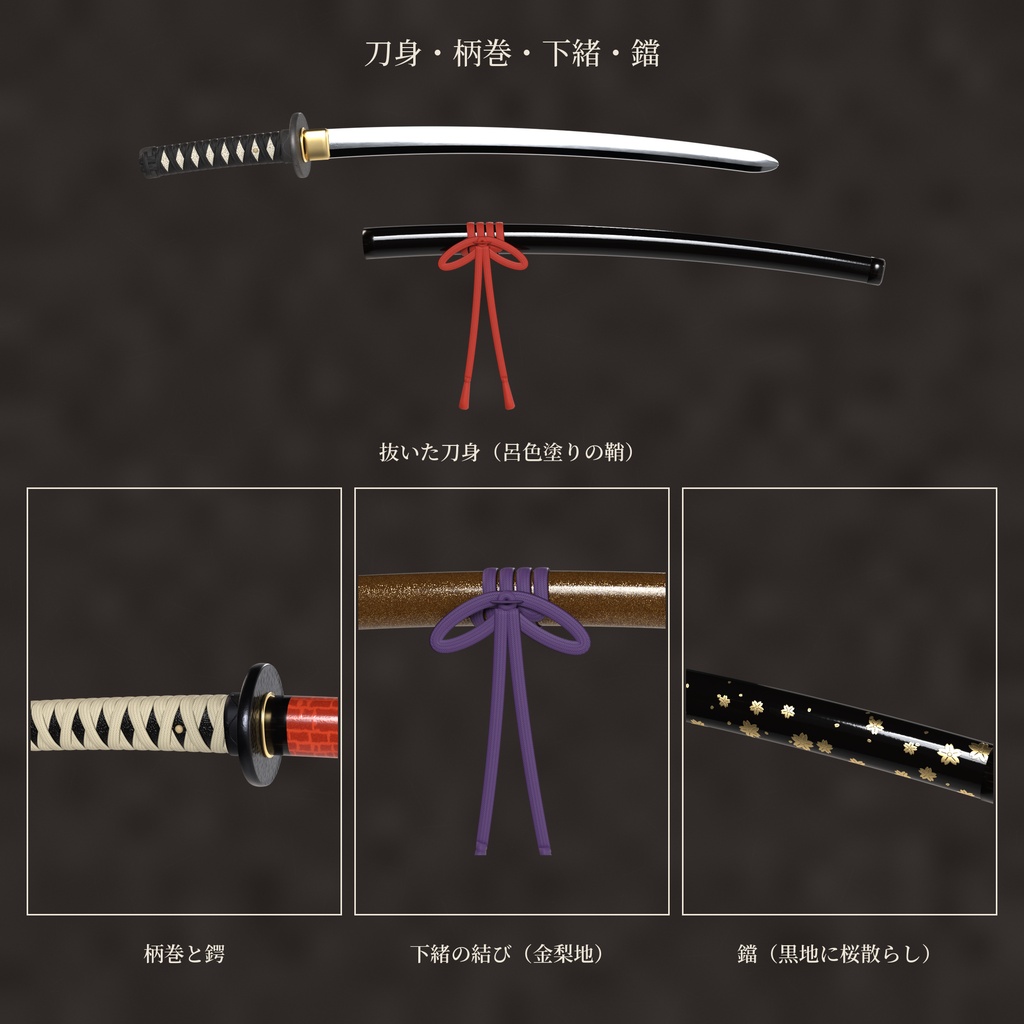
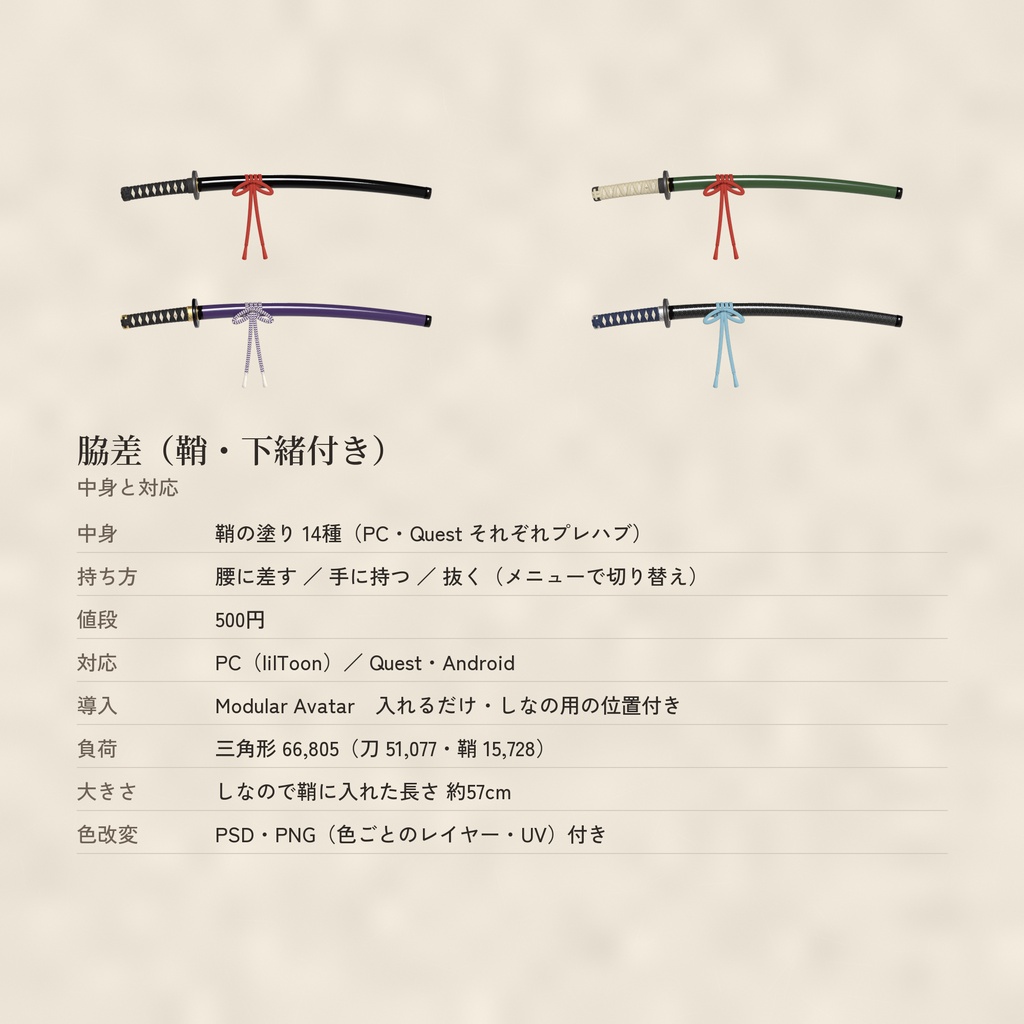


鞘に入った脇差です。 腰に差す・左手に持つ・右手で抜く、の3つをメニューで切り替えられます。 柄は柄糸の菱巻きで、菱の窓から鮫皮がのぞきます。 頭・縁・鍔・切羽・はばき・鯉口・鐺・目釘・鵐目まで作りました。 下緒は鯉口の下で鞘に巻いて結んであります。 抜くと、鎬造の刀身に白い刃文です。 和装・時代劇ふうの写真に。 鞘の塗りは14種です。 ■ 入っている物 ・鞘の塗り14種 朱の変わり塗り/朱の艶塗り/黒の呂色塗り/黒の石目塗り/根来塗り/溜塗り/鉄紺/江戸紫/青漆/弁柄/利休鼠/黒地に桜散らし/黒地に青海波/金梨地 柄糸・下緒・金具の色は塗りごとに合わせてあります。刀身はどれも同じです。 ・腰に差す/手に持つ/抜く(メニューで切り替え) ・持っている間の手の形(左手で鞘を握る/右手で柄を握る) ・色改変用の PSD・PNG:色ごとにレイヤー分け(単色の地+陰影)・UV の線付き(別の zip) ■ 対応 ・PC:lilToon ・Quest / Android:専用のマテリアルとプレハブ入り ・Modular Avatar:プレハブをアバターに入れるだけで、腰と両手に付きます ・メニューの「脇差」→「腰に差す」「手に持つ」「抜く」のどれか1つ。もう一度押すとしまいます(ワールドをまたいでも覚えています) ・持っている間は、その手のハンドサイン(指の形)は出ません。しまうと戻ります ・光ったり点滅したりはしません ・MA で多くのアバターに付けられます(試したのはしなの)。他のアバターは Scene ビューで位置を合わせてください。 ■ 持ち方(本物に合わせました) ・腰に差す:左の腰の帯に、刃を上にして差します。少し斜めに下げた「落とし差し」です。 ・手に持つ:左手で鞘の下緒の下を握ります。刃は上、柄は前です。 ・抜く:右手で柄を握って刀を持ちます。左手は「手に持つ」と同じ所で鞘を持ったままです。 本物の脇差(打刀と同じ「かたな」の仲間)も、刃を上にして帯に直に差します。 (「腰に差す」の写真で鞘に添えた左手は、写真用のポーズです。腰に差す間、手の形は変わりません) ■ 大きさ(しなのに付けた時) ・鞘に入れた長さ 約57cm(本物の脇差の 0.82 倍) ■ 負荷の目安 ・ポリゴン(三角形):66,805(刀 51,077・鞘 15,728。PC と Quest 同じ) ・マテリアル:3(鞘・金具と柄・刀身) ・テクスチャ:色(JPG)・ノーマル・滑らかさ。2048(滑らかさは 1024) ・PhysBone:なし コンストレイント:VRC Parent Constraint 2つ ・Quest では三角形が多めです。アバターのパフォーマンスランクに気を付けてください。 ■ 入れ方(Modular Avatar) 1. unitypackage を入れる。① Core(必ず先に)→ ②〜⑦ Colors1〜6(使う塗りの物だけでも OK)。 2. Prefabs/PC の好きな塗りのプレハブ(TL_Wakizashi_KawariShu など。Quest は Prefabs/Quest の _Quest)をアバターの中へドラッグ。 3. 他のアバターは、中の Hips > Saya(腰)・LeftHand > TePoint(左手)・RightHand > NukuPoint(右手)を Scene ビューで合わせる。 4. そのままアップロード。 ■ 使う人が先に入れておく物(同梱していません) ・VRChat SDK(Avatars)3.7.0 以上(VRChat のコンストレイントを使います) ・Modular Avatar ・lilToon(PC 版を使う時) ■ 動作確認 ・Unity 2022.3.22f1 ・VRChat SDK Avatars 3.10.6 ・Modular Avatar 1.18.7 ・lilToon 2.4.1 ■ ファイル ・Tinkerleaf_Wakizashi_v1.0_Core.zip(必ず要る) ・Tinkerleaf_Wakizashi_v1.0_Colors1〜6.zip(塗りのパック) ・Tinkerleaf_Wakizashi_v1.0_FBX_1〜6.zip(FBX とテクスチャ。Unity だけなら要りません) ・色改変用の PSD・PNG(Tinkerleaf_Kaihen_…・別の zip。要る物だけダウンロードしてください) ■ 作り方について 美術館・博物館の拵の写真(桃山の朱鞘・黒鞘・石目塗り・柄巻の写真など)を横に出して見ながら、柄・鍔・鞘の長さの割合、菱巻きの窓の数、下緒の結び方を合わせました。 差し方・持ち方も調べて、刃を上にする本物の差し方にしています。 形も色も、Blender と自分で書いたプログラムで作りました。 他の店の刀の形・塗りは真似ていません。 家紋・神社の名前や紋は入れていません。 AI(画像生成・3D 生成)は使っていません。 ■ 更新 ・v1.0:初めの版。 ■ ご注意 ・配り直し・売ることはできません(利用規約の Terms_ja.txt を読んでください)。 ・絵のアバターは同梱していません。 ・VRChat 用の小物です。本物の刀のことは扱っていません。 ■ tinkerleaf の他の物 ・蛇の目傘 和傘 柄14種:https://tinkerleaf.booth.pm/items/9111614 ・盃と酒瓢箪:https://tinkerleaf.booth.pm/items/9111004 ・頭に載る鏡餅 三方付き・なし:https://tinkerleaf.booth.pm/items/9109062 ・破魔矢 絵馬3種:https://tinkerleaf.booth.pm/items/9109011 ・羽子板と羽根 絵3種:https://tinkerleaf.booth.pm/items/9108844 ・竹の手提灯 4色:https://tinkerleaf.booth.pm/items/9108427 ・和紙と漆の狐面(顔全部):https://tinkerleaf.booth.pm/items/9102798 ・太縁の丸メガネ 金箔散らし:https://tinkerleaf.booth.pm/items/9094199 ・大正の丸メガネ 玉飾りのチェーン付き:https://tinkerleaf.booth.pm/items/9093827 ・漆の狐面(無料):https://tinkerleaf.booth.pm/items/9089745 ・漆と蒔絵の指輪:https://tinkerleaf.booth.pm/items/9086491 ・つまみ細工のかんざし:https://tinkerleaf.booth.pm/items/9085893 ・銀杏のかんざし:https://tinkerleaf.booth.pm/items/9083656 ・水引の結び(無料):https://tinkerleaf.booth.pm/items/9085349 ―――――――――― Wakizashi – 14 scabbard finishes, worn / held / drawn (PC / Quest, Modular Avatar) A wakizashi (Japanese short sword) in its scabbard. Switch between worn at the hip, held in the left hand, and drawn in the right hand from the menu. Diamond-wrapped hilt with ray skin showing through, kashira, fuchi, tsuba, seppa, habaki, koiguchi, kojiri, mekugi and shitodome. The sageo cord is wrapped and tied around the scabbard below the mouth. Drawn, the blade has a ridge line and a white hamon. For kimono and period-style photos. - 14 scabbard finishes: vermilion kawari-nuri, glossy vermilion, black roiro, black ishime, negoro, tame-nuri, iron navy, Edo purple, green seishitsu, bengara red, rikyu gray, cherry petals on black, seigaiha waves on black, gold nashiji. The hilt wrap, sageo and fittings are matched to each finish. - Worn / held / drawn, switched from the menu "脇差", saved across worlds - Hand poses while holding (left hand grips the scabbard / right hand grips the hilt). Gestures of that hand are not shown while holding. - Held like a real one: worn edge up in the sash on the left hip; when drawn, the left hand keeps holding the scabbard. - Nothing glows or flashes. - PC: lilToon / Quest & Android: prefabs with their own materials - Modular Avatar: drop the prefab onto your avatar, it attaches to the hip and both hands - Should fit most avatars with MA (tested on Shinano). For other avatars, adjust Hips > Saya, LeftHand > TePoint and RightHand > NukuPoint in the Scene view. - Size on Shinano: about 57 cm long in the scabbard - Layered PSD / PNG for recoloring (flat color per area + shading, UV lines), in separate zips Performance: 66,805 tris (sword 51,077, scabbard 15,728; PC and Quest); materials: 3; PhysBones: none; 2 VRC Parent Constraints. The triangle count is high for Quest; please mind your avatar's performance rank. Files: Core (required), Colors1–6 (finish packs; any is fine with Core), FBX_1–6 (FBX and textures for other software), Kaihen (recolor PSD / PNG). Required (not included): VRChat SDK (Avatars) 3.7.0 or later, Modular Avatar, lilToon (for PC). Tested with Unity 2022.3.22f1, VRChat SDK 3.10.6, Modular Avatar 1.18.7, lilToon 2.4.1. Made in Blender and self-written code, while looking at museum photos of real sword mountings. No generative AI (image / 3D) was used. No family crests, shrine names or crests are used. The avatar in the images is not included. Redistribution and resale are not allowed. Please read Terms_en.txt.