

【Epli(エプリ)対応】イヤーピアス // [Epli] Ear Piercings
- Digital300 JPY
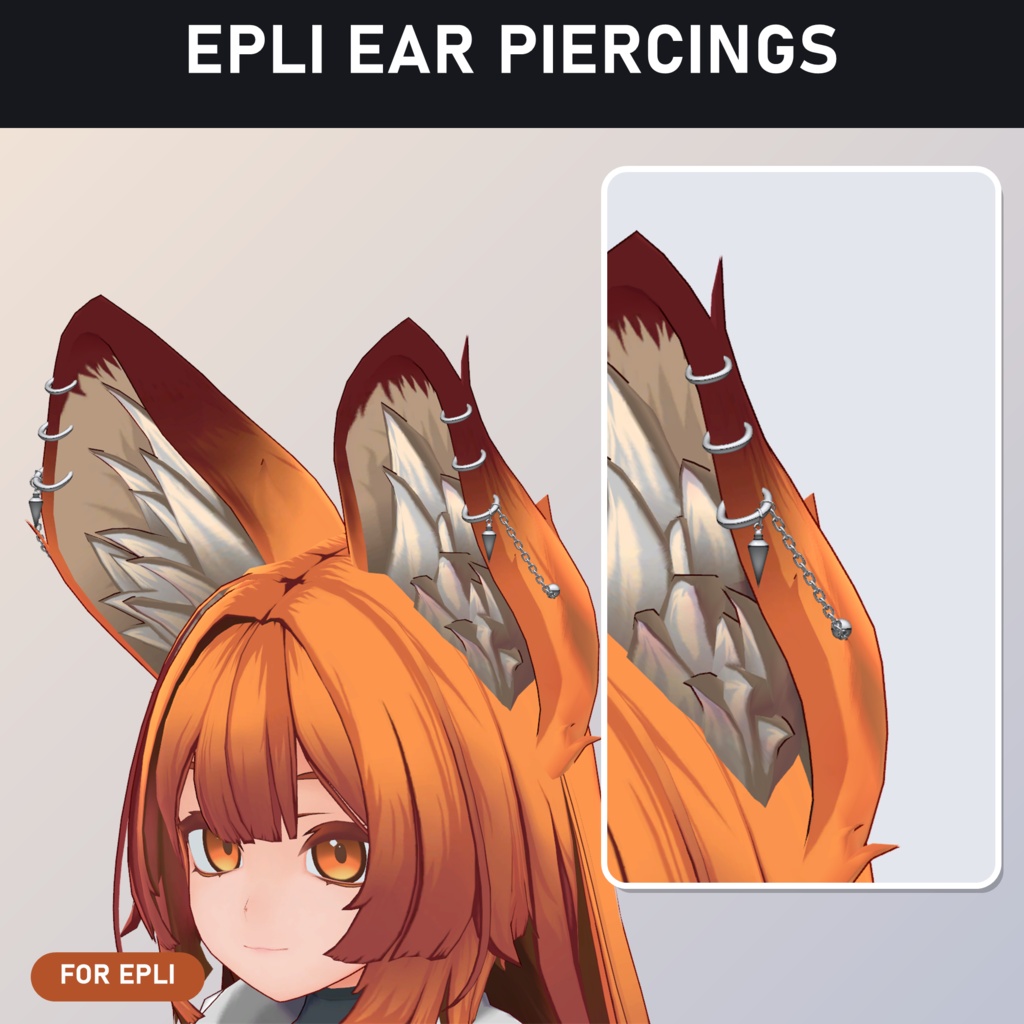


オリジナル3Dモデル『Epli(エプリ)』(DIGITAL様)専用のイヤーピアスです。 片耳に3つのリング、一番下のリングにはペンダントとチェーンがついています。 Epliの耳に合わせて新しくモデリングしたオリジナルのデータです。 ■ 特徴 ・片耳3つ × 両耳 = 6つのピアス ・6つそれぞれをメニューから個別にオン・オフ (状態は保存) ・ペンダントとチェーンはPhysBoneで揺れます ・VRCFury / Modular Avatar 両対応: 使っているツールに合わせたプレハブをアバターに入れるだけ。アップロード時に耳のボーンへ自動でつながります ・金属のマテリアル設定済み (lilToon) ■ 内容物 ・Epli_Ear_Piercings.unitypackage - Epli Ear Piercings (VRCFury).prefab - Epli Ear Piercings (Modular Avatar).prefab - FBX、マテリアル、メニューアイコン ・README (日本語 / English) ■ 使い方 1. 先にEpliと、VRCFuryまたはModular Avatarをプロジェクトに入れ、UnityPackageをインポートします。 2. Assets / Vulpes / Epli Ear Piercings から、使っているツールに合わせてプレハブを1つだけアバターの中にドラッグします。 VRCFury → Epli Ear Piercings (VRCFury) Modular Avatar → Epli Ear Piercings (Modular Avatar) 3. アップロードすると、Expressionメニューに「Ear Piercings」が追加されます。 ■ 動作環境 Unity 2022.3 / VRChat SDK 3.10 / lilToon 2.4.1 VRCFury 1.1499.0 または Modular Avatar 1.19.0 で動作確認 ■ 注意事項 ・アバター本体は含まれません。Epliをお持ちの方専用です。 ・2つのプレハブを同時に入れないでください。 ・耳のボーンの名前・位置を変更している場合は、正しくつかないことがあります。 ・シェーダーやライトによって見え方が変わります。 ・改変OK。データの再配布・転売・自作発言は禁止です。 ・データ商品のため、購入後の返品・返金はできません。 ■ 対応アバター 『Epli(エプリ)』 DIGITAL様 https://booth.pm/ja/items/5831118 ※画像の黒髪は「Epli Color Set」(VulpesVelox、別売り)です。 ―――――――――――――――― Ear piercings made for the avatar "Epli" by DIGITAL. 3 hoops on each ear; the lowest hoop has a pendant and a chain. Original data, newly modeled to fit Epli's ears. ■ Features - 3 hoops per ear x 2 ears = 6 piercings - Each of the 6 has its own toggle in the menu (saved) - The pendant and chain swing with PhysBones - Works with VRCFury or Modular Avatar: put the matching prefab on your avatar. It attaches to the ear bones when you upload - Metal material ready to use (lilToon) ■ Contents - Epli_Ear_Piercings.unitypackage - Epli Ear Piercings (VRCFury).prefab - Epli Ear Piercings (Modular Avatar).prefab - FBX, material, menu icons - README (Japanese / English) ■ How to use 1. Add Epli and either VRCFury or Modular Avatar to your project, then import the UnityPackage. 2. From Assets / Vulpes / Epli Ear Piercings, drag ONE prefab matching your tool onto your avatar. VRCFury → Epli Ear Piercings (VRCFury) Modular Avatar → Epli Ear Piercings (Modular Avatar) 3. Upload: an "Ear Piercings" folder is added to the Expression menu. ■ Tested with Unity 2022.3 / VRChat SDK 3.10 / lilToon 2.4.1 VRCFury 1.1499.0 or Modular Avatar 1.19.0 ■ Notes - The avatar is not included. For Epli owners only. - Do not add both prefabs. - If you renamed or moved Epli's ear bones, the piercings may not attach correctly. - How it looks depends on shader and lighting. - Editing is OK. Redistribution, resale or claiming it as your own work is not allowed. - Digital product: no returns or refunds after purchase. * The black hair in the images is "Epli Color Set" by VulpesVelox (sold separately).