
【FREE / 無料】Hugging Face Bulk Downloader(Hugging Face 一括 ダウンローダー)【Donations are welcome / 寄付歓迎】
- Free / 無料Digital0 JPY
- Donate / 寄付(The content is the same as the free version / 無料版と中身は同じです)Digital100 JPY

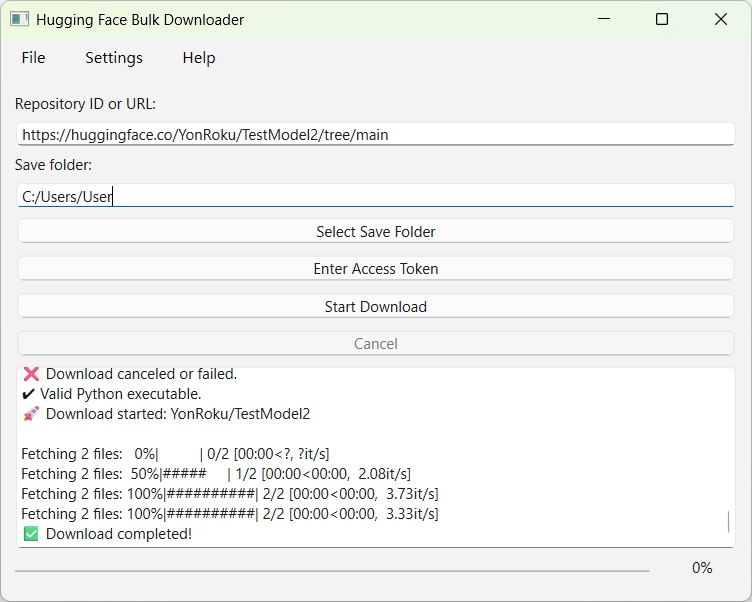
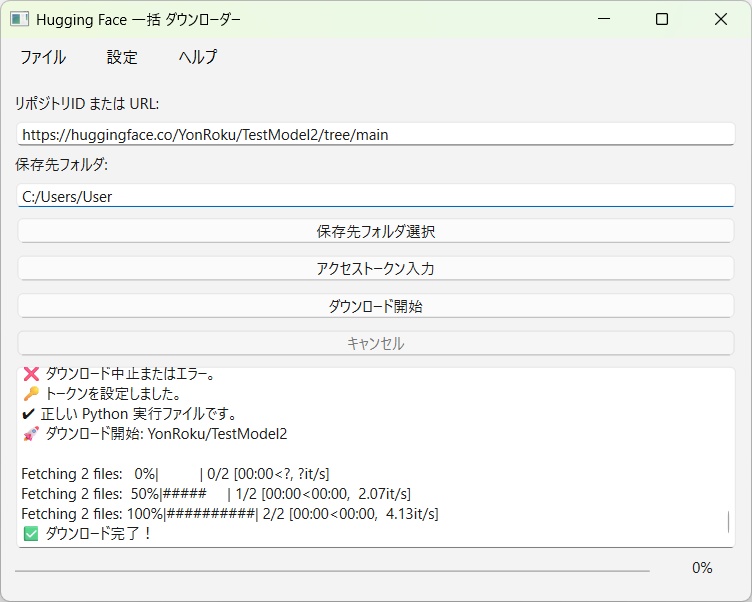


This tool allows you to download files from Hugging Face repositories in bulk. It includes features such as selecting a save folder, downloading gated models using an access token, and saving logs. The interface supports both English and Japanese. Hugging Faceのリポジトリのファイルを一括でダウンロードするツールです。 保存フォルダ選択、アクセストークン入力によるゲートモデルのダウンロード対応、 ログ保存などの機能を備えています。また、英語、日本語に対応しています。
README.txt
==================================================================================================== Hugging Face Bulk Downloader ==================================================================================================== ---------------------------------------------------------------------------------------------------- IMPORTANT ---------------------------------------------------------------------------------------------------- Please make sure to read IMPORTANT.txt. ---------------------------------------------------------------------------------------------------- Overview ---------------------------------------------------------------------------------------------------- This tool allows you to download files from Hugging Face repositories in bulk. It includes features such as selecting a save folder, downloading gated models using an access token, and saving logs. The interface supports both English and Japanese. ---------------------------------------------------------------------------------------------------- Supported Environments ---------------------------------------------------------------------------------------------------- Windows 10, Windows 11 ---------------------------------------------------------------------------------------------------- Installation ---------------------------------------------------------------------------------------------------- Simply extract the files to any folder. Installation is complete. ---------------------------------------------------------------------------------------------------- Uninstallation ---------------------------------------------------------------------------------------------------- Delete the entire folder to uninstall. ---------------------------------------------------------------------------------------------------- Basic Usage ---------------------------------------------------------------------------------------------------- Enter the repository ID or URL into "Repository ID or URL". Examples: ・YonRoku/Model ・https://huggingface.co/YonRoku/Model ・https://huggingface.co/YonRoku/Model/tree/main Enter the folder path into "Save folder". You can easily select it using the "Select Save Folder" button. The folder must already exist, and downloading is not possible if it contains any files or subfolders. For gated models, an access token is required. Click the "Enter Access Token" button and enter your access token. You must use a token associated with an account that has access permission. Leaving this field blank will use anonymous access. Click the "Start Download" button to begin downloading. Click the "Cancel" button to stop the download. ---------------------------------------------------------------------------------------------------- Additional Usage ---------------------------------------------------------------------------------------------------- ● About the Menu Bar ◎ "File" Menu ○ "Save Log" Save the log displayed at the bottom of the application window. ○ "Exit" Close Hugging Face Bulk Downloader. ◎ "Settings" Menu ○ "Enable Notifications" Show notifications when downloads succeed or fail. ○ "Open Folder When Complete" Open the save folder automatically when the download finishes successfully. ○ "Save Access Token" Save the access token to settings_hfbd_*_*_*.json. This removes the need to enter the token the next time you open the software. Since the token is stored in plain text, it is safer to leave this unchecked. ○ "Language" Switch the interface language between Japanese and English. ○ "Reset Settings" Reset all settings to their default values. ◎ "Help" Menu ○ "About" Display version information. ---------------------------------------------------------------------------------------------------- Notes ---------------------------------------------------------------------------------------------------- The file settings_hfbd_*_*_*.json is automatically generated when launching Hugging Face Bulk Downloader. The cache folder is automatically generated when you run a download. Additionally, C:\Users\(User)\.cache\huggingface is also automatically generated when you run a download. If downloading does not work, the model may be gated. For gated models, please enter an access token. An access token from an account that has been granted access is required. If the download size is large, the download process may stop or produce errors. In such cases, please download the files individually from your web browser. During downloading, some errors may cause the application to freeze. If this happens, please press the Cancel button to stop the download. Enabling "Save access token" saves you the trouble of entering it each time, but the token is stored in plain text, so for security reasons it is recommended to leave this option unchecked. This software is an unofficial tool. It is not officially supported by Hugging Face. ---------------------------------------------------------------------------------------------------- Remarks ---------------------------------------------------------------------------------------------------- This software executes commands using python-3.13.9-embed-amd64\pythonw.exe. Example command: from huggingface_hub import snapshot_download snapshot_download(repo_id='YonRoku/Model', cache_dir=r'cache', local_dir=r'C:\Users\User\Desktop', token='hf_XXXXXXXXXXXXXXXXXXXXXXXXXXXX') If you use python-3.13.9-embed-amd64\python.exe and input a command similar to the example above, downloading will work. If the file size is large and the progress bar does not move, making you unsure whether the download is proceeding, you can check the network usage in Task Manager. From there, you can roughly estimate whether the download is in progress. ---------------------------------------------------------------------------------------------------- About python-3.13.9-embed-amd64 ---------------------------------------------------------------------------------------------------- Some files inside the "python-3.13.9-embed-amd64" folder may be flagged by antivirus software during download, but no viruses have been added. However, if you are concerned, you can follow the steps below yourself and replace the "python-3.13.9-embed-amd64" folder. The software will still work. 1. Download and extract the following file: https://www.python.org/downloads/windows/ ↓ https://www.python.org/ftp/python/3.13.9/python-3.13.9-embed-amd64.zip 2. Open "python313._pth" inside the "python-3.13.9-embed-amd64" folder and change the line "#import site" to "import site". 3. Download "https://bootstrap.pypa.io/get-pip.py" and place it in the "python-3.13.9-embed-amd64" folder. 4. Open Command Prompt and move to the "python-3.13.9-embed-amd64" folder. Run the following commands: python get-pip.py python -m pip install --upgrade huggingface_hub ---------------------------------------------------------------------------------------------------- Disclaimer ---------------------------------------------------------------------------------------------------- The author assumes no responsibility for any problems or damages arising from the use of this software. ---------------------------------------------------------------------------------------------------- Version History ---------------------------------------------------------------------------------------------------- Ver.1.0.0a - README.txt, README_JA.txt modified. Ver.1.0.0 - First release. ---------------------------------------------------------------------------------------------------- Contact ---------------------------------------------------------------------------------------------------- E-Mail: yonroku46464646@gmail.com ---------------------------------------------------------------------------------------------------- Author ---------------------------------------------------------------------------------------------------- YonRoku (Support & Updates via GitHub / ChatGPT conversation) ---------------------------------------------------------------------------------------------------- Copyright ---------------------------------------------------------------------------------------------------- © 2025 YonRoku ---------------------------------------------------------------------------------------------------- License ---------------------------------------------------------------------------------------------------- Described in LICENSE.txt
README_JA.txt
==================================================================================================== Hugging Face Bulk Downloader(Hugging Face 一括 ダウンローダー) ==================================================================================================== ---------------------------------------------------------------------------------------------------- 重要 ---------------------------------------------------------------------------------------------------- 必ずIMPORTANT_JA.txtをお読みください。 ---------------------------------------------------------------------------------------------------- 概要 ---------------------------------------------------------------------------------------------------- Hugging Faceのリポジトリのファイルを一括でダウンロードするツールです。 保存フォルダ選択、アクセストークン入力によるゲートモデルのダウンロード対応、 ログ保存などの機能を備えています。また、英語、日本語に対応しています。 ---------------------------------------------------------------------------------------------------- 動作環境 ---------------------------------------------------------------------------------------------------- Windows 10、Windows 11 ---------------------------------------------------------------------------------------------------- インストール方法 ---------------------------------------------------------------------------------------------------- 任意の場所に解凍したらインストール完了です。 ---------------------------------------------------------------------------------------------------- アンインストール方法 ---------------------------------------------------------------------------------------------------- フォルダごとゴミ箱に入れればアンインストール完了です。 ---------------------------------------------------------------------------------------------------- 主な使用方法 ---------------------------------------------------------------------------------------------------- 「リポジトリID または URL」にリポジトリID または URLを入力してください。 例: ・YonRoku/Model ・https://huggingface.co/YonRoku/Model ・https://huggingface.co/YonRoku/Model/tree/main 「保存先フォルダ」にフォルダパスを入力してください。 「保存先フォルダ選択」ボタンで簡単に選択できます。 フォルダは作成されている必要があり、中にファイル、フォルダが入っていると ダウンロードできません。 ゲートモデルの場合、アクセストークンを入力する必要があります。 「アクセストークン入力」ボタンを押してアクセストークンを入力してください。 また、アクセスが許可されたアカウントのアクセストークンが必要です。 空欄で匿名アクセスになります。 「ダウンロード開始」ボタンでダウンロードされます。 「キャンセル」ボタンでダウンロードが中止されます。 ---------------------------------------------------------------------------------------------------- その他使用方法 ---------------------------------------------------------------------------------------------------- ●メニューバーについて ◎「ファイル」メニュー ○「ログを保存」 ソフト画面下部のログを保存できます。 ○「終了」 Hugging Face Bulk Downloaderを終了します。 ◎「設定」メニュー ○「通知を有効にする」 ダウンロード成功、失敗時に通知されます。 ○「完了時にフォルダを開く」 ダウンロード成功時に保存先フォルダを開きます。 ○「アクセストークンを保存」 アクセストークンをsettings_hfbd_*_*_*.jsonに保存します。 次回Hugging Face Bulk Downloaderを開いたときに アクセストークンを入力する手間が省けます。 平文で保存されるのでセキュリティ的にはチェックを入れない方が良いです。 ○「言語」 日本語、Englishから言語を設定できます。 ○「設定をリセット」 設定をリセットします。 ◎「ヘルプ」メニュー ○「バージョン情報」 バージョン情報を表示します ---------------------------------------------------------------------------------------------------- 注意事項 ---------------------------------------------------------------------------------------------------- settings_hfbd_*_*_*.jsonはHugging Face Bulk Downloader起動時に自動で作成されます。 cacheフォルダはダウンロード実行時に自動で作成されます。 また、C:\Users\(User)\.cache\huggingfaceもダウンロード実行時に自動で作成されます。 ダウンロードができない場合、ゲートモデルの可能性があります。 ゲートモデルの場合、アクセストークンを入力してください。 また、アクセスが許可されたアカウントのアクセストークンが必要です。 ダウンロード量が多い場合、ダウンロードが止まる、エラーになる可能性があります。 その際はブラウザから個別でダウンロードしてください。 ダウンロード中、エラーによってはフリーズする場合があります。 その際はキャンセルボタンを押してダウンロードを中止してください。 「アクセストークンを保存」にチェックを入れるとアクセストークンを入力する手間が省けますが、 平文で保存されるのでセキュリティ的にはチェックを入れない方が良いです。 本ソフトは非公式ツールです。Hugging Faceが公式にサポートするものではありません。 ---------------------------------------------------------------------------------------------------- 備考 ---------------------------------------------------------------------------------------------------- 本ソフトはpython-3.13.9-embed-amd64\pythonw.exeにコマンドを渡してダウンロードしています。 コマンド例: from huggingface_hub import snapshot_download snapshot_download(repo_id='YonRoku/Model', cache_dir=r'cache', local_dir=r'C:\Users\User\Desktop', token='hf_XXXXXXXXXXXXXXXXXXXXXXXXXXXX') ちなみにpython-3.13.9-embed-amd64\python.exeを開き、 上記コマンド例に倣い入力、実行をするとダウンロードできます。 ファイルサイズが大きく、進捗率が変わらずダウンロードされているか不安になる場合は タスクマネージャーから通信量が確認出来るので そこからダウンロードが行われているかどうかある程度推測できます。 ---------------------------------------------------------------------------------------------------- python-3.13.9-embed-amd64について ---------------------------------------------------------------------------------------------------- ダウンロードの際に「python-3.13.9-embed-amd64」フォルダ内のファイルが ウイルス対策ソフトに引っかかる場合がありますが、ウイルスを仕込んではいません。 ですが、気になる場合はご自身で下記手順を実行し、「python-3.13.9-embed-amd64」フォルダを 差し替えても動作します。 1. 「https://www.python.org/downloads/windows/」 から 「https://www.python.org/ftp/python/3.13.9/python-3.13.9-embed-amd64.zip」 をダウンロードし、解凍します。 2. 「python-3.13.9-embed-amd64」フォルダの「python313._pth」内の 「#import site」を「import site」に書き換えます。 3. 「https://bootstrap.pypa.io/get-pip.py」をダウンロードして、 「python-3.13.9-embed-amd64」フォルダに配置します。 4. コマンドプロンプトを開き、「python-3.13.9-embed-amd64」フォルダに移動します。 「python get-pip.py」を実行し、 「python -m pip install --upgrade huggingface_hub」でHugging Face Hubのインストールをします。 ---------------------------------------------------------------------------------------------------- 免責事項 ---------------------------------------------------------------------------------------------------- 本データの利用によって生じたトラブル、損害等について一切の責任を負いかねます。 ---------------------------------------------------------------------------------------------------- バージョン変更履歴 ---------------------------------------------------------------------------------------------------- Ver.1.0.0a - README.txt、README_JA.txt修正。 Ver.1.0.0 - 初回リリース。 ---------------------------------------------------------------------------------------------------- 連絡先 ---------------------------------------------------------------------------------------------------- E-Mail:yonroku46464646@gmail.com ---------------------------------------------------------------------------------------------------- 作者 ---------------------------------------------------------------------------------------------------- YonRoku (Support & Updates via GitHub / ChatGPT conversation) ---------------------------------------------------------------------------------------------------- コピーライト ---------------------------------------------------------------------------------------------------- © 2025 YonRoku ---------------------------------------------------------------------------------------------------- ライセンス ---------------------------------------------------------------------------------------------------- LICENSE.txtに記述
LICENSE.txt
PySide6 Copyright: Copyright (C) The Qt Company Ltd. Licensed under the GNU Lesser General Public License version 3. Qt Libraries Copyright: Copyright (C) The Qt Company Ltd. Qt is available under multiple licenses, including the LGPLv3. Python Copyright: Copyright (C) Python Software Foundation. Licensed under the Python Software Foundation License Version 2. See https://www.python.org/psf/license/ for details. Hugging Face Hub Copyright: Copyright (C) Hugging Face Inc. Licensed under the Apache License, Version 2.0. See https://github.com/huggingface/huggingface_hub/blob/main/LICENSE for details. For the full text of the license, please refer to the attached URL: https://opensource.org/license/python-2-0 https://www.gnu.org/licenses/lgpl-3.0.html https://www.apache.org/licenses/LICENSE-2.0
IMPORTANT.txt
==================================================================================================== Hugging Face Bulk Downloader ==================================================================================================== ---------------------------------------------------------------------------------------------------- IMPORTANT ---------------------------------------------------------------------------------------------------- Before extracting, make sure that the SHA512 hash value of hfbd.zip matches the hash value in SHA512HASH.txt. Command example: certutil -hashfile C:\hfbd_V*.*.*\hfbd.zip SHA512 Open Command Prompt, enter the above command following the example, and run it to verify the hash value.
IMPORTANT_JA.txt
==================================================================================================== Hugging Face Bulk Downloader(Hugging Face 一括 ダウンローダー) ==================================================================================================== ---------------------------------------------------------------------------------------------------- 重要 ---------------------------------------------------------------------------------------------------- 必ずhfbd.zipのSHA512ハッシュ値が SHA512HASH.txtのハッシュ値と同等か確認してから解凍してください。 コマンド例: certutil -hashfile C:\hfbd_V*.*.*\hfbd.zip SHA512 コマンドプロンプトを開き、上記コマンド例に倣い入力、実行をするとハッシュ値を確認できます。
SHA512HASH.txt
Hugging Face Bulk Downloader Ver.1.0.0a 36d490d1e44d44c7c8b2967b342e58634fa6fe4d486b747ede7e4db579bb30d8cb8d0aebaab5e8ad41ff6c9286ca49cb6f537916cd6e5be7c426790a41a97eca Hugging Face Bulk Downloader Ver.1.0.0 f33b04683d65133e806e4f5486004264d07cf27a945b7946f733ca5d53dc780b9c15bd2a62e0f78f493c2170c7f1b8f56cce61348cb56a691fbbc1bc24d08b79