
Warudo Mod Manager
- Digital1,000 JPY
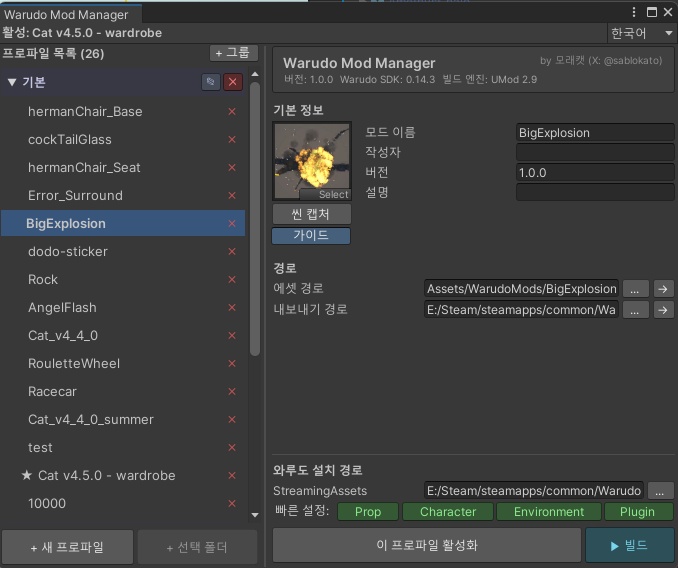
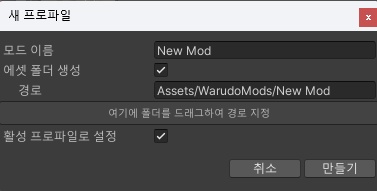
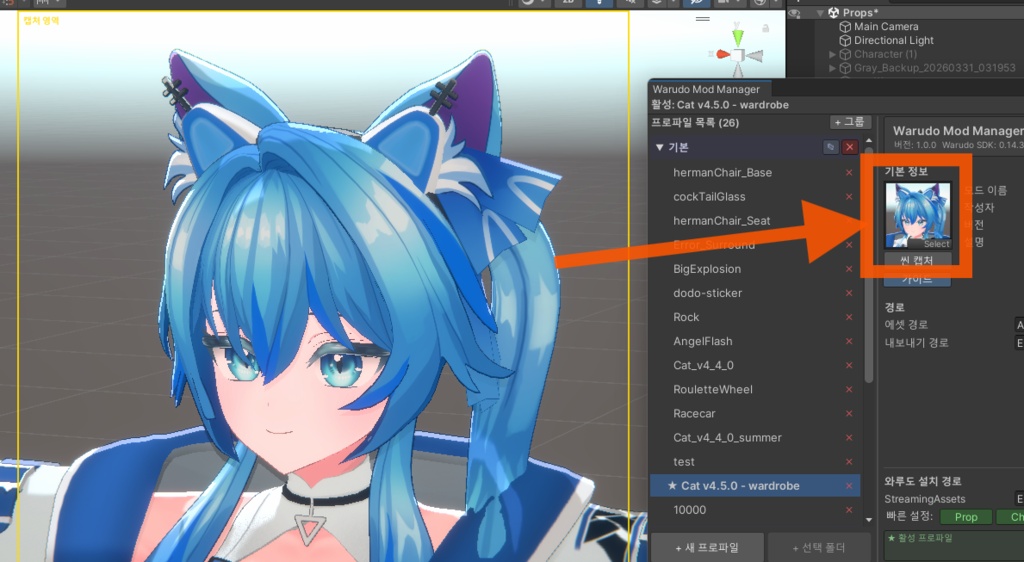


==================================================== Warudo Mod Manager v1.0.0 ==================================================== [ 문의 / お問い合わせ / Contact ] X (Twitter): @sablokato Gmail: moraekato 설명서는 한국어 원문에 기반합니다. 이외의 언어는 번역된 문서입니다. マニュアルは韓国語の原文に基づいています。以外の言語は翻訳文書です。 The manual is based on the original Korean text. Versions in other languages are translations. ==================================================== --- 한국어 (원문) --- ==================================================== Warudo SDK(UMod)용 모드 익스포트 프로파일 관리 에디터 확장입니다. 여러 모드를 한 프로젝트에서 작업할 때, 프로파일 전환과 빌드를 한 창에서 처리할 수 있습니다. 제작: 모래캣 / moraecat (X: @sablokato) [ 기능 ] - Warudo SDK 내에서, 모드 프로파일을 다중 관리하며, 플레이 모드 전환 / 스크립트 컴파일 시 프로파일이 사라지는 문제를 예방합니다. - 모드 프로파일을 그룹으로 분류하고, 드래그앤드롭으로 정렬할 수 있습니다. - 씬 뷰 캡처로 모드 썸네일을 즉시 생성할 수 있습니다. (캡처 가이드 오버레이 포함) - Warudo 폴더의 StreamingAssets 경로를 지정하여, Prop/Character/Environment/Plugin 으로 익스포트 하는 빠른 경로 지정이 가능합니다. - 프로파일 정보는 JSON 파일로 자동 저장됩니다. - 다국어 지원: 한국어 / English / 日本語 / 简体中文 / 繁體中文 [ 요구 사항 ] - Unity 2021.3.x (Warudo SDK 프로젝트) - Warudo Mod Tool (app.warudo.modtool) ※ Warudo SDK 프로젝트에 기본 포함되어 있습니다. [ 설치 ] 동봉된 WarudoModManager_v1.0.0.unitypackage 파일을 Warudo SDK 프로젝트에 임포트하세요. [ 사용법 ] 메뉴: Warudo > Warudo Mod Manager 1. 좌측 목록에서 프로파일 추가 - "+ 새 프로파일" 버튼, 또는 - Project 탭에서 폴더 선택 후 "+ 선택 폴더" 버튼 2. 우측 상세에서 모드 이름/작성자/버전/경로 설정 3. 와루도 설치 경로 지정 후 빠른 설정 버튼으로 내보내기 경로 설정 4. "▶ 빌드" 버튼으로 해당 프로파일 빌드 (활성 프로파일은 자동으로 전환·복원됩니다) [ 이용 약관 ] - 본 도구는 유니티 패키지 파일로 제공됩니다. - 본 도구는 구매자 본인의 환경에서 자유롭게 사용할 수 있습니다. - 본 도구의 무단 재배포/재판매 행위를 금지합니다. ==================================================== --- 日本語 --- ==================================================== Warudo SDK(UMod)向けのModエクスポートプロファイル管理エディタ拡張です。 1つのプロジェクトで複数のModを制作するとき、プロファイルの切り替えとビルドを1つのウィンドウで完結できます。 [ 機能 ] - Warudo SDK内でModプロファイルを複数管理し、プレイモード切り替えやスクリプトコンパイル時にプロファイルが消える問題を防ぎます。 - Modプロファイルをグループに分類し、ドラッグ&ドロップで並べ替えできます。 - シーンビューのキャプチャでModサムネイルを即時作成できます。(キャプチャガイドのオーバーレイ付き) - WarudoフォルダのStreamingAssetsパスを指定して、Prop/Character/Environment/Pluginへのエクスポート先をすばやく設定できます。 - プロファイル情報はJSONファイルに自動保存されます。 - 多言語対応:한국어 / English / 日本語 / 简体中文 / 繁體中文 [ 動作要件 ] - Unity 2021.3.x(Warudo SDKプロジェクト) - Warudo Mod Tool(app.warudo.modtool) ※Warudo SDKプロジェクトに標準で含まれています。 [ インストール ] 同梱の WarudoModManager_v1.0.0.unitypackage をWarudo SDKプロジェクトにインポートしてください。 [ 使い方 ] メニュー:Warudo > Warudo Mod Manager 1. 左側のリストでプロファイルを追加 - 「+ 新規プロファイル」ボタン、または - Projectタブでフォルダを選択して「+ フォルダ」ボタン 2. 右側の詳細パネルでMod名/作者/バージョン/パスを設定 3. Warudoインストールパスを指定し、クイック設定ボタンでエクスポートパスを設定 4. 「▶ ビルド」ボタンでそのプロファイルをビルド (アクティブプロファイルは自動で切り替え・復元されます) [ 利用規約 ] - 本ツールはUnityパッケージファイルとして提供されます。 - 本ツールは購入者ご自身の環境で自由に使用できます。 - 本ツールの無断再配布・再販売を禁止します。 ==================================================== --- English --- ==================================================== An editor extension for managing mod export profiles in the Warudo SDK (UMod). When working on multiple mods in a single project, you can switch profiles and build - all from one window. [ Features ] - Manage multiple mod profiles within the Warudo SDK, preventing profiles from being lost when entering Play Mode or recompiling scripts. - Organize mod profiles into groups and sort them with drag & drop. - Create mod thumbnails instantly by capturing the Scene View. (with a capture guide overlay) - Set the StreamingAssets path of your Warudo folder for quick export path selection to Prop/Character/Environment/Plugin. - Profile data is automatically saved to a JSON file. - Localized UI: 한국어 / English / 日本語 / 简体中文 / 繁體中文 [ Requirements ] - Unity 2021.3.x (Warudo SDK project) - Warudo Mod Tool (app.warudo.modtool) * Included in the Warudo SDK project by default. [ Installation ] Import the bundled WarudoModManager_v1.0.0.unitypackage into your Warudo SDK project. [ Usage ] Menu: Warudo > Warudo Mod Manager 1. Add a profile in the left panel - the "+ New Profile" button, or - select a folder in the Project tab and click "+ Folder" 2. Set the mod name / author / version / paths in the detail panel on the right 3. Set your Warudo install path, then use the quick buttons to fill in the export path 4. Click "▶ Build" to build that profile (the active profile is switched and restored automatically) [ Terms of Use ] - This tool is provided as a Unity package file. - This tool may be used freely in the purchaser's own environment. - Unauthorized redistribution or resale of this tool is prohibited.