

Skybox Surface Shader
- Digital800 JPY
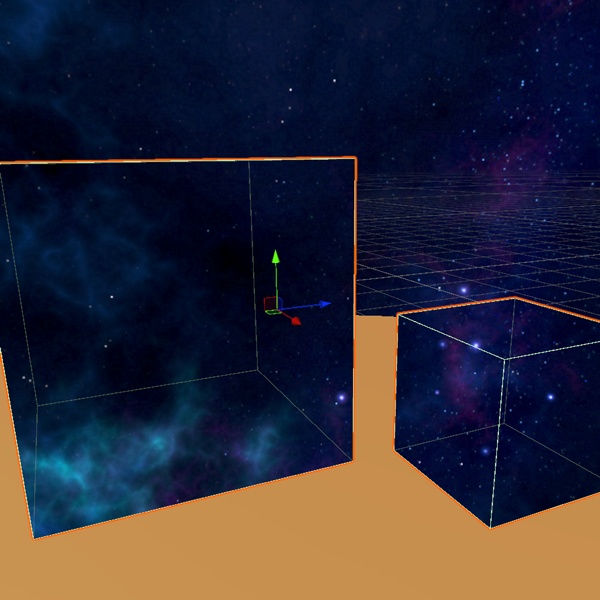

🌌 Skybox Surface Shader - Unity Built-in Shader Paint the Sky on Any Surface - "Turn any mesh into a perfect slice of your skybox." - "Ceilings, domes, and fake windows that match your sky — automatically." - "Your skybox, on any surface. Zero manual texture setup." Want an open-sky ceiling, an infinite window, or a mirror that reflects the horizon — without manually duplicating textures? Skybox Surface Shader is a Built-in shader and synchronization script that automatically copies your scene's skybox (Panoramic or Cubemap) onto any mesh. Simply enable Perfect Match and the surface will align seamlessly with the scene's actual sky, creating the illusion of an endless view. Why Use It? - Generic materials on walls and ceilings often fail to match the scene's skybox, reducing visual immersion. - Manually syncing skybox textures, rotation, exposure, and tint settings is tedious and easy to get wrong. - Reflection probes can be costly in performance and may not provide the desired infinite-sky illusion. - Create open-sky ceilings, infinite windows, and sky-reflecting surfaces without writing a single line of shader code. 📦 Package Contents - SkyboxOnlySurface.shader — Fully featured skybox surface shader - SkyboxOnlySurfaceSync.cs — Automatically syncs with your scene's RenderSettings.skybox - Example material ready for immediate use - Detailed README with setup instructions and quick start guide - Commercial license for use in VRChat worlds, games, videos, and other projects ✨ Features - Auto Sync — Automatically synchronizes the scene skybox texture, HDR settings, tint, exposure, and rotation. - Perfect Match — Window mode with glass effects disabled provides a near pixel-perfect match with Panoramic skyboxes. - Two Rendering Modes — Window mode displays the sky through the surface, while Mirror mode reflects the sky. - Panoramic & Cubemap Support — Automatically detects and adapts to the skybox type used in the scene. - Optional Visual Effects — Includes Edge Glow and Darken Edges for a glass-like appearance. - Inner Face Support — Works correctly when viewed from inside domes, spheres, and enclosed environments. - Built-in Render Pipeline Compatible — Supports Unity 2019+ and Unity 2022 LTS. - Works in Standard Unity Projects — No VRChat SDK or additional packages required. 🚀 Quick Start - Configure your skybox in Lighting > Environment. - Apply the Skybox Only Surface material to any mesh. - Add SkyboxOnlySurfaceSync to the same GameObject. - Enable Perfect Match and you're ready to go. ❓ FAQ Does it work with URP or HDRP? - No. This asset is designed exclusively for the Built-in Render Pipeline. Do I need the VRChat SDK? - No. It works in any Unity project using the Built-in Render Pipeline. Can I use it commercially in VRChat worlds? - Yes. Commercial use is permitted under the included license. Do I need to manually configure the skybox texture? - No. When using SkyboxOnlySurfaceSync with Perfect Match enabled, the setup is handled automatically. What's the difference between Window and Mirror modes? - Window mode displays the sky as if you're looking through an opening or transparent surface. - Mirror mode reflects the sky based on the surface normals. Can I resell or redistribute the .unitypackage? - No. You may use the asset in your final projects, including commercial projects, but redistribution, resale, or sharing of the original files is not permitted. 📋 Requirements Unity Built-in RP · Skybox set in Lighting · Not compatible with URP/HDRP