

【VRChat・汎用】影の出ないワールドでも足元に影が落ちるシェーダー「足影」(アバター用・PC)
- Digital500 JPY
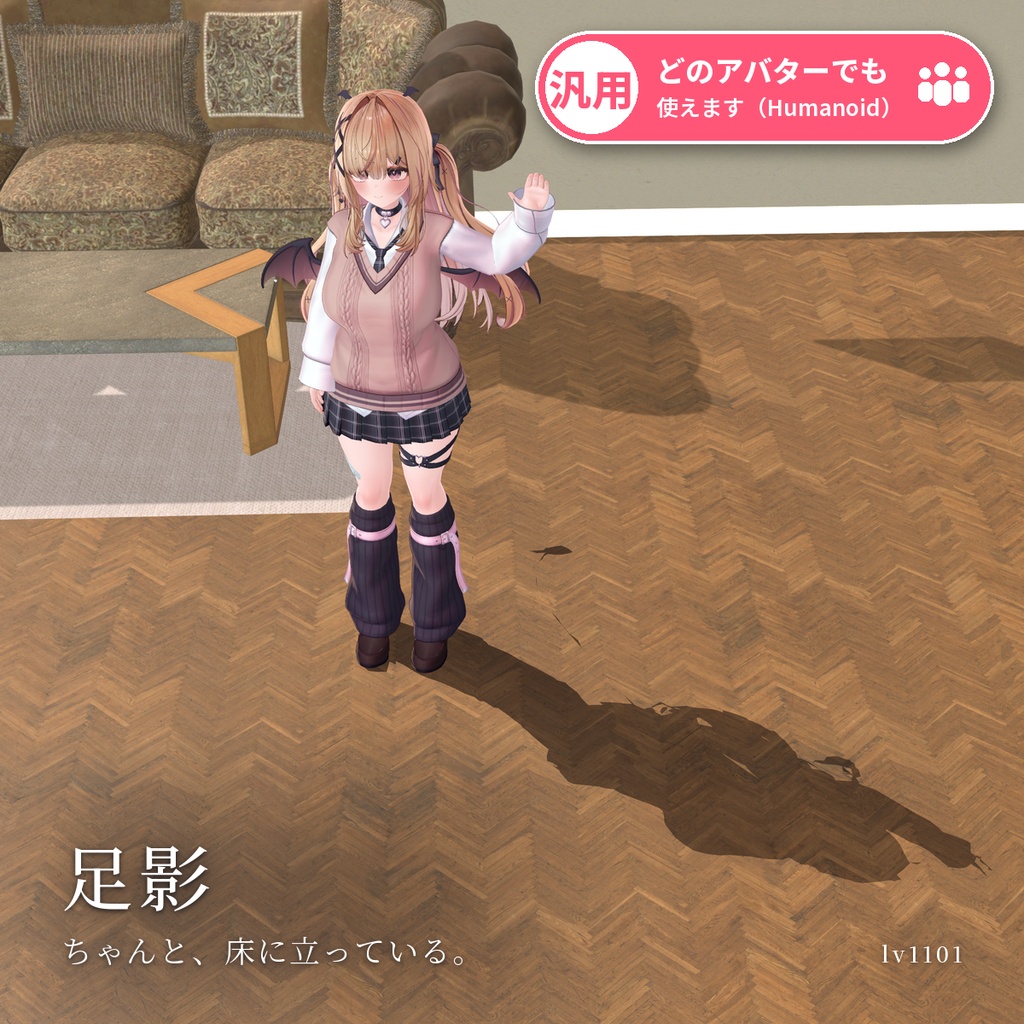
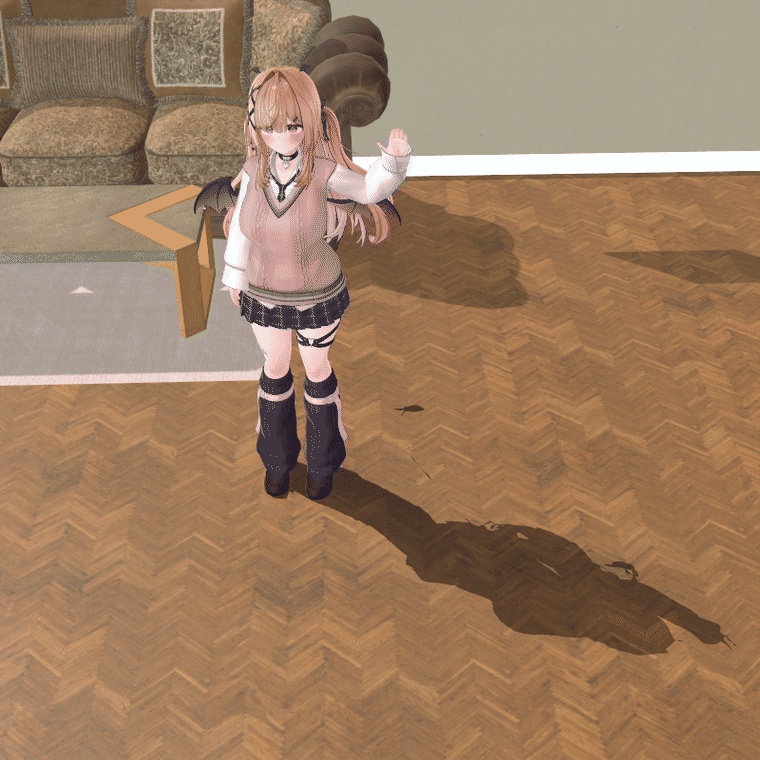
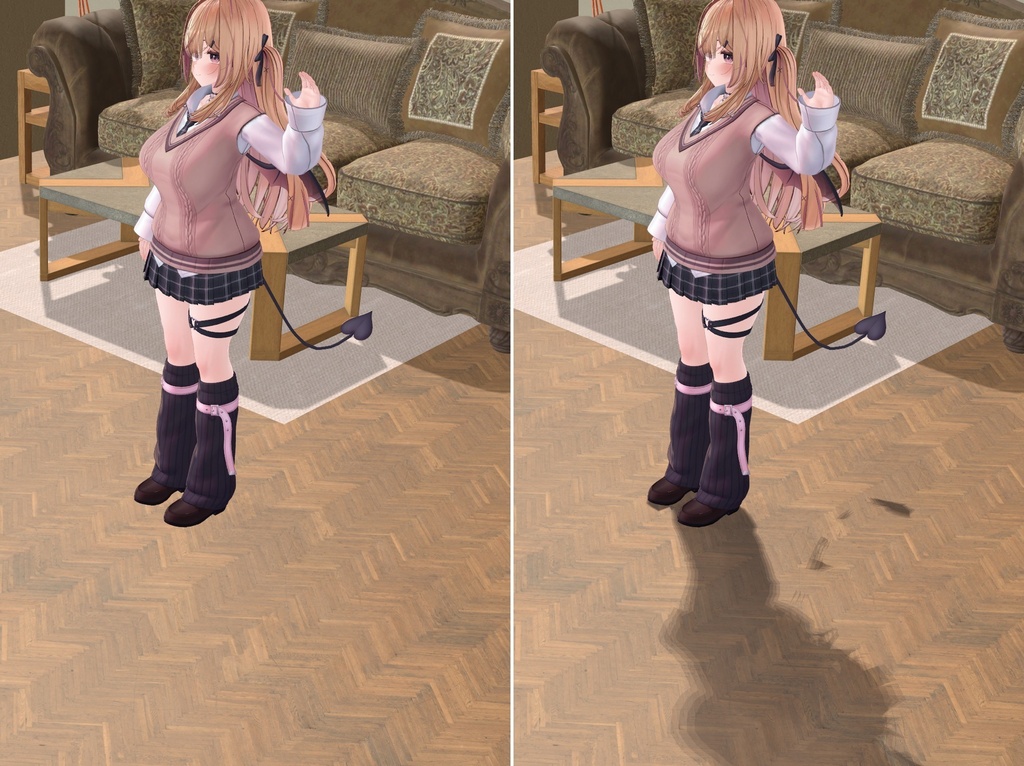
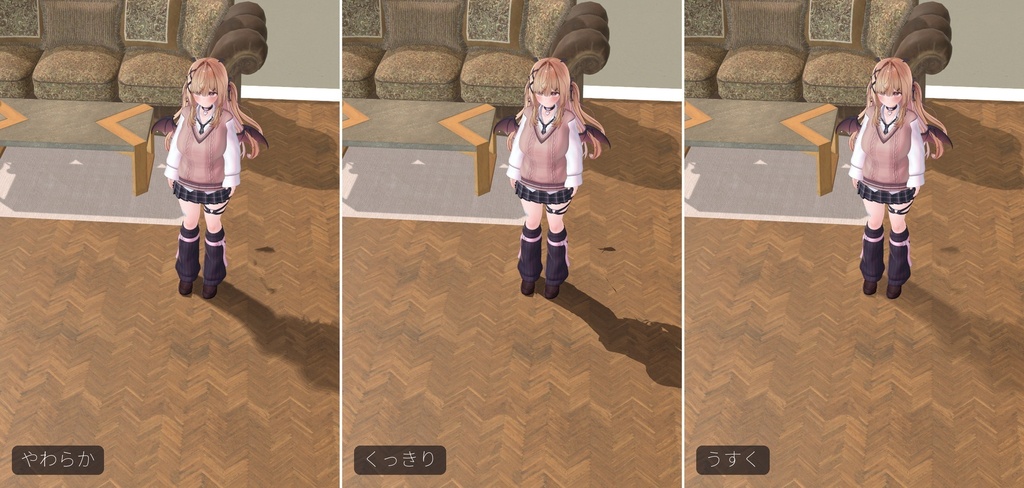
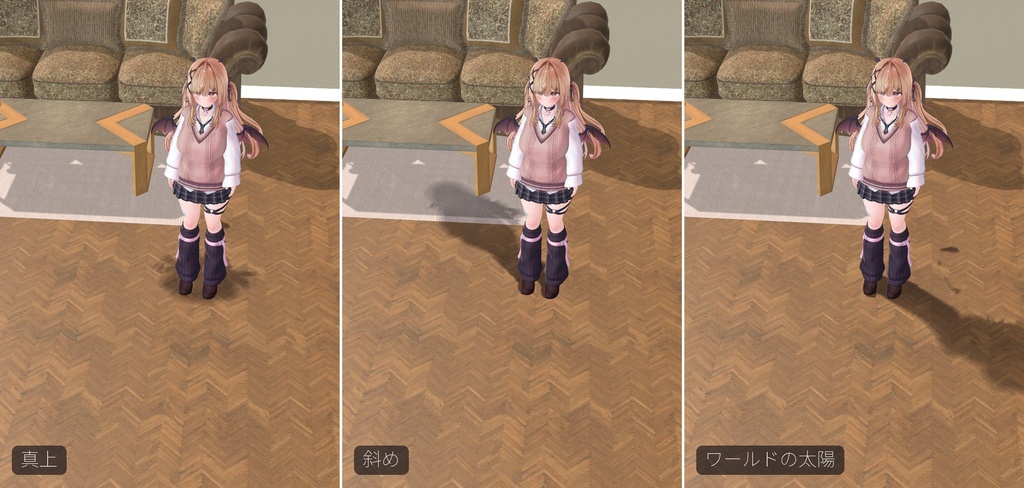
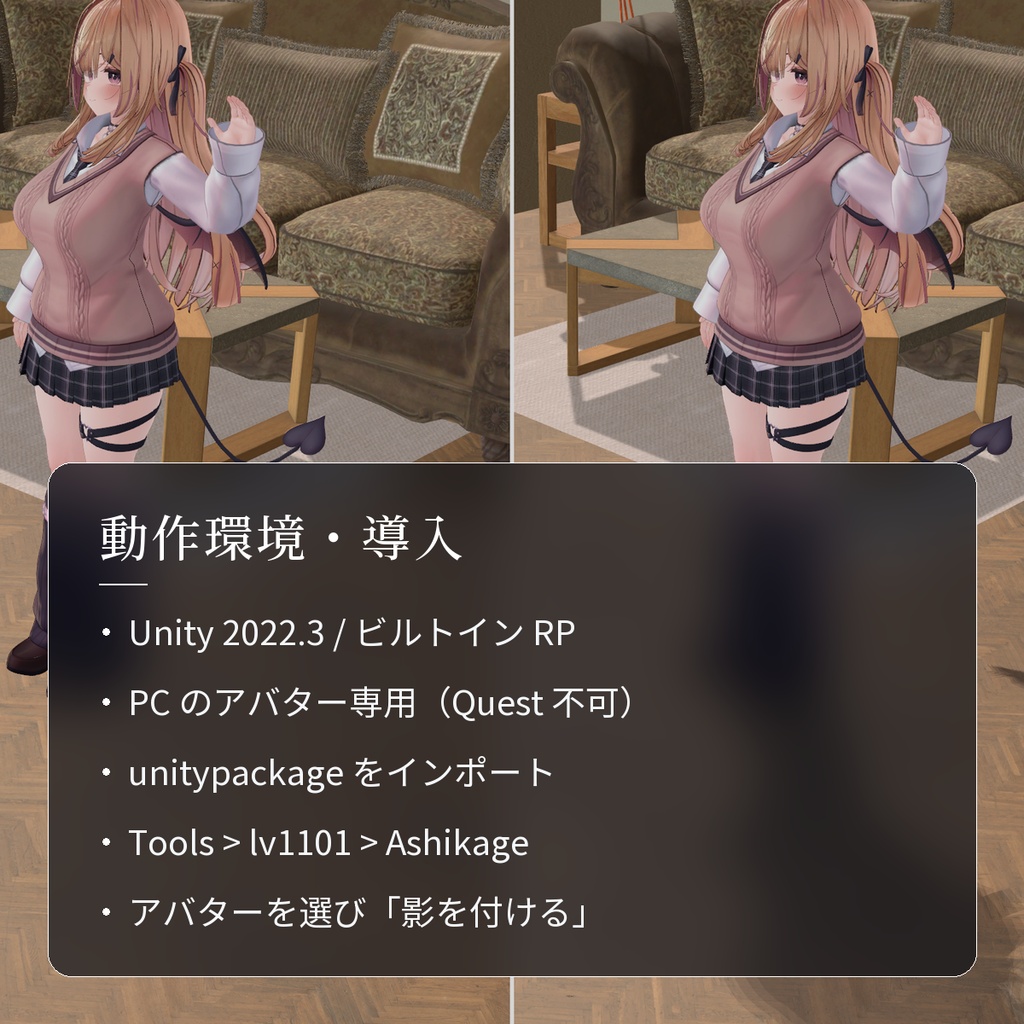
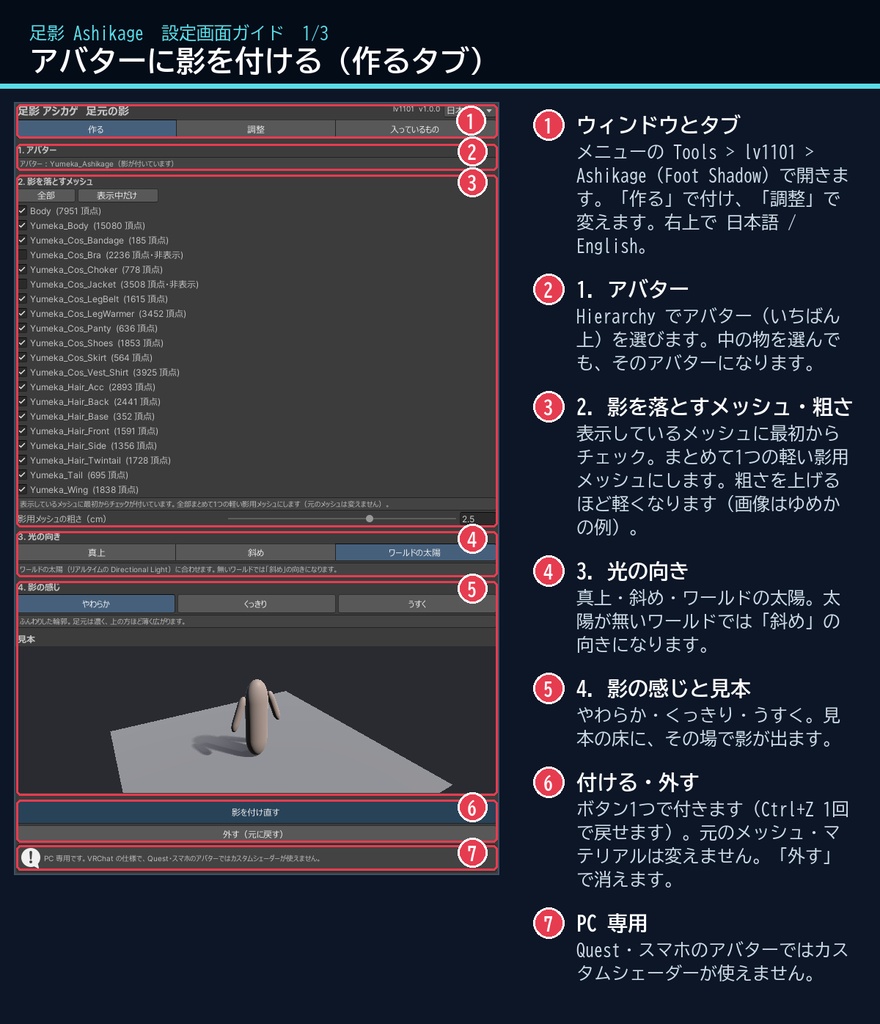
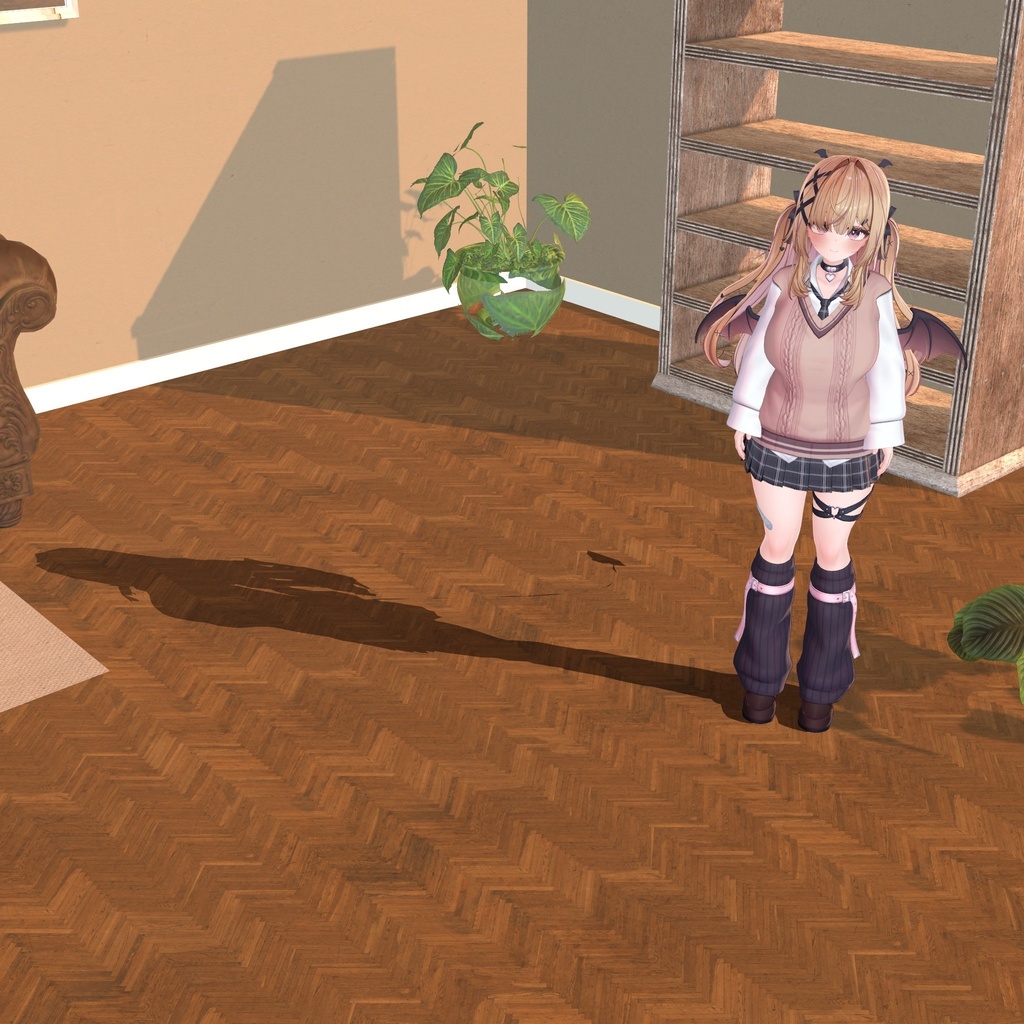
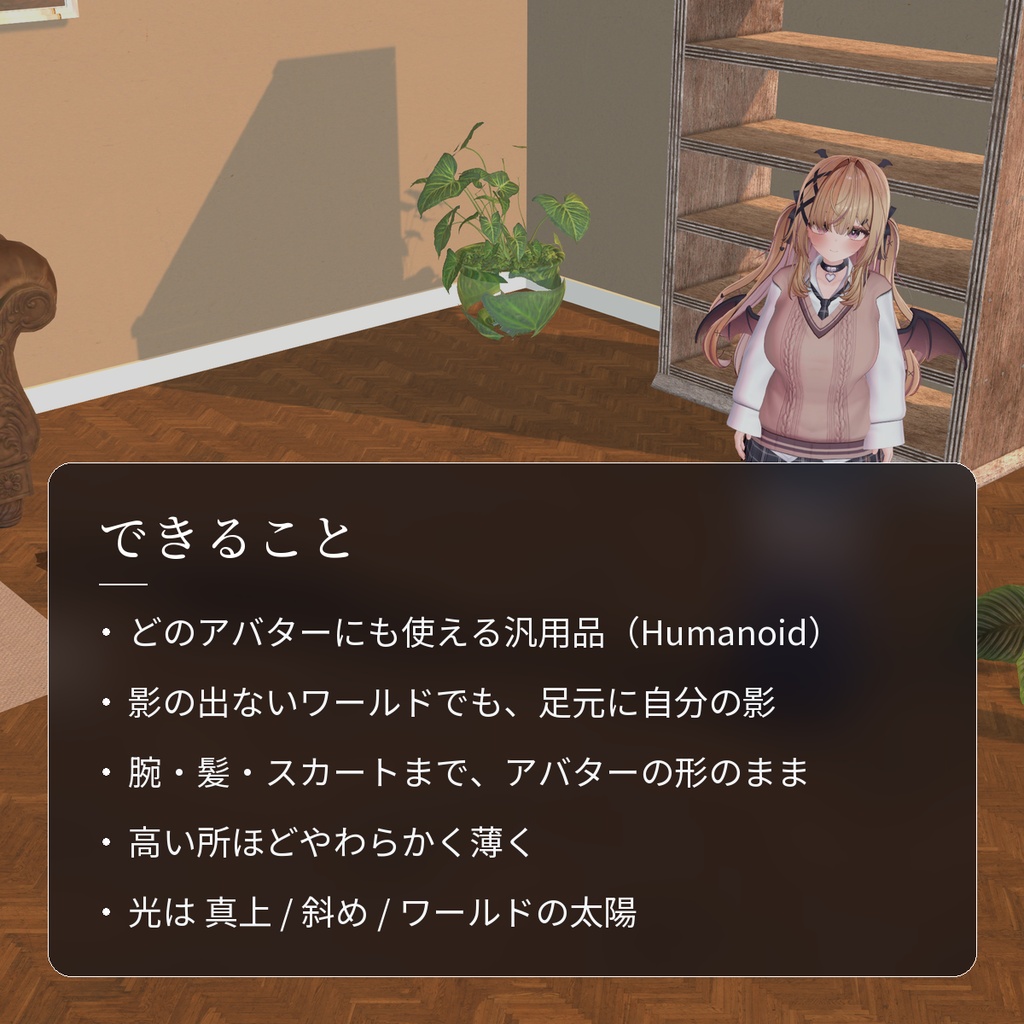
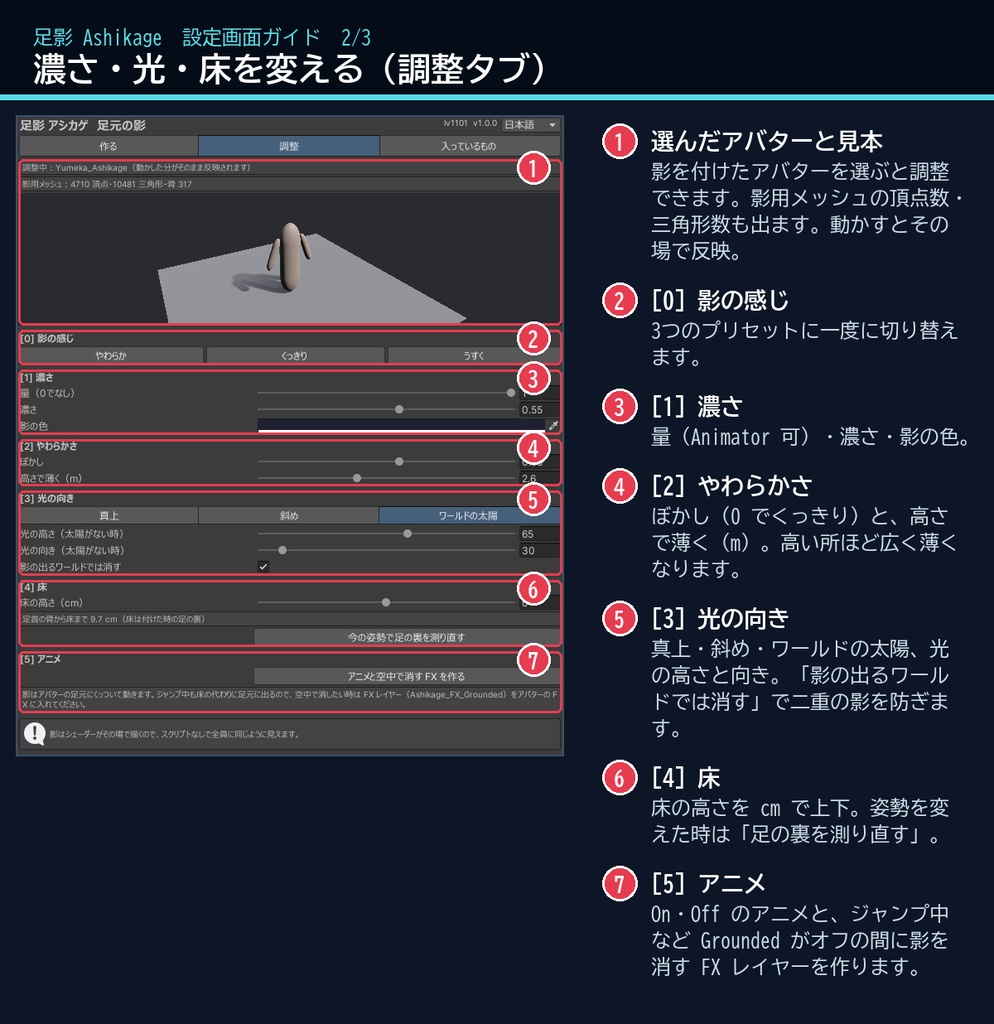
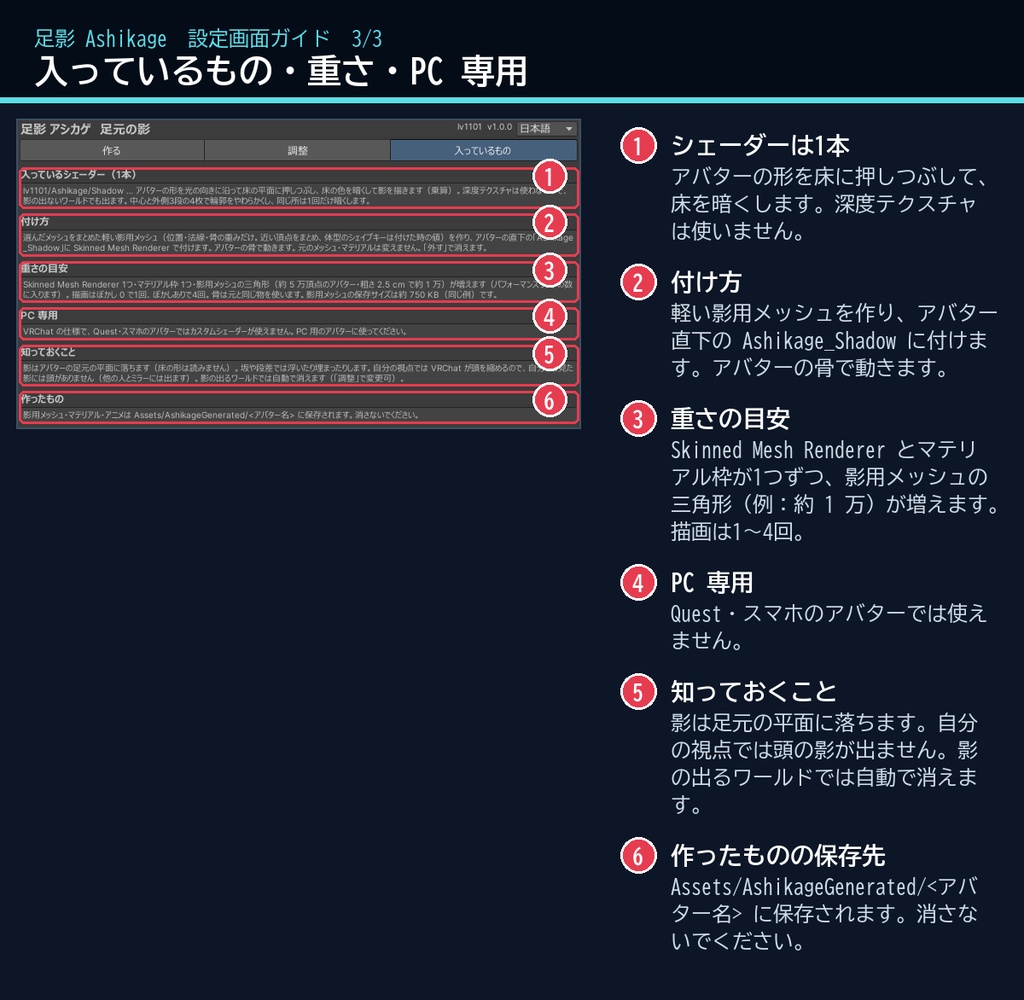
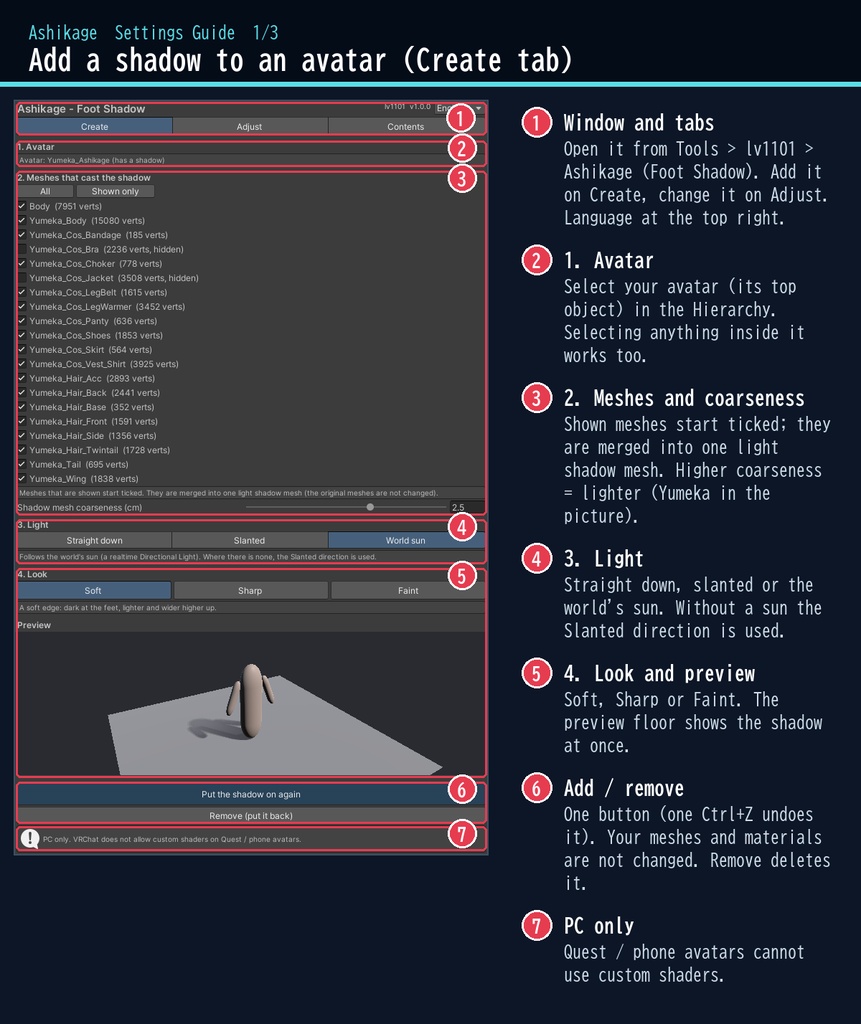
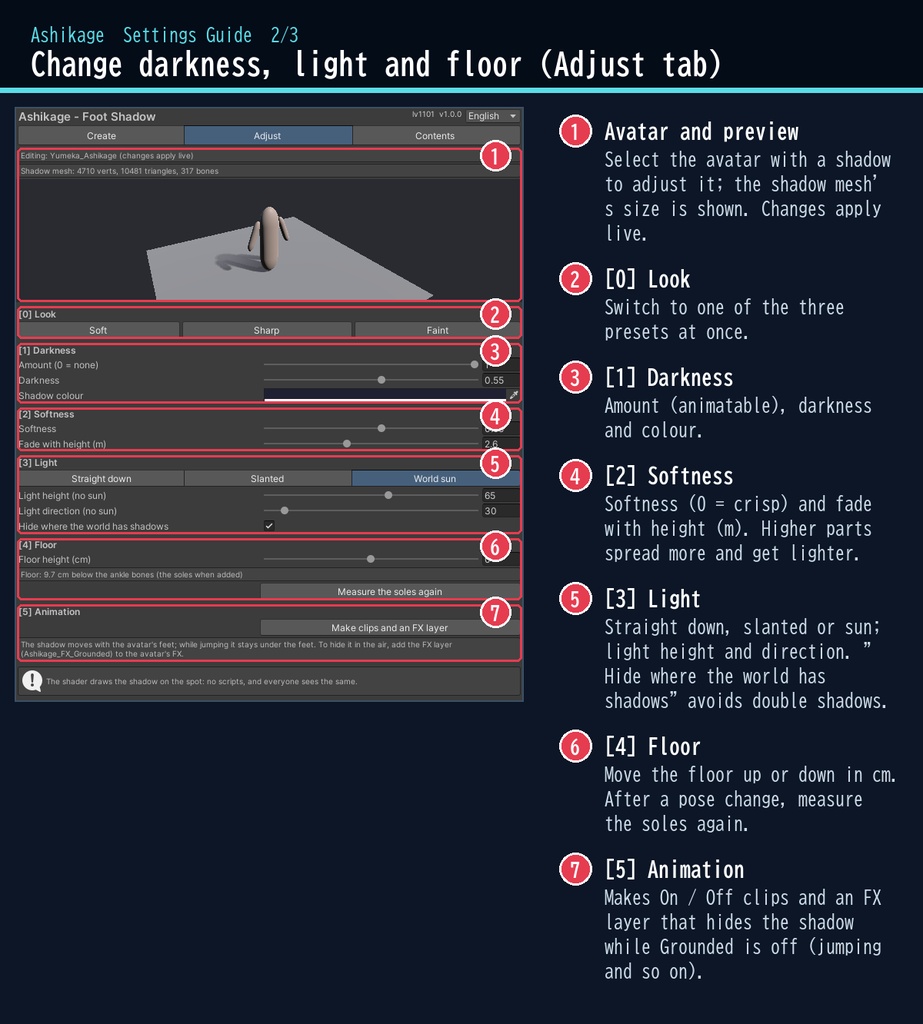
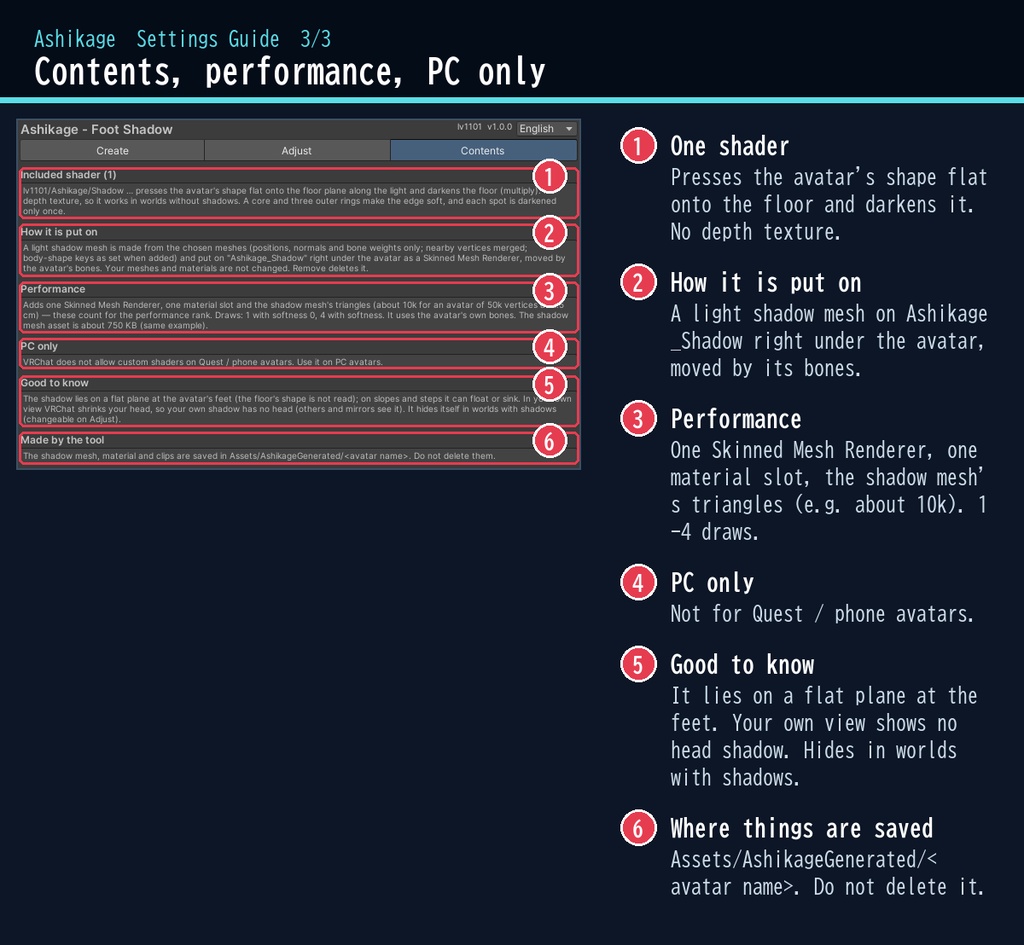


宙に浮いて見えていた足元に、自分の影を。 「足影(アシカゲ)」は、影の出ないワールドでも、アバターの形の影を足元の床に落とすシェーダーです。 手を振れば影も手を振り、髪やスカートの形もそのまま。床にちゃんと立っているように見えます。 アバターを選んでボタンを押すだけで、見ている全員に同じように見えます。 ■ ポイント ・ゆめか専用ではありません。Humanoid のアバターなら、どのアバターにも使える汎用品です ・影の出ないワールドでも、足元に自分の影 ・腕・髪・スカート・しっぽまで、アバターの形のまま ・足元は濃く、高い所ほどやわらかく薄く ・光は 真上 / 斜め / ワールドの太陽 から選べる ・影の出るワールドでは自動で消える(二重にならない) ↓ 動きは2枚目の GIF、くわしくは下へ。 ■ くわしく ・足元の影:腕・髪・スカート・しっぽまで、アバターの形のまま床に落ちます ・やわらかさ:中心と外側3段の4枚で輪郭をぼかし、床から高い所ほど広く・薄くなります。0 にすると、くっきりした影(アニメ調に) ・光の向き:真上(足元に丸く)/ 斜め(高さと向きを指定、ワールドに固定)/ ワールドの太陽(リアルタイムの Directional Light に合わせる。無い時は斜め) ・調整:量・濃さ・影の色・ぼかし・高さで薄く・床の高さ(cm) ・プリセット:やわらか / くっきり / うすく ・腕と体が重なっても、同じ所は1回だけ暗くなります(濃いむらが出ません) ・床より下になった部分は消え、光が低すぎる時は 30 度で止めます(影が伸びすぎません) ・影の出るワールドでは自動で消えます(見ている人の設定で影がオンの時。切り替え可) ・量(_Amount)は Animator で動かせます。On / Off のアニメと、ジャンプ・落下・飛行中(VRChat の Grounded がオフ)に影を消す FX レイヤーをボタン1つで作れます ・影用メッシュは選んだメッシュをまとめて軽くした物(位置・法線・骨の重みだけ)。アバターの骨で一緒に動きます ・非破壊:アバターの下に「Ashikage_Shadow」を1つ足すだけ。元のメッシュ・マテリアルは変えません ・「外す(元に戻す)」ボタンで消せます。付けるのも Ctrl+Z 1回で取り消せます ■ 動作環境 ・対応アバター:汎用。Humanoid のアバターならどれでも使えます(画像はゆめかで撮影。lilToon 2.3.4 で確認) ・Unity 2022.3(VRChat で使うバージョン) ・ビルトイン レンダーパイプライン ・PC 専用(VRChat の仕様で、Quest・スマホのアバターではカスタムシェーダーが使えません) ・VRChat SDK3 Avatars(なくてもコンパイルできます。Modular Avatar も不要です) ・深度テクスチャは使いません ■ 導入 1. unitypackage を Unity にドラッグ&ドロップしてインポート 2. メニューの Tools > lv1101 > Ashikage (Foot Shadow) でウィンドウを開く 3. Hierarchy でアバターを選び、「影を付ける」を押す 使い方は同梱の README_ja.txt と、商品画像の「設定画面ガイド」(日本語・英語)にあります。 ウィンドウ右上で 日本語 / English を切り替えられます(Auto は PC の言語に合わせます)。 ■ 重さの目安 Skinned Mesh Renderer が1つ、マテリアル枠が1つ増えます。影用メッシュの三角形も増えます(ゆめか・粗さ 2.5 cm で約 1 万。パフォーマンスランクのポリゴン数に入ります。粗さで調整できます)。 描画はぼかし 0 で1回、ぼかしありで4回(同じ軽いメッシュ)。骨はアバターの物をそのまま使います。影用メッシュの保存サイズはゆめかで約 750 KB です。 ■ 内容物 ・Ashikage_1.0.0.unitypackage(README_ja.txt / README_en.txt 入り) ・利用規約.txt / TermsOfUse_en.txt ■ ご注意 ※画像は Unity 上(Linear)で撮影したものです。家具の影はワールドの影(ベイク)に見立てたもので、アバター自身はリアルタイムの影を落としていません(足元の影は足影のものです。撮影のため「影の出るワールドでは消す」をオフにしています)。 ※背景の素材:Poly Haven(CC0)。商品には含みません。 ※画像のアバター:ゆめか Yumeka(©Arka_X / https://booth.pm/ja/items/8672657 )。商品には含みません。 ※影は足元の平面に落ちます(床の形は読みません)。坂や段差では浮いたり、床に埋まって見えなくなったりします。 ※影は足元についていくので、ジャンプ中は空中に浮きます(FX レイヤーで消せます)。 ※自分の視点では VRChat が頭を縮めるので、自分から見た影には頭がありません(他の人・ミラーでは出ます)。 ※体型のシェイプキーは付けた時の値で影に入ります。変えた時は付け直してください。 ■ 利用規約(概要) ・VRChat のアバター(Public/商用・有料イベントでの使用を含む)で使えます ・改変できます ・シェーダー・スクリプトの再配布、転売はできません(改変したものも含む) ・クレジット表記は任意です(書いていただけると嬉しいです) 詳しくは同梱の 利用規約.txt をご覧ください。 ―――――――――――――――― ■ English Works with any avatar (universal, Humanoid avatars) - the images just use Yumeka. Ashikage is a foot shadow shader and tool for VRChat avatars (PC only, Built-in RP, Unity 2022.3). Even in worlds without shadows, it lays an avatar-shaped shadow on the floor at your feet. The avatar's mesh is pressed flat onto the floor plane along the light, so no depth texture is needed and it works in every world. Dark at the feet, softer and lighter higher up. Light: straight down, slanted (fixed to the world) or the world's sun (its realtime Directional Light; slanted where there is none). Adjust darkness, colour, softness, fade with height and the floor height. Where the world already casts realtime shadows (and the viewer has shadows on) it hides itself, so there are no double shadows. No Udon / U#: the shader draws it on the spot, so everyone sees the same. Select your avatar in the dedicated window and press one button. It is non-destructive: one child "Ashikage_Shadow" with a light shadow mesh (positions, normals and bone weights only) moved by the avatar's own bones; your meshes and materials are not changed. "Remove" deletes it. Presets: Soft / Sharp / Faint. A stencil darkens each spot only once (no dark patches where an arm crosses the body). Parts under the floor fade; a very low sun is held at 30 degrees. _Amount is animatable: one button makes On / Off clips and an FX layer that hides the shadow while VRChat's Grounded is off (jumping, falling, flying). PC avatars only: VRChat does not allow custom shaders on Quest / mobile avatars. Performance: adds one Skinned Mesh Renderer, one material slot and the shadow mesh's triangles (about 10k for Yumeka at 2.5 cm; counts for the polygon rank, adjustable). Draws: 1 with softness 0, 4 with softness. Avatar in the images: Yumeka (©Arka_X), not included. Backgrounds: Poly Haven (CC0), not included. • Full English UI: switch Auto / 日本語 / English at the top right of the window • English README (README_en.txt) and Terms of Use (TermsOfUse_en.txt) included • English settings guide images are included in the product images Install: import the unitypackage, open Tools > lv1101 > Ashikage (Foot Shadow), select your avatar and press "Add shadow". Terms (summary): usable on VRChat avatars, including public use, commercial use and paid events; modification allowed; redistribution or resale of the shader / scripts (including modified versions) is not allowed; credit is optional. ■ 更新履歴 / Version history 1.0.0 最初の版 / First release