

【無料】非破壊FT変換ツール|VRChat SDK 3.10.6 対応
- 無料版Digital0 JPY
- 応援版(内容・機能は無料版と同じ)Digital300 JPY


【無料・応援版あり】非破壊FT変換ツール|VRChat SDK 3.10.6 対応
日本語
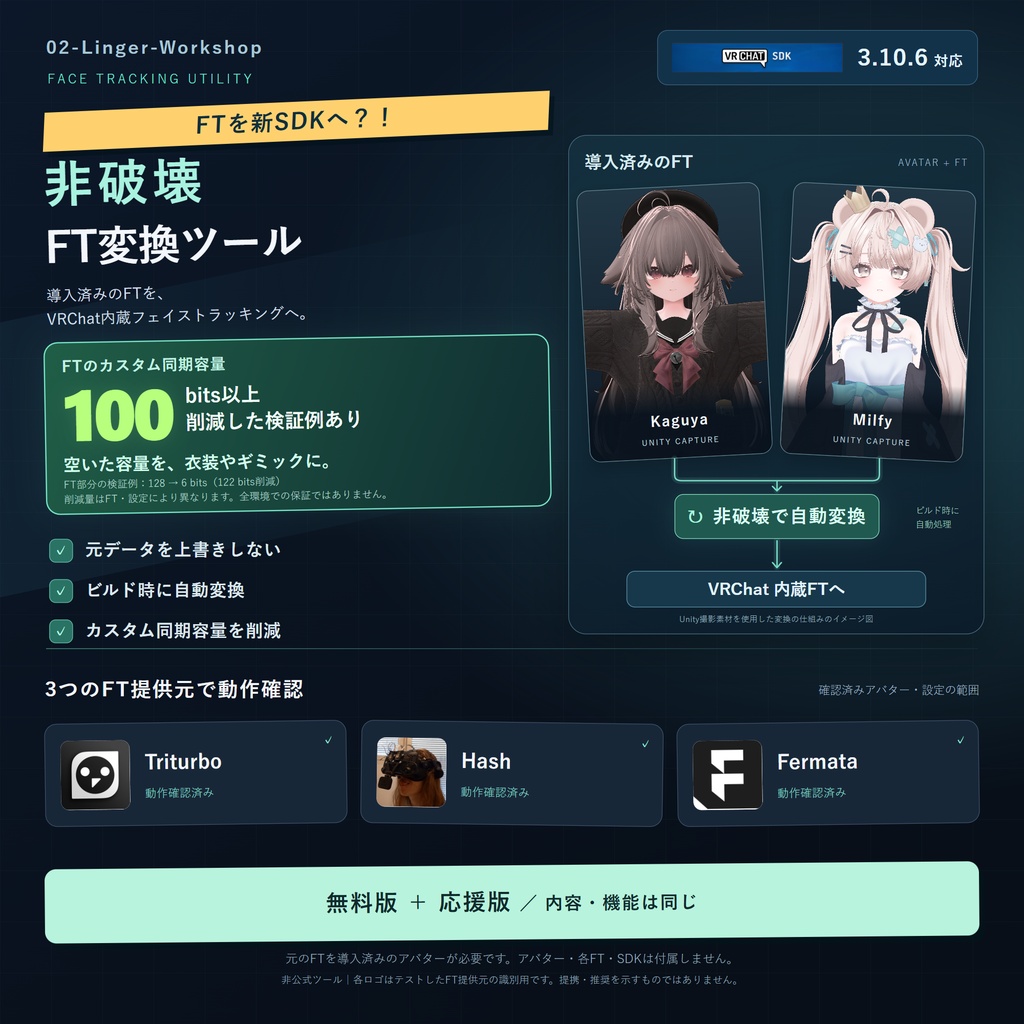
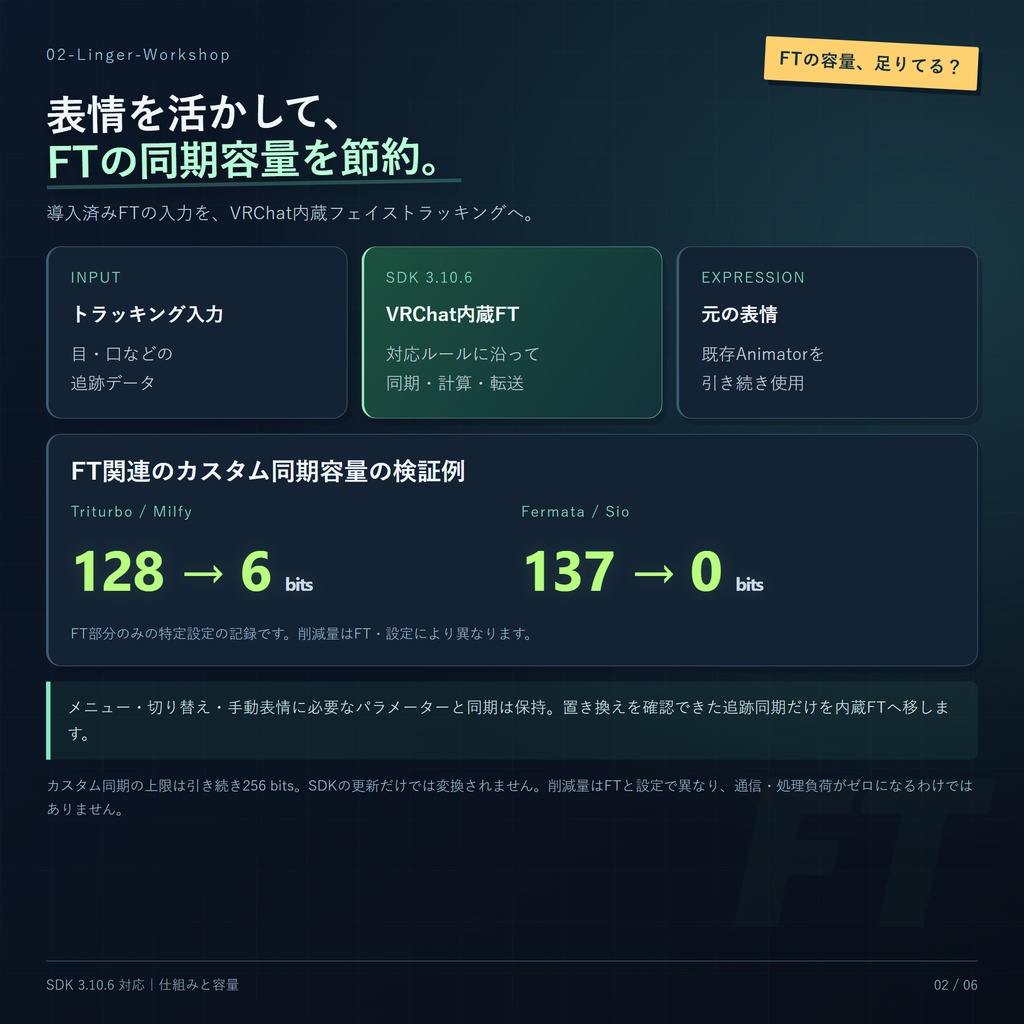
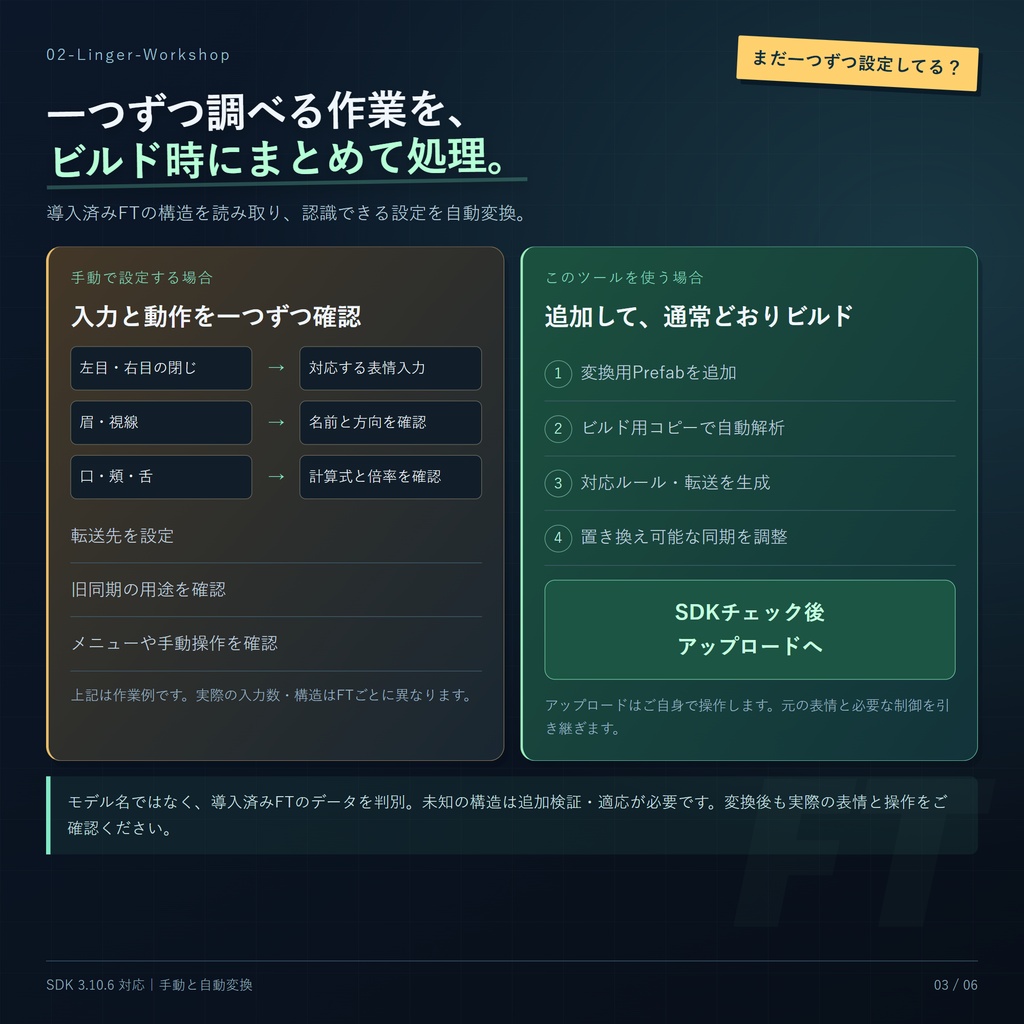
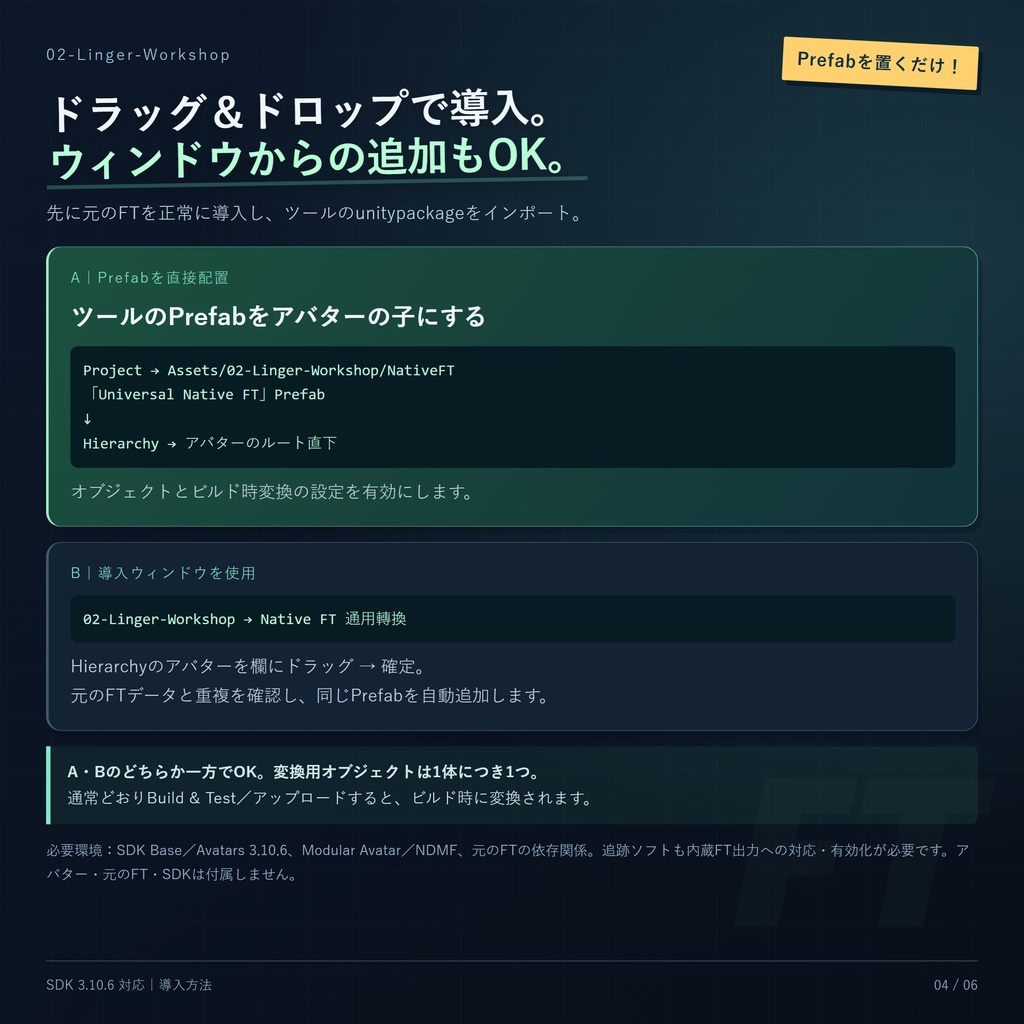
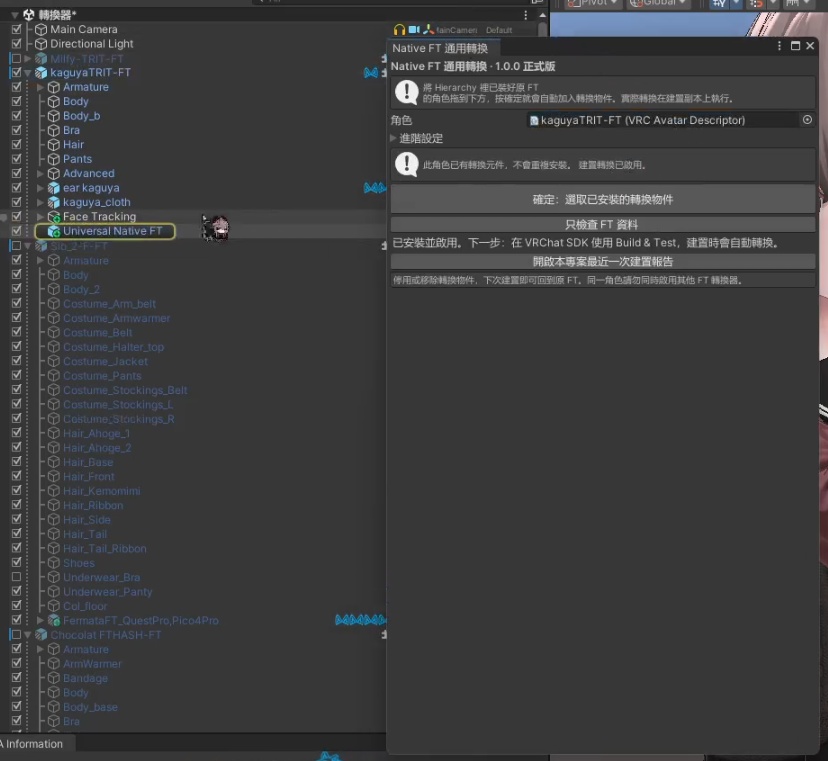
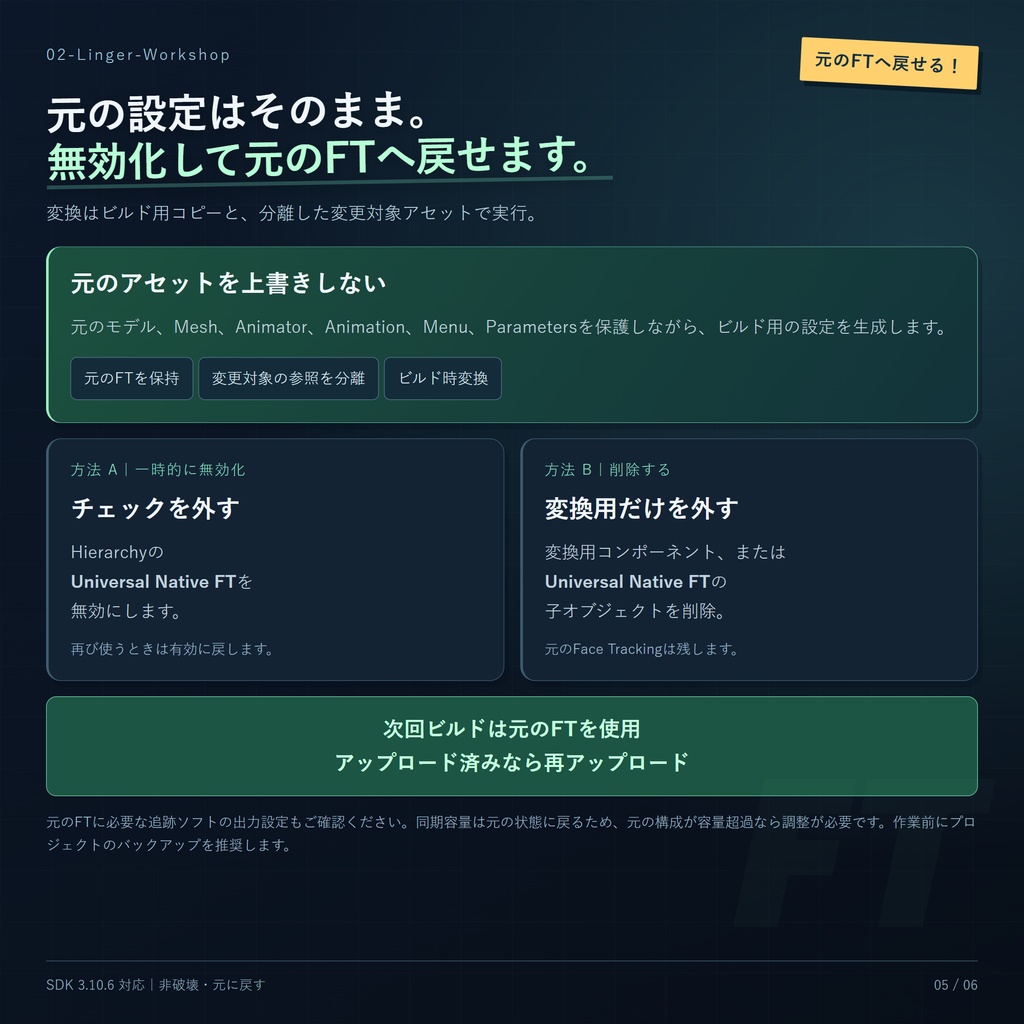
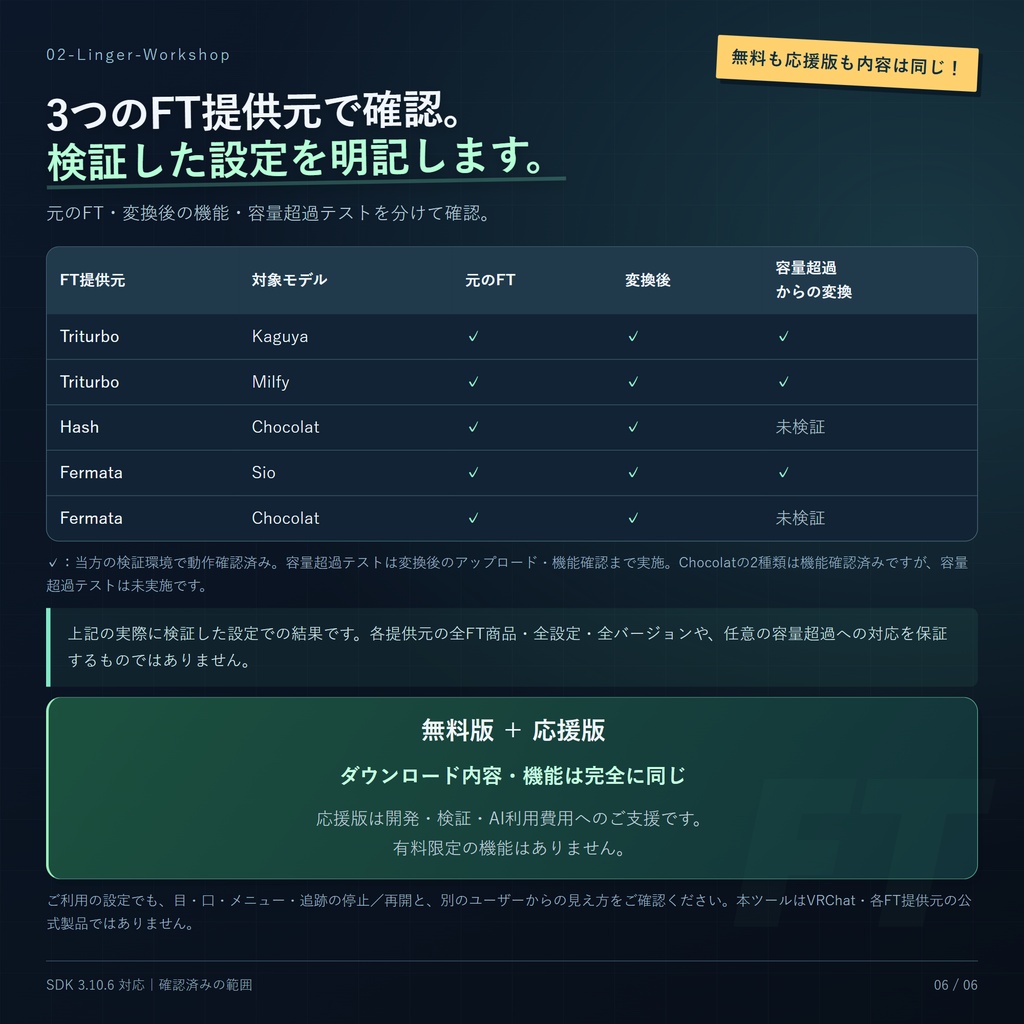
非破壊FT変換ツール 導入済みのFTを、VRChat内蔵フェイストラッキングへ。 普段使っている表情を活かしながら、FTが使用するカスタム同期パラメーターの容量を減らすためのツールです。 導入済みのFTデータを解析し、ビルド用コピーに内蔵フェイストラッキング設定を自動生成します。認識できた既存のアニメーションや操作を引き継ぎます。「Native FT」はVRChat内蔵のフェイストラッキング機能を指します。 ■ 無料版・応援版について 無料版と有料の応援版は、収録ファイル・機能ともに完全に同じです。有料版限定の機能はありません。 無料でご利用いただけます。開発・検証・AI利用にかかる費用を応援していただける場合は、応援版をお選びください。ご支援ありがとうございます! ■ 主な機能 ・現在の変換ルールに合う導入済みFTデータを自動判別します。アバター名による利用制限はありません。 ・ビルド用コピーと、変更対象として分離した参照アセットのみを編集します。元のPrefab、FBX、Mesh、Animator、Animation、Menu、Parametersは上書きしません。 ・インストール画面から、変換用オブジェクトをアバターに自動追加します。 ・置き換え可能と確認できた追跡入力を内蔵FTへ移し、カスタム同期容量を削減します。必要な手動操作や他の機能のパラメーターは保持します。 ・変換用オブジェクトやコンポーネントを無効にすると、次回のビルドで元のFTに戻せます。 ■ 動作確認済みのFT・アバター ・Triturbo:Kaguya、Milfy ・Hash/hashedits:Chocolat ・Fermata:Sio、Chocolat 上記のFTパッケージと設定について、元のFTおよび変換後の機能を実際に検証し、動作を確認しています。容量超過状態からの変換は、Triturbo/Kaguya・MilfyとFermata/Sioで確認済みです。Hash・FermataのChocolatでは容量超過テストを行っていません。 結果は記載の設定に限ります。各提供元の全FT商品・全設定・全バージョンを検証したものではなく、未記載の構成は未検証です。 ■ 同期容量の検証例 以下は特定の検証設定におけるFT関連のカスタム同期容量のみの比較(変換前 → 変換後)です。アバターの他の機能は含みません。 ・Triturbo/Milfy:FTの同期容量 128 → 6 bits。 ・Fermata/Sio:FTの同期容量 137 → 0 bits。 削減量は設定によって異なります。256 bitsはパラメーターの個数ではなく、カスタム同期容量の上限です。容量が減っても、通信量や処理負荷がゼロになるわけではありません。 ■ 必要な環境 ・元のFTが導入済みで、正常に動作しているアバター。本ツールにアバター本体や各制作者のFTパッケージは含まれません。元のFTの導入やメッシュパッチを代行するものではありません。 ・VRChat SDK Base/Avatars 3.10.6正式版以降。実際の検証は3.10.6で行っています。今後のSDKでは互換性の確認が必要です。 ・Modular Avatar、NDMF、および元のFTが必要とする依存パッケージ。 ・VRChat内蔵FTへ入力できるトラッキングソフトと機器。当方の検証環境はPaper Tracker 7.4.0+Quest 3Sです。その他の機器での動作確認を意味するものではありません。 ・Unityでの検証環境:2022.3.22f1。 ■ 導入手順 1. 元のFTが正常に動作することを確認し、プロジェクトをバックアップします。 2. 本ツールのunitypackageをインポートし、Unityのコンパイル完了を待ちます。 3. 次のどちらか一方の方法で導入します。 A|Prefabを直接ドラッグ&ドロップ:ProjectでAssets/02-Linger-Workshop/NativeFTを開き、「Universal Native FT」PrefabをHierarchy内のアバターのルート直下にドラッグし、子オブジェクトとして配置します。 B|導入ウィンドウ:「02-Linger-Workshop → Native FT 通用轉換」を開き、Hierarchy内のアバターのルートをアバター欄にドラッグして確定します。同じ変換用Prefabが自動追加され、元のFTデータや重複導入のチェックも行えます。 4. 変換用オブジェクトはアバターごとに1つだけ配置してください。オブジェクトとビルド時変換の設定を有効にし、AとBでそれぞれ追加しないでください。 5. 通常どおりBuild & Testまたはアップロードを行います。ビルド時に変換されます。 6. 目・口・既存の表情・メニューを確認し、別のユーザーからの見え方も確認してください。 配置先:Assets/02-Linger-Workshop/NativeFT。 SDK 3.10.5には必要な内蔵FT機能がありません。依存関係の案内を表示し、変換を有効にしたままコア機能が読み込めない場合はビルドを停止します。 ■ 無効化・注意事項 変換用オブジェクトやコンポーネントを無効にする、ビルド時変換をオフにする、またはコンポーネントを外すと、次回のビルドでは元のFTが使われます。アップロード済みアバターへ反映するには再アップロードが必要です。 同じアバターで他のFT変換ツールを同時に有効にしないでください。 用途を確認できないパラメーターや独自の制御・アニメーション構造については、理由を表示し、追加検証や個別の適応が必要になります。 元の容量が256 bitsを超えていても、変換後に必ずアップロードできるとは限りません。最終ビルドの総容量とSDKの検証結果をご確認ください。 ■ 表記について 本ツールはVRChat、Triturbo、Hash、Fermataの公式製品ではありません。ショップアイコンは動作確認済みFTの識別用であり、提携や推奨を示すものではありません。画像内のアバター、各FTパッケージ、SDKは付属しません。 元のFTのショップ: Triturbo:https://triturbo.booth.pm/ Fermata:https://fermat.booth.pm/ Hash:https://hashedits.booth.pm/ この日本語説明は、繁体字中国語の原文をAIで翻訳したものです。表現が不明瞭な場合は、繁体字中国語の説明をご確認ください。
繁體中文
非破壞式面捕轉換工具 把已經安裝好的 FT,轉為 VRChat 內建面捕。 想保留原本喜歡的表情,又想減少 FT 佔用的自訂同步參數嗎? 本工具會讀取角色已安裝的 FT 設定,在建置副本上自動建立 VRChat 內建面捕設定,沿用已辨識的原有動畫與控制方式。 這裡的「Native FT」就是 VRChat 內建的面部追蹤系統。 ■ 免費版與付費支持版 兩者的下載內容與功能完全相同,沒有付費限定功能。 工具可免費使用。如果你願意支持開發、測試與 AI 使用成本,也可以選擇付費支持版。謝謝你的支持! ■ 主要功能 ・自動辨識已安裝、符合目前轉換規則的 FT 資料,不以角色名稱作為使用限制。 ・非破壞式轉換:只修改建置副本及隔離的引用資產,不覆寫來源 Prefab、FBX、Mesh、Animator、Animation、Menu 或 Parameters。 ・安裝視窗會自動把轉換物件加入角色,不必手動尋找 Prefab。 ・把已確認可替代的追蹤輸入轉為內建面捕,減少其自訂同步用量;必要的手動控制與其他功能參數仍會保留。 ・停用轉換物件或元件後,下次建置即可回到原 FT。 ■ 已測試的 FT 來源與角色 ・Triturbo:Kaguya、Milfy ・Hash/hashedits:Chocolat ・Fermata:Sio、Chocolat 以上 FT 套件與設定已完成實際測試,原廠 FT 與轉換後的功能皆已驗收通過。容量超額測試另完成於 Triturbo/Kaguya、Milfy 與 Fermata/Sio;Hash、Fermata 的 Chocolat 未進行容量超額測試。 測試結果限於所列配置,尚未涵蓋三家全部 FT 商品、設定與版本;未列項目屬於尚未驗證。 ■ 同步用量實例 以下只比較特定測試配置中 FT 相關的自訂同步容量(轉換前 → 轉換後),不包含角色其他功能。 ・Triturbo/Milfy:FT 同步容量 128 → 6 bits。 ・Fermata/Sio:FT 同步容量 137 → 0 bits。 節省量依角色與設定而異,不保證所有角色都能降到相同數字。256 指的是自訂同步參數的位元預算,不是參數個數。減少此用量,也不代表沒有網路傳輸或額外運算。 ■ 使用前準備 ・已正常安裝並可使用原 FT 的角色;本工具不包含角色本體或各家的 FT 套件,也不替代原 FT 的安裝與模型修補。 ・VRChat SDK Base 與 Avatars 3.10.6 正式版或以上;本次實際驗證為 3.10.6。未來版本仍需確認相容性。 ・Modular Avatar、NDMF,以及原 FT 所需的依賴。 ・支援 VRChat 內建面捕輸出的追蹤軟體與裝置。本次驗收環境使用 Paper Tracker 7.4.0 與 Quest 3S;這不代表其他設備皆已驗證。 ・工具的 Unity 驗證環境為 2022.3.22f1。 ■ 使用方式 1. 先確認原廠 FT 可以正常運作,並保留專案備份。 2. 匯入本工具的 unitypackage,等待 Unity 編譯完成。 3. 以下兩種安裝方式擇一: A|直接拖入 Prefab(Drag & Drop):在 Project 開啟 Assets/02-Linger-Workshop/NativeFT,將「Universal Native FT」Prefab 拖到 Hierarchy 的角色根物件底下,成為角色的子物件。 B|安裝視窗:開啟「02-Linger-Workshop → Native FT 通用轉換」,將 Hierarchy 的角色根物件拖入角色欄位,按確定,自動加入同一個轉換 Prefab。視窗也提供來源檢查與重複安裝檢查。 4. 同一角色只保留一個轉換物件,確認物件已啟用且「建置時轉成原生面捕」已勾選;不要重複使用 A、B 各放一份。 5. 照常 Build & Test 或上傳;真正轉換在建置時執行。 6. 確認眼睛、嘴巴、原有表情與選單,並請另一位使用者確認遠端顯示。 工具位置:Assets/02-Linger-Workshop/NativeFT。 SDK 3.10.5 缺少所需的內建面捕功能。新版工具會顯示更新提示;啟用轉換但核心未載入時會阻止建置,避免誤以為已完成轉換。 ■ 停用與注意事項 停用轉換物件、取消建置轉換,或移除轉換元件,下次建置即可使用原 FT。已上傳的角色需要重新上傳才會套用變更。 同一角色不要同時啟用本工具與另一套 FT 轉換器。 遇到無法確認的參數所有權、特殊控制或動畫結構,工具會指出原因;不是所有差異都能自動處理。 來源宣告超過 256 bits,不代表最後一定能上傳;應以完整建置後的總用量與 SDK 檢查結果為準。 ■ 來源與識別 本工具不是 VRChat、Triturbo、Hash 或 Fermata 的官方產品。圖片中的商店圖示僅用於識別已測試的 FT 來源,不表示合作或背書;展示角色、各家 FT 與 SDK 均不包含在本工具包內。 原 FT 商店: Triturbo:https://triturbo.booth.pm/ Fermata:https://fermat.booth.pm/ Hash:https://hashedits.booth.pm/
English
Non-Destructive Face Tracking Converter Convert an installed FT setup to VRChat's built-in face tracking. Keep the facial expressions you already use while reducing the custom synced parameter budget consumed by FT. This tool reads a supported, installed FT setup and creates native face-tracking settings on the build copy, reusing recognized animations and controls. “Native FT” means VRChat's built-in face-tracking system. ■ Free and Supporter editions Both editions contain exactly the same files and features. There are no paid-exclusive features. The tool is free to use. If you would like to help cover development, testing, and AI usage costs, you can choose the paid Supporter edition. Thank you! ■ Features ・Recognizes installed FT data that matches the current conversion rules, without restricting use by avatar name. ・Works on the build copy and isolated referenced assets. It does not overwrite source Prefabs, FBX files, meshes, animators, animations, menus, or parameters. ・The installation window automatically adds the conversion object to your avatar. ・Replaces verified tracking inputs with native face tracking to reduce their custom synchronization cost, while retaining required manual controls and other feature parameters. ・Disable the conversion object or component to use the original FT setup on the next build. ■ Tested FT sources and avatars ・Triturbo: Kaguya, Milfy ・Hash / hashedits: Chocolat ・Fermata: Sio, Chocolat We tested the FT packages and configurations listed above and verified their original and converted functionality. Over-budget conversion tests also passed for Triturbo / Kaguya and Milfy, and Fermata / Sio. The Hash and Fermata setups for Chocolat have not undergone over-budget tests. These results apply to the listed configurations. We have not tested every FT product, setting, or version from these creators; unlisted configurations remain unverified. ■ Parameter-budget examples These examples compare only FT-related custom synchronization cost (before → after), excluding other avatar features: ・Triturbo / Milfy: FT synchronization cost: 128 → 6 bits. ・Fermata / Sio: FT synchronization cost: 137 → 0 bits. Savings depend on the configuration. The 256-bit budget is not a count of parameters. Lower custom synchronization cost does not mean zero network traffic or zero processing cost. ■ Requirements ・An avatar with its original FT setup already installed and working. Avatar models and vendor FT packages are not included. This tool does not install the original FT setup or perform its mesh patches. ・VRChat SDK Base and Avatars 3.10.6 stable or later. Version 3.10.6 was actually verified; future versions require compatibility checks. ・Modular Avatar, NDMF, and the original FT setup's dependencies. ・Tracking software and hardware that can provide VRChat native face-tracking input. Our test setup used Paper Tracker 7.4.0 with Quest 3S; other devices are not thereby verified. ・The Unity verification environment was 2022.3.22f1. ■ Installation 1. Confirm that the original FT works and keep a project backup. 2. Import the tool's unitypackage and wait for Unity to finish compiling. 3. Choose one installation method: A | Drag & Drop: In the Project window, open Assets/02-Linger-Workshop/NativeFT and drag the “Universal Native FT” Prefab under the avatar root in the Hierarchy, making it a child of the avatar. B | Installation window: Open “02-Linger-Workshop → Native FT 通用轉換”, drag the avatar root from the Hierarchy into the avatar field, and confirm. The window adds the same conversion Prefab and provides source-data and duplicate-installation checks. 4. Keep only one conversion object per avatar. Ensure the object and conversion-on-build option are enabled; do not install one copy with each method. 5. Build & Test or upload as usual. Conversion runs during the build. 6. Check eyes, mouth, expressions, and menus, then ask another user to check the remote appearance. Asset location: Assets/02-Linger-Workshop/NativeFT. SDK 3.10.5 lacks the required native FT functionality. The tool displays dependency guidance and blocks a requested conversion when its core cannot load. ■ Disabling and limitations Disable the conversion object or component, turn off conversion on build, or remove the component. The next build uses the original FT. Previously uploaded avatars must be uploaded again to apply the change. Do not enable another FT converter on the same avatar at the same time. Unrecognized parameter ownership, custom controls, or animation structures require further verification or adaptation; the tool reports these cases. An over-budget source does not guarantee a successful upload after conversion. The final built total and SDK validation determine the result. ■ Identification This is not an official product of VRChat, Triturbo, Hash, or Fermata. Shop icons identify tested FT sources and do not imply collaboration or endorsement. Displayed avatars, vendor FT packages, and the SDK are not included. Original FT shops: Triturbo: https://triturbo.booth.pm/ Fermata: https://fermat.booth.pm/ Hash: https://hashedits.booth.pm/ This English description was translated from Traditional Chinese using AI. If any wording is unclear, please refer to the Traditional Chinese description.
Update
V1.0.0: 首次發布。 Initial release. 初回リリース。 V1.0.1: 修復 Triturbo FT 刪除耳朵等部件後的建置問題,並補測三家 FT 的相同情境。 Fixed a Triturbo FT build issue after removing parts such as ears, and tested the same scenario with all three FT providers. 耳などのパーツ削除後に発生するTriturbo FTのビルド不具合を修正し、3つのFT提供元で同様のケースのビルド確認を行いました。 英文及日文由 AI 翻譯。