

VRChat Avatar Material Loadout System | Automated Material Swapping
- Digital1,600 JPY
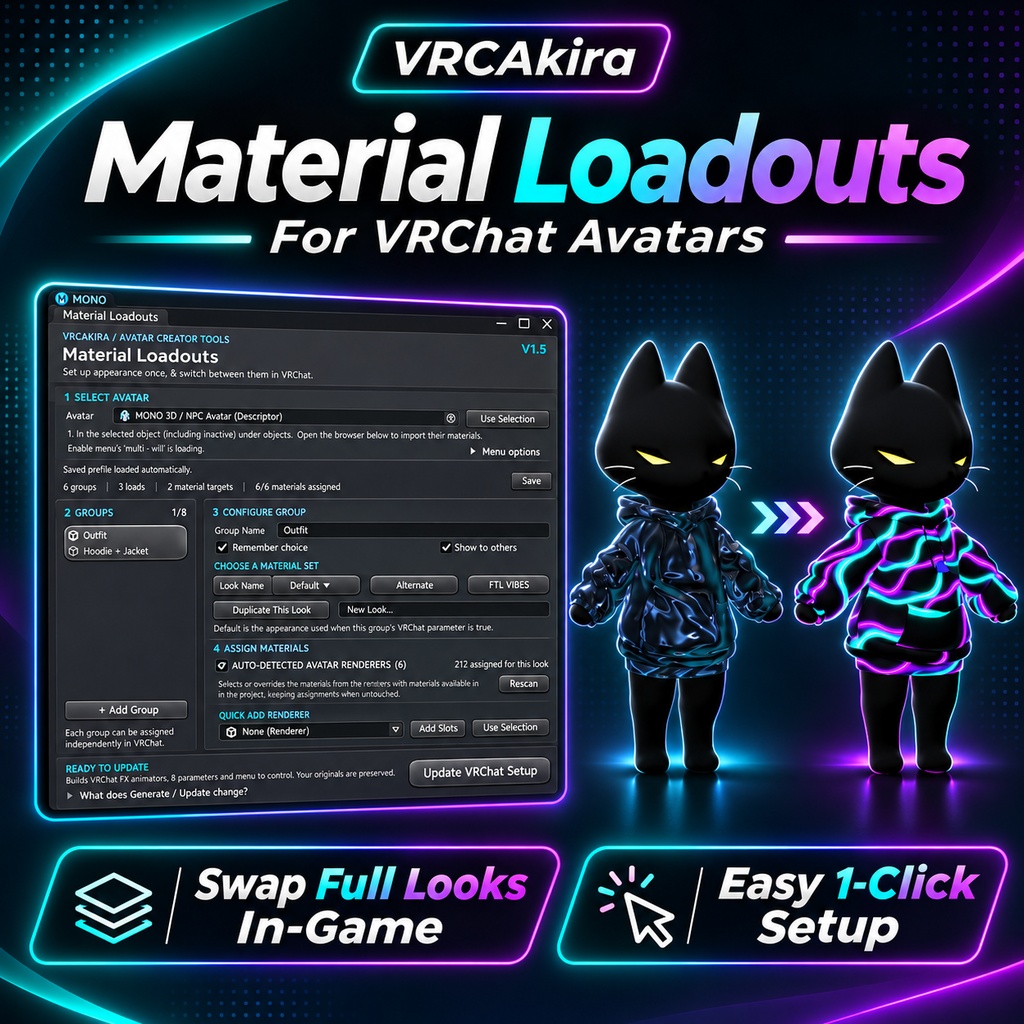

VRChat Avatar Material Loadout System | In-Game Material Swapping | Automatic Setup Create multiple looks for your VRChat avatar and switch between them instantly in-game! The VRCAkira Material Loadout System is an easy-to-use Unity Editor tool that lets you create, manage, and switch between multiple material configurations on your VRChat avatar. Whether you want to change your outfit's colors, swap between different clothing textures, activate glowing materials, or create entirely different visual styles, Material Loadouts makes it simple. Best of all, you don't need to manually create animations, FX layers, parameters, or Expression Menus. The tool handles the setup for you! ✨ Features 🎨 Multiple Material Loadouts Create up to 8 material configurations per group. Switch between complete material setups in-game. Assign different materials to individual mesh material slots. Set your avatar's original materials as the default appearance. 👕 Multi-Mesh Material Swapping Change multiple materials simultaneously with a single selection. Supports both Skinned Mesh Renderers and Mesh Renderers. Create independent groups for jackets, pants, accessories, and more. Mix and match different material loadouts in-game. ⚡ Automatic VRChat Setup Automatically generates material-swap animations. Creates and configures FX Animator layers and transitions. Generates VRChat Expression Parameters and Menu controls. Supports synchronized material changes visible to other players. No manual Animator setup required! 🔍 Automatic Avatar Material Detection Select your VRChat Avatar Descriptor to detect available mesh renderers. Automatically identifies existing materials and material slots. Select and import multiple renderers at once. Initializes loadouts using your avatar's current materials. 💾 Saved Loadout Configurations Automatically saves your material loadout configurations. Reopen the editor without rebuilding your setup. Supports separate configurations for different avatars. Can recover previously generated loadouts from compatible setups. 🛠️ Non-Destructive Workflow Generates new FX, Expressions Menu, and parameter assets. Preserves the original source assets. Detects existing Material Loadouts menus and updates them instead of creating duplicates. Supports full Expressions Menus by allowing you to choose a control to replace. Easily add, remove, or modify loadouts and regenerate your setup. 🚀 How It Works Step 1 — Select Your Avatar Open the Material Loadouts Editor and assign your VRChat Avatar Descriptor. Step 2 — Choose Your Materials Select the detected mesh renderers you want to customize. The tool automatically imports their material slots and existing materials. Step 3 — Create Your Looks Create additional material loadouts and assign the materials you want for each appearance. For example: Default — Black Jacket Alternate — White Jacket Neon — Glowing Cyberpunk Jacket Special — Custom Animated Shader Material Step 4 — Generate! Click Generate VRChat Setup. The tool automatically creates the required animations, Animator layers, parameters, and Expression Menu controls. Step 5 — Swap In-Game! Upload your avatar to VRChat, open your Expressions Menu, and switch between your material loadouts whenever you want! 💡 Perfect For Avatar creators offering multiple outfit colors or textures. Cyberpunk and futuristic avatars with glowing material variants. Clothing creators adding customization options to their products. Avatars with multiple skins or themed appearances. Anyone who wants material customization without manually configuring Unity animations. 📦 What's Included VRCAkira Material Loadouts Unity Editor Script Automatic material detection and loadout management VRChat FX Animator and Expressions Menu generator Persistent loadout configuration system ⚙️ Requirements Unity version compatible with your VRChat avatar project VRChat Avatars SDK3 A VRChat avatar with compatible Mesh Renderers or Skinned Mesh Renderers Materials configured for the desired appearances Important Notes: This is a Unity Editor tool, not a runtime script or standalone avatar. Material swapping is handled through VRChat's Animator and Expression Menu systems. The materials and shaders used must be compatible with your target VRChat platform. Switching materials does not automatically optimize materials, textures, or draw calls. Generated assets are stored in your Unity project. Existing source assets are preserved, but your avatar descriptor is updated to reference the generated setup. Made by VRCAkira Spend less time configuring Animators and more time creating awesome avatars!