

頭をたたかれると吹っ飛ぶ BonkPat|吹っ飛ぶ・くるくる回る・尻もちの3つのたたかれリアクション ギミック【VRChat・NDMF・Modular Avatar・非破壊・Quest 対応】【無料お試し版あり】
- 製品版Digital800 JPY
- 無料お試し版Digital0 JPY
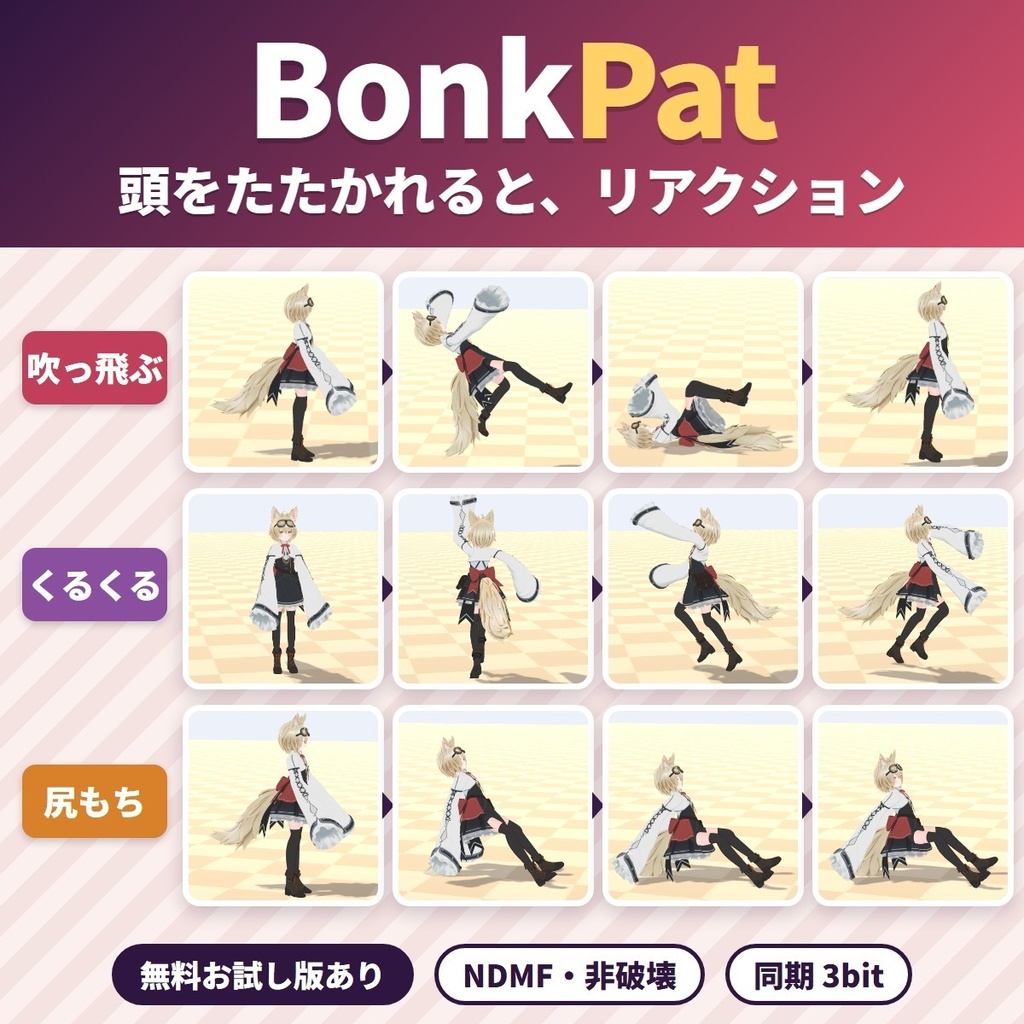
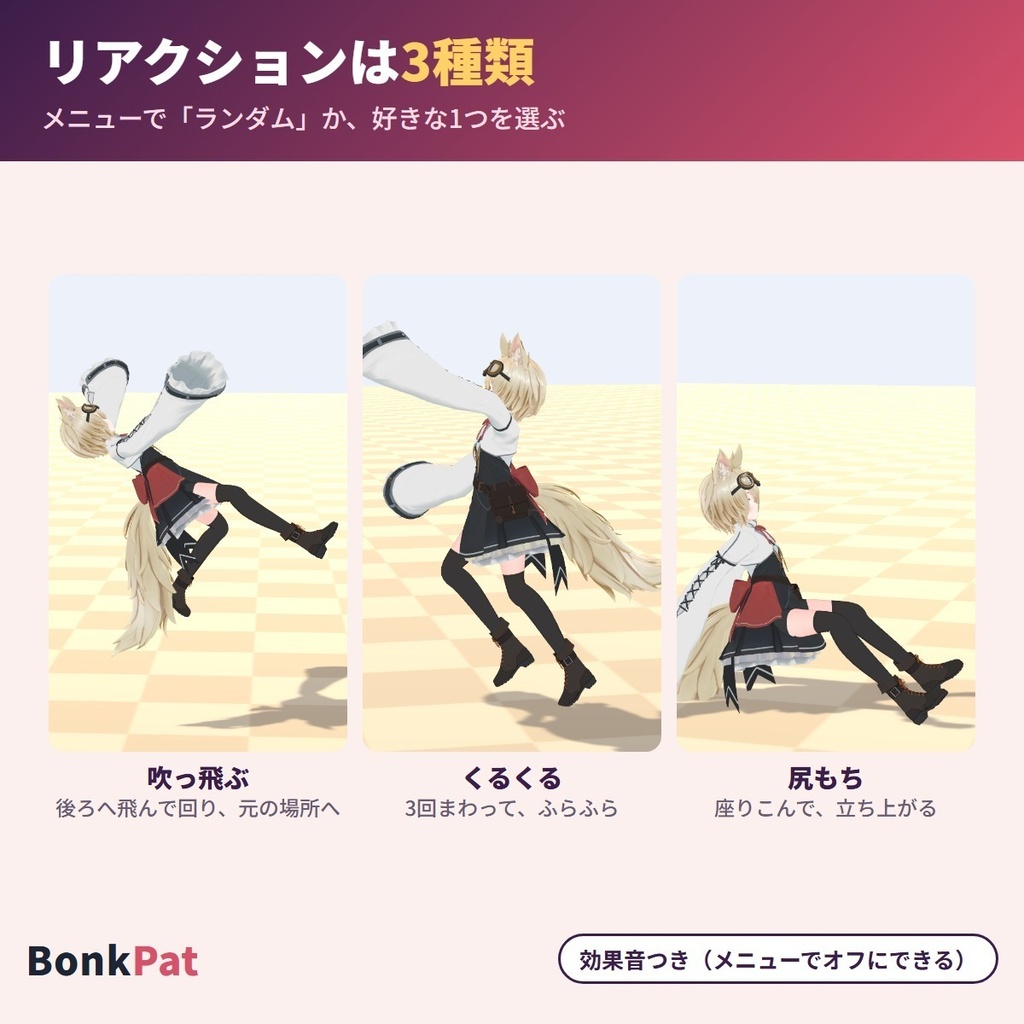
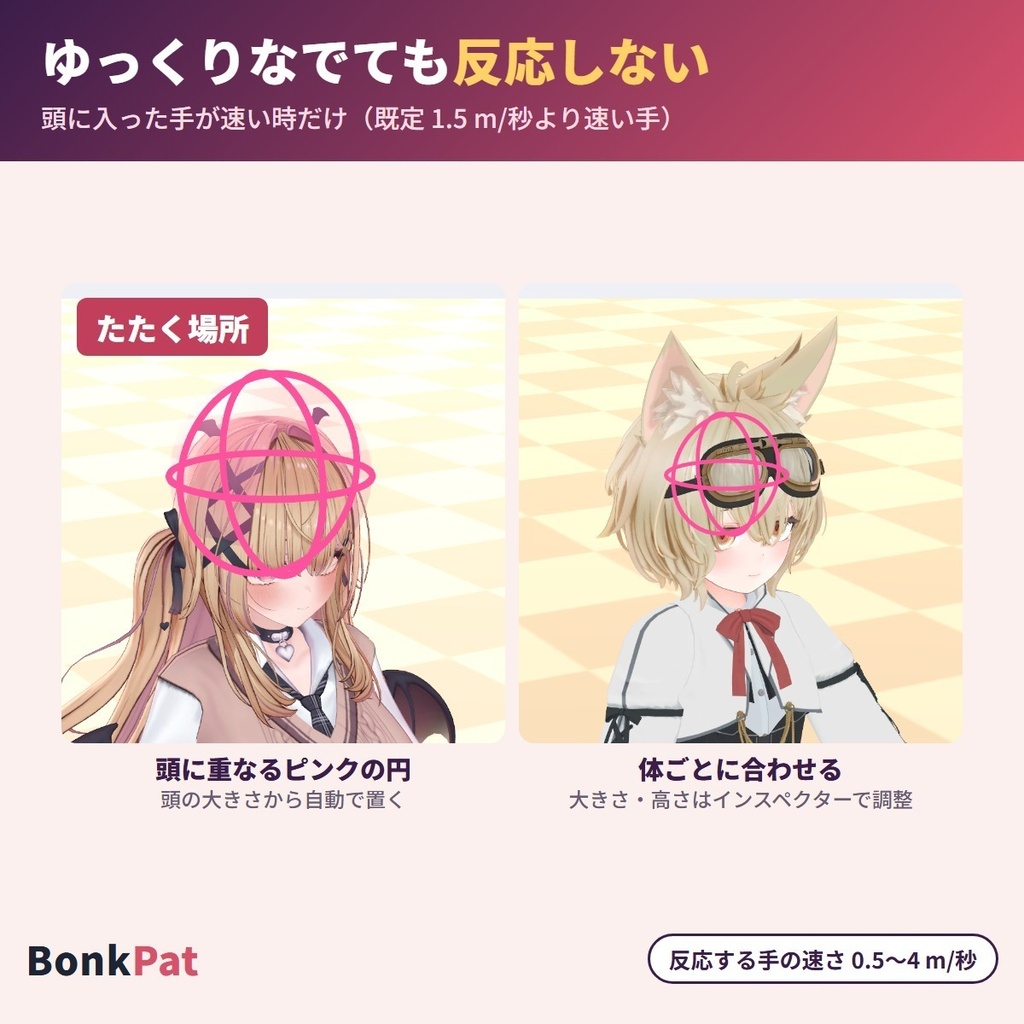
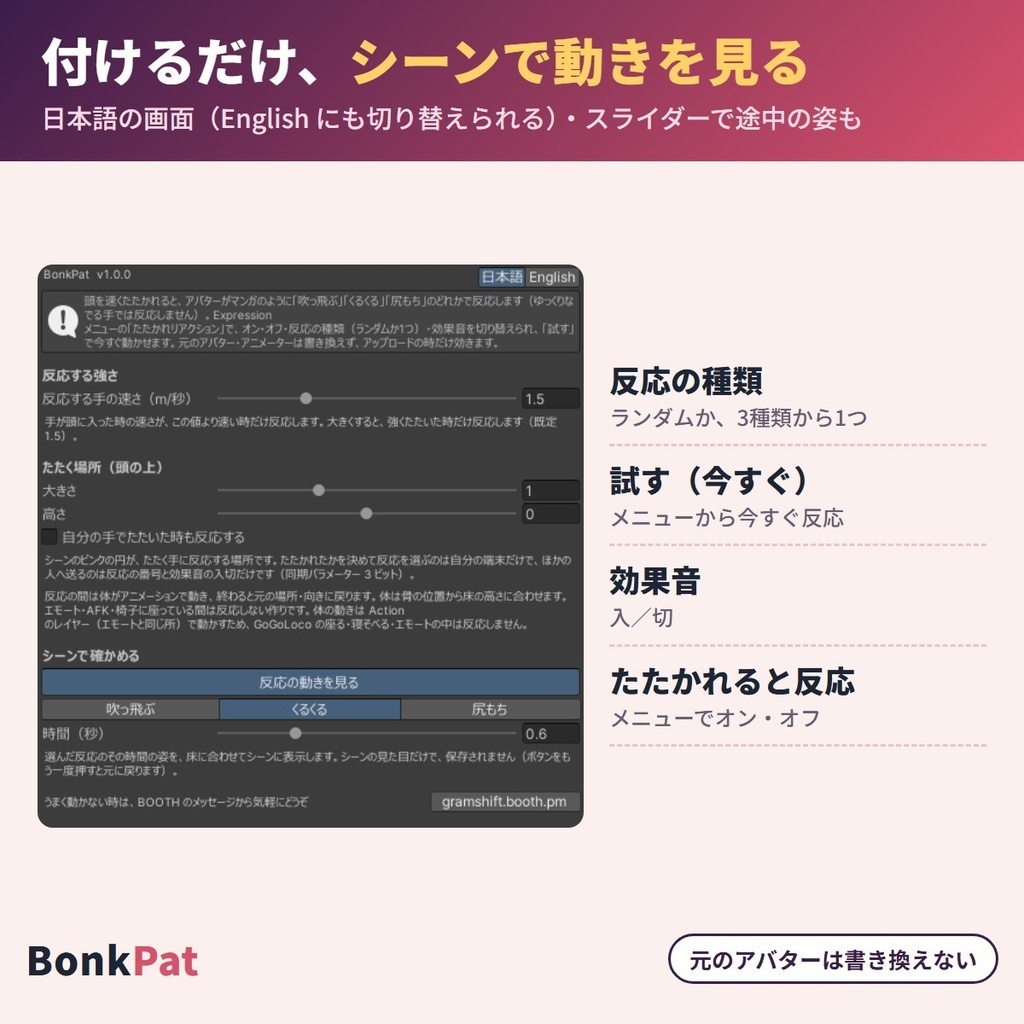
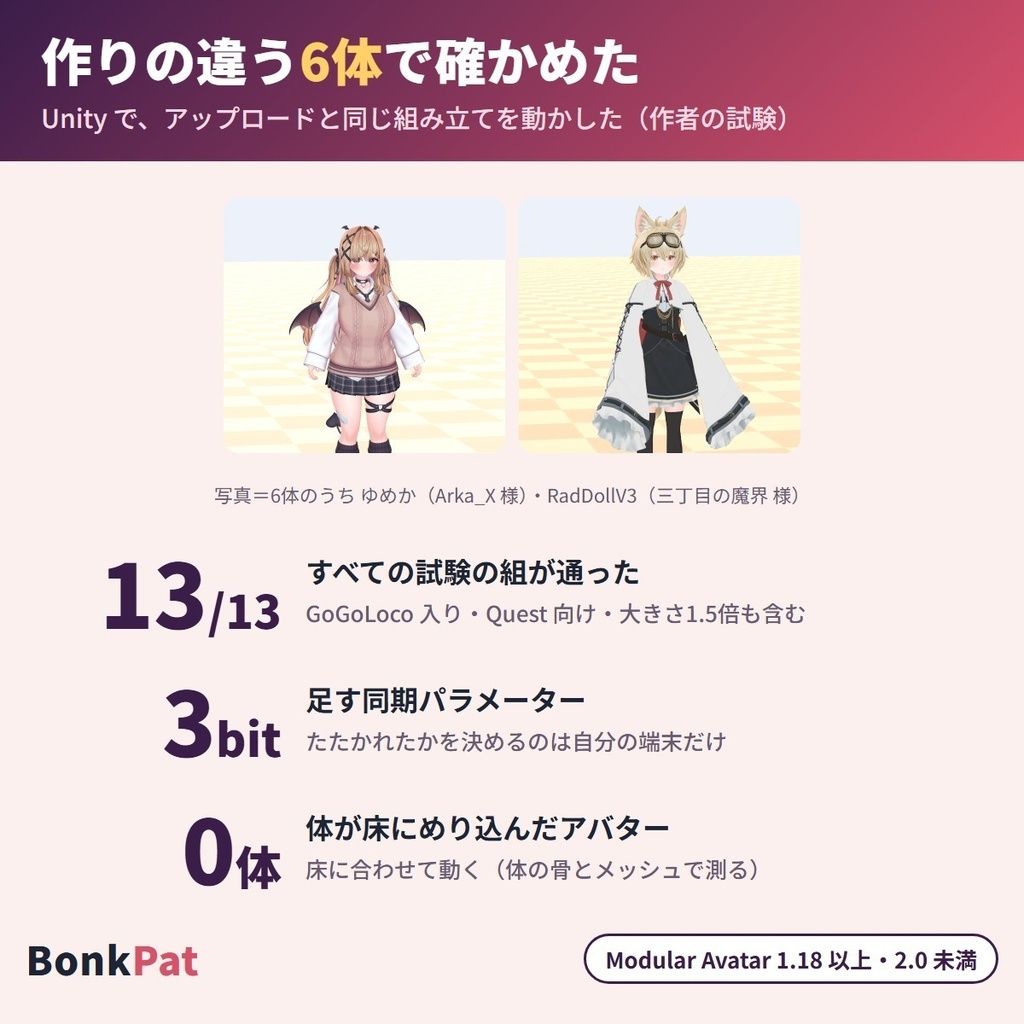
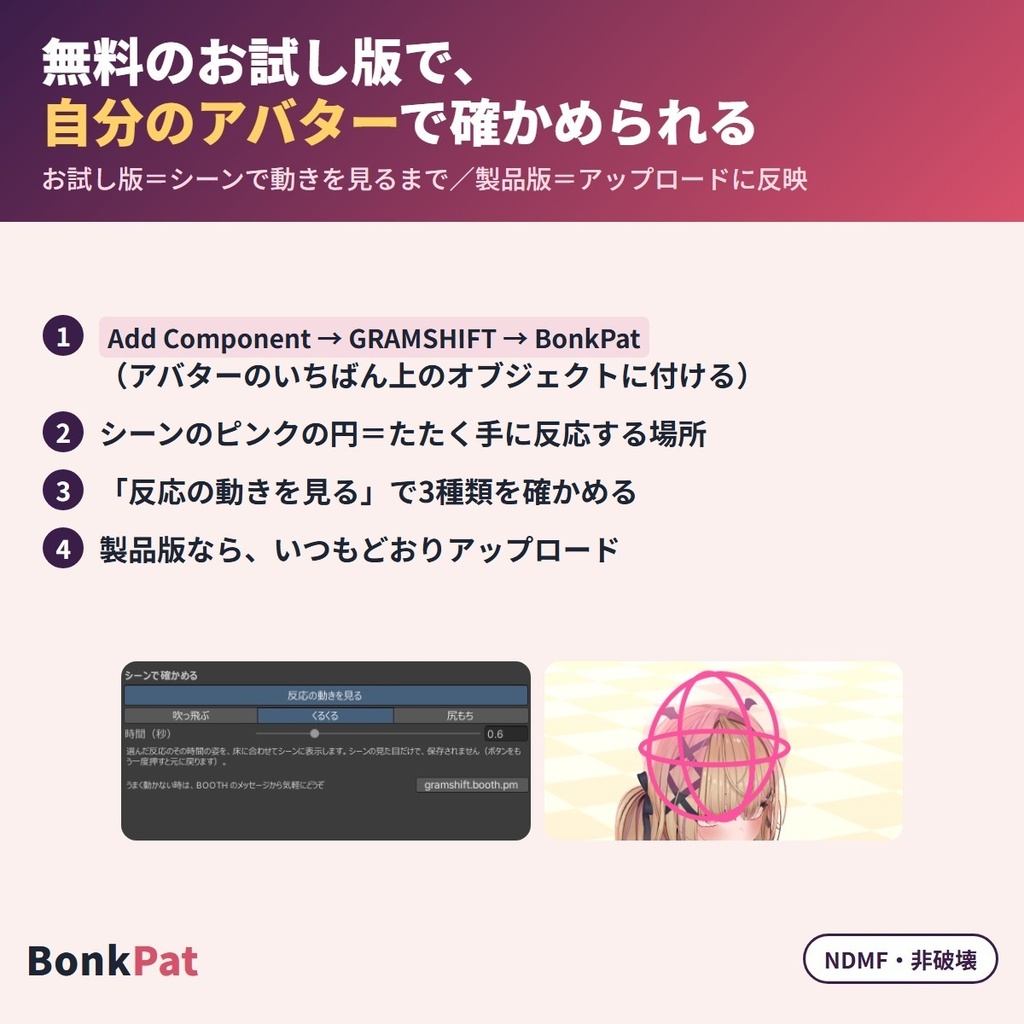


頭をポカッとたたかれると、VRChat のアバターがマンガのように「吹っ飛ぶ」「くるくる回る」「尻もちをつく」たたかれリアクションのギミックを、Modular Avatar でコンポーネントを1つ付けるだけで入れられます。手が速く当たった時だけ反応し、人型(Humanoid)のボーンから動きを作るので、いろいろなアバターに付けられ、PC と Quest(Android)のどちらにもアップロードできます。 買う前に無料お試し版で、自分のアバターの動きをシーンで確かめられます。Expression メニューの「たたかれリアクション」で、オン・オフ、反応の選び方(ランダム/吹っ飛ぶ/くるくる/尻もち)、効果音のオン・オフ、今すぐ反応する「試す」ボタンを使えます。画面は日本語/English。元のアバターのファイルは変わりません(NDMF 対応/非破壊)。 English / 简体中文 / 한국어:下の段落に説明があります(descriptions below) ■ まずは無料お試し版で、自分のアバターを確かめる ・お試し版(無料):たたく場所と、3つの反応の動きをシーンで確かめられます(確認用) ・製品版(800円):上に加えて、アップロードするアバターに、たたかれると反応する仕組みと Expression メニューの「たたかれリアクション」が入ります。製品版はお試し版の上から入れます ■ できること ・吹っ飛ぶ(約3.2秒):後ろへ大きく飛んで宙でひっくり返り、元の場所に戻る ・くるくる(約2.4秒):その場で3回まわり、腕をばたつかせてふらつく。頭の上に目を回す星が出る ・尻もち(約2秒):その場でドスンと尻もちをついて、立ち上がる ・反応ごとに短い効果音(メニューでオン・オフ) ・速く当たった時だけ反応:手が頭に当たった時の速さが「反応する手の速さ」(既定 1.5 m/秒・0.5〜4)より速い時に反応するので、なでなでと分けられる ・反応の選び方:ランダム(最初)か、3つのどれか1つに決める ・「試す(今すぐ)」でメニューから今すぐ反応(デスクトップの人・写真や動画を撮る時に) ・体は骨と体の形から床の高さに合わせ、終わると元の場所・向きに戻る。アバターを拡大していても、その大きさに合わせる ・たたく場所(頭の上)は、頭の大きさに合わせて自動で決まる。「たたく場所(頭の上)」で大きさ・高さを変えられる ・ほかの人の手で反応する(最初)。「自分の手でたたいた時も反応する」をオンにすると自分の手でも ・「シーンで確かめる」→「反応の動きを見る」で、アップロード前に3つの動きを好きな時間でシーンに出せる(保存されない) ・ふだんの動きはそのまま:体を動かすのは反応している間だけ。まばたき・口の動きは反応中もそのまま ・たたかれたかを決めて反応を選ぶのは自分の端末。ほかの人へ送るのは反応の番号と効果音のオン・オフだけで、使う同期パラメーターは 3 ビット。メニューの設定は次に入った時も残る ・Quest(Android)向けにアップロードすると、Quest で使える形(効果音なし・Quest 用の星)で入る ・日本語/English 切り替え(アップロードした時の言葉でメニューの名前が入る) ■ 試した結果 作りの違う6体のアバターで試しました(組み合わせ13通り)。 ・6体とも組み立てのエラーは0 ・3つの反応とも、体(骨と体の形)は立ちポーズの時より下へ入らなかった ・吹っ飛ぶ:身長の約1.8〜2倍の距離を飛び、終わりは元の場所から1.4cm以内に戻った ・くるくる:約3回まわり(約1092°)、腕を広げて固まったコマ(T の字)は0 ・1回たたかれると1回だけ反応し、反応中にもう一度たたかれても反応は変わらない ・ランダムで3つとも出た。メニューでオフにすると反応しない。「試す」はオフの時も動く ・エモート・AFK・椅子の間に手が当たっても反応しなかった ・移動ギミックを入れたアバター2体でも組み立てのエラーは0で、元のギミックもそのまま残った ・「反応する手の速さ」を 3.0 にした形・アバターを1.5倍に拡大した形・自分の手で反応する形・Quest 向けの形でも組み立てのエラーは0 ・ヒエラルキーの右クリック → GRAMSHIFT → BonkPat を押し、3体に1つずつ付くのを確かめた ・使う同期パラメーターは6体とも 3 ビット ・人型(Humanoid)でないアバターでは、何も足さずお知らせを出す。お試し版は、アップロードの形に何も足さない ・作者の試験13通り(製品版)はすべて通過しました ■ 使う前に ・アバターの規約で、アニメーション・メニュー・効果音を足す改変が許されているか確かめてください ・人型(Humanoid)のアバター向けです ■ 使い方 1. Modular Avatar 1.18 以上 2.0 未満(NDMF が含まれます)を入れてから、unitypackage をプロジェクトに入れる 2. アバターの一番上(VRC Avatar Descriptor の付いた物)に「Add Component → GRAMSHIFT → BonkPat」を付ける(ヒエラルキーの右クリック → GRAMSHIFT → BonkPat でも付きます) 3. 「シーンで確かめる」→「反応の動きを見る」で、3つの動きを見る 4. いつもどおりアップロードし、VRChat でほかの人に頭をポカッとたたいてもらう(メニューの「試す(今すぐ)」でも反応します) ■ 動作環境 ・Unity 2022.3 / VRChat SDK3 Avatars / Modular Avatar 1.18 以上 2.0 未満(NDMF が含まれます) ・PC と Quest(Android) ・作者が試した版:Unity 2022.3.22f1 / SDK 3.10.5 / MA 1.18.7 / NDMF 1.14.8 ・試したアバター:ゆめか(Arka_X 様)・HAOLAN(ハオラン/かなリぁ 様)・RadDollV3(三丁目の魔界 様)ほか、作りの違う3体の計6体 ■ よくある質問 Q. なでられただけで吹っ飛びませんか? A. 反応するのは、手が頭に当たった時の速さが「反応する手の速さ」(既定 1.5 m/秒)より速い時です。ゆっくりなでる手では反応しません。強くたたいた時だけにしたい時は値を上げてください。 Q. 対応表に無いアバターでも使えますか? A. 人型(Humanoid)のアバターなら付けられます。アバター名の一覧ではなく、人型のボーンから動きを作ります。作者は作りの違う6体で試しました。動きは、お試し版で先に確かめられます。 Q. 移動ギミック(GoGoLoco など)を入れたアバターでも使えますか? A. はい。作者の試験では、移動ギミックを入れたアバター2体で組み立てのエラーは0で、元のギミックもそのまま残りました。 Q. Quest でも使えますか? A. はい。Quest(Android)向けにアップロードすると、Quest で使える形で入ります。3つの反応・メニュー・たたく場所は PC 向けと同じで、違いは「効果音が入らない」「頭の上の星が Quest 用の見た目になる」の2つです。 ■ 制限 ・エモート・AFK・椅子の間と、それらが終わってから約1.5秒は反応しません ・反応の間は、頭・手・腰・足をトラッキングからアニメーションに切り替えて体を動かし、終わるとトラッキングに戻ります(目と口はそのまま) ・長い髪・服・しっぽは、反応の途中で床の下に入ることがあります(体は床に合わせます) ・反応の長さ・動きの形は決まっています(3つの中から選べます) ・Quest(Android)では効果音は鳴りません ・人型(Humanoid)でないアバターでは使えません ・Modular Avatar 1.18 より前・2.0 以降では BonkPat は組み込まれず、お知らせが出ます ・お試し版はシーンの見た目だけで、アップロードしたアバターには入りません ■ 困った時は うまく動かない時は、このページの「ショップへのお問い合わせ」から気軽にどうぞ(アバターの名前と、表示された文があると早く調べられます)。
利用規約
・VRChat などで使うアバターの改変に、個人・法人・商用を問わず使えます ・このツールを使って作ったアバター・改変データの公開・販売に、このツール側の制限はありません(元のアバターの規約に従ってください) ・ツール(製品版・お試し版)の改変・逆コンパイル・解析はできません ・ツールのファイル(効果音・絵を含む)の再配布・転売・共有、買っていない人への譲渡はできません ・お試し版を製品版の形にして配ること、お試し版の制限を外すための改変はできません ・同梱の「利用規約_Terms.txt」が正です Terms (summary): you may use it to modify avatars for VRChat etc., for personal, corporate or commercial use; this tool puts no limit on publishing or selling avatars or edit data made with it (follow the original avatar's terms); you may not modify, decompile or analyze the tool (full or trial); the tool files (including sounds and images) may not be redistributed, resold, shared or given to people who did not buy it; you may not turn the trial into the full version or remove its limits. The included "利用規約_Terms.txt" is authoritative.
更新履歴
1.0.0(2026-11)公開 1.0.0 (2026-11) released
English
When someone bonks your VRChat avatar on the head, it flies away, spins around or falls on its bottom like in a cartoon: a bonk reaction gimmick you add with Modular Avatar by attaching one component. It reacts only when a hand hits fast, and it builds the motion from the Humanoid bones, so it fits many avatars and uploads for both PC and Quest (Android). Before you buy, check the motion on your own avatar in the scene with the free trial. In the Expressions menu, "Bonk reaction" lets you turn it on or off, choose how it reacts (Random / Fly away / Spin / Fall on bottom), turn the sound on or off, and react right now with the "Try now" button. The UI is in Japanese / English. Your original avatar files are not changed (NDMF, non-destructive). ■ Try it on your avatar with the free trial first ・Trial (free): see the bonk area and the three reactions in the scene (for checking) ・Full version (800 yen): on top of that, the bonk reactions and "Bonk reaction" in the Expressions menu are added to the avatar you upload. Import the full version over the trial ■ What it does ・Fly away (about 3.2 s): flies far backwards, turns over in the air and comes back to its place ・Spin (about 2.4 s): spins three times on the spot, flails its arms and wobbles. Dizzy stars appear above the head ・Fall on bottom (about 2 s): drops onto its bottom with a thud and stands back up ・A short sound for each reaction (on / off in the menu) ・Reacts to fast hits: it reacts when the hand enters the head area faster than "Hand speed to react" (default 1.5 m/s, 0.5-4), so bonks and headpats are told apart ・How it reacts: Random (default), or always one of the three ・"Try now" in the menu reacts right away (for desktop users, photos and videos) ・The body is fitted to the floor from its bones and body shape, and returns to its place and facing at the end. It follows your avatar's size even if you scaled it up ・The bonk area (top of the head) is placed automatically from the head size. Change its size and height under "Bonk area (top of the head)" ・Reacts to other people's hands (default). Turn on "Also react to your own hands" to react to your own hands too ・"Check in the scene" > "Preview the reactions" shows the three motions at any time point in the scene before upload (not saved) ・Your normal movement stays as it is: the body moves only during a reaction, and blinking and mouth movement keep working during it ・Your own client decides whether you were bonked and picks the reaction. Only the reaction number and the sound switch are sent to others, using 3 bits of synced parameters. Menu settings are kept the next time you join ・When uploaded for Quest (Android), it is added in a Quest-ready form (no sound, Quest-style stars) ・Japanese / English switch (the menu names are added in the language chosen at upload) ■ Test results Tested on 6 avatars with different builds (13 combinations). ・0 build errors on all 6 ・In all three reactions the body (bones and body shape) did not go lower than in its standing pose ・Fly away: flies about 1.8-2 times the avatar's height, and ends within 1.4 cm of where it started ・Spin: about three turns (about 1092°), 0 frames frozen with arms spread (T-pose) ・One bonk gives one reaction, and another bonk during a reaction does not change it ・Random gave all three. With the menu off it does not react. "Try now" works even when it is off ・A hand hitting during emotes, AFK or chairs did not trigger a reaction ・0 build errors on 2 avatars with a locomotion gimmick, and that gimmick stayed as it was ・0 build errors with "Hand speed to react" set to 3.0, with the avatar scaled up 1.5x, with your own hands enabled, and in the Quest build ・Right-click in the Hierarchy > GRAMSHIFT > BonkPat added exactly one to each of 3 avatars ・Uses 3 bits of synced parameters on all 6 avatars ・On non-Humanoid avatars it adds nothing and shows a notice. The trial adds nothing to the upload ・All 13 of the author's test cases (full version) passed ■ Before you use it ・Check that your avatar's terms allow edits that add animations, menus and sounds ・For Humanoid avatars ■ How to use 1. Install Modular Avatar 1.18 or later and earlier than 2.0 (NDMF is included), then import the unitypackage into your project 2. Add "Add Component > GRAMSHIFT > BonkPat" to the top of your avatar (the object with VRC Avatar Descriptor) (right-click in the Hierarchy > GRAMSHIFT > BonkPat also works) 3. In "Check in the scene", press "Preview the reactions" to see the three motions 4. Upload as usual, and have someone bonk your head in VRChat ("Try now" in the menu also triggers it) ■ Requirements ・Unity 2022.3 / VRChat SDK3 Avatars / Modular Avatar 1.18 or later and earlier than 2.0 (NDMF is included) ・PC and Quest (Android) ・Versions the author tested: Unity 2022.3.22f1 / SDK 3.10.5 / MA 1.18.7 / NDMF 1.14.8 ・Tested avatars: Yumeka (by Arka_X), HAOLAN (by かなリぁ), RadDollV3 (by 三丁目の魔界) and 3 others with different builds, 6 in total ■ FAQ Q. Will a headpat send me flying? A. It reacts when the hand enters the head area faster than "Hand speed to react" (default 1.5 m/s). A slow headpat does not trigger it. Raise the value if you want it to react only to hard bonks. Q. Can I use it on an avatar that is not on a list? A. You can add it to Humanoid avatars. It builds the motion from the Humanoid bones, not from a list of avatar names. The author tested 6 avatars with different builds. You can check the motion with the free trial first. Q. Does it work on avatars with a locomotion gimmick (such as GoGoLoco)? A. Yes. In the author's tests, 2 avatars with a locomotion gimmick had 0 build errors and the original gimmick stayed as it was. Q. Does it work on Quest? A. Yes. When uploaded for Quest (Android), it is added in a Quest-ready form. The three reactions, the menu and the bonk area are the same as for PC; the two differences are that no sound is added and the stars above the head use a Quest-ready look. ■ Limitations ・It does not react during emotes, AFK or chairs, or for about 1.5 seconds after they end ・During a reaction, the head, hands, hips and feet switch from tracking to animation to move the body, and go back to tracking at the end (eyes and mouth stay as they are) ・Long hair, clothes or tails may go below the floor during a reaction (the body is fitted to the floor) ・The length and shape of the reactions are fixed (you can choose from the three) ・No sound on Quest (Android) ・Not for non-Humanoid avatars ・With Modular Avatar earlier than 1.18 or 2.0 and later, BonkPat is not added and a notice appears ・The trial only changes how it looks in the scene and is not added to the uploaded avatar ■ Need help? If something doesn't work, feel free to use "Contact this Shop" on this page (the avatar name and any message you saw help us check faster).
简体中文
当有人敲你的 VRChat 头像的头时,它会像动画片一样飞出去、转圈或者一屁股坐倒——这是一个用 Modular Avatar 添加一个组件即可加入的“被敲反应”机关(gimmick)。只有手快速打到时才会反应,并根据 Humanoid(人形)骨骼生成动作,因此适用于多种头像,PC 和 Quest(Android)都可以上传。 购买前,可以用免费试用版在场景中确认自己头像的动作。在 Expressions(表情)菜单的 "Bonk reaction"(被敲反应)中,可以开关该功能、选择反应方式(Random 随机 / Fly away 飞出去 / Spin 转圈 / Fall on bottom 屁股坐倒)、开关音效,还可以用 "Try now"(立即试试)按钮马上触发反应。界面为日语 / 英语。你的原始头像文件不会被改动(NDMF,非破坏性)。 ■ 先用免费试用版在自己的头像上确认 ・试用版(免费):可在场景中查看敲击区域和三种反应(用于确认) ・完整版(800 日元):在此基础上,会把被敲反应和 Expressions 菜单中的 "Bonk reaction" 添加到你上传的头像中。请在试用版之上导入完整版 ■ 功能介绍 ・飞出去(约 3.2 秒):向后飞得很远,在空中翻过身,然后回到原来的位置 ・转圈(约 2.4 秒):在原地转三圈,挥舞手臂并摇摇晃晃。头顶会出现眩晕的星星 ・屁股坐倒(约 2 秒):“咚”的一声坐到地上,然后重新站起来 ・每种反应都有一段短音效(可在菜单中开关) ・只对快速打到反应:手进入头部区域的速度超过 "Hand speed to react"(触发反应的手速)(默认 1.5 m/s,范围 0.5-4)时才反应,因此能区分敲头和摸头 ・反应方式:Random(随机,默认),或固定为三种中的某一种 ・菜单中的 "Try now" 可立即触发反应(适合桌面用户、拍照和录视频) ・身体会根据骨骼和体型贴合地面高度,结束时回到原来的位置和朝向。即使你放大过头像,也会跟随头像的大小 ・敲击区域(头顶)会根据头部大小自动放置。可以在 "Bonk area (top of the head)"(敲击区域(头顶))中更改大小和高度 ・会对他人的手产生反应(默认)。打开 "Also react to your own hands"(也对自己的手产生反应)后,自己的手也会触发 ・"Check in the scene"(在场景中确认)>"Preview the reactions"(预览反应)可以在上传前于场景中随时查看三种动作(不会保存) ・平时的动作保持不变:只在反应期间移动身体,反应中眨眼和嘴部动作也照常 ・是否被敲以及选择哪种反应,由你自己的客户端决定。发送给其他人的只有反应编号和音效开关,使用 3 位同步参数。菜单设置在下次进入时仍会保留 ・为 Quest(Android)上传时,会以适用于 Quest 的形式添加(无音效,星星为 Quest 用的样式) ・日语 / 英语切换(菜单名称以上传时所选的语言添加) ■ 测试结果 在 6 个构造不同的头像上进行了测试(共 13 种组合)。 ・6 个头像的构建错误均为 0 ・三种反应中,身体(骨骼和体型)都没有低于站立姿势时的位置 ・飞出去:飞行距离约为头像身高的 1.8-2 倍,结束时与起点相差不到 1.4 cm ・转圈:约三圈(约 1092°),手臂张开僵住的帧(T-pose)为 0 ・一次敲击只触发一次反应,反应过程中再次被敲也不会改变 ・Random 三种都出现过。菜单关闭时不会反应。即使关闭,"Try now" 也能使用 ・在表情动作、AFK 或坐椅子期间手打到,没有触发反应 ・在 2 个装有移动类机关的头像上构建错误为 0,原有机关也保持原样 ・将 "Hand speed to react" 设为 3.0、头像放大 1.5 倍、启用自己的手触发,以及 Quest 构建时,构建错误均为 0 ・在 Hierarchy 中右键 > GRAMSHIFT > BonkPat,确认 3 个头像各添加了 1 个 ・6 个头像使用的同步参数均为 3 位 ・对非 Humanoid 头像不会添加任何内容,并显示提示。试用版不会向上传内容中添加任何东西 ・作者的 13 项测试(完整版)全部通过 ■ 使用前请注意 ・请确认头像的使用条款是否允许添加动画、菜单和音效的修改 ・适用于 Humanoid 头像 ■ 使用方法 1. 安装 Modular Avatar 1.18 或更高且低于 2.0 的版本(已包含 NDMF),然后将 unitypackage 导入你的项目 2. 在头像最上层(带有 VRC Avatar Descriptor 的对象)添加 "Add Component > GRAMSHIFT > BonkPat"(在 Hierarchy 中右键 > GRAMSHIFT > BonkPat 也可以) 3. 在 "Check in the scene" 中点击 "Preview the reactions",查看三种动作 4. 像平时一样上传,然后在 VRChat 中让别人敲你的头(菜单中的 "Try now" 也能触发) ■ 运行环境 ・Unity 2022.3 / VRChat SDK3 Avatars / Modular Avatar 1.18 或更高且低于 2.0(已包含 NDMF) ・PC 和 Quest(Android) ・作者测试过的版本:Unity 2022.3.22f1 / SDK 3.10.5 / MA 1.18.7 / NDMF 1.14.8 ・测试过的头像:Yumeka(Arka_X 制作)、HAOLAN(かなリぁ 制作)、RadDollV3(三丁目の魔界 制作)以及其他 3 个构造不同的头像,共 6 个 ■ 常见问题 Q. 摸头会把我打飞吗? A. 手进入头部区域的速度超过 "Hand speed to react"(默认 1.5 m/s)时才会反应。缓慢摸头不会触发。如果想只对用力敲击反应,请调高该数值。 Q. 不在对应表里的头像也能用吗? A. Humanoid(人形)头像都可以添加。它是根据 Humanoid 骨骼生成动作,而不是根据头像名称列表。作者用 6 个构造不同的头像进行了测试。你可以先用免费试用版确认动作。 Q. 装有移动类机关(如 GoGoLoco)的头像也能用吗? A. 可以。在作者的测试中,2 个装有移动类机关的头像构建错误为 0,原有机关也保持原样。 Q. Quest 上也能用吗? A. 可以。为 Quest(Android)上传时,会以适用于 Quest 的形式添加。三种反应、菜单和敲击区域与 PC 相同,区别只有两点:不添加音效,头顶的星星为 Quest 用的样式。 ■ 限制 ・在表情动作、AFK、坐椅子期间,以及它们结束后约 1.5 秒内不会反应 ・反应期间,头、手、腰、脚会从追踪切换为动画来移动身体,结束后恢复为追踪(眼睛和嘴保持不变) ・长发、衣服或尾巴在反应过程中可能会陷到地面以下(身体是按地面贴合的) ・反应的时长和动作形态是固定的(可以在三种中选择) ・Quest(Android)上没有音效 ・不适用于非 Humanoid 头像 ・在低于 1.18 或 2.0 及以上的 Modular Avatar 中,不会添加 BonkPat,并会显示提示 ・试用版只改变场景中的外观,不会添加到上传的头像中 ■ 需要帮助时 如果无法正常运行,请随时通过本页面的 "咨询"按钮联系我们(提供头像名称和你看到的提示信息,能帮助我们更快排查)。
한국어
누군가 VRChat 아바타의 머리를 콩 때리면 만화처럼 날아가거나, 빙글빙글 돌거나, 엉덩방아를 찧는 '콩!' 리액션 기믹을 Modular Avatar로 컴포넌트 하나만 붙여서 넣을 수 있어요. 손이 빠르게 부딪힐 때만 반응하고, Humanoid 본에서 동작을 만들기 때문에 여러 아바타에 붙일 수 있으며 PC와 Quest(Android) 모두 업로드할 수 있어요. 구매하기 전에 무료 체험판으로 내 아바타의 움직임을 씬에서 확인할 수 있어요. Expressions 메뉴의 "Bonk reaction"(콩 리액션)에서 켜기/끄기, 반응 방식(Random(랜덤) / Fly away(날아가기) / Spin(빙글빙글) / Fall on bottom(엉덩방아)), 효과음 켜기/끄기를 정할 수 있고, "Try now"(지금 해보기) 버튼으로 바로 반응시킬 수도 있어요. UI는 일본어 / English예요. 원본 아바타 파일은 변경되지 않아요(NDMF, 비파괴). ■ 먼저 무료 체험판으로 내 아바타에서 확인해 보세요 ㆍ체험판(무료): 때리는 영역과 3가지 리액션을 씬에서 확인할 수 있어요(확인용) ㆍ정식판(800엔): 위 기능에 더해, 업로드하는 아바타에 콩 리액션과 Expressions 메뉴의 "Bonk reaction"이 추가돼요. 정식판은 체험판 위에 덮어서 임포트하세요 ■ 할 수 있는 것 ㆍFly away(날아가기, 약 3.2초): 뒤로 멀리 날아가 공중에서 몸이 뒤집히고 원래 자리로 돌아와요 ㆍSpin(빙글빙글, 약 2.4초): 제자리에서 세 바퀴 돌며 팔을 휘적거리고 비틀거려요. 머리 위에 어지러운 별이 나타나요 ㆍFall on bottom(엉덩방아, 약 2초): 쿵 하고 엉덩방아를 찧고 다시 일어나요 ㆍ리액션마다 짧은 효과음(메뉴에서 켜기/끄기) ㆍ빠르게 맞았을 때만 반응: 손이 "Hand speed to react"(반응하는 손의 속도)(기본 1.5 m/s, 0.5~4)보다 빠르게 머리 영역에 들어올 때 반응하므로, 때리기와 쓰다듬기를 구분해요 ㆍ반응 방식: Random(기본값) 또는 3가지 중 하나로 고정 ㆍ메뉴의 "Try now"로 바로 반응해요(데스크톱 사용자, 사진·영상 촬영용) ㆍ몸은 본과 체형을 바탕으로 바닥 높이에 맞춰지고, 끝나면 원래 위치와 방향으로 돌아와요. 아바타를 키웠어도 그 크기에 맞춰져요 ㆍ때리는 영역(머리 위)은 머리 크기에 맞춰 자동으로 배치돼요. "Bonk area (top of the head)"(때리는 영역(머리 위))에서 크기와 높이를 바꿀 수 있어요 ㆍ다른 사람의 손에 반응해요(기본값). "Also react to your own hands"(내 손에도 반응)를 켜면 내 손에도 반응해요 ㆍ"Check in the scene"(씬에서 확인) > "Preview the reactions"(리액션 미리보기)에서 업로드 전에 3가지 동작을 언제든 씬에서 볼 수 있어요(저장되지 않아요) ㆍ평소 움직임은 그대로: 몸을 움직이는 것은 리액션 중뿐이고, 리액션 중에도 눈 깜빡임과 입 움직임은 그대로예요 ㆍ맞았는지 판단하고 리액션을 고르는 것은 내 클라이언트예요. 다른 사람에게는 리액션 번호와 효과음 스위치만 보내며, 동기화 파라미터는 3비트를 써요. 메뉴 설정은 다음 접속 때도 유지돼요 ㆍQuest(Android)용으로 업로드하면 Quest에 맞는 형태로 추가돼요(효과음 없음, Quest용 별) ㆍ일본어 / English 전환(메뉴 이름은 업로드할 때 고른 언어로 들어가요) ■ 테스트 결과 구성이 다른 아바타 6종으로 테스트했어요(13가지 조합). ㆍ6종 모두 빌드 오류 0 ㆍ3가지 리액션 모두 몸(본과 체형)이 서 있는 포즈보다 아래로 내려가지 않았어요 ㆍFly away: 아바타 키의 약 1.8~2배를 날아가고, 시작 위치에서 1.4cm 이내로 돌아와요 ㆍSpin: 약 세 바퀴(약 1092°), 팔을 벌린 채 굳은 프레임(T-pose)은 0 ㆍ한 번 때리면 리액션도 한 번, 리액션 중에 다시 때려도 바뀌지 않아요 ㆍRandom에서 3가지가 모두 나왔어요. 메뉴를 끄면 반응하지 않아요. "Try now"는 꺼져 있어도 작동해요 ㆍ이모트, AFK, 의자 중에 손이 부딪혀도 반응하지 않았어요 ㆍ이동 기믹이 들어간 아바타 2종에서도 빌드 오류 0이었고, 원래 기믹도 그대로 남았어요 ㆍ"Hand speed to react"를 3.0으로 한 경우, 아바타를 1.5배로 키운 경우, 내 손에 반응하도록 켠 경우, Quest 빌드에서도 빌드 오류 0 ㆍHierarchy에서 우클릭 > GRAMSHIFT > BonkPat을 눌러 아바타 3종에 하나씩 붙는 것을 확인했어요 ㆍ6종 모두 동기화 파라미터는 3비트 ㆍHumanoid가 아닌 아바타에서는 아무것도 추가하지 않고 안내가 표시돼요. 체험판은 업로드에 아무것도 추가하지 않아요 ㆍ제작자의 테스트 13가지(정식판)를 모두 통과했어요 ■ 사용하기 전에 ㆍ아바타의 이용 약관에서 애니메이션, 메뉴, 효과음을 추가하는 개변이 허용되는지 확인해 주세요 ㆍHumanoid 아바타용이에요 ■ 사용 방법 1. Modular Avatar 1.18 이상 2.0 미만(NDMF 포함)을 설치한 뒤, unitypackage를 프로젝트에 임포트해요 2. 아바타의 최상위(VRC Avatar Descriptor가 있는 오브젝트)에 "Add Component > GRAMSHIFT > BonkPat"을 추가해요(Hierarchy에서 우클릭 > GRAMSHIFT > BonkPat으로도 추가돼요) 3. "Check in the scene"에서 "Preview the reactions"를 눌러 3가지 동작을 확인해요 4. 평소처럼 업로드하고, VRChat에서 다른 사람에게 머리를 콩 때려 달라고 해 보세요(메뉴의 "Try now"로도 반응해요) ■ 동작 환경 ㆍUnity 2022.3 / VRChat SDK3 Avatars / Modular Avatar 1.18 이상 2.0 미만(NDMF 포함) ㆍPC 및 Quest(Android) ㆍ제작자가 테스트한 버전: Unity 2022.3.22f1 / SDK 3.10.5 / MA 1.18.7 / NDMF 1.14.8 ㆍ테스트한 아바타: Yumeka(Arka_X 님), HAOLAN(かなリぁ 님), RadDollV3(三丁目の魔界 님) 외에 구성이 다른 3종, 총 6종 ■ 자주 묻는 질문 Q. 쓰다듬기만 해도 날아가나요? A. 손이 "Hand speed to react"(기본 1.5 m/s)보다 빠르게 머리 영역에 들어올 때 반응해요. 천천히 쓰다듬으면 반응하지 않아요. 세게 때릴 때만 반응하길 원하면 값을 올려 주세요. Q. 목록에 없는 아바타에도 쓸 수 있나요? A. Humanoid 아바타라면 붙일 수 있어요. 아바타 이름 목록이 아니라 Humanoid 본에서 동작을 만들어요. 제작자는 구성이 다른 6종으로 테스트했어요. 동작은 무료 체험판으로 먼저 확인할 수 있어요. Q. 이동 기믹(GoGoLoco 등)이 들어간 아바타에도 쓸 수 있나요? A. 네. 제작자의 테스트에서 이동 기믹이 들어간 아바타 2종은 빌드 오류가 0이었고, 원래 기믹도 그대로 남았어요. Q. Quest에서도 쓸 수 있나요? A. 네. Quest(Android)용으로 업로드하면 Quest에 맞는 형태로 추가돼요. 3가지 리액션, 메뉴, 때리는 영역은 PC용과 같고, 차이는 "효과음이 들어가지 않음"과 "머리 위의 별이 Quest용 모양으로 표시됨" 두 가지예요. ■ 제한 사항 ㆍ이모트, AFK, 의자 중과 그것이 끝난 뒤 약 1.5초 동안은 반응하지 않아요 ㆍ리액션 중에는 머리, 손, 허리, 발을 트래킹에서 애니메이션으로 바꿔 몸을 움직이고, 끝나면 트래킹으로 돌아와요(눈과 입은 그대로) ㆍ긴 머리, 옷, 꼬리는 리액션 도중 바닥 아래로 들어갈 수 있어요(몸은 바닥에 맞춰져요) ㆍ리액션의 길이와 동작 모양은 정해져 있어요(3가지 중에서 고를 수 있어요) ㆍQuest(Android)에서는 효과음이 나지 않아요 ㆍHumanoid가 아닌 아바타에서는 사용할 수 없어요 ㆍModular Avatar 1.18 미만이나 2.0 이상에서는 BonkPat이 추가되지 않고 안내가 표시돼요 ㆍ체험판은 씬에서 보이는 모습만 바꾸며, 업로드한 아바타에는 추가되지 않아요 ■ 도움이 필요할 때 잘 작동하지 않으면 이 페이지의 「문의」에서 편하게 문의해 주세요(아바타 이름과 표시된 메시지를 알려 주시면 더 빨리 확인할 수 있어요).