

【PC・Quest】踏むと舞う、ざくざく鳴る落ち葉
- Digital800 JPY
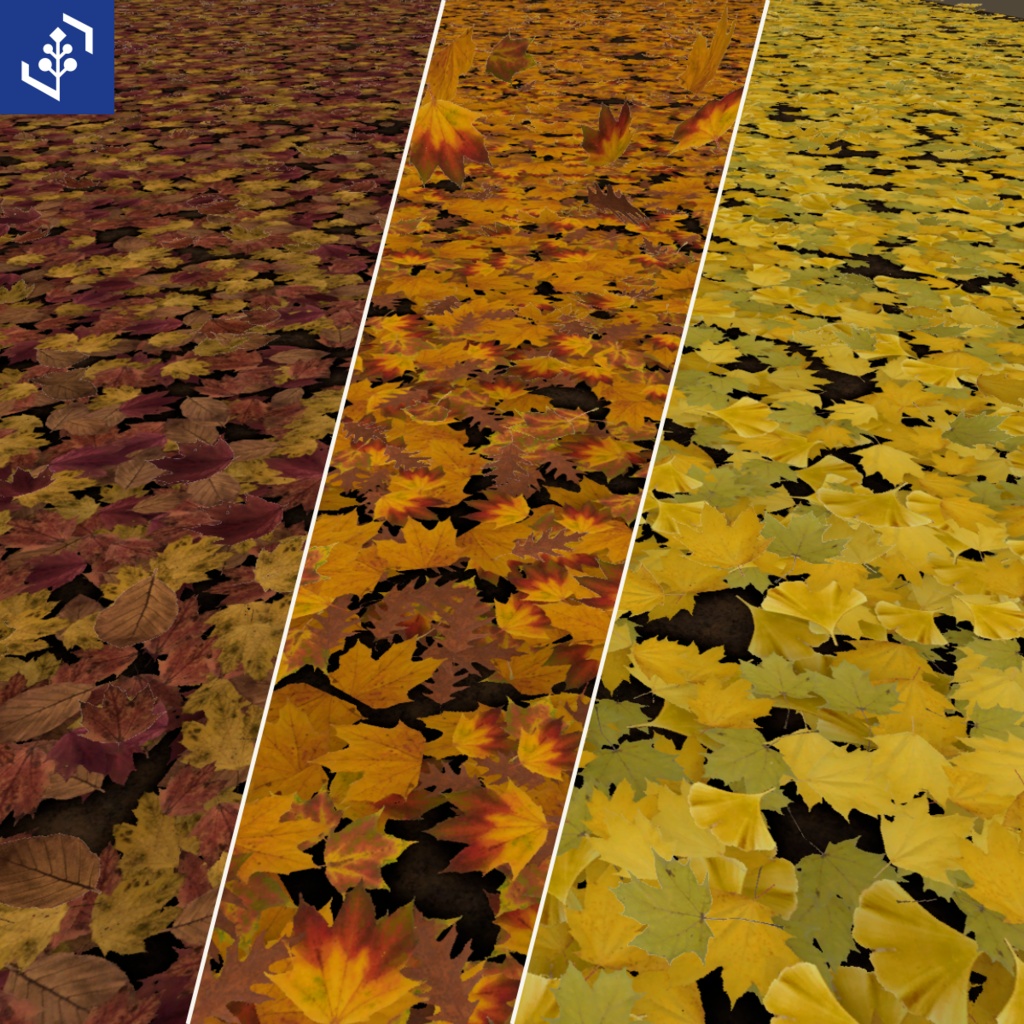


秋のワールドの足元に、踏むと揺れて舞う落ち葉を。写真由来の9色の葉と短い葉ずれ音で、歩く場所に秋の気配を添えるワールド用素材です。 Windows・Meta Quest単体向けの表示を用意しています。
踏むと揺れ、走るとさらに遠く舞う
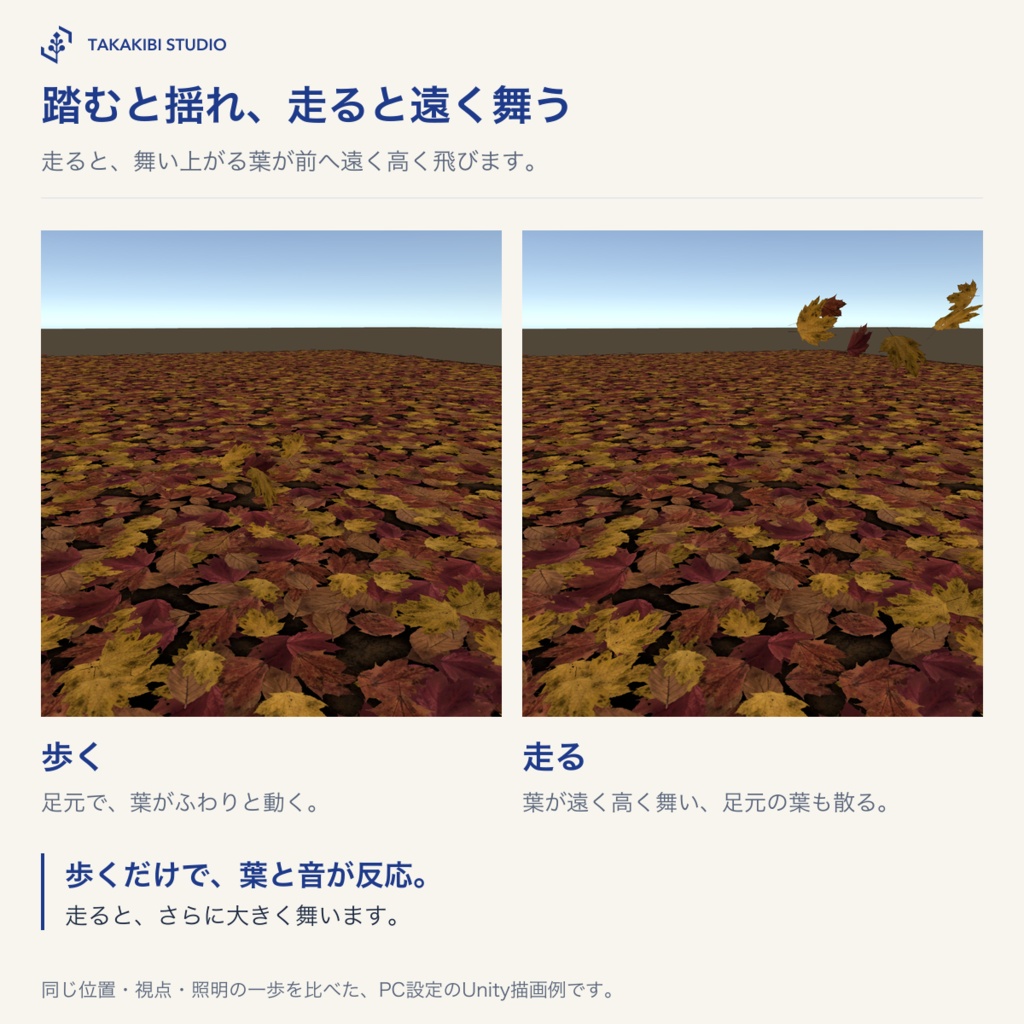
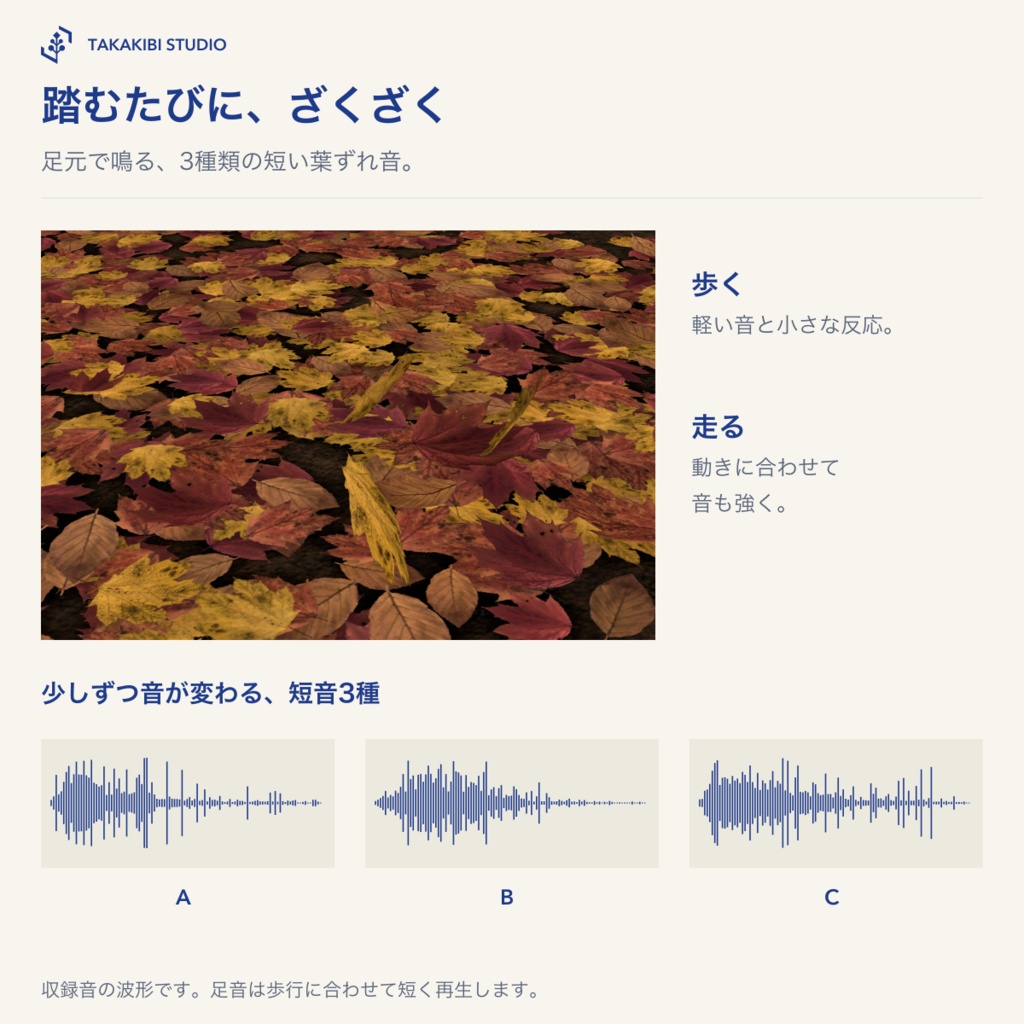
落ち葉のある場所を歩くと、足元の葉が揺れて舞います。走ると舞い上がる葉が前へ遠く高く飛び、足元の葉も蹴られて少し回ります。音も強くなり、移動に合わせて反応します。 落ち葉を山へ集める機能と熊手は含みません。
9色から選べる、写真由来の葉
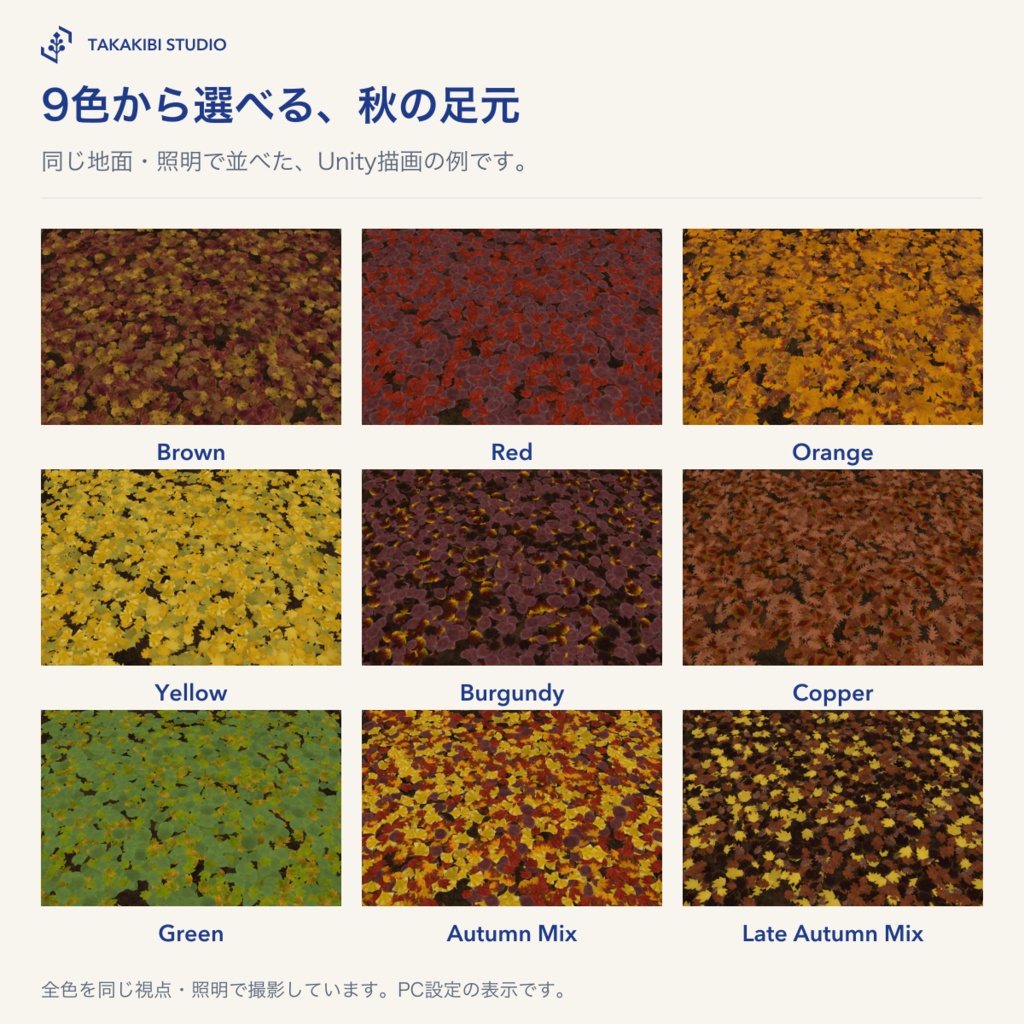
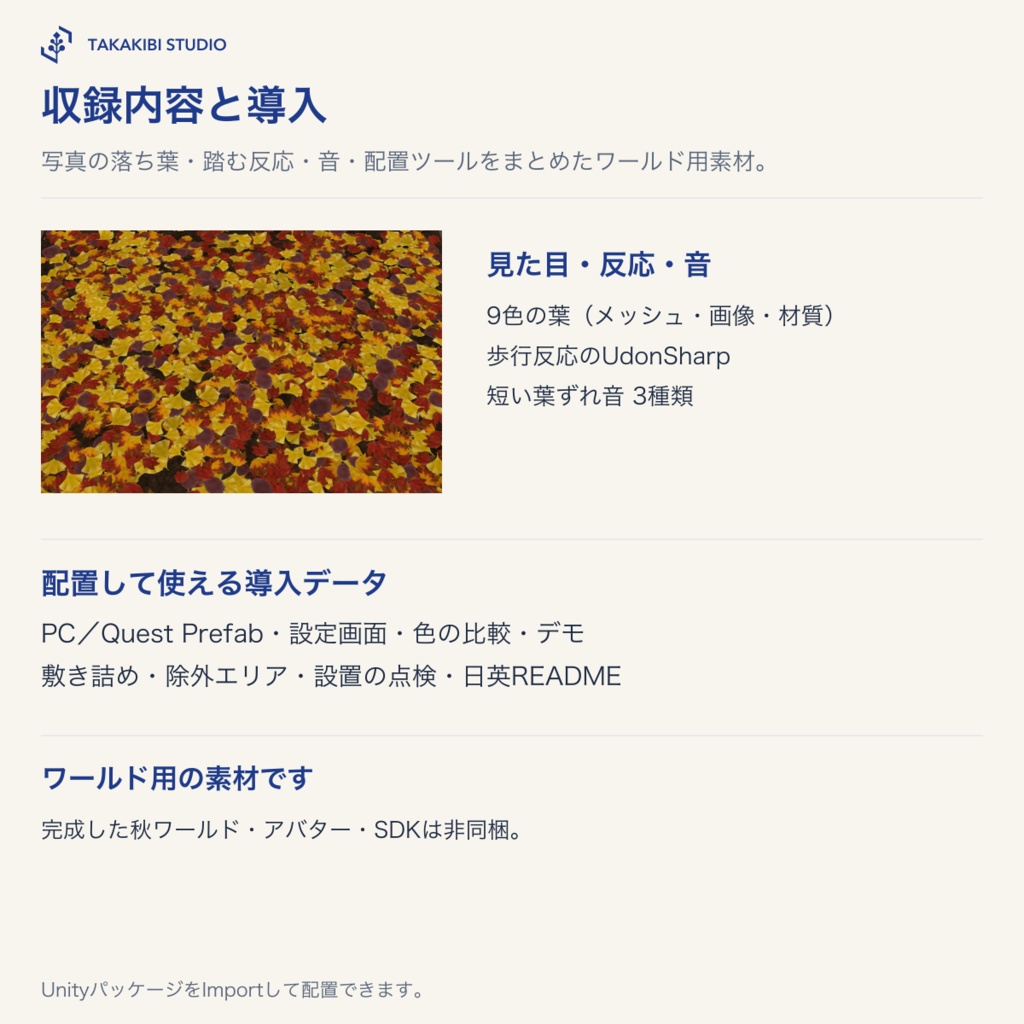
従来の黄・赤茶・茶・深い赤を混ぜた色(Brown)に加えて、Red・Orange・Yellow・Burgundy・Copper・Green、Autumn Mix・Late Autumn Mixの8色を追加し、9色から選べます。写真の色ムラや傷みを残した葉を、地面の落ち葉と薄い立体の葉に組み合わせています。 全色を同じ地面・照明で見比べられるサンプルシーンを同梱しています。
広い範囲に、継ぎ目なく敷き詰める
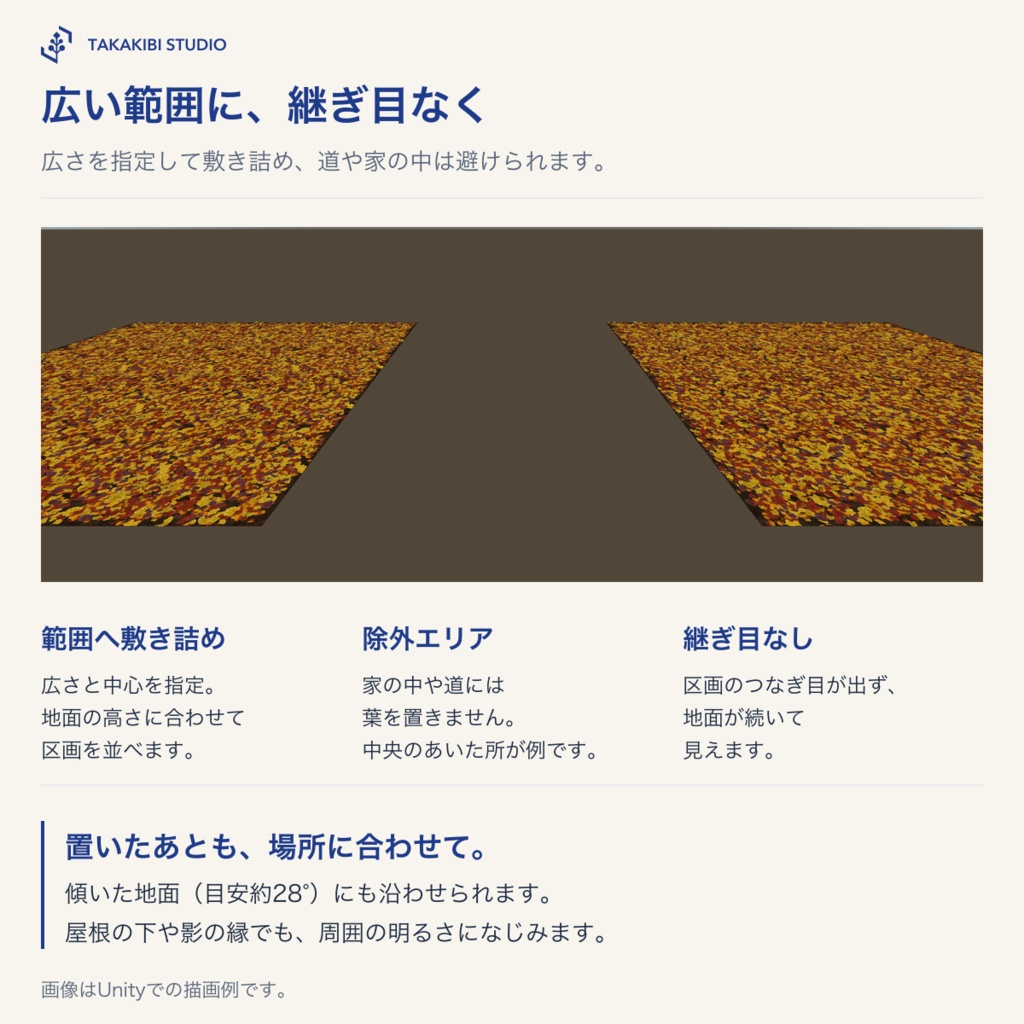
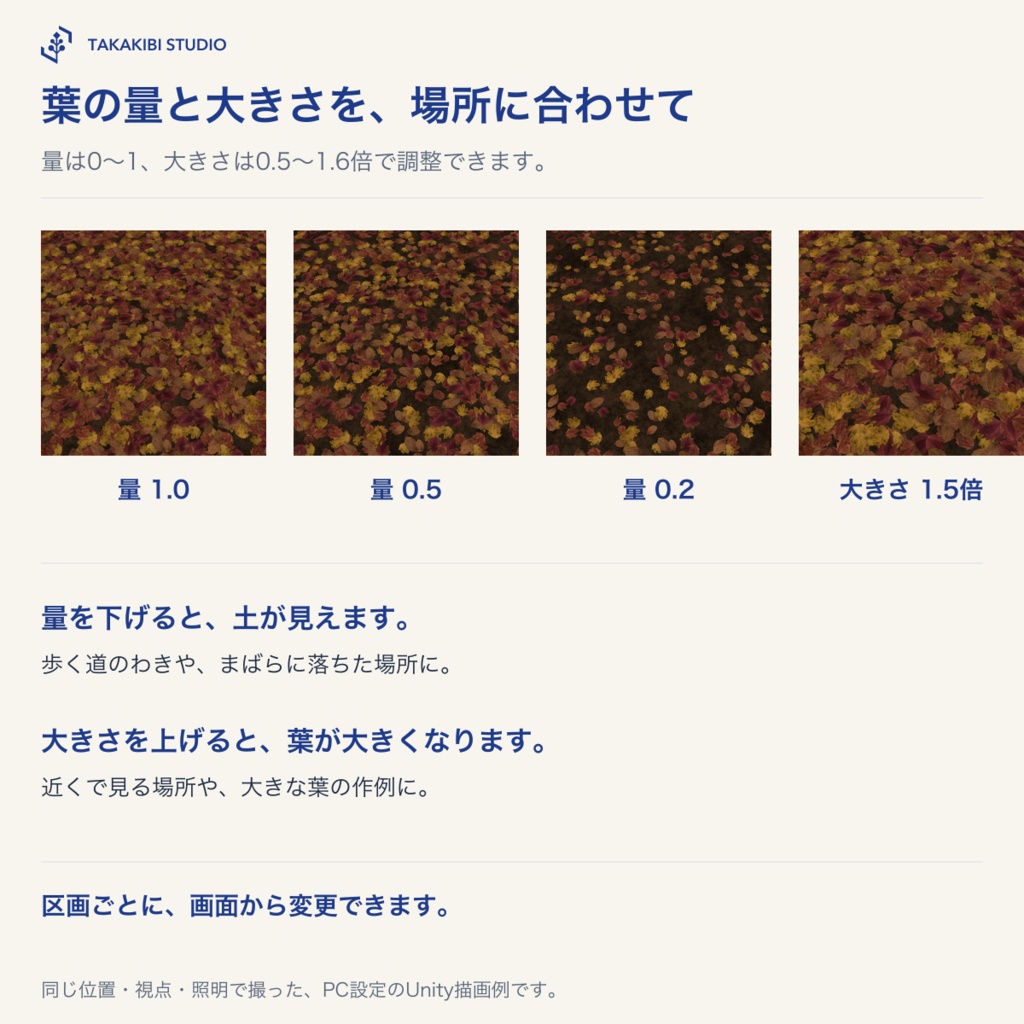
「範囲へ敷き詰める」で広さと中心を指定すると、地面の高さに合わせて区画を並べます。区画の継ぎ目は出ません。家の中や道を避ける除外エリア、葉の量(0〜1)と大きさ(0.5〜1.6倍)の調整、傾いた地面(目安約28°)への追従も使えます。
屋根の下や影の縁でもなじむ
焼き込み照明のワールドでは、屋根の下や影の縁の葉だけが日向の明るさに見えることがあります。遮蔽を焼くと、周囲の明るさに合わせられます。設置の点検では、地面からの浮き・埋まり・傾き・段差・他の区画との重なりを、区画ごとに確認できます。 太陽の向きを実行中に動かすワールドには向きません。
足元で鳴る、短い葉ずれ音
短い葉ずれ音を3種類収録しています。歩行に合わせて音が変わり、走ると少し強く鳴ります。 試聴動画は、秋の静止景観と商品の葉ずれ音を紹介するものです。歩行や葉が舞う動作の実演ではありません。景観は地面の材質や連続して敷く範囲を調整した撮影用の作例で、配布Prefabの初期状態とは異なります。背景と撮影用シーンは付属しません。
導入と使い方
1. VRChat SDK3 Worlds・UdonSharp入りのUnityプロジェクトへ、同梱のunitypackageをImportします。 2. Tools > Takakibi > Leaves / 落ち葉 を開き、「落ち葉を配置(現在のビルド先)」を押します。広い範囲には「範囲へ敷き詰める」を使います。 3. 区画のInspectorで色を選びます。区画は平らな地面に合わせて配置します。 4. SDKでWindows/Androidへ切り替えてビルドします。落ち葉の表示はビルド先に合わせて調整されます。 画面からPC/Questの表示、足音の音量、葉の量と大きさを変更できます。導入確認用デモシーン、色の比較シーン、日英の手順書を同梱しています。
対応環境・注意事項
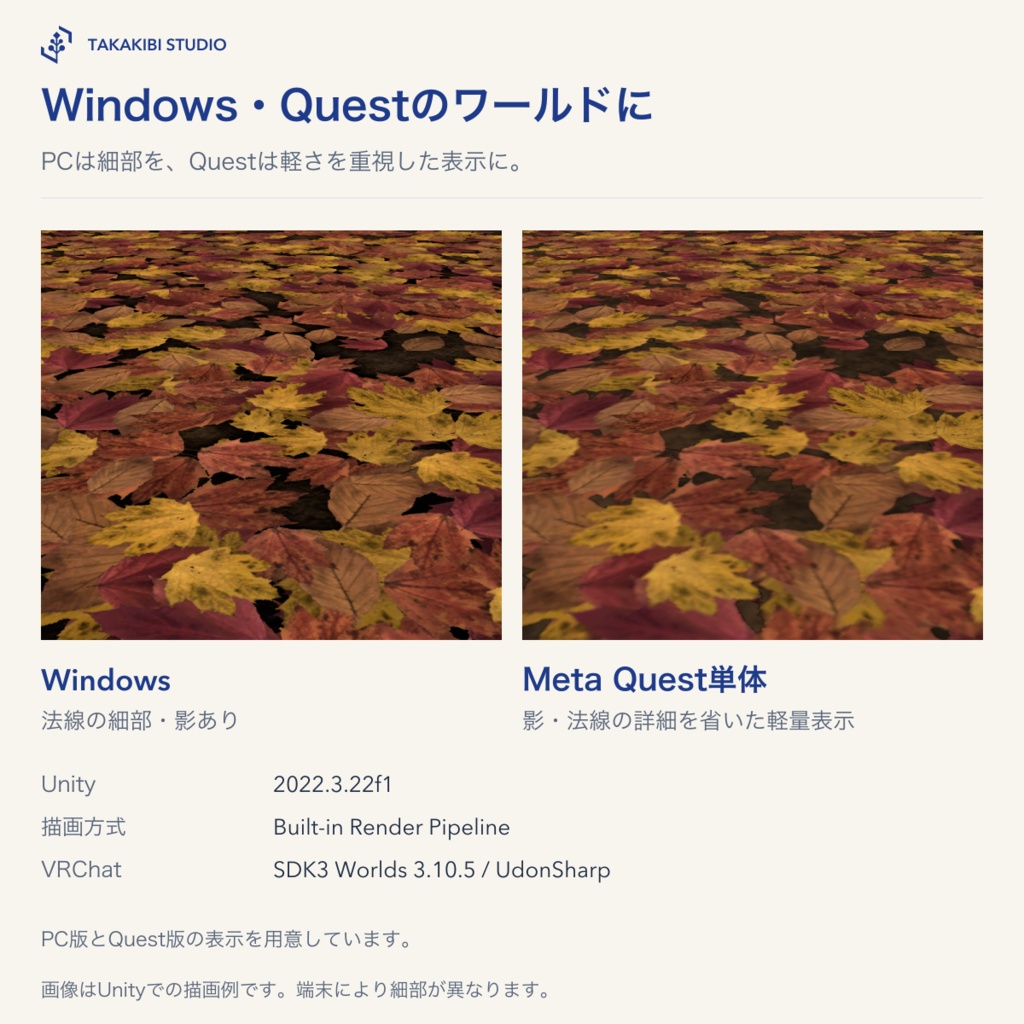
対応先:Windows(デスクトップモード)/PC VR/Meta Quest単体 Unity 2022.3.22f1、Built-in Render Pipeline VRChat SDK3 Worlds 3.10.5/UdonSharp(別途必要・非同梱) PC版は法線の細部と葉の影、Quest版は軽さを重視した表示です。機種と設定により見え方が異なります。 区画は2.4m四方で、ルートは等倍・Y軸回転のみで配置します。広い範囲は「範囲へ敷き詰める」か区画の複製で作ります。傾斜は約8°までが目安で、傾斜への追従を使うと約28°まで合わせられます。葉の位置を全員へ厳密同期する機能はありません。各クライアントがプレイヤーの移動から描くローカル演出です。 地面のColliderは別途必要です。アバター用ではありません。掲載画像はUnityでの描画例です。
内容物
・FallenLeaves_v1.1.0.unitypackage ・PC/Questの配置用Prefab各1点 ・葉のメッシュ3点、色別の葉の写真画像、土の画像2点、9色分のPC/Quest用マテリアル ・歩行反応のUdonSharp、シェーダーと共通ファイル ・配置、色、PC/Quest表示、音量、葉の量と大きさ、範囲への敷き詰め、遮蔽、設置の点検を扱うEditor画面 ・色の比較シーン、導入確認用デモシーン ・短い葉ずれ音3種類 ・日英README・利用条件 完成した秋のワールド・アバター・VRChat SDK本体は含みません。
変更履歴
v1.1.0(2026年11月18日) ・葉の色が全9色になり、量と大きさも調整できるようになりました。 ・指定範囲に継ぎ目なく敷き詰め、道や建物の中を除外できます。傾斜に沿った配置、屋根や影に合わせた明るさの調整、設置状態の点検にも対応しました。 ・走ると葉がより高く遠くへ舞い、足元の葉も散ります。多くの区画を置いたときの歩行判定を軽くしました。 v1.0.0(2026年11月13日) ・初版を公開しました。
利用条件・お問い合わせ
改変し、ご自身の作品や商用作品に使用できます。クレジット表記は不要です。素材そのものの再配布・譲渡・転売はできません。公開ワールドへの組込みに使用できます。音声素材だけを配布することはできません。 共同制作や受託制作で素材ファイルを共有する場合は、受け取る各制作者も本商品を購入してください。素材ファイルを含む編集用データを納品する場合は、納品先も購入が必要です。第三者CC0素材の部分にはCC0が適用され、本商品の条件はその素材について元から認められている利用を制限しません。詳しくは同梱の利用条件をご確認ください。 お問い合わせフォーム https://forms.gle/1D6am64azk1L13MK7 お問い合わせは上のフォーム、またはBOOTHのショップメッセージからお願いします。
制作について
制作にAIを使用しています。
Fallen leaves for autumn worlds
Add fallen leaves that sway and scatter underfoot to your autumn world. Nine photographic leaf colors and short rustling sounds bring an autumn atmosphere to the places you walk. Includes display settings for Windows and standalone Meta Quest.
Sway as you walk, scatter farther as you run
Leaves sway and scatter as you walk through the leaf-covered area. When you run, thrown-up leaves fly farther and higher, nearby leaves are kicked in the direction of travel and spin a little, and the sound becomes stronger. Leaf piling and a rake are not included.
Nine photographic leaf colors
In addition to the original mix of yellow, reddish brown, brown and deep red (Brown), eight colors are added: Red, Orange, Yellow, Burgundy, Copper, Green, Autumn Mix and Late Autumn Mix. You can choose from nine. The leaves keep the color variation and wear of the photographs, combined as ground coverage and thin three-dimensional leaves. A comparison scene shows every color under the same ground and lighting.
Cover large areas without seams
"Fill area" places patches over a chosen size and center, following the ground height, with no seams between patches. Exclusion areas keep houses and paths clear. You can also adjust leaf amount (0-1) and size (0.5-1.6x), and follow sloped ground (about 28 degrees).
Blends in under roofs and at shadow edges
In baked-lighting worlds, leaves under a roof or at a shadow edge can look sunlit. Baking occlusion matches them to the surrounding light. The placement check reports patches that float, sink, tilt, sit on steps or overlap other patches. Not suitable for worlds where the sun moves at runtime.
Short rustling sounds underfoot
Includes three short rustling sounds. The sound changes with your footsteps and becomes a little stronger when you run. The sound preview pairs a static autumn scene with the product’s rustling sounds. It does not demonstrate walking or leaf-scattering motion. Ground materials and continuous leaf placement were adjusted for this filming example; the scene differs from the default prefab setup. The background and filming scene are not included.
Installation and use
1. Import the bundled unitypackage into a Unity project with VRChat SDK3 Worlds and UdonSharp. 2. Open Tools > Takakibi > Leaves / 落ち葉, enable English, and click Add patch for current build target. Use "Fill area" for large areas. 3. Choose a color in the patch Inspector. Position patches on flat ground. 4. Switch the SDK target to Windows or Android and build. Leaf display adjusts to the build target. Use the window to change PC/Quest display, footstep volume, and leaf amount and size. A small installation demo, a color comparison scene and Japanese/English instructions are included.
Requirements and limitations
Platforms: Windows desktop mode / PC VR / standalone Meta Quest Unity 2022.3.22f1, Built-in Render Pipeline VRChat SDK3 Worlds 3.10.5 / UdonSharp (required separately, not bundled) The PC version uses normal-map detail and leaf shadows; the Quest version prioritizes a lighter display. Appearance varies by device and settings. A patch is a 2.4m square. Keep root scale at 1 and use Y rotation only. Cover a larger area with "Fill area" or by duplicating patches. Slopes up to about 8 degrees are the standard range; slope following matches ground up to about 28 degrees. There is no strict synchronization of leaf positions between clients. Each client renders a local response from player movement. Provide your own ground collider. Not an avatar asset. Product images are Unity renders.
Contents
- FallenLeaves_v1.1.0.unitypackage - One placement prefab each for PC and Quest - Three leaf meshes, photographic leaf images for each color, two soil maps, and PC/Quest materials for nine colors - UdonSharp footstep response, shader and include file - Editor window for placement, color, PC/Quest display, volume, leaf amount and size, fill area, occlusion and placement check - Color comparison scene and small installation demo scene - Three short rustling sounds - Japanese/English README and terms A complete autumn world, avatars and the VRChat SDK are not included.
Changelog
v1.1.0 (November 18, 2026) - Choose from nine leaf colors and adjust leaf density and size. - Fill an area without seams, exclude paths or building interiors, fit leaves to slopes, bake shading under roofs, and check placement. - Running sends leaves higher and farther and scatters nearby leaves. Footstep detection is more efficient across many patches. v1.0.0 (November 13, 2026) - Initial release.
Terms of use and contact
You may modify the product and use it in your own works and commercial works. Credit is not required. Redistribution, transfer or resale of the materials themselves is not allowed. You may incorporate the product into public worlds. The audio files may not be distributed on their own. When sharing material files for collaborative or commissioned work, every creator receiving them must also purchase the product. If editable project data containing the materials is delivered to a client, the client must also purchase it. Third-party CC0 portions remain subject to CC0; these product terms do not restrict rights already granted for those portions. Please read the bundled terms and third-party notices for details. Contact form https://forms.gle/1D6am64azk1L13MK7 For inquiries, please use the form above or BOOTH shop messages.
Production
AI was used in the production of this product.